Pride Grid Virtual
- Experts
- Version: 1.31
- Updated: 1 September 2026
- Activations: 5

PRIDE GRID VIRTUAL — ADAPTIVE GRID EXPERT ADVISOR FOR METATRADER 5
Pride Grid Virtual is an automated Expert Advisor that manages independent BUY and SELL grids simultaneously. Grid spacing, profit targets and trailing parameters are calculated dynamically from the range of closed candles.
Its key feature is the use of virtual grid legs. During the early stages of a grid cycle, levels are calculated internally and are not sent to the broker. Real positions start from the grid leg selected by the user. This can reduce the number of simultaneously open positions and the resulting account load.
MAIN FEATURES
• Independent BUY and SELL grid management.
• Grid formation based on the current market range.
• Configurable first real grid leg.
• Virtual legs before real positions are opened.
• Configurable lot multiplier.
• Basket take profit calculated separately for each direction.
• Profit trailing with a configurable distance.
• Maximum loss limit applied separately to BUY and SELL.
• Maximum spread filter.
• Allowed execution deviation control.
• Grid-state persistence between terminal restarts.
• Automatic recovery after MetaTrader 5 is restarted.
• Virtual grid levels displayed on the chart.
• Compact information panel without trading buttons.
• Support for backtesting and optimization in the MT5 Strategy Tester.
HOW IT WORKS
The Expert Advisor analyzes price direction using closed candles. The direction matching the current movement may continue building its grid.
The distance between grid legs is calculated as a percentage of the total range of a selected number of candles. Therefore, the grid step adapts automatically to changing market volatility.
BUY and SELL cycles operate independently. Opening a real position in one direction does not remove the virtual legs of the opposite direction.
Positions remain virtual until the configured first real grid leg is reached. From that level, the Expert Advisor starts sending trading operations to the broker.
PROFIT MANAGEMENT
The following values are calculated independently for each direction:
• Basket take-profit level.
• Minimum profit required to start trailing.
• Trailing-stop distance.
• Current financial result of the direction.
When a basket reaches its calculated target, the Expert Advisor closes the corresponding cycle and starts a new one.
RISK MANAGEMENT
Direction loss limit is specified in the deposit currency. When the configured loss is reached, the Expert Advisor closes real positions in that direction and clears its grid. A value of 0 disables this limit.
The maximum spread filter prevents new positions from being opened while the current spread is above the configured value.
INFORMATION PANEL
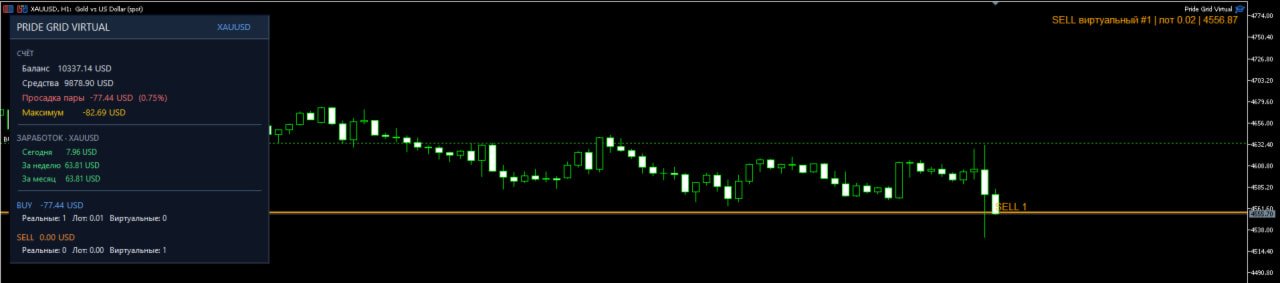
The chart panel displays:
• Balance and equity.
• Current drawdown for the symbol.
• Maximum recorded drawdown.
• Results for the current day, week and month.
• BUY and SELL results.
• Number of real positions.
• Total volume.
• Number of virtual grid legs.
The panel is informational only and does not contain trading buttons.
INPUT PARAMETERS
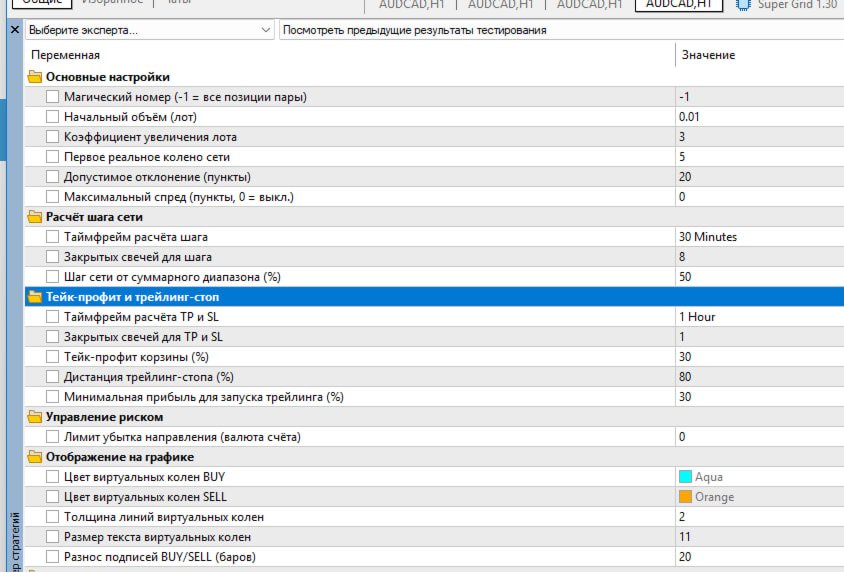
MAIN SETTINGS
• Magic number — identifier used for the Expert Advisor's positions. A value of -1 allows all positions of the current symbol to be considered.
• Initial volume — initial trading volume in lots.
• Lot multiplier — multiplier applied to the volume of the next grid leg.
• First real grid leg — grid-leg number from which real positions are opened.
• Allowed deviation — permitted execution-price deviation in points.
• Maximum spread — maximum spread allowed for new positions. A value of 0 disables this filter.
GRID STEP CALCULATION
• Grid step timeframe — timeframe used to calculate the distance between grid legs.
• Closed candles for grid step — number of closed candles included in the calculation.
• Grid step from total range — grid step as a percentage of the candles' total range.
TAKE PROFIT AND TRAILING STOP
• TP and SL calculation timeframe — timeframe used for take-profit and trailing calculations.
• Closed candles for TP and SL — number of closed candles included in those calculations.
• Basket take profit — target for the combined BUY or SELL basket.
• Trailing stop distance — trailing distance as a percentage of the calculated range.
• Minimum profit to start trailing — minimum profit at which trailing becomes active.
RISK MANAGEMENT
• Direction loss limit — maximum permitted loss for one direction in the deposit currency. A value of 0 disables the limit.
CHART DISPLAY
• BUY virtual leg color — color of virtual BUY levels.
• SELL virtual leg color — color of virtual SELL levels.
• Virtual leg line width — width of virtual-level lines.
• Virtual leg text size — font size of virtual-level labels.
• BUY/SELL label spacing — distance between BUY and SELL labels on the chart.
INFORMATION PANEL
• Show information panel — shows or hides the information panel. Disabling the panel does not affect the trading logic.
INSTALLATION AND TESTING
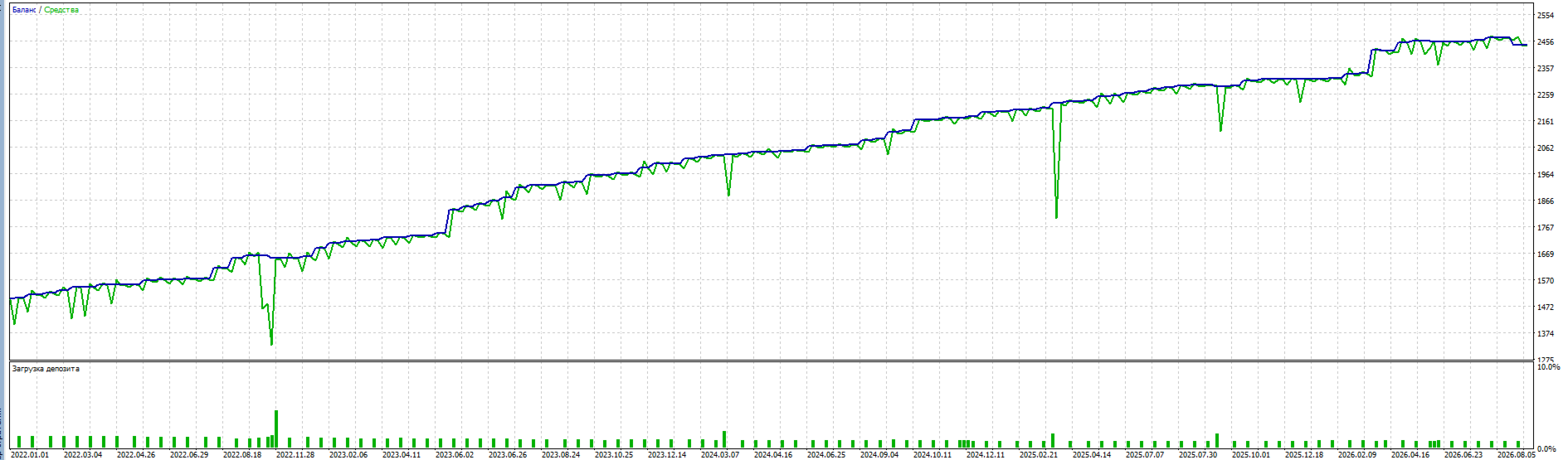
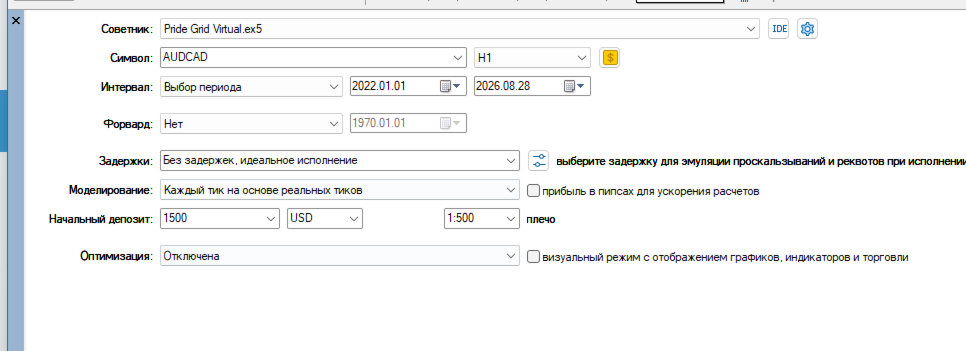
Attach the Expert Advisor to one chart for each symbol that you want to trade. Enable algorithmic trading and select settings appropriate for the symbol, broker conditions and account size. Backtest and optimize the settings using your broker's real-tick history before live use. Results can vary because of spread, commission, execution, swaps and quote history.
IMPORTANT
Grid strategies can create several positions and may produce substantial drawdown during prolonged one-way market movement. Use a suitable initial volume and loss limit. Historical tests do not guarantee future results. This product is not investment advice and does not guarantee profit.