Multi Language Gold Silver Trading Panel
- Utilitaires
-
En Hao Peng
 Trader from Hubei, China. Focus on trend‑based pyramid EA for XAUUSD gold. My strategies use floating‑profit adding‑position logic with multi‑layer risk control, no dangerous martingale. All products are tested by multi‑year backtest. Please test the demo version on demo account before live trading
 - Version: 17.0
- Mise à jour: 26 août 2026
- Activations: 10
Product Name
MT5 Gold & Silver Multi-Language Trading Panel V17.00
Introduction
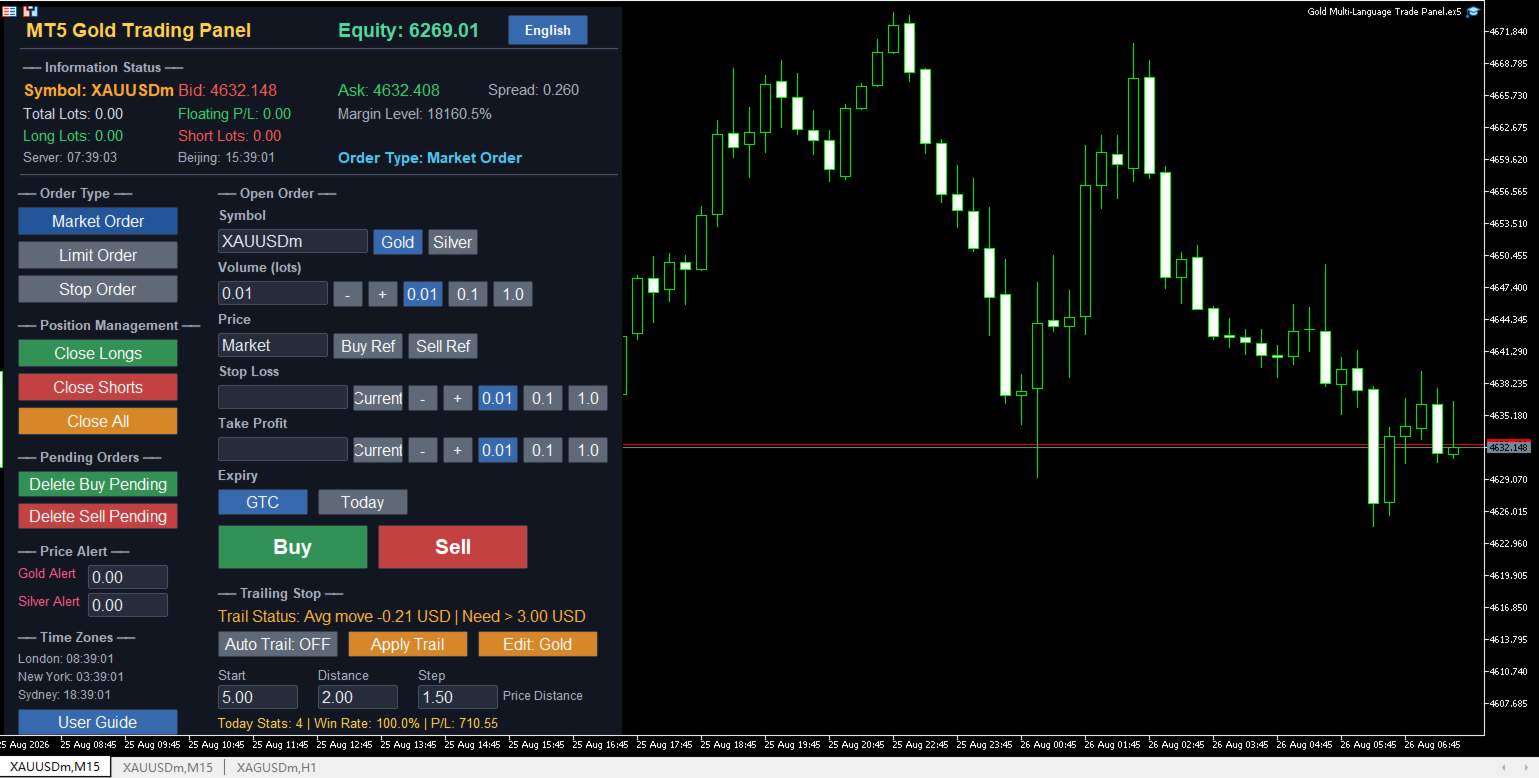
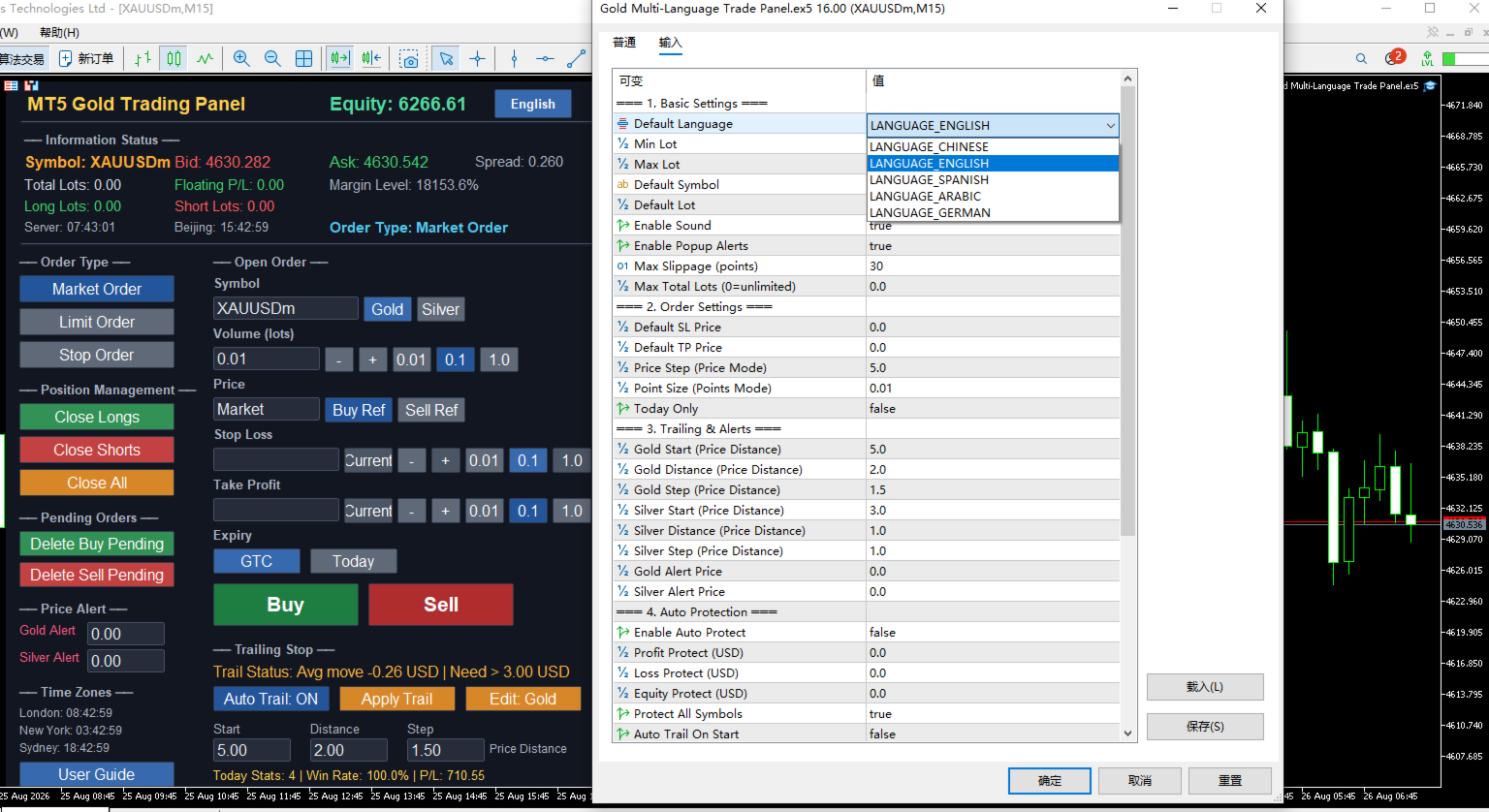
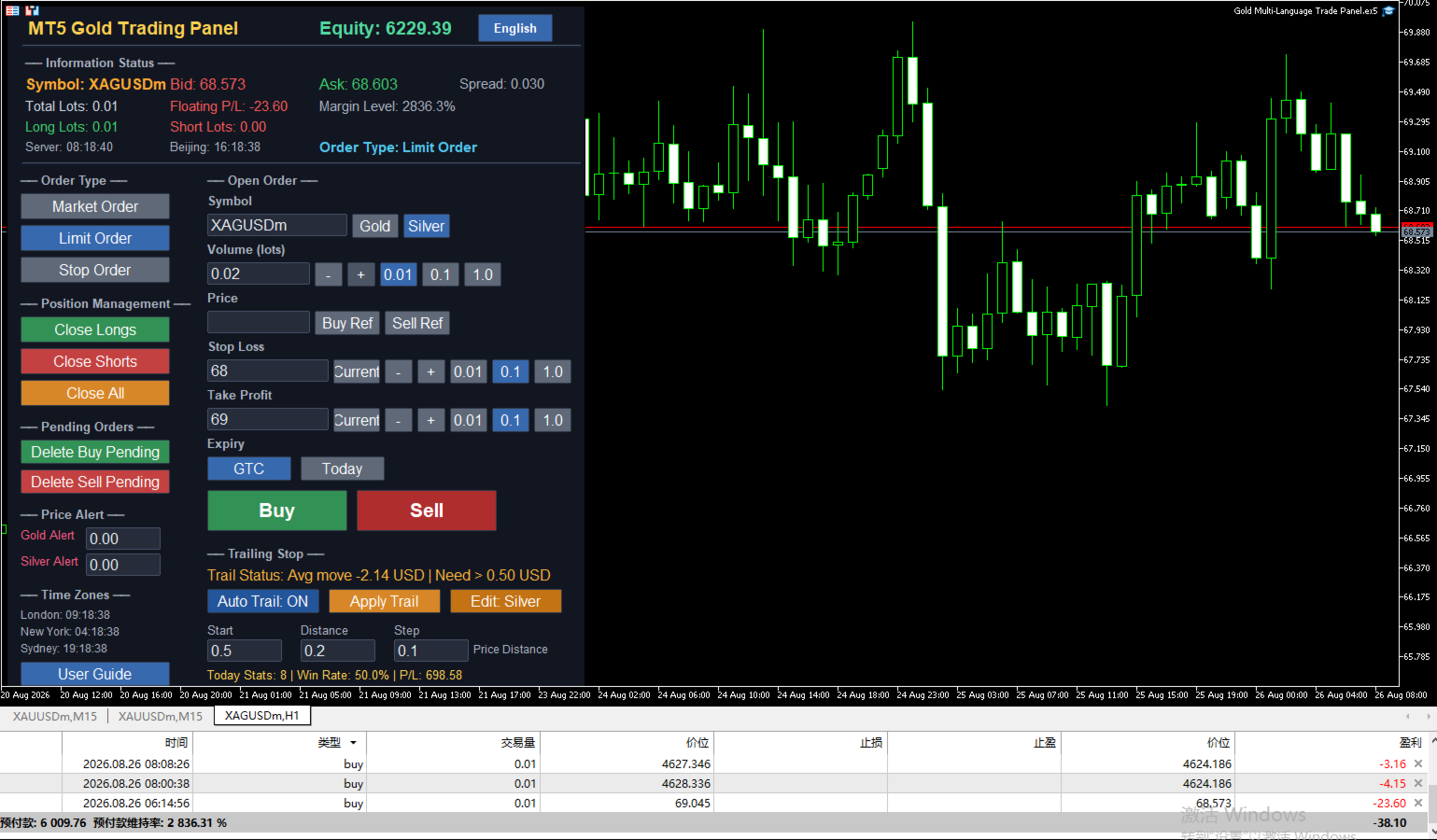
This is a professional trading panel designed specifically for manual gold and silver traders. It supports five languages: English, Chinese, Spanish, Arabic, and German. The panel automatically detects gold and silver symbols, so users do not need to enter symbol codes manually. It is compatible with most brokers worldwide, including standard accounts, zero spread accounts, and raw spread accounts. Users only need to attach the panel to a gold or silver chart, and then they can quickly place orders, manage trailing stops, use auto protection, set price alerts, and handle order management.
This product has been tested and refined over a long period, with the goal of helping traders reduce repetitive work, avoid human errors, and focus more on market analysis and trading decisions.
Key Advantages
Automatic Symbol Detection Worldwide
The panel automatically searches for and recognizes gold and silver related symbols. It supports common symbol codes as well as codes with different suffixes, such as XAUUSD, GOLD, XAGUSD, SILVER, XAUUSDm, XAUUSDz, XAGUSDm, and XAGUSDz. Users do not need to manually enter symbol codes or worry about broker-specific naming differences.
USD Price Distance Trailing Stop
The trailing stop start distance, trailing distance, and step are all measured in US dollar price distance, independent of trading volume. Whether a user trades 1 lot or 100 lots, the dollar distance remains the same. For example, setting a gold start distance of 3 USD means the price must move 3 USD in a favorable direction before trailing begins. This method is intuitive and avoids confusion caused by point conversion.
Dual Magic Number Independent Management
The panel includes two separate magic number settings for gold and silver. When users switch trading symbols, the panel automatically switches to the corresponding magic number, ensuring that gold orders and silver orders are completely separated in management, closing, statistics, and trailing stops. For users running multiple charts, simply set a different magic number on each chart to use them safely in parallel without interference.
Multi-Language Interface and Help System
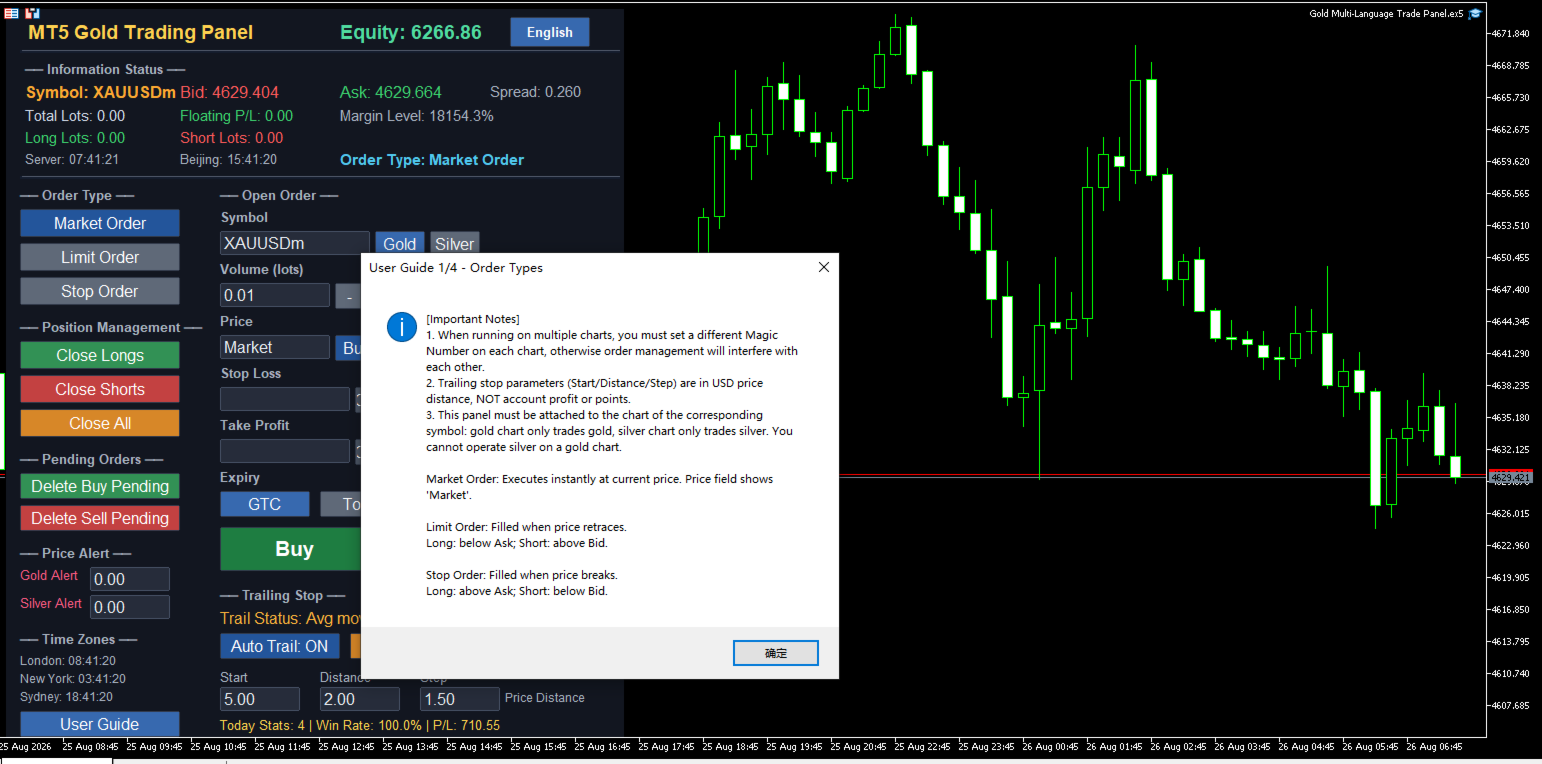
All panel text, buttons, alerts, and help messages support automatic switching between five languages. Users can click the language button at the top right of the panel to cycle through English, Chinese, Spanish, Arabic, and German. The help system provides four detailed windows covering order types, trailing stops, auto protection and alerts, and input parameters, helping new users get started quickly and reducing the learning curve.
Clear Button Status Feedback
State buttons such as order type, step selection, symbol switching, and auto trailing remain blue when selected, allowing users to quickly see the current setting. Other momentary buttons give brief color feedback after being clicked, so users know the action has been executed, reducing repeated clicks and mistakes.
Core Functions
Three Order Types
The panel supports three order methods: market execution, limit orders, and stop orders.
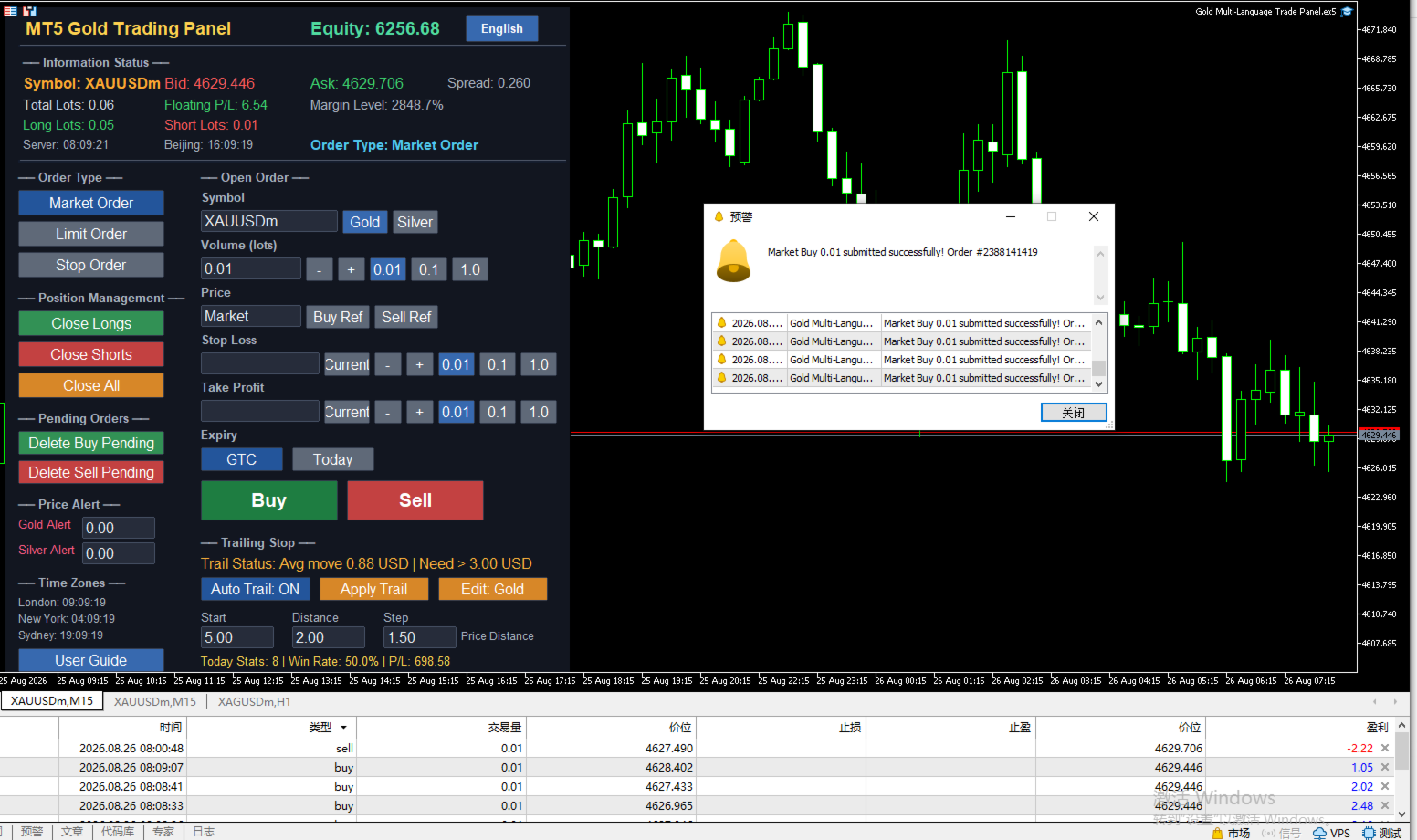
Market execution fills immediately at the current market price, and the price input box automatically shows the market price and locks, so no manual entry is needed.
Limit orders are filled when the price retraces to a specified level. For long orders, the limit price should be below the current ask; for short orders, it should be above the current bid.
Stop orders are filled when the price breaks through a specified level. For long orders, the stop price should be above the current ask; for short orders, it should be below the current bid.
Users can also use the buy reference and sell reference buttons to quickly fill the current real-time ask or bid price into the price box, improving order entry speed.
Trailing Stop
The trailing stop is one of the core features of this panel. Start distance, trailing distance, and step are all calculated in US dollar price distance, independent of trade volume.
The recommended minimum start distance for gold is 3 USD, and for silver it is 0.3 USD. Starting trailing below these values may cause profit to be unable to cover normal pullbacks, making trailing meaningless.
The panel supports one-click trailing and automatic trailing modes. One-click trailing immediately checks the current symbol positions once; automatic trailing checks and adjusts stops every 0.5 seconds when enabled.
The trailing status bar shows the current average price movement of the selected symbol and a fixed suggested start distance hint, helping users judge whether they are close to the start condition.
Auto Protection and Price Alerts
Auto protection includes profit protection, loss protection, and equity protection. When floating profit reaches a set amount, all positions can be closed automatically; when floating loss reaches a set amount, all positions can also be closed; when account equity falls below a set value, full closure is triggered as well. Users can freely set protection amounts and cooldown time in the input parameters.
Price alerts support both gold and silver. Users can set separate alert prices. When the market price breaks through the alert line, the panel will pop up a warning window, play a sound, and support email and mobile push notifications.
Information Status Display
The information bar at the top of the panel shows the current symbol's bid, ask, spread, total lots, floating profit and loss, margin level, long lots, and short lots in real time.
The left side of the panel shows the current time of London, New York, and Sydney markets, helping users understand trading activity in different sessions.
The today statistics area shows the number of trades, win rate, and total profit and loss for the day, based on closed orders with the current magic number, and resets at Beijing midnight.
Quick Order Management
The left function area provides quick buttons for closing long positions, closing short positions, closing all positions, deleting buy pending orders, and deleting sell pending orders. Users can quickly handle positions and pending orders without opening the trading terminal, which is especially useful in fast-moving markets.
Suitable Users
Intraday traders can quickly switch order types, place orders, and close positions with one click, improving efficiency.
Swing traders can use automatic trailing to let profits grow as the market moves, reducing the frequency of manual stop adjustments.
Users who trade both gold and silver can use the dual magic number system to completely separate the two symbols and avoid confusion.
Global users can eliminate language barriers through the language switching function, and with automatic symbol detection, they can use the panel directly without additional configuration.
Version 17.00 Update Notes
Added dual magic number system, so gold and silver orders are managed completely independently.
Trailing stop parameters have been fully adjusted to US dollar price distance, which is more intuitive for traders.
Added a fixed red hint in the trailing status bar showing the suggested minimum start distance.
Improved symbol detection logic to be compatible with more broker symbol code suffixes.
Fixed an issue where some prompts still displayed Chinese in non-Chinese language environments.
Increased the font size of the language button for clearer interface text.
Usage Notes
This panel must be attached to the corresponding symbol chart. Gold charts are only for trading gold, and silver charts are only for trading silver. You cannot operate both symbols on the same chart at the same time.
If you need to track both gold and silver simultaneously, open two separate charts, load the panel on each, and set different magic numbers for each chart.
Trailing stop parameters are in US dollar price distance and independent of trading volume. Users should choose appropriate values based on the volatility of the symbol.
Auto protection, statistics, and closing functions are all based on the current magic number to identify orders, so make sure the magic number is set correctly to avoid interfering with other strategies.
Risk Warning
Trading involves significant risk and may result in the loss of all capital. Please use this product with caution after fully understanding the risks. It is recommended to test on a demo account first and set reasonable risk control parameters according to your own capital situation. Past performance does not guarantee future results.
The road of trading is full of challenges, and good tools can make operation smoother. This panel does not predict the market, but it can help users place orders faster, manage orders more clearly, and execute risk control more stably. The rest is up to the trader's own judgment and discipline.
For technical support or feedback, please leave a message on the MQL5 product page. Thank you for your support.