Multi Language Gold Silver Trading Panel

  • Утилиты
  • En Hao Peng
    En Hao Peng
    • lndependent trading sofgware Developer в  Huanggang,Hubei,China
    • Китай
    • 218
    Trader from Hubei, China. Focus on trend‑based pyramid EA for XAUUSD gold. My strategies use floating‑profit adding‑position logic with multi‑layer risk control, no dangerous martingale. All products are tested by multi‑year backtest. Please test the demo version on demo account before live trading
  • Версия: 17.0
  • Обновлено: 26 августа 2026
  • Активации: 10

Product Name

MT5 Gold & Silver Multi-Language Trading Panel V17.00

Introduction

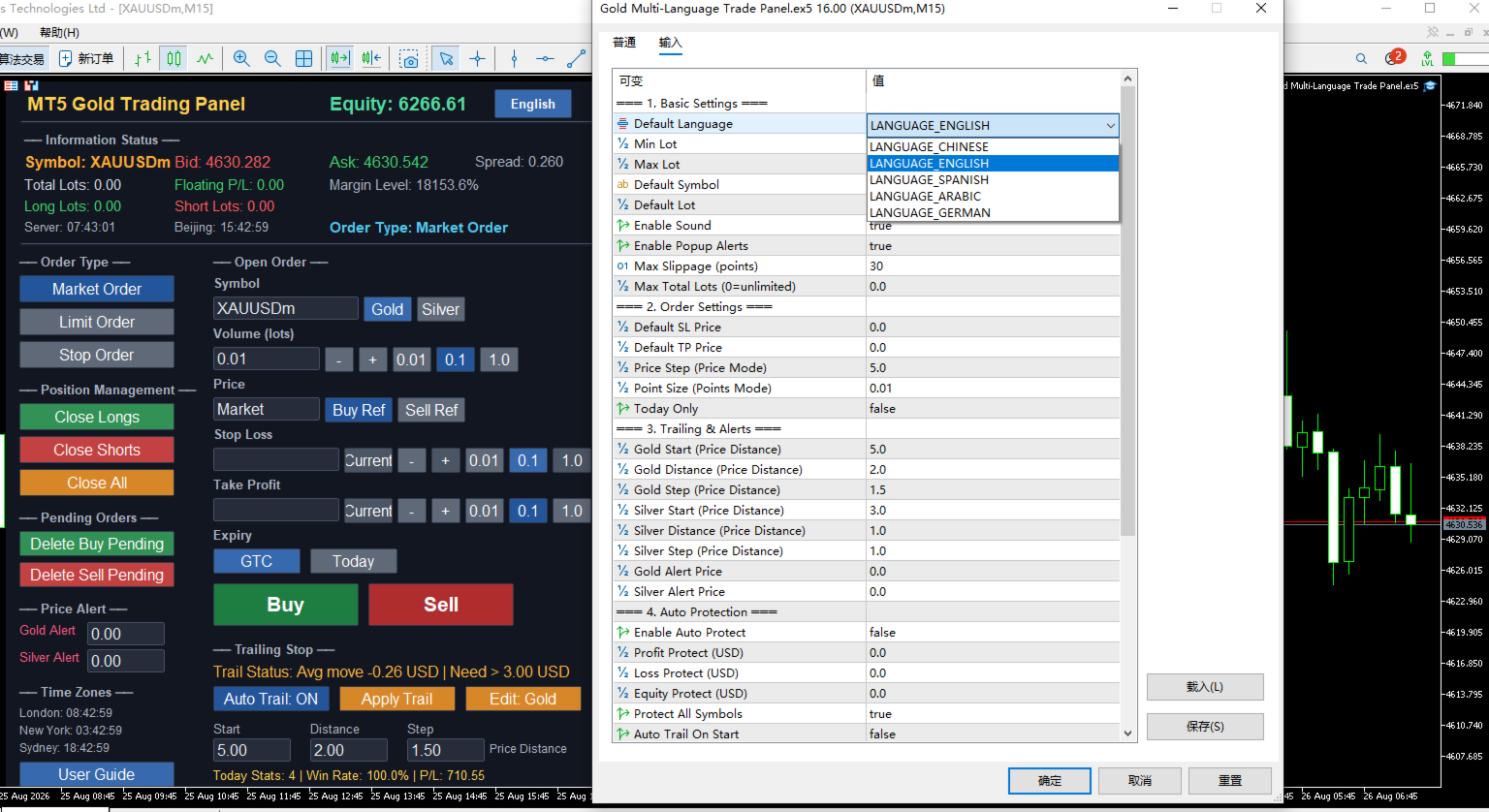
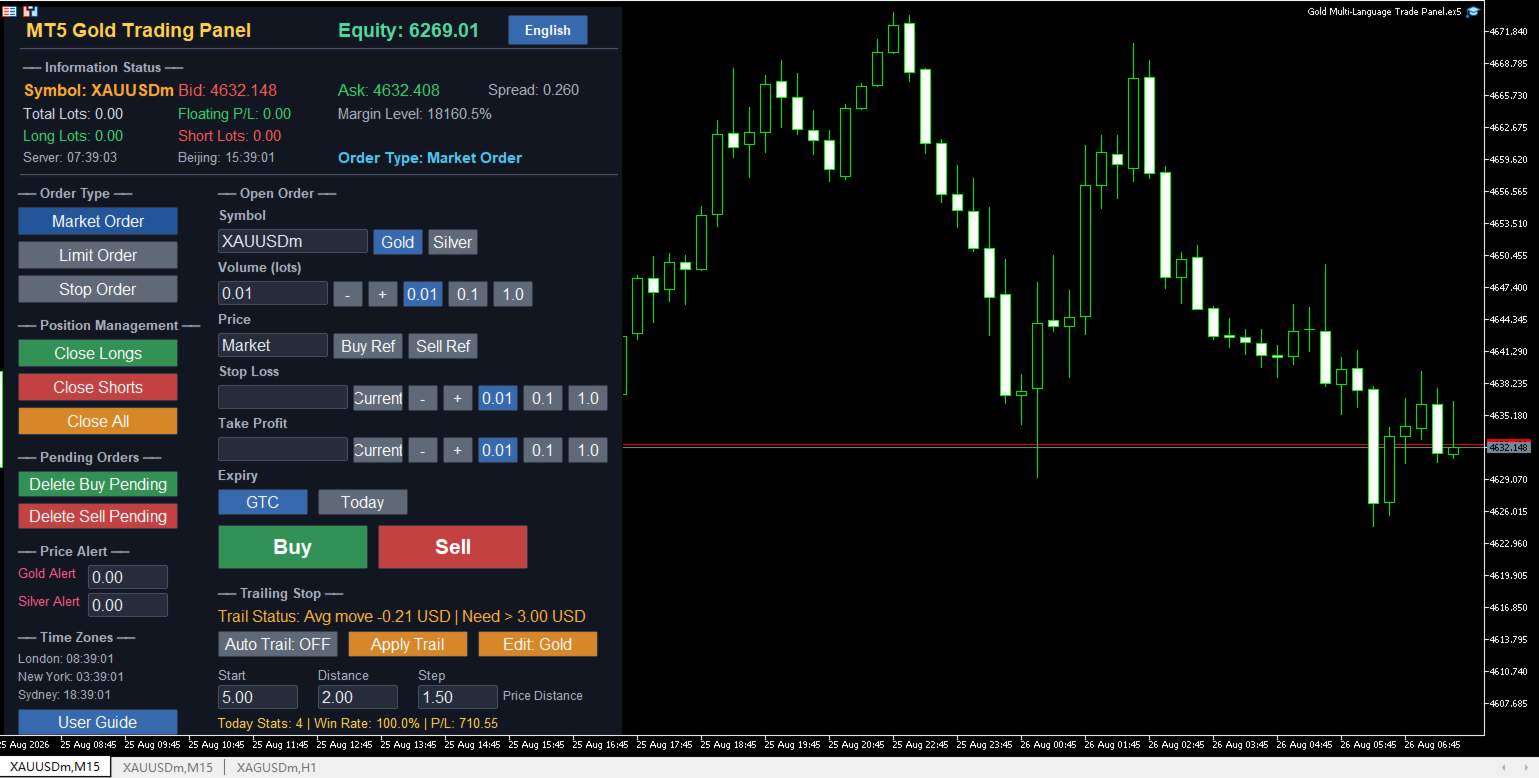
This is a professional trading panel designed specifically for manual gold and silver traders. It supports five languages: English, Chinese, Spanish, Arabic, and German. The panel automatically detects gold and silver symbols, so users do not need to enter symbol codes manually. It is compatible with most brokers worldwide, including standard accounts, zero spread accounts, and raw spread accounts. Users only need to attach the panel to a gold or silver chart, and then they can quickly place orders, manage trailing stops, use auto protection, set price alerts, and handle order management.

This product has been tested and refined over a long period, with the goal of helping traders reduce repetitive work, avoid human errors, and focus more on market analysis and trading decisions.

Key Advantages

Automatic Symbol Detection Worldwide

The panel automatically searches for and recognizes gold and silver related symbols. It supports common symbol codes as well as codes with different suffixes, such as XAUUSD, GOLD, XAGUSD, SILVER, XAUUSDm, XAUUSDz, XAGUSDm, and XAGUSDz. Users do not need to manually enter symbol codes or worry about broker-specific naming differences.

USD Price Distance Trailing Stop

The trailing stop start distance, trailing distance, and step are all measured in US dollar price distance, independent of trading volume. Whether a user trades 1 lot or 100 lots, the dollar distance remains the same. For example, setting a gold start distance of 3 USD means the price must move 3 USD in a favorable direction before trailing begins. This method is intuitive and avoids confusion caused by point conversion.

Dual Magic Number Independent Management

The panel includes two separate magic number settings for gold and silver. When users switch trading symbols, the panel automatically switches to the corresponding magic number, ensuring that gold orders and silver orders are completely separated in management, closing, statistics, and trailing stops. For users running multiple charts, simply set a different magic number on each chart to use them safely in parallel without interference.

Multi-Language Interface and Help System

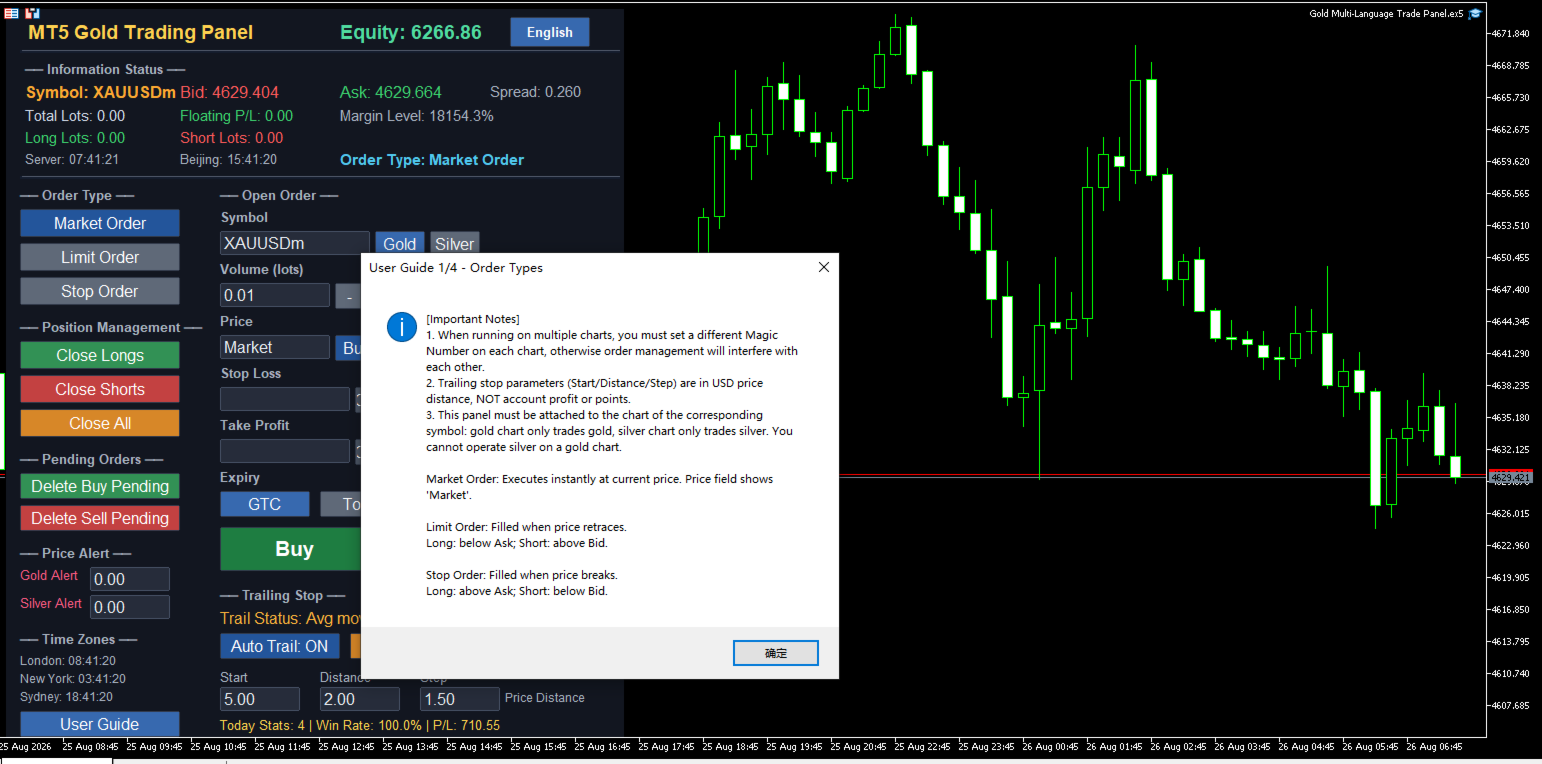
All panel text, buttons, alerts, and help messages support automatic switching between five languages. Users can click the language button at the top right of the panel to cycle through English, Chinese, Spanish, Arabic, and German. The help system provides four detailed windows covering order types, trailing stops, auto protection and alerts, and input parameters, helping new users get started quickly and reducing the learning curve.

Clear Button Status Feedback

State buttons such as order type, step selection, symbol switching, and auto trailing remain blue when selected, allowing users to quickly see the current setting. Other momentary buttons give brief color feedback after being clicked, so users know the action has been executed, reducing repeated clicks and mistakes.

Core Functions

Three Order Types

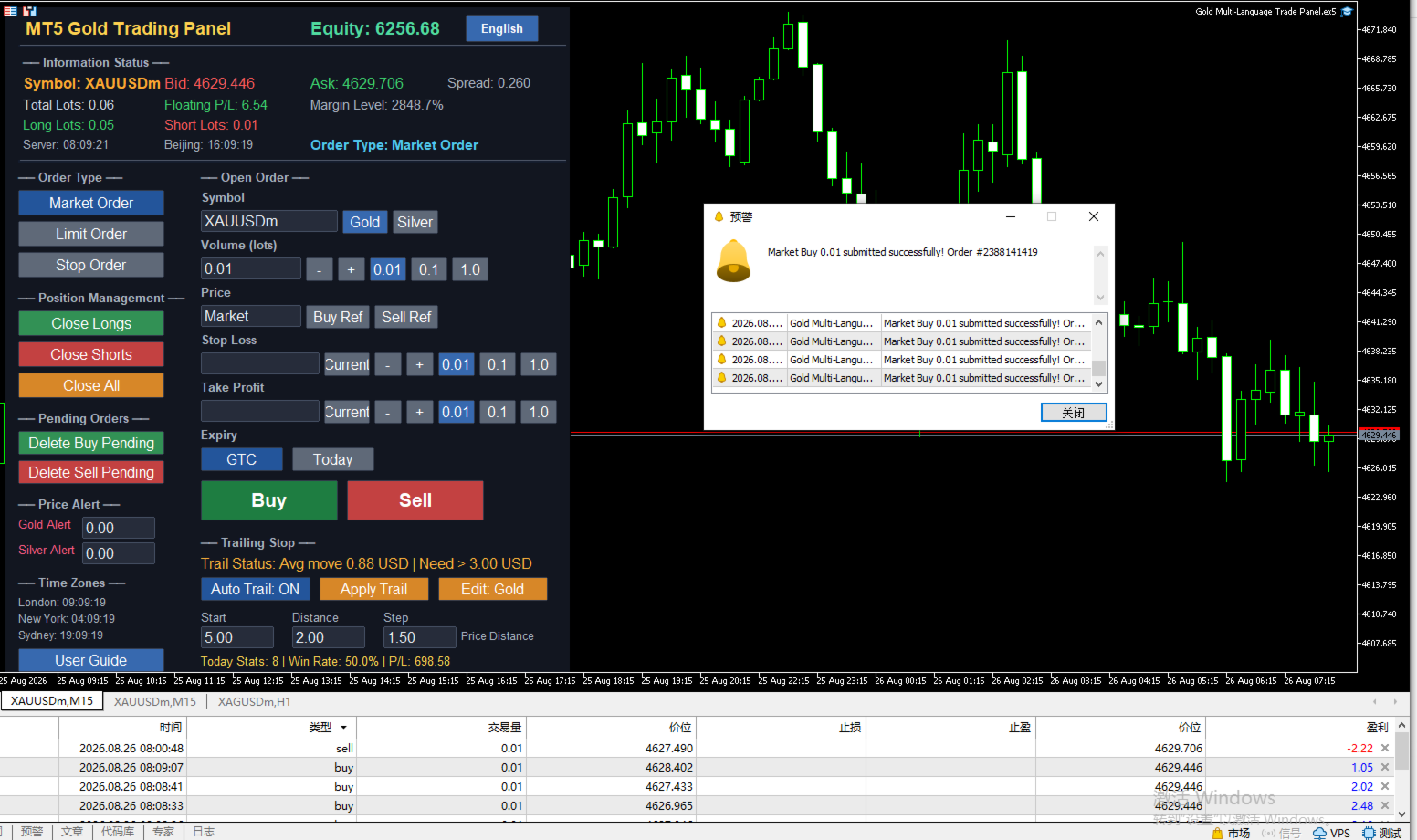
The panel supports three order methods: market execution, limit orders, and stop orders.
Market execution fills immediately at the current market price, and the price input box automatically shows the market price and locks, so no manual entry is needed.
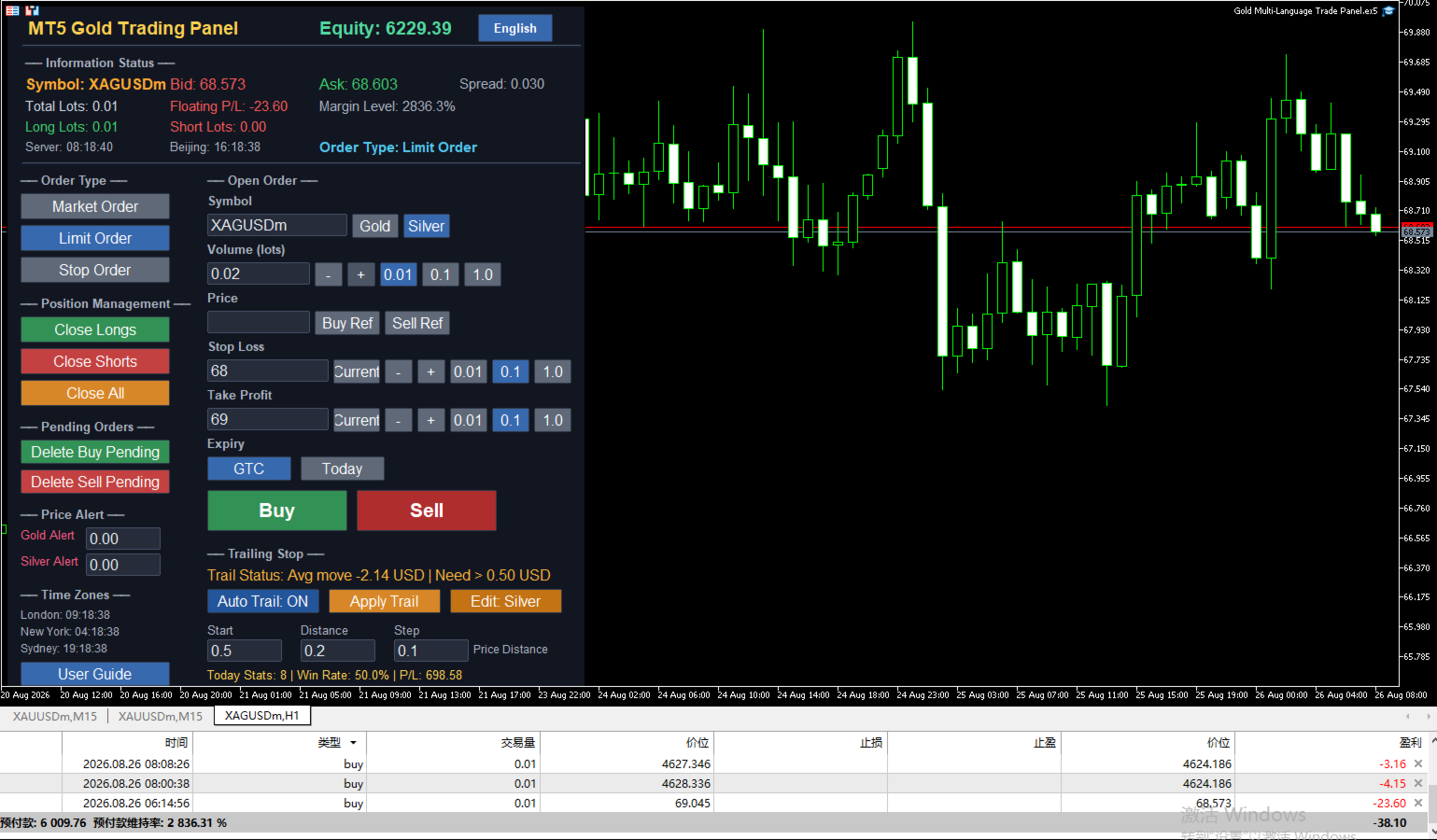
Limit orders are filled when the price retraces to a specified level. For long orders, the limit price should be below the current ask; for short orders, it should be above the current bid.
Stop orders are filled when the price breaks through a specified level. For long orders, the stop price should be above the current ask; for short orders, it should be below the current bid.
Users can also use the buy reference and sell reference buttons to quickly fill the current real-time ask or bid price into the price box, improving order entry speed.

Trailing Stop

The trailing stop is one of the core features of this panel. Start distance, trailing distance, and step are all calculated in US dollar price distance, independent of trade volume.
The recommended minimum start distance for gold is 3 USD, and for silver it is 0.3 USD. Starting trailing below these values may cause profit to be unable to cover normal pullbacks, making trailing meaningless.
The panel supports one-click trailing and automatic trailing modes. One-click trailing immediately checks the current symbol positions once; automatic trailing checks and adjusts stops every 0.5 seconds when enabled.
The trailing status bar shows the current average price movement of the selected symbol and a fixed suggested start distance hint, helping users judge whether they are close to the start condition.

Auto Protection and Price Alerts

Auto protection includes profit protection, loss protection, and equity protection. When floating profit reaches a set amount, all positions can be closed automatically; when floating loss reaches a set amount, all positions can also be closed; when account equity falls below a set value, full closure is triggered as well. Users can freely set protection amounts and cooldown time in the input parameters.
Price alerts support both gold and silver. Users can set separate alert prices. When the market price breaks through the alert line, the panel will pop up a warning window, play a sound, and support email and mobile push notifications.

Information Status Display

The information bar at the top of the panel shows the current symbol's bid, ask, spread, total lots, floating profit and loss, margin level, long lots, and short lots in real time.
The left side of the panel shows the current time of London, New York, and Sydney markets, helping users understand trading activity in different sessions.
The today statistics area shows the number of trades, win rate, and total profit and loss for the day, based on closed orders with the current magic number, and resets at Beijing midnight.

Quick Order Management

The left function area provides quick buttons for closing long positions, closing short positions, closing all positions, deleting buy pending orders, and deleting sell pending orders. Users can quickly handle positions and pending orders without opening the trading terminal, which is especially useful in fast-moving markets.

Suitable Users

Intraday traders can quickly switch order types, place orders, and close positions with one click, improving efficiency.
Swing traders can use automatic trailing to let profits grow as the market moves, reducing the frequency of manual stop adjustments.
Users who trade both gold and silver can use the dual magic number system to completely separate the two symbols and avoid confusion.
Global users can eliminate language barriers through the language switching function, and with automatic symbol detection, they can use the panel directly without additional configuration.

Version 17.00 Update Notes

Added dual magic number system, so gold and silver orders are managed completely independently.
Trailing stop parameters have been fully adjusted to US dollar price distance, which is more intuitive for traders.
Added a fixed red hint in the trailing status bar showing the suggested minimum start distance.
Improved symbol detection logic to be compatible with more broker symbol code suffixes.
Fixed an issue where some prompts still displayed Chinese in non-Chinese language environments.
Increased the font size of the language button for clearer interface text.

Usage Notes

This panel must be attached to the corresponding symbol chart. Gold charts are only for trading gold, and silver charts are only for trading silver. You cannot operate both symbols on the same chart at the same time.
If you need to track both gold and silver simultaneously, open two separate charts, load the panel on each, and set different magic numbers for each chart.
Trailing stop parameters are in US dollar price distance and independent of trading volume. Users should choose appropriate values based on the volatility of the symbol.
Auto protection, statistics, and closing functions are all based on the current magic number to identify orders, so make sure the magic number is set correctly to avoid interfering with other strategies.

Risk Warning

Trading involves significant risk and may result in the loss of all capital. Please use this product with caution after fully understanding the risks. It is recommended to test on a demo account first and set reasonable risk control parameters according to your own capital situation. Past performance does not guarantee future results.

The road of trading is full of challenges, and good tools can make operation smoother. This panel does not predict the market, but it can help users place orders faster, manage orders more clearly, and execute risk control more stably. The rest is up to the trader's own judgment and discipline.

For technical support or feedback, please leave a message on the MQL5 product page. Thank you for your support.
Рекомендуем также
Trade Assistant 38 in 1
Makarii Gubaydullin
4.91 (23)
Многофункциональная утилита: калькулятор лота, сеточные ордера, индикатор Price Action, менеджер ордеров, рассчёт R/R, и многое другое Демо-веpсия  |   Инструкция  |   Версия для MT4 Утилита не работает в тестере стратегий: вы можете скачать демо-версию ЗДЕСЬ , чтобы протестировать продукт перед покупкой. Напишите мне  если есть вопросы / идеи по улучшению / в случае найденного бага Упроситите и сделайте вашу торговлю быстрее, при этом расширяя стандартные возможности терминала. 1. Открытие но
Ultimate Pro Trading Panel — All-In-One Manual & Grid Trading Dashboard Pro Trading Panel   is an all-in-one on-chart control panel that gives discretionary and semi-automated traders a complete toolkit for entries, exits, risk management, and grid trading — without leaving the chart. Every function is visual, draggable, and updates in real time. If you want to test this utility feel free to download the basic preview version of this tool here:  https://www.mql5.com/en/market/product/181435 Who
MNtradepro Trading Panel – Scalping Manager КРАТКОЕ ОПИСАНИЕ Менеджер ручной торговли для MetaTrader 5 с быстрым исполнением ордеров, управлением TP/SL прямо на графике, функцией Break Even, защитой от спреда и инструментами управления рисками. ОПИСАНИЕ MNtradepro Trading Panel — это менеджер ручной торговли для MetaTrader 5, разработанный для быстрого исполнения и активного управления сделками прямо с одного графика. Панель позволяет открывать, управлять и защищать сделки с помощью кнопок, го
This tool will perform Trailing stop loss and Break even management for orders. Helps you limit or reduce the time spend watching orders on the screen, especially when you need to go to sleep. Just add this EA to 1 chart, you can manage all pairs. You can filter orders by comment, magic number, symbol and order ticket number. When Breakeven it can add shift/offset pips (to cover the commission...). You can try in strategy tester before purchase. The EA will add Buy and Sell alternately, so you
VENIQOR Smart Trade Copier PRO is more than a simple MT5 trade copier. It combines fast local trade synchronization with flexible risk management, Account Protection and optional News Protection for every Receiver account. As with our other VENIQOR products, we welcome useful customer feedback and are happy to implement meaningful improvements and new features whenever possible. The same EA works as both Master and Receiver . One Master can copy trades to multiple Receivers running on the same
Anchor Trade Manager
Kalinskie Gilliam
5 (7)
Anchor: The EA Manager Your EAs manage their own trades. Anchor manages the account around them. Anchor gives you one place to control your EAs, manage risk and decide when trading is allowed. Any EA, any vendor, any broker or symbol. No source-code changes required. The Problem Most EAs only know what they are doing. They cannot see when another EA is already trading, when several EAs open and are stacking risk or when the account has reached your loss limit. Even using just one EA, it may not
Overview Mirror Signals Service EA (Text only)   is a powerful monitoring Expert Advisor that automatically sends   real-time Telegram notifications   for all important trade events on your MetaTrader 5 account. It is engineered specifically for   signal providers ,   trade-copier operators ,   auditors ,   educators , and   professional trading services   that require immediate, detailed, and reliable reporting. Everything from   entries, exits, SL/TP changes, comment changes, trailing sto
DDKiller Pro
Njaratahiry Michael Randrianiaina
Stop Blowing Your Account. Once and For All. DDKiller Pro is the MT5 risk guardian that runs silently on your chart and shuts down trading the moment you hit a limit — whether you're grinding a prop firm challenge or managing your own CFD account. The problem every trader knows: You set your rules. You break them anyway. One revenge trade. One overleveraged position. One session that erases a month of gains. DDKiller Pro removes that decision from your hands entirely. What it does: The second yo
Exp5 Duplicator
Vladislav Andruschenko
4.78 (9)
Duplicator для MetaTrader 5 — профессиональный дубликатор позиций внутри одного терминала Надёжный советник для трейдеров, которым нужно автоматически дублировать уже открытые позиции в MetaTrader 5, увеличивать объём, применять собственные настройки лота и сопровождать дубликаты по заданным правилам. Это удобный инструмент для ручной торговли, алгоритмических систем и гибкого управления уже существующими позициями внутри одного терминала. Duplicator для MT5 не открывает позиции по собственной
RRtoolBox
David Ruiz Moreno
RRtoolbox - Professional Tools: Risk:Reward Trading Tool (SL/TP Horizontals + Pending orders + Diagonals), Alerts set on trend lines (for alerts on diagonal levels), SelfManagement (BE, partials...), close/cancelling by time, Statistics, Info and trading on chart. One-Click Trading with Visual Risk:Reward Management RRtoolbox is a comprehensive trading panel that combines one-click order execution,  statistics and  powerful visual Risk:Reward tools, alerts set with trendlines, on chart butt
Overtrading Stopper MT5 1. Overview Overtrading Stopper MT5 is a MetaTrader 5 utility EA that helps discretionary traders follow their own trading rules. You can set rules in advance, such as: how many times you may trade today, how many consecutive losses should make you stop, how many minutes to pause after a loss, and how to avoid entering several trades in rapid succession. When a configured limit or condition is reached, the EA displays the reason for the protection state on the chart. Depe
Торговый ассистент на графике и панель управления рисками Полнофункциональная утилита на графике с многорежимными SL и TP (ATR, R:R, пункты, валюта счета), живой аналитикой и экономическим календарем Ergotick Trade Manager — это профессиональная торговая панель «все в одном», разработанная для дискреционных трейдеров, участников проп-челленджей и скальперов. Она сочетает в себе мгновенный автоматический расчет размера лота, многорежимную настройку Stop Loss и Take Profit, продвинутое управление
Trading Utility for Forex Currency Pairs Only not for Gold  Functions Auto Lot Calculation based on Risk Auto stoploss  Auto TakeProfit Breakeven Auto Close Half % Close in percentage with respect to the PIPs Pending Orders BuyLimit Sell Limit with distances BuyStop Sell Stop    with distances Trading Informations Risk in percentage For Multiple trades Combine Takeprofit and Combine Stoplosses
EccRk Trade Manager
Prudent Mwangani Lumidi
Product Overview & Advantages The ECC RK Trade Manager operate as an interactive risk and trade management utility tool for the MetaTrader 5 (MT5) platform. The application offers several core operational advantages: Real-Time Interactive Interface:  Features a draggable, interactive dashboard that locks onto your chart and fully syncs in real-time with your MT5 broker server. Visual Control:  Allows you to control your trade parameters by dragging lines directly on the chart, which instantly u
Trade Command Center
Nguyen Thanh Trieu
5 (2)
Дополнительные материалы и инструкции Инструкция по установке - Демо-версия приложения для тренировочного счета ; Официальная информация Официальный канал Профиль продавца Trade Command Center — Профессиональная панель управления ордерами и контроля рисков Risk Guard в реальном времени Trade Command Center — это высокопроизводительная визуальная торговая панель, калькулятор лота и утилита управления рисками для платформы MetaTrader 5. Она разработана специально для трейдеров, которым треб
Risk Management Panel for MetaTrader 5 Overview This tool is a comprehensive risk management indicator for MetaTrader 5 that provides traders with a visual interface to calculate and manage trade parameters based on their risk tolerance. It features a draggable panel with interactive price lines and real-time calculations. Key Features Risk Management Controls: Adjustable risk percentage (0.1%-100%) of account equity or balance Customizable risk/reward ratio with +/- buttons Choice between Equit
Отличный индикатор спреда. Отражает спред на каждом баре так как он есть. Необходимо помнить, что отображается спред на момент открытия бара. Поэтому самая правильная информация будет на минутный барах. Спред – это одно из базовых понятий форекс, знать которое должен любой трейдер. Если объяснить наглядно, можно описать такой пример. Трейдер покупает пару EUR/USD по курсу 1,1000. Однако он сразу уходит в минус, например, на 10 пунктов, как будто бы он купил ее по цене 1,1010. Поэтому ему нужно
SLTPSetter
Raphael Djangmah Osro Agbo
SLTPSetter - StopLoss Take Profit Setter HOW DOES IT WORK? Risk and account management is a very critical aspect of trading. Before entering a position, you must be fully aware how much you will be willing to loss both in percentage and value. This is where SLTPSetter gets you covered.  All you need to do is attach the indicator on the chart and PRESS BUY OR SELL automatically, all parameters needed for placing the trades will be provided at the top left corner of the screen. Feel free to adjust
Recovery Manager Panel MT5 is a manual order management panel for traders who want to manage open positions directly from the chart in a clearer and more organized way. This tool is not a signal robot. It does not predict market direction, generate entry signals, or trade automatically based on market forecasts. Instead, it helps traders work with positions that are already open. You can calculate possible recovery lot sizes, view estimated target levels on the chart, and use available floating
Equity Lock Manager is an equity and high-water-mark protection utility. Key functions: - Initial-equity and peak-equity reference modes - Configurable arming thresholds - Clear lock and breach states - Scoped pending-order cancellation - Optional full or partial position close - Persisted recovery state - Confirmed baseline reset controls The utility enforces protection settings configured by the user. It does not provide entry signals, predict market direction or guarantee trading results. T
Magic Number Manager   - это профессиональная утилита управления торговлей для MetaTrader 5, обеспечивающая централизованный мониторинг и контроль для 20+ советников, работающих одновременно на одном счете. Ключевые особенности: Информационная панель производительности   - Таблица в реальном времени, отображающая для каждого советника: общее количество сделок, процент прибыльных сделок, общую прибыль, среднюю сделку, лучшую/худшую сделку, текущую просадку и фактор прибыли. Цветовое кодирование м
Bastion is a monitor-and-close-only risk manager for prop-firm traders. It watches your account against your firm's daily-loss and maximum-drawdown limits in real time and force-closes your open positions BEFORE you cross a line. It never opens a trade of its own, so it stays fully within the tools allowed by FTMO, FundedNext, The5ers, FTUK and FXIFY. Why traders fail challenges A large share of failed evaluations end on a single daily-loss breach: a moment of inattention, a news spike, one tra
AlgoDevMT5 Trade Manager Pro AlgoDevMT5 Trade Manager Pro is a professional trade management and risk control utility for MetaTrader 5. Designed for discretionary traders and funded account traders, this utility helps traders plan trades visually, calculate position size instantly, and manage risk with precision. Trade Manager Pro does not generate trading signals, open trades automatically, or provide investment advice. It is a trader-assistance utility designed to improve consistency and risk
Automate your ICT Analysis with the Accumulation, Manipulation, and Distribution (AMD) Indicator. This advanced trading tool is designed for Smart Money Concepts (SMC) traders who want to automate the tedious process of marking up charts. It automatically identifies the Asian Range (Accumulation), detects Liquidity Sweeps (Manipulation), and signals high-probability reversals confirmed by Fair Value Gaps (Distribution). Stop staring at the charts waiting for a sweep. Let the indicator alert you
RSI Currency Strength Meter is a powerful and elegant multi-currency indicator that measures the real-time relative strength of the 8 major currencies using RSI logic. By calculating the smoothed performance of each currency across its major pairs and applying the RSI formula, it delivers clean and responsive strength lines that make it easy to spot which currencies are truly strong or weak at any moment. This indicator is particularly useful for visualizing currency correlations and divergence
The Stop Loss Manger - SL Mange With the Stop Loss Manager you can finally sleep peacefully while it effectively manages your risk in stock market trading. Simply set your individual stop loss limits and let the manager trade for you. Never worry about losses again - the Stop Loss Manager takes care of it for you! Get the ultimate support for your trading now and maximize your profits with ease. Join the community of successful traders who swear by Stop Loss Manager today. Function overview: 1.
Pattern Recognition EA - From Learn to Earn. The market repeats itself. This EA finds every past repeat of the current candle sequence - and lets history vote the direction. ONE SHAPE. EVERY REPEAT IN HISTORY VOTES. The last N candles on your signal timeframe form a shape. The EA scans the history you choose - a fixed number of bars or everything your broker provides - for the SAME shape, and checks what happened next, every single time. Only when enough repeats exist AND a clear majority of t
Обзор BreakEvenConsole   — это панель управления сделками для MetaTrader 5, созданная для быстрого и практичного контроля открытых позиций. Она предоставляет на графике удобное рабочее пространство для переноса позиции в безубыток, установки точного Stop Loss или Take Profit, использования trailing lock, частичного закрытия позиций и закрытия всех позиций одним нажатием. Этот инструмент предназначен для трейдеров, которым нужен прямой контроль над позициями без переключения между меню или ручным
Prop Session Risk Guard MT5 — это индикатор сигналов на основе сессий для MetaTrader 5, разработанный для ручных трейдеров, которым требуется более четкое руководство по входу и выходу во время активных рыночных сессий с интегрированным осознанием рисков. Этот профессиональный инструмент объединяет подтвержденные стрелки покупки/продажи, проекцию тейк-профита/стоп-лосса, фильтры времени сессий, мониторинг спреда и четкую панель на графике для поддержки дисциплинированных торговых решений. Основ
King ElChart Manual Trade Panel
Mohammed Maher Al-sayed Mohammed Ahmed Saleh
King Chart – Manual Trading Panel for MetaTrader 5 Overview King Chart is a simple yet powerful manual trading panel built for traders who want speed, precision, and clarity. It enables quick order execution, clear lot control, and real-time account monitoring  all directly on your MT5 chart. Main Features Multi-Lot Trade Execution 3 Buy and 3 Sell buttons for instant execution Each button is tied to a custom lot size field Designed for flexible scaling in or out of trades Position Management D
С этим продуктом покупают
Trade Assistant MT5
Evgeniy Kravchenko
4.41 (216)
Помогает рассчитать риск на сделку, простая установка нового ордера с помощью линий, управление ордерами с функциями частичного закрытия, 7 типов трейлинг-стопа и другие полезные функции. Дополнительные материалы и инструкции Инструкция по установке - Инструкция к приложению - Пробная версия приложения для демо счета Функция Линии   - отображает на графике линию открытия, стоп-лосс, тейк-профит. С помощью этой функции легко установить новый ордер и увидеть его дополнительные характеристики пе
================================================================================ POC BREAKOUT - V20.72. Full Professional Grade Toolkit ================================================================================ POC Breakout is a full MetaTrader 5 trading dashboard for discretionary traders who want breakout signals, Point of Control (POC) context, volume profiles, order flow, market structure, news, alerts, and advanced trade planning in one professional workspace. Attached directly to you
TradePanel MT5
Alfiya Fazylova
4.88 (167)
Trade Panel — это многофункциональный торговый помощник. Приложение содержит более 50 торговых функций для ручной торговли и позволяет автоматизировать большинство торговых операций. Инструкция к приложению + видео-инструкции: https://www.mql5.com/ru/blogs/post/756476 Пробная версия приложения для демо-счета: https://www.mql5.com/ru/blogs/post/750864 Как установить приложение: https://www.mql5.com/ru/blogs/post/750096 Как тестировать приложение в визуальном режиме: https://www.mql5.com/ru/blogs/
The product will copy all telegram signal to MT5 ( which you are member) , also it can work as remote copier.  Easy to set up, copy order instant, can work with almost signal formats, image signal,  s upport to translate other language to English Work with all type of channel or group, even channel have "Restrict Saving Content", work with  multi channel, multi MT5 Work as remote copier: with signal have ticket number, it will copy exactly via ticket number. Support to backtest signal. How to s
Global Investing FX Terminal
Santiago Nicolas Pla Casuriaga
Global Investing FX Terminal — это комплексный FX-дашборд для MetaTrader 5 — процентные ставки центральных банков, позиции COT CFTC, рэнкинг carry, индексы экономических сюрпризов, перекос опционов, настроения ритейла и корреляции, тринадцать панелей в общей сложности — отображается на едином канвасе без мерцания и обновляется каждые 10 секунд через один прикреплённый EA. Никаких внешних программ не требуется. Профессиональный анализ валютного рынка требует одновременного доступа к данным, котор
Power Candles Strategy Scanner — самооптимизирующийся инструмент для поиска настроек по нескольким инструментам Power Candles Strategy Scanner использует тот же самооптимизирующийся движок, что и индикатор Power Candles — для всех символов в вашем Market Watch, одновременно. На одной панели отображается информация о том, какие символы в данный момент являются статистически торгуемыми, какая стратегия выигрывает на каждом из них, оптимальная пара Stop Loss / Take Profit, а также отправляется увед
Premium Trade Manager - Торговая панель со встроенным коучем Premium Trade Manager помещает торгового коуча прямо в ваш график, а под ним работает полноценный движок исполнения. Настройте сделку так, как вы всегда это делаете, затем позвольте Max, вашему ИИ-наставнику по трейдингу, прочитать именно эту настройку с учётом вашего живого счёта и дать чёткое заключение до того, как вы входите: соответствует ли стоп дисциплинированному подходу, разумен ли риск, не выходит ли высоковолатильный релиз ч
Trading Chaos Expert
Gennadiy Stanilevych
5 (11)
Этот программный продукт не имеет аналогов в мире, поскольку он является универсальным "пультом управления" торговых операций, начиная от получения торговых сигналов, автоматизации входа в позиции, установки стоп-лоссов и тейк-профитов, а также трейлинга прибыли одновременно по множеству сделок в одном открытом окне. Интуитивно понятное управление экспертом в "три клика" на экране монитора позволяет полноценно использовать все его функции на разного рода компьютерах, включая планшетные. Взаимоде
Footprint Chart Pro — Professional OrderFlow EA for MetaTrader 5 Version 6.34 | Professional tool for real traders | Institutional-Grade Visualization DEMO USERS - PLEASE SELECT EVERY TICK / REAL TICK WHEN TESTING AND YOU HAVE DOWNLOADED HISTORICAL DATA. IF YOU SEE A WAITING SCREEN AND IT IS NOT DOWNLOADING, IT MEANS YOU HAVE LOW HISTORICAL DATA. TRY 1 MIN AND 5 MIN FIRST ON 1 DAY DATA. ONE DAY DATA SHOULD BE THE NEWEST AND MOST CURRENT DATE. PLEASE WAIT UNTIL THE MARKET HAS ROLLED OVER PERIOD.
Farmed Hedge Yield Farming | All Markets (Manual - Hybrid - Semi/Automated EA) VERIFIED TRADING RESULTS - Farmed Hedge Yield Axi Copy:  https://www.mql5.com/en/signals/2356376 - Farmed Hedge Yield Exn Copy:   https://www.mql5.com/en/signals/2356404 - Farmed Hedge Yield V Copy:  https://www.mql5.com/en/signals/2357156 * Before purchasing, please feel free to send me a message if you have any questions about the product or setup. ** After purchase,  Contact me via private message to receive t
Welcome to ENTRY IN THE ZONE WITH SMC MULTI TIMEFRAME Entry In The Zone and SMC Multi Timeframe is a real-time market analysis tool based on Smart Money Concepts (SMC), designed to analyze market structure, price direction, and key trading zones. It supports both Single-Timeframe Analysis and Multi-Timeframe Analysis, providing a clearer view of the overall market structure across multiple timeframes, with real-time BUY / SELL signals that do not repaint. It is designed to help filter trading op
Quant AI Agents
Ho Tuan Thang
5 (1)
Quant AI Agents are independent trading Expert Advisors. Instead of trading using a fixed strategy like other conventional EAs, Quant AI Agents   is a   multi-agent AI trading framework   that turns natural-language strategy prompts into live.  WANT THE SAME RESULTS AS MY LIVE SIGNAL?   Use the exact same brokers I do:   IC MARKETS , IC TRADING   .  Unlike the centralized stock market, Forex has no single, unified price feed.  Every broker sources liquidity from different providers, creating un
VirtualTradePad PRO SE MT5 — профессиональный торговый центр управления для MetaTrader 5 VirtualTradePad PRO SE — это премиальная торговая панель и рабочая среда управления сделками на графике для MetaTrader 5 . Она создана для трейдеров, которым нужны более быстрое исполнение, более понятный контроль позиций, структурированное управление сделками, визуальное планирование уровней и профессиональный рабочий процесс прямо с графика. Это не просто панель BUY / SELL. PRO SE объединяет ручную торговл
YuClusters
Yury Kulikov
4.93 (43)
Внимание: Ознакомиться с работой программы можно с помощью бесплатной версии  YuClusters DEMO . YuClusters это профессиональная система анализа рынка. Для трейдера открываются уникальные возможности анализа потока ордеров, объемов торговли, движения цены используя различные графики, профили, индикаторы, графические объекты. YuClusters оперирует данными на основе ленты сделок или тиковой информации, в зависимости от того, что доступно в котировках финансового инструмента.  YuClusters позволяет с
AI Agent Supervisor is NOT an Expert Advisor. AI Agent Supervisor   is a   multi-agent AI risk & portfolio supervisor   that watches every EA on your account and intervenes in real time.  WANT AN AI PORTFOLIO MANAGER WATCHING YOUR FLEET 24/7?   Run your fleet on the same brokers I do:   IC MARKETS , IC TRADING   .  Unlike the centralized stock market, Forex has no single, unified price feed.  Every broker sources liquidity from different providers, creating unique data streams. The Supervisor r
Check EA performance  https://www.mql5.com/en/signals/2376164?source=Site +Profile+Seller Spot vs Future Arbitrage EA for MT5 Spot vs Future Arbitrage EA is an automated Expert Advisor designed for MetaTrader 5 that operates using price differences between Gold spot and Gold futures instruments. The strategy opens positions on both instruments simultaneously to take advantage of temporary differences between spot and futures prices. Requirements The trading account must provide both Gold spot
Custom Timeframe Manager Pro: неограниченные таймфреймы в MetaTrader 5 Стандартные настройки терминала часто скрывают важные детали движения цены. Ограничивая анализ только классическими периодами, трейдер рискует упустить моменты зарождения тренда и истинные уровни волатильности. Custom Timeframe Manager Pro — это профессиональная утилита, расширяющая границы MetaTrader 5. Создавайте любые кастомные периоды, включая дробные и экзотические, и работайте с ними как с обычными графиками терминала.
Custom Alerts AIO: Универсальный сканер рынка — Без настройки Обзор Custom Alerts AIO — это самый быстрый и простой способ отслеживать рыночные сигналы в реальном времени на множестве инструментов без дополнительной настройки и без необходимости покупать другие продукты. В состав входят все необходимые индикаторы от Stein Investments, что делает этот инструмент идеальным решением «всё в одном» для трейдеров, ценящих простоту и эффективность. Просто установите на график и сразу получайте сигнал
Adam FTMO MT5
Vyacheslav Izvarin
5 (2)
ADAM EA Special Version for FTMO Please use ShowInfo= false for backtesting ! Our 1st EA created using ChatGPT technology Trade only GOOD and checked PROP FIRMS  Default parameters for Challenge $100,000 Tested on EURUSD and GBPUSD only  Use 15MIN Time Frame Close all deals and Auto-trading  before Weekend at 12:00 GMT+3  Friday For Prop Firms MUST use special Protector  https://www.mql5.com/en/market/product/94362 --------------------------------------------------------------------------------
Mt5 To InterativeBrokers Copier allows you to copy deals from MT5 account to Interactive Brokers. With this, you can run your EA strategy on a MT5 Demo/Real Account, then copy all the deals to Interactive Brokers account real time. Features: 1. Copy or Invert-Copy deals Realtime from MT5 to IB Account. 2. Synchronizing positions of both accounts periodicaly, in case any missing copying. 3. You can choose only Buy position or Sell position. Symbols Setup: General Format:  {MT Symbol} -> {IB S
EasyInsight AIO MT5
Alain Verleyen
4.92 (12)
EASY Insight AIO – Всё-в-одном для умного и простого трейдинга Обзор Представьте, что вы можете просканировать весь рынок — Форекс, золото, криптовалюты, индексы и даже акции — всего за несколько секунд, без ручного просмотра графиков, сложной установки или настройки индикаторов. EASY Insight AIO — это ваш идеальный инструмент экспорта для трейдинга с поддержкой искусственного интеллекта. Он предоставляет полный снимок рынка в одном аккуратном CSV-файле — готовом к мгновенному анализу в ChatGP
The product will copy all  Discord  signal   to MT5   ( which you are member  ) , also it can work as remote copier.  Easy to set up. Work with almost signal formats, support to translate other language to English Work with multi channel, multi MT5. Work with Image signal. Copy order instant, auto detect symbol. Work as remote copier: with signal have ticket number, it will copy exactly via ticket number. How to setup and guide: Let read all details about setup and download Discord To MetaTrader
FUTURES ORDERFLOW FOOTPRINT CHART Professional OrderFlow EA for MetaTrader 5 Version 1.01| Professional tool for real traders | Institutional-Grade Visualization STRATEGY TESTER USERS - PLEASE SELECT EVERY REAL TICK WHEN TESTING AND YOU HAVE DOWNLOADED HISTORICAL DATA. IF YOU SEE A WAITING SCREEN AND IT IS NOT DOWNLOADING, IT MEANS YOU HAVE LOW HISTORICAL DATA. TRY 1 MIN AND 5 MIN FIRST ON 1 DAY DATA. ONE DAY DATA SHOULD BE THE NEWEST AND MOST CURRENT DATE. PLEASE WAIT UNTIL THE MARKET HAS ROL
Crystal Trade Manager – Advanced MT5 Risk and Trade Control Utility Overview Crystal Trade Manager (CTM) is a professional MetaTrader 5 utility designed for risk management, trade automation, and instant execution control. It provides traders with an integrated system for protecting equity, managing daily drawdowns, controlling lot sizes, and applying automation features such as automatic SL/TP, break-even, and trailing stop. The tool is suitable for manual traders, prop-firm challenge particip
Features   With MT5 to Interactive Brokers(IB) Trader, you can: 1. Load chart data from IB to MT5, and Analyze with all standard or customer Indicators. 2. Place Orders to IB Account Directly in MT5. 3. Make your Own EAs upon IB Securities by only making minus changes of the trading function. Usage 1) Installation Copy the "Mt5ToIBTraderEn.ex4" and sample files to [MT5 Data Folder]->MQL5->Experts.  2)  MT5 Settings Add the IP Address to the MT5 Allowed URLs in 'Tools->Options->Expert Adviso
Indicator Automation XT - Elite Universal Signal Engine Transform any indicator into a high-performance automated trading system instantly. Stop chasing signals and start executing with precision. Indicator Automation XT is the ultimate evolution of signal-to-trade technology for MetaTrader 5. Designed for traders who demand speed, reliability, and institutional-grade risk management, the XT version bridges the gap between your favorite technical indicators and the live market. Whether it is a
Active Lines
Yury Kulikov
5 (2)
Внимание :  Демо-версию для ознакомления и тестирования можно скачать здесь .  Демо-версия не позволяет совершать торговые операции и может быть запущена только на одном графике. Active Lines - мощный профессиональный инструмент для работы с линиями на графике. Active Lines предоставляет широкий набор действий для событий, связанных с пересечением ценой линий. Например: оповестить, открыть/модифицировать/закрыть позицию, разместить/удалить отложенные ордера. Active Lines позволяет к одной линии
Суть: используя юзер-интерфейс вы настраиваете параметры, которым должен соответствовать график до входа в позицию(позиции), настраиваете какие входные модели использовать, настраиваете правила по которым надо завершать торговлю и планирование. А всю рутину по наблюдению за графиком и исполнению Lazy Trader берет на себя. полное описание  :: 3 ключевых видео [1] -> [2] -> [3]  :: [ ДЕМО-ВЕРСИЯ ] Что он умеет? - Понимает структуру рынка по Ларри Вильямсу - Понимает Swing-структуру рынка по Майк
The Expert Advisor will help you forward all alert from  MetaTrader 5 to Telegram channel/ group.  All alert must save to folder <Data folder>MQL5\Files\Alerts\ , text file with format *.txt and screenshot with format *.gif or *.png. Parameters: - Telegram Bot Token: - create bot on Telegram and get token. - Telegram Chat ID:  - input your Telegram user ID,  group / channel ID - Forward Alert: - default true, to forward alert. - Send message as caption of Screenshot: - default false, set true t
Telegram to mt5 pro
Janet Abu Khalil
4 (4)
Telegram to MT5 Pro — Расширенный копировщик сигналов Telegram с Auto-Fix, Multi-TP, управлением риском и полным управлением сделками Telegram to MT5 Pro — профессиональный копировщик сигналов Telegram Telegram to MT5 Pro автоматически копирует торговые сигналы из Telegram прямо в ваш аккаунт MetaTrader 5 в реальном времени с полным контролем риска, исполнения и управления сделками. Система состоит из двух компонентов: • Expert Advisor (EA), работающий внутри MetaTrader 5 • Desktop bridge прило
Другие продукты этого автора
rend Pyramid v5.00 | Советник XAUUSD пирамидирование по плавающей прибыли   Этот золотой советник‑пирамид работает по плавающей прибыли: добавляет позиции только после появления плавающей прибыли по уже открытым ордерам, исключая слепое наращивание при убытке. Использует двойную фильтрацию по индикаторам EMA20 и ADX24 для отсеивания ложных сигналов во флэте и сокращения бесполезных открытий позиций. Встроены жёсткие средства риск‑контроля для защиты вашего счёта.   Основные преимущества   1. До
Фильтр:
Нет отзывов
Ответ на отзыв