PulseScope Studio

  • Utilities
  • Konstantin Chechnev
    Konstantin Chechnev
    • Software engineer at  Eqorex RnD Studio
    • Russia
    • 8499
    4.2 (5)
    💻 01 / METATRADER DEVELOPMENT
    ────────────────────────
    I develop solutions of any complexity — from indicators, trading panels and utilities to multi-level analytical systems, Expert Advisors, optimizers and specialized market research tools.
  • Version: 1.0
  • Activations: 5

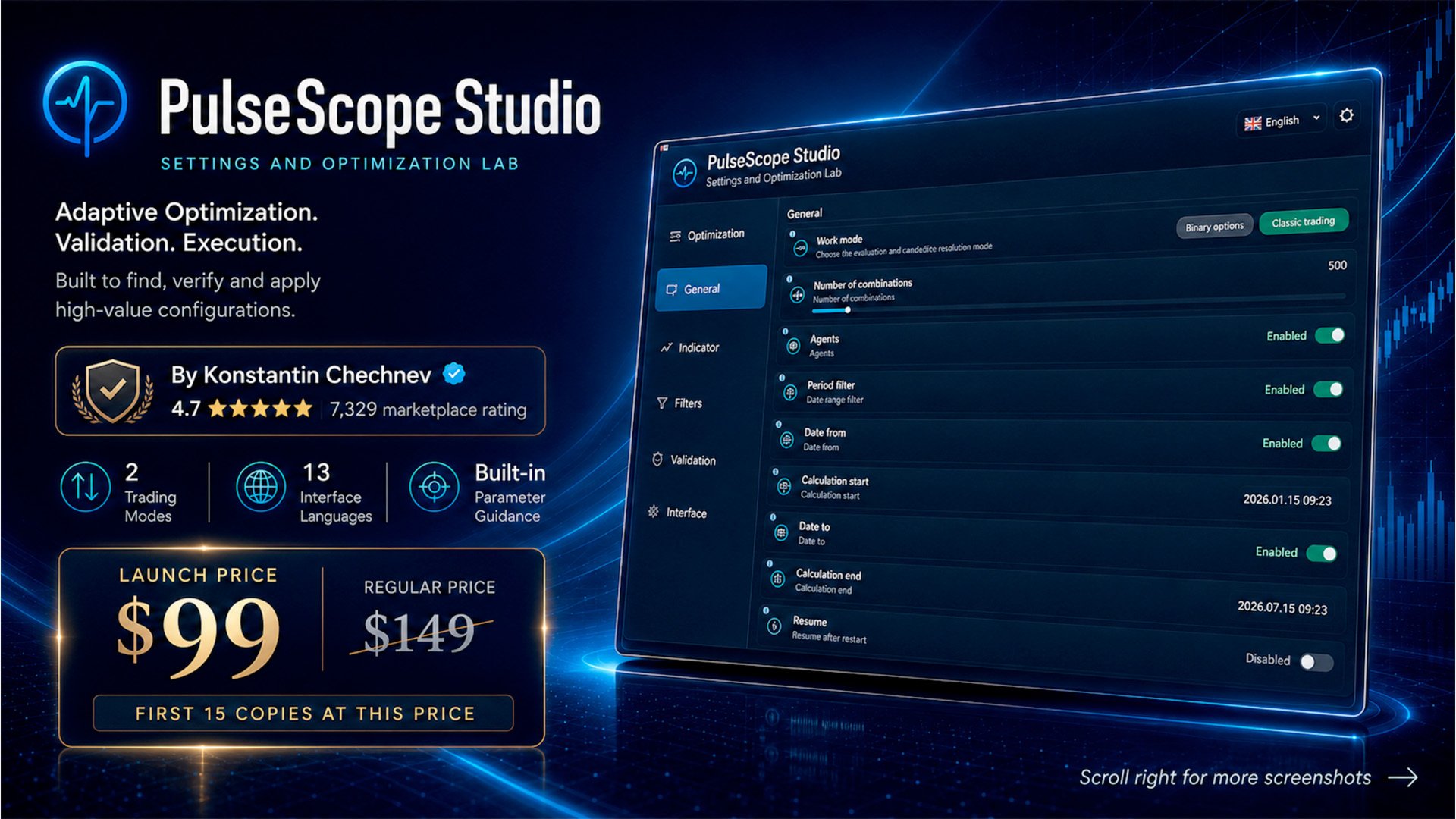
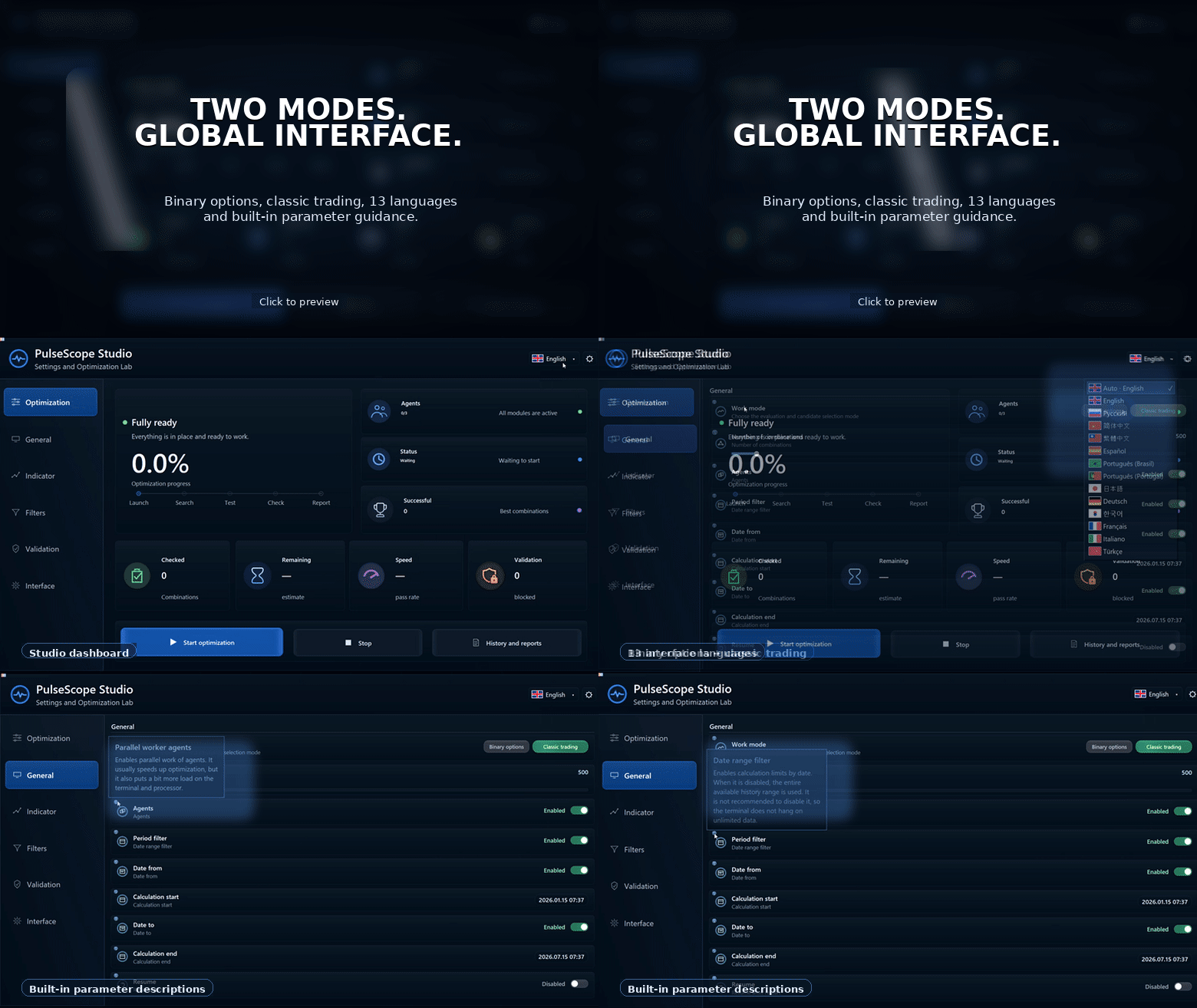
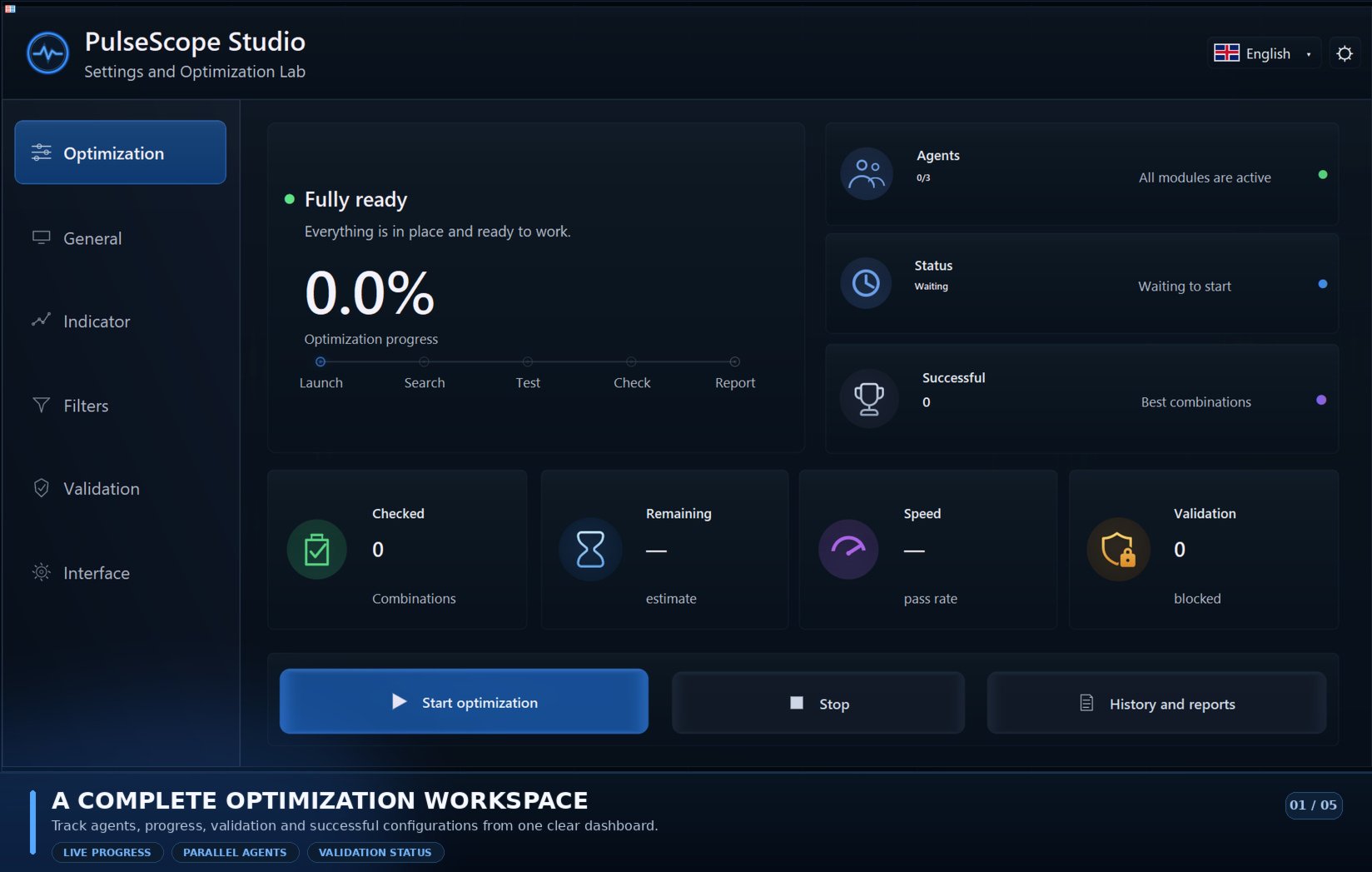
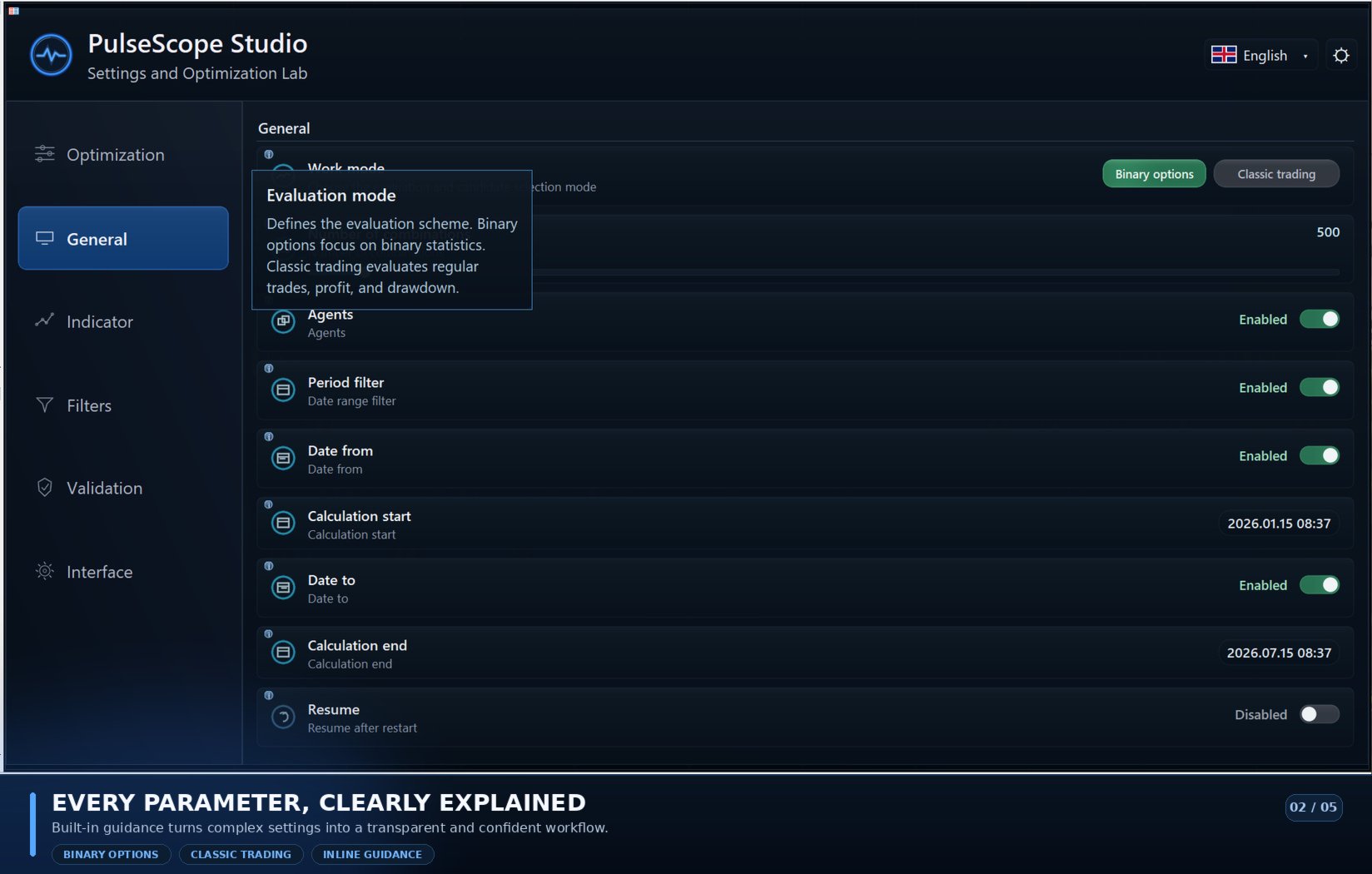
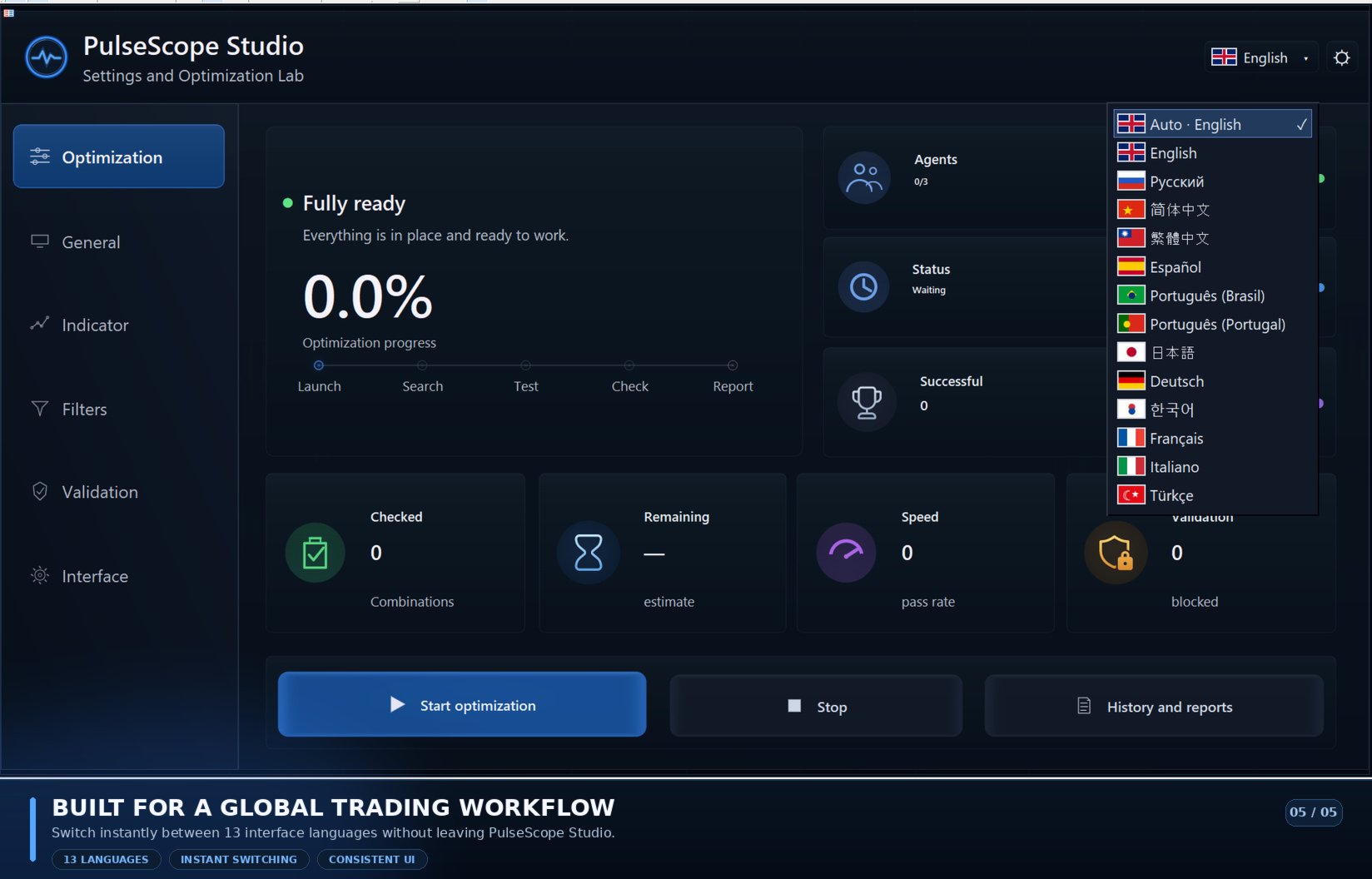
PulseScope Studio is an automated trading indicator optimizer for MetaTrader 5. It searches for robust parameter sets, filters out random historical performance peaks, validates candidates on a separate control period, and lets you launch the selected configuration directly on the chart.

The market is most deceptive precisely where a result looks especially convincing. Separating a genuine pattern from a lucky coincidence is the real challenge.

 
PulseScope Studio is a full-featured optimization environment for the built-in PulseScope Signal trading indicator. Its purpose is not to find the best result on historical data, but to use a multi-stage process of search, selection, and validation to identify a stable operating mode for a specific instrument, timeframe, and market structure — a mode capable of preserving its analytical and predictive characteristics beyond the source data.


What happens inside

Adaptive search instead of mechanical brute force. PulseScope Studio uses adaptive genetic search and parallel computational agents running on separate charts. The algorithm does not test parameters sequentially or waste passes on mechanically scanning the entire range.

Each new generation is formed with the results already obtained in mind: strong configurations are retained, their parameters are combined, and dynamic mutation control directs the search into new areas.

Exact duplicates and nearly identical variants are excluded, while values that consistently lead to weak results gradually lose priority. The search does not restart from scratch with every combination — it continuously restructures itself around what has already been selected.

The search does not lock onto a single discovered maximum. The algorithm combines broad exploration across different regions of the parameter space with examination of the neighborhood around promising configurations. Nearby settings are tested separately to distinguish a stable region from a single lucky pass.


Testing beyond the convenient segment

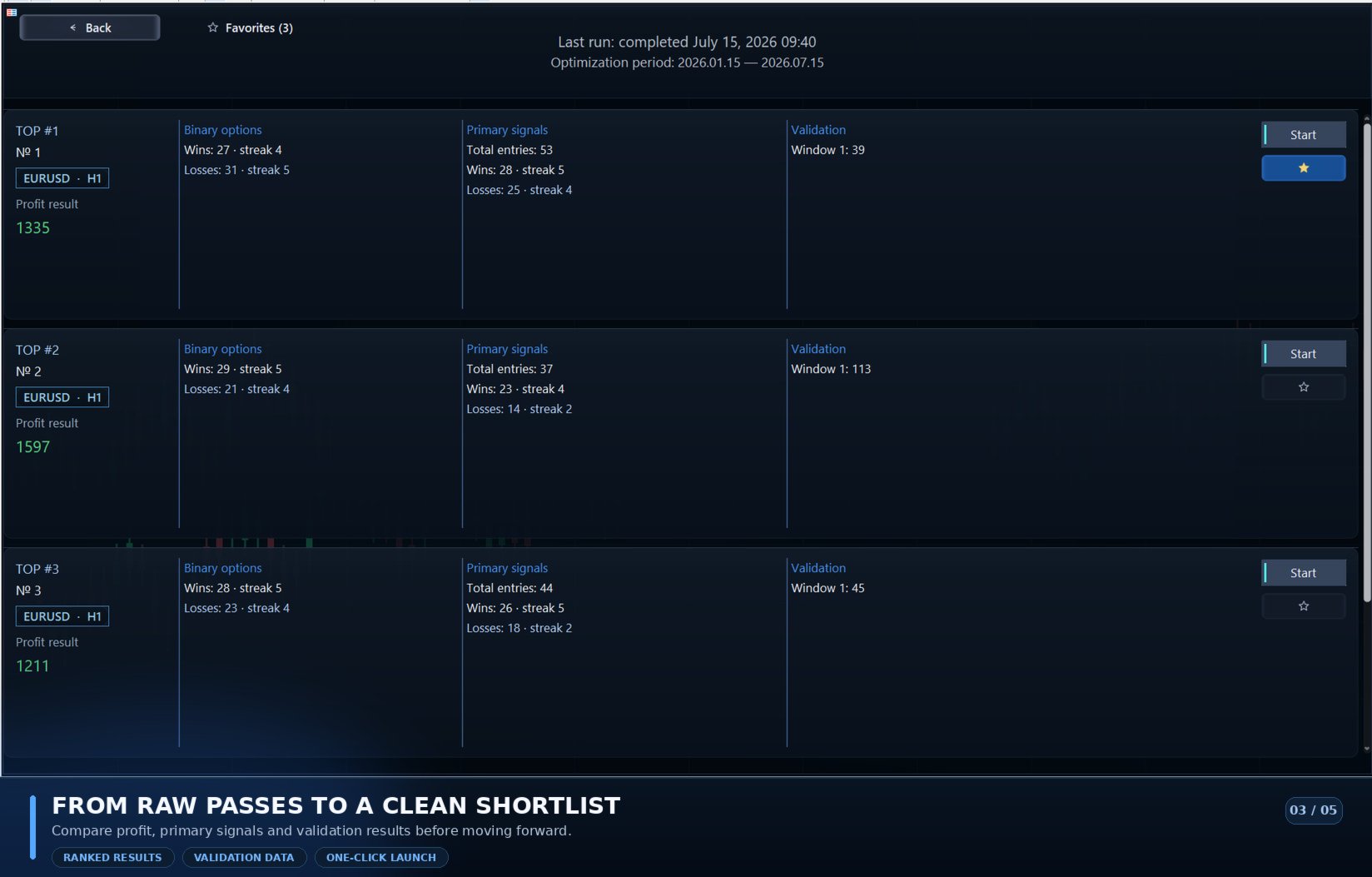
The main period is only the first stage. Even adaptive genetic search can find a configuration that happens to fit one historical segment exceptionally well. That is why promising variants do not end their journey on the main period — PulseScope Studio also evaluates them on a separate control segment that was not involved in parameter selection.

Statistics are recalculated for the control segment. This shows whether the configuration preserves the character of its behavior beyond the data on which it was found, or whether its result deteriorates sharply when the segment changes.

The purpose of the control check is to prevent a single lucky coincidence from appearing more convincing than it really is. It does not predict the future and does not turn a configuration into something guaranteed to remain stable.

The check answers the first question: is this configuration worth saving? The next question is whether it can then be reproduced precisely without starting a new search.


History and favorites

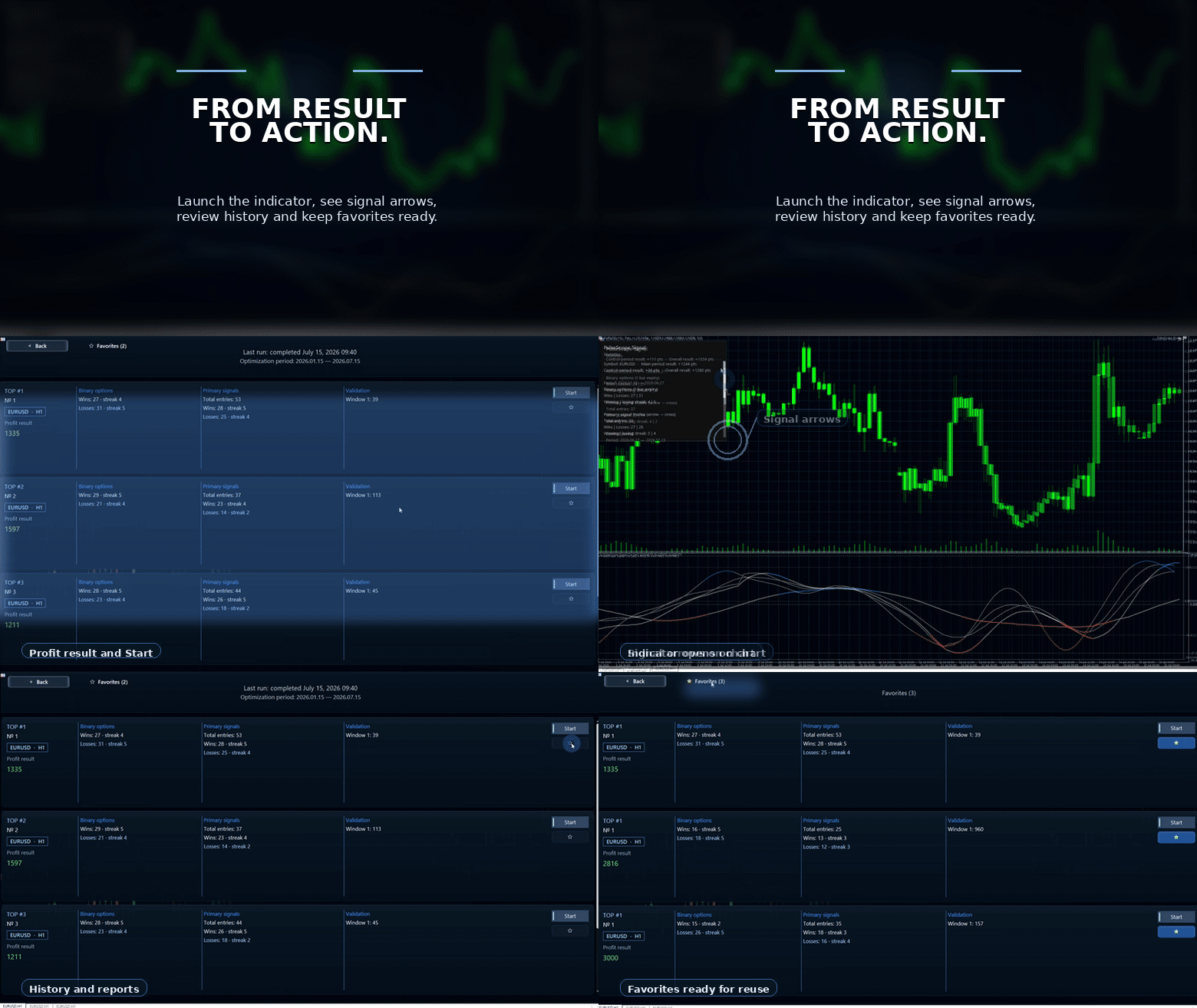
Every selected result is saved together with its parameters, instrument, and timeframe: EURUSD · M15, XAUUSD · H1, US100 · M5.

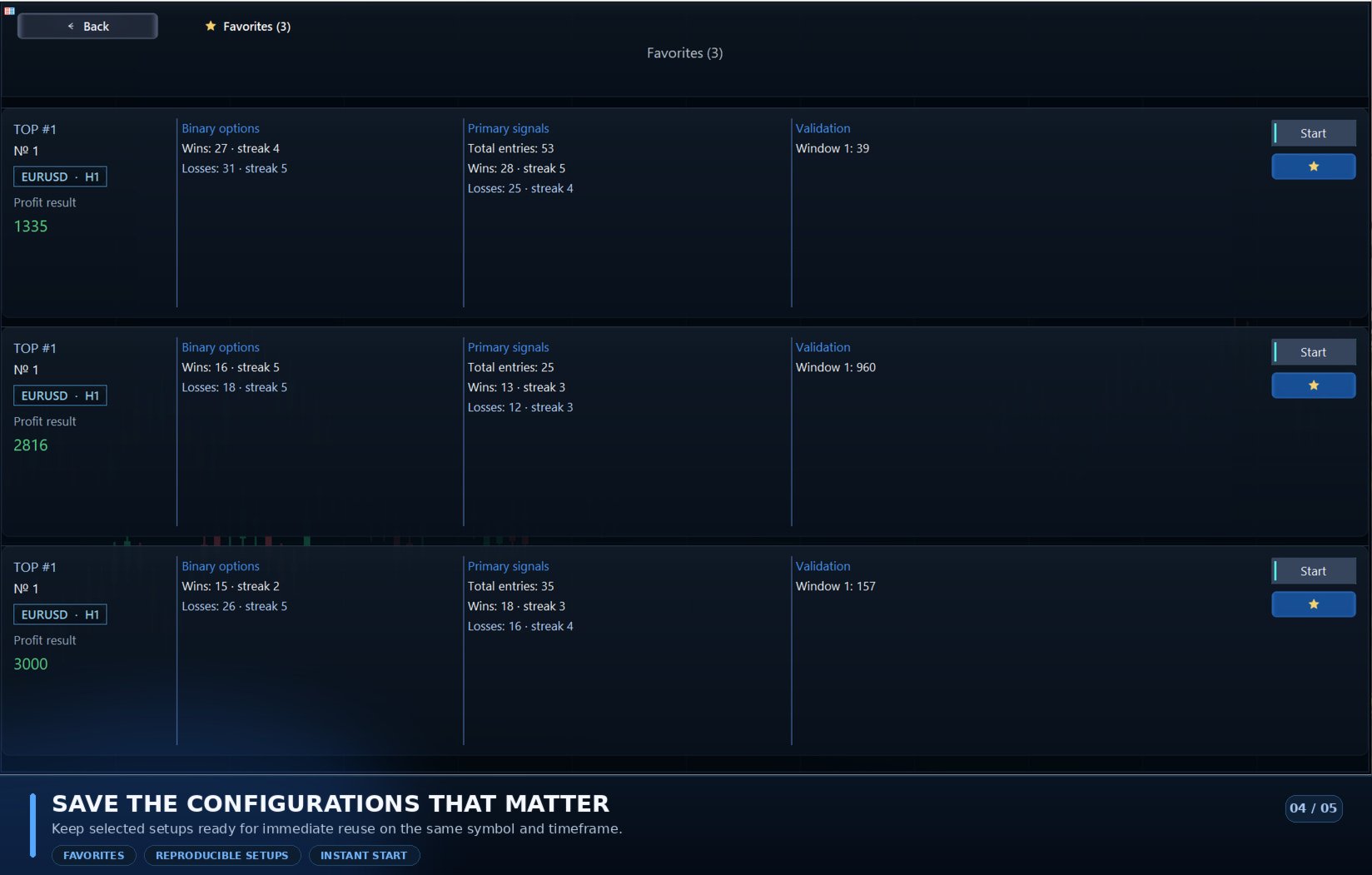
Relaunch without a new optimization. A suitable configuration can be added to favorites and launched again later without repeating the optimization. Studio restores not only the numerical parameters, but also the context in which they were obtained.

The selected variant does not remain just another row in a table — it becomes a reproducible configuration that can be revisited at any time.


Saving the settings is only half the job.
They must also be returned to the chart in the exact system for which they were found.


Built-in PulseScope Signal

The PulseScope Signal indicator is already built into PulseScope Studio. There is no need to install or purchase it separately: a saved configuration is launched directly from the utility interface on the corresponding instrument and timeframe.

Proprietary multi-loop architecture. PulseScope Signal is built on its own multi-loop architecture, not on a standard combination of classic indicators.

Three independent loops with different sensitivity levels analyze momentum across different scales of market movement and jointly track its formation, development, and weakening.

A separate adaptive computational chain for each loop. Each loop uses price-data processing with outlier suppression, an assessment of the market’s fractal structure, momentum normalization relative to current volatility, and SSA analysis of price increments.

The SSA module builds a Hankel trajectory matrix, extracts the dominant rank component, reconstructs the smoothed dynamics, and performs short-term extrapolation. This helps separate the structural component of the movement from random fluctuations in the price series.

The entire analytical architecture is optimized. Data from the three loops are combined by a proprietary multi-stage logic of alignment, confirmation, and adaptive thresholds. As a result, Studio optimizes not a single coefficient of a standard indicator, but the parameters of the complete PulseScope Signal analytical architecture.


Studio turns the complex architecture of PulseScope Signal into a full-fledged tool for practical work, rather than merely a way to observe ready-made signals.


What the user gets

From a table of passes to a complete selection system. Where classic optimization leaves the user alone with a table of optimization passes and a search for the most attractive number, PulseScope Studio is only beginning the real work.

The adaptive selection system forms new generations of parameters using previous results, examines the neighborhood of promising configurations, and gradually excludes directions that systematically fail the specified filters on the selected instrument and period.

Computation is concentrated where potential remains. The search does not repeat itself blindly: with every generation, the algorithm focuses calculations more precisely on promising areas and stops spending resources where results remain consistently weak.

This turns optimization from mechanical brute force into an engineering process of configuration selection and validation.

Fast adaptation to new data. This kind of process is especially important in an environment where volatility, pace, and the structure of market movement are constantly changing.

Instead of manually reviewing dozens of parameters, the user can quickly launch a new search cycle on an up-to-date data segment: parallel agents evaluate candidates, the genetic algorithm redirects the search as results accumulate, and the filters immediately exclude weak and repetitive areas.

As a result, Studio quickly forms a new selected set of settings for the current instrument, timeframe, and market dynamics.


The practical value of PulseScope Studio becomes clearest when the market changes:
instead of starting another manual search from scratch, the user launches a controlled adaptation cycle — from updated data to new configurations ready for validation and application.
Recommended products
Viking Alpha DAX Ivar Edition
Valdeci Carlos Dos Passos Albuquerque
Viking Alpha DAX — Germany 40 Expert Advisor for MetaTrader 5 LAUNCH PROMO Only 10 copies at launch price. Price increases with each sale. Launch price: $297 Next price: $497 Final price: $997 Live Performance: FX Blue — Vikingtradingbots What Makes Viking Alpha DAX Different Most DAX robots fail for one simple reason: they treat the Germany 40 like a forex pair. It isn't. The DAX has a heartbeat — a specific rhythm tied to the Frankfurt Stock Exchange opening, the European session structure, an
The Gold Buyer
Moses Aboliwen Aduboa
Ride the Gold Trend with a Simple Buy-Only EA The  EA is a fully automated Buy-Only Expert Advisor for MetaTrader 5. It is designed to capture upward market opportunities with safe risk management and seamless execution. Why Traders Choose It: Best performance on Gold (XAUUSD) – highly liquid and trending. Buy-Only EA – focuses purely on long positions. Plug & Play setup – attach and let it trade automatically. Built-in Stop Loss & Take Profit protection. Smart one-position contro
Bober Real MT5
Arnold Bobrinskii
4.88 (16)
Bober Real MT5 is a fully automatic Forex trading Expert Advisor. This robot was made in 2014 year and did a lot of profitbale trades during this period. So far over 7000% growth on my personal account. There was many updates but 2019 update is the best one. The robot can run on any instrument, but the results are better with EURGBP, GBPUSD, on the M5 timeframe. Robot doesn't show good results in tester or live account if you run incorrect sets. Set files for Live accounts availible only for cu
AuricSkeeter
Ioannidis Alexandre Anatolevitch
AuricSkeeter - Professional Breakout EA Fully automated Expert Advisor that identifies and trades breakout opportunities using custom indicator. No external indicators required - everything is built-in for maximum performance and reliability. KEY FEATURES Smart Breakout Detection - Automatically identifies significant highs and lows, placing pending orders at optimal levels Built-in News Filter - Protects your trades during high-impact economic events using the MQL5 Economic Calendar Advanced Ri
Cyclone Intraday
Mikhail Mitin
5 (1)
How the EA works (simple explanation) Trades on M5 timeframe Uses H1 timeframe to analyze global market context Analyzes 2 or 3 timeframes simultaneously On each timeframe: Checks price position relative to one or two Moving Averages Evaluates MA angle and distance between price and MA Entry logic is based on trend + volatility conditions , not on random signals The full algorithm is illustrated in the screenshots. Recommended usage Symbol: EURUSD Timeframe: M5 Trading style: Intraday
CRT Master EA MT5
Javier Sobrino Vega
CRT Master EA is an automated trading system based on Candle Range Theory (CRT) and market structure concepts (Accumulation, Manipulation, and Distribution). The Expert Advisor identifies liquidity sweeps where price temporarily manipulates outside a defined accumulation range before returning inside. It automatically executes trades based on structural confirmation, managing position sizing, stops, targets, and trailing rules. A manual indicator version of this logic is available as the CRT Mas
TSM Breakout
Ludovic Marc Marie Moncla
TSM Breakout is a fully automated Expert Advisor implementing time-series momentum - the most extensively documented market anomaly in the academic literature (Moskowitz, Ooi & Pedersen; the classic Turtle rules) - combined with a daily trend filter. HOW IT TRADES - Buys when the close breaks above the highest high of the last 55 bars; sells on a break of the lowest low - Initial stop loss proportional to volatility (2 x ATR) on every single trade - no exceptions - Exit on a break of the opposi
Gold Dual Window
Pedro Salar Montoro
Gold Dual Window is an automated Expert Advisor developed for trading XAUUSD on the M5 timeframe. The strategy combines trend structure, multi-timeframe confirmation and controlled pullbacks. The system only searches for trades during two configurable trading windows, avoiding continuous exposure throughout the entire session. Main features: - EMA 11, 34 and 103 trend structure on M5 - M15 trend confirmation - ADX and +DI / -DI directional filters - Real pullback detection - Recovery candle
Apex Rebalance Scalper
Sapatsakorn Sanjaiya
Apex Rebalance Scalper: Next-Gen Defensive Mean-Reversion Engine Tired of toxic Martingale EAs that blow accounts during flash crashes? Apex Rebalance Scalper is an institutional-grade algorithmic trading system engineered specifically to solve the fatal flaws of classical grid models. By combining high-frequency Touch & Turn Scalping with a mathematical Momentum-Gated Recovery and the proprietary Safe-Match Partial Close Engine , Apex delivers sustainable compounding without uncontained exposur
Pulse Trade EA Intelligent Trading. Disciplined Management. Automated Trading | Prop-Firm-Oriented Risk Management | Research-Optimized Profiles | Simple Setup Pulse Trade EA is a fully automated trading system for MetaTrader 5, developed by MyB2B Inc. using proprietary market-analysis algorithms, extensive historical research and instrument-specific optimization. Designed for traders who value disciplined risk management, including those participating in proprietary trading firm evaluations, Pu

US500 Scalper
Sergey Batudayev
The S&P 500 Scalper Advisor is an innovative tool designed for traders who want to successfully trade the S&P 500 Index. The index is one of the most widely used and prestigious indicators of the American stock market, comprising the 500 largest companies in the United States. Peculiarities: Automated trading solutions:   The advisor is based on advanced algorithms and technical analysis to automatically adapt the strategy to changing market conditions. Versatile approach:   The advisor combine
Scalping bot for the gold/dollar pair (XAU/USD) — a powerful and versatile solution for traders, designed to deliver maximum efficiency in a dynamic market. This bot is specifically engineered for scalping: it analyzes price changes and places trades even before significant market movements begin. This allows it to secure advantageous positions early and capitalize on even the smallest market fluctuations. Key Features: Flexibility: Adapts to any market conditions and suits your trading strategy
Mango Scalper
Mahmoud M A Alkhatib
Mango Scalper  is a fully automated scalping robot that uses a very Good and Smart breakout strategy, advanced money management and probabilistic analysis. Most effective in the price consolidation stages that occupy the bulk of the market time. Proven itself on real accounts with an excellent risk-to-reward ratio. Does not need forced optimization, which is the main factor of its reliability and guarantee of stable profit in the future. S uitable for both beginners and experienced traders.  
Impulse Hadge
Dilmurad Zamitov
5 (1)
English Version: ImpulseHedger XAU Tame the Gold Market with Mathematical Precision. Are you tired of "Grid" EAs that blow your account during long gold trends? Most grid systems fail because they lack a solid exit strategy for explosive moves. ImpulseHedger was specifically designed to turn Gold’s high volatility into a calculated advantage using a hybrid "Impulse Grid" and "Smart Shield" system. Key Features: Extended 7-Level Grid: A conservative lot progression ( $0.01$ to $0.03$ ) designed
Robot Scalper Pro
Khotibul Umam Ubaidillah
ROBOT SCALPER PRO — Advanced Algorithmic Trading System Robot Scalper Pro is a high-performance Expert Advisor (EA) specifically designed to capture scalping opportunities with precision and calculated strategy. Combining ADX/ATR momentum confirmation analysis with real-time news protection, this EA delivers an optimal balance between profitability and risk management. Key Features Smart Momentum & Sideways Filter: Equipped with a combined ADX & ATR filter to ensure the EA only enters t
Aurum Intraday EA
Rodrigo Leonardo Favreau Giuliodoro
Aurum Intraday EA – Advanced Gold Trading Algorithm The Aurum Intraday EA is a powerful automated trading system designed specifically for Gold (XAUUSD) traders who want to capture strong intraday movements while maintaining full control over risk and strategy configuration. Built with a robust algorithm and optimized for H1 and H4 timeframes (H4 recommended) , this Expert Advisor is capable of identifying high-probability opportunities in the gold market and executing trades with precision and
Expert Mind Core: Statistical Probability Engine The Expert Mind Core algorithm is based on a high-order mathematical model designed to analyze structural market imbalances. Unlike standard indicators, this system utilizes a multidimensional approach to price action, evaluating the rate of change in volatility (Gamma-analysis) and its deviation from the equilibrium point. The core logic functions by identifying exhaustion zones where the probability of a corrective movement significantly outweig
Trend Of The Day
Jarmin Jamike Ugorji
5 (1)
Trend Of The Day Follow the trend. Control the risk. Protect the capital. ICMarkets Live Signal 1  https://www.mql5.com/en/signals/2387790   Blog Post  Trend Of The Day - Analytics & Forecasts - 1 September 2026 - Traders' Blogs No Martingale / No Grid /   No Recovery / No Hedging / one trade entry with hard stoploss Release price is $199.99 but price will increase to $299 after certain number of purchases. Trend Of The Day is a professional trend-following Expert Advisor designed to identify
Aureus Edge Gold Trader
Craig Joshua Binnekamp
️ Aureus Edge Gold Trader (v2.10) The Specialist Engine for XAUUSD Aureus Edge is not a "jack-of-all-trades" bot. It is a high-precision Expert Advisor engineered strictly for Gold (XAUUSD) . While it includes stability protocols to pass global market validation, every line of logic is optimized for the unique volatility and liquidity of the Gold market . ️ Built for Professional Capital Preservation Unlike popular EAs that use dangerous recovery grids, Aureus Edge focuses on disciplined br
Gyroscopes mt5
Nadiya Mirosh
5 (2)
Gyroscope        professional forex expert   (for EURUSD, GBPUSD, USDJPY, AUDUSD, USDCHF, EURGBP, EURJPY, NZDUSD, USDCAD, EURCHF, AUDJPY, CADJPY pairs)   alyzing the market using the Elliot Wave Index. Elliott wave theory is the interpretation of processes in financial markets through a system of visual models (waves) on price charts. The author of the theory, Ralph Elliott, identified eight variants of alternating waves (of which five are in the trend and three are against the trend). The mov
| Fully-automated Smart Money Concept (ICT) inspired trading solution with multi-strategy capabilities | Built by a grid trader >> for grid traders.  This is MT5 version, click  here  for  Blue CARA MT4  (settings and logics are same in both versions)     Real monitoring signal  -->  Cara Gold Intro Blue CARA EA   ('CARA') - short for  C omprehensive  A lgorithmic   R esponsive   A dvisor is a next-gen  multi-currency    multi-timeframe  EA base on the widely known (and perhaps the most popul
QV Unlock MT5
Maksim Molodkin
QV Unlock — Manager and tool for restoring blocked/hedged positions (MT5) Are you stuck in a lock? Two opposing positions are frozen at a loss, and now you're looking at the chart, wondering what the net profit is, how big the break-even is, and when the next drawdown should be suspended. QV Unlock is a management tool for just such a situation. It uses any existing symbol lock — orders from your own advisor, another advisor, or manual trades — to show you the full picture on one panel and (if
Survival Nas100
You Liang Tham
Survival NAS100 — Adaptive Algorithmic Trading System Survival NAS100 is an advanced automated trading Expert Advisor developed specifically for the NAS100 index on MetaTrader 5. Built using extensive quantitative research, historical market analysis and systematic strategy development, Survival NAS100 is designed to adapt its trading behaviour to changing market conditions. Unlike conventional trading robots that depend on a single fixed strategy, Survival NAS100 incorporates multiple independe
Grid TRAP EA
Paline Maina
GridEA 10x10 – Professional Grid Trading Expert Advisor for MT5 GridEA 10x10 is a fully automated MetaTrader 5 Expert Advisor designed for traders who want consistent grid-based trading with intelligent basket management, automatic recovery, and profit protection. Built for speed, simplicity, and continuous market activity, this EA places a structured 10-level buy and sell stop grid that captures market momentum in both directions. Key Features 10x10 Dynamic Grid System Places 10 Buy Stop orde
Project Indirect Lock is the hybrid algorithm of Arbitrage, Grid and Hedging. Simple way to describe is Lock USD by using GBPUSD and EURUSD. It is almost all time parallel direction. This way, we can reduce a lot of drawdown if we compare to original Grid and Hedging. P.S. Please note that !!EVERY INVESTMENT ALWAYSE HAVE RISK!! !!USE WISELY WITH YOUR OWN RISK!!
SolarTrade Suite Financial Robot: LaunchPad Market Expert - designed to open trades! This is a trading robot that uses special innovative and advanced algorithms to calculate its values, Your Assistant in the World of Financial Markets. Use our set of indicators from the SolarTrade Suite series to better choose the moment to launch this robot. Check out our other products from the SolarTrade Suite series at the bottom of the description. Do you want to confidently navigate the world of inves
Exp THE X FULL
Vladislav Andruschenko
4.79 (28)
Universal automatic Expert Advisor for MetaTrader 5 working on standard indicators. UniversalEA  The Constructor EA is provided with a large set of functions. You can select one of 20 signals to open a position and 5 of 20 filters to sort out the signals of the standard indicators included in the MetaTrader package. Besides, you can adjust the indicator parameters, select a timeframe, and specify a signal bar for each signal. You can also download The X EA for the MetaTrader 4 terminal  The X f
Fusion 1
Kyaw Zan Tun
This Signal Running With Fusion 1 EA Fusion 2 EA is an Expert Advisor based on the fractal Lines Breakouts. Although recommended pair and set files are provided, it is built with many easy-to-understand money management settings, allowing you to adjust according to market conditions as well as customize for other currency pairs as desired. Live Signal Key Features  - 100% Automated Trading System - Works on Any Broker (ECN Recommended) - Money Management & Risk Control Settings - User-Fri
Added the ability to change the Lost size and make the EA the Lowest Price possible. If you buy it you will get support and future updates. Please support its evolution. This EA is plug-and-play. Aussie Precision is a time-sensitive Expert Advisor for MetaTrader 5, specifically designed for the AUD/USD currency pair. It is built to execute trades at predefined, controlled moments and is ideal for traders looking to automate high-precision entries based on timing. All time-based actions are align
Phoenix Midas
Alvaro Albillos Gutierrez
Phoenix Midas is an order-flow Expert Advisor built specifically for XAUUSD (Gold) on the M15 timeframe. It reads market structure through synthetic order-flow analysis — volume delta, volume profile (POC / value area) and liquidity behaviour — to time entries on two complementary setups, and it manages every trade with a fixed, pre-defined risk. Built-in news filtering and prop-firm risk controls make it suitable for both personal accounts and funded-challenge environments. WHAT IT IS NOT
Buyers of this product also purchase
Trade Assistant MT5
Evgeniy Kravchenko
4.43 (216)
It helps to calculate the risk per trade, the easy installation of a new order, order management with partial closing functions, trailing stop of 7 types and other useful functions. Additional materials and instructions Installation instructions - Application instructions Line function -   shows on the chart the Opening line, Stop Loss, Take Profit. With this function it is easy to set a new order and see its additional characteristics before opening.   Risk management  - The risk calculation
Forex Trade Manager MT5
InvestSoft
4.98 (687)
Trade Manager MT5 is an advanced position size calculator and trade management tool for MetaTrader 5, designed to help traders plan trades faster, control risk more precisely, and manage open positions directly from the chart. It combines order placement, risk based lot calculation, Stop Loss and Take Profit management, Break Even, Trailing Stop, Partial Close, Equity Protection, and external trade management in one panel. Whether you trade forex, indices, metals, commodities, crypto, or future
Telegram to MT5 MultiChannel Copier
Sergio Marquez Uroz
4.65 (20)
Telegram to MT5 Multi-Channel Copier   automatically copies trading signals from your Telegram and Discord channels straight to MetaTrader 5. No bots, no browser extensions, no manual copying. A signal arrives in Telegram or Discord and the EA opens the trade in your terminal within seconds. And before you copy a channel, the built-in backtester shows you what that channel would have done in your account. The product has two components: a Windows application that listens to your Telegram channel
================================================================================ POC BREAKOUT - V20.72. Full Professional Grade Toolkit ================================================================================ POC Breakout is a full MetaTrader 5 trading dashboard for discretionary traders who want breakout signals, Point of Control (POC) context, volume profiles, order flow, market structure, news, alerts, and advanced trade planning in one professional workspace. Attached directly to you
FarmedHedge Pair Trading Dashboard
Tanapisit Tepawarapruek
5 (6)
Farmed Hedge Yield Farming | All Markets (Manual - Hybrid - Semi/Automated EA) VERIFIED TRADING RESULTS - Farmed Hedge Yield Axi Copy:  https://www.mql5.com/en/signals/2356376 - Farmed Hedge Yield Exn Copy:   https://www.mql5.com/en/signals/2356404 - Farmed Hedge Yield V Copy:  https://www.mql5.com/en/signals/2357156 IMPORTANT NOTICE: FarmedHedge is a MANUAL-FOCUSED TRADING UTILITY ,not a fully automated EA. Results shown on this Signal include manual trades and overall strategic management.
Copy Telegram signals with your own trading rules Telegram to MT5 Signal Trader automatically copies text-based trading signals from public and private Telegram channels and groups into MetaTrader 5. Manage multiple providers and MT5 accounts from one desktop app, with individual risk and trade settings for each provider . No Telegram bot or API setup needed for copying. Simply sign in with your own Telegram account by phone or QR code and select the channels or groups you have already joined. Y
TradePanel MT5
Alfiya Fazylova
4.88 (170)
Trade Panel is a multi-functional trading assistant. The app contains over 50 trading functions for manual trading and allows you to automate most trading tasks. Application instructions: https://www.mql5.com/en/blogs/post/756482 Trial version of the application for a demo account: https://www.mql5.com/en/blogs/post/750865 How to install the application: https://www.mql5.com/en/blogs/post/756239 How to test the application in visual mode: https://www.mql5.com/en/blogs/post/770277 How to install
Master Your Trading Discipline   Stop losing your hard-earned gains to overtrading and emotional decisions. The Discipline Tool is your ultimate trading assistant, ensuring strict risk management in real-time. Key Protection Features: Advanced Drawdown Defense : Automatically halts trading if your daily drawdown exceeds a preset threshold (percentage or dollar amount). Real-Time Equity Lock : Safeguard profits by referencing peak equity, ensuring drawdown stays within control. Hard Profit Target
Power Candles Strategy Scanner - Self-Optimizing Multi-Symbol Setup Finder Self-optimizing settings work one chart at a time, and finding where they pay off right now means opening chart after chart. Power Candles Strategy Scanner runs the same self-optimizing engine as the Power Candles indicator on every symbol in your Market Watch, side by side. One panel ranks where it pays off: the winning strategy per symbol, its optimized Stop Loss and Take Profit. An alert fires the moment a fresh signal
Exp COPYLOT CLIENT for MT5
Vladislav Andruschenko
3.97 (35)
Professional Trade Copier for MetaTrader 5 Fast, professional, and reliable trade copier for MetaTrader . COPYLOT allows you to copy Forex trades between MT4 and MT5 terminals with support for Hedge and Netting accounts. COPYLOT MT5 version supports: - MT5 Hedge to MT5 Hedge - MT5 Hedge to MT5 Netting - MT5 Netting to MT5 Hedge - MT5 Netting to MT5 Netting - MT4 to MT5 Hedge - MT4 to MT5 Netting MT4 version Full Description +DEMO +PDF How To Buy How To Install How to get Log Files H
Entry In The Zone with SMC Multi Timeframe is a real-time market analysis tool based on Smart Money Concepts (SMC), designed to analyze market structure, price direction, and key trading zones. It supports both Single-Timeframe and Multi-Timeframe Analysis, providing a clearer view of overall market structure across multiple timeframes, with real-time BUY / SELL signals designed with a strict focus on No-Repaint principles.   The signals are designed to help filter unclear setups and evaluate tr
EasyInsight AIO MT5
Alain Verleyen
4.92 (12)
EASY Insight AIO – All-In-One Power for AI-Driven Trading Want to skip the setup and start scanning the entire market – Forex, Gold, Crypto, Indices, and even Stocks – in seconds? EASY Insight AIO is the complete plug-and-play solution for AI-powered trade analysis. It includes all core Stein Investments indicators built-in and automatically exports clean, structured CSV files – perfect for backtesting, AI prompts, and live market decision-making. No need to install or configure indicators manu
The product will copy all telegram signal to MT5 ( which you are member) , also it can work as remote copier.  Easy to set up, copy order instant, can work with almost signal formats, image signal,  s upport to translate other language to English Work with all type of channel or group, even channel have "Restrict Saving Content", work with  multi channel, multi MT5 Work as remote copier: with signal have ticket number, it will copy exactly via ticket number. Support to backtest signal. How to s
Trade Indicator Assistant   is a powerful MT5 utility designed to turn indicators into automated trading systems. Its main feature is the ability to automatically detect an indicator’s   BUY and SELL signal buffers , without requiring you to know the buffer numbers, search through indicator settings, or modify the indicator source code. Bonus Indicator:   After purchasing Trade Indicator Assistant, contact me to receive   Trade Signal Pro   completely free as a bonus indicator. [Download Demo V
Signal Trading View to MT5 Pro
Mirel Daniel Gheonu
4.5 (2)
Signal TradingView to MT5 Pro  Instant professional execution between TradingView and MetaTrader 5 Automate your trading strategy with the most robust communication bridge between TradingView alerts and real execution in MT5. Designed for traders who demand speed, flexibility, and impeccable risk management, this Expert Advisor transforms any alert message into a precise market or limit order.   Install and TEST the TRIAL version HERE STRENGTHS AND ADVANTAGES Universal Parsing Engine (Propriet
Grid Manual MT5
Alfiya Fazylova
4.73 (22)
Grid Manual is a trading panel for working with grid strategies. The utility is universal, has flexible settings and an intuitive interface. It works with a grid of orders not only in the direction of averaging losses, but also in the direction of increasing profits. The trader does not need to create and maintain a grid of orders, the utility will do it. It is enough to open an order and the "Grid manual" will automatically create a grid of orders for it and will accompany it until the close. F
The Patch
Mian Rameez Ali
The Patch It never opens a trade. It walks behind the ones that did. Every open position, every pending order — checked twice a second for the one thing that's easy to forget: a stop, a target. Found bare, it doesn't ask. It writes the missing number in, measured in points from wherever the position began, and moves on to the next. No strategy, no opinion on direction. Just the quiet assumption that nothing should ever sit on the market unprotected — not because someone decided it shouldn't,
EA Overfitter
Stephen J Martret
5 (1)
That backtest looks great. But will it still be making money tomorrow, next week, next month? EA Overfitter re-runs your EA on 100 price histories it has never seen. One score tells you if the edge is real. A backtest tells you what an EA did on one price history — the one that happened to occur. What you cannot tell from it is how much of that result was the strategy and how much was the particular path. EA Overfitter answers that. It builds up to 100 synthetic price histories your EA has n
VirtualTradePad One Click Trading Panel
Vladislav Andruschenko
4.59 (74)
Trading Panel for MetaTrader 5 — professional one-click trading from chart and keyboard A powerful trading panel for active manual trading, designed to open, manage, and close trades far faster and more efficiently than the standard MetaTrader interface. This panel is built for traders who want full control over positions, pending orders, profit management, and trading execution inside one professional workspace. This is not just another utility. It is a complete trading cockpit for MetaTrader
Anchor Trade Manager
Kalinskie Gilliam
5 (9)
Your EAs cannot see each other, but Anchor can. Anchor gives you one place to coordinate your EAs, manage risk, and decide when trading is allowed. It works alongside the trading bots you already use without any changes to them. The Problem One EA opens a trade. Then another starts trading. The next thing you know, you wake up to multiple grids built across your account. Each EA may be doing exactly what it was designed to do, but together they can place far more risk on your account than you in
Floor Watch
Syed Tauqeer Hussain Shah
Floor Watch One number, watched every thirty seconds: how far equity has fallen since the day began — or since its highest point, if it's told to trail the peak instead of the open. Cross the line and it doesn't argue. Every open position closes, every pending order vanishes, and anything that slips through afterward gets shut the moment it appears. Not asked. Removed. The floor holds until the clock turns 5 AM Pakistan time — then, and only then, does the day start over. One rule. No except
MT5 to Telegram Signal Provider turns your trading account into a signal provider. Every trade action, whether manual, by EA or from your phone, is instantly sent as a message to Telegram. You can fully customize the format or use a ready-made template for quick setup. [ Demo ] [ Manual ] [ MT4 Version ] [ Discord Version ]     New: [ Telegram To MT5 ] Setup A step by step user guide is available. Key Features Ability to customize order details sent to subscribers You can create a tiered subs
RETAILBERG FOOTPRINT CHART PRO — Order-Flow Workspace for MetaTrader 5 Version 7.00  |  Professional System  |  31 tools  |  One chart A full 150-page illustrated User Manual is included. Please read the full manual to understand this feature packed footprint chart elements and ui. https://www.mql5.com/en/blogs/post/777982 DEMO / STRATEGY TESTER — PLEASE READ FIRST
The MT5 to Discord Signal Provider is a user-friendly, fully customizable utility designed for sending trading signals directly to Discord. This tool transforms your trading account into an efficient signal provider. Customize message formats to suit your style! For ease of use, select from pre-designed templates and choose which message elements to include or exclude. [ Demo ] [ Manual ] [ MT4 Version ] [ Telegram Version ]  New: [ Telegram To MT5 ] Setup Follow our detailed user guide for eas
Buy once. Get all my MT4 and MT5 indicators - available now and released in the future - at no extra cost. Contact me after purchase for instructions to receive them. The price is planned to rise by 50$ after every 10 purchases, up to 999$. The Market price at checkout applies. Keep the indicator you trust. Automate the work around it. Your signal. Your rules. Your execution. Already have an MT5 indicator you rely on, but still need to watch the chart, wait for a signal, calculate the lot, plac
AI Trading Assistant | Discord/Telegram → MetaTrader 5 Automation An advanced automation framework that enables natural language trade instructions sent from Discord or Telegram to be executed automatically on MetaTrader 5 using n8n workflows and a custom Expert Advisor. This solution integrates modern workflow automation with MetaTrader 5, allowing users to send trade instructions such as: “buy EURUSD 1% risk 30 pip SL 3R TP” “sell GBPUSD now 2% 20 SL 60 TP” “buy limit EURUSD at 1.0850 with 1%
Astro Trade MT5
Indra Maulana
5 (8)
25% discount on the release of the tool: only for the next 3 buyers Send a message to receive a demo version. AstroTrade Trading Assistant AstroTrade is a comprehensive multi-functional trading utility developed for the MetaTrader 5 platform. It integrates essential tools for trade execution, risk management, and technical monitoring into a single unified interface. The application is designed to assist traders in managing their daily operations through a visual and structured environment. Vi
Trader Evolution
Siarhei Vashchylka
5 (7)
" Trader Evolution " - A utility designed for traders who use wave and technical analysis in their work. One tab of the utility is capable of money management and opening orders, and the other can help in making Elliott wave and technical analysis. Manual (Be sure to read before purchasing) | Version for MT4 Advantages 1. Trading in a few clicks. Immediate and pending orders are available in the panel 2. Money management. The program automatically selects the appropriate lot size 3. Simplifies
YuClusters
Yury Kulikov
4.93 (43)
Attention: You can view the program operation in the free version  YuClusters DEMO .  YuClusters is a professional market analysis system. The trader has unique opportunities to analyze the flow of orders, trade volumes, price movements using various charts, profiles, indicators, and graphical objects. YuClusters operates on data based on Time&Sales or ticks information, depending on what is available in the quotes of a financial instrument. YuClusters allows you to build graphs by combining da
Premium Trade Manager - The Trade Panel With a Coach Built In Premium Trade Manager puts a trading coach inside your chart, with a full execution engine underneath it. Set the trade up the way you always do, then let Max, your AI trading coach, read that exact setup against your live account and give you a straight verdict before you commit: is the stop disciplined, is the risk sane, is a high-impact release minutes away, are you near a prop-firm limit. Below sits the engine that runs everything
More from author
Tick Flow Market Depth Signals for MetaTrader 5 combines tick-flow analysis, price levels, and synthetic market depth. The indicator helps you compare current activity with price behavior and generates intraday signals when the model's conditions are met. Smart DOM builds a calculated view of market depth from price and tick data. Its zones and position maps are model estimates, not records of actual pending orders, other traders' positions, or a complete market order book. Main features Synthet
Signal Binary Option
Konstantin Chechnev
2 (1)
Signal indicator for binary options that is also used effectively on Forex and other markets. It is suitable for short-term grid trading on M1–M5 and includes step-by-step position scaling signals. The indicator uses two-level adaptation: a basic speed profile (a “fast/smooth” setting right from the start) and auto-adaptation based on trade results, which adjusts the filters to the current market, taking into account series of winning and losing signals. The model looks for short directional im
Arrow Strategy Builder
Konstantin Chechnev
Arrow Strategy Builder — an Expert Advisor that remembers the user’s placed up/down arrows on the chart and generates trading signals when the same conditions repeat. Suitable for both beginners and experienced traders, offering an intuitive interface and functionality for automated trading on any financial instrument. The full version of the multi-currency trading advisor for Metatraider 5 is available here. Main Features Easy Strategy Creation: Build trading strategies by placing arrows (Bu
FREE
Tick Flow
Konstantin Chechnev
5 (1)
TickFlow is a tool for tick-data analysis and visual highlighting of significant zones on the chart. The utility aggregates current and historical ticks, shows the buy/sell balance, and helps to identify support/resistance levels and cluster zones. This is the MetaTrader 4 version. How it works (brief) TickFlow collects tick data and aggregates it by price steps and candles. Based on the collected data the indicator builds visual layers: up/down tick counters, buy/sell ratio, historical levels
Correlation Monitor
Konstantin Chechnev
Correlation Monitor is an indicator for quickly detecting relationships between instruments: it helps you find pairs with strong positive/negative correlation, spot divergences, and make better‑informed decisions for hedging, pair and basket trading. Meta traider 4. Key features • Correlation matrix and compact list: instantly shows the strength of relationships between selected symbols; color coding makes it easy to read. • Mini‑chart of the correlated instrument synchronized with the visible a
FREE
Arkavelle
Konstantin Chechnev
Sometimes you just want to take a breath for a minute: while the chart “breathes,” you can switch gears and refresh your focus—without leaving the terminal. ARKAVELLE is drawn right on the chart: a small arcade game for a calm break between ideas and trades. Rules are simple • Goal: bounce the ball with the paddle and break the bricks. • Controls: ← / → arrow keys or the mouse (move within the panel). Catch falling power-ups—they change the pace and add some fun: • Expand — widens the paddle for
FREE
Tick Flow MT4
Konstantin Chechnev
TickFlow is a tool for tick-data analysis and visual highlighting of significant zones on the chart. The utility aggregates current and historical ticks, shows the buy/sell balance, and helps to identify support/resistance levels and cluster zones. This is the MetaTrader 5 version. How it works (brief) TickFlow collects tick data and aggregates it by price steps and candles. Based on the collected data the indicator builds visual layers: up/down tick counters, buy/sell ratio, historical levels
PurrTradeX Signals
Konstantin Chechnev
PurrTradeX is an Expert Advisor that allows users to create and test custom trading strategies based on their own indicator signals. The advisor captures signals from manually placed or automatically generated arrows on the chart and uses them to identify trading opportunities. Key Features Signal recording: place arrows on the chart to mark buy or sell signals. The advisor records the values of integrated indicators (RSI, CCI, DeMarker, WPR) around these points. Automatic arrow placement:
Fibonacci MT5
Konstantin Chechnev
Fibonacci EA MT5 is an Expert Advisor for automating trading based on Fibonacci levels. It determines the minimum and maximum prices over a specified number of bars, builds Fibonacci levels, and opens trades when the current price reaches the selected levels. The EA can trade with the trend or against it, depending on the given parameters. It also allows you to configure levels for closing trades, risk management, and time filters. Features Automatic detection of local extremes and the construct
Fibonacci levels, entry rules, and automated execution on one chart. Dynamic Fibonacci Levels EA for MetaTrader 5 selects two confirmed swing points, draws a Fibonacci grid between them, and trades near the selected levels. The Expert Advisor assesses price structure, momentum, the age of swing points, range, and volatility. The working grid can be rebuilt when market structure changes. Its anchor points can also be moved manually. Main features Anchor selection. Analyzes up to 220 bars. Candida
Lexicon Pattern
Konstantin Chechnev
Lexicon Pattern analyzes sequences of closed candles and uses their statistics for automated trading in MetaTrader 5. The default configuration is intended for EURUSD M5. On the first processed tick of a new bar, the Expert Advisor chooses to buy, sell, or skip entry (ABSTAIN). When algorithmic trading is enabled and the conditions are met, it submits a market order with Stop Loss and Take Profit. Main features Candle classification. Each closed bar is assigned to one of eight structural states.
Two instruments, their relationship, and their divergence on one panel. Correlation Impulse 3D for MetaTrader 5 compares two price series on the H1 hourly timeframe and generates signals for the symbol on the current chart. The decision uses a closed candle, and the arrow appears at the next bar's open. With source history and settings unchanged, subsequent candles do not alter a confirmed signal. The second instrument provides a comparison, not an instruction to open an opposite trade. Main fea
Review a trade idea before entry and see which conditions are met and which are still missing. Entry Quality Filter Analyzer for MetaTrader 5 assesses buy and sell scenarios against six criteria, explains the restrictions, and helps you build an analytical plan. The states BLOCKED, SKIP, WAIT, READY, and LATE distinguish a blocked scenario, a rejected scenario, pending confirmation, conditions met, and signs of a late entry. READY means the model's conditions are satisfied, not that an outcome i
A breakout and the return through a level can be studied as a sequence of events. False Breakout Trap Radar for MetaTrader 5 tracks price behavior around key levels and marks signs of a false breakout once confirmation is complete. You can watch an event as it develops. An arrow and any enabled alert appear only after confirmation by a closed candle. The indicator distinguishes a quick move beyond a level followed by a return, a failed attempt to hold beyond a level, and areas of range compressi
A forecast at the start of a candle, a result check after it closes. Forex Next Candle Forecast 3D for MetaTrader 5 estimates the direction and range of a new candle on its first tick. The forecast is displayed on a three-dimensional panel and recorded for comparison with actual price movement. The indicator uses the sequence of quotes, completed market episodes, and current context. Once recorded, a forecast is not changed using subsequent data. Adaptive memory updates after the candle closes a
Eight currencies, up to 28 pairs, and an overview of their movements on one screen. Pair Currency Strength Meter for MetaTrader 5 compares related currency pairs, calculates the relative strength of each currency, and helps you assess a selected pair in the context of the currency network. The analysis covers USD, EUR, GBP, JPY, CHF, CAD, AUD, and NZD. The indicator first evaluates the available data and the state of each currency. It then selects a pair and creates an analytical plan when the m
Draw a level and observe how price reacts after tracking begins. Support Resistance Price Action for MetaTrader 5 works with your horizontal lines, rectangular zones, and trend lines. It records touches, bounces, and breakouts, and compiles statistics on subsequent price movement. Create an object on the chart, select it, and press Track. The indicator records its geometry and activation time. Events that occurred before that point are not included in the observations for the activated version o
Filter:
No reviews
Reply to review