ZoneFlow
- Experts
-
Gabriel Costin Floricel
 Hey there!
I'm a seasoned freelancer and full-stack programmer with over 20 years of experience turning ideas into reality. Whether it's crafting sophisticated algorithms or building dynamic, user-friendly systems, I've been there, done that, and probably debugged it twice! - Version: 1.0
- Activations: 5
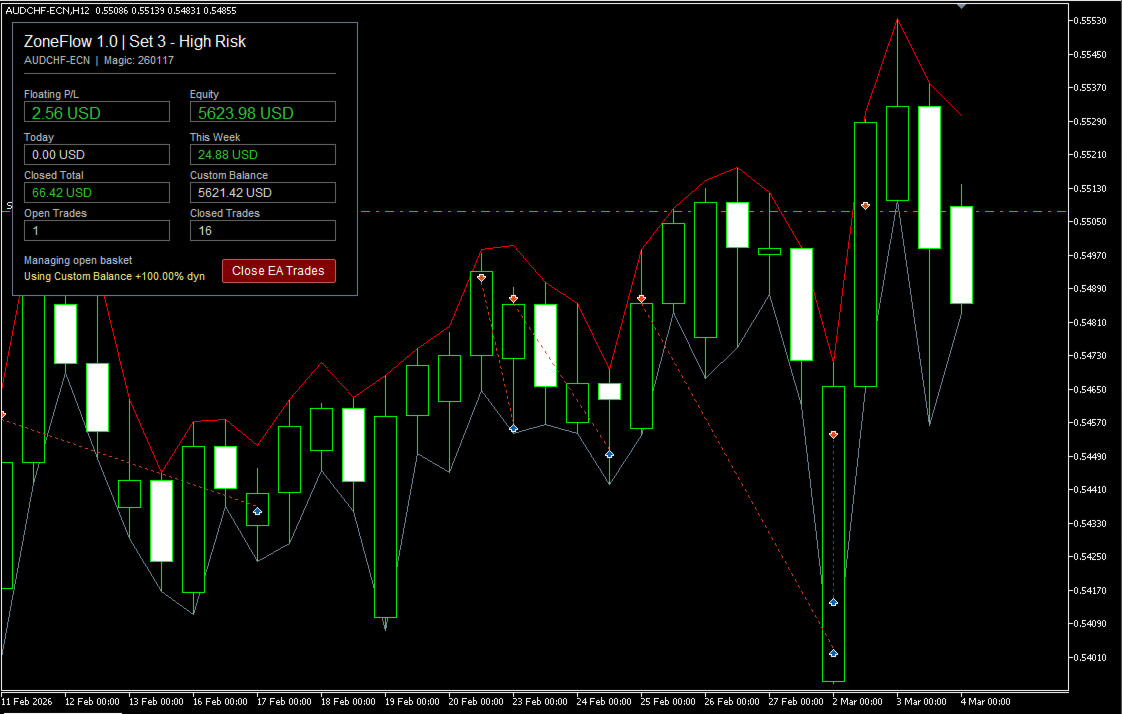
The EA searches for important price zones, waits for price to reach those areas, confirms the setup with RSI behavior, and manages the open trades as a structured basket.
ZoneFlow is designed for traders who want a zone-based mean reversion system with controlled recovery logic, adaptive profit targets, optional chart visualization, and a simple on-chart profit panel.
Important Author NoteThis EA was created based on a trading approach shared by a friend who uses this type of strategy. I personally have not traded this EA live myself yet.
How ZoneFlow Works
ZoneFlow searches for support and resistance zones using recent and extreme price action.
A support zone can be used for buy entries, while a resistance zone can be used for sell entries.
When price reaches a selected zone, the EA waits for RSI confirmation before opening a position. This means the EA does not enter only because price touches a zone. It also waits for additional confirmation from RSI behavior.
If price moves against the first trade, ZoneFlow can open one single recovery trade at the next valid zone.
The open trades are managed as a basket. The basket can close when the combined profit reaches the configured adaptive profit target.
If price continues moving against both trades after the recovery position, the EA can close the basket when the zone becomes invalidated.
ZoneFlow uses a limited recovery model. It can open one initial trade and one recovery trade per basket. It does not use unlimited grid layering.
Main Features-
Automatic support and resistance zone detection
-
RSI-confirmed entries
-
Multi-symbol capability by attaching the EA to multiple charts
-
Basket-based trade management
-
One initial trade and one possible recovery trade per basket
-
Adaptive basket profit target
-
Optional profit target depreciation for older baskets
-
Optional first-entry lot boost on premium zones
-
Optional profit target boost for stronger zones
-
Custom balance mode for risk control
-
Dynamic balance mode based on EA closed net profit
- Support for different account currencies
-
Hedging account support
-
Can be used on standard, ECN, cent, and funded/prop-style accounts, if the broker or firm allows this type of strategy
-
Optional on-chart profit panel
-
Close-all EA trades button from the panel
-
Optional support and resistance zone drawing on the chart
-
Hard drawdown protection for EA trades
-
Optional spread filter
-
Multiple built-in risk presets
ZoneFlow has been tested on the following Forex pairs:
AUDCAD, AUDCHF, AUDJPY, AUDNZD, AUDUSD, CADCHF, CADJPY, CHFJPY, EURAUD, EURCAD, EURCHF, EURGBP, EURJPY, EURNZD, EURUSD, GBPAUD, GBPCAD, GBPCHF, GBPJPY, GBPNZD, GBPUSD, NZDCAD, NZDCHF, NZDJPY, NZDUSD, USDCAD, USDCHF, and USDJPY.
The exact symbol names may be different depending on the broker. Some brokers use suffixes such as “-ECN”, “.m”, “.pro”, or no suffix at all.
Users should attach the EA only to symbols available in their broker’s Market Watch.
Chart SetupZoneFlow works on the symbol where it is attached.
To trade multiple symbols, the user must attach the EA to each desired chart separately.
For example, to trade EURUSD, GBPUSD, and USDJPY, open three separate charts and attach ZoneFlow to each one.
The EA uses its own internal timeframe logic, so the selected chart timeframe does not control the strategy calculations.
Account CompatibilityZoneFlow requires a hedging account because it manages positions as individual trades and baskets.
Netting accounts are not recommended and are not considered supported.
The EA can work on different account types, including standard accounts, ECN accounts, cent accounts, and prop-style accounts, as long as the broker or prop firm allows this type of trading behavior.
Users should always check the rules of their broker or prop firm before using any Expert Advisor, especially one that uses basket or recovery logic.
News FilterZoneFlow does not include a built-in news filter.
The strategy is designed to be used with small lot sizes and controlled exposure, so the main risk control comes from conservative sizing, limited recovery behavior, and drawdown protection.
However, small lot sizes do not remove market risk. Users should still be careful during high-impact news events, strong market shocks, and periods of abnormal volatility.
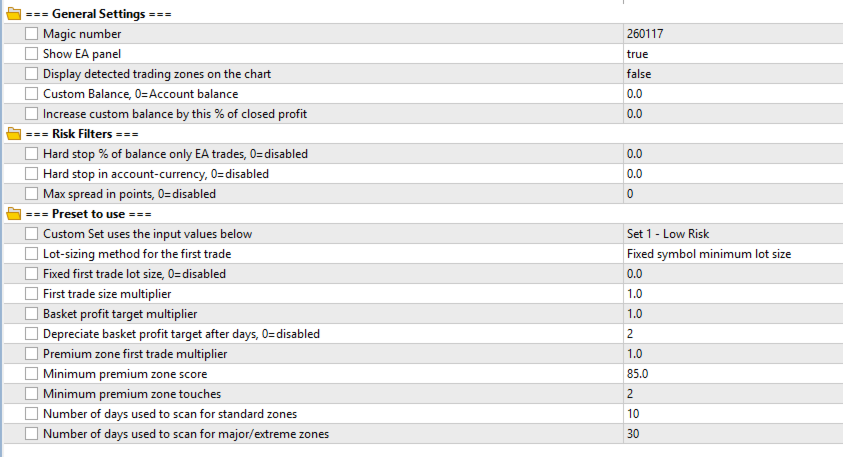
General SettingsMagic Number
This value is used to identify trades opened by the EA. It helps ZoneFlow manage only its own positions and separate them from manual trades or trades opened by other Expert Advisors.
Show EA PanelDisplays a simple on-chart panel with useful EA information, including profit data and a button to close all trades opened by the EA.
Display Trading Zones on the ChartAllows ZoneFlow to draw detected support and resistance zones directly on the chart. This is useful for visual monitoring, testing, and understanding where the EA may consider entries.
Custom BalanceAllows the EA to calculate lot sizes and risk as if the account balance were a custom value.
Using a lower custom balance can reduce risk exposure.
Using a higher custom balance can increase risk exposure.
When set to zero, ZoneFlow uses the real account balance.
Dynamic Balance Based on EA ProfitThis feature can increase the custom balance based on ZoneFlow’s closed net profit.
For example, when set to 50%, each unit of closed profit adds 50% of that amount to the balance value used by the EA.
This allows the system to scale gradually with profits instead of immediately using the full account balance.
Risk FiltersMaximum EA Drawdown by Percentage
Stops EA activity when the drawdown from EA trades reaches the selected percentage of the balance.
This is a hard protection limit for trades managed by the EA.
Set to zero to disable this filter.
Maximum EA Drawdown by MoneyStops EA activity when the drawdown from EA trades reaches the selected amount in the account currency.
Set to zero to disable this filter.
Maximum SpreadPrevents new entries when the spread is higher than the allowed limit.
This can help avoid poor entries during high-spread conditions, rollover, or low-liquidity periods.
Set to zero to disable this filter.
Preset SelectionZoneFlow includes several preset modes:
-
Custom Set
-
Set 1 — Low Risk
-
Set 2 — Medium Risk
-
Set 3 — High Risk
The selected preset controls the main strategy behavior, including basket sizing, zone scan windows, adaptive target behavior, and recovery logic.
The Custom Set option allows the user to manually configure the strategy settings.
Custom Set SettingsFirst Trade Lot Mode
Controls how the EA calculates the first trade size.
Available modes include:
-
Fixed symbol minimum lot size
-
Conservative balance-based scaling
-
Moderate balance-based scaling
This allows the trader to choose between simple minimum-lot trading or balance-based lot calculation.
Custom Fixed First Trade LotUses a fixed lot size for the first trade when the value is greater than zero.
When set to zero, ZoneFlow uses the selected first trade lot mode instead.
First Trade Size MultiplierMultiplies the calculated first trade lot size.
This can be used to increase or reduce the first position size without changing the main lot mode.
Basket Profit Target MultiplierAdjusts the basket profit target.
A higher value requires more profit before closing the basket.
A lower value makes the EA close baskets with a smaller profit target.
Profit Target Depreciation After DaysAfter the selected number of days, ZoneFlow can gradually reduce the required basket profit target.
This can help older baskets close more easily instead of waiting indefinitely for the original target.
Set to zero to disable this behavior.
Premium Zone SettingsPremium Zone First Trade Multiplier
Allows ZoneFlow to increase the first trade size when the entry zone is considered a premium zone.
Minimum Premium Zone ScoreDefines the minimum quality score required for a zone to qualify as premium. Values can range from 0 to 130.
Minimum Premium Zone TouchesDefines how many times a zone must be touched or respected by price before it can qualify as a premium zone.
A higher value can help identify stronger support and resistance areas.
Zone Scan SettingsStandard Zone Scan Period
Controls how many recent days ZoneFlow uses to detect normal support and resistance zones.
A shorter period makes the EA focus more on recent market structure.
A longer period may include older zones.
Extreme Zone Scan PeriodControls how many days ZoneFlow uses to detect major or extreme support and resistance zones.
These zones can represent stronger market levels and may be useful for identifying larger reaction areas.
Recommended UsageStart with the lowest-risk preset.
Use small lot sizes, especially when running the EA on many symbols.
Test the EA on a demo account before using it on a real account.
Use a VPS if running ZoneFlow on several charts or if the trading terminal must stay active continuously.
Start with the tested major and minor Forex pairs before trying other symbols.
Avoid using very small accounts with too many symbols at the same time.
Monitor floating drawdown, margin usage, and basket exposure carefully.
Testing RecommendationsBefore using ZoneFlow on a live account, users should test the EA in the Strategy Tester and on a demo account.
Recommended testing steps:
-
Test one symbol first.
-
Test several symbols together using the same risk level.
-
Start with the Low Risk preset.
-
Use realistic spread and commission conditions.
-
Forward test on a demo account.
-
Check floating drawdown, not only closed profit.
-
Review how the EA behaves during strong one-way market moves.
-
Make sure the selected account size can handle the number of active symbols.
-
Traders who understand support and resistance trading
-
Traders who understand basket trading
-
Traders who want zone-based Forex automation
-
Traders who prefer conservative lot sizing
-
Traders who can monitor risk and margin
-
Demo testing and forward testing
-
Controlled live trading with proper risk management
-
Users looking for guaranteed profit
-
Very small accounts trading many symbols at once
-
High-spread or high-slippage brokers
-
Fully unattended aggressive recovery trading
-
Users who do not understand floating drawdown and margin risk
-
Netting accounts
-
Traders who expect every support or resistance zone to hold
-
Users who do not test before going live
ZoneFlow does not guarantee profit.
All trading involves risk, and past performance does not predict future results.
Support and resistance zones can fail, especially during strong trends, news events, low-liquidity periods, or abnormal market conditions.
Because ZoneFlow can use basket recovery logic, floating drawdown may increase during strong one-way market moves.
Use conservative settings first, test carefully, and treat risk control as the most important part of the setup.
Final NoteZoneFlow is a limited zone-based recovery trading system.
Its strength is automation, support and resistance detection, RSI-confirmed entries, adaptive basket targets, and structured trade management.
Its main risk is recovery exposure during strong directional market moves.
For best results, use conservative settings, small lot sizes, realistic account sizing, and careful testing before live trading.