Visual Risk Trade Manager

  • Utilities
  • Ramesh Satyaprakash Pal
    Ramesh Satyaprakash Pal
    • Independent MT5 Developer at  Independent Trader Developer
    • India
    • 164
    MT5 developer and trader focused on creating practical trade management tools, risk management solutions, and productivity enhancements for MetaTrader 5. My goal is to build reliable, user-friendly, and efficient tools that help traders manage positions directly from the chart.
  • Version: 1.0
  • Activations: 5

Visual Risk Trade Manager MT5

Professional Visual Trade Management for MetaTrader 5

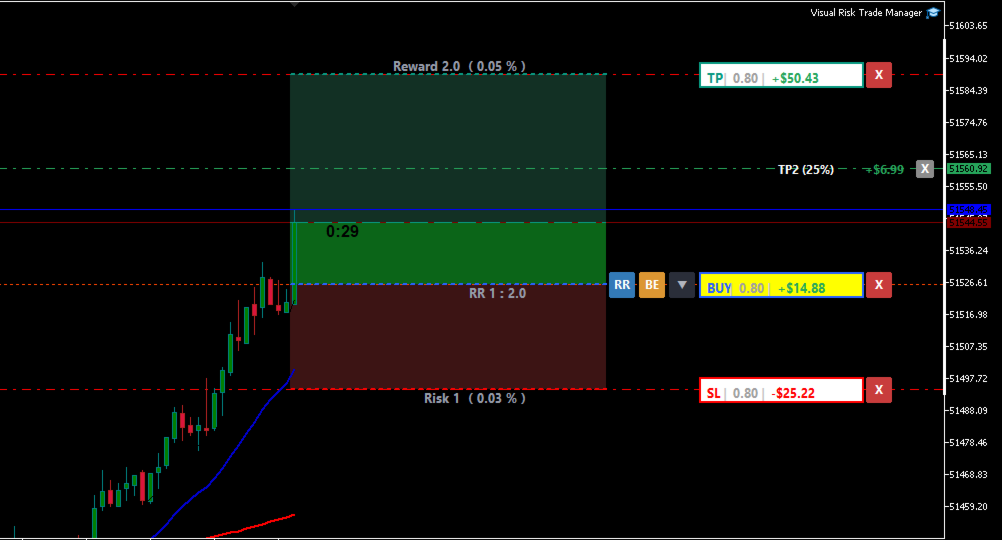
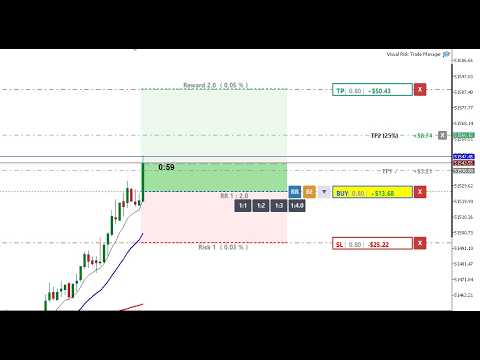
Visual Risk Trade Manager MT5 is a powerful trade management utility designed for manual traders who want complete control over their positions directly from the chart. The tool provides visual risk analysis, position management, profit protection, and real-time trade monitoring without generating signals or opening trades automatically.

Whether you are a scalper, day trader, swing trader, or prop firm trader, Visual Risk Trade Manager helps simplify trade execution and risk management through an intuitive chart-based interface.

KEY FEATURES

✔ Live Profit & Loss Display
Monitor your open trade profit and loss directly on the chart in real time.

✔ Visual Risk / Reward Zones
Instantly visualize risk and potential reward before entering or managing a trade.

✔ Progress Zones
Track price movement toward Stop Loss and Take Profit targets with clear visual progress indicators.

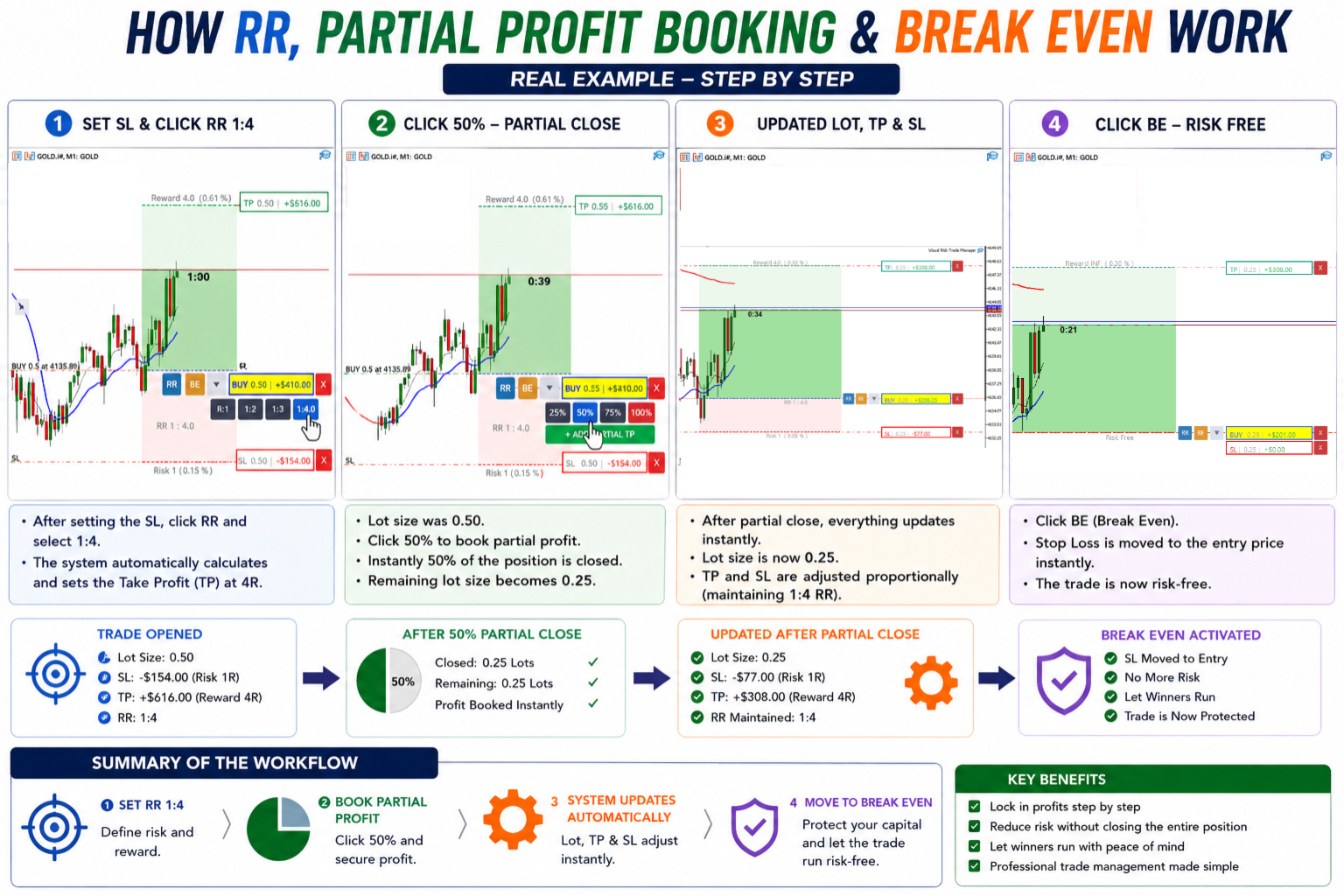
✔ One-Click Break Even
Move Stop Loss to the entry price instantly and secure your position with a single click.

✔ Instant Partial Close
Quickly close:
• 25% of position
• 50% of position
• 75% of position
• 100% of position

✔ One-Click Trade Close
Close open positions directly from the chart interface.

✔ Drag & Drop TP / SL Management
Modify Stop Loss and Take Profit levels visually by dragging chart levels.

✔ Multiple Partial Take Profit Levels
Create and manage multiple TP levels (TP1, TP2, TP3, TP4) to secure profits step by step.

✔ Trade Statistics & Information
View important trade metrics and position information directly on the chart.

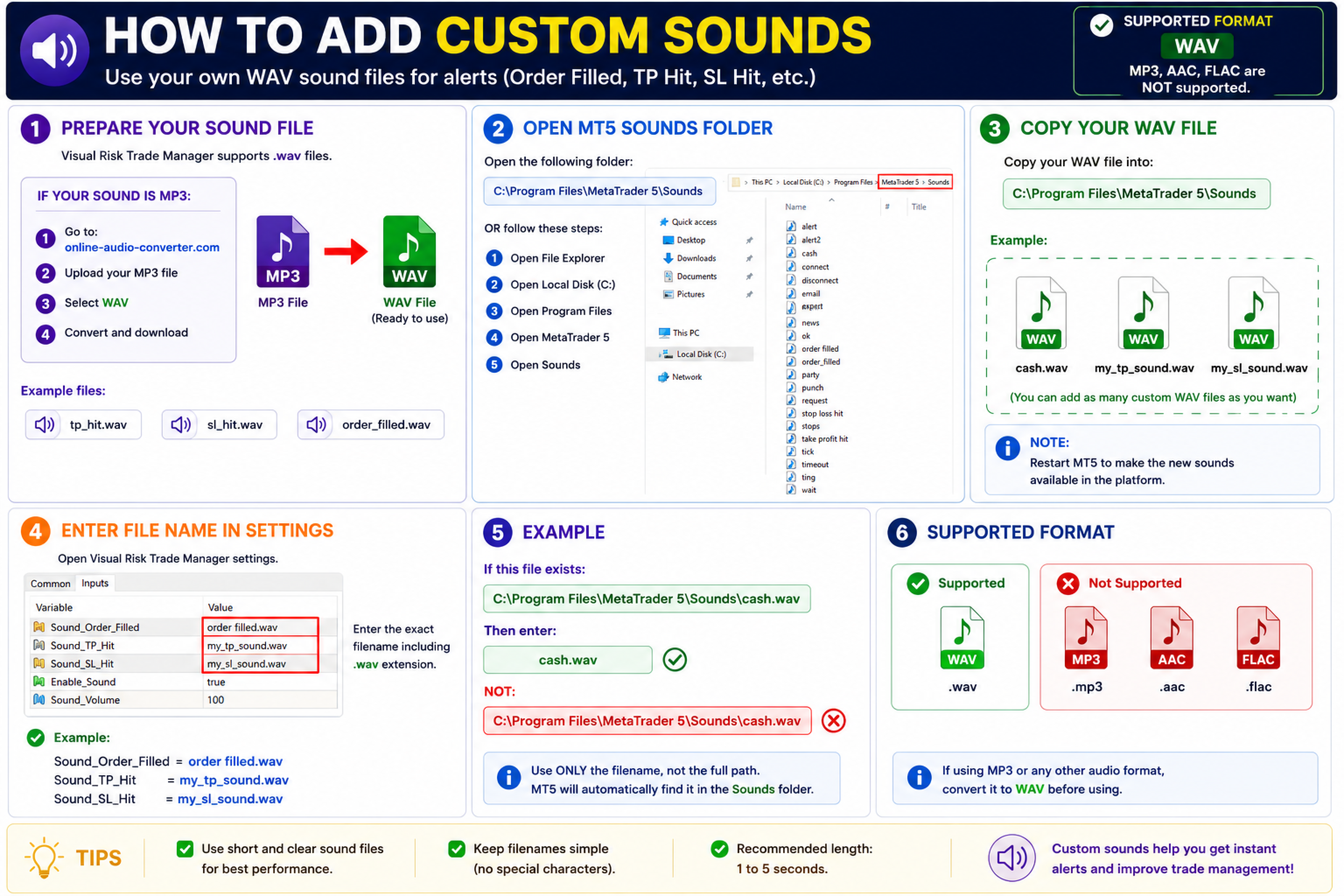
✔ Custom Sound Alerts
Use your own sound notifications for:
• Order Filled
• Take Profit Hit
• Stop Loss Hit
• Trade Events

✔ Fully Customizable Interface
Customize colors, labels, buttons, sounds, and visual elements to match your preferred trading style.

DESIGNED FOR

• Scalpers
• Day Traders
• Swing Traders
• Prop Firm Traders
• Manual Traders
• Professional MT5 Users

IMPORTANT NOTICE

Visual Risk Trade Manager MT5 is a trade management utility only.

The tool does NOT:
• Generate trading signals
• Open trades automatically
• Execute automated trading strategies
• Perform copy trading
• Provide market predictions

All trading decisions remain under the trader's control.

PROP FIRM & BROKER COMPATIBILITY

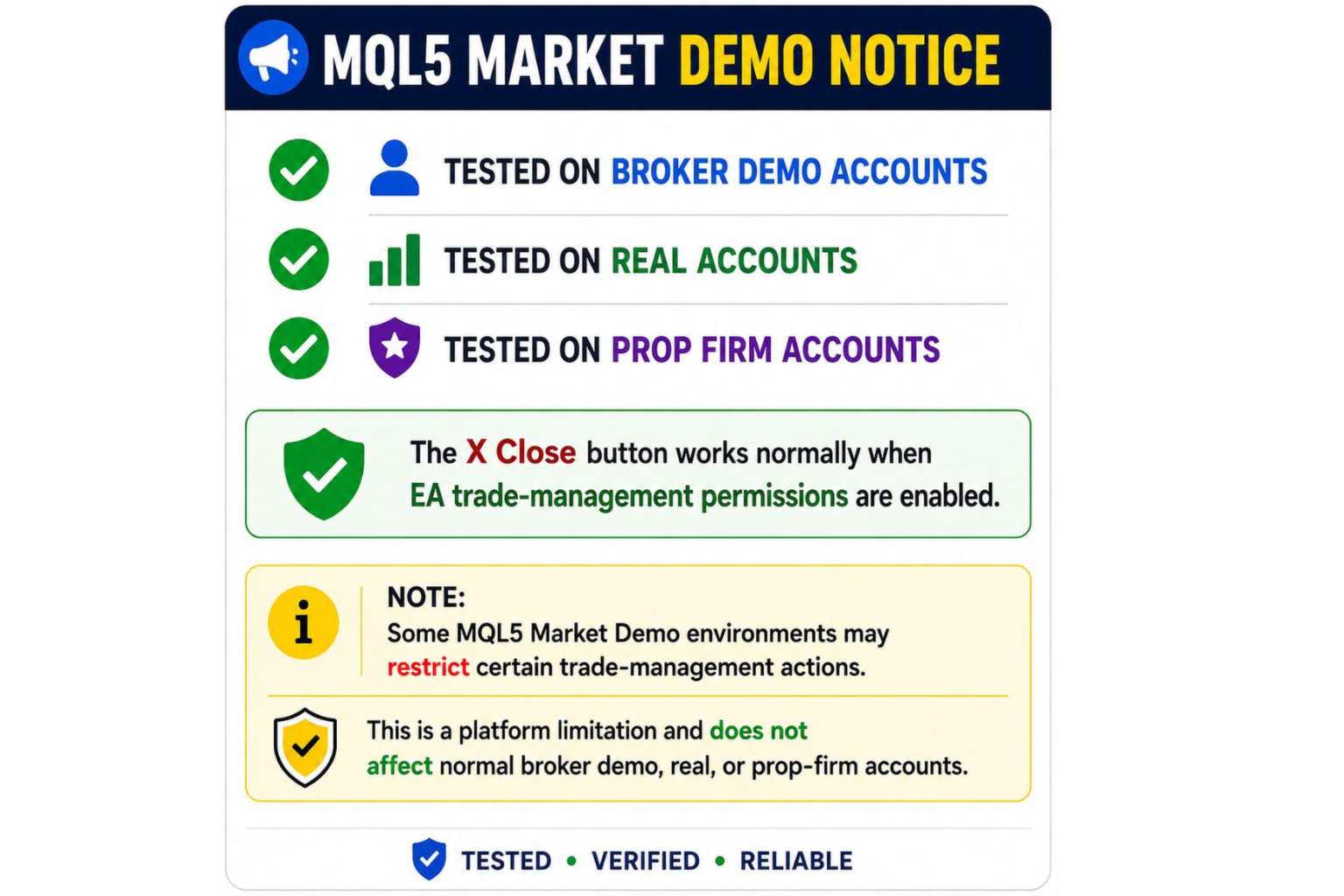
The tool has been tested on broker demo accounts, real accounts, and various prop firm environments.

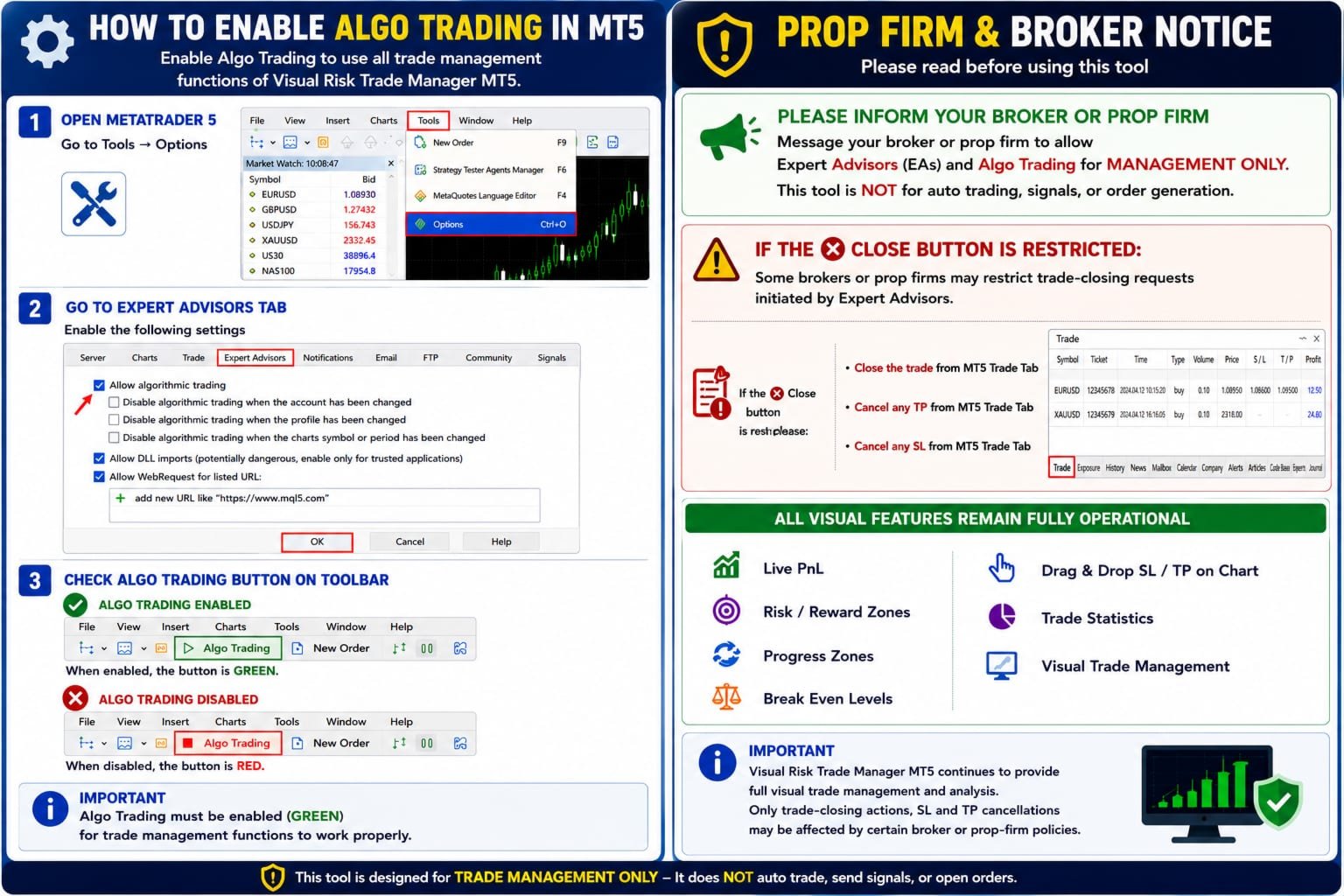
Some brokers or prop firms may require Expert Advisor (EA) permissions for trade management functions such as:
• Break Even
• Partial Close
• One-Click Close
• TP / SL Modification

Visual analysis features remain available even if certain trade-management actions are restricted by broker policies.

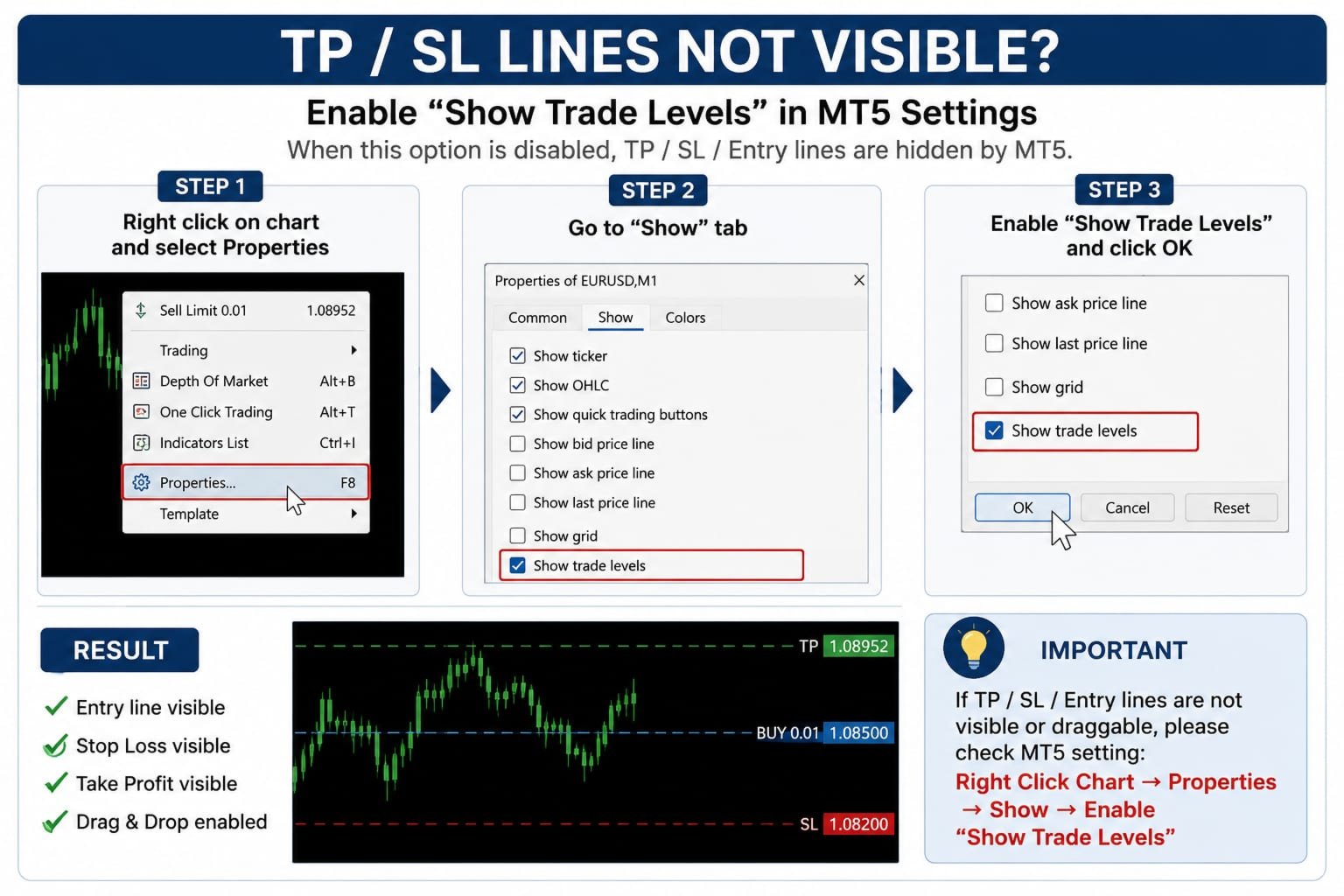
HOW TO ENABLE ALGO TRADING

  1. Open MetaTrader 5.

  2. Go to Tools → Options → Expert Advisors.

  3. Enable "Allow Algorithmic Trading".

  4. Click OK.

  5. Ensure the Algo Trading button on the MT5 toolbar is GREEN.

This permission is required for trade-management functions to operate correctly.

SYSTEM REQUIREMENTS

• MetaTrader 5
• Windows Desktop or VPS
• MT5-Compatible Broker
• Any Symbol
• Any Timeframe

FREQUENTLY ASKED QUESTIONS

Q: Does this tool automatically open trades?
A: No. Visual Risk Trade Manager is designed exclusively for trade management.

Q: Does it generate trading signals?
A: No. The tool does not provide trading signals or market predictions.

Q: Can I use it with prop firms?
A: In most cases yes. Always verify your firm's EA policy before use.

Q: Why is the Close button not working?
A: Ensure Algo Trading is enabled and verify that your broker or prop firm permits EA-based trade management actions.

Q: Can I modify TP and SL directly from the chart?
A: Yes. Stop Loss and Take Profit levels can be adjusted visually using drag-and-drop functionality.

Recommended products
Easy Trade Copy Client MT5
Krutik Piyushkumar Parekh
Easy Trade Copy (Client / Receiver) The easiest and most reliable way to copy trades to your account without missing a beat. If you want to copy trades from a master account to your own account, you need a tool you can trust. Most copiers glitch, miss trades, or accidentally open duplicates when your internet drops or your computer restarts. The Easy Trade Copy is built differently. It is a "smart" copier that double-checks every single trade to make sure your account perfectly matches the mast
This tool will perform Trailing stop loss and Break even management for orders. Helps you limit or reduce the time spend watching orders on the screen, especially when you need to go to sleep. Just add this EA to 1 chart, you can manage all pairs. You can filter orders by comment, magic number, symbol and order ticket number. When Breakeven it can add shift/offset pips (to cover the commission...). You can try in strategy tester before purchase. The EA will add Buy and Sell alternately, so you
Trade copier MT5
Alfiya Fazylova
4.6 (55)
Trade Copier is a professional utility designed to copy and synchronize trades between trading accounts. Copying occurs from the account / terminal of the supplier to the account / terminal of the recipient, which are installed on the same computer or VPS . PROMOTION - If you have already purchased the "Trade Copier MT5," you can receive the "Trade Copier MT4" for free (for copying MT4 > MT5 and MT4 < MT5). For more detailed information about the conditions, please contact us via private message
Get full access for just $1.67/month with the 1-year rental.  Quick support is available for any questions or assistance you may need. This is a professional multifunctional utility that combines  R emote control, Trading Statistics, Auto Reports, Price Alerts, and Trade Notifications into one modern Discord monitoring system. The utility s upports R emote control directly from your Discord channel using the menu command. Send Trade Reports, view open positions, create, delete and manage active
King Trade Copier
Mohammed Maher Al-sayed Mohammed Ahmed Saleh
KingCopier – Lightning-Fast Local Trade Copier for MetaTrader (Master + Slave) KingCopier is a professional local trade copier that mirrors every trading action from one Master account to unlimited Slave accounts on the same PC or VPS — with an internal copy latency of just a few milliseconds. It was built by a real trader for daily real-money use, with one goal: whatever happens on the Master must happen on the Slave, instantly and without exceptions. Watch the demo video to see the real cop
Ultimate Pro Trading Panel — All-In-One Manual & Grid Trading Dashboard Pro Trading Panel   is an all-in-one on-chart control panel that gives discretionary and semi-automated traders a complete toolkit for entries, exits, risk management, and grid trading — without leaving the chart. Every function is visual, draggable, and updates in real time. If you want to test this utility feel free to download the basic preview version of this tool here:  https://www.mql5.com/en/market/product/181435 Who
Gold Flow Seconds Chart transforms MetaTrader 5 into a fast and convenient workspace for manual trading. The utility builds 5-second and 10-second candles from the tick data provided by your broker. M1, M5, M7, M15, M30, H1 and H4 views are also available in the same interface. MOUSE-DRIVEN CHART NAVIGATION • Drag the chart horizontally and vertically with the left mouse button. • Use the mouse wheel to change candle width. • Use Ctrl + mouse wheel to adjust the vertical scale. • Return to t
Auto Trade Copier for MT5
Vu Trung Kien
4.56 (27)
Auto Trade Copier is designed to copy trades to multiple MT4, MT5 and cTrader accounts/terminals with 100% accuracy. The provider and receiver accounts must be on the same PC/VPS. With this tool, you can copy trades to receiver accounts on the same PC/VPS. All trading actions will be copied from provider to receiver perfectly. This version can be used on MT5 accounts only. For MT4 accounts, you must use Auto Trade Copier (for MT4). Reference: - For MT4 receiver, please download Trade Receiver Fr
Trade Assistant 38 in 1
Makarii Gubaydullin
4.91 (23)
Multifunctional tool: Lot Calculator, Grid Orders, R/R ratio, Trade Manager, Supply and Demand zones, Price Action and much more Demo version   |   User manual Trade Assistant   doesn't work in the strategy tester : you can download the   Demo Version HERE  to test the utility . Contact me   for any questions  / ideas for improvement / in case of a bug found If you need a MT4 version, it is available here Simplify, speed up and automate your trading   process . Expand the standard terminal capa
Trading Utility for Forex Currency Pairs Only not for Gold  Functions Auto Lot Calculation based on Risk Auto stoploss  Auto TakeProfit Breakeven Auto Close Half % Close in percentage with respect to the PIPs Pending Orders BuyLimit Sell Limit with distances BuyStop Sell Stop    with distances Trading Informations Risk in percentage For Multiple trades Combine Takeprofit and Combine Stoplosses
KC Trade Copier Pro is the ultimate local trade copying solution designed for high-performance trading on MetaTrader 5. Engineered for speed and reliability, it allows you to replicate trades between multiple accounts on the same PC or VPS with near-zero latency (1-5ms) . Whether you are a Prop Firm trader managing multiple funded accounts, a portfolio manager, or a scalper requiring instant execution, KC Trade Copier Pro offers a professional alternative to expensive monthly subscription servi
Symbol Manager for MT5
Taras Slobodyanik
5 (3)
Symbol Manager or Grid Manager, designed to group orders into one position (by Symbol or by Magic Number). This utility will be useful to multi-currency traders (many EAs), who can have multiple orders on several pairs. You will be able to see the total number of lots, the total profit, and set virtual stop loss and virtual take profit. To set a real TP (or SL), you must first set the virtual value, and then enter the command in this cell: "set". If you want to set real TP/SL for all orders at
Bastion is a monitor-and-close-only risk manager for prop-firm traders. It watches your account against your firm's daily-loss and maximum-drawdown limits in real time and force-closes your open positions BEFORE you cross a line. It never opens a trade of its own, so it stays fully within the tools allowed by FTMO, FundedNext, The5ers, FTUK and FXIFY. Why traders fail challenges A large share of failed evaluations end on a single daily-loss breach: a moment of inattention, a news spike, one tra
Exp5 Duplicator
Vladislav Andruschenko
4.78 (9)
Duplicator for MetaTrader 5 — professional position duplicator inside one terminal A reliable Expert Advisor for traders who want to automatically duplicate already opened positions in MetaTrader 5, increase volume, apply custom lot settings, and manage duplicates with precise rules. It is a practical tool for manual trading, algorithmic systems, and flexible management of existing positions inside one terminal. Duplicator for MT5 does not open positions by its own trading strategy. Its role is
Copy Trade PRO - Slave EA (FREE with Master EA) Receive Trades Automatically from Your Master Account Copy Trade PRO - Slave EA is a professional trade receiver designed for MetaTrader 5. It automatically mirrors trades from the Copy Trade PRO Master EA with fast execution, intelligent symbol matching, and flexible risk management.    Telegram Support Link :   @GoldBotXSupport Need help or have questions? Contact me on WhatsApp:      https://wa.me/447378910922 This Slave EA is complete
FREE
Overview Mirror Signals Service EA (Text only)   is a powerful monitoring Expert Advisor that automatically sends   real-time Telegram notifications   for all important trade events on your MetaTrader 5 account. It is engineered specifically for   signal providers ,   trade-copier operators ,   auditors ,   educators , and   professional trading services   that require immediate, detailed, and reliable reporting. Everything from   entries, exits, SL/TP changes, comment changes, trailing sto
Easy Copier Limited  is utility tool to copy trade / trade copier form one account (master) to other account (slave) .  It works only with a single forex ( EURUSD ) . You can use this tool as local copier ( Terminals have to be in same PC / VPS ) as well as Remote Copier ( Terminals can be in different PC / VPS ). For remote copy you can use my server or it can be configured to your server . Trades are possible to copy from    MT4 => MT4     MT4 => MT5         MT5 => MT5       MT5 => M
This is a common, simple and easy to use but effective tool to manage trading risks for all traders. It also help trader places stop loss and take profit levels at the same time the order is filled. How to set the expert advisor's parameters to support your trading style? Lots size. Fixed lots size - For traders who prefered to trade with fixed lots size, they can input the lots size in 'User lots' menu in the expert advisor's properties. The input value should be from the 'Minimum Volume' to th
Trade Manager DaneTrades
Levi Dane Benjamin
4.23 (30)
DaneTrades Trade Manager is a professional trade panel for MetaTrader 5, designed for fast, accurate execution with built‑in risk control. Place market or pending orders directly from the chart while the panel automatically calculates position size from your chosen risk, helping you stay consistent and avoid emotional decision‑making. The Trade Manager is built for manual traders who want structure: clear risk/reward planning, automation for repeatable management, and safeguards that help reduc
Trade Copier Pro for MT5
Kuldeep Krishnat Konde
MT5 to MT5 Trade Copier – Fast and Reliable Trade Copying Solution The MT5 Trade Copier is a powerful tool designed to copy trades seamlessly between MetaTrader 5 accounts with minimal latency and high accuracy. Built for speed, flexibility, and ease of use, the copier works across different brokers, even when symbols use different prefixes or suffixes. This Expert Advisor is suitable for professional traders, signal providers, fund managers, and traders who manage multiple accounts. Key Featur
ACB Breakout Arrows EA MT5
KEENBASE SOFTWARE SOLUTIONS
Automate the ACB Breakout Workflow ACB Breakout Arrows EA evaluates breakout signals on the attached chart and manages trades with the built-in ACB Breakout Arrows and ACB Trade Filter logic. Attach the EA to the symbol and timeframe you want it to monitor, enable automated trading, then choose the position, session, filter and exit rules that fit your test plan. The required indicators and dependencies are embedded in the EA, so no separate download is needed. Their panels are not displayed on
OMINI Scalper V1: Smart Momentum and Volatility-Driven Recovery OMINI Scalper V1 is a fully automated, advanced trading system designed to identify and exploit deep market bottoms and momentum injections. Built on proprietary "Omni-Flow" volume pressure logic, this EA doesn't just guess where the reversal is—it calculates real-time smart volume, normalizes the data, and strikes exactly when bullish momentum re-enters the market. To ensure maximum efficiency, OMINI Scalper V1 features an adaptiv
SL Risk Manager Auto SL System SL Risk Manager Auto SL System is a practical and easy-to-use tool designed to help you manage your Stop Loss levels before and after opening a trade . With this tool, you can set your Stop Loss level before entering a position . Especially when trading Gold (XAU), you can easily define your Stop Loss based on a specific dollar amount , giving you better control over the risk of each trade. You can also use the panel to automatically open trades according to the ra
Tired of fumbling with lot size calculations and manually managing every trade? The Visual Risk Manager (VRM) is a professional-grade trading panel designed to streamline your trading and enforce discipline. This Expert Advisor is not a strategy; it's a powerful utility that allows you to manage your risk and execute trades with unparalleled speed and precision, directly from your chart. Why You Need the Visual Risk Manager Stop letting emotions and guesswork control your trading. VRM ensures t
CRYPTO ZEUS DUAL-CORE PROTOCOL  Advanced Crypto Matrix: Supertrend AI + External Sync Module - [NEW] 24/7 Crypto Unlock: The EA now fully supports weekend trading by auto-detecting Crypto assets. - [NEW] Continuous Trend Rider: Re-enters trades continuously on pullbacks if the macro-trend remains strong, maximizing profit on long runs. - [NEW] Ghost Trailing Stop: Added a virtual trailing stop to fully ride breakouts instead of exiting at fixed Fibo targets. - [NEW] Preset System: Added a buil
OneClick Trade Panel is a professional trade management tool that puts essential trading functions at your fingertips. Designed for traders who need quick and efficient trade management, this EA simplifies complex trading tasks into single-click operations. This tool helps you manage your open positions faster and more efficiently than traditional manual methods. What This EA Does This Expert Assistant provides three key trade management functions: Move SL/TP to Breakeven   - Smart trade protect
Risk Trade Management Panel
Yim Chung Eric Liong Wee Kwong
Risk Panel is an on-chart position sizing, order execution and trade management utility for MetaTrader 5. It is built for discretionary traders who choose their own entries but want to calculate volume, prepare orders and manage positions directly from the chart. The panel does not provide trading signals and does not choose when to trade. How it works Enter the amount you want to risk, in money or as a percentage of your balance or equity. Position the Stop Loss and Take Profit lines on the cha
Trade Copier Local MT5 is a fast local trade copier for copying trades between multiple MT4 and MT5 accounts. One EA works in both Master and Slave modes. Simply select the required Copier Mode and use the same product on your MetaTrader terminals. Copy trades between: • MT5 → MT5 • MT5 → MT4 • MT4 → MT5 • MT4 → MT4 Perfect for: • Trading multiple accounts at once • Linking multiple trading accounts • Personal account mirroring • Signal providers • Account managers • Prop trading setups #
Truvana Trend Campaign Manager EA (TCM) Advanced Basket Management & Profit Locking Tool for Trend Traders Short Description Turn strong trends into managed campaigns. Truvana TCM is a professional trade management EA designed for traders who already know how to identify trends and execute entries. The EA automatically manages basket expansion, validates risk before adding positions, and locks profits using a broker-side Basket Stop Price (BSP). No martingale. No grid recovery. No signal genera
Inverted_Chart_EA Utility Expert Advisor Inverted_Chart_EA creates and maintains a mirror-inverted chart of any symbol and timeframe. It automatically generates a custom instrument (e.g. US30_INV ) and keeps its price history updated in real time, with bars mirrored around a chosen pivot. This utility gives traders a new way to analyze the market from a different perspective by flipping the chart upside down. Why use an inverted chart? Highlight hidden patterns – price formations that look ordin
Buyers of this product also purchase
Trade Assistant MT5
Evgeniy Kravchenko
4.43 (216)
It helps to calculate the risk per trade, the easy installation of a new order, order management with partial closing functions, trailing stop of 7 types and other useful functions. Additional materials and instructions Installation instructions - Application instructions - Trial version of the application for a demo account Line function -   shows on the chart the Opening line, Stop Loss, Take Profit. With this function it is easy to set a new order and see its additional characteristics bef
Forex Trade Manager MT5
InvestSoft
4.98 (677)
Trade Manager MT5 is an advanced position size calculator and trade management tool for MetaTrader 5, designed to help traders plan trades faster, control risk more precisely, and manage open positions directly from the chart. It combines order placement, risk based lot calculation, Stop Loss and Take Profit management, Break Even, Trailing Stop, Partial Close, Equity Protection, and external trade management in one panel. Whether you trade forex, indices, metals, commodities, crypto, or future
================================================================================ POC BREAKOUT - V20.72. Full Professional Grade Toolkit ================================================================================ POC Breakout is a full MetaTrader 5 trading dashboard for discretionary traders who want breakout signals, Point of Control (POC) context, volume profiles, order flow, market structure, news, alerts, and advanced trade planning in one professional workspace. Attached directly to you
TradePanel MT5
Alfiya Fazylova
4.88 (168)
Trade Panel is a multi-functional trading assistant. The app contains over 50 trading functions for manual trading and allows you to automate most trading tasks. Application instructions + video instructions: https://www.mql5.com/en/blogs/post/772292 Trial version of the application for a demo account: https://www.mql5.com/en/blogs/post/750865 How to install the application: https://www.mql5.com/en/blogs/post/756239 How to test the application in visual mode: https://www.mql5.com/en/blogs/post/7
Telegram to MT5 MultiChannel Copier
Sergio Marquez Uroz
4.46 (13)
Telegram to MT5 Multi-Channel Copier   automatically copies trading signals from your Telegram channels straight to MetaTrader 5. No bots, no browser extensions, no manual copying. A signal arrives in Telegram and the EA opens the trade in your terminal within seconds. And before you copy a channel, the built-in backtester shows you what that channel would have done in your account. The product has two components: a Windows application that listens to your Telegram channels, and this Expert Advi
FarmedHedge Pair Trading Dashboard
Tanapisit Tepawarapruek
5 (5)
Farmed Hedge Yield Farming | All Markets (Manual - Hybrid - Semi/Automated EA) VERIFIED TRADING RESULTS - Farmed Hedge Yield Axi Copy:  https://www.mql5.com/en/signals/2356376 - Farmed Hedge Yield Exn Copy:   https://www.mql5.com/en/signals/2356404 - Farmed Hedge Yield V Copy:  https://www.mql5.com/en/signals/2357156 IMPORTANT NOTICE: FarmedHedge is a MANUAL-FOCUSED TRADING UTILITY ,not a fully automated EA. Results shown on this Signal include manual trades and overall strategic management.
Copy Telegram signals with your own trading rules Telegram to MT5 Signal Trader automatically copies text-based trading signals from public and private Telegram channels and groups into MetaTrader 5. Manage multiple providers and MT5 accounts from one desktop app, with individual risk and trade settings for each provider . No Telegram bot or API setup needed for copying. Simply sign in with your own Telegram account by phone or QR code and select the channels or groups you have already joined. Y
Premium Trade Manager - The Trade Panel With a Coach Built In Premium Trade Manager puts a trading coach inside your chart, with a full execution engine underneath it. Set the trade up the way you always do, then let Max, your AI trading coach, read that exact setup against your live account and give you a straight verdict before you commit: is the stop disciplined, is the risk sane, is a high-impact release minutes away, are you near a prop-firm limit. Below sits the engine that runs everything
EA Overfitter
Stephen J Martret
5 (1)
That backtest looks great. But will it still be making money tomorrow, next week, next month? EA Overfitter re-runs your EA on 100 price histories it has never seen. One score tells you if the edge is real. A backtest tells you what an EA did on one price history — the one that happened to occur. What you cannot tell from it is how much of that result was the strategy and how much was the particular path. EA Overfitter answers that. It builds up to 100 synthetic price histories your EA has n
Astro Trade MT5
Indra Maulana
5 (7)
25% discount on the release of the tool: only for the next 3 buyers Send a message to receive a demo version. AstroTrade Trading Assistant AstroTrade is a comprehensive multi-functional trading utility developed for the MetaTrader 5 platform. It integrates essential tools for trade execution, risk management, and technical monitoring into a single unified interface. The application is designed to assist traders in managing their daily operations through a visual and structured environment. Vi
Exp COPYLOT CLIENT for MT5
Vladislav Andruschenko
3.97 (35)
Professional Trade Copier for MetaTrader 5 Fast, professional, and reliable trade copier for MetaTrader . COPYLOT allows you to copy Forex trades between MT4 and MT5 terminals with support for Hedge and Netting accounts. COPYLOT MT5 version supports: - MT5 Hedge to MT5 Hedge - MT5 Hedge to MT5 Netting - MT5 Netting to MT5 Hedge - MT5 Netting to MT5 Netting - MT4 to MT5 Hedge - MT4 to MT5 Netting MT4 version Full Description +DEMO +PDF How To Buy How To Install How to get Log Files H
Welcome to ENTRY IN THE ZONE WITH SMC MULTI TIMEFRAME Entry In The Zone and SMC Multi Timeframe is a real-time market analysis tool based on Smart Money Concepts (SMC), designed to analyze market structure, price direction, and key trading zones. It supports both Single-Timeframe Analysis and Multi-Timeframe Analysis, providing a clearer view of the overall market structure across multiple timeframes, with real-time BUY / SELL signals that do not repaint. It is designed to help filter trading op
The product will copy all telegram signal to MT5 ( which you are member) , also it can work as remote copier.  Easy to set up, copy order instant, can work with almost signal formats, image signal,  s upport to translate other language to English Work with all type of channel or group, even channel have "Restrict Saving Content", work with  multi channel, multi MT5 Work as remote copier: with signal have ticket number, it will copy exactly via ticket number. Support to backtest signal. How to s
Footprint Chart Pro — Professional OrderFlow EA for MetaTrader 5 Version 6.34 | Professional tool for real traders | Institutional-Grade Visualization DEMO USERS - PLEASE SELECT EVERY TICK / REAL TICK WHEN TESTING AND YOU HAVE DOWNLOADED HISTORICAL DATA. IF YOU SEE A WAITING SCREEN AND IT IS NOT DOWNLOADING, IT MEANS YOU HAVE LOW HISTORICAL DATA. TRY 1 MIN AND 5 MIN FIRST ON 1 DAY DATA. ONE DAY DATA SHOULD BE THE NEWEST AND MOST CURRENT DATE. PLEASE WAIT UNTIL THE MARKET HAS ROLLED OVER PERIOD.
Signal Trading View to MT5 Pro
Mirel Daniel Gheonu
4.5 (2)
Signal TradingView to MT5 Pro  Instant professional execution between TradingView and MetaTrader 5 Automate your trading strategy with the most robust communication bridge between TradingView alerts and real execution in MT5. Designed for traders who demand speed, flexibility, and impeccable risk management, this Expert Advisor transforms any alert message into a precise market or limit order.   Install and TEST the TRIAL version HERE STRENGTHS AND ADVANTAGES Universal Parsing Engine (Propriet
FUTURES ORDERFLOW FOOTPRINT CHART Professional OrderFlow EA for MetaTrader 5 Version 1.01| Professional tool for real traders | Institutional-Grade Visualization STRATEGY TESTER USERS - PLEASE SELECT EVERY REAL TICK WHEN TESTING AND YOU HAVE DOWNLOADED HISTORICAL DATA. IF YOU SEE A WAITING SCREEN AND IT IS NOT DOWNLOADING, IT MEANS YOU HAVE LOW HISTORICAL DATA. TRY 1 MIN AND 5 MIN FIRST ON 1 DAY DATA. ONE DAY DATA SHOULD BE THE NEWEST AND MOST CURRENT DATE. PLEASE WAIT UNTIL THE MARKET HAS ROL
Grid Manual MT5
Alfiya Fazylova
4.73 (22)
Grid Manual is a trading panel for working with grid strategies. The utility is universal, has flexible settings and an intuitive interface. It works with a grid of orders not only in the direction of averaging losses, but also in the direction of increasing profits. The trader does not need to create and maintain a grid of orders, the utility will do it. It is enough to open an order and the "Grid manual" will automatically create a grid of orders for it and will accompany it until the close. F
Timeless Charts
Samuel Manoel De Souza
5 (8)
Timeless Charts is an all-in-one trading utility for professional traders. It combines custom chart types such as Seconds Charts and Renko with advanced order flow analysis using Footprints , Clusters , Volume Profiles , VWAP studies, and anchored analysis tools for deeper market insight. Trading and position management are handled directly from the chart through an integrated trade management panel , while Market Replay and Virtual Accounts provide environments for practicing trading skills and
MT5 to Telegram Signal Provider turns your trading account into a signal provider. Every trade action, whether manual, by EA or from your phone, is instantly sent as a message to Telegram. You can fully customize the format or use a ready-made template for quick setup. [ Demo ] [ Manual ] [ MT4 Version ] [ Discord Version ]     New: [ Telegram To MT5 ] Setup A step by step user guide is available. Key Features Ability to customize order details sent to subscribers You can create a tiered subs
Trade Indicator Assistant   is a powerful MT5 utility designed to turn indicators into automated trading systems. Its main feature is the ability to automatically detect an indicator’s   BUY and SELL signal buffers , without requiring you to know the buffer numbers, search through indicator settings, or modify the indicator source code. Bonus Indicator:   After purchasing Trade Indicator Assistant, contact me to receive   Trade Signal Pro   completely free as a bonus indicator. [Download Demo V
Anchor Trade Manager
Kalinskie Gilliam
5 (9)
Your EAs cannot see each other, but Anchor can. Anchor gives you one place to coordinate your EAs, manage risk, and decide when trading is allowed. It works alongside the trading bots you already use without any changes to them. The Problem One EA opens a trade. Then another starts trading. The next thing you know, you wake up to multiple grids built across your account. Each EA may be doing exactly what it was designed to do, but together they can place far more risk on your account than you in
Trade Manager DashPlus
Henry Lyubomir Wallace
4.85 (13)
DashPlus is an advanced trade management tool designed to enhance your trading efficiency and effectiveness on the MetaTrader 5 platform. It offers a comprehensive suite of features, including risk calculation, order management, advanced grid systems, chart-based tools, and performance analytics. Key Features 1. Recovery Grid Implements an averaging and flexible grid system to manage trades during adverse market conditions. Allows for strategic entry and exit points to optimize trade recovery
Power Candles Strategy Scanner - Self-Optimizing Multi-Symbol Setup Finder Power Candles Strategy Scanner runs the same self-optimizing engine that powers the Power Candles indicator - on every symbol in your Market Watch, side by side. One panel tells you which symbols are statistically tradable right now, which strategy wins on each, the optimal Stop Loss / Take Profit pair, and pings you the moment a fresh signal fires. This tool is part of the Stein Investments ecosystem - 18+ tools plus Max
This Expert Advisor waits a position to be opened, no matter if you open manually or with the EA buttons or eventually via mobile: it creates a Grid in Anti Martingale with pending stop orders in the same direction of the first position. You can specify the number of orders, the size and the distance between the orders. You can also adjust the Monetary Target of the Grid, the monetary Stop Loss, the Intermediate Target (when reached the EA insert an order with opposite direction of the total pos
VirtualTradePad One Click Trading Panel
Vladislav Andruschenko
4.59 (74)
Trading Panel for MetaTrader 5 — professional one-click trading from chart and keyboard A powerful trading panel for active manual trading, designed to open, manage, and close trades far faster and more efficiently than the standard MetaTrader interface. This panel is built for traders who want full control over positions, pending orders, profit management, and trading execution inside one professional workspace. This is not just another utility. It is a complete trading cockpit for MetaTrader
YuClusters
Yury Kulikov
4.93 (43)
Attention: You can view the program operation in the free version  YuClusters DEMO .  YuClusters is a professional market analysis system. The trader has unique opportunities to analyze the flow of orders, trade volumes, price movements using various charts, profiles, indicators, and graphical objects. YuClusters operates on data based on Time&Sales or ticks information, depending on what is available in the quotes of a financial instrument. YuClusters allows you to build graphs by combining da
Copy your MT5 trades to Interactive Brokers You keep using MT5. Every order you open or close is sent to your IB account. In real time. No coding. No changes to your strategy or EA. Try it first Rent 1 month: $30. Test on a live or paper account. What it does Real-time copying: same direction, reverse, or one side only. Map any MT5 symbol to any IB symbol. Set a lot ratio for each. Forex, Futures, Stocks, CFDs, Metals and Crypto. Position sync: both accounts checked, any difference fixed. Optio
EchoTrade Telegram to MT5 Copier
Perpetual Chinemerem Vincent
5 (2)
EchoTrade Telegram to MT5 Copier Seamless, Instant, and Reliable Signal Copying - Direct from Telegram to MetaTrader 5! The product does not run in the strategy tester but you can get free trial version here  for testing before purchase. Tired of manually executing trades from Telegram signals? EchoTrade automates the process, instantly copying trades from any Telegram channel or group directly into your MT5 account—accurately, efficiently, and without delay. Key Features: Universal Compatibi
The News Filter MT5
Leolouiski Gan
4.78 (23)
This product filters   all expert advisors and manual charts   during news time.  It is able to remove any of your EA during news and automatically reattach them after news ends. This product also comes with a complete  order management system   that can handle your open positions and pending orders before the release of any news. Once you purchase   The News Filter , you will no longer need to rely on built-in news filters for future expert advisors, as this product can filter them all from her
Ultimate Extractor
Clifton Creath
5 (8)
Ultimate Extractor - Professional Trading Analytics for MT5 *****this is the local HTML version of Ultimate Extractor. !!!!!it is not compatible with Cloud!!!! For the online version please reach out to me directly****** Ultimate EA manager also now available when you use cloud pro and above for free!! Ultimate Extractor transforms your MetaTrader 5 trading history into actionable insights with comprehensive analytics, interactive charts, and real-time performance tracking. What It Does Automa
Filter:
No reviews
Reply to review