Panel Indicator For MT5
- Indicators
-
Nicola Capatti
 Italian software developer and algorithmic trader. I work on automated trading systems and create indicators and Expert Advisors that I share for free as open source projects.
- Version: 1.0
Panel Indicator For MT5
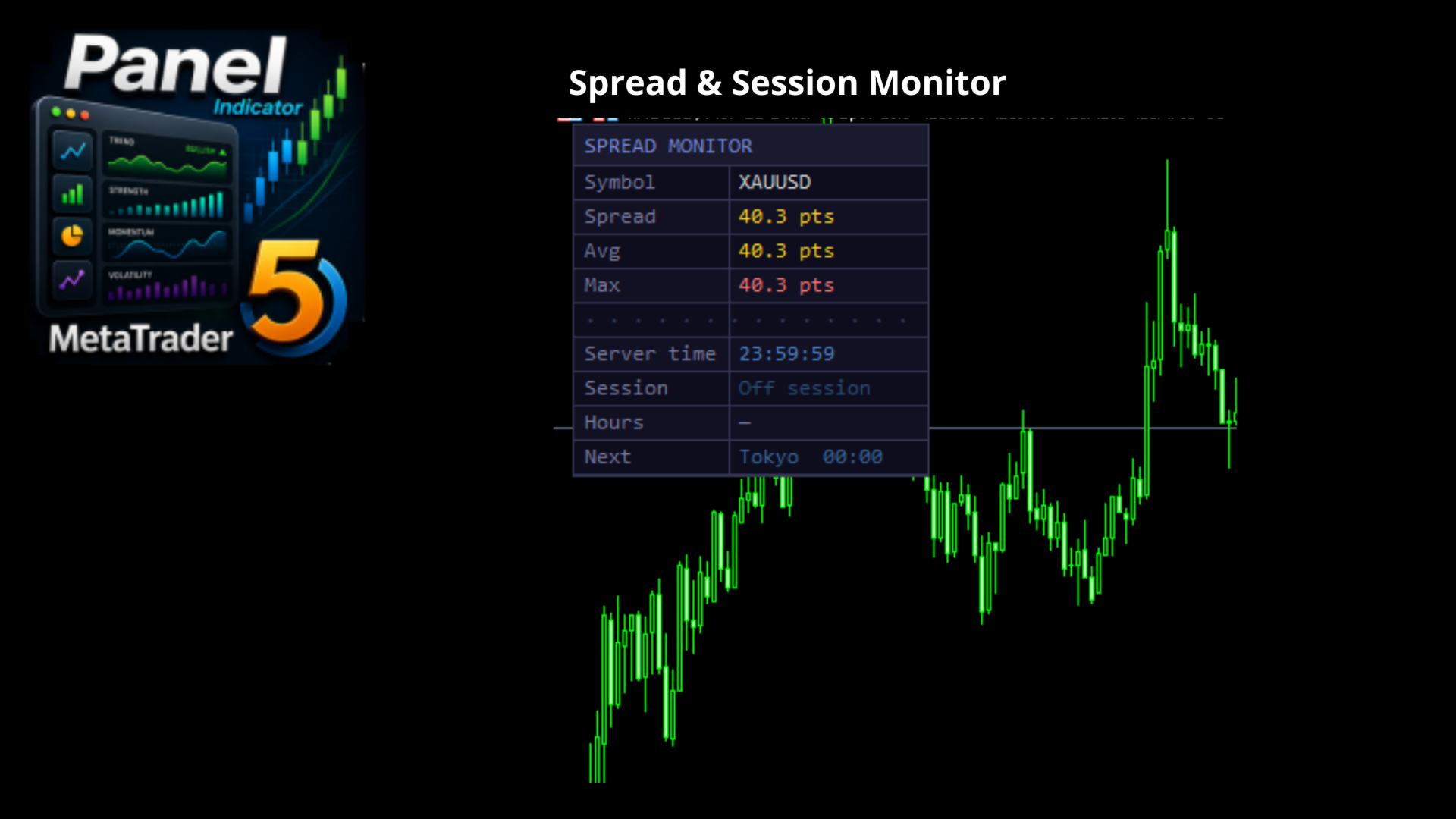
Panel Indicator For MT5 is a visual indicator designed for MetaTrader 5 that integrates all essential information about spread and market sessions into a single compact panel. Positioned directly on the chart, it provides the trader with an immediate, real-time updated reading without the need to open additional windows or consult external sources.
Real-time spread monitoring
The panel continuously displays the current spread value for the instrument loaded on the chart. Alongside the instantaneous value, the indicator automatically calculates the average spread accumulated during the active session and the maximum value recorded in the same time interval. As soon as the session changes, the counters are reset and the calculation starts over, ensuring statistics that are always relevant to the current operational context.
Spread values are color-coded: green indicates a spread within the norm relative to the calculated average, yellow signals a slightly elevated spread, and red highlights an anomalous or out-of-range spread. This system allows the trader to assess market conditions at a glance before executing an order.
Automatic market session detection
The indicator automatically identifies the currently active market session among Tokyo, London, and New York. The start and end times of each session are fully configurable by the user through input parameters, expressed in the broker's server time. This approach allows the panel to adapt to any broker and time zone without manual intervention in the code.
When two or more sessions overlap, the panel explicitly indicates this by showing the names of both active sessions. The indicator also correctly handles cases where a session crosses midnight, as can happen with the Tokyo session in certain configuration scenarios.
In addition to the current session, the panel always shows the next session that will open and its start time, allowing the trader to plan their activity in advance. When no session is active, the panel clearly signals this with the appropriate indication in the selected language.
Integrated server clock
The panel incorporates a clock that displays the current broker server time, updated every half second. This data is particularly useful for traders who operate on time-based strategies or who need to coordinate the opening of positions with the start or close of a specific session.
Full multilingual support
All labels and texts displayed in the panel are available in thirteen languages: English, Italian, Spanish, French, German, Portuguese, Russian, Chinese, Japanese, Arabic, Hindi, Turkish, and Korean. The language is selected through a single input parameter and the panel updates instantly without requiring the indicator to be reloaded.
Complete visual customization
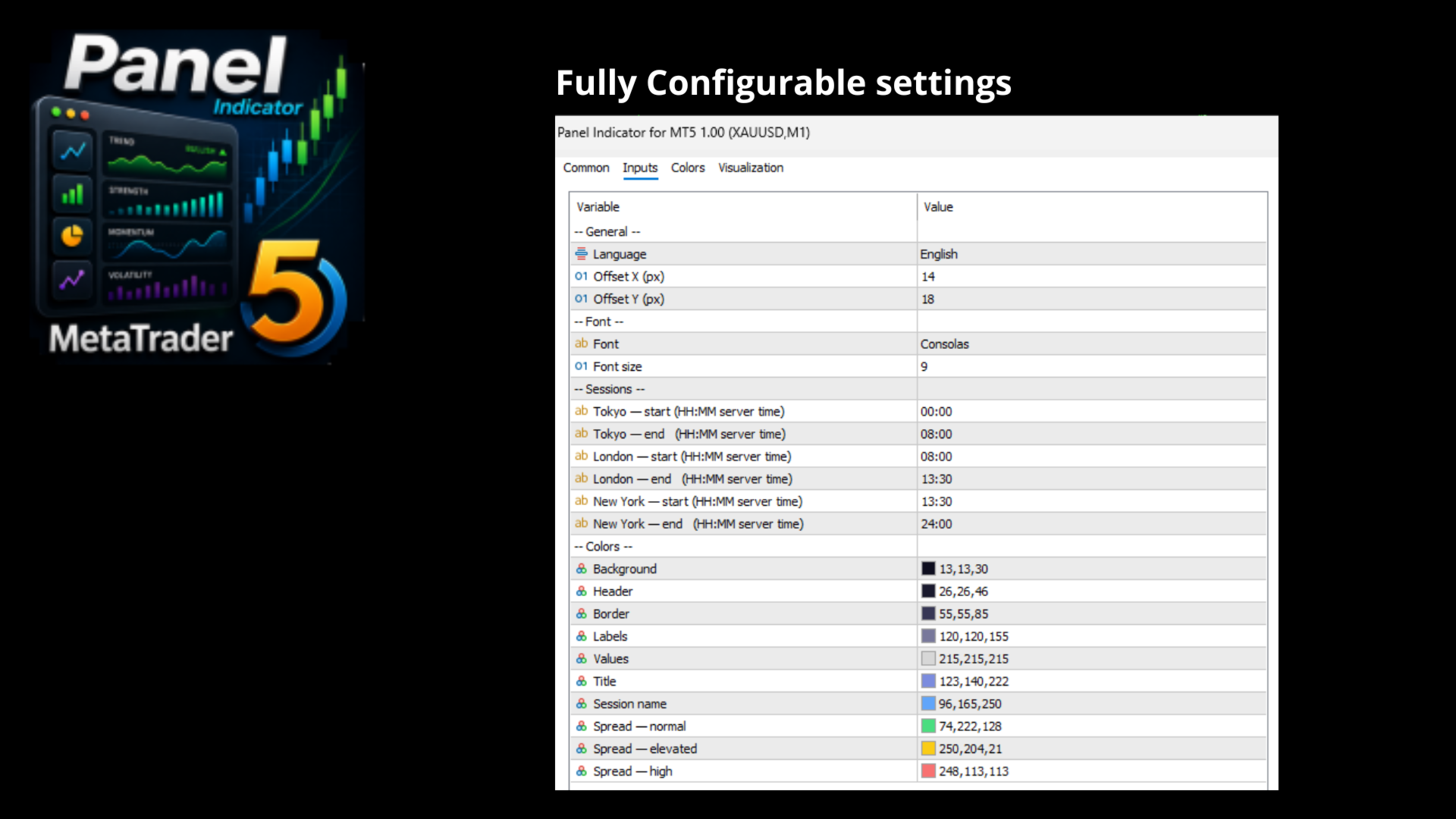
The appearance of the panel is fully customizable. The user can choose the font type and size, position the panel in the upper-left or lower-left corner of the chart, and adjust the horizontal and vertical margins from the edge. Each color element is individually configurable: general background, header, borders, labels, values, title, session names, and the three spread color levels.
Dynamic update and resizing
The panel updates every 500 milliseconds via an internal timer, regardless of the arrival of new ticks. This ensures that the server clock and spread always remain fresh even on instruments with a reduced tick frequency. When the chart window is resized, the panel automatically readjusts while maintaining its position and structure.
Input parameters
- Language — interface language (13 options available)
- Table position — panel anchoring corner on the chart
- Offset X / Offset Y — distance in pixels from the chart edge
- Font / Font size — font type and size
- Tokyo / London / New York start and end — session times in HH:MM format in server time
- Colors — background, header, border, labels, values, title, session, normal spread, elevated spread, high spread
Compatibility
The indicator is compatible with any financial instrument available in MetaTrader 5, including forex, indices, commodities, and cryptocurrencies. It does not require access to candle history nor does it depend on external libraries. It installs in seconds and works immediately without mandatory configuration: the default values are already set for typical use with times expressed in the broker's server time.