
Position Planning Console
- Utilities
- Version: 1.13
- Updated: 8 May 2026

Professional Position Planning and Volume Control Panel for MetaTrader 5
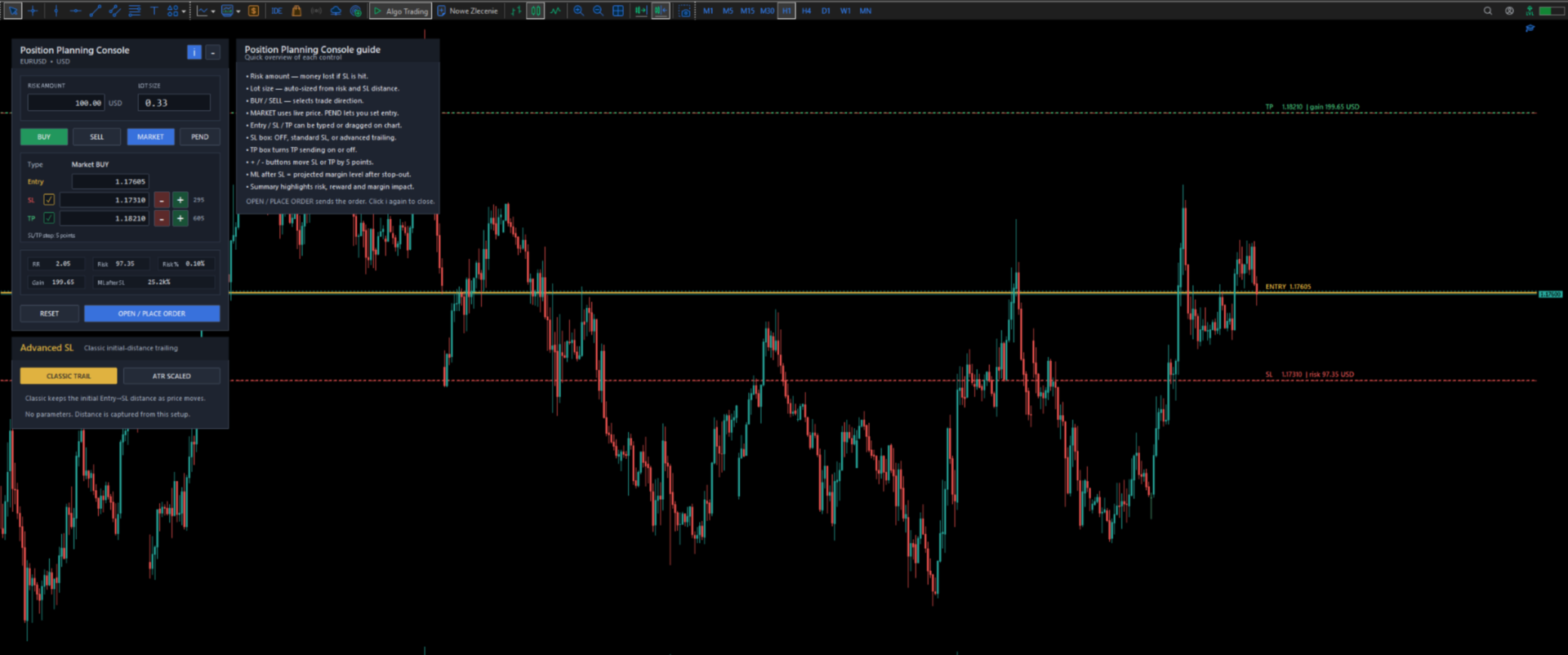
Position Control Suite is a professional visual trade planning panel for MetaTrader 5. It is designed for traders who want to prepare orders directly on the chart, define the exact stop-loss level, and automatically calculate the appropriate position volume from a chosen account-currency risk amount.
The main idea is simple and practical: define how much you want to risk, set the Stop Loss distance, and the panel calculates the lot size for that setup. This helps create a more consistent order preparation process and reduces the need for manual calculations before opening a position.
Main Functionality
- Account-currency risk input: enter the exact amount you want to risk on the trade.
- Automatic lot calculation: the tool calculates position volume from the risk amount and Stop Loss distance.
- Visual Entry, Stop Loss and Take Profit levels: levels are displayed directly on the chart.
- Market order mode: the entry follows the executable Bid or Ask price depending on BUY or SELL direction.
- Pending order mode: manually set or drag the entry level to prepare Buy Limit, Buy Stop, Sell Limit or Sell Stop orders.
- Editable price fields: Entry, Stop Loss and Take Profit can be typed directly into the panel.
- Chart-based adjustment: Stop Loss and Take Profit levels can be adjusted visually on the chart.
- Fast step controls: plus and minus buttons move SL or TP by 5 points for quick fine-tuning.
- Optional SL and TP sending: open an order with or without sending Stop Loss or Take Profit to the broker.
- Advanced Stop Loss mode: includes classic trailing and ATR proportional trailing for the specific position opened by the panel.
- Margin impact summary: shows projected margin level after Stop Loss, helping evaluate margin pressure before entry.
- Compact mode: minimize the panel when more chart space is needed.
- Built-in information panel: explains each control directly inside the interface.
Risk and Volume Calculation
The position volume is calculated from the selected account-currency risk amount and the distance between Entry and Stop Loss. The calculation uses the symbol properties available in MetaTrader 5 and can use OrderCalcProfit for more accurate estimation when supported.
This means the trader can focus on the planned risk amount instead of manually converting points, tick value and lot size. The Stop Loss level remains the core reference for position sizing, even when the user chooses not to send SL to the broker.
Advanced Stop Loss
The advanced Stop Loss function is attached only to the specific position opened by the panel. It does not manage all positions on the same symbol. This design helps keep position management precise and controlled.
- Classic trailing: keeps the initial Entry-to-SL distance as the trade moves.
- ATR proportional trailing: captures the ATR relationship when the trade opens and keeps the trailing distance proportional to ATR changes.
Summary Panel
The panel displays the most important information before execution:
- RR: reward-to-risk ratio based on current SL and TP distances.
- Risk: estimated loss if the Stop Loss is reached.
- Risk %: risk amount compared to account balance.
- Gain: estimated result if Take Profit is reached.
- ML after SL: projected margin level after the planned SL is reached.
Important Notes
Position Control Suite does not predict market direction and does not contain an automatic trading strategy. It is a professional order preparation, position sizing and risk planning utility.
Final order execution, spread, margin requirements, minimum stop distances and accepted order parameters depend on the broker, the trading symbol and current market conditions.






































User didn't leave any comment to the rating