Phantom Copier

Your best trades are worth nothing if they only run on one account.

You found the strategy. You proved it works. But copying it to your second account, your funded account, your investor account -- that is where it falls apart. Manual copying is slow, error-prone, and impossible to scale. You miss entries, forget to move stops, and close the wrong position.

PHANTOM Copier fixes that. One Master account sends every trade -- opens, modifications, closes -- to any number of Follower accounts. Across brokers. Across terminals. In real time.

---

### What PHANTOM Copier Does

PHANTOM Copier is a Master-Follower trade copier for MetaTrader 5. The Master EA detects every new trade, SL/TP modification, and position close on the provider account. Followers receive these signals and execute them with configurable lot scaling, slippage protection, and optional reverse copy.

Two modes:
- Cloud Mode -- Master sends to API, Follower polls from API. Works across different brokers and terminals.
- Local Mode -- Master and Follower on the same terminal using shared memory. Zero latency.

---

### Who This Is For

- Account managers copying trades to multiple client accounts
- Prop firm traders mirroring a strategy across evaluation and funded accounts
- Signal providers who want their subscribers to auto-execute
- Multi-broker traders running the same strategy on different brokers for diversification
- Reverse copy traders who want to automatically take the opposite side

---

### How It Works

1. Master EA: Drag onto the provider account chart. Set MODE=MASTER. It detects all new trades, modifications, and closes.
2. Follower EA: Drag onto one or more receiver account charts. Set MODE=FOLLOWER. Enter the Master ID.
3. Trades flow automatically: Opens, SL/TP changes, and closes are copied in real time.
4. Lot scaling: Followers apply their own position sizing -- fixed lot, multiplier, or risk-based.

---

### Full Feature List

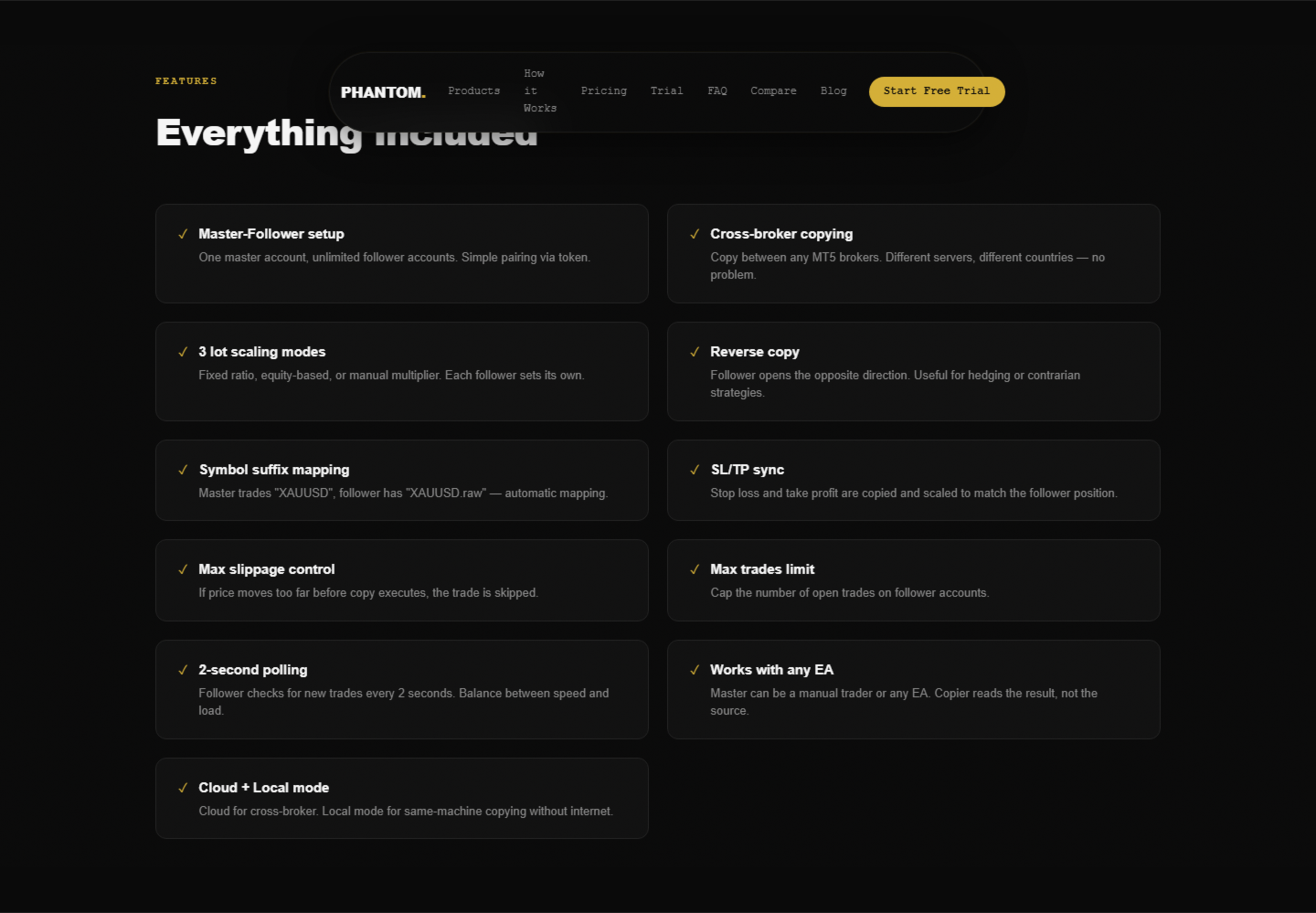
Master-Follower Architecture
- One Master, unlimited Followers
- Auto-generated Master ID for easy setup
- Magic number filter -- copy only specific EAs or all trades

Cross-Broker Copying
- Cloud mode via PHANTOM API -- works across any broker
- No shared folders or network drives needed
- 2-second poll interval (configurable)

3 Lot Scaling Modes
- Fixed lot -- every copied trade uses the same lot size
- Multiplier -- scale the master volume by a factor (0.5x, 1x, 2x, etc.)
- Risk % -- calculate lot from account balance and SL distance

Reverse Copy Mode
- Copy in the opposite direction (Master buys, Follower sells)
- SL and TP are automatically swapped
- Useful for hedging or contrarian strategies

Execution Controls
- Max slippage protection (configurable points)
- Max open trades limit
- Symbol suffix mapping (XAUUSD to XAUUSDm, .pro, etc.)
- Copies SL/TP modifications in real time

---

### Setup in 3 Steps

1. Drag PHANTOM Copier onto the Master account chart, set MODE=1 (MASTER)
2. Drag PHANTOM Copier onto the Follower account chart, set MODE=2 (FOLLOWER), enter the Master ID
3. Done -- trades are copied automatically from that moment

---

### System Requirements

- MetaTrader 5 (Build 4000+)
- Any broker (hedging or netting account)
- Internet connection required for Cloud Mode
- VPS recommended for 24/7 operation

---

Part of the PHANTOM Trading Suite:
- Phantom News Shield — Automatic news protection
- Phantom Trail Pro — Smart trailing stop manager
- Phantom Guardian — Prop firm risk management
- Phantom Copier — Smart trade copier
- Phantom Airbag — AI trade filter for any EA
- Phantom Trader DSS — Autonomous AI trader

Try the full PHANTOM Suite free for 14 days at goldfoundry.de/sentinel
Recommended products
Atlas Trade Desk
Bernhard Wurzlbauer
Atlas Trade Desk MT5 Atlas Trade Desk MT5 is a visual trade panel, risk manager and lot calculator for manual MetaTrader 5 traders. Plan market and pending orders directly on the chart, calculate position size from your selected risk, adjust Entry, Stop Loss and Take Profit visually, and manage open positions from one clean dashboard. The tool is built for discretionary traders who want faster order preparation, clearer risk control and safer position management without switching between multipl
Hybrid Assisted Trading Engine Manual Trading. Machine Discipline. The Hybrid Assisted Trading Engine is an institutional-grade manual trade management system designed to protect traders from emotional mistakes — without taking control away from them. You decide when to enter . The engine decides how the trade is managed . What It Does This system continuously monitors your manual trades and enforces professional-level trade management rules in real time: Smart Breakeven logic R-based trai
Trade Control Panel
Jerry Jilun Anak Liban
Trade Control Panel Function Normal One Click Function Close All Close All Profit Close All Loss Close All Pending Order Close All Sell Close All Buy Advance One Click Function 1.  Close Partial Lot Sell by Percent It will help you partial close for all open position by desire percent you wanted. No longer partial close one by one for every open position Manual input for desire percent 2. Close Partial Lot Buy by Percent It will help you partial close for all open position by desire percent
Hard Scalping Assistant
Jorge Javier Catalan Garcia
Hard Scalping Assistant is a semi-automatic Expert Advisor for MetaTrader 5 created for traders who want to keep making their own decisions, but with a much more advanced, organized and professional execution. It does not enter the market on its own: you choose the direction, define the trade idea and adjust the zone directly on the chart, while the assistant automatically calculates the risk, lot size and the full execution structure. With just a few clicks, you can prepare BUY or SELL trades
FREE
Bright Night MT5
Marat Baiburin
1 (2)
bright night is a fully automatic adviser for working on the Forex market during quiet hours. Another 1 copies will be sold for $599. Next price 699$ Monitoring the work of the adviser: https://www.mql5.com/ru/signals/1868387 Correct GMT setting: https://www.mql5.com/en/blogs/post/743531 As we know, lately at night the spread in the Forex market has been widening, sometimes to unreasonable limits. Sometimes a spread can kill a potentially profitable trade and make a loss out of it. But not in t
Forex Trade Manager Pro MT5 Trade Manager MT5 is a comprehensive trade management utility for MetaTrader 5 that gives you complete control over every aspect of your position from the moment you plan a trade to the moment you close it. It is built for traders who take risk seriously, from the beginner building discipline to the professional scalper who needs instant execution across multiple positions. The tool attaches to any chart and presents a clean, compact panel. You mark your intended entr
Smart Funds
Sivakumar A L Mani
Profit return — an Expert Advisor for funds trading ( SFP ). I previously used this trading idea in manual trading. The core of the strategy is a return of price to the Bollinger Bands range, but not blindly and not on every touch. For the fund market, bands alone are not enough, so the EA uses additional filters that eliminate weak and non-working market situations. Trades are opened only when the return logic is truly justified.
RiskFrame Account Guard for MetaTrader 5 Account-wide daily loss, drawdown and exposure protection — for every symbol, every magic, manual trades and other EAs. RiskFrame Account Guard monitors the whole trading account and applies the selected protective response when a configured rule is tripped. It works with manual trading, third-party Expert Advisors, trade panels and other order sources. It does not open positions or generate signals. Manual: Open the full RiskFrame Account Guard MT5 user
Easy EA for closing positions with profit or loss. All positions of chart's symbol are counted separately. Settings: TPforSymbol — set profit amount to indicate when to close every positions for the symbol of the chart. Swap and commission are decreasing your profit. SLforSymbol — set SL amount to indicate SL for every positions for the symbol of the chart. Swap and commission are increasing your loss. SLforSyblol is always below/equal zero.
Phantom Correlation Shield Institutional Over-Exposure & Correlation Guard for MetaTrader 5 Are you running multiple EAs or trading multiple currency pairs at the same time? Then you are almost certainly over-exposed- without knowing it. When you Buy EUR/USD and Buy GBP/USD at the same time, you are essentially doubling your risk on the same trade — because these two pairs move together with a correlation above 0.85. If one trade loses, the other will lose too. Your account takes double the d
Spread Costs refers to the amount of the loss caused by the spread, and Swap Benefits refers to the amount of the income gained by overnight positions. Spread Costs is an important indicator for short-term traders, especially for scalping traders, and Swap Benefits is an important indicator for long-term traders. Since the spreads and swaps on the MetaTrader 5 platform are all expressed in points, we need to convert it into the amount expressed in the account currency. This tool can display the
Introducing the  Precision Data Extractor: ATR , an MQL5 utility crafted for traders, analysts and quants who need accurate historical data to build robust datasets. This tool lets you selectively pull historical price and indicator data—  Average True Range  ( ATR )—from  multiple timeframes  and  periods , then stores it in a  CSV  format, making it easy to feed into  machine learning models ,  trading algorithms , or  in-depth market analyses . Compatible with  Forex ,  Stocks , and  Commodit
Trade Builder Pro
Mostafa Saad Saeed Shawara
Trade Builder Pro - In teractive Visual Trade Manager & Risk Assistant on Chart Short Description Simplify your trading with Trade Builder Pro , a highly interactive Trade Assistant and Trade Manager . Set up your entry, stop loss, and multiple take profit targets directly on the chart, with automatic calculation of lot sizes and the risk reward ratio in real-time. Overview Effective Trade Management is essential for long-term trading success. Trade Builder Pro eliminates manual risk calculat
# Higher-Lower Pending Bot - Advanced Multi-Pending Orders System ## Revolutionize Your Trading with Smart Pending Order Automation Welcome to the **Higher-Lower Pending Bot** - the most sophisticated pending order management system available on MQL5. Designed for traders who want to maximize opportunities while minimizing manual effort, this EA combines intelligent order placement with comprehensive profit tracking in one powerful package. ## What Makes Our Bot Unique? ### Smart D
Initial Balance Session  The Initial Balance Indicator is a professional-grade tool for MetaTrader 5 traders, designed to enhance your trading by visualizing key price levels during the Australia, Tokyo, London, and US market sessions. This indicator plots the Initial Balance (IB) range—the high, low, and midpoint prices—formed during the first hour of each session, with a customizable box to highlight the range and optional extension levels for advanced analysis. Optimized for smooth, flicker-f
================================================================================ POC BREAKOUT - V20.72. Full Professional Grade Toolkit ================================================================================ POC Breakout is a full MetaTrader 5 trading dashboard for discretionary traders who want breakout signals, Point of Control (POC) context, volume profiles, order flow, market structure, news, alerts, and advanced trade planning in one professional workspace. Attached directly to you
Binance Grid Pro offers an alternative to the built in Grid systems Binance Platform offers. This utility let you define a grid parameters for interact with your Binance account using an Isolated Margin account. This is, similar to Spot Grid in Binance. This is not for handle with derivatives contracts, is for handle with Spot through Isolated Margin Account. But obviosly this utility offers a different approach than built in Binance Grid to handle the Grid, which I have found useful based on
copiermt5tomt5 – MT5 to MT5 Trade Copier Copiermt5tomt5 – MT5 to MT5 Trade Copier for MetaTrader 5 Copiermt5tomt5 is a local trade copier for MetaTrader 5 that synchronizes trades between multiple MT5 terminals running on the same computer or VPS. The system is designed for traders who manage multiple accounts and require reliable copying between terminals. It works efficiently in different environments including personal computers and VPS setups. Use Cases The system is suitable for multi-accou
You can see Binance Spot data instantly in Metatrader 5 and it allows you to use all the features that Metatrader has provided to you. You can access the data of all symbols listed on Binance Futures. Don't forget to set the timezone. Binance it's 00:00 UTC. You need to fix it according to your own country You need to install the free Binance Spot Symbol List plugin. https://www.mql5.com/tr/market/product/83507 After loading, it automatically downloads the data of the cryptos in the market obser
Pro LTS TradeDashboard MT5
Mohammed Rafi Abdul Lathif
Pro LTS Trade Dashboard & Market Manager Stop calculating. Start trading. The Pro LTS Trade Dashboard is not just a risk calculator—it is a complete trading command center designed to replace the default MT5 terminal. It combines professional Risk Management, Trade Execution, and a unique Draggable Symbol Switcher into one clean, collapsible interface. Developed by Logic Trade Solution (LTS) , this tool is built for traders who need speed, precision, and screen space. Why Go Pro? While our fr
MQL5 Blogs : https://www.mql5.com/en/blogs/post/761446 MT4 Version : https://www.mql5.com/en/market/product/136790 MT5 Version : https://www.mql5.com/en/market/product/136791 Time Wizard is a professional trading assistant built for traders who need speed, timing, and execution control in one clean dashboard. This Expert Advisor is designed for event-based trading, scheduled execution, and fast semi-automatic order management. It allows you to prepare your orders in advance, define the exact
Boleta de negociação, adiciona automáticamente as ordens Take Profit e Stop Loss quando excutada uma ordem de compra ou venda. Ao apertar as teclas de atalho (A, D, ou TAB), serão inseridas duas linhas de pre-visualização, representando as futuras ordens de take profit (azul) e stop loss (vermelho), as quais irão manter o distanciamento especificado pelo usuário. Ditas ordens só serão adicionadas ao ser executada a ordem inicial. Ao operar a mercado, as ordens pendentes de take profit, e stop lo
EasyOrder Risk Manager
Kristina Kurnitskaya
EasyOrder Risk Manager EasyOrder Risk Manager is a professional Risk-Based Entry panel for MetaTrader 5 designed for traders who prioritize structured execution and strict risk control. This tool allows you to define your risk as a percentage of account balance and automatically calculates the correct lot size based on your Stop Loss distance. No manual calculations. No emotional lot sizing. No risk mistakes. Key Features Risk-based position sizing (% of balance) Real-time lot calcu
Copy Trade Pro MT5
Nitu Brijesh Yadav
MasterEA MT5 Premium – Professional Copy Trade Sender One Purchase. Unlimited Possibilities. MasterEA MT5 Premium is a professional MT5 trade broadcasting solution that instantly sends your trading activity to one or multiple receiving accounts. Buy only the Master EA. SlaveEA MT5 Premium (Trade Receiver) is included FREE with your purchase. No additional payment is required for the Receiver EA. What Can Be Copied? MasterEA automatically broadcasts: Market Buy Orders Market Sell Orders
Seconds Scalper Pro
Cristhian Alexander Gaibor Cuasquer
Seconds Scalper Pro creates real-time 1 to 60 second charts in MetaTrader 5 — with a complete trading panel built INSIDE the same tool. One product. The chart you analyze is the chart you trade from. Most seconds-chart tools give you only the chart. To actually place an order you have to install a SECOND separate utility, bolt it on, and switch between windows. Seconds Scalper Pro doesn't work that way. The seconds chart and the full trade panel are the same product — nothing to add, nothing ex
EAs Manager
Abdeljalil El Kedmiri
5 (2)
Are you running multiple EAs on the same MT5 account? Let one powerful Manager control them all. EAs Manager Pro V2 is a professional EA management, risk-control, and trade-assistance tool that acts as a central command center for your entire MT5 account. It automatically detects your EAs using their Magic Numbers , monitors EA and manual trades , and gives you complete visibility and control from one simple dashboard. What makes V2 powerful? EA & Manual Trade Support – Manage automated and manu
AlgoDevMT5 Trade Manager Pro
Harry Charles H Westwood
AlgoDevMT5 Trade Manager Pro AlgoDevMT5 Trade Manager Pro is a professional trade management and risk control utility for MetaTrader 5. Designed for discretionary traders and funded account traders, this utility helps traders plan trades visually, calculate position size instantly, and manage risk with precision. Trade Manager Pro does not generate trading signals, open trades automatically, or provide investment advice. It is a trader-assistance utility designed to improve consistency and risk
The Ultimate High-Speed Local Bridge for Professional Multi-Account Management Local Investor Copier Pro is a high-performance trade synchronization utility designed for MetaTrader 5. It allows you to mirror trades between different terminals on the same PC or VPS with near-zero latency , ensuring you never miss an entry due to execution delays. Whether you are managing a private portfolio across multiple brokers, syncing several Prop Firm accounts, or following a master trader via Investor Pas
Bohemia Gold MT5
Vladislav Taska
4.75 (4)
Bohemia Gold MT5 is  Trend & Volatility EA trading system designed specifically for Gold (XAUUSD) . It combines higher-timeframe trend filtering , trend detection , volatility-based SL management , and advanced trade management to adapt market conditions. It uses style logic focused on trend strength, volatility, and capital protection. NOTE:   Based on backtests, I found better trading results with the following setup: D1/H4/H2 (Trend/ADX/ATR & trade). The SET file can be downloaded here … bohe
FREE
This EA help traders close their open positions at a specific MT5 server time before news or before ending of H4 timeframe of the morning New York session to protect their profit or prevent from unexpected loss. The default setting is 19:30 (HH:MM) and you can adjust as require to fit trading strategies. It very user friendly where contain only single input parameter to specify a time that position will be closed.  
Buyers of this product also purchase
Trade Assistant MT5
Evgeniy Kravchenko
4.41 (215)
It helps to calculate the risk per trade, the easy installation of a new order, order management with partial closing functions, trailing stop of 7 types and other useful functions. Additional materials and instructions Installation instructions - Application instructions - Trial version of the application for a demo account Line function -   shows on the chart the Opening line, Stop Loss, Take Profit. With this function it is easy to set a new order and see its additional characteristics bef
Forex Trade Manager MT5
InvestSoft
4.98 (670)
Trade Manager MT5 is an advanced position size calculator and trade management tool for MetaTrader 5, designed to help traders plan trades faster, control risk more precisely, and manage open positions directly from the chart. It combines order placement, risk based lot calculation, Stop Loss and Take Profit management, Break Even, Trailing Stop, Partial Close, Equity Protection, and external trade management in one panel. Whether you trade forex, indices, metals, commodities, crypto, or future
TradePanel MT5
Alfiya Fazylova
4.88 (166)
Trade Panel is a multi-functional trading assistant. The app contains over 50 trading functions for manual trading and allows you to automate most trading tasks. Before making a purchase, you can test the demo version on a demo account. Download the trial version of the application for a demonstration account: https://www.mql5.com/en/blogs/post/750865 . Full instructions here . Trade. Allows you to perform trading operations in one click: Open pending orders and positions with automatic risk cal
Beta Release The Telegram to MT5 Signal Trader is nearly at the official alpha release. Some features are still under development and you may encounter minor bugs. If you experience issues, please report them, your feedback helps improve the software for everyone. Telegram to MT5 Signal Trader is a powerful tool that automatically copies trading signals from Telegram channels or groups directly to your MetaTrader 5 account. It supports both public and private Telegram channels, and you can conn
Astro Trade MT5
Indra Maulana
5 (2)
AstroTrade Trading Assistant AstroTrade is a comprehensive multi-functional trading utility developed for the MetaTrader 5 platform. It integrates essential tools for trade execution, risk management, and technical monitoring into a single unified interface. The application is designed to assist traders in managing their daily operations through a visual and structured environment. Visual Trade Execution and Risk Management The application includes a specialized trading panel that assists in c
Power Candles Strategy Scanner - Self-Optimizing Multi-Symbol Setup Finder Power Candles Strategy Scanner runs the same self-optimizing engine that powers the Power Candles indicator - on every symbol in your Market Watch, side by side. One panel tells you which symbols are statistically tradable right now, which strategy wins on each, the optimal Stop Loss / Take Profit pair, and pings you the moment a fresh signal fires. This tool is part of the Stein Investments ecosystem - 18+ tools plus Max
Telegram to MT5 Multi-Channel Copier automatically copies trading signals from your Telegram channels directly into MetaTrader 5. No bots, no browser extensions, no manual copying. You receive a signal on Telegram and the EA opens the trade on your terminal in a few seconds. The product includes two components: a Windows application that listens to your Telegram channels, and this Expert Advisor that executes the signals on your MT5 terminal. An MT4 version is also available. Setup guide and app
FarmedHedge Pair Trading Dashboard
Tanapisit Tepawarapruek
5 (3)
Farmed Hedge Yield Farming | All Markets (Manual - Hybrid - Semi/Automated EA) MULTI-ASSET SUPPORT Trade any asset available on your broker - Forex: Major, Minor, Exotic pairs - Crypto: BTC, ETH, XRP, SOL, BNB - Stocks: Apple, Tesla, Amazon, Google, etc. - Commodities: Gold, Silver, Oil, Gas - Indices: US30, NAS100, SPX500, DAX40 - Any CFD your broker offers VERIFIED TRADING RESULTS - Farmed Hedge Yield Axi Copy:  https://www.mql5.com/en/signals/2356376 - Farmed Hedge Yield Exn Copy:   https:/
Premium Trade Manager - The Trade Panel With a Coach Built In Premium Trade Manager puts a trading coach inside your chart, with a full execution engine underneath it. Set the trade up the way you always do, then let Max, your AI trading coach, read that exact setup against your live account and give you a straight verdict before you commit: is the stop disciplined, is the risk sane, is a high-impact release minutes away, are you near a prop-firm limit. Below sits the engine that runs everything
VirtualTradePad PRO SE MT5 — professional trading control center for MetaTrader 5 VirtualTradePad PRO SE is a premium chart-based trading panel and trade-management workspace for MetaTrader 5 . It is designed for traders who want faster execution, clearer position control, structured trade management, visual level planning and a professional workflow directly from the chart. This is not only a BUY / SELL panel. PRO SE combines manual trading, pending orders, position management, partial exits, b
Trade Manager DaneTrades
Levi Dane Benjamin
4.23 (30)
DaneTrades Trade Manager is a professional trade panel for MetaTrader 5, designed for fast, accurate execution with built‑in risk control. Place market or pending orders directly from the chart while the panel automatically calculates position size from your chosen risk, helping you stay consistent and avoid emotional decision‑making. The Trade Manager is built for manual traders who want structure: clear risk/reward planning, automation for repeatable management, and safeguards that help reduc
Anchor Trade Manager
Kalinskie Gilliam
5 (7)
Anchor: The EA Manager Your EAs manage their own trades. Anchor manages the account around them. Anchor gives you one place to control your EAs, manage risk and decide when trading is allowed. Any EA, any vendor, any broker or symbol. No source-code changes required. The Problem Most EAs only know what they are doing. They cannot see when another EA is already trading, when several EAs open and are stacking risk or when the account has reached your loss limit. Even using just one EA, it may not
Custom Alerts AIO: All-in-One Market Scanner – No Setup Required Overview Custom Alerts AIO is the fastest and easiest way to monitor multiple markets for real-time trading signals—without any setup or extra licenses. It comes with all required Stein Investments indicators already embedded, making it the perfect plug-and-play solution for traders who value simplicity and performance. Just load it to any chart and start receiving alerts across Forex, Metals, Crypto, and Indices. Shares can be a
Footprint Chart Pro — Professional OrderFlow EA for MetaTrader 5 Version 6.34 | Professional tool for real traders | Institutional-Grade Visualization DEMO USERS - PLEASE SELECT EVERY TICK / REAL TICK WHEN TESTING AND YOU HAVE DOWNLOADED HISTORICAL DATA. IF YOU SEE A WAITING SCREEN AND IT IS NOT DOWNLOADING, IT MEANS YOU HAVE LOW HISTORICAL DATA. TRY 1 MIN AND 5 MIN FIRST ON 1 DAY DATA. ONE DAY DATA SHOULD BE THE NEWEST AND MOST CURRENT DATE. PLEASE WAIT UNTIL THE MARKET HAS ROLLED OVER PERIOD.
YuClusters
Yury Kulikov
4.93 (43)
Attention: You can view the program operation in the free version  YuClusters DEMO .  YuClusters is a professional market analysis system. The trader has unique opportunities to analyze the flow of orders, trade volumes, price movements using various charts, profiles, indicators, and graphical objects. YuClusters operates on data based on Time&Sales or ticks information, depending on what is available in the quotes of a financial instrument. YuClusters allows you to build graphs by combining da
Quant AI Agents
Ho Tuan Thang
5 (1)
Quant AI Agents are independent trading Expert Advisors. Instead of trading using a fixed strategy like other conventional EAs, Quant AI Agents   is a   multi-agent AI trading framework   that turns natural-language strategy prompts into live.  WANT THE SAME RESULTS AS MY LIVE SIGNAL?   Use the exact same brokers I do:   IC MARKETS , IC TRADING   .  Unlike the centralized stock market, Forex has no single, unified price feed.  Every broker sources liquidity from different providers, creating un
The product will copy all telegram signal to MT5 ( which you are member) , also it can work as remote copier.  Easy to set up, copy order instant, can work with almost signal formats, image signal,  s upport to translate other language to English Work with all type of channel or group, even channel have "Restrict Saving Content", work with  multi channel, multi MT5 Work as remote copier: with signal have ticket number, it will copy exactly via ticket number. Support to backtest signal. How to s
Features   With MT5 to Interactive Brokers(IB) Trader, you can: 1. Load chart data from IB to MT5, and Analyze with all standard or customer Indicators. 2. Place Orders to IB Account Directly in MT5. 3. Make your Own EAs upon IB Securities by only making minus changes of the trading function. Usage 1) Installation Copy the "Mt5ToIBTraderEn.ex4" and sample files to [MT5 Data Folder]->MQL5->Experts.  2)  MT5 Settings Add the IP Address to the MT5 Allowed URLs in 'Tools->Options->Expert Adviso
Welcome to ENTRY IN THE ZONE WITH SMC MULTI TIMEFRAME Entry In The Zone and SMC Multi Timeframe is a real-time market analysis tool based on Smart Money Concepts (SMC), designed to analyze market structure, price direction, and key trading zones. It supports both Single-Timeframe Analysis and Multi-Timeframe Analysis, providing a clearer view of the overall market structure across multiple timeframes, with real-time BUY / SELL signals that do not repaint. It is designed to help filter trading op
MT5 to Telegram Signal Provider turns your trading account into a signal provider. Every trade action, whether manual, by EA or from your phone, is instantly sent as a message to Telegram. You can fully customize the format or use a ready-made template for quick setup. [ Demo ] [ Manual ] [ MT4 Version ] [ Discord Version ]     New: [ Telegram To MT5 ] Setup A step by step user guide is available. Key Features Ability to customize order details sent to subscribers You can create a tiered subs
EA Auditor
Stephen J Martret
5 (4)
EA Auditor is an independent analysis tool for traders evaluating Expert Advisors and trading signals on MetaTrader 5. It audits backtest reports, reviews posted developer signals, and cross-verifies the two against each other to help traders assess strategies before committing capital. The MQL5 market offers a wide range of Expert Advisors from many developers, with varying approaches, quality, and transparency. EA Auditor provides a consistent, data-driven framework for reviewing them, answer
The Expert Advisor will help you forward all alert from  MetaTrader 5 to Telegram channel/ group.  All alert must save to folder <Data folder>MQL5\Files\Alerts\ , text file with format *.txt and screenshot with format *.gif or *.png. Parameters: - Telegram Bot Token: - create bot on Telegram and get token. - Telegram Chat ID:  - input your Telegram user ID,  group / channel ID - Forward Alert: - default true, to forward alert. - Send message as caption of Screenshot: - default false, set true t
FUTURES ORDERFLOW FOOTPRINT CHART Professional OrderFlow EA for MetaTrader 5 Version 1.01| Professional tool for real traders | Institutional-Grade Visualization STRATEGY TESTER USERS - PLEASE SELECT EVERY REAL TICK WHEN TESTING AND YOU HAVE DOWNLOADED HISTORICAL DATA. IF YOU SEE A WAITING SCREEN AND IT IS NOT DOWNLOADING, IT MEANS YOU HAVE LOW HISTORICAL DATA. TRY 1 MIN AND 5 MIN FIRST ON 1 DAY DATA. ONE DAY DATA SHOULD BE THE NEWEST AND MOST CURRENT DATE. PLEASE WAIT UNTIL THE MARKET HAS ROL
EasyInsight AIO MT5
Alain Verleyen
4.92 (12)
EASY Insight AIO – All-In-One Power for AI-Driven Trading Want to skip the setup and start scanning the entire market – Forex, Gold, Crypto, Indices, and even Stocks – in seconds? EASY Insight AIO is the complete plug-and-play solution for AI-powered trade analysis. It includes all core Stein Investments indicators built-in and automatically exports clean, structured CSV files – perfect for backtesting, AI prompts, and live market decision-making. No need to install or configure indicators manu
Bneu Prop Firm Pass System
Marvinson Salavia Caballero
BNEU PROP FIRM PASS SYSTEM v2.32 PRODUCT OVERVIEW Bneu Prop Firm Pass System is a professional risk management and account protection utility for MetaTrader 5. Attach to any chart and configure your account rules. The system monitors daily loss, maximum drawdown, profit target, trading days, open risk, margin usage, news events, pending orders, weekend restrictions, and rollover restrictions from one dashboard. It includes a 5-tab premium dashboard, prop firm presets, custom rules, Risk Senti
Signal Trading View to MT5 Pro
Mirel Daniel Gheonu
4.5 (2)
Signal TradingView to MT5 Pro  Instant professional execution between TradingView and MetaTrader 5 Automate your trading strategy with the most robust communication bridge between TradingView alerts and real execution in MT5. Designed for traders who demand speed, flexibility, and impeccable risk management, this Expert Advisor transforms any alert message into a precise market or limit order.   Install and TEST the TRIAL version HERE After purchase, contact us to receive a bonus STRENGTHS AND
Grid Manual MT5
Alfiya Fazylova
4.73 (22)
Grid Manual is a trading panel for working with grid strategies. The utility is universal, has flexible settings and an intuitive interface. It works with a grid of orders not only in the direction of averaging losses, but also in the direction of increasing profits. The trader does not need to create and maintain a grid of orders, the utility will do it. It is enough to open an order and the "Grid manual" will automatically create a grid of orders for it and will accompany it until the close. F
AI Agents Supervisor
Ho Tuan Thang
5 (1)
AI Agent Supervisor is NOT an Expert Advisor. AI Agent Supervisor   is a   multi-agent AI risk & portfolio supervisor   that watches every EA on your account and intervenes in real time.  WANT AN AI PORTFOLIO MANAGER WATCHING YOUR FLEET 24/7?   Run your fleet on the same brokers I do:   IC MARKETS , IC TRADING   .  Unlike the centralized stock market, Forex has no single, unified price feed.  Every broker sources liquidity from different providers, creating unique data streams. The Supervisor r
The product will copy all  Discord  signal   to MT5   ( which you are member  ) , also it can work as remote copier.  Easy to set up. Work with almost signal formats, support to translate other language to English Work with multi channel, multi MT5. Work with Image signal. Copy order instant, auto detect symbol. Work as remote copier: with signal have ticket number, it will copy exactly via ticket number. How to setup and guide: Let read all details about setup and download Discord To MetaTrader
Unlimited Trade Copier Pro MT5 is a tool to copy trade remotely to multiple MT4, MT5 and cTrader accounts at different computers/locations over internet. This is an ideal solution for you if you are a signal provider and want to copy your trades to other receivers globally on your own rules. One provider can copy trades to multiple receivers and one receiver can get trade from multiple providers as well. The provider can even set the subscription expiry for each receiver, so that receiver will n
Filter:
No reviews
Reply to review