SMC Prime X
- Utilities
-
Pawel Drucis
 Welcome to YOX Trade!
With more than 20 years of experience in the trading industry, YOXO Trade develops and provides professional software solutions designed to support traders in their everyday trading activities. - Version: 1.18
- Activations: 15
SMC Prime X – Smart Money Concepts Trade Assistant for MT5
Black Week Launch Offer!
Price goes up with the sales.
SMC Prime X is a trade assistant for MetaTrader 5 that reads market structure, liquidity and order blocks for you. It draws them on the chart and turns them into trade setups with the entry, stop and lot size already calculated. You make the decision; it does the analysis and the order handling.
Features:
Market Structure
- Labels every swing automatically: HH, HL, LH, LL.
- Marks every BOS (break of structure) and CHoCH (change of character).
- Four timeframes in one table (M5, M15, H1, H4): trend, last break, level and age.
- Strong (protected) and weak (target) levels, with the distance in pips.
- Pick a timeframe and its levels are drawn on your chart. You can see the H1 or H4 picture while trading M1 or M5.
- A “story” view shows the latest swings and breaks in order.
Order Blocks
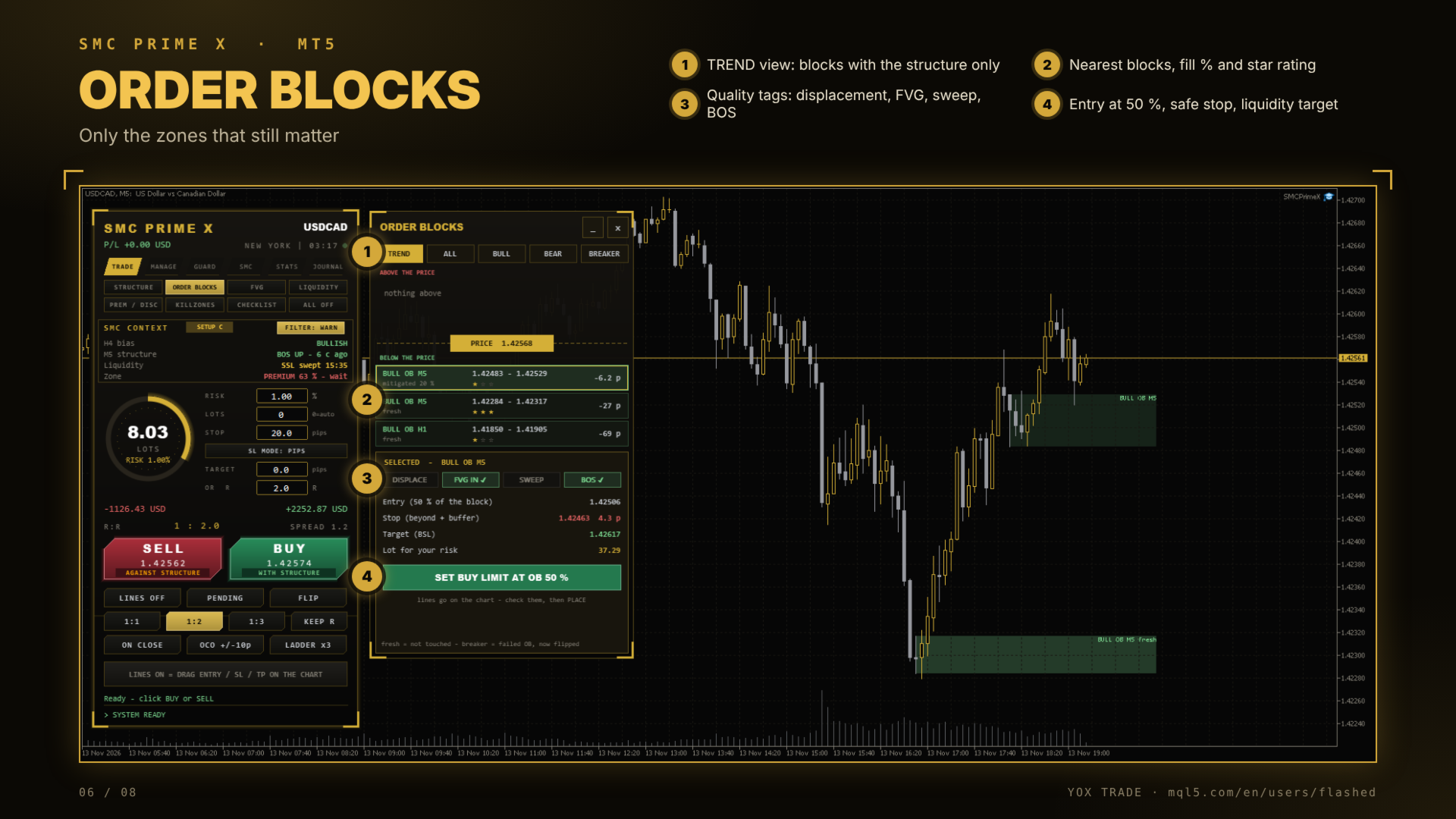
- Detects bullish and bearish order blocks, and breakers (failed blocks that flipped).
- Only zones that still matter:
- Used-up blocks are removed automatically.
- Overlapping blocks are merged.
- Oversized higher-timeframe zones are hidden on small charts.
- TREND view: shows only the blocks in the direction of the structure.
- Quality tags: displacement, FVG inside, liquidity sweep, BOS/CHoCH.
- Star rating (1–3 stars) based on the sweep and the higher-timeframe bias.
- One click sets a limit order at 50% of the block, with a safe stop and a liquidity target.
Fair Value Gaps
- Bullish and bearish FVGs with the % filled.
- Inverted FVGs (IFVG) are tracked separately.
- Entry at the consequent encroachment (50% of the gap).
Liquidity Map
- Buy-side and sell-side liquidity: equal highs/lows, swing points, previous day, previous week and the Asia range.
- Every sweep is checked: did price reverse, or close through the level?
- Draw on liquidity: the next untouched target in the direction of the trend.
Premium / Discount
- The dealing range comes from the swing structure. You can use the chart range or the M15, H1 or H4 range.
- OTE zone (0.62 – 0.79) and equilibrium levels.
- Clear reading: buy zone, sell zone, wait, or “price above/below the range”.
- One click sets a limit order at OTE 0.705.
Killzones
- Asia, London, New York AM and New York PM, shown in your local time. Summer time changes are handled automatically.
- The high, low and range of each session.
- Live status with a countdown to the next session.
- Session boxes are drawn on the chart.
A+ Setup Checklist
Seven rules are checked before every trade:
- Higher-timeframe bias
- Liquidity taken
- A fresh structure shift
- A point of interest (order block or FVG)
- Price in premium or discount
- Inside a killzone
- Risk-to-reward to the liquidity target
You get a score and a grade (A+ / A / B / C). It shows what’s still missing, plus the entry, stop and target at the point of interest.
- Set lines at the POI with one click.
- Or arm an alert at 7/7: the assistant tells you when every rule is green and prepares the trade lines.
Trade panel and risk management
- Lot size from your risk %: you set the risk, and the lot size is calculated from the stop.
- Buy and sell buttons labelled “with structure” / “against structure”, so you always know which side you’re on.
- Market orders, pending orders, draggable entry / stop / target lines, candle-close entries, OCO and a ladder of orders.
- Partial closes, breakeven, close-half and reverse.
- Guards:
- Daily and weekly loss limit
- Equity drawdown lock
- Maximum trades and open positions
- Spread filter
- News pause from the MT5 calendar
- Trading hours
- Risk per currency
- A trade journal, stats and CSV export.
Alerts that matter
- CHoCH: a possible change of trend.
- Key liquidity sweeps: equal highs/lows, previous day and week, Asia range.
- First touch of a fresh order block in the direction of the trend.
You can switch alerts on and off with one click.
Built for clarity
- Clean black and gold interface. Every tool opens next to the main panel, so the price stays visible.
- Closed candles only, so drawings don’t repaint.
- Works on forex pairs, gold, silver and indices, on any timeframe from M1 to D1.
- Settings are remembered per chart.
Who is it for?
- Traders learning SMC: the tools explain what they see in plain words, and the checklist shows what a good setup needs.
- Experienced SMC traders: they get faster analysis across 4 timeframes, with the trade levels and risk calculated in one click.
- Scalpers on M1/M5: the higher-timeframe levels and the M15 range come straight onto the small chart.