Quantum Levels Pro
- Indicators
-
Yuliia Kulakova
 Algorithmic trader with 5+ years in cryptocurrency
markets. Co-creator of Quantum Crypto PRO — an Expert
Advisor powered by real-time whale data from 25,000+
active traders on Hyperliquid DEX.
Our approach is fundamentally different: instead of - Version: 3.10
- Activations: 10
Non-Repainting Price Target Indicator for MT5 | Version 3.10
Here's the problem with 90% of indicators: they tell you what already happened. Moving averages, RSI, MACD — they all look at past data and react after the move is done. By the time they give you a signal, the best entry is already gone.
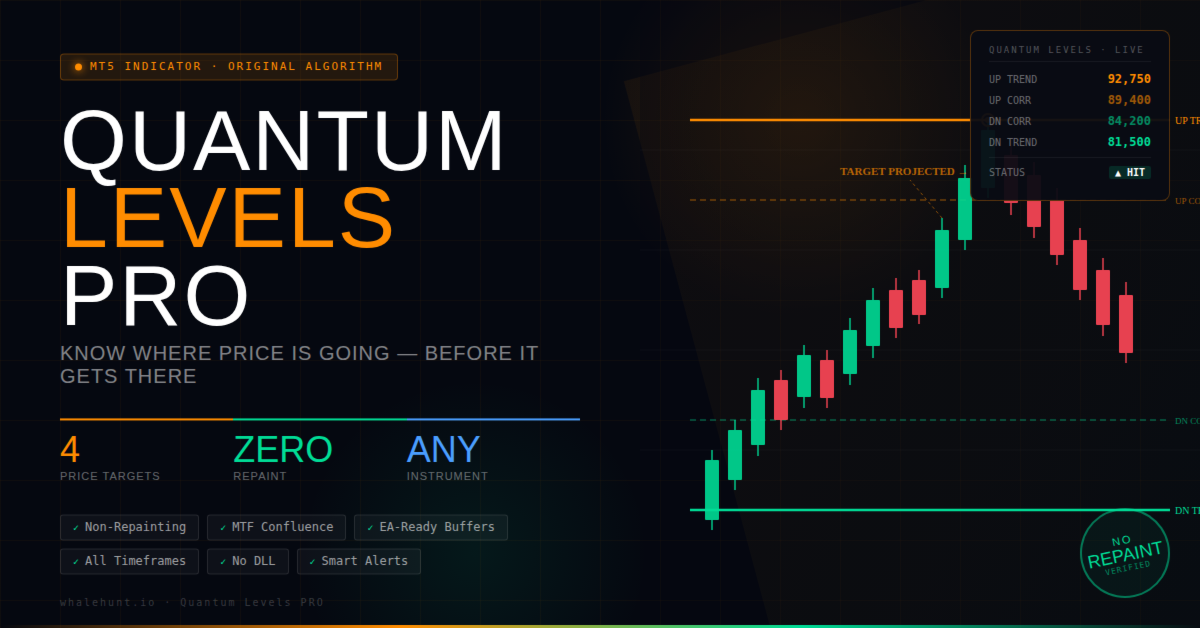
Quantum Levels PRO is different. It calculates exact price targets — specific levels where price is heading next — while the move is still developing. You see the destination before the journey is complete. That's not hindsight. That's foresight.
What Quantum Levels PRO Does
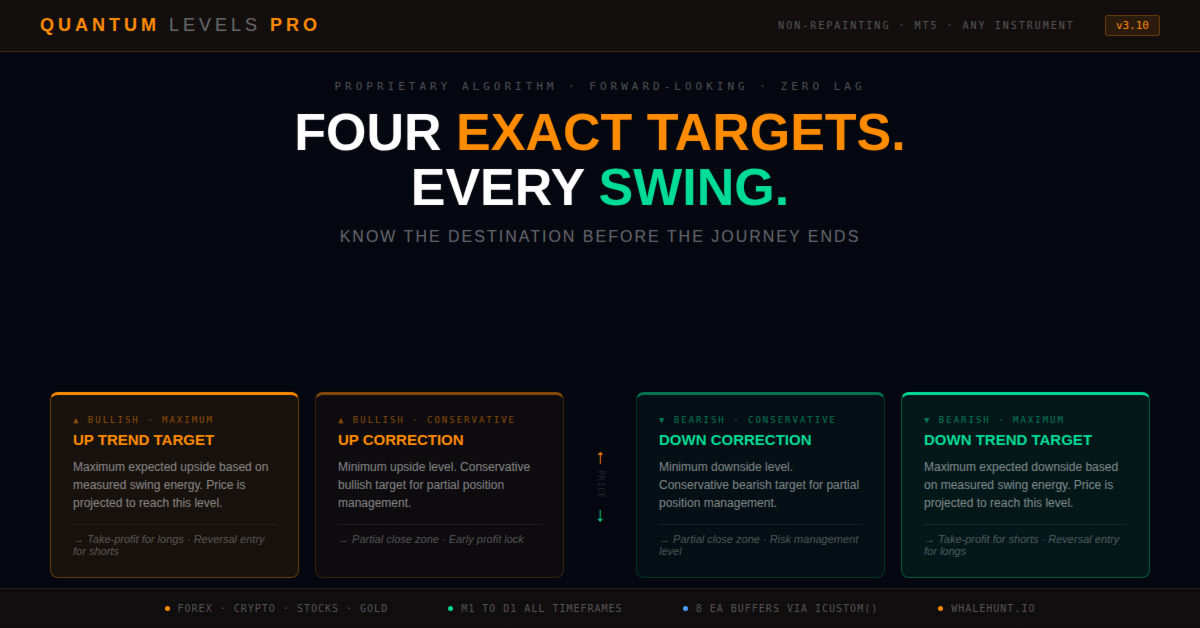
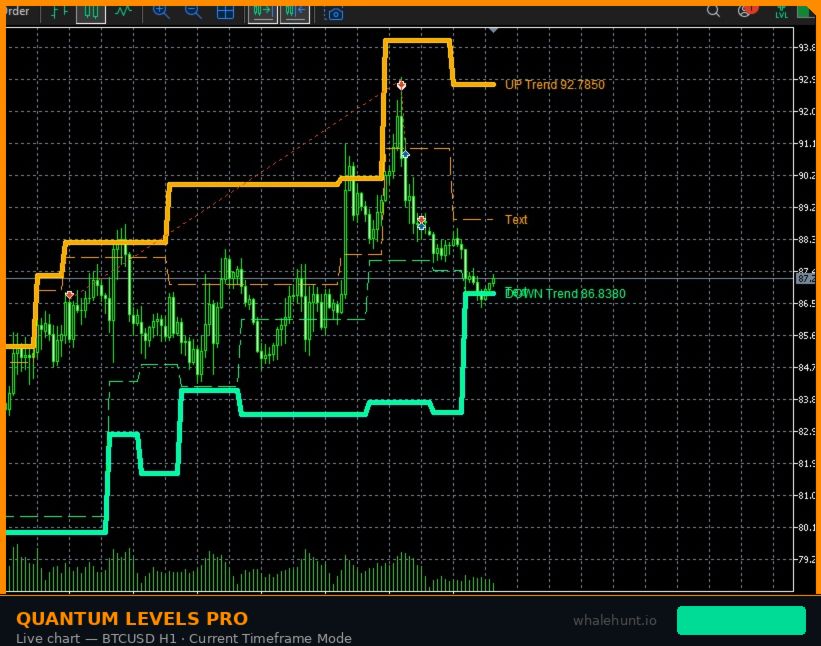
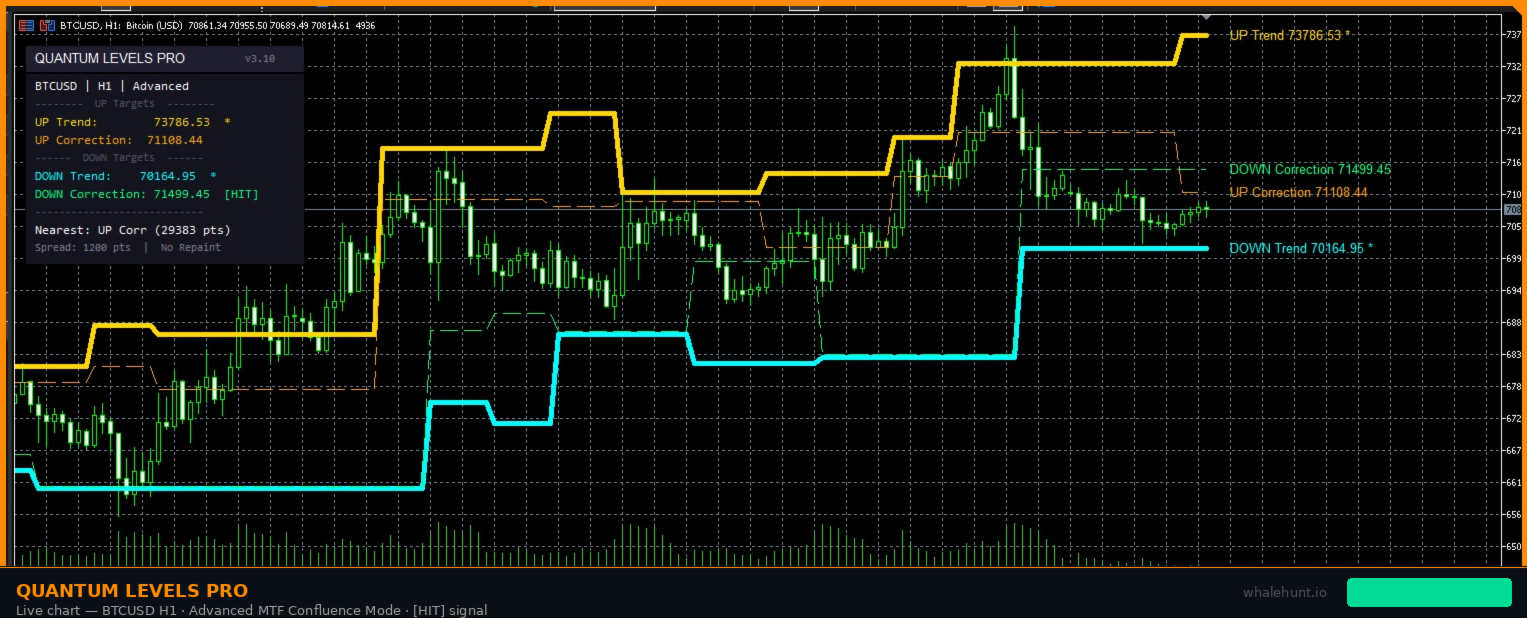
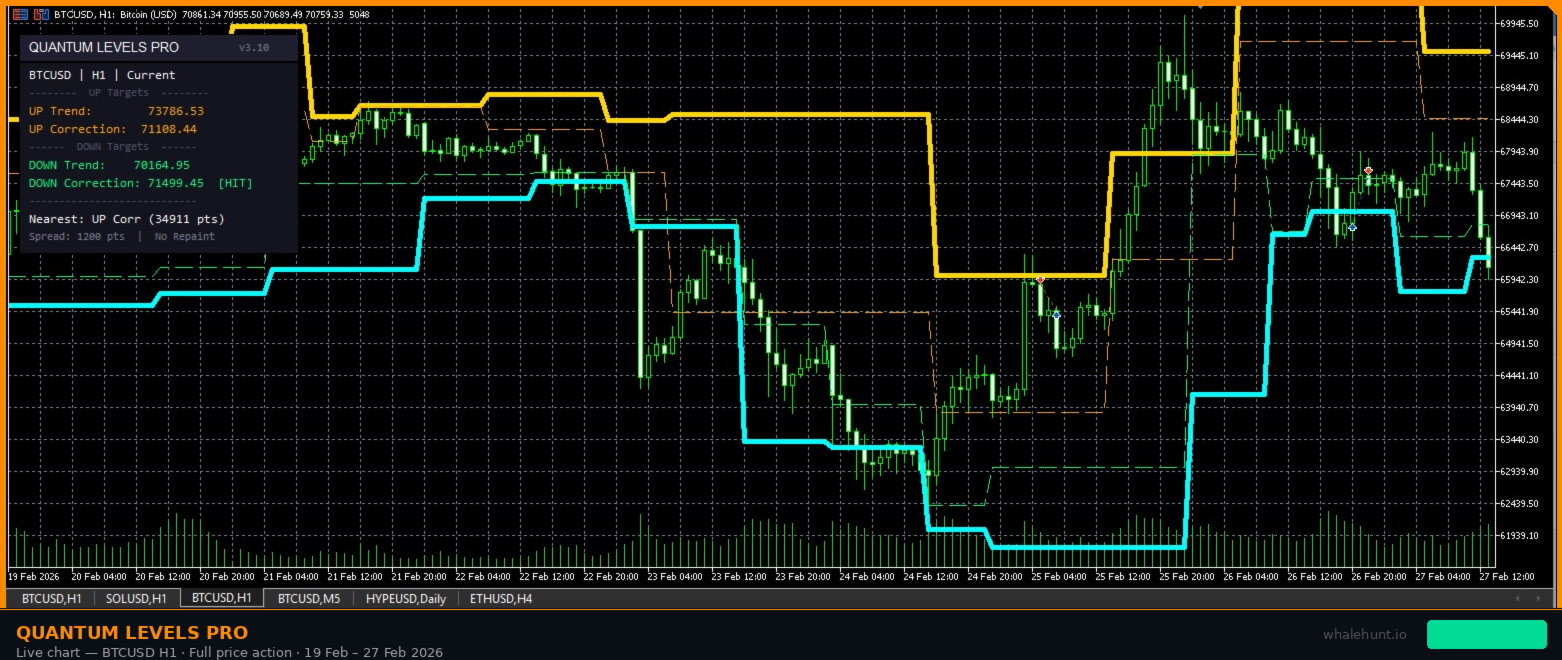
This indicator analyzes the swing structure of any instrument — stocks, forex, crypto, commodities, indices — and projects four precise price targets at every moment:
- UP Trend Target — the maximum upside price level based on recent swing energy. Take-profit for longs, or reversal short entry.
- UP Correction Target — the minimum upside level, conservative bullish target. First partial close for longs, or early warning zone.
- DOWN Trend Target — the maximum downside price level based on swing range analysis. Take-profit for shorts, or reversal long entry.
- DOWN Correction Target — the minimum downside level, conservative bearish target. First partial close for shorts, or early warning zone.
These are not random lines. Each level is calculated from the measured range of previous swings — the market's own "memory" of how far it moves. Targets activate when a swing breakout occurs and remain fixed until the next breakout. They do not repaint, shift, or recalculate retroactively.
How It Works — In Simple Terms
Every market moves in swings — price goes up, pulls back, then pushes higher (or vice versa). Each swing has a measurable range. Quantum Levels PRO tracks these ranges and learns how far the current instrument typically extends.
When price breaks above a swing high, the indicator projects two upside targets: Trend Target (based on the largest swing range observed) and Correction Target (based on the smallest). The same logic applies in reverse when price breaks below a swing low.
Think of it this way: if a rubber band stretches 10 cm in previous pulls, and you stretch it again, you can predict it will extend roughly 10 cm. Quantum Levels does this with price — measuring the market's "elastic range" and projecting the next destination.
Key Features
- Non-Repainting Engine — once a target level appears on the chart, it stays. No retroactive changes, no shifting lines, no disappearing signals. Every level is verifiable on historical data.
- Works on Any Instrument — forex, crypto, stocks, indices, commodities, CFDs. If it has a price chart with swings, Quantum Levels can project its targets. No symbol restrictions.
- Scalping to Swing Trading — equally effective on M1–M5 for scalpers and H1–D1 for position traders. The swing calculation adapts to any timeframe automatically.
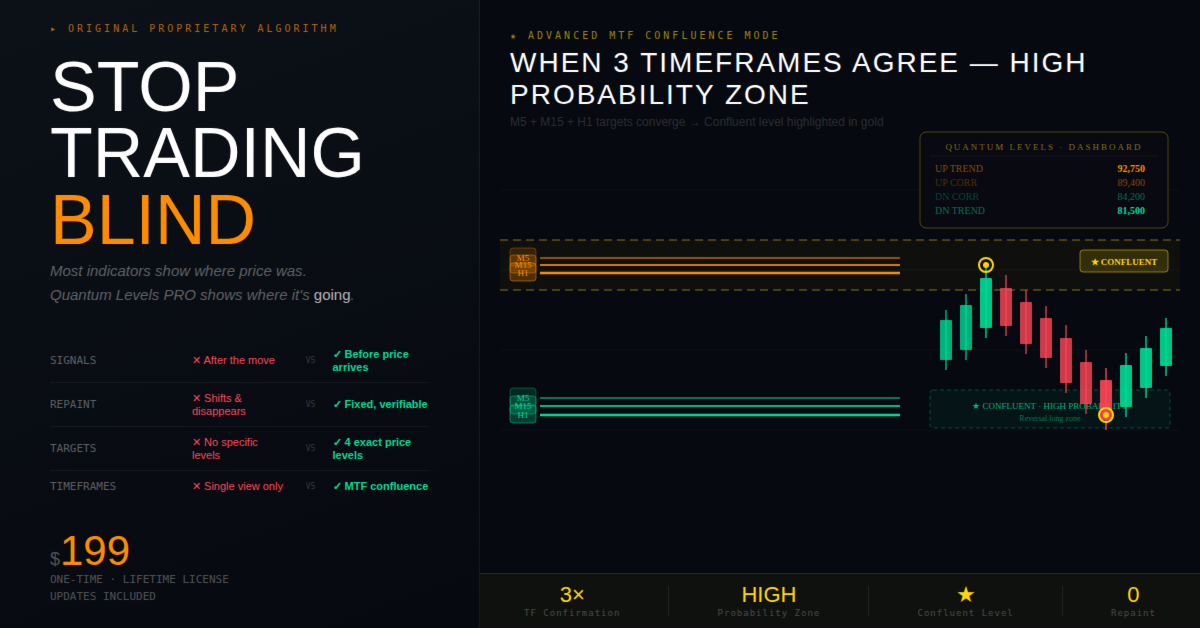
- Advanced MTF Confluence — in Advanced mode, the indicator compares targets across M5, M15, and H1. When multiple timeframes agree on the same level, it's highlighted as a high-probability zone.
- Professional Dashboard — on-chart panel displays all current targets, touch status, nearest level distance, spread, and confluence markers.
- Smart Alert System — get notified the moment price touches a target via popup, sound, email, or push notification. Separate controls for trend and correction targets.
- Data Window and EA Integration — all target values and touch status are accessible via the Data Window and iCustom() buffers, so you can build automated strategies on top of Quantum Levels.
- Fully Customizable Visuals — choose your own colors for trend/correction lines, confluent levels, dashboard background, and labels.
How Traders Use Quantum Levels PRO
Strategy 1: Target-Based Entries
When the DOWN Trend Target is hit, many traders look for reversal longs — this is the maximum expected downside, and price often bounces here. Set a limit buy order at the target level with a tight stop-loss below.
Strategy 2: Take-Profit Placement
Already in a trade? Use the Trend Target as your take-profit level. The Correction Target serves as a partial close point — secure some profit early, then let the rest ride to the full target.
Strategy 3: Scalping M1–M5
On lower timeframes, targets are tighter and activate more frequently. Scalpers use the correction targets for quick 5–15 pip captures, entering when price approaches a level and shows rejection.
Strategy 4: Confluence Trading (Advanced Mode)
Enable Advanced mode and watch for confluent levels — when M5, M15, and H1 targets align on the same price zone, the probability of a reaction increases dramatically. These levels are highlighted with special colors and thicker lines.
Strategy 5: Risk Management Zones
Use the gap between Correction and Trend targets as a "danger zone." If you're long and price reaches the UP Correction Target but stalls, it's a warning that bullish momentum may be fading before reaching the full Trend Target.
Complete Input Parameters
Main Settings
- Mode — Current Timeframe or Advanced (MTF Confluence)
- Show Correction Targets — toggle correction target lines on/off for a cleaner chart
Advanced Mode
- Confluence Tolerance (%) — how close two MTF targets must be to count as confluent (% of price)
- Proximity Alert Distance — alert when price is within N points of a confluent level
Visual Settings
- UP Trend / Correction Color — default: Orange
- DOWN Trend / Correction Color — default: Spring Green
- Confluent UP / DOWN Color — default: Gold / Aqua
- Line Width (Trend / Correction) — 3 / 1
- Show Price Labels — display target values as text labels on the chart
Dashboard
- Show Dashboard Panel — on-chart information panel with all levels and status
- Panel Position X / Y — pixel position of the dashboard on chart
- Background / Border / Text / Header Color — full color customization
Alerts
- Popup / Sound / Email / Push — all disabled by default
- Alert Sound File — custom sound file for audio alerts
- Alert Timeframe — only trigger alerts on a specific timeframe
- Alert on Trend / Correction Touch — choose which target types trigger alerts
- Alert on Proximity to Confluent — get warned when price approaches a confluent level
Buffer Map for EA Developers
Quantum Levels PRO exposes its data through standard indicator buffers, accessible via iCustom() or the Data Window:
- Buffer 0 — UP Trend Target (price level)
- Buffer 1 — UP Correction Target (price level)
- Buffer 2 — DOWN Trend Target (price level)
- Buffer 3 — DOWN Correction Target (price level)
- Buffer 4 — UP Trend Touched (1.0 = yes, 0.0 = no)
- Buffer 5 — UP Correction Touched (1.0 / 0.0)
- Buffer 6 — DOWN Trend Touched (1.0 / 0.0)
- Buffer 7 — DOWN Correction Touched (1.0 / 0.0)
Touch status resets automatically when a new target activates — giving you a clean "first touch" signal for your Expert Advisors.
Frequently Asked Questions
Does it repaint?
No. Once a target level appears, it stays exactly where it was calculated. You can verify this by scrolling through any historical chart — every level is locked in place.
Does it work on crypto / gold / stocks?
Yes. The swing measurement algorithm is universal. It works on anything that has a price chart with recognizable swing highs and lows. Tested on BTCUSD, XAUUSD, EURUSD, NASDAQ, and dozens of other instruments.
What's the best timeframe?
It works on all timeframes. Scalpers prefer M1–M5 for quick captures. Day traders use M15–H1. Swing traders work with H4–D1. The swing calculation adapts automatically.
How accurate are the targets?
The targets are based on measured swing ranges — the market's own historical behavior. They represent the statistically expected extension of the current move. No indicator can guarantee 100% accuracy, but Quantum Levels gives you a mathematically grounded expectation rather than a guess.
Can I use it in my Expert Advisor?
Yes. All four target values and four touch-status values are exposed through standard MQL5 buffers (0–7). Use iCustom() to read them in your EA.
What is Advanced mode?
Advanced mode calculates targets on M5, M15, and H1 simultaneously and checks if targets from different timeframes align at the same price level. When they do, the level is marked as "confluent" — it has support from multiple time perspectives, making it statistically stronger.
Stop trading in the rearview mirror.
Most traders stare at indicators that show where price has been.
With Quantum Levels PRO, you'll know where it's going — before it gets there.
One indicator. Four targets. Zero lag.
Risk Disclaimer: Trading financial instruments involves substantial risk of loss and is not suitable for every investor. Past performance is not indicative of future results. The Quantum Levels PRO indicator provides analytical information only and does not constitute investment advice. Always use proper risk management. Only trade with funds you can afford to lose.
Copyright © 2025–2026 Yuliia Kulakova