Quantum Levels Pro
- Indicatori
-
Yuliia Kulakova
 Trader algoritmico con oltre 5 anni di esperienza
nei mercati delle criptovalute. Co-creatore di
Quantum Crypto PRO — un EA alimentato da dati
whale in tempo reale di oltre 25.000 trader attivi
su Hyperliquid DEX.
Il nostro approccio è fondamentalmente diverso: invece - Versione: 3.10
- Attivazioni: 10
Indicatore di Target di Prezzo Non-Repainting per MT5 | Versione 3.10
Il problema con il 90% degli indicatori: ti dicono cosa è già successo. Medie mobili, RSI, MACD — analizzano i dati passati e reagiscono dopo che il movimento è terminato. Quando danno un segnale, il miglior punto di ingresso è già sparito.
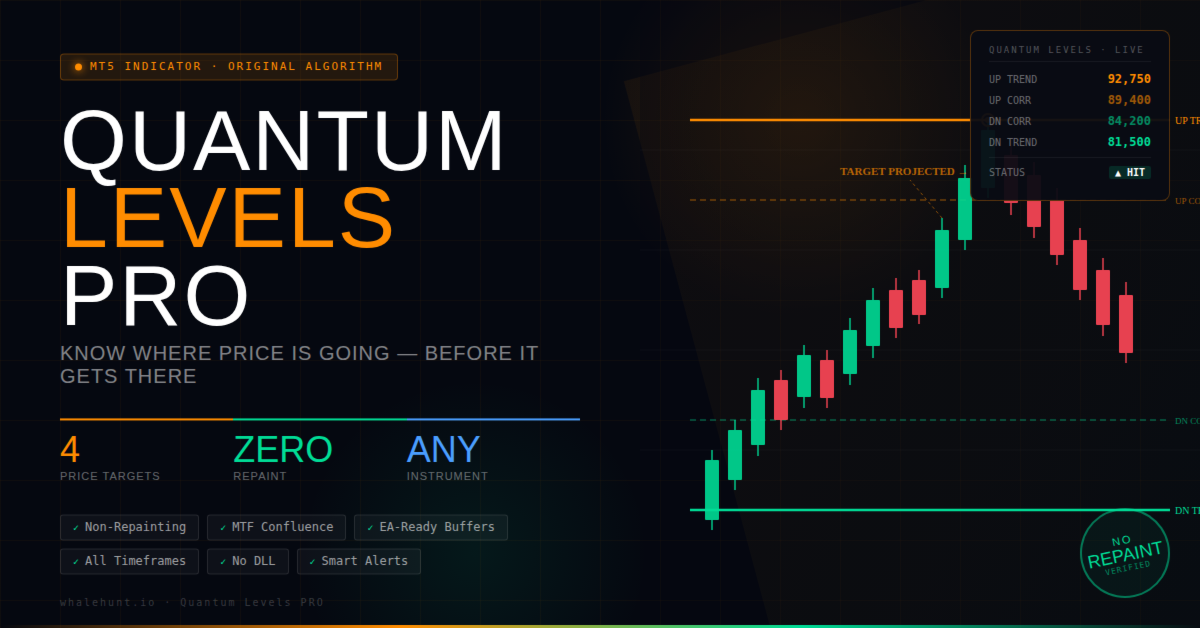
Quantum Levels PRO è diverso. Calcola obiettivi di prezzo precisi — livelli specifici verso cui il prezzo si sta dirigendo — mentre il movimento è ancora in corso. Vedi la destinazione prima che il viaggio sia completato. Non è analisi retrospettiva. È lungimiranza.
Cosa Fa Quantum Levels PRO
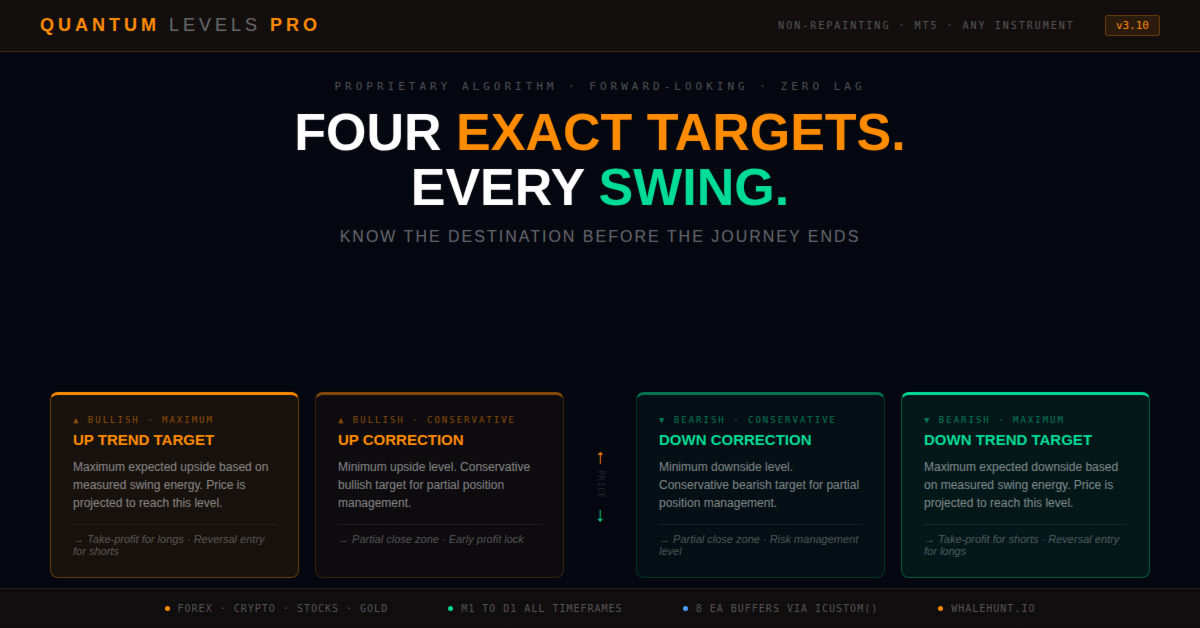
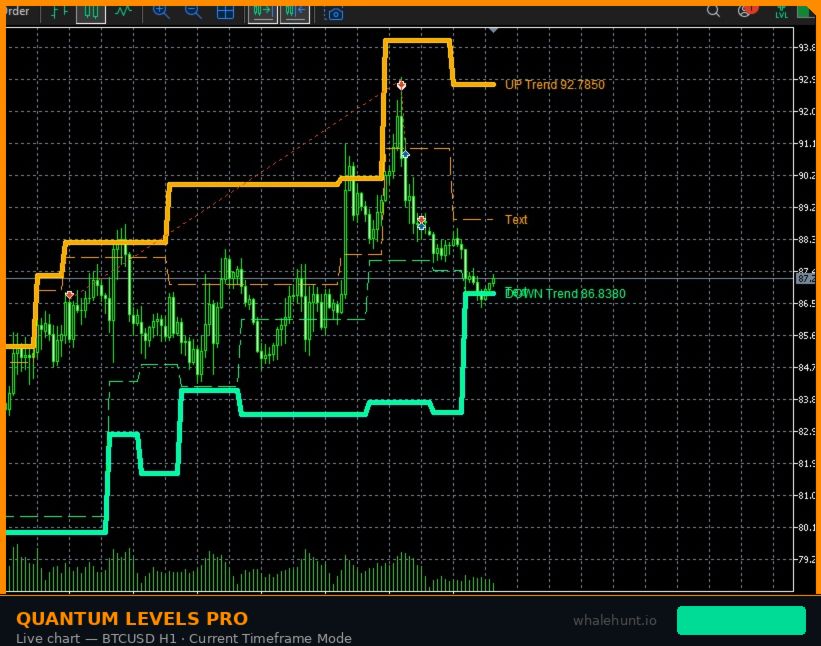
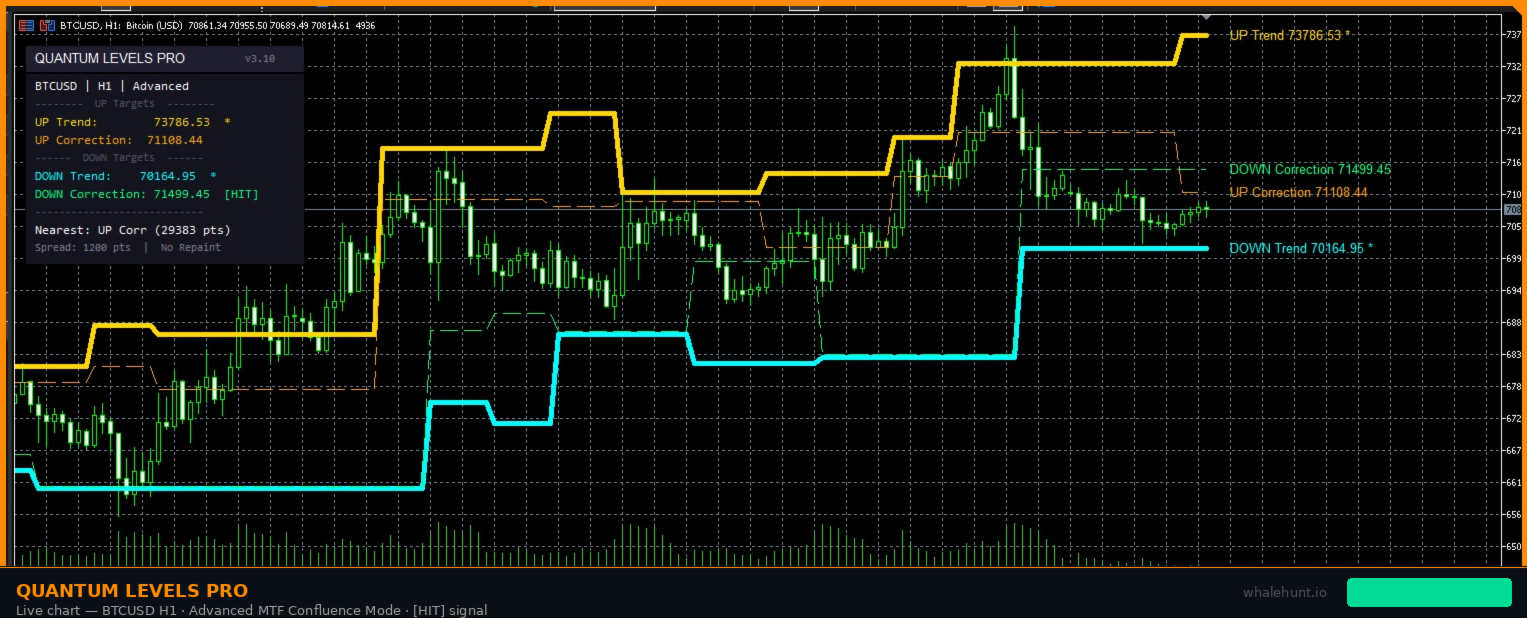
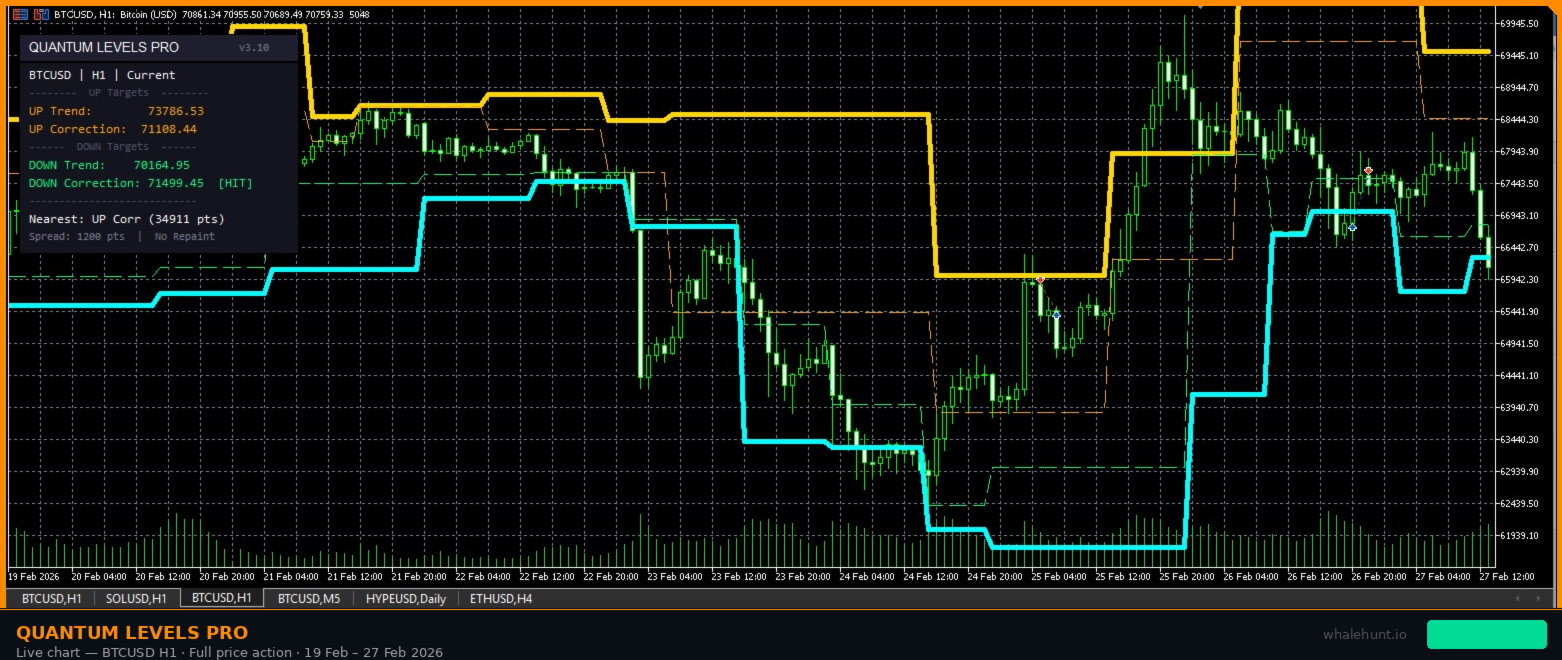
Questo indicatore analizza la struttura degli swing di qualsiasi strumento — azioni, forex, criptovalute, materie prime, indici — e proietta quattro obiettivi di prezzo precisi in ogni momento:
- UP Trend Target — il livello massimo al rialzo basato sull'energia recente degli swing. Take-profit per long, o ingresso di inversione per short.
- UP Correction Target — il livello minimo al rialzo, obiettivo rialzista conservativo. Prima zona di chiusura parziale per long.
- DOWN Trend Target — il livello massimo al ribasso basato sull'analisi del range di swing. Take-profit per short, o ingresso di inversione per long.
- DOWN Correction Target — il livello minimo al ribasso, obiettivo ribassista conservativo. Prima zona di chiusura parziale per short.
Non si tratta di linee casuali. Ogni livello è calcolato dal range misurato degli swing precedenti — la propria "memoria elastica" del mercato. I target si attivano al breakout dello swing e rimangono fissi fino al successivo. Nessun repainting, nessuno spostamento, nessun ricalcolo retroattivo.
Come Funziona — In Termini Semplici
Ogni mercato si muove in swing. Ogni swing ha un range misurabile. Quantum Levels PRO traccia questi range e impara fino a dove lo strumento attuale si estende tipicamente.
Quando il prezzo supera un massimo di swing, l'indicatore proietta due obiettivi al rialzo: Trend Target (basato sul range massimo osservato) e Correction Target (basato sul minimo). La stessa logica si applica in senso inverso quando il prezzo rompe un minimo di swing.
Pensa a un elastico: se si è allungato di 10 cm negli stiramenti precedenti, puoi prevedere il prossimo allungamento. Quantum Levels fa lo stesso con il prezzo.
Funzionalità Principali
- Motore Non-Repainting — una volta che un livello target appare, rimane. Nessuna modifica retroattiva, nessuna linea che si sposta, nessun segnale che scompare. Ogni livello verificabile su dati storici.
- Qualsiasi Strumento — forex, criptovalute, azioni, indici, materie prime, CFD. Nessuna restrizione sui simboli.
- Dallo Scalping allo Swing Trading — ugualmente efficace su M1–M5 per scalper e H1–D1 per trader di posizione. Il calcolo degli swing si adatta automaticamente.
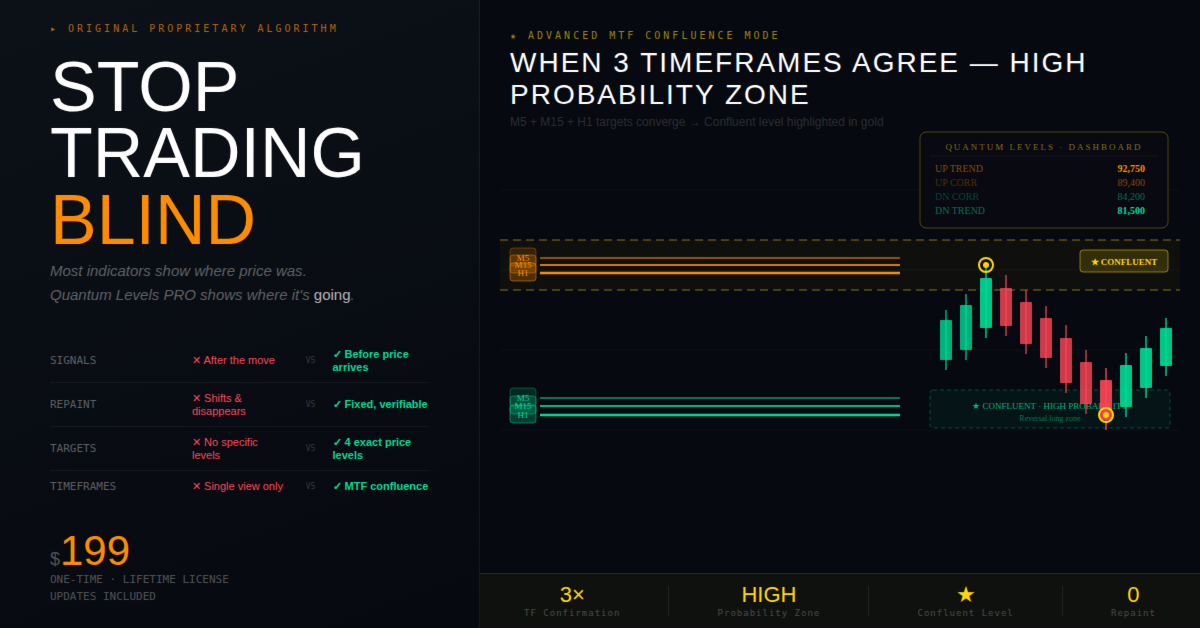
- Confluenza MTF Avanzata — in modalità Avanzata, l'indicatore confronta i target su M5, M15 e H1. Quando più timeframe concordano sullo stesso livello, viene evidenziato come zona ad alta probabilità.
- Dashboard Professionale — pannello integrato con tutti i target attuali, stato di tocco, distanza al livello più vicino e marcatori di confluenza.
- Sistema di Allerte Intelligente — notifica nel momento in cui il prezzo tocca un target: popup, suono, email o push. Controlli separati per target di tendenza e correzione.
- Integrazione EA — tutti i valori dei target e stati di tocco accessibili via Data Window e iCustom().
- Visual Completamente Personalizzabili — scegli i tuoi colori per linee, livelli confluenti, sfondo dashboard ed etichette.
Come i Trader Usano Quantum Levels PRO
Strategia 1: Ingressi Basati sui Target
Quando il DOWN Trend Target viene raggiunto, molti trader cercano long di inversione — questo è il massimo ribasso atteso. Ordine di acquisto limitato al livello target con stop ravvicinato sotto.
Strategia 2: Posizionamento del Take-Profit
Già in una posizione? Usa il Trend Target come livello di take-profit. Il Correction Target serve come punto di chiusura parziale — assicura profitto presto, lascia il resto correre al target completo.
Strategia 3: Scalping M1–M5
Su timeframe più bassi, i target sono più ravvicinati e si attivano più frequentemente. Gli scalper usano i correction target per catture rapide.
Strategia 4: Trading di Confluenza (Modalità Avanzata)
Attiva la modalità Avanzata e osserva i livelli confluenti — quando i target di M5, M15 e H1 si allineano nella stessa zona di prezzo, la probabilità di una reazione aumenta drasticamente.
Strategia 5: Zone di Gestione del Rischio
Usa il divario tra Correction e Trend target come "zona di pericolo". Se sei long e il prezzo raggiunge l'UP Correction Target ma si ferma, è un avvertimento che il momentum rialzista potrebbe stare svanendo.
Parametri di Input Completi
Impostazioni Principali
- Modalità — Timeframe Corrente o Avanzata (Confluenza MTF)
- Mostra Correction Target — attiva/disattiva le linee di correzione
Modalità Avanzata
- Tolleranza Confluenza (%) — quanto vicini devono essere i target MTF per essere confluenti
- Distanza Allerta Prossimità — allerta quando il prezzo è entro N punti da un livello confluente
Impostazioni Visive
- Colore UP Trend / Correction — predefinito: Arancione
- Colore DOWN Trend / Correction — predefinito: Spring Green
- Colore Confluente UP / DOWN — predefinito: Oro / Acqua
- Spessore Linea (Trend / Correction) — 3 / 1
- Mostra Etichette Prezzo — visualizza i valori dei target come etichette sul grafico
Dashboard
- Mostra Dashboard — pannello informativo sul grafico con tutti i livelli e stati
- Posizione Pannello X / Y — posizione in pixel sul grafico
- Colori Pannello — personalizzazione completa di sfondo, bordo, testo e intestazione
Allerte
- Popup / Suono / Email / Push — tutti disattivati per default
- File Audio — file audio personalizzato per allerte sonore
- Timeframe Allerta — attivare allerte solo su un timeframe specifico
- Tocco Trend / Correction — scegliere quali tipi di target attivano allerte
- Allerta Prossimità Confluente — avviso quando il prezzo si avvicina a un livello confluente
Mappa dei Buffer per Sviluppatori EA
- Buffer 0 — UP Trend Target (livello di prezzo)
- Buffer 1 — UP Correction Target (livello di prezzo)
- Buffer 2 — DOWN Trend Target (livello di prezzo)
- Buffer 3 — DOWN Correction Target (livello di prezzo)
- Buffer 4 — UP Trend Toccato (1.0 = sì, 0.0 = no)
- Buffer 5 — UP Correction Toccato (1.0 / 0.0)
- Buffer 6 — DOWN Trend Toccato (1.0 / 0.0)
- Buffer 7 — DOWN Correction Toccato (1.0 / 0.0)
Lo stato di tocco si resetta automaticamente quando si attiva un nuovo target — segnali "primo tocco" puliti per i tuoi Expert Advisor.
Domande Frequenti
Fa repainting?
No. Una volta che un livello target appare, rimane esattamente dove è stato calcolato. Verificabile scorrendo qualsiasi grafico storico.
Funziona su criptovalute / oro / azioni?
Sì. L'algoritmo di misurazione degli swing è universale. Testato su BTCUSD, XAUUSD, EURUSD, NASDAQ e decine di altri strumenti.
Qual è il miglior timeframe?
Funziona su tutti i timeframe. Scalper: M1–M5. Day trader: M15–H1. Swing trader: H4–D1.
Quanto sono precisi i target?
I target si basano su range di swing misurati — il comportamento storico del mercato stesso. Rappresentano l'estensione statisticamente attesa del movimento attuale.
Posso usarlo nel mio EA?
Sì. I quattro valori dei target e i quattro valori di stato di tocco sono esposti tramite buffer MQL5 standard (0–7). Usa iCustom() per leggerli nel tuo EA.
Cos'è la modalità Avanzata?
Calcola i target su M5, M15 e H1 simultaneamente e verifica se i target di diversi timeframe si allineano allo stesso livello di prezzo. Quando lo fanno, il livello viene marcato come "confluente".
Smetti di fare trading guardando nello specchietto retrovisore.
La maggior parte dei trader fissa indicatori che mostrano dove il prezzo è stato.
Con Quantum Levels PRO, saprai dove sta andando — prima che ci arrivi.
Un indicatore. Quattro target. Zero ritardo.
Avvertenza sui rischi: Il trading di strumenti finanziari comporta un rischio sostanziale di perdita e non è adatto a tutti gli investitori. Le performance passate non sono indicative dei risultati futuri. Quantum Levels PRO fornisce esclusivamente informazioni analitiche e non costituisce consulenza finanziaria.
Copyright © 2025–2026 Yuliia Kulakova