Previous Highs and Lows Levels
- Indicators
- David Ramirez Rodriguez
- Version: 1.0
- Activations: 5
Previous_Highs_Lows-Socarix-STS
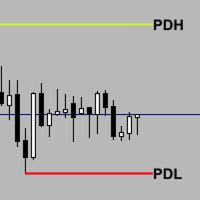
Previous_Highs_Lows-Socarix-STS automatically plots the previous day, week and month highs and lows (PDH/PDL, PWH/PWL, PMH/PML), extending these levels forward in time and labeling them clearly.
It highlights confluences when several levels share the same price and can mark crossed levels with an “X”, with optional fading. Weekly and monthly levels use smart logic: levels that were already crossed earlier in the current week/month are hidden for today. Fully customizable styles and visibility, works on any symbol and timeframe. A visual level tool; it does not provide trading signals.
Previous_Highs_Lows-Socarix-STS is a level-based visual indicator designed to keep the most important previous highs and lows in front of you at all times:
-
Previous Day High / Low (PDH / PDL)
-
Previous Week High / Low (PWH / PWL)
-
Previous Month High / Low (PMH / PML)
Levels are drawn as horizontal lines extended into the current session, with configurable labels that can sit on the right or left side of the chart.
When price crosses a level, the label can show an “X” and the level itself can be visually faded, so you instantly see which levels are still “fresh” and which have already been worked.
When two or more levels share exactly the same price (for example PDH and PWH), the indicator groups them into a single label, such as:
-
PDH | PWH
-
PWL | PML
-
PDH | PWH | PMH
This keeps the chart clean and makes confluences very easy to spot.
For weekly and monthly levels, the indicator uses a smart HTF logic:
it scans the current week/month and finds the first time price crossed that level. Based on that first cross:
-
If the first cross happened on a previous day of the current week/month → the level is hidden today.
-
If the first cross happens today → the level is shown with an X.
-
If it has not been crossed yet → the level is shown as a clean, untouched level.
This reconstruction is done from historical data, so you don’t need to have the indicator running from the start of the week or month.
Key features
-
Automatically plots:
-
Previous Day High/Low (PDH/PDL)
-
Previous Week High/Low (PWH/PWL)
-
Previous Month High/Low (PMH/PML)
-
-
Extends all levels horizontally for a user-defined number of hours.
-
Clear labels for each level:
-
PDH, PDL, PWH, PWL, PMH, PML.
-
Optional “X” when price crosses the level.
-
Labels can be placed on the right or left side of the chart.
-
-
Confluence grouping:
-
If several levels share the same price, they are combined into one label
(e.g. PDH | PWH | PMH), reducing chart clutter.
-
-
Crossed level styling:
-
Optional fading by transparency (alpha) or
-
Darkening of the original color by a chosen percentage.
-
-
Smart weekly/monthly logic:
-
Hides weekly/monthly levels that were already crossed on previous days of the current week/month.
-
Shows only the levels that still matter today.
-
-
Flexible previous-day calculation:
-
Option to calculate PDH/PDL from D1 candles (classic institutional approach), or
-
From the current timeframe if you prefer.
-
-
Lightweight, object-based indicator (no heavy buffers).
-
Works on any symbol and timeframe with sufficient history.
Default preset
The indicator ships with a classic previous-levels configuration:
-
ShowPD, ShowPW and ShowPM enabled → daily, weekly and monthly levels visible.
-
UseFixedHigherTF enabled → Previous Day levels are calculated from D1 candles.
-
Labels placed on the right side of the chart.
-
Distinct line styles for daily, weekly and monthly levels.
-
Moderate extension in hours so levels remain visible into the current session.
-
Optional fading of crossed levels.
You can use it as-is out of the box and later fine-tune line styles, colours, extension hours and which groups of levels you want to see.
Timeframe & calculation options
If you want to adapt the indicator to your trading style:
-
Classic PDH/PDL mode (recommended)
Leave UseFixedHigherTF = true → PDH and PDL are always calculated from D1 bars. -
Flexible timeframe mode
Set UseFixedHigherTF = false → “previous day” is taken from the previous bar on the current timeframe.
Weekly and monthly levels are always taken from W1 and MN1 data respectively.
Typical use
-
Use PDH/PDL, PWH/PWL and PMH/PML as intraday and HTF reference levels.
-
Identify confluences where daily, weekly and monthly levels align.
-
Treat previous highs and lows as:
-
Reaction zones and potential bounce areas.
-
Bias validation / invalidation levels.
-
Targets or partial-take areas.
-
-
Quickly see:
-
Which levels remain untouched today.
-
Which levels have already been crossed and faded.
-
Which weekly/monthly levels are no longer relevant and have been automatically hidden.
-
Inputs
-
Label & visual settings
-
LabelSize – Label font size.
-
CrossSymbol – Symbol appended on cross (default “ X”).
-
ShowCrossSymbol – Enable/disable the cross symbol.
-
LabelSide – Label side (right/left).
-
ExtendHours – Number of hours to extend each level.
-
-
Logic & crossed appearance
-
UseFixedHigherTF – PDH/PDL from D1 or from current timeframe.
-
UseAlphaOnCross – Fade crossed levels by transparency or by darkening.
-
CrossAlpha – Transparency level for crossed lines.
-
DarkenPercent – Darkening percentage for crossed lines.
-
-
Visibility
-
ShowPD – Show/hide daily levels.
-
ShowPW – Show/hide weekly levels.
-
ShowPM – Show/hide monthly levels.
-
-
Style & colours
-
StyleDay / StyleWeek / StyleMonth – Line style for each level group.
-
WidthDay / WidthWeek / WidthMonth – Line width.
-
ColorPDH / ColorPDL / ColorPWH / ColorPWL / ColorPMH / ColorPML – Colours per level type.
-
Notes
-
Levels are drawn only when sufficient historical data is available for D1, W1 and MN1.
-
All elements are chart objects. If you manually move or delete them, the indicator will recreate or reset them on the next update.
-
Weekly/monthly cross logic is reconstructed from history; the indicator does not need to have been running from the start of the week/month.
Visual analysis tool.
Disclaimer
This indicator does not provide buy/sell signals and does not guarantee any results.
It is designed to deliver objective previous-day/week/month levels and their cross status, to help you build better market context within your own trading strategy.
FAQs (EN)
1) Why are some weekly or monthly levels missing today?
Because the indicator hides weekly/monthly levels whose first cross in the current week/month happened on previous days. Only levels that are still relevant for today are shown.
2) What does the “X” next to a label mean?
It means that price has crossed that level. Combined with optional fading, this lets you distinguish between untouched and already-worked levels at a glance.
3) Can I hide some levels or use only daily/weekly/monthly?
Yes. You can independently enable/disable:
-
ShowPD (daily),
-
ShowPW (weekly),
-
ShowPM (monthly).
You can also choose whether PDH/PDL are based on D1 or on the current timeframe via UseFixedHigherTF.
4) Does it work on any instrument and timeframe?
Yes. It works on any symbol (forex, indices, commodities, crypto, etc.) and on any timeframe, as long as there is enough historical data to read D1, W1 and MN1 bars.
5) Does it provide buy/sell signals?
No. Previous_Highs_Lows-Socarix-STS is a context and level tool.
It does not provide automatic entries or exits; it is intended to complement your existing trading strategy.
Quick installation guide (MT5)
Option 1: Install from MetaTrader 5 (recommended)
-
Open MetaTrader 5.
-
Go to the Market tab inside the platform.
-
Log in with your MQL5 account.
-
Search for Previous_Highs_Lows-Socarix-STS.
-
Click Buy / Download / Install (depending on your case).
-
Open Navigator → Indicators and locate the indicator.
-
Drag it onto a chart or double-click it.
-
Adjust inputs if needed and click OK.
Option 2: If you purchased it on the MQL5 website
-
Open MetaTrader 5.
-
Log in with the same MQL5 account used for the purchase.
-
Go to Navigator → Market → Purchased.
-
Select Previous_Highs_Lows-Socarix-STS and click Install.
-
Attach it to your chart from the Indicators list.
If it doesn’t show up
-
Restart MT5.
-
Right-click the Navigator panel and choose Refresh.
-
Make sure you are logged into the correct MQL5 account.