
Minty Triangle
- Experts
- Version: 20.0
- Updated: 2 August 2026

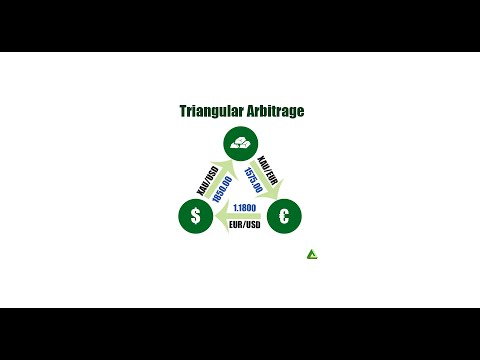
Minty Triangle is an Expert Advisor for MetaTrader 5 that looks for triangular arbitrage: short moments when the exchange rates of three currencies do not agree with each other.
This strategy is all about speed. The price gaps it trades last only milliseconds, so the result depends on how fast your whole setup is: your hardware, your connection to the broker and, above all, how quickly your broker fills all three trades. The settings come second. On a slow setup it will not work, whatever the settings. Arbitrage is also first come, first served: only the trader whose orders arrive first gets each opportunity.
Read this first
Many brokers do not allow arbitrage. They can cancel trades, reverse profits weeks later, or add a delay to your account that stops the strategy from working while everything still looks normal. Check your broker's terms and ask for written confirmation.
This strategy will not work on the majority of setups. A home computer, a typical shared virtual private server or a standard retail account is too slow: by the time all three orders are filled, the gap is gone. It needs a fast, specialised setup with dedicated hardware, a very low ping to your broker and a broker that executes all three trades quickly. The section Speed and hardware explains why.
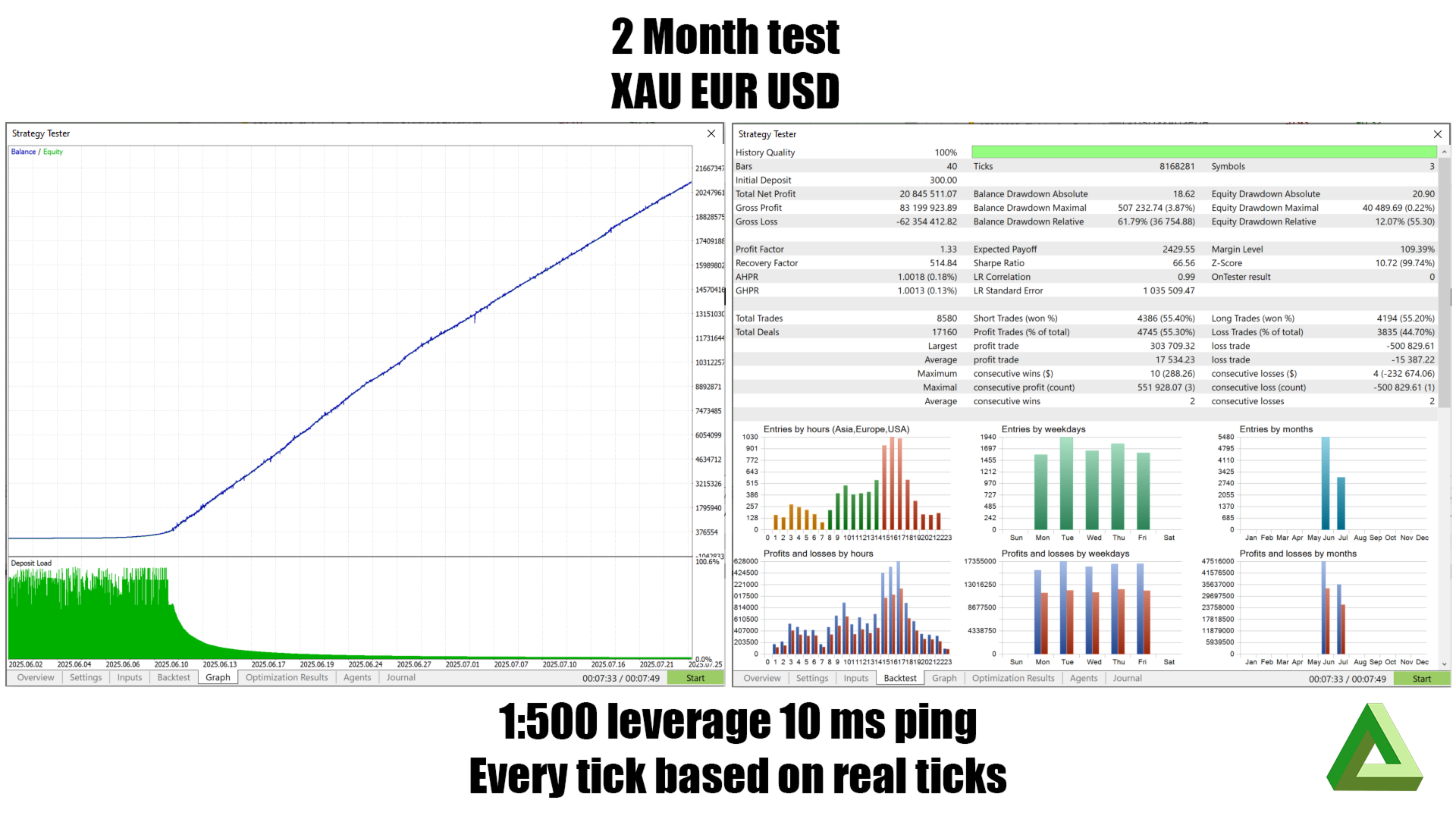
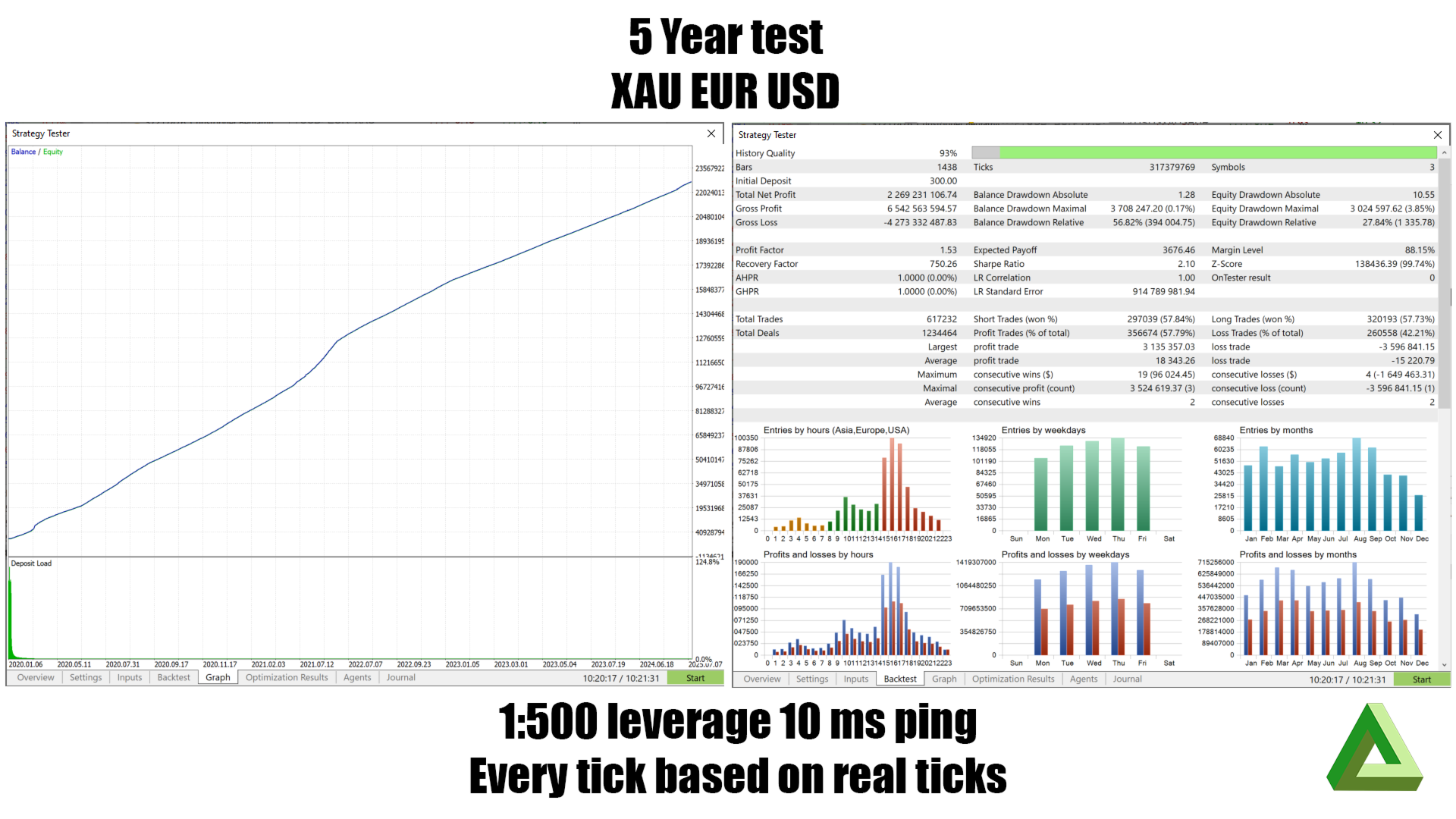
A good backtest proves very little here. The Strategy Tester fills all three trades at the same instant, which does not happen in real trading, so it cannot test the one thing that decides the result.
Before you risk money, run Shadow Mode. It measures all of the above without placing a single trade.
The idea
Start with gold, exchange it for dollars, exchange those dollars for euros and the euros back to gold. If the prices are consistent, you end up where you started. The three prices come from different sources and do not update at exactly the same moment, so sometimes the round trip ends with slightly more than it started with.
That difference is the target. It is usually smaller than the spread of one of the three symbols, and it usually disappears within milliseconds. No money is actually converted: the Expert Advisor opens three positions that roughly cancel each other out, so that only the price difference remains.
How it works
You enter a list of currencies, for example XAU,USD,EUR. The Expert Advisor finds your broker's symbol names, including suffixes such as .raw or m, and builds every possible triangle. A loop that starts at a different corner is the same trade and is counted once, while the opposite direction is a different trade. Three currencies give 2 triangles and four currencies give 8.
On every price update, the Expert Advisor does the following for each triangle:
- It calculates the trade sizes from the risk factor and the free margin.
- It sends a calculated amount around the triangle at the live prices. If more comes back than went in, the difference is the possible profit.
- It subtracts the commission for opening and closing and the expected slippage. The slippage is measured from your own fills, and by default the Expert Advisor plans for a fill that is worse than 90% of past fills.
- What is left must reach the profit threshold. By default this is at least the total cost again.
- It checks that all three prices are recent. A price that is 400 milliseconds old describes a market that has already moved on, so the gap is not real.
Before sending the orders, it reads the latest prices again, checks them again and cancels the trade if the opportunity is gone. Then it calculates all stop losses and sends the three orders directly after each other, starting with the leg that has the widest spread. Prices move between finding an opportunity and acting on it, and this final check prevents many trades on gaps that have already closed.
The profit target becomes smaller over time. A triangle that has not paid off quickly is no longer an arbitrage, only three positions that pay swap. After the expire time (5 minutes by default) the Expert Advisor closes the triangle at break-even.
A triangle is also closed when a market is about to close, when its loss becomes very large, and when one of its three positions is missing. A triangle with a missing leg is no longer balanced. It has become a directional trade, so the Expert Advisor closes it instead of trying to repair it. After such a close, new trades pause for one hour.
Optional filters skip trading around high-impact news (30 minutes before and after), during sudden increases in volatility, and around market opening and closing times.
Speed and hardware
First come, first served
Imagine 5 dollars lying on the ground and 10 people who see it at the same moment. Only the person who grabs it first gets it. The other nine bend down for nothing, and being second earns the same as being last.
Arbitrage works the same way. When three prices briefly disagree, Minty Triangle is not the only program that sees it. Banks, professional trading firms and many other arbitrage programs watch the same prices, often with faster equipment placed right next to the price sources. The orders that arrive first take the opportunity, and their trading pulls the prices back into line. Orders that arrive a few milliseconds later find the gap already closed. They are filled at normal prices and pay the spread and commission for a profit that no longer exists.
So the question is not only whether your setup is fast, but whether it is faster than everyone else trading the same gap. That is why every millisecond in the following sections matters.
Why most setups are too slow
A triangle only works if all three legs are filled at nearly the prices the Expert Advisor saw. Every step between the arrival of a price and the fill of the third leg takes time:
- the price travels from the broker to your terminal;
- your computer processes the price and decides;
- three orders travel to the broker;
- the broker executes and fills each order;
- the confirmations travel back.
On a typical setup this adds up to 50 to 300 milliseconds or more. By then the prices have moved and the opportunity is gone or has turned into a loss. No setting can fix a setup that is too slow. Shadow Mode shows whether your setup is fast enough.
Ping is not execution time
These are two different delays, and both count.
Ping is the network round trip: the time a small message needs to reach your broker's trade server and come back. MetaTrader 5 shows it in the bottom right corner of the terminal. It only measures the connection between you and the broker.
Execution time is the time inside the broker: from the moment the broker's server receives your order until the trade is filled and confirmed. During this time the broker checks margin and risk, may pass the order to a liquidity provider, may wait for the provider to accept it, and then books the fill. MetaTrader 5 shows the execution time of every order in the Journal tab as "done in" a number of milliseconds.
The delay that matters is ping plus execution time. A ping of 1 millisecond does not help if the broker then needs 150 milliseconds to fill the order. The total is still 151 milliseconds.
Why many forex brokers are too slow
Retail forex brokers are not exchanges. Many pass your orders through a bridge to one or more liquidity providers, or fill them on their own dealing desk. Each step adds time, and some brokers and liquidity providers hold an order for a moment before they accept it, partly to protect themselves against this kind of strategy. Execution times of tens to hundreds of milliseconds are common, even when the ping is very low. A fast server connected to a slow broker is still a slow setup.
Fast on two legs, slow on one
Brokers often do not execute every symbol equally fast. Each symbol can be routed to a different liquidity provider or price stream. A major pair such as EURUSD may be filled in a few milliseconds, while gold or a cross rate such as XAUEUR takes much longer, for example 8, 12 and 240 milliseconds for the three legs.
In a triangle, the slow leg decides the result. The price difference only exists while all three prices hold together. While the slow leg is waiting, its price moves and it is filled with slippage. The two fast legs are already open at the earlier prices, so the slippage on the third leg can remove the whole gap or turn it into a loss. A slow leg is also more likely to be rejected or partly filled, which leaves the triangle unbalanced.
Check the execution times in the Journal for each of the three symbols separately. An average hides the one slow leg that costs money.
Why fast hardware matters
Speed on your own side counts as well. On every price update, and on a timer every millisecond, the Expert Advisor recalculates every triangle: the amount around each loop, the commission, the slippage model, the age of each price, the margin and the lot sizes. With four currencies that is 8 triangles, and all of this floating-point work has to be finished before the orders can be sent.
MetaTrader 5 runs each Expert Advisor on a single thread, so the speed of one processor core is what counts: its clock speed and how many floating-point calculations it completes per second. A slower or busy processor delays the decision, and every millisecond spent deciding is a millisecond the gap has to survive.
The terminal also writes logs, price history and the Expert Advisor's files to disk. A slow disk can pause the terminal for a moment, and if that moment falls in the middle of a triangle, the remaining legs are late.
Recommended setup
As a minimum, use a high-frequency trading server with a recent high-clock processor such as an AMD Ryzen 9 7950X or 9950X, a fast solid-state drive and a ping to your broker's trade server below 1 to 2 milliseconds. In practice this means a server in the same data center as the broker's trade server. Ask your broker where its servers are located.
Dedicated hardware is preferred. On a shared virtual server, the processor is shared with other customers. When they are busy, the Expert Advisor has to wait for processor time, and these pauses come at random moments, including the moments when a fast reaction is needed. A dedicated server gives Minty Triangle the full speed of its processor cores at all times.
Run Minty Triangle on its own: one terminal, no other Expert Advisors or heavy indicators, and no power-saving modes that lower the processor clock. The broker must allow arbitrage and must fill all three symbols quickly, because fast hardware cannot make a slow broker fast.
Then measure: set the simulated execution latency to your ping plus the execution time of the slow leg, and let Shadow Mode show whether the opportunities survive.
Shadow Mode
When Shadow mode is set to true, the Expert Advisor works normally but never places a trade.
When it finds an opportunity, it records it. After a realistic delay (the simulated execution latency, 150 milliseconds by default), it checks what the opportunity was actually worth. Both values are written to the file _MintyTriangleShadowLog.csv:
| Column | Meaning |
|---|---|
| sig_net | The profit the Expert Advisor calculated when it found the opportunity |
| real_net | What the opportunity was worth after the delay |
| edge_decay | The difference between the two, which is the cost of the delay |
| survived | 1 if the trade would still have made money |
To use it, sort the file by sig_net and find the value above which survived is reliably 1. That is the minimum profit you need with your broker and your connection. It is a measured value and more reliable than a value tuned in a backtest. Set the profit threshold from it.
If edge_decay is regularly larger than sig_net, every opportunity is gone before your orders reach the broker. In that case the strategy does not work on your setup, and no setting will change that. Run Shadow Mode for at least a week and across different trading sessions.
Risks in more detail
Broker permission
Many retail brokers do not allow arbitrage. Where it is not allowed, they usually reserve the right to cancel trades and reverse profits, sometimes weeks later, to restrict or close the account, to add execution delays, to widen spreads or to reject orders.
The risk is not only that the strategy stops working. It can appear to work, build a profit and then have that profit reversed. Such clauses are common at market maker brokers but also exist at other brokers. Ask in writing and keep the reply.
Speed
| Professional arbitrage | Typical retail setup | |
|---|---|---|
| Location | In the data center next to the price source | At home or on a distant server |
| Round trip | Microseconds | 30 to 200 milliseconds or more |
| Execution | All legs at once | Three orders after each other |
As a result, the gap is usually gone before the orders arrive. The three orders are not executed together, so one can be filled while another is rejected, and partial fills break the balance. Slippage also works against you: orders are filled quickly when the price moves against you and late when it moves in your favour. A server close to your broker helps and is close to necessary, but it only reduces the delay. Dedicated hardware and a broker with fast execution on every leg are needed as well.
Backtests
The Strategy Tester fills all three legs at one instant, so it assumes away the main question: does the gap survive the time needed to trade it?
In addition, the timing of ticks across several symbols in the Strategy Tester is approximate, and this strategy depends entirely on that timing. Many arbitrage results in a backtest come from the tester rather than from real price differences. Spreads are simplified, and there are no requotes, rejections or partial fills. The news filter may not work in the Strategy Tester, in which case the backtest and the live account trade different opportunities.
Past results do not indicate future results. Use the backtest to check that the Expert Advisor runs correctly, and use Shadow Mode and small live trades to find out whether it works on your setup.
Other things to know
A triangle is not free of risk. Lot sizes are rounded to your broker's volume steps, so the three positions never cancel each other out exactly and a small directional position always remains. Swap is charged on all three legs and can be larger than the profit if a triangle stays open overnight. Legs can be closed separately by a stop loss or a margin call, and all three legs use margin.
Some settings need care. With the stop loss enabled, one leg can be stopped out while the other two stay open, which leaves the position unbalanced. The emergency close is set at a loss of 99% of the balance and cannot be changed. Start with a low risk factor. Your broker must also keep order comments, because the Expert Advisor uses them to recognise its own trades.
Settings
Arbitrage settings
| Setting | Default | Description |
|---|---|---|
| Currency set | XAU,USD,EUR | The currencies to build triangles from, separated by commas |
| Risk factor | 10 | The percentage of free margin to use |
| Profit threshold | 100 | The required profit as a percentage of the costs |
| Profit trigger | 50 | The percentage of the calculated profit to take |
| Expire time | 5 minutes | After this time the target falls to break-even |
Safety settings
| Setting | Default | Description |
|---|---|---|
| Enable stop-loss | false | A stop loss on each leg |
| Stop-loss period | 4 hours | The timeframe used to size the stop loss |
| Enable volatility filter | false | Skip trading during sudden increases in volatility |
| Volatility period | 1 hour | The timeframe used by the volatility filter |
| Enable news filter | false | Skip trading 30 minutes before and after high-impact news |
Broker and execution settings
| Setting | Default | Description |
|---|---|---|
| Symbol suffix | empty | For example .raw or m |
| Max deviation | 20 | The largest accepted price difference at the fill, in points (0 uses the broker's default) |
| Max quote age | 250 | Prices older than this many milliseconds are not used (0 turns the check off) |
| Re-check edge on fresh ticks before firing | true | Check the opportunity again just before sending |
| Fire widest-spread leg first | true | Send the leg with the widest spread first |
| Slippage percentile | 90 | How cautious the slippage estimate is (50 uses the median) |
| Abandon unconfirmed legs after | 5000 | Give up on an order that is not confirmed within this many milliseconds |
Performance settings
| Setting | Default | Description |
|---|---|---|
| Commission lookup cache lifetime | 300 | How often the commission is checked again, in seconds |
| News calendar refresh interval | 60 | How often the news calendar is read, in seconds |
| Display refresh interval | 250 | How often the panel is redrawn, in milliseconds |
Shadow mode and other settings
| Setting | Default | Description |
|---|---|---|
| Shadow mode | false | Measure only, never trade |
| Simulated execution latency | 150 | The delay to simulate, in milliseconds |
| Min gap between logs for one route | 1000 | The shortest time between two log entries for the same triangle, in milliseconds |
| Shadow log file | _MintyTriangleShadowLog.csv | The Shadow Mode results file |
| Magic number | 8172934 | Identifies the Expert Advisor's trades |
| Draw display | true | Show the panel on the chart |
| Enable debug | false | Write detailed messages to the log |
| Clear slippage log | false | Delete the stored slippage history at startup |
The Expert Advisor creates two files in the MQL5\Files folder: _MintyTriangleSlippageLog.csv, the fill history used by the cost model, and the Shadow Mode results file.
Suggested approach
- Confirm in writing that your broker allows arbitrage.
- Measure your ping and the execution time in the Journal for each of the three symbols. If the total is far above a few milliseconds, the setup is too slow.
- Run a backtest to check that the Expert Advisor runs and builds the triangles you expect, not to judge the results.
- Run Shadow Mode on a live account for a week or more.
- Check edge_decay. If the gap does not survive your delay, stop here.
- If it does, set the profit threshold from the Shadow Mode data, not from a backtest.
- Trade the minimum size until the real slippage matches the Shadow Mode results.
- Increase the size slowly and check the results regularly, because brokers and markets change.


































Very smart triangl