
I build and sell Gold Aegis Protocol, an Expert Advisor, or EA: a trading robot for MetaTrader. When I check a backtest, I want the native tester report beside the settings. An equity curve alone leaves too much of the test unexplained.
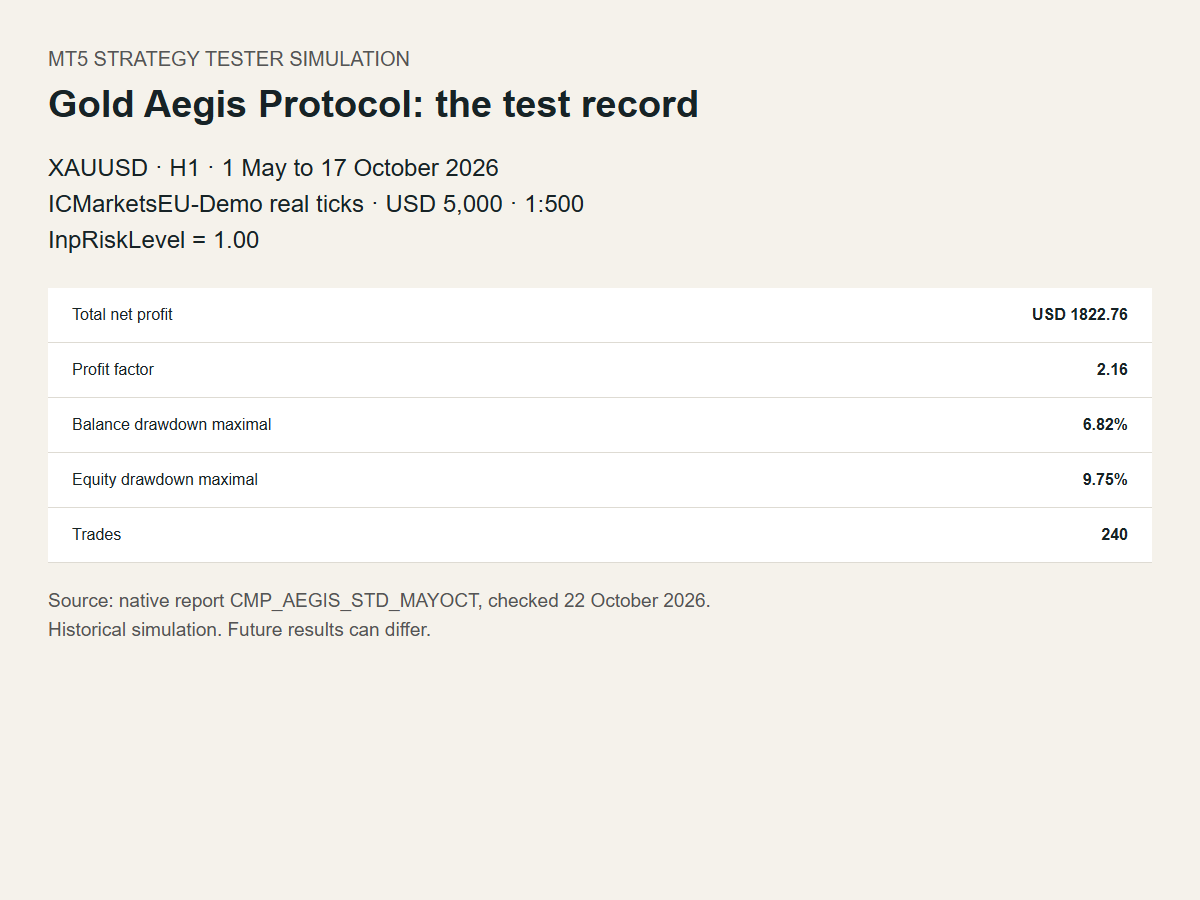
Here is one of my MT5 Strategy Tester simulations. It used XAUUSD, gold priced in US dollars, on H1, the one-hour timeframe, from 1 May to 17 October 2026. The data was ICMarketsEU-Demo broker real ticks, meaning recorded price updates. The simulated deposit was USD 5,000, leverage was 1:500, and InpRiskLevel was 1.00.
The drawdown line I read first
In this Strategy Tester simulation, the native report shows 6.82% maximal balance drawdown and 9.75% maximal equity drawdown. Maximal drawdown measures the largest peak-to-trough fall during the test. Balance reflects closed trades; equity also includes the profit or loss of positions still open.
Those figures describe different parts of the same test. Quoting the balance figure alone would leave out the larger fall recorded in equity. That is why I keep the report's field name beside its value when I summarize a run.
The same simulation recorded USD 1,822.76 total net profit over 240 trades and a profit factor of 2.16. Profit factor is gross profit divided by the magnitude of gross loss. These figures belong to this window and these settings.
Keep enough detail to compare another run
The report identifier for this example is CMP_AEGIS_STD_MAYOCT. Its account record names the symbol, dates, timeframe, deposit and leverage. The native report lists the EA inputs and the modelling mode, “Every tick based on real ticks”.
When another result differs, those records give me a place to start. I compare the inputs and test conditions before trying to explain the difference. Matching a product name and a date range leaves other settings to check.
For your own tests, save the input set with the native report. Keep a record of the broker data and execution-cost settings too. That makes a later comparison more useful than a cropped screenshot of the final balance.
Try the window on your broker data
Search for "Gold Aegis Protocol" in the Market tab of your terminal and use its free Strategy Tester demo. Try XAUUSD, H1, 1 May to 17 October 2026, “Every tick based on real ticks”, a USD 5,000 deposit, leverage of 1:500 and InpRiskLevel=1.00. Save your complete input set and cost settings with your report. This is a starting point for a test on your broker's data; it does not promise an identical result. If you share a comparison, include those records.
Backtests are historical simulations. They do not guarantee future results.




