

Engineering a Self-Healing Expert Advisor in MQL5 (Part 1): Persistent Trade State Architecture
 2 725
2 725
 0
0

Introduction
Modern Expert Advisors are increasingly expected to operate continuously in unstable environments such as VPS servers, remote terminals, and live trading infrastructures. However, despite the growing complexity of automated trading systems, many Expert Advisors still rely almost entirely on temporary runtime memory during execution.
This becomes a serious problem the moment the trading terminal unexpectedly shuts down. A VPS restart, an internet interruption, a MetaTrader crash, a power outage, or a terminal restart can instantly erase an Expert Advisor's internal operational state. Variables stored in memory disappear, temporary calculations are lost, and the recovery context becomes unavailable when the EA restarts. For simple systems, this may not create major issues. However, the situation becomes far more dangerous when an EA internally manages important trade information, such as virtual stop-loss and take-profit levels, breakeven state, trailing-stop progression, synchronization status, or other recovery-sensitive logic.
Consider a simple example. An Expert Advisor opens a BUY position and internally tracks a virtual stop-loss at a specific price level without sending the stop directly to the broker. Minutes later, the VPS hosting the terminal unexpectedly restarts. When MetaTrader launches again, the Expert Advisor no longer remembers the virtual stop level it was previously monitoring. If the price moved significantly during the downtime, the trade may now be exposed without protection because the EA lost its operational memory during the restart.
The core problem is not necessarily the trade itself. The problem is the loss of continuity between trading sessions. This article series explores how such problems can be reduced by introducing a persistent trade-state architecture into an MQL5 Expert Advisor. Instead of relying entirely on temporary runtime variables, the EA continuously stores important operational information into a local SQLite database so it can later reconstruct its internal state after a restart.
In this first part of the series, we focus specifically on designing the persistence foundation itself. We will build the database layer, create a structured trade-state model, implement database initialization routines, and develop functions capable of saving and restoring operational trade information between sessions.
By the end of this article, readers will have built a persistence layer that maintains continuity after a terminal restart and prevents the EA from starting with empty runtime memory.
Understanding the Persistence Problem in Expert Advisors
Most Expert Advisors are designed for uninterrupted execution, maintaining their operational state in memory as they process market data. The "Persistence Problem" occurs when the terminal unexpectedly closes.
The root of restart-related failures lies in the difference between runtime memory and persistent storage. Runtime memory stores temporary data that exists only while the EA is active. Because this memory is volatile, it is erased the moment MetaTrader shuts down.
When the terminal restarts, the EA launches with a "fresh" memory state. It cannot "remember" previous session data unless the developer has explicitly programmed the system to retrieve it from persistent storage. This creates a significant architectural vulnerability.
Consider the following scenario:
- An Expert Advisor opens a BUY position on XAUUSD.
- The EA internally manages: a virtual stop-loss; a virtual take-profit; a breakeven activation state; and a trailing stop progression.
- The VPS hosting MetaTrader unexpectedly restarts.
- MetaTrader closes. All temporary operational memory is erased.
- MetaTrader launches again.
- The EA starts with no knowledge of the previous trade state.
The position itself may still exist at the broker. The EA memory does not. At this point, the Expert Advisor no longer remembers: where the virtual stop-loss was located; whether breakeven had already activated; how far trailing progression had advanced; or what operational state existed before shutdown.
The problem becomes especially dangerous when an EA relies on virtual trade management instead of broker-side protection. Since the broker does not know the internally managed stop levels, the responsibility of remembering and enforcing those levels belongs entirely to the Expert Advisor itself.
If the EA loses its operational memory during a restart, virtual protection effectively disappears until the internal state is reconstructed. The persistence problem can therefore be summarized very simply:
EA restart → runtime memory resets → operational trade state is lost
This issue is not caused by MetaTrader malfunctioning. The terminal behaves exactly as expected. The real problem originates from architectural design decisions inside the Expert Advisor itself.
Many traditional EAs assume uninterrupted execution and therefore store critical operational information only in temporary memory. As a result, the EA becomes vulnerable to restarts, crashes, shutdowns, and connectivity interruptions because its internal state does not survive beyond the current session.
To solve this problem, important operational information must be moved beyond temporary runtime memory into persistent storage capable of surviving terminal shutdowns and restarts.
In the next section, we will begin designing the persistent trade-state model that will serve as the recovery foundation for the remainder of the series.
Preparing the Expert Advisor Foundation and Recovery State Model
Before we begin implementing the recovery architecture itself, we first need to prepare the foundational Expert Advisor project that will host the remainder of the system throughout this series. Readers are encouraged to open MetaEditor and follow the implementation step-by-step alongside the article.
Create a new empty Expert Advisor source file named "selfHealingExpert.mq5." After creating the file, remove the default generated code and paste the following boilerplate foundation:
//+------------------------------------------------------------------+
//|                                            SelfHealingExpert.mq5 |
//|          Copyright 2026, MetaQuotes Ltd. Developer is Chacha Ian |
//|                          https://www.mql5.com/en/users/chachaian |
//+------------------------------------------------------------------+
#property copyright "Copyright 2026, MetaQuotes Ltd. Developer is Chacha Ian"
#property link      "https://www.mql5.com/en/users/chachaian"
#property version   "1.00"
#include <Trade\Trade.mqh>
//+------------------------------------------------------------------+
//| Database configuration                                           |
//+------------------------------------------------------------------+
#define DATABASE_FILE_NAME "self_healing_trade_manager.sqlite"
//+------------------------------------------------------------------+
//| Enumeration: Defines the direction of the test trade.            |
//+------------------------------------------------------------------+
enum ENUM_TEST_TRADE_DIRECTION
  {
   TEST_TRADE_BUY,   // Open a BUY position
   TEST_TRADE_SELL   // Open a SELL position
  };
//+------------------------------------------------------------------+
//| Enumeration: Defines the current operational state of the EA.    |
//+------------------------------------------------------------------+
enum ENUM_EA_STATE
  {
   EA_STATE_STARTING,
   EA_STATE_RECOVERING,
   EA_STATE_RUNNING,
   EA_STATE_SAFE_MODE,
   EA_STATE_ERROR
  };
//+------------------------------------------------------------------+
//| User Input Parameters                                            |
//+------------------------------------------------------------------+
input long   InpMagicNumber     = 20260509;
input int    InpTimerSeconds    = 5;
input double InpVirtualSLPoints = 500;
input double InpVirtualTPPoints = 1000;
input double InpLots            = 0.01;
input bool   InpAllowTestTrade  = true;
input bool   InpOpenTestTradeOnStartup = true;
input ENUM_TEST_TRADE_DIRECTION InpTestTradeDirection = TEST_TRADE_BUY;
input bool   InpUseBreakeven           = true;
input double InpBreakevenTriggerPoints = 300;
input double InpBreakevenLockPoints    = 20;
input bool   InpUseTrailingStop        = true;
input double InpTrailStartPoints       = 500;
input double InpTrailStepPoints        = 100;
input double InpTrailDistancePoints    = 300;
//+------------------------------------------------------------------+
//| Structure: Stores the persistent operational state and risk      |
//| parameters of an active trade for recovery after a system crash. |
//+------------------------------------------------------------------+
struct STradeState
{
   ulong    ticket;
   string   symbol;
   long     magic;
   int      direction;
   double   volume;
   double   entryPrice;
   double   virtualSL;
   double   virtualTP;
   double   lastTrailPrice;
   bool     breakevenActivated;
   bool     trailingActivated;
   datetime openTime;
   datetime lastHeartbeat;
   datetime lastUpdateTime;
};
//+------------------------------------------------------------------+
//| Global variables: Maintain the EA's runtime state, active trade  |
//| information, and SQLite database connection during execution.    |
//+------------------------------------------------------------------+
ENUM_EA_STATE g_eaState       = EA_STATE_STARTING; // Current operational state of the Expert Advisor.
STradeState   g_tradeState;                        // Active trade's virtual management and recovery state.
bool          g_hasTradeState = false;             // Indicates whether a valid trade state is currently loaded.
int           g_database      = INVALID_HANDLE;    // Active SQLite database connection handle.
CTrade        g_trade;                             // Trading object used to send test orders.
//+------------------------------------------------------------------+
//| Expert initialization function                                   |
//+------------------------------------------------------------------+
int OnInit()
  {
//--- create timer
   EventSetTimer(InpTimerSeconds);
   return(INIT_SUCCEEDED);
  }
//+------------------------------------------------------------------+
//| Expert deinitialization function                                 |
//+------------------------------------------------------------------+
void OnDeinit(const int reason)
  {
//--- destroy timer
   EventKillTimer();
  }
//+------------------------------------------------------------------+
//| Expert tick function                                             |
//+------------------------------------------------------------------+
void OnTick()
  {
//---
  }
//+------------------------------------------------------------------+
//| Timer function                                                   |
//+------------------------------------------------------------------+
void OnTimer()
  {
//---
  }
//+------------------------------------------------------------------+
This foundation now establishes the initial architecture of the project before persistence logic is introduced. The #property section defines the Expert Advisor metadata displayed by MetaTrader.
//+------------------------------------------------------------------+
//|                                            SelfHealingExpert.mq5 |
//|          Copyright 2026, MetaQuotes Ltd. Developer is Chacha Ian |
//|                          https://www.mql5.com/en/users/chachaian |
//+------------------------------------------------------------------+
#property copyright "Copyright 2026, MetaQuotes Ltd. Developer is Chacha Ian"
#property link      "https://www.mql5.com/en/users/chachaian"
#property version   "1.00"
The following #include statement:
#include <Trade\Trade.mqh> imports the standard trade library used later in the series for opening and closing demonstration trades. Next, the project defines the database filename configuration:
//+------------------------------------------------------------------+
//| Database configuration                                           |
//+------------------------------------------------------------------+
#define DATABASE_FILE_NAME "self_healing_trade_manager.sqlite"
This constant centralizes the SQLite database filename used throughout the recovery system.
The ENUM_TEST_TRADE_DIRECTION enumeration defines the direction of the demonstration trades used later during recovery testing.
//+------------------------------------------------------------------+
//| Enumeration: Defines the direction of the test trade.            |
//+------------------------------------------------------------------+
enum ENUM_TEST_TRADE_DIRECTION
  {
   TEST_TRADE_BUY,   // Open a BUY position
   TEST_TRADE_SELL   // Open a SELL position
  };
The ENUM_EA_STATE enumeration defines the operational state of the Expert Advisor during runtime. This is important because the EA later transitions between startup, recovery, normal execution, Safe Mode, and critical failure conditions.
//+------------------------------------------------------------------+
//| Enumeration: Defines the current operational state of the EA.    |
//+------------------------------------------------------------------+
enum ENUM_EA_STATE
  {
   EA_STATE_STARTING,
   EA_STATE_RECOVERING,
   EA_STATE_RUNNING,
   EA_STATE_SAFE_MODE,
   EA_STATE_ERROR
  };
The input parameter section defines the configurable settings used throughout the recovery system. Although some of these inputs will only become active in later parts of the series, defining them early helps establish the overall architecture of the Expert Advisor.
//+------------------------------------------------------------------+
//| User Input Parameters                                            |
//+------------------------------------------------------------------+
input long   InpMagicNumber     = 20260509;
input int    InpTimerSeconds    = 5;
input double InpVirtualSLPoints = 500;
input double InpVirtualTPPoints = 1000;
input double InpLots            = 0.01;
input bool   InpAllowTestTrade  = true;
input bool   InpOpenTestTradeOnStartup = true;
input ENUM_TEST_TRADE_DIRECTION InpTestTradeDirection = TEST_TRADE_BUY;
input bool   InpUseBreakeven           = true;
input double InpBreakevenTriggerPoints = 300;
input double InpBreakevenLockPoints    = 20;
input bool   InpUseTrailingStop        = true;
input double InpTrailStartPoints       = 500;
input double InpTrailStepPoints        = 100;
input double InpTrailDistancePoints    = 300;
Next, we define the STradeState structure.
//+------------------------------------------------------------------+
//| Structure: Stores the persistent operational state and risk      |
//| parameters of an active trade for recovery after a system crash. |
//+------------------------------------------------------------------+
struct STradeState
{
   ulong    ticket;
   string   symbol;
   long     magic;
   int      direction;
   double   volume;
   double   entryPrice;
   double   virtualSL;
   double   virtualTP;
   double   lastTrailPrice;
   bool     breakevenActivated;
   bool     trailingActivated;
   datetime openTime;
   datetime lastHeartbeat;
   datetime lastUpdateTime;
};
This structure acts as the central operational memory model of the recovery system. It stores all critical information required to reconstruct the managed trade state after a restart or shutdown.
Immediately below the structure, we define the global runtime variables used throughout the project.
//+------------------------------------------------------------------+
//| Global variables: Maintain the EA's runtime state, active trade  |
//| information, and SQLite database connection during execution.    |
//+------------------------------------------------------------------+
ENUM_EA_STATE g_eaState       = EA_STATE_STARTING; // Current operational state of the Expert Advisor.
STradeState   g_tradeState;                        // Active trade's virtual management and recovery state.
bool          g_hasTradeState = false;             // Indicates whether a valid trade state is currently loaded.
int           g_database      = INVALID_HANDLE;    // Active SQLite database connection handle.
CTrade        g_trade;                             // Trading object used to send test orders.
The first variable:
ENUM_EA_STATE g_eaState = EA_STATE_STARTING;
stores the current operational state of the Expert Advisor. This variable allows the EA to understand what phase of execution it is currently in. For example, during startup, the EA enters EA_STATE_STARTING; during recovery, it enters EA_STATE_RECOVERING; during normal operation, it enters EA_STATE_RUNNING; and during dangerous synchronization problems, it can enter EA_STATE_SAFE_MODE.
Later in the series, different parts of the EA will use this variable to decide whether certain operations are allowed to execute safely. The next variable:
STradeState g_tradeState;
stores the active runtime recovery state of the managed trade. This structure becomes the central working memory of the Expert Advisor while it is running. It contains: the position ticket; virtual stop-loss, virtual take-profit; trailing information; heartbeat timestamps; and all other recovery-sensitive trade information.
Whenever the EA loads saved data from SQLite, the information is restored into g_tradeState. Later, the EA continuously updates this structure during runtime before saving it back into the database again.
The following flag:
bool g_hasTradeState = false;
tells the EA whether a valid trade state is currently loaded into memory. This is important because the EA should never attempt to manage a trade unless a proper operational state already exists.
For example, before checking: virtual stop-loss; virtual take-profit; breakeven logic; or trailing logic, the EA first verifies that:
g_hasTradeState == true This prevents the recovery system from trying to manage empty or uninitialized trade data.
Next, we define:
int g_database = INVALID_HANDLE;
This variable stores the active SQLite database connection handle. Later, when the EA successfully opens the SQLite database using DatabaseOpen, MetaTrader returns a database handle, which is stored inside g_database.
All database operations later in the project use this handle, including: saving trade state; loading trade state; updating heartbeat information; and marking trades as closed. If the database is not opened successfully, g_database remains equal to INVALID_HANDLE, which allows the EA to detect database initialization failures safely.
Finally, we define:
CTrade g_trade;
This is the trade execution object provided by MetaTrader’s standard trade library. Later in the series, this object will be used to: open demonstration trades; close positions; and manage recovery-related trade operations.
Instead of manually building trade requests from scratch, the CTrade class provides a cleaner and safer interface for broker trade execution.
At this stage, the Expert Advisor contains the operational state model, the persistent trade-state structure, the runtime globals, and the fundamental event handlers required for the recovery architecture.
Finally, the boilerplate defines the four core event handlers used by the Expert Advisor lifecycle. The OnInit function executes when the EA starts.
//+------------------------------------------------------------------+
//| Expert initialization function                                   |
//+------------------------------------------------------------------+
int OnInit()
  {
//--- create timer
   EventSetTimer(InpTimerSeconds);
   return(INIT_SUCCEEDED);
  }
The timer system is initialized using:
EventSetTimer(InpTimerSeconds); This instructs MetaTrader to begin generating timer events at fixed intervals defined by the InpTimerSeconds input parameter. For example, if:
InpTimerSeconds == 5 Then MetaTrader automatically calls the OnTimer function every five seconds while the EA remains active. Although the timer does not yet perform recovery operations in this section, it already establishes the timing infrastructure that later parts of the recovery system will rely on.
In upcoming sections, the timer system will help the EA perform periodic background tasks such as heartbeat updates, synchronization checks, recovery monitoring, and database state maintenance. This is important because some recovery operations should continue executing even during periods of low market activity, where ticks may arrive slowly or stop temporarily.
For example, if the market becomes inactive overnight, the OnTick event may stop executing frequently. However, the recovery system still needs a reliable mechanism for monitoring operational continuity independently of incoming price ticks. For this reason, the timer system is initialized early in the project.
The OnDeinit function executes when the EA shuts down.
//+------------------------------------------------------------------+
//| Expert deinitialization function                                 |
//+------------------------------------------------------------------+
void OnDeinit(const int reason)
  {
//--- destroy timer
   EventKillTimer();
  }
Inside it, we call:
EventKillTimer(); to safely stop the timer system that was previously started inside OnInit. This ensures MetaTrader no longer generates timer events after the Expert Advisor has been unloaded. Later, this function will safely close the database connection and commit final runtime state information before termination.
The OnTick function executes whenever a new market tick arrives.
//+------------------------------------------------------------------+
//| Expert tick function                                             |
//+------------------------------------------------------------------+
void OnTick()
  {
//---
  }
Future virtual trade-management logic will operate from this event handler.
The OnTimer function executes at fixed intervals determined by the number of seconds set using EventSetTimer during expert initialization.
//+------------------------------------------------------------------+
//| Timer function                                                   |
//+------------------------------------------------------------------+
void OnTimer()
  {
//---
  }
This timer becomes important because some recovery tasks should continue running independently of market ticks. Later in the series, the timer will help perform synchronization checks, heartbeat updates, and recovery monitoring even during periods of low market activity.
At this stage, the project foundation is now fully prepared. The Expert Advisor should compile successfully, contain the core recovery architecture definitions, and be ready for the SQLite persistence layer that we will build in the next section.
Setting Up SQLite Persistence in MQL5
At this point, the Expert Advisor already has the basic runtime structure needed to hold recovery information while the program is running. However, runtime memory alone is not enough. If the terminal shuts down, the values stored in memory disappear. To solve this, we need to create a permanent storage layer for the project. This layer will store the EA’s important trade-state information inside an SQLite database so the information can still be available after MetaTrader restarts.
For this project, the database file name is defined using:
//+------------------------------------------------------------------+
//| Database configuration                                           |
//+------------------------------------------------------------------+
#define DATABASE_FILE_NAME "self_healing_trade_manager.sqlite"
This constant stores the database filename in one place. Later, when we open the database, we will refer to DATABASE_FILE_NAME instead of typing the filename directly inside the database function. This makes the code easier to maintain because changing the database name only requires editing one line.
Since we are not using the common files directory, the database will be created inside the current terminal’s local files directory:
MQL5/Files/self_healing_trade_manager.sqlite
This keeps the database local to the current MetaTrader terminal while still allowing it to survive terminal restarts. Next, we create the function responsible for opening the SQLite database.
//+------------------------------------------------------------------+
//| Opens the SQLite database used for persistent trade state.       |
//+------------------------------------------------------------------+
bool OpenDatabase()
  {
//--- open or create the SQLite database file
   g_database = DatabaseOpen(DATABASE_FILE_NAME,
                             DATABASE_OPEN_READWRITE |
                             DATABASE_OPEN_CREATE);

//--- validate database handle
   if(g_database == INVALID_HANDLE)
     {
      //--- print database initialization error
      PrintFormat("Failed to open database. Error: %d", GetLastError());

      return(false);
     }
//--- database opened successfully
   return(true);
  }
The OpenDatabase function creates the connection between the Expert Advisor and the SQLite database file. The result of DatabaseOpen is stored in g_database. This value becomes the active database handle to be used by all database operations later.
The flags used in DatabaseOpen are important. DATABASE_OPEN_READWRITE allows the EA to read from and write to the database. DATABASE_OPEN_CREATE allows MetaTrader to create the database file automatically if it does not already exist.
If the database opens successfully, g_database receives a valid handle, and the function returns true. If the database fails to open, g_database remains invalid, the error is printed, and the function returns false. After opening the database, the next step is to make sure the required table exists.
//+------------------------------------------------------------------+
//| Ensures that all required SQLite tables exist.                   |
//+------------------------------------------------------------------+
bool EnsureDatabaseTables()
  {
//--- validate database connection
   if(g_database == INVALID_HANDLE)
     {
      //--- database is not available
      Print("Cannot ensure database tables because the database is not open.");

      return(false);
     }

//--- SQL query used to create the trade state table
   string query =
      "CREATE TABLE IF NOT EXISTS trade_states ("
      "ticket INTEGER PRIMARY KEY,"
      "symbol TEXT,"
      "magic INTEGER,"
      "direction INTEGER,"
      "volume REAL,"
      "entry_price REAL,"
      "virtual_sl REAL,"
      "virtual_tp REAL,"
      "last_trail_price REAL,"
      "breakeven_activated INTEGER,"
      "trailing_activated INTEGER,"
      "open_time INTEGER,"
      "last_heartbeat INTEGER,"
      "last_update_time INTEGER,"
      "state TEXT"
      ");";

//--- execute table creation query
   if(!DatabaseExecute(g_database, query))
     {
      //--- print SQL execution error
      PrintFormat("Failed to ensure database tables. Error: %d", GetLastError());

      return(false);
     }

//--- required database tables verified successfully
   return(true);
  }
The EnsureDatabaseTables function prepares the database structure needed by the EA. Before executing the SQL query, the function first checks whether the database handle is valid:
if(g_database == INVALID_HANDLE)
This prevents the EA from trying to create a table before the database has been opened.
The SQL statement uses:
CREATE TABLE IF NOT EXISTS
This is important because the EA may be attached to the chart many times. If the table already exists, SQLite leaves it unchanged. If the table does not exist, SQLite creates it.
For our use case, we only define one database table called:
trade_states
This table will store the recoverable state of the trade. Its columns match the important fields already defined inside STradeState, such as ticket, symbol, magic number, position direction, entry price, virtual SL, virtual TP, trailing information, heartbeat time, update time, and state. This creates the permanent storage structure that will later allow the EA to save and restore trade-state information.
Finally, we need a function to close the database safely.
//+------------------------------------------------------------------+
//| Closes the active SQLite database connection.                    |
//+------------------------------------------------------------------+
void CloseDatabase()
  {
//--- validate database handle
   if(g_database == INVALID_HANDLE)
      return;

//--- close SQLite database connection
   DatabaseClose(g_database);

//--- reset database handle
   g_database = INVALID_HANDLE;
  }
The CloseDatabase function is responsible for releasing the active SQLite connection when the EA is removed from the chart or when the terminal shuts down. The function first checks whether the database handle is already invalid. If there is no active database connection, it exits immediately. If the database is open, the function calls:
DatabaseClose(g_database); After closing the database, it resets the handle back to INVALID_HANDLE. This prevents the EA from accidentally using an old database handle after the connection has already been closed. At this stage, the EA now has three important database lifecycle functions:
OpenDatabase()              // opens or creates the SQLite database file

EnsureDatabaseTables()      // creates the trade_states table if missing

CloseDatabase()             // closes the SQLite database connection safely
However, these functions do not execute by themselves. In the next step, we must connect them to the EA lifecycle by calling them from OnInit and OnDeinit.
Connecting SQLite to the EA Lifecycle
The database must be opened when the EA starts, because all future save and recovery operations depend on a valid SQLite connection. The required table must also be verified immediately after opening the database. If the table does not exist, the EA creates it. If it already exists, the EA continues without changing existing data.
Update the OnInit function as follows:
//+------------------------------------------------------------------+
//| Expert initialization function                                   |
//+------------------------------------------------------------------+
int OnInit()
  {
//--- Create a connection to the SQLite database
   if(!OpenDatabase())
     {
      g_eaState = EA_STATE_ERROR;
      return(INIT_FAILED);
     }
//--- Create the database table or make sure that it exists
   if(!EnsureDatabaseTables())
     {
      CloseDatabase();
      g_eaState = EA_STATE_ERROR;
      return(INIT_FAILED);
     }
//--- create timer
   EventSetTimer(InpTimerSeconds);
//--- Sets the EA to the RUNNING state
   g_eaState = EA_STATE_RUNNING;
   return(INIT_SUCCEEDED);
  }
The startup sequence is now clear. First, the EA attempts to open the SQLite database. If that fails, initialization stops because the persistence layer is not available. Next, the EA checks whether the trade_states table exists. If this step fails, the database connection is closed before initialization stops.
Only after the database has been opened and verified successfully does the EA start the timer. Finally, the EA moves into EA_STATE_RUNNING, which means the foundation is ready for the next recovery operations that will be added later.
The database also needs a clean shutdown path. When the EA is removed from the chart, recompiled, or the terminal shuts down, the active SQLite connection should be closed before the program exits. Update the OnDeinit function as follows:
//+------------------------------------------------------------------+
//| Expert deinitialization function                                 |
//+------------------------------------------------------------------+
void OnDeinit(const int reason)
  {
//--- Close the database connection
  CloseDatabase();
//--- destroy timer
   EventKillTimer();
  }
This ensures that the database handle is released safely when the EA stops running. At this point, the persistence layer is no longer just a group of unused functions. This completes the first operational version of the SQLite persistence layer.
Testing the Persistence Layer
At this stage, the Expert Advisor should compile and initialize successfully without errors. Before continuing to the next section, we should verify that the SQLite persistence layer is actually working correctly.
Press the Compile button inside MetaEditor and confirm that the project compiles successfully. If everything has been implemented correctly so far, the compilation log should show:
0 error(s), 0 warning(s)
Next, return to MetaTrader 5 and locate the Expert Advisor inside the Navigator panel. The EA should appear under:
Navigator → Expert Advisors
Attach the EA to any chart and allow automated trading when prompted. At this point, the EA still does not open trades or perform recovery operations. However, during initialization, the following sequence now occurs automatically:
1. Open the SQLite database.
2. Verify the trade_states table exists.
3. Start the timer system.
4. Transition into RUNNING state.
If the database initialization succeeds, MetaTrader automatically creates the SQLite database file. To verify this, open the MetaTrader data directory. Inside MetaTrader, navigate to:
File → Open Data Folder
A Windows File Explorer window will appear. From there, open the following folders:
MQL5 → Files
Inside the Files directory, you should now see the SQLite database file:
self_healing_trade_manager.sqlite
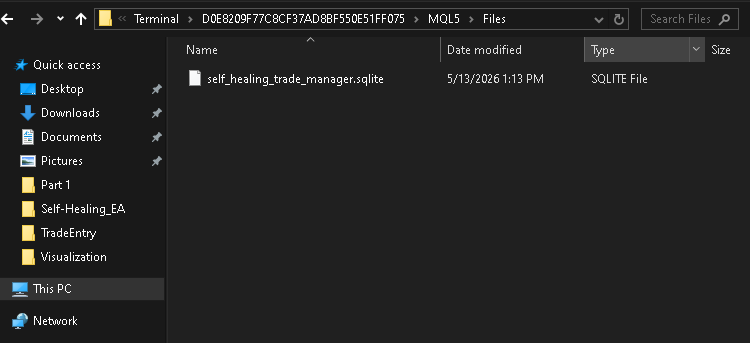
The presence of this file confirms that: the database opened successfully; the persistence layer initialized correctly; and the EA is now capable of storing recovery information permanently between terminal sessions.
At this stage, the database is still mostly empty because the EA has not yet started saving trade-state information. However, the persistence infrastructure itself is now fully operational and ready for the recovery logic that we will implement later.
Saving Recoverable Trade State into SQLite
At this stage, the Expert Advisor can already: open the SQLite database; create the trade_states table; and maintain a persistent storage layer. However, the recovery system still cannot preserve operational continuity until the EA becomes capable of saving runtime trade information into SQLite. The purpose of persistence is not simply to create a database file. The purpose is to continuously store the internal operational state of the Expert Advisor so that the information can later be reconstructed after a restart.
To accomplish this, we now create the function responsible for saving the current runtime trade state into the SQLite database. Add the following function below CloseDatabase:
//+------------------------------------------------------------------+
//| Saves or updates the active trade state in the SQLite database.  |
//+------------------------------------------------------------------+
bool SaveTradeState(const STradeState &state)
  {
//--- validate database connection
   if(g_database == INVALID_HANDLE)
     {
      //--- database connection unavailable
      Print("Cannot save trade state because the database is not open.");

      return(false);
     }

//--- prepare SQL query used to save the trade state
   string query = StringFormat(
                     "INSERT OR REPLACE INTO trade_states "
                     "(ticket,symbol,magic,direction,volume,entry_price,virtual_sl,virtual_tp,"
                     "last_trail_price,breakeven_activated,trailing_activated,open_time,"
                     "last_heartbeat,last_update_time,state) "
                     "VALUES (%I64u,'%s',%I64d,%d,%.8f,%.8f,%.8f,%.8f,%.8f,%d,%d,%I64d,%I64d,%I64d,'ACTIVE');",
                     state.ticket,
                     state.symbol,
                     state.magic,
                     state.direction,
                     state.volume,
                     state.entryPrice,
                     state.virtualSL,
                     state.virtualTP,
                     state.lastTrailPrice,
                     state.breakevenActivated ? 1 : 0,
                     state.trailingActivated ? 1 : 0,
                     (long)state.openTime,
                     (long)state.lastHeartbeat,
                     (long)state.lastUpdateTime
                  );

//--- execute SQL save query
   if(!DatabaseExecute(g_database, query))
     {
      //--- print SQL execution error
      PrintFormat("Failed to save trade state. Error: %d", GetLastError());

      return(false);
     }

//--- trade state saved successfully
   return(true);
  }
The SaveTradeState function is responsible for transferring the current runtime recovery state from memory into SQLite persistent storage. The function accepts:
const STradeState &state which represents the active runtime trade-state structure currently loaded in memory. Before attempting to save data, the function first validates the database connection:
if(g_database == INVALID_HANDLE)
This prevents the EA from attempting database operations before SQLite has been initialized successfully. Next, the function prepares the SQL query responsible for storing the trade-state information. The SQL statement uses:
INSERT OR REPLACE
This is important because the same trade state may be updated many times during runtime. If the trade ticket does not already exist inside the table, SQLite creates a new row. If the ticket already exists, SQLite replaces the previous row using the updated recovery information. This allows the Expert Advisor to continuously maintain the latest operational trade state inside persistent storage instead of creating duplicate records for the same position.
The query stores all major recovery-sensitive information, including: trade ticket; symbol; magic number; direction; volume; entry price; virtual stop-loss; virtual take-profit; trailing progression; breakeven state; heartbeat timestamps; and operational state status.
Notice that the final column stores:
ACTIVE
This indicates that the saved trade-state record still represents an actively managed position. Later in the series, closed trades will be marked differently so the recovery system does not accidentally restore inactive positions during restart. Finally, the function executes the SQL query using DatabaseExecute. If the query executes successfully, the function returns true. Otherwise, the SQLite error is printed, and the function returns false.
At this stage, the Expert Advisor can now persist operational runtime state into SQLite storage. This becomes the foundation upon which the recovery system will later reconstruct trade-state information after restart.
Loading Recoverable Trade State from SQLite
At this stage, the Expert Advisor can already: create the SQLite database; initialize the trade_states table; and maintain a persistent storage layer. However, persistence alone is not enough. A self-healing Expert Advisor must also be capable of restoring previously saved information back into runtime memory after a restart. This is the core idea behind recovery.
When the terminal shuts down, all runtime variables disappear from memory. After a restart, the EA must rebuild its operational state using the information previously stored inside SQLite. To accomplish this, we now create two important recovery functions:
- TradeStateExists
- LoadTradeState
The TradeStateExists function checks whether a saved trade-state record already exists inside the database for a specific ticket. The LoadTradeState function restores the saved SQLite information back into the STradeState runtime structure. We begin with TradeStateExists. Add the following function below SaveTradeState:
//+------------------------------------------------------------------+
//| Checks whether a trade state record exists for a ticket.         |
//+------------------------------------------------------------------+
bool TradeStateExists(const ulong ticket)
  {
//--- validate database connection
   if(g_database == INVALID_HANDLE)
      return(false);
//--- prepare SQL query used to search for the trade ticket
   string query =
      StringFormat("SELECT ticket FROM trade_states WHERE ticket=%I64u;",
                   ticket);
//--- prepare SQLite query request
   int request = DatabasePrepare(g_database, query);
//--- validate SQLite request handle
   if(request == INVALID_HANDLE)
     {
      //--- print SQLite preparation error
      PrintFormat("Failed to prepare trade state existence query. Error: %d",
                  GetLastError());
      return(false);
     }
//--- read SQLite query result
   bool exists = DatabaseRead(request);
//--- release SQLite request resources
   DatabaseFinalize(request);
//--- return query result
   return(exists);
  }
This function performs a lightweight database lookup using the trade ticket.
The SQL query:
SELECT ticket FROM trade_states WHERE ticket=...
This query searches the database for an existing trade-state record with the specified ticket number. The query is prepared using DatabasePrepare, which creates an SQLite request handle used during data retrieval. Next, the function calls DatabaseRead. If SQLite successfully reads a matching row, the function returns true. Otherwise, it returns false.
Finally, the request handle is released using DatabaseFinalize. This is important because SQLite request handles should always be released after use to avoid unnecessary resource accumulation during runtime. Next, we create the function responsible for rebuilding the runtime state from SQLite.
Add the following function directly below TradeStateExists:
//+------------------------------------------------------------------+
//| Loads a saved trade state from the SQLite database by ticket.    |
//+------------------------------------------------------------------+
bool LoadTradeState(const ulong ticket, STradeState &state)
  {
//--- validate database connection
   if(g_database == INVALID_HANDLE)
     {
      //--- database connection unavailable
      Print("Cannot load trade state because the database is not open.");

      return(false);
     }
//--- prepare SQL query used to load the saved trade state
   string query = StringFormat(
                     "SELECT ticket, symbol, magic, direction, volume,entry_price,virtual_sl,virtual_tp,"
                     "last_trail_price,breakeven_activated,trailing_activated,open_time,"
                     "last_heartbeat,last_update_time "
                     "FROM trade_states WHERE ticket=%I64u AND state='ACTIVE';",
                     ticket
                  );
//--- prepare SQLite query request
   int request = DatabasePrepare(g_database, query);
//--- validate SQLite request handle
   if(request == INVALID_HANDLE)
     {
      //--- print SQLite preparation error
      PrintFormat("Failed to prepare load trade state query. Error: %d",
                  GetLastError());
      return(false);
     }
//--- validate query result
   if(!DatabaseRead(request))
     {
      //--- release SQLite request resources
      DatabaseFinalize(request);
      return(false);
     }
//--- temporary database values
   long ticketValue;
   long magicValue;
   long openTimeValue;
   long heartbeatValue;
   long updateTimeValue;
   int  breakevenValue;
   int  trailingValue;
//--- read database column values
   DatabaseColumnLong(request, 0, ticketValue);
   DatabaseColumnText(request, 1, state.symbol);
   DatabaseColumnLong(request, 2, magicValue);
   DatabaseColumnInteger(request, 3, state.direction);
   DatabaseColumnDouble(request, 4, state.volume);
   DatabaseColumnDouble(request, 5, state.entryPrice);
   DatabaseColumnDouble(request, 6, state.virtualSL);
   DatabaseColumnDouble(request, 7, state.virtualTP);
   DatabaseColumnDouble(request, 8, state.lastTrailPrice);
   DatabaseColumnInteger(request, 9, breakevenValue);
   DatabaseColumnInteger(request, 10, trailingValue);
   DatabaseColumnLong(request, 11, openTimeValue);
   DatabaseColumnLong(request, 12, heartbeatValue);
   DatabaseColumnLong(request, 13, updateTimeValue);
//--- rebuild runtime trade state
   state.ticket              = (ulong)ticketValue;
   state.magic               = magicValue;
   state.breakevenActivated  = (breakevenValue > 0);
   state.trailingActivated   = (trailingValue > 0);
   state.openTime            = (datetime)openTimeValue;
   state.lastHeartbeat       = (datetime)heartbeatValue;
   state.lastUpdateTime      = (datetime)updateTimeValue;
//--- release SQLite request resources
   DatabaseFinalize(request);
//--- trade state restored successfully
   return(true);
  }
This function reconstructs the runtime state. First, it retrieves the saved trade-state row from SQLite by ticket.
Only records marked as:
state='ACTIVE'
are loaded. This prevents the EA from recovering trades that were already marked as closed. After preparing the query and validating the result, the function begins reading the database columns individually using functions such as DatabaseColumnLong, DatabaseColumnDouble, DatabaseColumnInteger, and DatabaseColumnText.
Each database value is then copied back into the runtime STradeState structure. This is the moment when persistent storage becomes operational recovery memory. The EA is now capable of reconstructing previously saved trade information back into the runtime state after a restart. At this stage, the persistence layer can now: save runtime state into SQLite; verify whether saved state exists; and restore saved trade-state information back into memory.
This completes the foundational persistence and recovery architecture required before we begin implementing live trade recovery logic in the upcoming sections.
Conclusion
In this part of the series, we embarked on solving one of the most important architectural weaknesses in traditional Expert Advisors: the loss of operational memory after terminal restart or shutdown. To address this problem, we built the persistence foundation of a self-healing recovery system using SQLite inside MetaTrader 5. Throughout the article, we successfully implemented the following components:
- A clean Expert Advisor project foundation.
- Operational state management using ENUM_EA_STATE.
- The centralized STradeState recovery structure.
- Global runtime state management.
- SQLite database integration inside MetaTrader 5.
- Automatic database creation inside the MQL5/Files directory.
- Database lifecycle management.
- Persistent trade-state storage using SaveTradeState.
- Trade-state existence verification using TradeStateExists.
- Runtime state reconstruction using LoadTradeState.
At this stage, the Expert Advisor can now: create its SQLite database automatically; maintain a persistent storage layer; save recoverable trade-state information; and restore previously saved runtime state back into memory. This persistence architecture now forms the foundation upon which the remainder of the recovery system will be built throughout this five-part series.
Before continuing, compare your implementation with the attached source file.
SelfHealingExpert.mq5
Make sure your project: compiles successfully; creates the SQLite database correctly; and matches the persistence behavior demonstrated throughout this article. In the next part of the series, we will begin building the live recovery layer of the system. This includes: managed position detection; virtual stop-loss and take-profit management; startup recovery procedures; and immediate post-restart protection validation.
By the end of the next article, the Expert Advisor will be capable of recovering and continuing management of active trades after a restart using the persistence layer developed in this part.
Project Repository
The project is supported in MQL5 Algo Forge and will continue to evolve throughout this series.
Repository:
Warning: All rights to these materials are reserved by MetaQuotes Ltd. Copying or reprinting of these materials in whole or in part is prohibited.
This article was written by a user of the site and reflects their personal views. MetaQuotes Ltd is not responsible for the accuracy of the information presented, nor for any consequences resulting from the use of the solutions, strategies or recommendations described.

 Detecting and Classifying Fractal Patterns Using Machine Learning
 Joint Recurrence Quantification Analysis (JRQA) in MQL5: Detecting Simultaneous Recurrence in Two Series
 Keeping Memory Across Restarts: EA State Persistence Using Binary Files in MQL5
 Meta-Labeling the Classics (Part 1): Filtering and Sizing RSI Trades

- Free trading apps
- Over 8,000 signals for copying
- Economic news for exploring financial markets
You agree to website policy and terms of use