

Engineering a Self-Healing Expert Advisor in MQL5 (Part 2): Restart-Safe Virtual Trade Protection
 1 778
1 778
 0
0

Introduction
- Detecting managed positions after restart.
- Restoring hidden virtual protection levels from SQLite.
- Validating whether virtual exits were crossed while the Expert Advisor was offline.
- Safely continuing runtime trade management after recovery.
By the end of this article, readers will have a working restart-safe protection system capable of recovering and continuing management of hidden stop-loss and take-profit levels after a terminal restart.
Understanding the Virtual Protection Failure Scenario
In broker-side trade protection, stop-loss and take-profit levels are stored directly on the broker server. Once the position is opened, the protection remains active even if the trading terminal shuts down or the Expert Advisor stops running.
In a virtual protection system, the stop-loss and take-profit levels exist only inside the runtime memory of the Expert Advisor. The EA continuously monitors market prices during execution and manually closes positions whenever the virtual protection conditions are reached.
Under normal runtime conditions, this architecture functions correctly. However, the situation changes immediately once the trading terminal shuts down unexpectedly. Consider the following scenario:
- EA opens a BUY trade.
- Virtual stop-loss stored internally.
- Terminal shuts down.
- Price crosses hidden stop-loss.
- EA restarts. Trade remains open unexpectedly.
This problem occurs because the runtime memory is volatile. Once the terminal closes, the Expert Advisor loses access to its internal protection state and stops monitoring the active position completely.
During this offline period, the market continues moving normally. If price crosses the hidden stop-loss while the Expert Advisor is no longer running, the broker remains unaware because no broker-side stop-loss was ever placed. After a restart, the trade may still remain open even though the intended protection conditions were already violated earlier.
This creates a dangerous mismatch between the actual market situation and the last known runtime state of the Expert Advisor. In Part 1, we solved the persistence problem by storing recoverable trade-state information inside SQLite. However, persistence alone is still not sufficient. After a restart, the Expert Advisor must validate the restored virtual protection levels against the current market price before resuming normal trade management.
Extending the Recovery Architecture for Virtual Trade Protection
In this article, we extend the recovery architecture we built in Part 1. Previously, we used SQLite to build the data persistence foundation required for restart recovery. Thanks to that setup, the Expert Advisor can already save and restore trade states after a terminal shutdown.
This article builds on the Part 1 setup. Complete Part 1 first, because the rest of the series relies on the same code foundation. Now, our focus shifts to restart-safe virtual trade protection. We will start by building the broker-side position detection system used during the recovery process.
Detecting Managed Positions During Recovery
Before restoring virtual protection after a restart, the Expert Advisor must confirm that the managed broker-side position still exists.
This step is critical because restart recovery cannot begin from SQLite alone. The database may contain previously saved trade-state information, but the Expert Advisor must first confirm that the corresponding broker-side position is still active before attempting recovery.
To handle this, the recovery process starts by discovering broker-side positions. Specifically, the Expert Advisor needs to:
- Scan currently open positions.
- Identify positions belonging to the current symbol.
- Filter only the positions managed by the current recovery system.
To accomplish this safely, the EA uses the symbol and magic number as the primary recovery identifiers. The symbol ensures that the recovery logic only targets positions belonging to the current chart instrument, while the magic number ensures that the EA does not accidentally interfere with positions opened manually or by other Expert Advisors.
For simplicity and easier demonstration of the recovery workflow, the architecture developed throughout this series will manage one active position at a time. This allows the restart and recovery logic to remain easier to follow while establishing the core self-healing mechanisms clearly.
Add the following function below LoadTradeState:
//+------------------------------------------------------------------+
//| Finds one open position managed by this Expert Advisor.          |
//+------------------------------------------------------------------+
bool FindManagedPosition(ulong &ticket)
  {
//--- initialize output ticket
   ticket = 0;
//--- scan all currently open positions
   for(int i = PositionsTotal() - 1; i >= 0; i--)
     {
      //--- retrieve broker position ticket
      ulong positionTicket = PositionGetTicket(i);
      //--- skip invalid positions
      if(positionTicket == 0)
         continue;
      //--- retrieve broker position properties
      string positionSymbol = PositionGetString(POSITION_SYMBOL);
      long   positionMagic  = PositionGetInteger(POSITION_MAGIC);
      //--- ignore positions from different symbols
      if(positionSymbol != _Symbol)
         continue;
      //--- ignore positions belonging to other systems
      if(positionMagic != InpMagicNumber)
         continue;
      //--- managed position found successfully
      ticket = positionTicket;

      return(true);
     }
//--- no managed position found
   return(false);
  }
The function begins by initializing the output ticket variable to zero. This guarantees that the recovery system starts from a known state before position discovery begins. Next, the function scans all currently open broker-side positions using PositionsTotal.
For each position, the Expert Advisor retrieves the broker ticket and validates that the position exists correctly before continuing further. The recovery logic then filters positions using two conditions:
- The current chart symbol.
- The configured magic number.
Only positions satisfying both conditions are considered valid recovery candidates. Once a matching position is found, the function stores the broker ticket inside the output variable and immediately returns true.
If no matching position is discovered after scanning all open positions, the function returns false, indicating that no managed recovery position currently exists.
This function now becomes the entry point of the restart recovery process. The recovery architecture can now safely identify broker-side positions before attempting to restore virtual protection from SQLite storage.
Creating Controlled Recovery Test Trades
To develop and test the recovery logic, the Expert Advisor requires a reliable method for generating controlled failure scenarios. Because the current objective is simply to validate this restart-safe architecture rather than manage real trading strategies, we do not need complex entry rules. Instead, we just need a simple mechanism to open controlled positions that we can use to test:
- Virtual stop-loss recovery.
- Virtual take-profit recovery.
- Restart behavior.
- Runtime recovery continuity.
The test trades opened throughout this series intentionally avoid broker-side stop-loss and take-profit levels. This is important because the recovery architecture being developed relies entirely on internally managed virtual protection.
The broker, therefore, remains unaware of the intended stop-loss and take-profit levels. Instead, those protection levels will later be created, stored, restored, and monitored entirely by the Expert Advisor itself.
Before the EA can open these controlled recovery positions safely, it must first become capable of constructing the initial runtime protection state associated with each managed trade. The next section focuses on building that initialization workflow.
Building the Initial Virtual Protection State
Once a managed position is opened, the Expert Advisor must immediately construct the internal recovery state required for future restart recovery. This recovery state serves as the operational snapshot of the managed trade. It contains the information required to:
- Rebuild virtual protection after restart.
- Continue runtime management safely.
- Maintain operational continuity between sessions.
For this reason, the recovery state must be constructed immediately after the position is opened successfully. Add the following function below FindManagedPosition:
//+------------------------------------------------------------------+
//| Builds the initial virtual protection state for an open position.|
//+------------------------------------------------------------------+
void BuildInitialTradeState(const ulong ticket, STradeState &state)
  {
//--- validate broker position existence
   if(!PositionSelectByTicket(ticket))
     {
      //--- broker position unavailable
      PrintFormat("Cannot build trade state. Position not found. Ticket: %I64u", ticket);
      return;
     }
//--- retrieve broker position properties
   state.ticket              = ticket;
   state.symbol              = PositionGetString(POSITION_SYMBOL);
   state.magic               = PositionGetInteger(POSITION_MAGIC);
   state.direction           = (int)PositionGetInteger(POSITION_TYPE);
   state.volume              = PositionGetDouble(POSITION_VOLUME);
   state.entryPrice          = PositionGetDouble(POSITION_PRICE_OPEN);
   state.lastTrailPrice      = state.entryPrice;
   state.breakevenActivated  = false;
   state.trailingActivated   = false;
   state.openTime            = (datetime)PositionGetInteger(POSITION_TIME);
   state.lastHeartbeat       = TimeCurrent();
   state.lastUpdateTime      = TimeCurrent();
//--- construct BUY virtual protection
   if(state.direction == POSITION_TYPE_BUY)
     {
      state.virtualSL = state.entryPrice - (InpVirtualSLPoints * _Point);
      state.virtualTP = state.entryPrice + (InpVirtualTPPoints * _Point);
     }
//--- construct SELL virtual protection
   else if(state.direction == POSITION_TYPE_SELL)
     {
      state.virtualSL = state.entryPrice + (InpVirtualSLPoints * _Point);
      state.virtualTP = state.entryPrice - (InpVirtualTPPoints * _Point);
     }
  }
The function begins by validating that the broker-side position still exists before attempting to construct the recovery state. This prevents the Expert Advisor from initializing runtime recovery information using an invalid or unavailable position.
Once the position is confirmed successfully, the function retrieves the broker-side trade information required by the recovery architecture. This includes the ticket, symbol, trade direction, position volume, entry price, and the original broker open time.
The function then initializes the runtime recovery flags used later throughout the series. At this stage:
- Breakeven recovery is inactive.
- Trailing recovery is inactive.
- The last trailing reference price is initialized using the original trade entry price.
The final section of the function constructs the hidden virtual stop-loss and take-profit levels. For BUY positions, the virtual stop-loss is placed below the entry price while the virtual take-profit is placed above it. For SELL positions, the logic is reversed.
These protection levels are not sent to the broker. They exist entirely inside the runtime recovery state managed internally by the Expert Advisor. At this stage, the Expert Advisor can now construct the initial runtime recovery state required for restart-safe trade management. The next section uses this initialization workflow to begin opening controlled recovery-oriented test trades.
Opening Recovery-Oriented Test Trades
Now that the Expert Advisor can construct the initial recovery state of a managed position, we can begin opening controlled test trades used throughout the remainder of the recovery system development. The objective of this function is not to implement a trading strategy. Its purpose is to create predictable recovery scenarios that can later be used to test:
- Virtual protection recovery.
- Restart validation.
- Runtime management continuity.
Add the following function below BuildInitialTradeState:
//+------------------------------------------------------------------+
//| Opens one test position without broker-side SL or TP levels.     |
//+------------------------------------------------------------------+
bool OpenTestTrade()
  {
//--- validate test trade permissions
   if(!InpAllowTestTrade)
      return(false);
//--- validate EA runtime state
   if(g_eaState != EA_STATE_RUNNING)
      return(false);
//--- prevent multiple managed positions
   ulong existingTicket = 0;
   if(FindManagedPosition(existingTicket))
     {
      //--- managed position already exists
      PrintFormat("Test trade was not opened. Managed position already exists. Ticket: %I64u",
                  existingTicket);
      return(false);
     }
//--- configure Expert Advisor magic number
   g_trade.SetExpertMagicNumber(InpMagicNumber);
   bool result = false;
//--- open BUY test trade
   if(InpTestTradeDirection == TEST_TRADE_BUY)
      result = g_trade.Buy(InpLots,
                           _Symbol,
                           0.0,
                           0.0,
                           0.0,
                           "Self-healing EA test BUY");
//--- open SELL test trade
   else
      result = g_trade.Sell(InpLots,
                            _Symbol,
                            0.0,
                            0.0,
                            0.0,
                            "Self-healing EA test SELL");
//--- validate trade execution result
   if(!result)
     {
      //--- print broker execution failure
      PrintFormat("Failed to open test trade. Retcode: %d",
                  g_trade.ResultRetcode());
      return(false);
     }
//--- print successful trade execution
   PrintFormat("Test trade opened successfully. Order ticket: %I64u",
               g_trade.ResultOrder());
   ulong positionTicket = 0;
//--- locate managed broker position
   if(FindManagedPosition(positionTicket))
     {
      //--- construct runtime recovery state
      BuildInitialTradeState(positionTicket, g_tradeState);
      //--- activate runtime recovery tracking
      g_hasTradeState = true;
      //--- save initial recovery state into SQLite
      if(!SaveTradeState(g_tradeState))
         Print("Test trade was opened, but its initial state could not be saved.");
      else
         PrintFormat("Initial trade state saved successfully. Position ticket: %I64u",
                     positionTicket);
     }
   return(true);
  }
The function begins by validating whether controlled test trading is currently allowed. This provides safer development control during recovery testing.
The Expert Advisor then verifies that the system is already running normally before attempting to open new managed positions.
Next, the recovery architecture checks whether another managed position already exists. Since the project uses a single-position recovery workflow, the EA prevents additional managed trades from being opened simultaneously.
Once validation completes successfully, the Expert Advisor configures the recovery magic number and opens either a BUY or SELL position depending on the selected test configuration.
Notice that both trades are opened with stop-loss and take-profit set to
0.0 and 0.0,
respectively.
This is intentional. The recovery architecture being developed throughout this series uses entirely virtual protection. The broker, therefore, receives no visible stop-loss or take-profit levels.
After the trade opens successfully, the Expert Advisor immediately:
- Locates the broker-side position.
- Constructs the runtime recovery state.
- Activates runtime tracking.
- Stores the initial recovery state inside SQLite.
At this stage, the Expert Advisor can now generate controlled recovery-oriented test trades capable of surviving restart recovery workflows.
Recovering Trade State After Restart
At this point, the Expert Advisor can open a controlled test trade, build its initial virtual protection state, and save that state into SQLite. The next step is to make the EA capable of restoring that saved state after a restart.
Recovery begins by checking whether a managed broker-side position still exists. If no managed position is found, there is nothing to recover, and the EA can continue normally. If a managed position exists, the EA attempts to load its saved state from SQLite using the position ticket.
Add the following function below OpenTestTrade:
//+------------------------------------------------------------------+
//| Recovers the active trade state from SQLite after EA restart.    |
//+------------------------------------------------------------------+
bool RecoverTradeState()
  {
//--- initialize managed position ticket
   ulong ticket = 0;
//--- check whether a managed broker position exists
   if(!FindManagedPosition(ticket))
     {
      //--- no active position requires recovery
      Print("Recovery completed. No managed open position was found.");
      g_hasTradeState = false;
      return(true);
     }
//--- load saved trade state for the managed position
   if(!LoadTradeState(ticket, g_tradeState))
     {
      //--- saved state is missing while broker position exists
      PrintFormat("Recovery failed. Managed position exists, but no active saved state was found. Ticket: %I64u",
                  ticket);
      g_hasTradeState = false;
      g_eaState       = EA_STATE_SAFE_MODE;
      return(false);
     }
//--- activate recovered runtime trade state
   g_hasTradeState = true;
//--- print restored protection levels
   PrintFormat("Recovery completed. Trade state restored. Ticket: %I64u",
               g_tradeState.ticket);
   PrintFormat("Recovered virtual SL: %.5f | Recovered virtual TP: %.5f",
               g_tradeState.virtualSL,
               g_tradeState.virtualTP);
//--- recovery completed successfully
   return(true);
  }
The function has three possible outcomes. If no managed position exists, recovery succeeds because there is nothing to restore. If a managed position exists and its saved state is found in SQLite, the EA restores that information into g_tradeState and sets g_hasTradeState to true. If a managed position exists but no saved state is found, the EA enters EA_STATE_SAFE_MODE because it should not manage a trade whose virtual protection state is missing.
Now update OnInit so recovery happens during startup:
//+------------------------------------------------------------------+
//| Expert initialization function                                   |
//+------------------------------------------------------------------+
int OnInit()
  {
//--- set initial EA state
   g_eaState = EA_STATE_STARTING;
//--- create a connection to the SQLite database
   if(!OpenDatabase())
     {
      g_eaState = EA_STATE_ERROR;
      return(INIT_FAILED);
     }
//--- create the database table or make sure that it exists
   if(!EnsureDatabaseTables())
     {
      CloseDatabase();
      g_eaState = EA_STATE_ERROR;
      return(INIT_FAILED);
     }
//--- create timer
   EventSetTimer(InpTimerSeconds);
//--- enter recovery mode
   g_eaState = EA_STATE_RECOVERING;
//--- restore saved trade state if a managed position exists
   if(!RecoverTradeState())
     {
      Print("The EA entered Safe Mode because recovery was incomplete.");
      return(INIT_SUCCEEDED);
     }
//--- enter normal runtime state
   g_eaState = EA_STATE_RUNNING;
//--- open a test trade only when no recovered trade exists
   if(InpOpenTestTradeOnStartup && !g_hasTradeState)
      OpenTestTrade();
   return(INIT_SUCCEEDED);
  }
With this startup flow, the EA no longer begins blindly after a restart. It first opens the database, prepares the table, enters recovery mode, checks for an existing managed position, and restores the saved virtual protection state when possible.
At this point, the EA can reconstruct its saved trade state after a restart. The next step is to validate whether the restored virtual stop-loss or take-profit was already crossed while the EA was offline.
Closing Managed Positions Safely
Before the Expert Advisor can enforce virtual stop-loss and take-profit levels, it needs a controlled way to close the managed position from inside the recovery system.
This is necessary because virtual protection is not handled by the broker. When the price reaches a virtual stop-loss or virtual take-profit level, the EA itself must close the position. After closing it, the EA must also update SQLite so the saved record is no longer treated as an active recovery candidate.
We begin by adding the function that updates the saved database record after a managed trade has been closed. Add the following function below RecoverTradeState:
//+------------------------------------------------------------------+
//| Marks a saved trade state as closed in the SQLite database.      |
//+------------------------------------------------------------------+
bool MarkTradeClosed(const ulong ticket)
  {
//--- validate database connection
   if(g_database == INVALID_HANDLE)
      return(false);
//--- prepare SQL query used to close the saved trade state
   string query = StringFormat(
                     "UPDATE trade_states SET state='CLOSED',last_update_time=%I64d "
                     "WHERE ticket=%I64u;",
                     (long)TimeCurrent(),
                     ticket
                  );
//--- execute SQL update query
   if(!DatabaseExecute(g_database, query))
     {
      //--- print SQL execution error
      PrintFormat("Failed to mark trade as closed. Error: %d", GetLastError());
      return(false);
     }
//--- trade state marked as closed successfully
   return(true);
  }
MarkTradeClosed does not close the broker position. Its only responsibility is to update the saved SQLite record after the position is no longer active. The function changes the database record from ACTIVE to CLOSED.
This distinction is important because recovery logic should only restore active trade states. If completed trades remain marked as active, the EA may later attempt to recover old positions that should no longer be managed.
Next, we add the function that actually closes the managed broker position. Add the following function below MarkTradeClosed:
//+------------------------------------------------------------------+
//| Closes the active managed position and records the close reason. |
//+------------------------------------------------------------------+
bool CloseManagedPosition(const string reason)
  {
//--- validate active runtime trade state
   if(!g_hasTradeState)
      return(false);
//--- validate broker position existence
   if(!PositionSelectByTicket(g_tradeState.ticket))
     {
      //--- broker position unavailable
      PrintFormat("Cannot close managed position. Position not found. Ticket: %I64u",
                  g_tradeState.ticket);
      return(false);
     }
//--- close broker position
   if(!g_trade.PositionClose(g_tradeState.ticket))
     {
      //--- print broker close failure
      PrintFormat("Failed to close managed position. Reason: %s. Retcode: %d",
                  reason,
                  g_trade.ResultRetcode());

      return(false);
     }
//--- print successful broker close
   PrintFormat("Managed position closed. Ticket: %I64u. Reason: %s",
               g_tradeState.ticket,
               reason);
//--- mark saved recovery state as closed
   MarkTradeClosed(g_tradeState.ticket);
//--- deactivate runtime trade tracking
   g_hasTradeState = false;
//--- managed position closed successfully
   return(true);
  }
CloseManagedPosition is the controlled exit function used by virtual protection. The function first checks whether a valid runtime trade state exists. If the EA does not currently have a loaded trade state, it has no position to close through the recovery system.
It then confirms that the broker-side position still exists using the saved ticket stored in g_tradeState. This prevents the EA from sending a close request for a position that is no longer available.
If the position exists, the EA closes it using CTrade:
g_trade.PositionClose(g_tradeState.ticket)
After the broker position is closed successfully, the function calls:
MarkTradeClosed(g_tradeState.ticket)
This updates SQLite so the saved trade state is no longer treated as active.
Finally, the EA sets:
g_hasTradeState = false; This tells the runtime system that there is no longer an active managed trade loaded in memory.
At this point, the Expert Advisor can now close managed positions safely and keep the persistent recovery record consistent with the broker-side trade status. This prepares the system for the next step, where virtual stop-loss and take-profit levels will trigger controlled closures through this function.
Validating Virtual Exits Immediately After Recovery
After restoring a saved trade state from SQLite, the Expert Advisor should check the current market price before resuming trade management. This step is important because the market may have moved while the EA was offline. If the price crossed the virtual stop-loss or virtual take-profit during that period, the recovered trade state is already outdated relative to the current market condition. The EA must therefore validate the recovered virtual protection levels immediately after recovery.
Add the following function below CloseManagedPosition:
//+------------------------------------------------------------------+
//| Checks whether the active position has crossed virtual exits.    |
//+------------------------------------------------------------------+
void CheckVirtualExits()
  {
//--- validate active runtime trade state
   if(!g_hasTradeState)
      return;
//--- allow checks only during recovery or normal runtime
   if(g_eaState != EA_STATE_RUNNING && g_eaState != EA_STATE_RECOVERING)
      return;
//--- validate broker position existence
   if(!PositionSelectByTicket(g_tradeState.ticket))
     {
      //--- broker position unavailable
      PrintFormat("Virtual exit check skipped. Position not found. Ticket: %I64u",
                  g_tradeState.ticket);
      g_hasTradeState = false;
      return;
     }
//--- retrieve current market prices
   double bid = SymbolInfoDouble(g_tradeState.symbol, SYMBOL_BID);
   double ask = SymbolInfoDouble(g_tradeState.symbol, SYMBOL_ASK);
//--- validate BUY virtual exits
   if(g_tradeState.direction == POSITION_TYPE_BUY)
     {
      if(bid <= g_tradeState.virtualSL)
        {
         CloseManagedPosition("Recovered virtual stop loss crossed");
         return;
        }
      if(bid >= g_tradeState.virtualTP)
        {
         CloseManagedPosition("Recovered virtual take profit crossed");
         return;
        }
     }
//--- validate SELL virtual exits
   if(g_tradeState.direction == POSITION_TYPE_SELL)
     {
      if(ask >= g_tradeState.virtualSL)
        {
         CloseManagedPosition("Recovered virtual stop loss crossed");
         return;
        }
      if(ask <= g_tradeState.virtualTP)
        {
         CloseManagedPosition("Recovered virtual take profit crossed");
         return;
        }
     }
  }
The function begins by confirming that a valid runtime trade state exists. If no trade state is currently loaded, there is nothing to validate.
Next, the function checks whether the EA is either running normally or currently recovering. This prevents virtual exit validation from executing during unrelated operational states.
The function then verifies that the broker-side position still exists. If the position cannot be selected, the EA clears the active runtime tracking flag and exits the check.
After those safety checks, the EA retrieves the current market prices using the recovered symbol.
For BUY positions, the virtual stop-loss is checked against the Bid price because BUY positions are closed at Bid. If Bid is less than or equal to the saved virtual stop-loss, the EA closes the position immediately. If Bid is greater than or equal to the saved virtual take-profit, the EA also closes the position immediately.
For SELL positions, the logic uses the Ask price because SELL positions are closed at Ask. If Ask is greater than or equal to the virtual stop-loss, the EA closes the position. If Ask is less than or equal to the virtual take-profit, the EA closes the position.
Now update OnInit so this validation runs immediately after recovery and before any new test trade is opened:
//+------------------------------------------------------------------+
//| Expert initialization function                                   |
//+------------------------------------------------------------------+
int OnInit()
  {
//--- set initial EA state
   g_eaState = EA_STATE_STARTING;

//--- create a connection to the SQLite database
   if(!OpenDatabase())
     {
      g_eaState = EA_STATE_ERROR;
      return(INIT_FAILED);
     }

//--- create the database table or make sure that it exists
   if(!EnsureDatabaseTables())
     {
      CloseDatabase();
      g_eaState = EA_STATE_ERROR;
      return(INIT_FAILED);
     }

//--- create timer
   EventSetTimer(InpTimerSeconds);

//--- enter recovery mode
   g_eaState = EA_STATE_RECOVERING;

//--- restore saved trade state if a managed position exists
   if(!RecoverTradeState())
     {
      Print("The EA entered Safe Mode because recovery was incomplete.");
      return(INIT_SUCCEEDED);
     }

//--- enter normal runtime state
   g_eaState = EA_STATE_RUNNING;

//--- remember whether recovery restored an active trade state
   bool recoveredTradeExists = g_hasTradeState;

//--- validate recovered virtual exits immediately
   CheckVirtualExits();

//--- open a test trade only when no recovered trade exists
   if(InpOpenTestTradeOnStartup && !g_hasTradeState && !recoveredTradeExists)
      OpenTestTrade();

   return(INIT_SUCCEEDED);
  }
The added recoveredTradeExists flag is important. It remembers whether a trade was recovered before virtual exit validation took place.
This prevents the EA from opening a new test trade in the same startup cycle if startup validation closes the recovered trade. Without this flag, the EA could recover a trade, close it because the virtual stop-loss or take-profit had already been crossed, and then immediately open a new test trade in the same startup cycle.
At this stage, the Expert Advisor can now restore hidden virtual protection after a restart and immediately check whether the current market price has already crossed the recovered stop-loss or take-profit levels. This closes the most dangerous restart gap in virtual trade management.
Building the Runtime Virtual Protection Loop
At this point, the Expert Advisor can restore a saved trade state after a restart and immediately validate whether the recovered virtual stop-loss or take-profit has already been crossed. That protects the trade during startup recovery.
However, virtual protection must also be monitored continuously while the EA is running. For that reason, we need to build a runtime management loop. The EA must occasionally confirm that the managed position still exists, check whether the current price has reached any virtual exit level, and keep the saved trade state updated in SQLite.
Add the following function below CheckVirtualExits:
//+------------------------------------------------------------------+
//| Manages the active trade using the saved virtual protection state.|
//+------------------------------------------------------------------+
void ManageActiveTrade()
  {
//--- allow management only during normal runtime
   if(g_eaState != EA_STATE_RUNNING)
      return;
//--- validate active runtime trade state
   if(!g_hasTradeState)
      return;
//--- validate broker position existence
   if(!PositionSelectByTicket(g_tradeState.ticket))
     {
      //--- broker position no longer exists
      PrintFormat("Managed position no longer exists. Ticket: %I64u",
                  g_tradeState.ticket);
      MarkTradeClosed(g_tradeState.ticket);
      g_hasTradeState = false;
      return;
     }
//--- check virtual stop-loss and take-profit levels
   CheckVirtualExits();
//--- stop if virtual exit closed the position
   if(!g_hasTradeState)
      return;
//--- update latest runtime modification time
   g_tradeState.lastUpdateTime = TimeCurrent();
//--- save latest active trade state
   SaveTradeState(g_tradeState);
  }
The function starts by checking whether the EA is in normal runtime mode. If the EA is not running normally, trade management is skipped.
It then checks whether a valid trade state is currently loaded in memory. This prevents the EA from trying to manage a trade when no recovered or initialized state exists.
Next, the function verifies that the broker-side position still exists. If the position is no longer available, the saved database record is marked as closed and runtime tracking is disabled.
After these safety checks, the function calls:
CheckVirtualExits();
This allows the runtime loop to continuously monitor the hidden virtual stop-loss and take-profit levels. If CheckVirtualExits closes the trade, g_hasTradeState becomes false, and the function exits immediately.
If the position remains active, the EA updates lastUpdateTime and saves the latest trade state back into SQLite. This keeps the persistent record aligned with the current runtime state.
Now update the event handlers so the runtime protection loop executes automatically. Update OnTick as follows:
//+------------------------------------------------------------------+
//| Expert tick function                                             |
//+------------------------------------------------------------------+
void OnTick()
  {
//--- manage active virtual protection on every price tick
   ManageActiveTrade();
  }
Update OnTimer as follows:
//+------------------------------------------------------------------+
//| Timer function                                                   |
//+------------------------------------------------------------------+
void OnTimer()
  {
//--- manage active virtual protection at fixed intervals
   ManageActiveTrade();
  }
With this change, virtual protection is monitored from both market ticks and timer events. OnTick allows the EA to react to normal price updates, while OnTimer gives the system an additional periodic management path.
At this stage, the Expert Advisor can now manage hidden virtual stop-loss and take-profit levels during normal runtime. In a later part of the series, this timer-driven flow will be extended further with heartbeat tracking, reconciliation checks, and Safe Mode recovery.
Testing Restart-Safe Virtual Protection
At this stage, the recovery architecture is now capable of:
- Opening controlled virtual-protection trades.
- Storing the runtime recovery state inside SQLite.
- Restoring that state after a restart.
- Validating recovered virtual exits.
- Continuing runtime trade management safely.
The next step is to test the complete recovery workflow practically. Begin by compiling the Expert Advisor and attaching it to a chart inside MetaTrader 5. If automated trading is enabled and test-trade opening is allowed through the input settings, the EA should automatically open a controlled recovery test trade.
Once the trade opens successfully, the Expert Advisor immediately:
- Constructs the initial virtual protection state.
- Activates runtime management.
- Stores the recovery information inside SQLite.
To verify that the persistence layer is functioning correctly, open the MetaTrader terminal data directory by selecting:
File → Open Data Folder
Next, navigate to:
MQL5 → Files
Inside this directory, the SQLite database file should now exist:
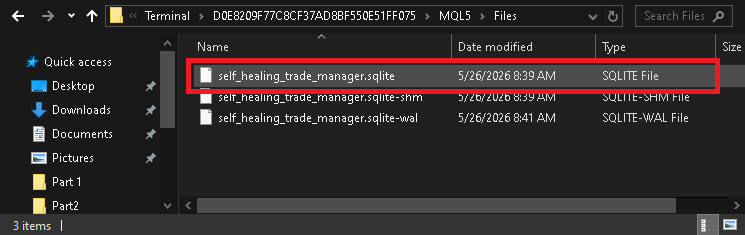
At this point, the database file confirms that the persistence layer has already been initialized successfully by the Expert Advisor. To inspect the saved recovery data directly, open the SQLite database using a SQLite browser application such as DB Browser for SQLite.
After opening the database file, inspect the trade_states table.

The saved record should contain the active trade ticket, symbol, trade direction, virtual stop-loss, virtual take-profit, and the current recovery state marked as ACTIVE. This confirms that the Expert Advisor is successfully storing the managed runtime protection state persistently instead of relying entirely on temporary runtime memory.
Next, test the restart recovery workflow itself. Close the MetaTrader terminal completely while the managed trade remains open. During this period, the broker-side position should remain active because the stop-loss and take-profit levels are being managed internally by the Expert Advisor rather than by the broker.
Reopen the terminal and attach the Expert Advisor to the same chart again. During startup, the EA should:
- Detect the managed broker-side position.
- Restore the previously saved runtime state from SQLite.
- Recover the virtual protection levels.
- Validate the current market price.
- Continue runtime management automatically.
Finally, the restart-safe validation logic can also be tested by intentionally allowing the price to cross the virtual stop-loss or take-profit while the terminal remains closed. In this scenario, after a restart, the Expert Advisor should immediately:
- Restore the saved trade state.
- Detect that the virtual protection level was already crossed while offline.
- Close the managed position automatically.
- Update the SQLite record from ACTIVE to CLOSED.
This confirms that the recovery system can safely continue hidden virtual trade protection even after terminal restart or temporary offline periods.
Conclusion
At this stage, the Expert Advisor is no longer dependent only on temporary runtime memory. By storing virtual stop-loss and take-profit data in SQLite, it can restore managed positions after a restart and continue protecting them automatically.
This makes the virtual protection system restart-safe. If the terminal, VPS, or platform is interrupted, the EA can reload the saved trade state, check whether protection levels were reached while it was offline, and close the position if necessary.
Before moving on, compare your implementation with the attached SelfHealingExpertPart2.mq5 source file to make sure the recovery and runtime protection logic work correctly together.
In the next part, we will extend this architecture with persistent breakeven management and restart-aware trailing stop logic, allowing the EA to restore not only fixed virtual protection levels, but also more dynamic trade-management behavior.
Warning: All rights to these materials are reserved by MetaQuotes Ltd. Copying or reprinting of these materials in whole or in part is prohibited.
This article was written by a user of the site and reflects their personal views. MetaQuotes Ltd is not responsible for the accuracy of the information presented, nor for any consequences resulting from the use of the solutions, strategies or recommendations described.

 Implementing a Fluent Interface Builder Pattern for MQL5 Order Construction
 Building a Type-Safe Event Bus in MQL5: Decoupling EA Components Without Global Variables
 MQL5 Wizard Techniques you should know (Part 95): Using Disjoint Set Union and Deep Belief Network in a Custom Signal Class
 Extremal Optimization (EO)

- Free trading apps
- Over 8,000 signals for copying
- Economic news for exploring financial markets
You agree to website policy and terms of use