

Keeping Memory Across Restarts: EA State Persistence Using Binary Files in MQL5
 1 346
1 346
 0
0

Introduction
Maintaining state continuity across terminal restarts is critical for Expert Advisors that track multi-trade metrics. Examples include daily frequency caps and position-sizing progressions. Because standard MQL5 variables reside strictly in volatile memory, routine terminal restarts reset the EA's internal counters to their default values. This introduces execution vulnerabilities where an EA may bypass its risk parameters or miscalculate lot sizes upon initialization. The standard workaround of utilizing terminal Global Variables is structurally inadequate for complex logic. These variables are limited to storing individual double values, lack data structure hierarchy, and are easily erased during terminal reinstallation or directory maintenance.
This article presents a framework for state serialization using native MQL5 binary file operations. It stores the EA's runtime state in a single struct, writes it on key events, and reloads it on initialization. The resulting include file, PersistenceManager.mqh, provides a self-contained, low-overhead mechanism that ensures an EA preserves its operational state across restarts, platform updates, and profile changes without relying on external databases or fragile terminal configurations.
Section 1: What an EA Needs to Remember
State vs. Position Data
There is an important distinction between position data and EA state. Position data, which includes open trades, ticket numbers, entry prices, and stop loss levels, is already stored by the broker's server and is always available to the EA through the standard position and history functions. That data does not need to be persisted locally because it is already stored by your broker.
The EA state is different. It refers to the internal logic variables the EA maintains in memory between ticks: counters, flags, multipliers, and bookkeeping values that the EA generates itself and that live nowhere but in the running process. When that process stops, the state is gone. None of it is stored by the broker or anywhere else MetaTrader can access. This is what PersistenceManager.mqh is designed to save.
Common State Variables Worth Persisting
The specific variables that need to be saved depend on the EA's logic, but certain patterns come up repeatedly across most strategies that need persistence. The list below covers the most common ones:
- Daily trade counter: shows how many trades have been opened today. Needs to reset at the start of each new trading day, but must survive intraday restarts.
- Consecutive win and loss counters: used by lot-scaling, martingale, anti-martingale, and streak-based strategies.
- Current lot size multiplier: the active position sizing factor derived from the streak or risk model.
- Last signal state: the most recent signal direction the EA acted on, used to prevent double entry on the same signal after a restart.
- Partial close flag: whether the EA has already taken a partial profit on the current open trade, preventing it from doing so again after a restart.
- Session high-watermark equity: this represents the highest equity reached in the current trading session. It is used for calculating trailing drawdown limits.
- Last processed bar time: which bar the EA last acted on, preventing it from re-triggering entry logic on the same bar after a restart.
Not all of these need to be in every EA. The point is that the struct design is flexible. Only include the fields that the specific strategy actually uses, and add new ones as the logic evolves. The binary file approach handles arbitrary struct layouts without any format changes to the read/write code.
Why GlobalVariables Fall Short
MQL5 global terminal variables, accessed through GlobalVariableSet() and GlobalVariableGet(), are often suggested as a persistence solution. They do survive terminal restarts, they are easy to use, and for a single double value they work fine. The problem emerges when a strategy needs to persist a collection of related values that represent a coherent state.
Unlike modern languages that use "objects" to group data, MQL5 Global Variables exist in a single, flat namespace. This means every EA on your terminal shares the same storage area. If two different EAs use the same variable name like Total_Trades, they will overwrite each other’s data. This name collision can cause your strategy to malfunction because it is reading data meant for a completely different program. To avoid this, developers are forced to use long, unique prefixes for every variable, which makes the code harder to manage.
Table 1 below highlights a feature comparison of GlobalVariable vs. binary file persistence:
| Feature | GlobalVariable | Binary File (FileWriteStruct) |
|---|---|---|
| Survives terminal restarts | Yes (stored in terminal) | Yes (stored on disk) |
| Survives terminal reinstall | No — wiped on clean install | Yes — file persists on disk |
| Readable outside MetaTrader 5 | No | Yes — any hex editor or script |
| Shared across terminals | Yes, within same machine | Yes — FILE_COMMON flag |
| Version / format control | None — value only | Yes — version field in struct |
| Stores complex structs | No — double only | Yes — any fixed-size struct |
| Can be inspected or backed up | Only via MetaTrader 5 terminal UI | Yes — standard file copy |
| Risk of name collision | High — shared namespace | Low — filename includes EA + symbol |
More practically, global variables are erased when the terminal is reinstalled or migrated to a different machine. If a trader moves between a desktop and a VPS, or reinstalls MetaTrader 5 after a system issue, the EA state can be wiped without warning. A file written to disk survives all of those events because it is a file that can be copied, backed up, and moved like any other file on your computer.
Section 2: MQL5 Binary File Functions
FILE_BIN Mode and Struct Serialization
MQL5's file system supports three modes: CSV for comma-separated text, TXT for plain text, and BIN for raw binary. The binary mode is what makes struct persistence clean. When you write a struct to a FILE_BIN file using FileWriteStruct(), MQL5 copies the exact bytes of the struct into the file, with no formatting, no parsing, and no conversion. Reading it back with FileReadStruct() copies those same bytes back into a struct variable of the same type. The operation is fast, lossless, and works for any struct containing only fixed-size members.
The key constraint is that the struct must contain only simple data types: integers, doubles, booleans, datetime, enums, and fixed-length char arrays. Dynamic arrays, strings, and pointers are not supported because their in-memory representations include pointer addresses that become meaningless when the process restarts. Keep the state struct to value types and it will always serialize and deserialize cleanly.
The Core File Functions
The MQL5 file management cycle relies on five core functions to handle verification, data transfer, and file clean-up:
- FileOpen(): Opens an existing file or creates a new one, returning a unique file handle.
- FileWriteStruct(): Writes the contents of a structure to the opened file.
- FileReadStruct(): Reads structured data back from the file.
- FileClose(): Closes the file handle and flushes any remaining pending writes to the disk.
- FileIsExist(): Checks if a specified file exists before trying to read it, preventing errors caused by attempting to open non-existent files.
//--- Open file for writing (creates if not present, overwrites if it exists)
int writeHandle = FileOpen("MyState.bin", FILE_WRITE | FILE_BIN | FILE_COMMON);

//--- Open file for reading
int readHandle = FileOpen("MyState.bin", FILE_READ | FILE_BIN | FILE_COMMON);

//--- Write a structure to disk (returns bytes written; should equal sizeof(struct))
uint bytesWritten = FileWriteStruct(writeHandle, myStateStruct);

//--- Read a structure from disk (returns bytes read)
uint bytesRead = FileReadStruct(readHandle, myStateStruct);

//--- Close file handles after operation
FileClose(writeHandle);

//--- Check if file exists prior to structural reads
bool exists = FileIsExist("MyState.bin", FILE_COMMON);
//+------------------------------------------------------------------+
By default, MQL5 file operations work within the terminal's local data folder, which is specific to that terminal installation. FILE_COMMON points to the shared common folder at MetaQuotes/Terminal/Common/Files, which is accessible from any MetaTrader 5 terminal installed on the same machine. For most single-machine setups, either works fine. FILE_COMMON is the safer default because it remains accessible if the trader switches between different brokers' terminals.
Versioning the State File
One practical problem arises when an EA is updated and the state struct gains new fields or changes existing ones. If the file on disk was written by an older version of the struct and the EA tries to read it into a newer struct, the bytes will be misaligned and the values will be garbage. This is silent, no error is shown, the EA just loads nonsense.
To fix this, add a version field at the start of the struct. Every time the struct layout changes, the version number increments. On load, the EA reads the version field first and compares it to the expected version. If they match, the read proceeds. If they do not, the file is treated as stale, deleted, and the EA starts from default values. This is a single integer check and it costs nothing.
//+------------------------------------------------------------------+
//| Version tracking definition for serialization safety             |
//| Note: Increment STATE_VERSION whenever the struct layout changes |
//+------------------------------------------------------------------+
#define STATE_VERSION
                1

//+------------------------------------------------------------------+
//| Structure storing EA persistent runtime state                    |
//| Note: The version field must remain the FIRST member of struct   |
//+------------------------------------------------------------------+
struct EAState
  {
   int               version;          // Struct version validation check
   datetime          lastSaveTime;     // Timestamp of last serialization
   datetime          lastBarTime;      // Last active operational bar time
   int               dailyTradeCount;  // Cumulative daily trade count
   int               lossStreak;       // Active consecutive loss sequence
   int               winStreak;        // Active consecutive win sequence
   double            currentLotMult;   // Volume scaling factor tracking
   double            sessionHighEq;    // Balance apex marker for reference
   bool              partialClosed;    // Position slice distribution flat
   int               lastSignal;       // Active trade gate signal mapping
   char              reserved[64];     // Padded bytes for future schema
  };
//+------------------------------------------------------------------+
The reserved[64] field adds 64 bytes of padding for future fields without changing the struct size. Crucially, the entire struct must be zero-initialized using ZeroMemory() before writing to disk. This ensures the reserved bytes are cleanly empty. When new variables are later carved out of this reserved space, they will safely default to zero when reading older state files, maintaining seamless backward compatibility. When the struct eventually grows beyond what the reserved space can absorb, you simply update the STATE_VERSION and drop the old file structure.
Section 3: The PersistenceManager Include File
Design Decisions
The include file is built around two functions: SaveState() and LoadState(). Both are template-like in concept and operate on the EAState struct defined by the developer. The file is named automatically from the EA name and symbol, so the same include file works across any EA without naming conflicts.
SaveState() opens the file, writes the struct, and closes the file. It sets the version and lastSaveTime fields before writing, so those are always current without the caller having to manage them. LoadState() checks whether the file exists, opens it if so, reads the struct, checks the version, and returns a default struct if anything fails. The caller never needs to handle file errors directly.
The Complete PersistenceManager.mqh
//+------------------------------------------------------------------+
//|                                           PersistenceManager.mqh |
//+------------------------------------------------------------------+
#property strict

#define STATE_VERSION 1

//+------------------------------------------------------------------+
//| Structure storing EA persistent runtime state                    |
//+------------------------------------------------------------------+
struct EAState
  {
   int               version;
   datetime          lastSaveTime;
   datetime          lastBarTime;
   int               dailyTradeCount;
   int               lossStreak;
   int               winStreak;
   double            currentLotMult;
   double            sessionHighEq;
   bool              partialClosed;
   int               lastSignal;
   char              reserved[64];
  };

//+------------------------------------------------------------------+
//| Generates the unique state file path for the specific instance   |
//+------------------------------------------------------------------+
string GetStateFilePath()
  {
   return(MQLInfoString(MQL_PROGRAM_NAME) + "_" + _Symbol + "_state.bin");
  }

//+------------------------------------------------------------------+
//| Returns an EAState structure populated with baseline values      |
//+------------------------------------------------------------------+
EAState DefaultState()
  {
   EAState s;
   ZeroMemory(s);
   s.version         = STATE_VERSION;
   s.lastSaveTime    = 0;
   s.lastBarTime     = 0;
   s.dailyTradeCount = 0;
   s.lossStreak      = 0;
   s.winStreak       = 0;
   s.currentLotMult = 1.0;
   s.sessionHighEq  = AccountInfoDouble(ACCOUNT_EQUITY);
   s.partialClosed  = false;
   s.lastSignal     = 0;
   return(s);
  }

//+------------------------------------------------------------------+
//| Serializes and saves the current EAState to disk                 |
//+------------------------------------------------------------------+
bool SaveState(EAState &state)
  {
   state.version      = STATE_VERSION;
   state.lastSaveTime = TimeCurrent();

   string path   = GetStateFilePath();
   int    handle = FileOpen(path, FILE_WRITE | FILE_BIN | FILE_COMMON);

   if(handle == INVALID_HANDLE)
     {
      Print("PersistenceManager: SaveState failed. Error: ", GetLastError());
      return(false);
     }

   uint written = FileWriteStruct(handle, state);
   FileClose(handle);

   if(written != sizeof(EAState))
     {
      Print("PersistenceManager: SaveState structural mismatch.");
      return(false);
     }
   return(true);
  }

//+------------------------------------------------------------------+
//| Deserializes and loads the historical EAState from disk          |
//+------------------------------------------------------------------+
bool LoadState(EAState &state)
  {
//--- Clear the global memory container completely before filling it
   ZeroMemory(state);
   string path = GetStateFilePath();

   if(!FileIsExist(path, FILE_COMMON))
     {
      Print("PersistenceManager: No state file found. Using defaults.");
      state = DefaultState();
      return(false);
     }

   int handle = FileOpen(path, FILE_READ | FILE_BIN | FILE_COMMON);
   if(handle == INVALID_HANDLE)
     {
      Print("PersistenceManager: LoadState failed. Error: ", GetLastError());
      state = DefaultState();
      return(false);
     }

   EAState loaded;
   ZeroMemory(loaded);
   uint bytesRead = FileReadStruct(handle, loaded);
   FileClose(handle);

   if(loaded.version != STATE_VERSION)
     {
      Print("PersistenceManager: Version mismatch. Resetting to defaults.");
      FileDelete(path, FILE_COMMON);
      state = DefaultState();
      return(false);
     }

   state = loaded;
   PrintFormat("PersistenceManager: State loaded. Last saved Server Time: %s",
               TimeToString(state.lastSaveTime, TIME_DATE | TIME_MINUTES));
   return(true);
  }

//+------------------------------------------------------------------+
//| Permanently purges the stored bin file from disk                 |
//+------------------------------------------------------------------+
void DeleteStateFile()
  {
   string path = GetStateFilePath();
   if(FileIsExist(path, FILE_COMMON))
     {
      FileDelete(path, FILE_COMMON);
      Print("PersistenceManager: State file deleted.");
     }
  }
//+------------------------------------------------------------------+
Section 4: Integration Pattern and Edge Cases
The Four-Line Integration
Adding persistence to an existing EA requires changes in three places: one #include at the top, two lines in OnInit(), and one line in OnDeinit(). Beyond that, SaveState() is called at any point in the EA's logic where state changes, typically after a trade opens, after a trade closes, and after a daily counter resets. The state variable itself is declared globally in the EA file.
//+------------------------------------------------------------------+
//|                                                   EA Integration |
//+------------------------------------------------------------------+
#include <PersistenceManager.mqh>

//--- Global state instance mapping
EAState g_state;

//--- Input parameters
input bool InpResetState = false; // Wipe saved state on initialization

//+------------------------------------------------------------------+
//| Expert initialization function                                   |
//+------------------------------------------------------------------+
int OnInit()
  {
//--- 1. Purge active state tracking if manual reset is requested
   if(InpResetState)
      DeleteStateFile();

//--- 2. Retrieve state parameters from file framework
   LoadState(g_state);

//--- 3. Verify calendar integrity for rolling profile sessions
   MqlDateTime savedDt, todayDt;
   TimeToStruct(g_state.lastSaveTime, savedDt);
   TimeToStruct(TimeCurrent(), todayDt);

   if(savedDt.day != todayDt.day || savedDt.mon != todayDt.mon)
     {
      g_state.dailyTradeCount = 0;
      Print("PersistenceManager: New trading day detected. Daily counter reset.");
     }

   return(INIT_SUCCEEDED);
  }

//+------------------------------------------------------------------+
//| Expert deinitialization function                                 |
//+------------------------------------------------------------------+
void OnDeinit(const int reason)
  {
//--- Commit active profile footprint to stable file cache
   SaveState(g_state);
  }

//+------------------------------------------------------------------+
//| Expert tick function                                             |
//+------------------------------------------------------------------+
void OnTick()
  {
//--- 1. Operational threshold restrictions
   if(g_state.dailyTradeCount >= 3)
      return;

//--- 2. Mathematical volume lot scaling calculation
   double lots = 0.1 * g_state.currentLotMult;
  }
//+------------------------------------------------------------------+
The day-change check in OnInit() is a small but important detail. If the EA restarts on a new trading day, the daily counter in the saved file still reflects yesterday's count. Comparing the save timestamp's calendar day against the current day catches this and resets the counter before the EA starts taking trades. Without this check, a file saved late on Thursday with dailyTradeCount = 3 would block all Friday trades.
Multiple Charts, Same EA
When the same EA runs on multiple charts simultaneously, for example, EURUSD H1 and EURUSD H4, both instances call GetStateFilePath() and both get the same filename because they share the same EA name and symbol. This causes a race condition: the two instances can overwrite each other's state file.
The fix is to include the chart timeframe in the filename. Replace the GetStateFilePath() function in PersistenceManager.mqh with the version below, which appends the period to the filename. Each instance then reads and writes its own separate file with no risk of collision.
//+------------------------------------------------------------------+
//| Generates a timeframe-unique path for multi-chart deployments    |
//| Note: Prevents state collisions when running on multiple periods |
//+------------------------------------------------------------------+
string GetStateFilePath()
  {
   string eaName = MQLInfoString(MQL_PROGRAM_NAME);
   string symbol = _Symbol;
   string period = EnumToString(_Period);

   return(eaName + "_" + symbol + "_" + period + "_state.bin");
  }
For EAs running on different symbols, let's say, EURUSD and GBPUSD on separate charts, the default filename already includes the symbol, so no collision occurs. The timeframe suffix is only needed when the same symbol and EA combination runs on more than one chart at a time.
The State Save Lifecycle
Knowing when to call SaveState() is as important as knowing how to implement it. Calling it on every tick is wasteful and unnecessary. The file is written to disk each time and that involves real I/O overhead. Calling it too infrequently means a crash can lose the most recent state changes. The right approach is event-driven: save state whenever something meaningful changes.
| EA Event | Action | Notes |
|---|---|---|
| OnInit() | LoadState() | Reads file if it exists. Falls back to default struct if not found or version mismatch. |
| Trade opened | SaveState() | Persist updated daily trade count, current lot multiplier, last signal. |
| Trade closed | SaveState() | Update win/loss streak, high watermark, partial close flags. |
| New day detected | SaveState() | Reset daily counters inside the struct before saving. |
| OnDeinit() | SaveState() | Final save on clean shutdown. Covers manual EA removal and terminal close. |
| Reset input = true | DeleteFile() + defaults | Traders set input flag to force a clean state on next init. File is detected, struct resets. |
Table 2 — When to call SaveState() across the EA's event lifecycle. Each row represents a state-changing event that warrants an immediate write to disk.
OnDeinit() at the bottom of the table is particularly important. When the EA is removed from a chart manually or the terminal shuts down normally, OnDeinit() is called before the process exits. Saving state there ensures the final values are captured even when the EA is stopped cleanly rather than crashing. For crashes and power failures, the last SaveState() call from the most recent trade event serves as the fallback.
Section 5: A Working Example — Surviving a Restart Mid-Session
The Demonstration EA
The following EA combines all the pieces into a complete, working demonstration. It tracks three state variables across restarts: daily trade count, consecutive loss streak, and the current lot multiplier derived from that streak. The entry logic is a basic placeholder, so the focus stays on the persistence behavior rather than the strategy itself.
//+------------------------------------------------------------------+
//|                                              PersistenceDemo.mq5 |
//+------------------------------------------------------------------+
#property strict
#include <PersistenceManager.mqh>
#include <Trade\Trade.mqh>

//--- Input parameters
input int      InpMaxDailyTrades = 3;
input double   InpBaseLots       = 0.1;
input double   InpLotMultiplier  = 1.5;
input bool     InpResetState     = false;

//--- Global variables
EAState  g_state;
CTrade   g_trade;
datetime g_lastBarTime = 0;

//+------------------------------------------------------------------+
//| Expert initialization function                                   |
//+------------------------------------------------------------------+
int OnInit()
  {
   if(InpResetState)
      DeleteStateFile();

//--- Load historical data into memory state
   LoadState(g_state);

//--- Validate daytime logic only if a historical state exists
   if(g_state.lastSaveTime > 0)
     {
      MqlDateTime sdt, tdt;
      TimeToStruct(g_state.lastSaveTime, sdt);
      TimeToStruct(TimeCurrent(), tdt);

      if(sdt.day != tdt.day || sdt.mon != tdt.mon)
        {
         g_state.dailyTradeCount = 0;
         Print("New trading day detected - daily counter reset.");
         SaveState(g_state);
        }
     }
   else
     {
      //--- For fresh profiles, ensure structural sizing begins at baseline
      g_state.currentLotMult = 1.0;
     }

   Print("=== STATE ON LOAD ===");
   PrintFormat("Daily trades so far : %d", g_state.dailyTradeCount);
   PrintFormat("Loss streak         : %d", g_state.lossStreak);
   PrintFormat("Current lot mult    : %.2f", g_state.currentLotMult);

   return(INIT_SUCCEEDED);
  }

//+------------------------------------------------------------------+
//| Expert deinitialization function                                 |
//+------------------------------------------------------------------+
void OnDeinit(const int reason)
  {
//--- Serialize active data footprint on parameter tweaks or extraction
   SaveState(g_state);
  }

//+------------------------------------------------------------------+
//| Expert tick function                                             |
//+------------------------------------------------------------------+
void OnTick()
  {
   datetime currentBar = iTime(_Symbol, PERIOD_CURRENT, 0);
   if(currentBar == g_lastBarTime)
      return;
   g_lastBarTime = currentBar;

   if(g_state.dailyTradeCount >= InpMaxDailyTrades)
     {
      PrintFormat("Daily trade limit reached (%d/%d).", g_state.dailyTradeCount, InpMaxDailyTrades);
      return;
     }

   if(PositionsTotal() > 0)
      return;

   double lots = NormalizeDouble(InpBaseLots * g_state.currentLotMult, 2);
   lots = MathMax(lots, SymbolInfoDouble(_Symbol, SYMBOL_VOLUME_MIN));

   bool buySignal = (g_state.lastSignal <= 0);
   double sl, tp;
   double atr = iATR(_Symbol, PERIOD_CURRENT, 14);
   if(atr == 0)
      return;

   if(buySignal)
     {
      sl = SymbolInfoDouble(_Symbol, SYMBOL_BID) - atr * 1.5;
      tp = SymbolInfoDouble(_Symbol, SYMBOL_BID) + atr * 2.0;
      if(g_trade.Buy(lots, _Symbol, 0, sl, tp, "PersistDemo"))
        {
         g_state.lastSignal = 1;
         PrintFormat("BUY signal sent to server. Lots: %.2f", lots);
        }
     }
   else
     {
      sl = SymbolInfoDouble(_Symbol, SYMBOL_ASK) + atr * 1.5;
      tp = SymbolInfoDouble(_Symbol, SYMBOL_ASK) - atr * 2.0;
      if(g_trade.Sell(lots, _Symbol, 0, sl, tp, "PersistDemo"))
        {
         g_state.dailyTradeCount++;
         g_state.lastSignal = -1;
         SaveState(g_state);
         PrintFormat("SELL opened. Daily count: %d | Lots: %.2f", g_state.dailyTradeCount, lots);
        }
     }
  }

//+------------------------------------------------------------------+
//| TradeTransaction function                                        |
//+------------------------------------------------------------------+
void OnTradeTransaction(const MqlTradeTransaction &trans,
                        const MqlTradeRequest      &req,
                        const MqlTradeResult       &res)
  {
//--- Isolate processing strictly to confirmed deal additions
   if(trans.type != TRADE_TRANSACTION_DEAL_ADD)
      return;

   ulong dealTicket = trans.deal;
   if(!HistoryDealSelect(dealTicket))
      return;

//--- Restrict validation context exclusively to this specific ticker
   if(HistoryDealGetString(dealTicket, DEAL_SYMBOL) != _Symbol)
      return;

   long dealEntry = HistoryDealGetInteger(dealTicket, DEAL_ENTRY);

//--- 1. TRACK NEWLY OPENED TRADES (Daily Counter)
   if(dealEntry == DEAL_ENTRY_IN)
     {
      g_state.dailyTradeCount++;
      PrintFormat("New trade detected on account. Daily count updated to: %d", g_state.dailyTradeCount);
      SaveState(g_state);
      return;
     }

//--- 2. TRACK CLOSED TRADES (Win/Loss Streaks)
   if(dealEntry == DEAL_ENTRY_OUT)
     {
      double profit     = HistoryDealGetDouble(dealTicket, DEAL_PROFIT);
      double swap       = HistoryDealGetDouble(dealTicket, DEAL_SWAP);
      double commission = HistoryDealGetDouble(dealTicket, DEAL_COMMISSION);
      double netProfit  = profit + swap + commission;

      if(netProfit < 0)
        {
         g_state.lossStreak++;
         g_state.winStreak       = 0;
         g_state.currentLotMult *= InpLotMultiplier;
         PrintFormat("Loss recorded. Streak: %d | Next lot mult: %.2f", g_state.lossStreak, g_state.currentLotMult);
        }
      else
         if(netProfit > 0)
           {
            g_state.winStreak++;
            g_state.lossStreak      = 0;
            g_state.currentLotMult  = 1.0;
            PrintFormat("Win recorded. Streak: %d | Lot mult reset to 1.0", g_state.winStreak);
           }

      SaveState(g_state);
     }
  }
//+------------------------------------------------------------------+
The OnTradeTransaction() function at the bottom is the key piece for updating the streak and lot multiplier. It fires whenever a deal is added to the account history, which includes both the opening and closing leg of any position. The check for TRADE_TRANSACTION_DEAL_ADD combined with DEAL ENTRY OUT filters it to actual trade closures. After updating the streak, SaveState() is called immediately so the updated values survive any subsequent restart.
Observing the Restart Behavior
To see the persistence in action, attach the EA to any chart with InpResetState = false. Open two or three trades and note the daily count and lot multiplier in the Experts log. Then remove the EA from the chart and re-attach it. On the second attachment, the Experts log will show the STATE ON LOAD output with the values that were saved: daily count intact, loss streak intact, lot multiplier intact. Nothing was lost.
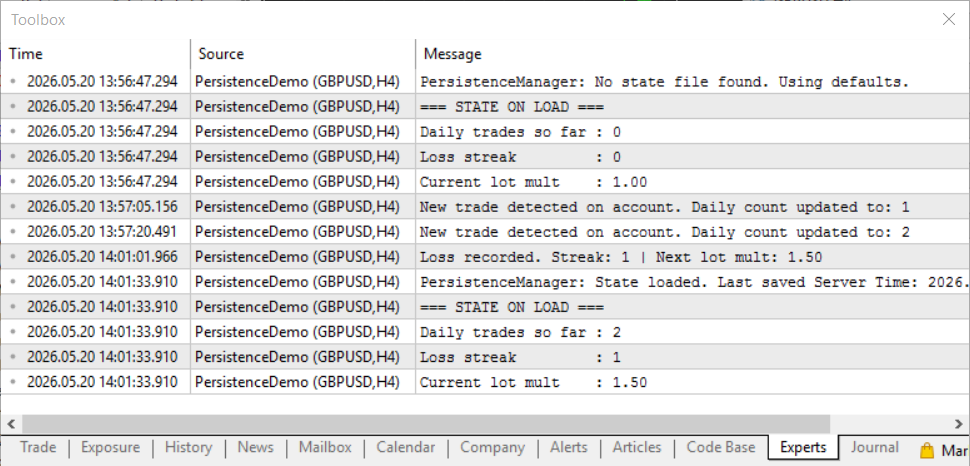
Fig. 1: Experts log for PersistenceDemo (GBPUSD,H4) showing state recovery across two initializations. The first load finds no file and uses defaults. After detecting two trades and a loss—which advances the loss streak to 1 and the lot multiplier to 1.50—the EA is reinitialized. The second load successfully reads the binary file, restoring the daily trade count (2), loss streak (1), and lot multiplier (1.50).
Verifying Day-Change Logic
Because the persistence system relies on broker server time (TimeCurrent()), modifying your local computer clock will not trigger a day-change reset during live chart testing. Instead, you can simulate a day transition by temporarily adjusting the loaded state data directly within OnInit().
To force-test the reset logic immediately:
- Add this temporary calculation line immediately after LoadState(g_state); in your OnInit() function:
// TESTING ONLY: Subtract 25 hours to simulate a file saved yesterday
g_state.lastSaveTime = g_state.lastSaveTime - 90000;
- Compile and attach the EA to a live demo chart, then remove it.
- Re-attach the EA to the chart.
On this second attachment, the EA will process the backdated timestamp, trigger the New trading day detected condition, and reset the daily trade counter to zero. Once you verify the reset in the Experts log, remove the temporary testing line and recompile your production code.
Srategy Tester Compatibility: PersistenceManager.mqh works in the Strategy Tester but behaves slightly differently. In the tester, every new run calls OnInit() fresh, so LoadState() will find whatever was written by a previous run's OnDeinit(). This can cause consecutive backtests to inherit state from each other — particularly the daily trade counter if the test dates fall in the same calendar month. Always set InpResetState = true for the first backtest run after modifying the EA, or manually delete the state file from the common folder between runs. After that, leave InpResetState = false to test recovery behavior across tester sessions.
Section 6: Extending and Adapting the Pattern
Adding New State Fields
Adding a new variable to the state struct is a two-step process:
- Add the field to EAState.
- Reduce the reserved[] array by the exact number of bytes you just added for the new variable. This keeps the total structure size identical to the old version.
If the new field fits within the existing reserved space, STATE_VERSION does not need to be incremented because the file size remains unchanged. This maintains backward compatibility, allowing the system to read older files seamlessly. Because the old file filled this padding with clean zeros via ZeroMemory(), the new field will safely read as 0. If your updated logic requires a non-zero default value for this new field on older files, you must explicitly assign it immediately after LoadState() returns true.
If the new field does not fit within the reserved bytes — meaning the struct needs to grow — increment STATE_VERSION. The next time LoadState() runs on a machine with an old file, it will detect the version mismatch, delete the stale file, and start fresh with the new defaults provided by DefaultState(). This is a one-time disruption that is unavoidable when the struct layout changes fundamentally.
Using the Pattern for Custom Indicators
Binary file persistence is not just for EAs; custom indicators often need to retain data between sessions as well. For example, an indicator might need to remember user-drawn support and resistance levels, or the highest and lowest pivots calculated over the last N days.
The exact same PersistenceManager pattern applies. To implement it:
- Define a struct specifically for the indicator's state.
- Include the persistence file in your code.
- Call LoadState() inside OnInit().
- Call SaveState() inside OnCalculate() once the final bar has been processed.
One difference to be aware of: indicators do not have an OnDeinit() that fires reliably on every removal. The terminal can sometimes remove an indicator without calling OnDeinit() if it is cleaning up during shutdown. For indicators, a more defensive approach is to call SaveState() on every call to OnCalculate() when the bar count has changed, rather than only on deinit. The file I/O cost is negligible once per bar.
Backing Up and Migrating State Files
Because state files live in a standard folder on disk, they are easy to manage. To back up the state of a running EA, copy the .bin file from MetaQuotes/Terminal/Common/Files/ to any location. To migrate to a new machine or a reinstalled terminal, copy the file to the same folder on the destination. The EA will pick it up on the next OnInit() as though nothing changed.
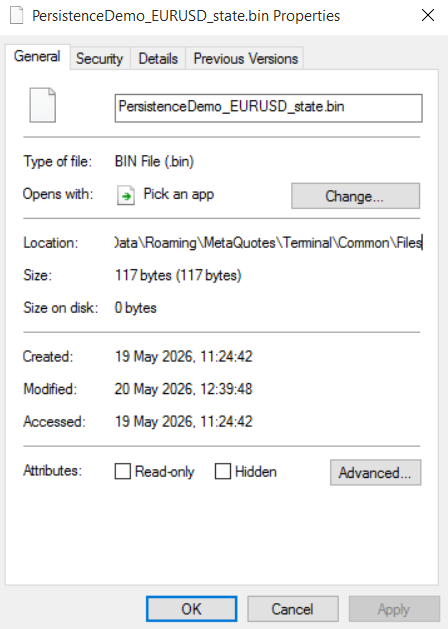
Fig. 2: The state file PersistenceDemo_EURUSD_state.bin located within the MetaQuotes sandbox common files folder. The file size is exactly 117 bytes—reflecting the precise footprint of the serialized state data structure. It can be copied, backed up, or migrated across machines like any standard file; the terminal will automatically locate and parse it upon the next EA initialization.
For traders who run EAs on both a local machine and a cloud server, syncing the state folder via any file sync service keeps both instances aware of each other's activity. This is a simple but effective way to ensure that a trade opened on the local machine during the day is reflected in the loss streak and daily counter when the server-hosted EA resumes the next morning.
Conclusion
The state reset problem is a silent vulnerability in MQL5 development. Because it does not generate runtime errors or manifest during standard strategy backtests, it typically remains unnoticed until a terminal restart or EA reload occurs in a live environment. When these routine events happen, the Expert Advisor initializes with default values, completely detached from its prior operational history, and executes strategy logic as if the trading session had just begun.
The implementation of PersistenceManager.mqh addresses this issue by introducing a self-contained serialization framework. By encapsulating volatile variables into a single data structure and committing it to a binary file, the include file ensures data continuity with minimal code overhead. The architecture inherently handles file versioning to prevent data corruption during structural updates, isolates filenames to prevent collisions between multiple chart instances, and operates entirely within the native MQL5 environment without external dependencies.
This approach also addresses implicit initialization assumptions. Setting cumulative variables to static defaults assumes a clean start, which is often false in live trading. Shifting to a persistent state model ensures that an Expert Advisor's structural memory remains intact across sessions, aligning its startup state with its actual historical performance.
Programs used in the article:
| # | Name | Type | Description |
|---|---|---|---|
| 1 | PersistenceManager.mqh | Include file | Complete include file containing the EAState struct, GetStateFilePath(), DefaultState(), SaveState(), LoadState(), and DeleteStateFile(). Drop into MQL5/Include/. |
| 2 | PersistenceDemo.mq5 | Demo EA | The demonstration EA showing all persistence functions integrated with daily trade limits, loss streak tracking, and lot size scaling. Attach to any chart to observe restart recovery behavior. |
Warning: All rights to these materials are reserved by MetaQuotes Ltd. Copying or reprinting of these materials in whole or in part is prohibited.
This article was written by a user of the site and reflects their personal views. MetaQuotes Ltd is not responsible for the accuracy of the information presented, nor for any consequences resulting from the use of the solutions, strategies or recommendations described.

 Application of the Grey Model in Technical Analysis of Financial Time Series
 Detecting and Classifying Fractal Patterns Using Machine Learning
 Beyond the Clock (Part 2): Building Runs Bars in MQL5
 Engineering a Self-Healing Expert Advisor in MQL5 (Part 1): Persistent Trade State Architecture

- Free trading apps
- Over 8,000 signals for copying
- Economic news for exploring financial markets
You agree to website policy and terms of use