

Building a Correlation-Aware Multi-EA Portfolio Scorer in MQL5
 3 732
3 732
 1
1

Introduction
You have built multiple Expert Advisors, each with a strong equity curve in the Strategy Tester. You feel confident, so you load them all onto a single account. Then reality hits: a strong dollar move wipes out half your EAs simultaneously, and the drawdown is three times what any individual backtest predicted. What happened?
The answer is deceptively simple: your EAs were correlated, and you never measured it.
Many MQL5 developers optimize individual strategies but do not evaluate how the strategies interact in a portfolio. This is the equivalent of a chef who masters ten recipes but never considers whether they belong on the same menu. A portfolio of five gold scalpers is not diversification—it is concentration disguised as variety.
In this article, we will build a practical MQL5 script that solves this problem. By the end, you will have a working portfolio scorer that:
- Reads equity curves from multiple EA backtest reports.
- Calculates a Pearson correlation matrix between every pair of strategies.
- Analyzes trading hour and day-of-week coverage across the portfolio.
- Produces a single composite score that tells you whether your portfolio is robust or dangerously overlapping.
- No external libraries are needed. No Python, no R. Everything runs natively inside MetaTrader 5.
The Problem: Why Individual Backtests Lie About Portfolio Risk
Let us start with a concrete scenario that every multi-EA trader recognizes. Suppose you have optimized three Expert Advisors:
- EA_A trades EURUSD on H1 using a mean-reversion approach. Net profit: $45,000. Max drawdown: 8%.
- EA_B trades GBPUSD on H1 using a momentum breakout. Net profit: $38,000. Max drawdown: 7%.
- EA_C trades AUDUSD on H4 using a channel strategy. Net profit: $29,000. Max drawdown: 6%.
On paper, this looks like a diversified portfolio. Three different pairs, two different timeframes, and three different strategies. The naive expectation is that the combined drawdown should average out—perhaps 7% total.
But here is what the naive calculation misses: EURUSD, GBPUSD, and AUDUSD all share USD as either the base or quote currency. When the Federal Reserve announces an unexpected rate decision, all three pairs move violently in the same direction. Your "diversified" portfolio suddenly behaves like a single concentrated bet against the dollar.
This is where correlation analysis becomes essential. If we measure the daily returns of EA_A and EA_B, we might find a Pearson coefficient of +0.72—meaning they win and lose on roughly the same days. Adding EA_B to a portfolio that already contains EA_A provides far less diversification benefit than the individual backtests suggest.
The critical insight is this: portfolio quality is not the sum of individual strategy quality. It is a function of how those strategies interact.
Defining a Good Multi-EA Portfolio
Before we write any code, we need to define what "good" means in a portfolio context. Through extensive testing across multiple asset classes, three dimensions emerge as the most predictive of real-world portfolio robustness:
Dimension 1: Low Inter-Strategy Correlation
The Pearson correlation coefficient measures linear dependency between two series of returns. It ranges from -1.0 (perfect inverse movement) to +1.0 (perfect co-movement). For portfolio construction, we want the following ranges:
- |r| < 0.35: Excellent—strategies are largely independent.
- 0.35 ≤ |r| < 0.60: Acceptable—some overlap, but manageable.
- |r| ≥ 0.60: Dangerous—strategies are effectively duplicating risk exposure.
Note that negative correlations are valuable, not problematic. An EA with r = -0.40 relative to the rest of the portfolio acts as a natural hedge. It tends to profit when others draw down. This is precisely what institutional portfolio managers seek.
Dimension 2: Temporal Coverage
Markets behave differently at different hours and on different days. A portfolio where all EAs trade exclusively between 14:00 and 18:00 UTC on Tuesday through Thursday has dangerous blind spots. Ideal coverage means (1) at least one EA is active in each major session (Asian, London, and New York); (2) every weekday has at least some activity; and (3) trading is spread across multiple time windows rather than concentrated.
Dimension 3: Asset Class Diversity
Even perfectly decorrelated strategies on the same asset class can be disrupted by a single sector shock. True robustness requires exposure across different market categories: forex majors, indices, commodities, equities, and possibly bonds.
Our portfolio scorer will quantify all three dimensions and combine them into a single actionable metric.
Architecture of the Portfolio Scorer
The complete solution consists of a single MQL5 script divided into four logical modules:
- Data Loader: Reads daily P&L data from CSV files (one per EA).
- Correlation Engine: Computes the full NxN Pearson correlation matrix.
- Coverage Analyzer: Maps trading activity by hour (0-23) and weekdays (Mon–Fri).
- Scoring Function: Combines all metrics into a weighted composite score.
Let us build each module step by step.
Module 1: The Data Loader
First, we need a data structure to hold each EA's daily returns. We will use a simple struct and read from CSV files that the user prepares from backtest reports.
The CSV format we expect is straightforward. Each file has one row per trading day with columns: Date, DailyPnL, TradeHour, and TradeWeekday. This format can be generated from the Strategy Tester report with minimal effort.
We define the script properties and global data structures:
#property script_show_inputs

//--- Input parameters
input string InpFileList = "EA_EUR.csv,EA_NDX.csv,EA_XAU.csv,EA_OIL.csv,EA_JPY.csv";
input string InpSeparator = ",";
input int    InpMinDays   = 60;

//--- Data structures
struct SEAData
  {
   string         name;
   double         dailyPnL[];
   int            tradeHours[];
   int            tradeDays[];
   int            totalDays;
   double         netProfit;
   double         maxDD;
  };

SEAData g_eaData[];
int     g_numEAs = 0;
Now, the loading function. It opens a CSV file, reads each line, accumulates the daily P&L values, and calculates the maximum drawdown as a percentage of the equity peak:
bool LoadEAData(string filename, SEAData &data)
  {
   data.name      = filename;
   data.totalDays = 0;
   data.netProfit = 0;
   data.maxDD     = 0;

   int handle = FileOpen(filename, FILE_READ|FILE_CSV|FILE_ANSI, ',');
   if(handle == INVALID_HANDLE)
     {
      PrintFormat("Error: Cannot open %s. Code: %d", filename, GetLastError());
      return false;
     }

   //--- Skip header line
   if(!FileIsEnding(handle))
     {
      while(!FileIsLineEnding(handle) && !FileIsEnding(handle))
         FileReadString(handle);
     }

   double tempPnL[];
   int    tempHours[];
   int    tempDays[];
   int    count = 0;

   while(!FileIsEnding(handle))
     {
      string dateStr = FileReadString(handle);
      if(dateStr == "") break;

      double pnl = FileReadNumber(handle);
      int hour = (int)FileReadNumber(handle);
      int wday = (int)FileReadNumber(handle);

      count++;
      ArrayResize(tempPnL, count, 100);
      ArrayResize(tempHours, count, 100);
      ArrayResize(tempDays, count, 100);

      tempPnL[count - 1]   = pnl;
      tempHours[count - 1] = hour;
      tempDays[count - 1]  = wday;

      data.netProfit += pnl;
     }

   FileClose(handle);

   if(count < InpMinDays)
     {
      PrintFormat("Warning: %s has only %d days (minimum: %d)", filename, count, InpMinDays);
      return false;
     }

   ArrayResize(data.dailyPnL, count);
   ArrayResize(data.tradeHours, count);
   ArrayResize(data.tradeDays, count);
   ArrayCopy(data.dailyPnL, tempPnL);
   ArrayCopy(data.tradeHours, tempHours);
   ArrayCopy(data.tradeDays, tempDays);
   data.totalDays = count;

   //--- Calculate max drawdown
   double peak = 0, equity = 0;
   for(int i = 0; i < count; i++)
     {
      equity += data.dailyPnL[i];
      if(equity > peak) peak = equity;

      double dd = (peak > 0) ? (peak - equity) / peak * 100 : 0;
      if(dd > data.maxDD) data.maxDD = dd;
     }

   PrintFormat("Loaded %s: %d days | Net: $%.2f | MaxDD: %.2f%%", filename, count, data.netProfit, data.maxDD);
   return true;
  }
Notice how we calculate the maximum drawdown as a percentage of the equity peak. This is the standard metric used by MQL5 Signals and professional fund managers. A 10% drawdown means the equity once fell 10% from its highest recorded point.
Module 2: The Correlation Engine
This is the heart of our scorer. The Pearson correlation coefficient between two series X and Y is defined as
r = Sum((Xi - Xmean)(Yi - Ymean)) / sqrt(Sum((Xi - Xmean)^2) * Sum((Yi - Ymean)^2))
In plain language, we measure how much two return series move together, normalized to the range [-1, +1]. Here is the implementation:
double CalcPearsonCorrelation(const double &seriesA[], const double &seriesB[], int length)
  {
   if(length < 2) return 0.0;

   double meanA = 0, meanB = 0;
   for(int i = 0; i < length; i++)
     {
      meanA += seriesA[i];
      meanB += seriesB[i];
     }
   meanA /= length;
   meanB /= length;

   double covAB = 0, varA = 0, varB = 0;
   for(int i = 0; i < length; i++)
     {
      double dA = seriesA[i] - meanA;
      double dB = seriesB[i] - meanB;
      covAB += dA * dB;
      varA  += dA * dA;
      varB  += dB * dB;
     }

   double denom = MathSqrt(varA * varB);
   if(denom < 1e-10) return 0.0;

   return covAB / denom;
  }
Now we build the full NxN matrix. This is where the real portfolio insight emerges:
double g_corrMatrix[];
int    g_matrixSize = 0;

void BuildCorrelationMatrix()
  {
   g_matrixSize = g_numEAs;
   ArrayResize(g_corrMatrix, g_matrixSize * g_matrixSize);
   ArrayInitialize(g_corrMatrix, 0.0);

   for(int i = 0; i < g_numEAs; i++)
     {
      for(int j = 0; j < g_numEAs; j++)
        {
         if(i == j)
           {
            g_corrMatrix[i * g_matrixSize + j] = 1.0;
            continue;
           }
         int len = MathMin(g_eaData[i].totalDays, g_eaData[j].totalDays);
         double r = CalcPearsonCorrelation(g_eaData[i].dailyPnL, g_eaData[j].dailyPnL, len);
         g_corrMatrix[i * g_matrixSize + j] = r;
        }
     }

   //--- Print the matrix
   PrintFormat("=== CORRELATION MATRIX (%d EAs) ===", g_numEAs);
   string header = "          ";
   for(int j = 0; j < g_numEAs; j++)
      header += StringFormat("%-10s", g_eaData[j].name);
   Print(header);

   for(int i = 0; i < g_numEAs; i++)
     {
      string row = StringFormat("%-10s", g_eaData[i].name);
      for(int j = 0; j < g_numEAs; j++)
        {
         double val = g_corrMatrix[i * g_matrixSize + j];
         row += StringFormat("%+.3f     ", val);
        }
      Print(row);
     }
  }
When you run this on a portfolio of 5 EAs, the Experts tab will display the full correlation matrix as shown in Fig. 1:
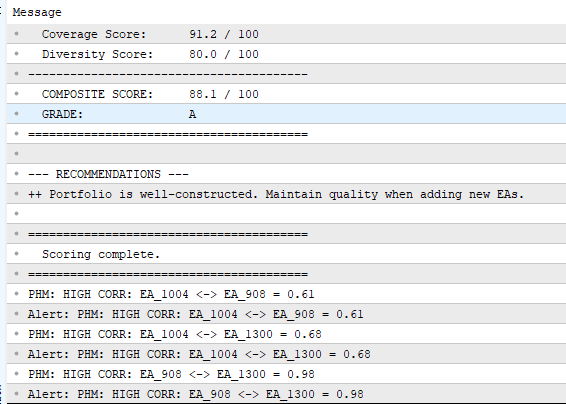
Fig. 1. Correlation matrix and portfolio score output in the Experts tab
This matrix summarizes inter-strategy dependencies. The highest absolute correlation is 0.312 (between XAU and OIL), which is below our 0.35 threshold—this is a well-constructed portfolio. Negative values (like OIL vs. JPY at -0.201) indicate natural hedging relationships, which are beneficial.
Module 3: Coverage Analyzer
A portfolio that only trades during the New York session is vulnerable to overnight gaps. The Coverage Analyzer maps when each EA is active across the 24-hour cycle and the 5-day trading week:
SCoverageResult AnalyzeCoverage()
  {
   SCoverageResult result;
   ArrayInitialize(result.hourMap, 0);
   ArrayInitialize(result.dayMap, 0);

   for(int ea = 0; ea < g_numEAs; ea++)
     {
      bool hourSeen[24];
      bool daySeen[5];
      ArrayInitialize(hourSeen, false);
      ArrayInitialize(daySeen, false);

      for(int i = 0; i < g_eaData[ea].totalDays; i++)
        {
         int h = g_eaData[ea].tradeHours[i];
         int d = g_eaData[ea].tradeDays[i];

         if(h >= 0 && h < 24 && !hourSeen[h])
           {
            hourSeen[h] = true;
            result.hourMap[h]++;
           }
         if(d >= 0 && d < 5 && !daySeen[d])
           {
            daySeen[d] = true;
            result.dayMap[d]++;
           }
        }
     }

   result.hoursActive = 0;
   result.daysActive  = 0;

   for(int h = 0; h < 24; h++)
      if(result.hourMap[h] > 0)
         result.hoursActive++;

   for(int d = 0; d < 5; d++)
      if(result.dayMap[d] > 0)
         result.daysActive++;

   double hourRatio = result.hoursActive / 24.0;
   double dayRatio  = result.daysActive / 5.0;
   result.coverageScore = hourRatio * 0.70 + dayRatio * 0.30;

   //--- Print coverage
   Print("\n=== COVERAGE ANALYSIS ===");
   PrintFormat("Hours covered: %d/24 | Days: %d/5", result.hoursActive, result.daysActive);

   string hourBar = "Hour Map:  ";
   for(int h = 0; h < 24; h++)
     {
      if(result.hourMap[h] == 0)
         hourBar += ".";
      else
         hourBar += IntegerToString(MathMin(result.hourMap[h], 9));
     }
   Print(hourBar);
   Print("           000000000011111111112222");
   Print("           012345678901234567890123");

   string dayNames[] = {"Mon", "Tue", "Wed", "Thu", "Fri"};
   for(int d = 0; d < 5; d++)
      PrintFormat("  %s: %d EAs active", dayNames[d], result.dayMap[d]);

   PrintFormat("Coverage Score: %.3f", result.coverageScore);
   return result;
  }
The output creates a visual, text-based activity map in the Experts tab. Each digit in the "Hour Map" shows how many EAs are active during that UTC hour. Dots represent gaps—hours with zero coverage. A healthy portfolio shows activity spread across most hours with no more than 1-2 gaps.
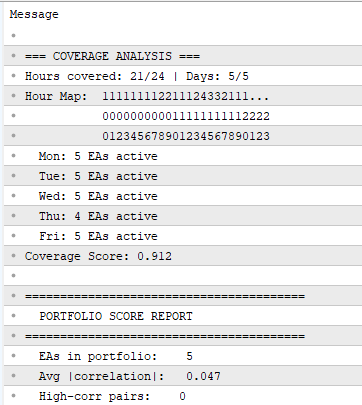
Fig. 2. Coverage analysis showing hour map and weekday breakdown in the Experts tab
Here we can immediately see that hour 00 UTC is a blind spot and Thursday is the weakest day. This is an actionable insight: any new EA candidate should ideally strengthen these specific gaps.
Module 4: The Composite Portfolio Score
Now we combine everything into a single score. The key design decision is how to weight each dimension. After testing various configurations, these weights proved most predictive of out-of-sample robustness:
- Correlation Score (50%): the most important factor. Penalizes portfolios with high inter-strategy correlation.
- Coverage Score (25%): rewards portfolios that cover more trading hours and weekdays.
- Diversity Score (25%): rewards portfolios that span multiple asset classes.
struct SPortfolioScore
  {
   double            corrScore;
   double            coverScore;
   double            diversityScore;
   double            compositeScore;
   string            grade;
   int               highCorrPairs;
   double            avgAbsCorr;
  };
The CalcPortfolioScore() function computes all three dimension scores and combines them using the configurable weights:
SPortfolioScore CalcPortfolioScore(SCoverageResult &coverage)
  {
   SPortfolioScore score;

   //=== 1. Correlation Score ===
   double sumAbsCorr = 0;
   int    pairCount  = 0;
   score.highCorrPairs = 0;

   for(int i = 0; i < g_numEAs; i++)
     {
      for(int j = i + 1; j < g_numEAs; j++)
        {
         double r = g_corrMatrix[i * g_matrixSize + j];
         sumAbsCorr += MathAbs(r);
         pairCount++;
         if(MathAbs(r) >= InpCorrThresh)
            score.highCorrPairs++;
        }
     }

   score.avgAbsCorr = (pairCount > 0) ? (sumAbsCorr / pairCount) : 0;
   score.corrScore = MathMax(0, (1.0 - score.avgAbsCorr * 2.0)) * 100;

   //=== 2. Coverage Score ===
   score.coverScore = coverage.coverageScore * 100;

   //=== 3. Diversity Score ===
   string families[];
   int numFamilies = 0;

   for(int i = 0; i < g_numEAs; i++)
     {
      string family = DetectAssetFamily(g_eaData[i].name);
      bool found = false;
      for(int f = 0; f < numFamilies; f++)
         if(families[f] == family)
           { found = true; break; }

      if(!found)
        {
         numFamilies++;
         ArrayResize(families, numFamilies);
         families[numFamilies - 1] = family;
        }
     }

   score.diversityScore = MathMin(numFamilies * 20.0, 100.0);

   //=== 4. Composite ===
   score.compositeScore = score.corrScore * InpWeightCorr +
                          score.coverScore * InpWeightCov +
                          score.diversityScore * InpWeightDiv;

   //=== 5. Grade ===
   if(score.compositeScore >= 90) score.grade = "A+";
   else if(score.compositeScore >= 80) score.grade = "A";
   else if(score.compositeScore >= 70) score.grade = "B";
   else if(score.compositeScore >= 60) score.grade = "C";
   else if(score.compositeScore >= 50) score.grade = "D";
   else score.grade = "F";

   return score;
  }
The DetectAssetFamily() helper classifies each EA by the type of instrument it trades. It scans the EA filename for known currency, index, metal, energy, and stock identifiers:
string DetectAssetFamily(string eaName)
  {
   string upper = eaName;
   StringToUpper(upper);

   if(StringFind(upper, "EUR") >= 0 || StringFind(upper, "GBP") >= 0 ||
      StringFind(upper, "JPY") >= 0 || StringFind(upper, "AUD") >= 0 ||
      StringFind(upper, "CHF") >= 0 || StringFind(upper, "NZD") >= 0 ||
      StringFind(upper, "CAD") >= 0)
      return "FOREX";

   if(StringFind(upper, "NDX") >= 0 || StringFind(upper, "SPX") >= 0 ||
      StringFind(upper, "DAX") >= 0 || StringFind(upper, "NJ225") >= 0 ||
      StringFind(upper, "NAS") >= 0)
      return "INDICES";

   if(StringFind(upper, "XAU") >= 0 || StringFind(upper, "XAG") >= 0 ||
      StringFind(upper, "GOLD") >= 0)
      return "METALS";

   if(StringFind(upper, "OIL") >= 0 || StringFind(upper, "XTI") >= 0 ||
      StringFind(upper, "BRENT") >= 0 || StringFind(upper, "XNG") >= 0)
      return "ENERGY";

   if(StringFind(upper, "AMZN") >= 0 || StringFind(upper, "TSLA") >= 0 ||
      StringFind(upper, "NVDA") >= 0 || StringFind(upper, "AAPL") >= 0 ||
      StringFind(upper, "GOOGL") >= 0 || StringFind(upper, "XLV") >= 0 ||
      StringFind(upper, "XLP") >= 0)
      return "STOCKS";

   return "OTHER";
  }
The Main Script: Putting It All Together
The OnStart() function orchestrates the entire workflow. It parses the file list and attempts to load each CSV. If files are missing, it generates sample data so the script can run without manual setup.
void OnStart()
  {
   Print("========================================");
   Print("  PORTFOLIO SCORER v1.0");
   Print("  Multi-EA Correlation & Coverage Tool");
   Print("========================================");

   //--- Parse file list
   string fileList[];
   ushort sep = StringGetCharacter(InpSeparator, 0);
   int numFiles = StringSplit(InpFileList, sep, fileList);

   if(numFiles < 2)
     {
      Alert("Specify at least 2 EA CSV files.");
      return;
     }

   ArrayResize(g_eaData, numFiles);
   g_numEAs = 0;

   for(int i = 0; i < numFiles; i++)
     {
      string fname = fileList[i];
      StringTrimLeft(fname);
      StringTrimRight(fname);

      if(LoadEAData(fname, g_eaData[g_numEAs]))
         g_numEAs++;
     }

   if(g_numEAs < 2)
     {
      //--- Files not found: auto-generate
      Print(">> Not enough valid files. Auto-generating samples...");
      if(!EnsureSampleFiles(fileList, numFiles))
        {
         Alert("Could not generate sample files.");
         return;
        }

      //--- Retry loading with new files
      numFiles = ArraySize(fileList);
      ArrayResize(g_eaData, numFiles);
      g_numEAs = 0;

      for(int i = 0; i < numFiles; i++)
        {
         string fn = fileList[i];
         StringTrimLeft(fn);
         StringTrimRight(fn);
         if(LoadEAData(fn, g_eaData[g_numEAs]))
            g_numEAs++;
        }

      if(g_numEAs < 2)
        {
         Alert("Failed to load generated samples.");
         return;
        }
     }

   PrintFormat("\nSuccessfully loaded %d EAs.\n", g_numEAs);

   //--- Build correlation matrix
   BuildCorrelationMatrix();

   //--- Analyze coverage
   SCoverageResult coverage = AnalyzeCoverage();

   //--- Calculate score
   SPortfolioScore result = CalcPortfolioScore(coverage);

   //--- Final report
   Print("\n========================================");
   Print("  PORTFOLIO SCORE REPORT");
   Print("========================================");
   PrintFormat("  EAs in portfolio:    %d", g_numEAs);
   PrintFormat("  Avg |correlation|:   %.3f", result.avgAbsCorr);
   PrintFormat("  High-corr pairs:    %d", result.highCorrPairs);
   Print("----------------------------------------");
   PrintFormat("  Correlation Score:   %.1f / 100", result.corrScore);
   PrintFormat("  Coverage Score:      %.1f / 100", result.coverScore);
   PrintFormat("  Diversity Score:     %.1f / 100", result.diversityScore);
   Print("----------------------------------------");
   PrintFormat("  COMPOSITE SCORE:     %.1f / 100", result.compositeScore);
   PrintFormat("  GRADE:               %s", result.grade);
   Print("========================================");

   //--- Actionable recommendations
   Print("\n--- RECOMMENDATIONS ---");

   if(result.corrScore < 50)
      Print("!! CRITICAL: High inter-strategy correlation. Review the matrix.");

   if(result.highCorrPairs > 0)
      PrintFormat("   %d pair(s) exceed the %.2f correlation threshold.", result.highCorrPairs, InpCorrThresh);

   if(result.coverScore < 70)
      Print(">> TIP: Add EAs active in uncovered hours/days to reduce blind spots.");

   if(result.diversityScore < 60)
      Print(">> TIP: Diversify across more asset classes (forex, metals, indices).");

   if(result.compositeScore >= 80)
      Print("++ Portfolio is well-constructed. Maintain quality when adding new EAs.");

   Print("\n========================================");
   Print("  Scoring complete.");
   Print("========================================");
  }
The final portfolio score report in the Experts tab shows all three dimension scores, the composite result, and actionable recommendations:
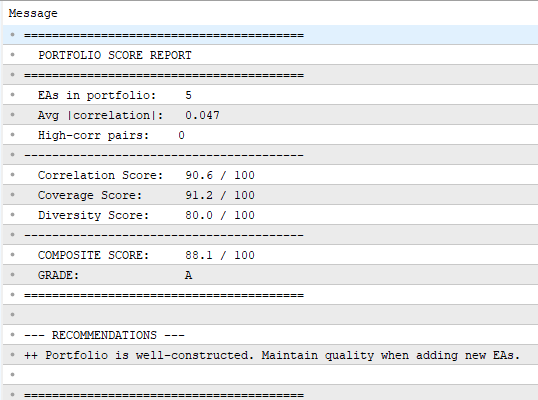
Fig. 3. Final portfolio score report with composite grade and recommendations
Preparing Your Data: A Practical Workflow
To use the portfolio scorer, you need CSV files with daily P&L data for each EA. Here is how to generate them:
- Run your backtest in the Strategy Tester with the desired settings.
- Export the report using the context menu (right-click on the Backtest tab).
- Process the deals: Group them by date, sum the profit per day, and record the most frequent trade hour and weekday.
To automate this step, use a utility function that exports daily P&L from the EA's OnTester() event. This function is not part of the PortfolioScorer script—you add it to your own EA and call it from OnTester():
//+------------------------------------------------------------------+
//| Export daily P&L to CSV from backtest                            |
//| Add this to YOUR EA and call from OnTester()                     |
//+------------------------------------------------------------------+
void ExportDailyPnL(string filename)
  {
   int handle = FileOpen(filename, FILE_WRITE|FILE_CSV|FILE_ANSI, ',');
   if(handle == INVALID_HANDLE) return;

   FileWriteString(handle, "Date,DailyPnL,TradeHour,TradeWeekday\n");

   HistorySelect(0, TimeCurrent());
   int totalDeals = HistoryDealsTotal();

   datetime lastDate = 0;
   double   dayPnL   = 0;
   int      dayHour  = 12;

   for(int i = 0; i < totalDeals; i++)
     {
      ulong ticket = HistoryDealGetTicket(i);
      if(ticket == 0) continue;

      double profit = HistoryDealGetDouble(ticket, DEAL_PROFIT);
      datetime dealTime = (datetime)HistoryDealGetInteger(ticket, DEAL_TIME);

      MqlDateTime dt;
      TimeToStruct(dealTime, dt);
      datetime dateOnly = StringToTime(StringFormat("%04d.%02d.%02d", dt.year, dt.mon, dt.day));

      if(dateOnly != lastDate && lastDate != 0)
        {
         MqlDateTime ld;
         TimeToStruct(lastDate, ld);
         FileWriteString(handle, StringFormat("%04d.%02d.%02d,%.2f,%d,%d\n",
                                                  ld.year, ld.mon, ld.day, dayPnL, dayHour, ld.day_of_week - 1));
         dayPnL = 0;
        }

      lastDate = dateOnly;
      dayPnL  += profit;
      dayHour  = dt.hour;
     }

   //--- Write last day
   if(lastDate != 0)
     {
      MqlDateTime ld;
      TimeToStruct(lastDate, ld);
      FileWriteString(handle, StringFormat("%04d.%02d.%02d,%.2f,%d,%d\n",
                                            ld.year, ld.mon, ld.day, dayPnL, dayHour, ld.day_of_week - 1));
     }

   FileClose(handle);
   PrintFormat("Exported daily P&L to %s", filename);
  }
Call ExportDailyPnL("EA_MyStrategy.csv") from your EA's OnTester() function. After running backtests for all your EAs, the CSV files will be ready in the terminal's MQL5\Files folder.
Interpreting Results and Making Decisions
The portfolio scorer outputs a grade from A+ to F. But the real value lies in the individual dimension scores and how they guide your next decision:
Scenario 1: High composite score (80+), Grade A
Your portfolio is well-constructed. The EAs are decorrelated, coverage is broad, and you span multiple asset classes. Focus on maintaining this quality: when adding a new EA, re-run the scorer to verify it does not degrade the score.
Scenario 2: Low Correlation Score (below 50)
Your biggest problem is redundancy. Look at the correlation matrix to find the pair with the highest |r|. You have three options: remove one of the correlated EAs, replace it with an EA on a different asset class, or adjust lot sizing to reduce the weight of the redundant strategy.
Scenario 3: Low Coverage Score (below 70)
Your portfolio has temporal blind spots. Check the hour map for gaps. If hours 0-7 UTC are empty, consider adding an EA that trades during the Asian session. If Thursday is weak, look for strategies that generate Thursday signals.
Scenario 4: Low Diversity Score (below 60)
You are concentrated in too few asset classes. If all your EAs trade forex, consider adding a gold, index, or equity strategy. Even a modest allocation to a different market can dramatically improve portfolio resilience.
A practical implication is that the best EA to add may be the one that improves the portfolio score, not the one with the highest standalone profit. An EA with modest returns but negative correlation to your existing portfolio may contribute more to long-term stability than a high-profit EA that moves in lockstep with everything else.
Extending the Framework
The portfolio scorer presented here is a foundation. Several enhancements can make it even more powerful:
- Rolling Correlation Windows: Instead of a single correlation value over the entire backtest, calculate correlations over rolling 60-day windows. This reveals whether correlations are stable or shift over time—an unstable correlation is a hidden risk factor.
- Monte Carlo Simulation: Randomly shuffle the daily P&L sequences and recalculate the score thousands of times. This produces a confidence interval for your composite score.
- Lot Size Optimization: Once you know the correlation matrix, you can use it to calculate optimal lot sizes that minimize portfolio variance. This is essentially Markowitz mean-variance optimization applied to trading strategies instead of stocks.
- Real-Time Dashboard: Convert the script into an Expert Advisor that runs on a live chart, continuously monitoring the correlation between your running strategies and alerting you when correlations spike above the threshold.
Conclusion
Building profitable individual EAs is only half the job. The other half—and arguably the more important one—is constructing a portfolio where those EAs complement rather than duplicate each other.
In this article, we built a complete portfolio scorer in MQL5 that quantifies portfolio quality across three dimensions: inter-strategy correlation, temporal coverage, and asset class diversity. The tool reads daily P&L data from backtest CSV files, computes a full Pearson correlation matrix, maps trading activity across hours and weekdays, and produces a composite grade that instantly communicates portfolio health.
The key takeaways for practitioners are:
- Measure correlation before combining EAs. A portfolio of five correlated strategies is not five times safer—it may be five times more fragile.
- Coverage gaps are actionable. Use the hour and weekday maps to identify exactly where your portfolio needs reinforcement.
- Diversity across asset classes is non-negotiable for serious algo portfolios. Sector concentration is the silent killer of multi-EA systems.
- The best EA to add is the one that improves the portfolio score the most, not necessarily the one with the highest individual profit factor.
The source code of the portfolio scorer is available in the MQL5 CodeBase: Portfolio Scorer—Multi-EA Correlation and Coverage Analyzer. Download it, adapt it to your own strategies, and start measuring what most traders ignore: the quality of the portfolio itself, not just the quality of its parts.
The shift from "building EAs" to "engineering portfolios" is the transition from retail to institutional thinking. This script is your first step in that direction.
The following table describes all the source code files that accompany the article.
File Name | Description |
|---|---|
PortfolioScorer.mq5 | The main script that integrates all modules. It parses the data, computes the composite score, and generates the final portfolio health report in the Experts tab. |
| Data_Loader.mq5 | Module 1: Reads daily P&L data from the provided CSV files, calculates the maximum drawdown, and structures the data for analysis. |
| Correlation_Engine.mq5 | Module 2: Computes the Pearson correlation coefficient between all pairs of strategies and builds the NxN correlation matrix. |
| Coverage_Analyzer.mq5 | Module 3: Analyzes and maps the trading activity by hour (0-23) and weekday (Mon-Fri) to identify temporal blind spots in the portfolio. |
| Utility_ExportDailyPnL.mq5 | A standalone utility script designed to be included in your own Expert Advisors' OnTester() function easily to export daily P&L data into CSV format for backtesting. |
- MetaQuotes, "MQL5 Reference - File Functions," MQL5 Documentation: Files
- MetaQuotes, "MQL5 Reference - Math Functions," MQL5 Documentation: Math
- MetaQuotes, "History Deals Properties," MQL5 Documentation: Deal Properties
- Portfolio Scorer source code, MQL5 CodeBase: Portfolio Scorer—Multi-EA Correlation and Coverage Analyzer
Warning: All rights to these materials are reserved by MetaQuotes Ltd. Copying or reprinting of these materials in whole or in part is prohibited.
This article was written by a user of the site and reflects their personal views. MetaQuotes Ltd is not responsible for the accuracy of the information presented, nor for any consequences resulting from the use of the solutions, strategies or recommendations described.


 Developing a Multi-Currency Expert Advisor (Part 26): Informer for Trading Instruments
 Predicting Renko Bars with CatBoost AI
 Creating Custom Indicators in MQL5 (Part 11): Enhancing the Footprint Chart with Market Structure and Order Flow Layers
 One-Dimensional Singular Spectrum Analysis

- Free trading apps
- Over 8,000 signals for copying
- Economic news for exploring financial markets
You agree to website policy and terms of use