

Larry Williams Market Secrets (Part 5): Automating the Volatility Breakout Strategy in MQL5
 9 752
9 752
 2
2

Introduction
Markets do not start trending by accident. According to Larry Williams, sustained price moves are usually born from moments of extreme volatility, when price expands beyond what has been normal recently. These volatility breakouts act like a spark, pushing the market into motion and keeping it moving in the same direction until an opposing force appears. This idea challenges the common habit of chasing small intraday swings and instead focuses attention on the moments when price activity truly matters.
In his book Long-Term Secrets to Short-Term Trading, Larry Williams explains that when volatility suddenly expands, price behaves much like an object set in motion. It tends to keep moving in that direction. The difficulty for many traders is not understanding the concept but applying it consistently without emotion, hesitation, or missed opportunities. Measuring volatility correctly, reacting at the right moment, and managing risk with discipline are not easy tasks to perform manually day after day.
In this article, we explore a practical way to automate Larry Williams’ volatility breakout concept using MQL5. The goal is simple: transform a powerful trading idea into a repeatable and objective process that can be tested, refined, and trusted. By doing so, we remove guesswork, reduce emotional interference, and allow the strategy to express its edge over time rather than trade by trade.
Understanding the Volatility Breakout Concept
In the world of short-term trading, Larry Williams emphasizes the power of volatility breakouts. At the core of this concept is the idea that when a market experiences an extensive range in a single day, it often signals the start of a new trend. This section delves into the fundamentals of measuring this volatility and how it shapes our trading strategy.
Measuring Yesterday’s Range
To begin, we look at the previous day’s range, which is simply the difference between the high and the low of the previous trading day.
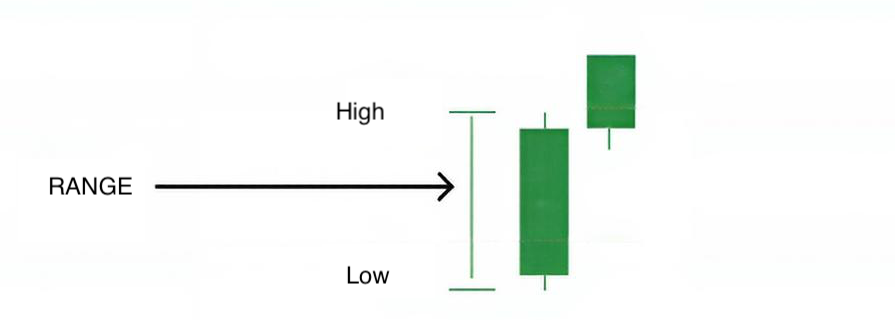
This range serves as a benchmark for identifying potential breakouts.
Why the Previous Day’s Range Matters
The previous day’s range gives us a reference point. When today’s price action surpasses a certain percentage of yesterday’s range, it suggests that the market is likely to continue moving in that direction.
How Breakout Levels Are Derived from Today’s Open
Once we have the previous day’s range, we add or subtract a percentage of that range from the current day’s open price. This creates our buy and sell entry levels. Essentially, we are not predicting the market; we are reacting to rising volatility.
The fundamental concept here is that we are looking for significant price expansions, not trying to guess exact tops or bottoms. This approach helps traders stay aligned with the market’s momentum and capture profitable moves.
In the following sections, we will delve deeper into the entry and exit models, including stop-loss and take-profit levels, to provide you with a comprehensive understanding of how to apply this strategy effectively.
Trading Rules
At this stage, we move from theory into something actionable. Everything discussed so far now translates into a small set of precise and repeatable trading rules. These rules are not based on prediction. They are based on reaction to volatility expansion, exactly as Larry Williams intended. The first step is always the same. At the start of a new trading day, we measure yesterday’s range. This range reflects the most recent market activity and volatility. It tells us how far the price was willing to travel during the previous session.
Once the range is known, today’s open becomes our reference point. From this open price, we project two levels. One above the open for a potential buy, and one below the open for a potential sell. Each level is calculated by applying a user-defined percentage of yesterday’s range. These projected levels act as volatility gates. Price must expand enough to reach them before a trade is allowed. 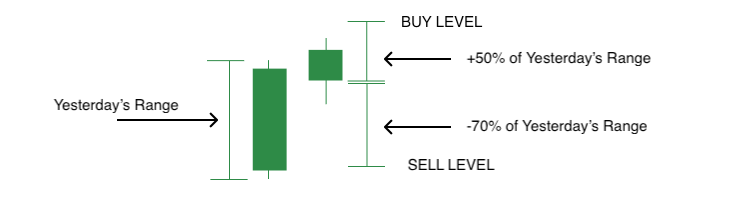
A trade is entered only if the price reaches one of these levels. There is no anticipation and no early entry. If the price never reaches the level during the day, no trade is taken, and the setup is discarded. The next trading day begins with a fresh calculation and new levels.
Once an entry is triggered, risk is immediately defined. The stop loss is placed at a fixed distance from the entry price, calculated as a percentage of yesterday’s range. This keeps risk aligned with recent market behavior instead of arbitrary point values. In more volatile markets, stops naturally widen. In quieter markets, they contract.
The take-profit level is then derived using a risk–reward model. The distance between the entry price and the stop loss defines the risk. A user-defined reward value determines how much larger the profit target should be relative to that risk. This ensures that every trade has a measured and intentional payoff structure.
Only one position can exist at a time. This design choice reflects the idea that volatility breakouts are directional events. If the market commits to one side, the system will as well. There is no stacking of positions and no hedging.
The essence of these rules is simple—measure volatility. Wait for expansion. Define risk from the same volatility source. Let price decide whether a trade is valid. This simplicity is what makes the strategy suitable for automation and robust across different markets.
Coding the Volatility Breakout Strategy
Before we begin writing any logic, it is important to ensure you are well prepared to follow along with the development process. This section focuses on implementation, not theory, so a few prerequisites are necessary.
To comfortably work through this part of the article, you should have a working knowledge of MQL5 basics such as variables, control statements, data structures, and general programming concepts. You should also be familiar with MetaTrader 5, including how to attach an Expert Advisor to a chart and use the Strategy Tester. Finally, you should know how to use MetaEditor 5, including creating source files, writing code, compiling, inspecting errors, and performing basic debugging.
If any of these areas feel unfamiliar, the official MQL5 Reference is strongly recommended. It is a comprehensive and well-maintained documentation that covers the language, the trading environment, and the platform APIs in detail.
In this article, we will develop the Expert Advisor step by step. For convenience, the complete source code we are building toward is provided in a single MQL5 file named lwVolatilityBreakoutExpert.mq5. You are encouraged to code along, as this makes the logic easier to understand and modify later.
At this point, let us get our hands dirty. Open MetaEditor 5, create a new Expert Advisor, choose an empty template, give it a name of your choice, and paste the provided source code.
//+------------------------------------------------------------------+
//|                                   lwVolatilityBreakoutExpert.mq5 |
//|          Copyright 2026, MetaQuotes Ltd. Developer is Chacha Ian |
//|                          https://www.mql5.com/en/users/chachaian |
//+------------------------------------------------------------------+

#property copyright "Copyright 2026, MetaQuotes Ltd. Developer is Chacha Ian"
#property link      "https://www.mql5.com/en/users/chachaian"
#property version   "1.00"

//+------------------------------------------------------------------+
//| Standard Libraries                                               |
//+------------------------------------------------------------------+
#include <Trade\Trade.mqh>

//--- CUSTOM ENUMERATIONS
enum ENUM_TRADE_DIRECTION
{
   ONLY_LONG,
   ONLY_SHORT,
   TRADE_BOTH
};

enum ENUM_LOT_SIZE_INPUT_MODE
{
   MODE_MANUAL,
   MODE_AUTO
};

//+------------------------------------------------------------------+
//| User input variables                                             |
//+------------------------------------------------------------------+
input group "Information"
input ulong magicNumber         = 254700680002;
input ENUM_TIMEFRAMES timeframe = PERIOD_CURRENT;

input group "Volatility Breakout Parameters"
input double inpBuyRangeMultiplier   = 0.50;
input double inpSellRangeMultiplier  = 0.50;
input double inpStopRangeMultiplier  = 0.50;
input double inpRewardValue          = 4.0;

input group "Trade and Risk Management"
input ENUM_TRADE_DIRECTION direction        = TRADE_BOTH;
input ENUM_LOT_SIZE_INPUT_MODE lotSizeMode  = MODE_AUTO;
input double riskPerTradePercent            = 1.0;
input double positionSize                   = 0.1;

//+------------------------------------------------------------------+
//| Global Variables                                                 |
//+------------------------------------------------------------------+
//--- Create a CTrade object to handle trading operations
CTrade Trade;

//--- Bid and Ask
double   askPrice;
double   bidPrice;

//+------------------------------------------------------------------+
//| Expert initialization function                                   |
//+------------------------------------------------------------------+
int OnInit(){

   //---  Assign a unique magic number to identify trades opened by this EA
   Trade.SetExpertMagicNumber(magicNumber);

   return(INIT_SUCCEEDED);
}

//+------------------------------------------------------------------+
//| Expert deinitialization function                                 |
//+------------------------------------------------------------------+
void OnDeinit(const int reason){

   //--- Notify why the program stopped running
   Print("Program terminated! Reason code: ", reason);

}

//+------------------------------------------------------------------+
//| Expert tick function                                             |
//+------------------------------------------------------------------+
void OnTick(){

   //--- Retrieve current market prices for trade execution
   askPrice      = SymbolInfoDouble (_Symbol, SYMBOL_ASK);
   bidPrice      = SymbolInfoDouble (_Symbol, SYMBOL_BID);

}

//+------------------------------------------------------------------+
//| TradeTransaction function                                        |
//+------------------------------------------------------------------+
void OnTradeTransaction(const MqlTradeTransaction& trans,
                        const MqlTradeRequest& request,
                        const MqlTradeResult& result)
{
}

//--- UTILITY FUNCTIONS

//+------------------------------------------------------------------+
This file serves as the boilerplate foundation upon which the entire strategy will be built.
Understanding the Structure of the Boilerplate
The source file is already organized into logical sections, each serving a specific purpose in the lifecycle of an Expert Advisor.
The header section contains metadata such as the file name, author information, version number, and links.
//+------------------------------------------------------------------+
//|                                   lwVolatilityBreakoutExpert.mq5 |
//|          Copyright 2026, MetaQuotes Ltd. Developer is Chacha Ian |
//|                          https://www.mql5.com/en/users/chachaian |
//+------------------------------------------------------------------+

#property copyright "Copyright 2026, MetaQuotes Ltd. Developer is Chacha Ian"
#property link      "https://www.mql5.com/en/users/chachaian"
#property version   "1.00"
While this does not affect trading behavior, it is good practice, especially when sharing or publishing code.
The standard libraries section includes the Trade.mqh library.
//+------------------------------------------------------------------+
//| Standard Libraries                                               |
//+------------------------------------------------------------------+
#include <Trade\Trade.mqh>
This gives us access to the CTrade class, which significantly simplifies order execution and trade management. Using standard library classes is encouraged, as they are optimized and maintained by MetaQuotes.
The custom enumerations section defines controlled input choices.
//--- CUSTOM ENUMERATIONS
enum ENUM_TRADE_DIRECTION
{
   ONLY_LONG,
   ONLY_SHORT,
   TRADE_BOTH
};

enum ENUM_LOT_SIZE_INPUT_MODE
{
   MODE_MANUAL,
   MODE_AUTO
};
For example, trade direction is limited to long-only, short-only, or both. Similarly, the lot size mode allows switching between manual position sizing and automatic risk-based sizing. Enumerations make user inputs safer and more precise.
User Input Parameters and Their Role
The input variables are grouped for clarity and usability inside the Expert Advisor settings panel.
The Information group contains the magic number and timeframe.
//+------------------------------------------------------------------+
//| User input variables                                             |
//+------------------------------------------------------------------+
input group "Information"
input ulong magicNumber         = 254700680002;
input ENUM_TIMEFRAMES timeframe = PERIOD_CURRENT;
The magic number uniquely identifies trades opened by this EA, which is essential when managing positions programmatically. The timeframe input determines which chart data is used when measuring volatility. This directly ties back to Larry Williams’ work, where the previous day’s range is central to the strategy.
The Volatility Breakout Parameters group contains the core strategy settings.
input group "Volatility Breakout Parameters"
input double inpBuyRangeMultiplier   = 0.50;
input double inpSellRangeMultiplier  = 0.50;
input double inpStopRangeMultiplier  = 0.50;
input double inpRewardValue          = 4.0;
The buy and sell range multipliers define how far the price must move away from today’s open, relative to yesterday’s range, before a trade is triggered. These values are expressed as fractions of the previous day’s range. This mirrors Larry Williams’ concept of entering only after meaningful expansion, not random price movement.
The stop range multiplier controls how the stop loss distance is derived from the same volatility measurement. By anchoring stops to volatility rather than fixed points, the strategy adapts naturally to changing market conditions.
The reward value defines the risk-to-reward relationship. In Larry Williams’ approach, exits are not arbitrary. They are structured to ensure that successful volatility expansions pay for multiple failed attempts.
The Trade and Risk Management group defines how trades are controlled and sized.
input group "Trade and Risk Management"
input ENUM_TRADE_DIRECTION direction        = TRADE_BOTH;
input ENUM_LOT_SIZE_INPUT_MODE lotSizeMode  = MODE_AUTO;
input double riskPerTradePercent            = 1.0;
input double positionSize                   = 0.1;
The trade direction input allows you to limit the strategy to bullish, bearish, or both market conditions. This is useful when aligning the EA with broader market bias or a higher timeframe context.
The lot size mode determines whether position size is manually fixed or automatically calculated based on a predefined risk. When automatic sizing is used, the risk-per-trade percentage determines the percentage of the account balance at risk on each trade. This reinforces one of the most essential principles in Larry Williams’ work: survival through disciplined risk control. The manual position size input is used only when automatic sizing is disabled.
Each of these inputs will be used later as we begin calculating volatility levels, entry prices, stop-losses, and take-profit targets.
Global Variables and Core Functions
The global variables section initializes objects and shared data used throughout the EA. The CTrade object handles all trading operations. Bid and ask prices are stored globally for efficient access during execution.
//+------------------------------------------------------------------+
//| Global Variables                                                 |
//+------------------------------------------------------------------+
//--- Create a CTrade object to handle trading operations
CTrade Trade;

//--- Bid and Ask
double   askPrice;
double   bidPrice;
The OnInit function runs once when the EA is loaded. Here, we assign the magic number so all trades are correctly tagged.
//+------------------------------------------------------------------+
//| Expert initialization function                                   |
//+------------------------------------------------------------------+
int OnInit(){

   //---  Assign a unique magic number to identify trades opened by this EA
   Trade.SetExpertMagicNumber(magicNumber);

   return(INIT_SUCCEEDED);
}
The OnDeinit function runs when the EA is removed or the platform shuts down. Logging the termination reason is helpful during testing and debugging.
//+------------------------------------------------------------------+
//| Expert deinitialization function                                 |
//+------------------------------------------------------------------+
void OnDeinit(const int reason){

   //--- Notify why the program stopped running
   Print("Program terminated! Reason code: ", reason);

}
The OnTick function is where the EA reacts to incoming price data. At this stage, it simply retrieves the current bid and ask prices. Later, this function will become the heart of the strategy, where volatility levels are calculated, and trade conditions are evaluated.
//+------------------------------------------------------------------+
//| Expert tick function                                             |
//+------------------------------------------------------------------+
void OnTick(){

   //--- Retrieve current market prices for trade execution
   askPrice      = SymbolInfoDouble (_Symbol, SYMBOL_ASK);
   bidPrice      = SymbolInfoDouble (_Symbol, SYMBOL_BID);

}
The OnTradeTransaction function is reserved for handling trade-related events.
//+------------------------------------------------------------------+
//| TradeTransaction function                                        |
//+------------------------------------------------------------------+
void OnTradeTransaction(const MqlTradeTransaction& trans,
                        const MqlTradeRequest& request,
                        const MqlTradeResult& result)
{
}
While it is empty for now, it will be helpful later for monitoring executions, closures, and potential trade management logic.
Finally, the Utility Functions section is where we will gradually add custom helper functions.
//--- UTILITY FUNCTIONS

//+------------------------------------------------------------------+
This is where volatility calculations, position sizing logic, and reusable components will live. Keeping these functions separate improves readability, testing, and long-term maintenance.
Recalculating Daily Volatility Levels on a New Bar
As we talked about earlier, the volatility breakout method relies on levels recalculated at the start of each trading day. These levels remain fixed throughout the day and guide every decision regarding trade entry, stop-loss placement, and profit targets. Once a new day begins, the old levels are discarded, and a fresh set is computed using the most recent completed bar.
For this strategy, we calculate seven key price levels. The first is yesterday's range, which represents the difference between the high and the low of the previous bar. From this range, we derive the long and short entry prices. We then compute the corresponding stop loss levels for both directions. Finally, we calculate the take profit levels using a predefined reward factor. Because these levels must be recalculated only once per day, we need a reliable way to detect when a new bar has formed within the selected timeframe.
Detecting a New Bar Formation
In MQL5, the terminal does not provide a direct event that signals the opening of a new bar. Instead, we detect this condition manually by comparing the current bar's opening time with that of the previously processed bar. To achieve this, we define a small utility function named IsNewBar. This function is designed to run on every tick but return true only once per bar.
//--- UTILITY FUNCTIONS
//+------------------------------------------------------------------+
//| Function to check if there's a new bar on a given chart timeframe|
//+------------------------------------------------------------------+
bool IsNewBar(string symbol, ENUM_TIMEFRAMES tf, datetime &lastTm){

   datetime currentTm = iTime(symbol, tf, 0);
   if(currentTm != lastTm){
      lastTm       = currentTm;
      return true;
   }
   return false;

}
The function retrieves the opening time of the most recent bar using the iTime function. It then compares this value with a stored timestamp representing the last processed bar. If the time has changed, a new bar has formed. The function updates the stored timestamp and signals this change by returning true.
The third parameter of this function is passed by reference. This is important because it allows the function to update the stored bar time directly, ensuring the change persists across ticks. To support this logic, we define a global datetime variable named lastBarOpenTime.
//--- To help track new bar open
datetime lastBarOpenTime;
This variable tracks the open time of the last processed bar and serves as a memory to prevent recalculations on the same day.
During expert initialization, this variable is explicitly set to zero.
//+------------------------------------------------------------------+
//| Expert initialization function                                   |
//+------------------------------------------------------------------+
int OnInit(){
   ...

   //--- Initialize global variables
   lastBarOpenTime       = 0;

   return(INIT_SUCCEEDED);
}
Initializing it ensures predictable behavior when the expert advisor starts running and avoids accidental reuse of old values.
Storing Daily Volatility Levels in Memory
Since the calculated levels must be reused throughout the trading day, we store them in a structured container rather than recalculating them repeatedly. For this purpose, we define a custom structure named MqlLwVolatilityLevels. This structure groups all volatility-related price levels into a single logical unit. It includes fields for yesterday's range, both entry prices, both stop-loss levels, and both take-profit levels.
//--- Holds all price levels derived from Larry Williams' volatility breakout calculations
struct MqlLwVolatilityLevels
{
   double yesterdayRange;
   double buyEntryPrice;
   double sellEntryPrice;
   double bullishStopLoss;
   double bearishStopLoss;
   double bullishTakeProfit;
   double bearishTakeProfit;
};

MqlLwVolatilityLevels lwVolatilityLevels;
After defining the structure, we create a single global instance named lwVolatilityLevels. This instance stores the active daily levels and makes them easily accessible throughout the expert advisor.
During initialization, we set all fields of this structure to zero using the ZeroMemory function.
//+------------------------------------------------------------------+
//| Expert initialization function                                   |
//+------------------------------------------------------------------+
int OnInit(){

   ...

   //--- Reset Larry Williams' volatility levels
   ZeroMemory(lwVolatilityLevels);

   return(INIT_SUCCEEDED);
}
This step clears any residual data and ensures that every field starts with a known value. This practice helps prevent subtle bugs caused by uninitialized memory.
Calculating Yesterday's Range
The foundation of the strategy is yesterday's price range. To compute it, we define a utility function named GetBarRange.
//+------------------------------------------------------------------+
//| Returns the price range (high - low) of a bar at the given index |
//+------------------------------------------------------------------+
double GetBarRange(const string symbol, ENUM_TIMEFRAMES tf, int index){

   double high = iHigh(symbol, tf, index);
   double low  = iLow (symbol, tf, index);

   if(high == 0.0 || low == 0.0){
      return 0.0;
   }

   return NormalizeDouble(high - low, Digits());
}
This function retrieves the high and low prices of a bar at a specified index using iHigh and iLow. For yesterday's range, we pass an index of one, which refers to the most recently completed bar. If either the high or low price is unavailable, the function returns zero safely. Otherwise, it calculates the range by subtracting the low from the high and normalizes the result to match the symbol's price precision. This value represents market expansion from the previous day and serves as the measuring stick for all breakout levels.
Computing Breakout Entry Prices
Using the available range, we calculate the breakout entry prices. The long entry price is derived by adding a fraction of yesterday's range to today's open price. This logic is implemented in the CalculateBuyEntryPrice function.
//+------------------------------------------------------------------+
//| Calculates the bullish breakout entry price using today's open and yesterday's range |
//+------------------------------------------------------------------+
double CalculateBuyEntryPrice(double todayOpen, double yesterdayRange, double buyMultiplier){

   return todayOpen + (yesterdayRange * buyMultiplier);
}
The multiplier input allows the trader to control how aggressive or conservative the breakout level should be.
Similarly, the short entry price is computed by subtracting a fraction of yesterday's range from today's open price. This logic is handled by the CalculateSellEntryPrice function.
//+------------------------------------------------------------------+
//| Calculates the bearish breakout entry price using today's open and yesterday's range |
//+------------------------------------------------------------------+
double CalculateSellEntryPrice(double todayOpen, double yesterdayRange, double sellMultiplier){

   return todayOpen - (yesterdayRange * sellMultiplier);
}
Together, these two prices define the points where the market must prove its strength or weakness before a trade is considered.
Calculating Stop Loss Levels
Risk control is central to Larry Williams' methodology. Stop-loss levels are set relative to the entry price using the same volatility measure.
For long trades, the stop loss is placed below the entry price by a specified fraction of yesterday's range. This calculation is performed by the CalculateBullishStopLoss function.
//+------------------------------------------------------------------+
//| Calculates the stop-loss price for a bullish position based on entry price and yesterday's range |
//+------------------------------------------------------------------+
double CalculateBullishStopLoss(double entryPrice, double yesterdayRange, double stopMultiplier){

   return entryPrice - (yesterdayRange * stopMultiplier);
}
For short trades, the stop loss is placed above the entry price by the same logic, implemented in the CalculateBearishStopLoss function.
//+------------------------------------------------------------------+
//| Calculates the stop-loss price for a bearish position based on entry price and yesterday's range |
//+------------------------------------------------------------------+
double CalculateBearishStopLoss(double entryPrice, double yesterdayRange, double stopMultiplier){

   return entryPrice + (yesterdayRange * stopMultiplier);
}
Using volatility-based stops ensures that risk adapts to changing market conditions rather than remaining fixed.
Calculating Take Profit Levels
Take-profit levels are calculated based on a risk-reward ratio rather than an arbitrary price target. For long trades, the distance between the entry price and the stop loss defines the risk. This distance is multiplied by a reward factor to determine the profit target. The CalculateBullishTakeProfit function applies this logic and places the take profit above the entry price.
//+------------------------------------------------------------------+
//| Calculates take-profit level for a bullish trade using risk-reward logic |
//+------------------------------------------------------------------+
double CalculateBullishTakeProfit(double entryPrice, double stopLossPrice, double rewardValue){

   double stopDistance   = entryPrice - stopLossPrice;
   double rewardDistance = stopDistance * rewardValue;
   return NormalizeDouble(entryPrice + rewardDistance, Digits());
}
For short trades, the same logic applies in reverse. The CalculateBearishTakeProfit function computes the reward distance and subtracts it from the entry price.
//+------------------------------------------------------------------+
//| Calculates take-profit level for a bearish trade using risk-reward logic |
//+------------------------------------------------------------------+
double CalculateBearishTakeProfit(double entryPrice, double stopLossPrice, double rewardValue){

   double stopDistance   = stopLossPrice - entryPrice;
   double rewardDistance = stopDistance * rewardValue;
   return NormalizeDouble(entryPrice - rewardDistance, Digits());
}
This approach keeps reward proportional to risk and aligns with disciplined trade management principles.
Bringing Everything Together on a New Bar
Once all supporting functions are in place, we tie them together inside the OnTick function. Whenever new price data arrives at the terminal, the expert advisor first updates the current bid and ask prices. It then checks whether a new bar has formed using the IsNewBar function.
When a new bar is detected, the expert recalculates all volatility levels in a clear and logical sequence.
//+------------------------------------------------------------------+
//| Expert tick function                                             |
//+------------------------------------------------------------------+
void OnTick(){

   ...

   //--- Run this block only when a new bar is detected on the selected timeframe
   if(IsNewBar(_Symbol, timeframe, lastBarOpenTime)){
      lwVolatilityLevels.yesterdayRange    = GetBarRange(_Symbol, timeframe, 1);
      lwVolatilityLevels.buyEntryPrice     = CalculateBuyEntryPrice (askPrice, lwVolatilityLevels.yesterdayRange, inpBuyRangeMultiplier );
      lwVolatilityLevels.sellEntryPrice    = CalculateSellEntryPrice(bidPrice, lwVolatilityLevels.yesterdayRange, inpSellRangeMultiplier);
      lwVolatilityLevels.bullishStopLoss   = CalculateBullishStopLoss(lwVolatilityLevels.buyEntryPrice, lwVolatilityLevels.yesterdayRange,  inpStopRangeMultiplier);
      lwVolatilityLevels.bearishStopLoss   = CalculateBearishStopLoss(lwVolatilityLevels.sellEntryPrice, lwVolatilityLevels.yesterdayRange, inpStopRangeMultiplier);
      lwVolatilityLevels.bullishTakeProfit = CalculateBullishTakeProfit(lwVolatilityLevels.buyEntryPrice, lwVolatilityLevels.bullishStopLoss,  inpRewardValue);
      lwVolatilityLevels.bearishTakeProfit = CalculateBearishTakeProfit(lwVolatilityLevels.sellEntryPrice, lwVolatilityLevels.bearishStopLoss, inpRewardValue);
   }
}
Yesterday's range is computed first. This range is then used to calculate entry prices, followed by stop-loss levels, and finally take-profit levels. Each computed value is stored inside the lwVolatilityLevels structure. From this point onward, these values remain constant throughout the day and can be referenced efficiently by the trade execution logic.
This design ensures that volatility levels are calculated once per day, remain consistent across all ticks, and reflect the core principles of Larry Williams' volatility breakout approach.
In the next section, we will begin using these stored levels to control trade execution and position management in a structured and disciplined manner.
Completing the Trading Logic and Executing Trades
At this stage of development, the Expert Advisor already knows what to trade and where to trade. The volatility-based levels derived from yesterday's range are calculated and stored once per day, and they remain valid until a new bar forms. What remains is to define how the EA reacts when the price interacts with those levels.
Larry Williams' volatility breakout logic is simple in execution. Once price expands beyond a predefined level, the market is signaling intent. We are not predicting direction. We are responding to expansion. This means our EA does not act until the price clearly crosses either the long or short entry level. To do this reliably, we must first teach the EA to recognize a price-crossing event.
Detecting a Crossover
The first utility function we introduce detects when the price crosses above a specific level from below. This is what triggers a potential long trade.
//+------------------------------------------------------------------+
//| To detect a crossover at a given price level                     |
//+------------------------------------------------------------------+
bool IsCrossOver(const double price, const double &closePriceMinsData[]){
   if(closePriceMinsData[1] <= price && closePriceMinsData[0] > price){
      return true;
   }
   return false;
}
The logic compares two consecutive closing prices from a lower timeframe. The previous close must be below or equal to the level, while the most recent close must be above it. When this condition is met, a bullish crossover has occurred. This method avoids reacting to price simply by touching a level. Instead, it confirms that the price has decisively moved through it. In practical terms, this aligns with Larry Williams' idea that expansion matters. A real breakout is not a touch. It is movement.
Detecting a Crossunder
The second utility function performs the opposite task. It detects when the price crosses below a predefined level.
//+------------------------------------------------------------------+
//| To detect a crossunder at a given price level                    |
//+------------------------------------------------------------------+
bool IsCrossUnder(const double price, const double &closePriceMinsData[]){
   if(closePriceMinsData[1] >= price && closePriceMinsData[0] < price){
      return true;
   }
   return false;
}
Here, the previous close must be above or equal to the level, while the most recent close must be below it. This confirms bearish expansion and becomes the trigger for a short trade.
Together, these two functions form the backbone of our entry detection logic. Both crossover functions rely on an array of one-minute closing prices. This array must always treat index zero as the most recent bar.
To make this possible, the array is declared in the global scope so it can be accessed throughout the EA.
//--- To store minutes data
double closePriceMinutesData [];
During expert initialization, it is explicitly set as a time series.
//+------------------------------------------------------------------+
//| Expert initialization function                                   |
//+------------------------------------------------------------------+
int OnInit(){
   ...

   //--- Treat the following arrays as timeseries (index 0 becomes the most recent bar)
   ArraySetAsSeries(closePriceMinutesData, true);

   return(INIT_SUCCEEDED);
}
This ensures that index zero always represents the latest data, index one the previous bar, and so on. This design choice allows the EA to react quickly and accurately to intraday price movement, even if the main trading logic is based on higher timeframes.
Inside the tick function, the array is updated continuously using a small amount of historical data. We only need the most recent bars to detect crosses, but copying a few extra bars ensures stability and prevents edge case errors.
//+------------------------------------------------------------------+
//| Expert tick function                                             |
//+------------------------------------------------------------------+
void OnTick(){

   ...

   //--- Get some minutes data
   if(CopyClose(_Symbol, PERIOD_M1, 0, 7, closePriceMinutesData) == -1){
      Print("Error while copying minutes datas ", GetLastError());
      return;
   }
}
If price data cannot be retrieved, the EA stops further processing for that tick. This protects the trading logic from acting on incomplete or invalid data.
Preventing Multiple Simultaneous Trades
Larry Williams' volatility breakout model assumes a single directional commitment. Once a breakout occurs, the trader is either long or short, not both. To enforce this rule programmatically, the EA must always know whether it already has an open position.
Two utility functions handle this responsibility. The first scans all open positions and checks whether there is an active buy position opened by this EA.
//+------------------------------------------------------------------+
//| To verify whether this EA currently has an active buy position.  |                                 |
//+------------------------------------------------------------------+
bool IsThereAnActiveBuyPosition(ulong magic){

   for(int i = PositionsTotal() - 1; i >= 0; i--){
      ulong ticket = PositionGetTicket(i);
      if(ticket == 0){
         Print("Error while fetching position ticket ", _LastError);
         continue;
      }else{
         if(PositionGetInteger(POSITION_MAGIC) == magic && PositionGetInteger(POSITION_TYPE) == POSITION_TYPE_BUY){
            return true;
         }
      }
   }

   return false;
}
It does this by comparing the position magic number and position type. If a matching buy position is found, the function returns true. The second function does the same for sell positions.
//+------------------------------------------------------------------+
//| To verify whether this EA currently has an active sell position. |                                 |
//+------------------------------------------------------------------+
bool IsThereAnActiveSellPosition(ulong magic){

   for(int i = PositionsTotal() - 1; i >= 0; i--){
      ulong ticket = PositionGetTicket(i);
      if(ticket == 0){
         Print("Error while fetching position ticket ", _LastError);
         continue;
      }else{
         if(PositionGetInteger(POSITION_MAGIC) == magic && PositionGetInteger(POSITION_TYPE) == POSITION_TYPE_SELL){
            return true;
         }
      }
   }

   return false;
}
By separating buy and sell checks, the logic remains straightforward to extend later if additional filters or rules are introduced.
Before opening any new trade, the EA verifies that no position of any type is currently active. This guarantees that only one trade exists at any given time.
Calculating Position Size Automatically
Risk management is a core part of Larry Williams' work. Rather than trading arbitrary lot sizes, risk is defined as a percentage of the account balance. The position size calculation function implements this concept directly.
//+------------------------------------------------------------------+
//| Calculates position size based on a fixed percentage risk of the account balance |
//+------------------------------------------------------------------+
double CalculatePositionSizeByRisk(double stopDistance){
   double amountAtRisk = (riskPerTradePercent / 100.0) * AccountInfoDouble(ACCOUNT_BALANCE);
   double contractSize = SymbolInfoDouble(_Symbol, SYMBOL_TRADE_CONTRACT_SIZE);
   double volume       = amountAtRisk / (contractSize * stopDistance);
   return NormalizeDouble(volume, 2);
}
First, it computes the monetary amount the trader is willing to risk based on account balance and the configured risk percentage. Next, it converts that risk into volume by factoring in the contract size of the traded instrument and the stop loss distance. This ensures that every trade risks a consistent portion of the account, regardless of market volatility or stop loss size. The final value is normalized to the appropriate precision, ensuring compatibility with the broker's volume requirements.
Opening a Buy Position
The buy execution function handles everything required to open a long trade.
//+------------------------------------------------------------------+
//| Function to open a market buy position                           |
//+------------------------------------------------------------------+
bool OpenBuy(double entryPrice, double stopLoss, double takeProfit, double lotSize){

   if(lotSizeMode == MODE_AUTO){
      lotSize = CalculatePositionSizeByRisk(lwVolatilityLevels.buyEntryPrice - lwVolatilityLevels.bullishStopLoss);
   }

   if(!Trade.Buy(lotSize, _Symbol, entryPrice, stopLoss, takeProfit)){
      Print("Error while executing a market buy order: ", GetLastError());
      Print(Trade.ResultRetcode());
      Print(Trade.ResultComment());
      return false;
   }
   return true;
}
If automatic position sizing is enabled, the function calculates the appropriate lot size using the previously defined risk logic. The stop-loss distance used in this calculation is derived directly from the volatility-based levels, keeping risk aligned with market conditions. The function then submits a market buy order using the trade object. If execution fails, detailed error information is printed to aid in diagnosing the issue. If execution succeeds, the function confirms success and returns control to the EA.
Opening a Sell Position
The sell execution function mirrors the buy logic, with the direction reversed.
//+------------------------------------------------------------------+
//| Function to open a market sell position                          |
//+------------------------------------------------------------------+
bool OpenSel(double entryPrice, double stopLoss, double takeProfit, double lotSize){

   if(lotSizeMode == MODE_AUTO){
      lotSize = CalculatePositionSizeByRisk(lwVolatilityLevels.bearishStopLoss - lwVolatilityLevels.sellEntryPrice);
   }

   if(!Trade.Sell(lotSize, _Symbol, entryPrice, stopLoss, takeProfit)){
      Print("Error while executing a market sell order: ", GetLastError());
      Print(Trade.ResultRetcode());
      Print(Trade.ResultComment());
      return false;
   }
   return true;
}
It calculates position size using the bearish stop distance and submits a market sell order with the appropriate entry price, stop loss, and take profit levels. This symmetry ensures that long and short trades are treated consistently, reducing the chance of logic errors and making the code easier to maintain.
Tying Everything Together in the Tick Function
With all components in place, the tick function becomes the EA's control center.
//+------------------------------------------------------------------+
//| Expert tick function                                             |
//+------------------------------------------------------------------+
void OnTick(){

   ...

   //--- Long position logic
   if(direction == TRADE_BOTH || direction == ONLY_LONG){
      if(IsCrossOver(lwVolatilityLevels.buyEntryPrice, closePriceMinutesData)){
         if(!IsThereAnActiveBuyPosition(magicNumber) && !IsThereAnActiveSellPosition(magicNumber)){
            OpenBuy(askPrice, lwVolatilityLevels.bullishStopLoss, lwVolatilityLevels.bullishTakeProfit, positionSize);
         }
      }
   }

   //--- Short position logic
   if(direction == TRADE_BOTH || direction == ONLY_SHORT){
      if(IsCrossUnder(lwVolatilityLevels.sellEntryPrice, closePriceMinutesData)){
         if(!IsThereAnActiveBuyPosition(magicNumber) && !IsThereAnActiveSellPosition(magicNumber)){
            OpenSel(bidPrice, lwVolatilityLevels.bearishStopLoss, lwVolatilityLevels.bearishTakeProfit, positionSize);
         }
      }
   }
}
First, it ensures price data is up to date. Then it evaluates long and short logic independently, based on user configuration. For long trades, the EA checks whether long trading is allowed. It then looks for a bullish crossover at the buy entry level. If a crossover is detected and no active position exists, a buy trade is executed.
The exact process applies to short trades, using the sell entry level and bearish crossover detection. This structure ensures that the EA responds only to valid breakout events, respects the direction settings, and enforces the single-trade rule at all times.
Improving Visual Clarity During Testing
Before moving into testing and backtesting, we add one final enhancement—chart configuration. A dedicated utility function adjusts chart appearance to improve clarity.
//+------------------------------------------------------------------+
//| This function configures the chart's appearance.                 |
//+------------------------------------------------------------------+
bool ConfigureChartAppearance()
{
   if(!ChartSetInteger(0, CHART_COLOR_BACKGROUND, clrWhite)){
      Print("Error while setting chart background, ", GetLastError());
      return false;
   }

   if(!ChartSetInteger(0, CHART_SHOW_GRID, false)){
      Print("Error while setting chart grid, ", GetLastError());
      return false;
   }

   if(!ChartSetInteger(0, CHART_MODE, CHART_CANDLES)){
      Print("Error while setting chart mode, ", GetLastError());
      return false;
   }

   if(!ChartSetInteger(0, CHART_COLOR_FOREGROUND, clrBlack)){
      Print("Error while setting chart foreground, ", GetLastError());
      return false;
   }

   if(!ChartSetInteger(0, CHART_COLOR_CANDLE_BULL, clrSeaGreen)){
      Print("Error while setting bullish candles color, ", GetLastError());
      return false;
   }

   if(!ChartSetInteger(0, CHART_COLOR_CANDLE_BEAR, clrBlack)){
      Print("Error while setting bearish candles color, ", GetLastError());
      return false;
   }

   if(!ChartSetInteger(0, CHART_COLOR_CHART_UP, clrSeaGreen)){
      Print("Error while setting bearish candles color, ", GetLastError());
      return false;
   }

   if(!ChartSetInteger(0, CHART_COLOR_CHART_DOWN, clrBlack)){
      Print("Error while setting bearish candles color, ", GetLastError());
      return false;
   }

   return true;
}
It sets a clean background, removes the grid, enforces candle mode, and applies clear color contrast for bullish and bearish candles. These changes do not affect trading logic. Their purpose is purely visual. During backtesting and live observation, clean charts make it easier to understand how price interacts with breakout levels and how trades are triggered.
The function is called during initialization.
//+------------------------------------------------------------------+
//| Expert initialization function                                   |
//+------------------------------------------------------------------+
int OnInit(){

   ...

   //--- To configure the chart's appearance
   if(!ConfigureChartAppearance()){
      Print("Error while configuring chart appearance", GetLastError());
      return INIT_FAILED;
   }

   return(INIT_SUCCEEDED);
}
If the chart configuration fails, the EA stops loading. This ensures the environment is correctly prepared before trading begins.
At this point, the Expert Advisor is fully developed. Please compile your source code. If all steps were followed correctly, the compilation should complete without errors. If any issues arise, the attached file named lwVolatilityBreakoutExpert.mq5 can be used as a reference to verify correctness.
Backtesting Results
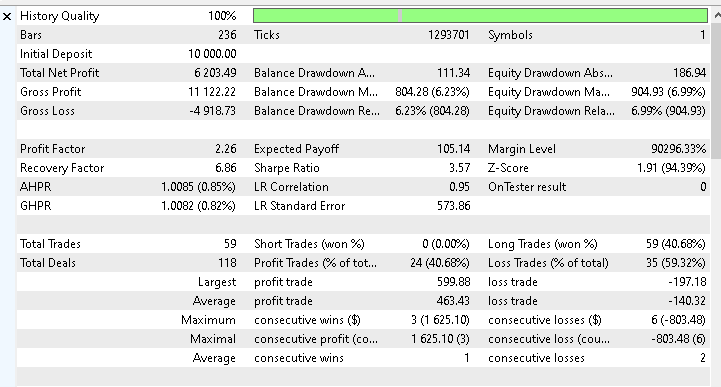
To validate the strategy in a realistic environment, the Expert Advisor was tested on Gold XAUUSD using the Daily timeframe. The backtest period runs from 1st January 2025 to 30th November 2025, covering eleven months of recent market activity at the time of writing.
The results are encouraging. Starting with an initial balance of ten thousand US dollars, the system achieved growth of slightly over 60% during the test period. The realized profit amounts to six thousand two hundred and three dollars and forty-nine cents.
More importantly, the equity curve shows steady progression with no extreme or erratic drawdowns.
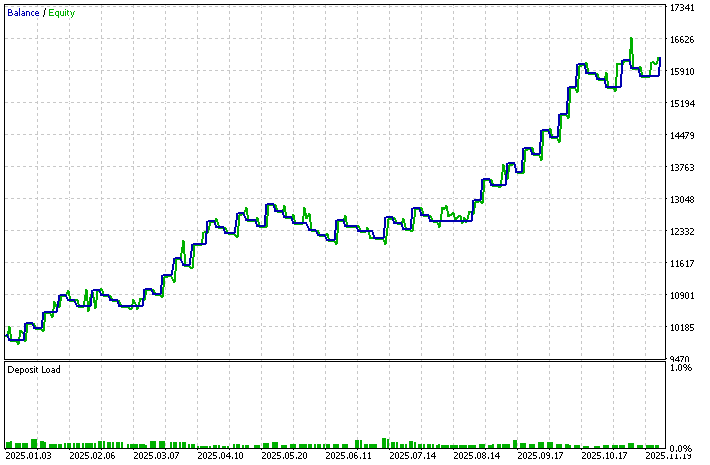
This kind of smooth equity behavior aligns well with the philosophy of volatility breakout trading, which aims to participate in sustained directional moves rather than chase short-lived fluctuations.
To make it easier for you to reproduce similar results, two files are attached to this article. The configurations.ini file contains the testing environment settings, while the parameters.set file includes the input values used during the backtest. You can load these files directly into the MetaTrader 5 strategy tester and run the same test on your side.
No trading strategy performs identically across all markets or under all conditions. Gold has its own volatility profile and behavioral characteristics, and results may differ when the same logic is applied to currencies, indices, or other commodities. This does not imply that the strategy is fragile. Instead, it highlights the importance of testing and adaptation.
The primary goal of this article is not optimization. The focus is on translating Larry Williams' volatility breakout concept into a clear, structured, and automated trading system. The input parameters were deliberately designed to remain flexible so that you can experiment, test, and refine them based on your own observations and risk tolerance. This process of exploration is where personal edge is developed.
As a next step, you are encouraged to run additional backtests on different symbols and timeframes, adjust the range multipliers, stop placement, and reward values, and study how these changes affect performance. Through disciplined testing and thoughtful analysis, you can adapt this automated framework to better align with your trading objectives and market preferences.
Conclusion
In this article, we took a complete journey from concept to execution, translating Larry Williams’ volatility breakout principles into a fully functional, testable MQL5 Expert Advisor. We began by understanding why abnormal range expansion often marks the birth of meaningful market moves, then carefully designed a logical framework to measure volatility, define objective entry and exit levels, and enforce disciplined risk management. Step by step, we transformed theory into code, ensuring that every calculation, condition, and decision had a clear purpose grounded in Larry Williams’ original work.
By the end of this process, you now have a practical blueprint for automating a proven trading idea, along with a clean and extensible EA structure that you can test, refine, and adapt to different markets. More importantly, you are no longer dependent on manual execution or subjective judgment when applying this strategy. Instead, you have a systematic approach that can be evaluated objectively through backtesting and forward testing.
This article is not just about building one trading system. It is about learning to think clearly when translating trading logic into code, to respect risk, and to give yourself room to discover your own edge. With this foundation in place, you are well prepared to explore further enhancements, additional filters, and deeper research into volatility-based trading ideas.
The table below provides a brief description of all files attached to this article.
| File Name | Description | |
|---|---|---|
| 1 | lwVolatilityBreakoutExpert.mq5 | The complete MQL5 source code of the Volatility Breakout Expert Advisor is developed step by step in this article. |
| 2 | configurations.ini | The Strategy Tester configuration file is used during backtesting to reproduce the testing environment. |
| 3 | parameters.set | The input parameters file used for the backtest, whose results are discussed in this article. |
Warning: All rights to these materials are reserved by MetaQuotes Ltd. Copying or reprinting of these materials in whole or in part is prohibited.
This article was written by a user of the site and reflects their personal views. MetaQuotes Ltd is not responsible for the accuracy of the information presented, nor for any consequences resulting from the use of the solutions, strategies or recommendations described.

 Price Action Analysis Toolkit Development (Part 54): Filtering Trends with EMA and Smoothed Price Action
 Python-MetaTrader 5 Strategy Tester (Part 02): Dealing with Bars, Ticks, and Overloading Built-in Functions in a Simulator
 Optimizing Trend Strength: Trading in Trend Direction and Strength
 From Basic to Intermediate: Events (I)

- Free trading apps
- Over 8,000 signals for copying
- Economic news for exploring financial markets
You agree to website policy and terms of use
Check out the new article: Larry Williams Market Secrets (Part 5): Automating the Volatility Breakout Strategy in MQL5.
Author: Chacha Ian Maroa
Well I suspect many are reading and like me, thoroughly enjoying your continued knowledge gathering, lessons and sharing of your findings across all the topics you present, I thought I would take a moment to thank you. You are a credit to the community and we are blessed to have you help us.
Cheers