

From Basic to Intermediate: Events (I)
 2 084
2 084
 0
0

Introduction
In the previous article From Basic to Intermediate: Struct (II), we discussed basic structures and how we could use them to pass values into functions and procedures. Although the topic of structures has not yet been explored in depth, I believe that this is still not the right moment to delve into certain aspects that exist and are possible to implement with structures. This is because, as far as I have been able to observe, here in MQL5 we do not really need programming to be done at a very high level. Please don't get me wrong.
What I mean is that with very little knowledge, but with a well-developed conceptual foundation, you can create and implement almost any type of application to be used in MetaTrader 5. And since 95% of the time (if not an even greater percentage) you will in fact be developing only simple applications, I see no reason to go into some of the more complex details at this moment.
Therefore, I will pause for a while on explanations related to basic programming concepts. We will instead begin to see how to implement an application for MetaTrader 5 using pure MQL5.
Since this article aims to explain the foundations involved in this way of implementing code in MQL5, we will start by looking at the most basic implementation of all. But before that, we need to discuss another topic.
Basic Concept of Events
Here, I will not go into too much detail, since discussing what the title of this topic refers to could easily result in an entire book on programming – and I mean that quite literally. This is an extremely broad subject, with many nuances. However, we need to align our understanding a bit before we actually begin talking about how to implement an application that will be used in MetaTrader 5.
Practically every graphical application uses events. The moment when a particular event is generated does not depend on what we are implementing, generally speaking. There are special cases in which we can trigger events from within our own application. However, since these are special cases, you should by no means take them as a way to control your code. In fact, very often a programmer who is implementing some kind of code to be executed in a given environment is not really "programming" in the traditional sense. They are defining how their code should respond to each event that arrives.
Some events may be ignored in one application, while in another they may take precedence over any other activity. Understanding this is very complicated and difficult for many beginners, because up to this point all the code presented was NOT INTENDED TO HANDLE EVENTS. It simply executed what it was programmed to do.
However, when we program an indicator or even an Expert Advisor to be used in MetaTrader 5, we are not concerned at all with making things happen, strange as that may sound. What we are actually interested in is defining how the indicator or Expert Advisor should respond to a given event.
For example, when you use a program such as Gimp, which allows you to draw in a window, you might imagine that the program is working in a certain way. But deep down, it is merely responding to events that you are generating, such as a mouse click, a key press, or dragging the mouse. All of these are events. The program DOES NOT KNOW and is not interested in monitoring what you are doing. It simply waits for an event and responds to it. In the end, you have an image manipulated and drawn.
The same thing happens with MetaTrader 5. It does not care what the user might be doing. It simply waits to receive some type of event. When the event occurs, it responds to it in some way.
But wait a moment. Who, then, is responsible for generating the events? Well, without going into too much detail: you are. However, the responsibility for deciding which graphical application will receive which event lies with the operating system. You, as a user, are not able to dictate this. You merely tell the operating system that a given application should perform a certain action, such as being minimized, maximized, or what should happen when you request to close the application.
Contrary to what many people think, the entity that actually decides how an application will be closed is NOT the operating system, but the application itself. That is why, when you are typing text and request to close the editing window, the editor may ask whether or not you want to save the changes. If the operating system had to manage this, things would be far more complicated. Ultimately, it is the application itself that decides how it will respond to an event, and never the operating system. For this reason, claiming that one system is better than another is, in my view, a lack of understanding of how things actually work.
Alright, even though MetaTrader 5 can be executed on an operating system other than Windows, we will adopt the assumption that it is still running on Windows. Even if you are using the WEB version of the MetaTrader 5 terminal, in order to simplify the explanation, we will establish Windows as the system base.
Why establish this concept? The reason is that if you are interested in learning how to program for MetaTrader 5, you need to understand that any application running within MetaTrader 5 will not be responding directly to events coming from Windows, but rather to events coming from MetaTrader 5 itself. Once again: there are specific situations in which an application running in MetaTrader 5 will in fact respond directly to Windows. But this is highly specific and requires a very advanced level of programming, which does not apply at this moment.
Now that these points have been made and we have a certain understanding, we can put everything that was mentioned into an image. This gives us the image shown below.
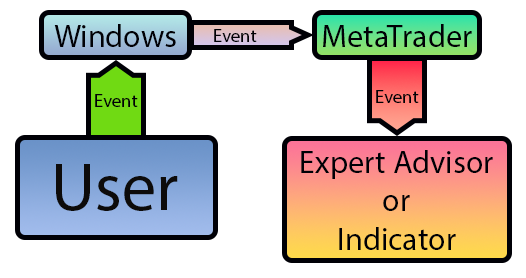
Figure 01
This image is quite emblematic, as it shows the path from an event that the user may be generating to the moment when an application running in MetaTrader 5 receives that same event. Note that although we mention an application as being an Expert Advisor, it could in fact be any type of application that can be executed in MetaTrader 5. However, since the Expert Advisor responds to most events, I used it as a way to indicate where our application would be in this whole scenario.
That was the easy part; now comes the fun part. There are two types of events: synchronous and asynchronous. Synchronous events may be of the type that occur every x period of time, and are therefore linked in some way to the system clock. An example of this type of event is the appearance of a new bar on the chart. It will always occur from time to time. However, we can also have synchronous events originating from asynchronous events, which makes some things quite interesting. But before we discuss synchronous events that originate from asynchronous ones, we need to understand what an asynchronous event is.
An asynchronous event is any event generated randomly. For example, a key press, mouse movement, or even opening or closing a position. In this specific case, the position would be opened or closed because the price reached a certain level. In short, an asynchronous event is any event whose occurrence time and order you cannot predict.
As mentioned, however, we can also have synchronous events based on asynchronous events. An example of this type of situation would be when you select something on a MetaTrader 5 chart and then drag or delete the object. The exact moment when each event occurred does not matter, but they happened in a specific order or sequence. This is why many people have difficulty programming certain types of applications. It may be necessary to respond to synchronous events that originate from asynchronous ones. In any case, you do not need to worry about this right now. As we progress through the articles, we will see how to work with this type of situation.
First Events in Practice
This is a moment that I must admit is somewhat challenging. The reason is that I want to show you how events happen. At the same time, I do not want to create something that does not make much sense. Therefore, we will need to resort to some means that are simple to understand, yet at the same time self-explanatory. This way we won't spend too much time trying to explain how events happen and how they are handled. This kind of topic is quite intuitive for those who understand events, but it can be very confusing for those who do not. So, let's make a first attempt at capturing and handling events in practice.
Before we begin, we need to understand one thing that is exceptionally present in MQL5: the division between different types of applications. Basically, in MQL5 we have two types of applications: those that can respond to user events and those that cannot respond to user events, at least not directly. It is very simple. Among those that can capture and consequently respond to user interaction events, we have indicators and Expert Advisors. On the other hand, those that cannot respond to user events, because they cannot capture such events, are scripts and services. Knowing this is very important so that you can choose the best alternative to adopt.
Well, up to this point we have basically worked only using scripts. In them, we have a single entry point, which is the OnStart procedure. From there on, everything must be generated and controlled by you, as the programmer. But in the current case, we want to capture events, whatever they may be. Therefore, we need to understand what each model allowed in MetaTrader 5 can offer us.
If you are reading this article, you have certainly already experimented (at least partially) with MetaTrader 5, using the applications that come with it by default. In this case, you must have noticed that we can have several indicators on the same chart. However, there can be one and only one Expert Advisor. So depending on your objective, we may end up implementing things either in an indicator or in an Expert Advisor.
However, there is a small detail that needs to be understood even before starting to implement the code itself. This detail refers to the limitations that exist in indicators and in Expert Advisors. And yes, there are limitations.
For example, an indicator CANNOT establish contact with the order system. This is exclusive to the Expert Advisor. On the other hand, an Expert Advisor CANNOT, at least not in a simple way, draw lines and perform calculations aimed at indicating something on the chart. In principle, an Expert Advisor HAS NO WAY to access MQL5 library functions to draw on the chart. These are exclusive to indicators. For this reason, knowing how to work with these models is very important. And this will be shown here throughout the articles.
Alright, so you might be thinking: "But then there is no way to create something that is really useful, since there are limitations that prevent us from creating an application that is truly unique." In fact, dear reader, MetaTrader 5 was designed to be a very stable and secure platform. Because of this, there are mechanisms that allow communication between different applications, thus giving us the possibility to create something truly interesting and easy to maintain in the long term.
Given this first brief introduction to the subject, let us begin by seeing how events are captured. For now, we will not worry about handling them, only about capturing them. For this purpose, we will use an indicator. It can be seen below, in its minimal code form.
01. //+------------------------------------------------------------------+
02. #property copyright "Daniel Jose"
03. //+------------------------------------------------------------------+
04. int OnInit()
05. {
06.    return INIT_SUCCEEDED;
07. };
08. //+------------------------------------------------------------------+
09. int OnCalculate(const int rates_total, const int prev_calculated, const int begin, const double &price[])
10. {
11.    return rates_total;
12. };
13. //+------------------------------------------------------------------+
Code 01
We are starting with minimal code to make the concept of an event easier to understand. There is no point in simply copying code without actually understanding why it needs to be implemented in that way.
At the moment this indicator is placed on the chart, some things will occur in a certain logical sequence. Understanding this is very important if you want to begin creating your own code. In this code 01, two events are captured. And the way MetaTrader 5 works together with these events will dictate how we should handle them. I know this may seem somewhat confusing at first. However, we can make our application interact and do things that were not imagined when the developers thought about how to implement MetaTrader 5. But to achieve this, we need to understand how and when each event will be triggered.
Of course, since we are at an early stage and focused only on didactics, I will not show how you can "force" MetaTrader 5 to do things that many consider impossible. But if you study and practice a lot, you will be able to do practically anything using MQL5 with MetaTrader 5: such as a video or image editor. Things for which MetaTrader 5 was not intended, since its main purpose is to allow us to buy and sell assets traded in an electronic market.
Very well. Now we can take that Figure 01 and expand it, to show the code 01, which is an indicator. With this, we have the following message flow.
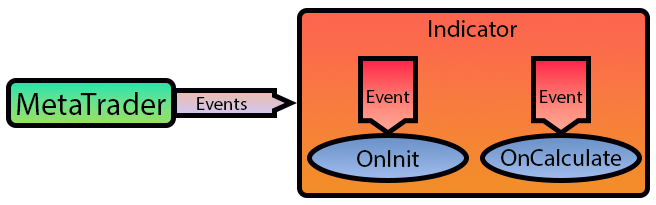
Figure 02
Figure 02 shows a continuation of Figure 01. What we are seeing in Figure 02 is what would be happening internally at the final point where events are handled. Now, since here we will handle things following a certain direction, it may be interesting for you to understand a bit more about other types of events that I will not address in these articles.
For this, I suggest that you take a look at the MQL5 documentation under Event Handling Functions. There you will get a much more detailed idea of how many events exist and are covered by MQL5, each with its own purpose and objective.
But returning to our issue, let us understand when each of the events seen in code 01 will be triggered. To understand this, all we need to do is add a small command that we already used in previous articles. Thus, that same Code 01 will now look as shown below:
01. //+------------------------------------------------------------------+
02. #property copyright "Daniel Jose"
03. //+------------------------------------------------------------------+
04. int OnInit()
05. {
06.    Print(__FUNCTION__);
07.
08.    return INIT_SUCCEEDED;
09. };
10. //+------------------------------------------------------------------+
11. int OnCalculate(const int rates_total, const int prev_calculated, const int begin, const double &price[])
12. {
13.    Print(__FUNCTION__);
14.
15.    return rates_total;
16. };
17. //+------------------------------------------------------------------+
Code 02
Great, now we know what is going on behind the scenes. But looking at this Code 02, you might be thinking: "But this code does absolutely nothing useful. Why create something like this?" Well, dear reader, in fact this code is extremely useful for what we want to do. Observe the following: the only thing this code will do is print a message in the terminal indicating which event is being captured. This is done in lines 06 and 13. However, see what happens when we place it on any chart.
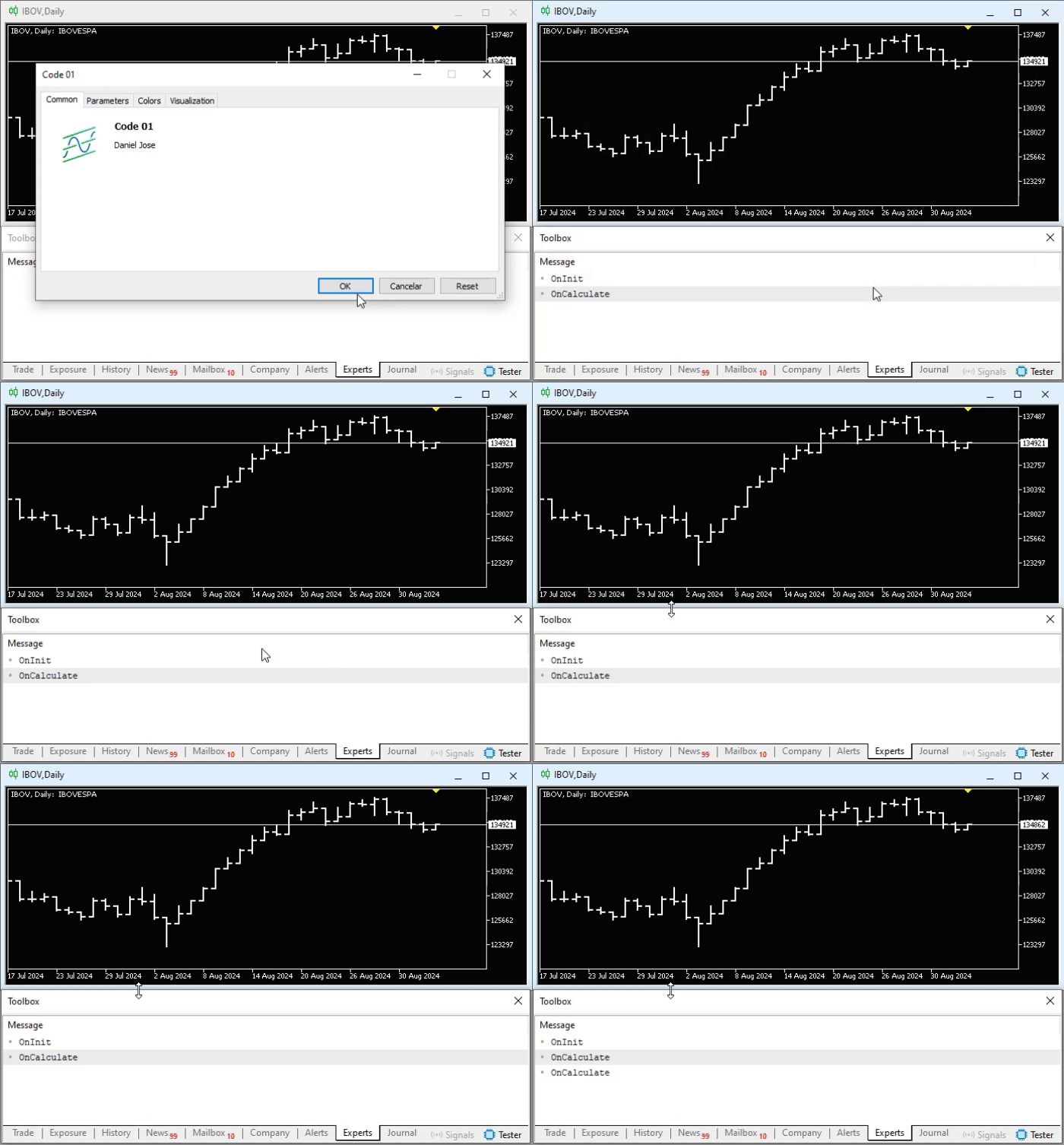
Animation 01
In this animation 01, we can see when MetaTrader 5 triggered an event that was captured by our indicator shown in Code 02. And that is exactly what you are noticing, dear reader. Despite our simple code apparently being completely useless, it was able to show us how an event triggered by MetaTrader 5 caused something to happen that was programmed by us. In this case, we handle the captured events by printing a message in the terminal – something that, at first glance, would not seem to happen. Pay attention to the sequence of the triggers. Also note the fact that line 13 was printed twice: the first time as soon as the indicator was placed on the chart, and the second time when the symbol price changed.
Understanding this is extremely important and will be of great use to us. Since we are dealing with events coming from MetaTrader 5, it implies that we will need to change the way we implement code when working with indicators and Expert Advisors, which are the only ones that respond to events triggered by MetaTrader 5.
Excellent. Now let us make another change to code 02 in order to add one more event handler. The code to be executed is what we can see below:
01. //+------------------------------------------------------------------+
02. #property copyright "Daniel Jose"
03. //+------------------------------------------------------------------+
04. int OnInit()
05. {
06.    Print(__FUNCTION__);
07.
08.    return INIT_SUCCEEDED;
09. };
10. //+------------------------------------------------------------------+
11. int OnCalculate(const int rates_total, const int prev_calculated, const int begin, const double &price[])
12. {
13.    Print(__FUNCTION__);
14.
15.    return rates_total;
16. };
17. //+------------------------------------------------------------------+
18. void OnDeinit(const int reason)
19. {
20.    Print(__FUNCTION__);
21. };
22. //+------------------------------------------------------------------+
Code 03
Once again, we have a very simple piece of code that apparently does nothing useful. However, when we execute it, take a look at what happens.
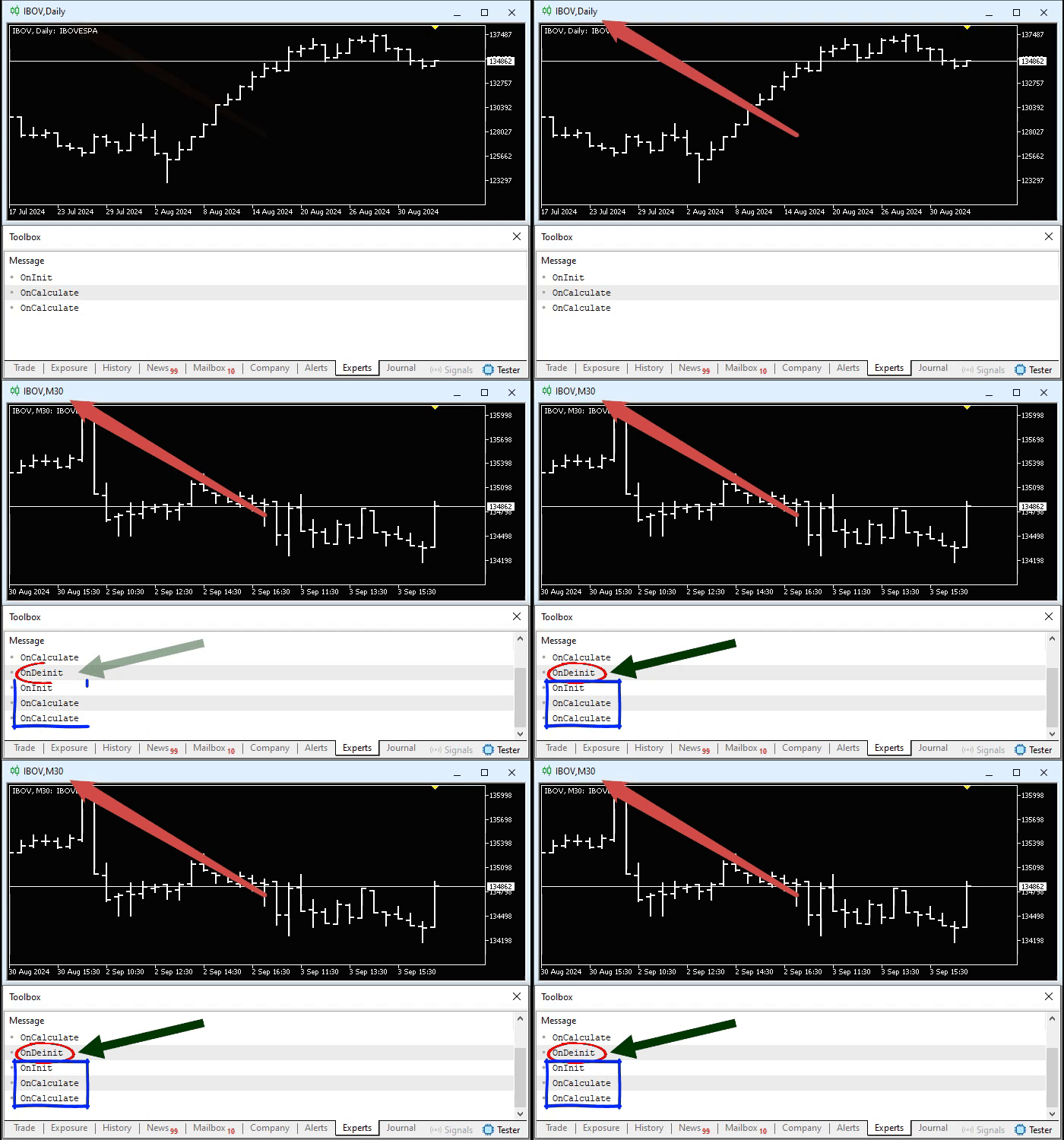
Animation 02
Just like in the first case, where we were trying to observe how our application would respond to events triggered by MetaTrader 5, here we have another type of capture. I want you to understand the following: the indicator was present on the chart, and the chart was using a given timeframe. As soon as we change the timeframe, an event is triggered, which in turn is being captured by the indicator shown in code 03.
Now comes the part that interests us. When the timeframe change occurred while the indicator shown in code 02 was present on the chart, we simply lost this event. Better said, we ignored the fact that MetaTrader 5 would trigger it, and we simply said the following:
"Look, MetaTrader 5, do whatever is necessary to keep everything working, because I have no problem with that."
So MetaTrader 5 triggered the event, but code 02 ignored it. As a result, we had the impression that the indicator would simply know how to behave in that type of situation. However, this is not always what we actually want to happen. In situations like this, we can use a procedure shown on line 18 in code 03, in order to capture this event and thus take the appropriate measures so that no other unexpected event may occur.
I know that many of you, especially those who already have some familiarity with MQL5 programming, may think that we do not need to worry about many events occurring in an indicator. However, there are situations in which, if you simply ignore certain events, you may face strange failures reported by MetaTrader 5. If your application does not take the appropriate measures, MetaTrader 5 will take the liberty of doing whatever is necessary to ensure that problems in your code do not interfere with the overall functioning of the platform.
Although many believe that indicators can hardly have errors, errors do occur. And when that happens, and MetaTrader 5 triggers an event that our code ignores, we may have platform performance issues, such as slowdowns or even freezes. But it is not MetaTrader 5's fault, but it's your application's, which is not responding properly to the triggered events.
To demonstrate this type of situation, let's implement a very simple piece of code, with a very simple yet very interesting objective: to tell us how many times the OnCalculate event was triggered over a given period of time. This code can be seen below:
01. //+------------------------------------------------------------------+
02. #property copyright "Daniel Jose"
03. //+------------------------------------------------------------------+
04. uint gl_Counter;
05. //+------------------------------------------------------------------+
06. int OnInit()
07. {
08.    gl_Counter = 0;
09.
10.    Print(__FUNCTION__);
11.
12.    return INIT_SUCCEEDED;
13. };
14. //+------------------------------------------------------------------+
15. int OnCalculate(const int rates_total, const int prev_calculated, const int begin, const double &price[])
16. {
17.    if (!gl_Counter)
18.    {
19.       uint arr[];
20.
21.       if (FileLoad(_Symbol, arr) > 0)
22.          gl_Counter = arr[0];
23.    }
24.
25.    Print(__FUNCTION__, " :: ", ++gl_Counter);
26.
27.    return rates_total;
28. };
29. //+------------------------------------------------------------------+
30. void OnDeinit(const int reason)
31. {
32.    uint arr[1];
33.
34.    arr[0] = gl_Counter;
35.    FileSave(_Symbol, arr);
36.
37.    Print(__FUNCTION__);
38. };
39. //+------------------------------------------------------------------+
Code 04
There is nothing in this code that we haven't already seen and discussed, so it is quite understandable to anyone who studies and practices what is shown in these articles. Perhaps the only part that may raise some doubt is what is related to the FileLoad and FileSave functions. Since they are very well explained in the official documentation, I will not go into further detail in this article.
However, when executed, this code 04 will generate something similar to what is shown below.
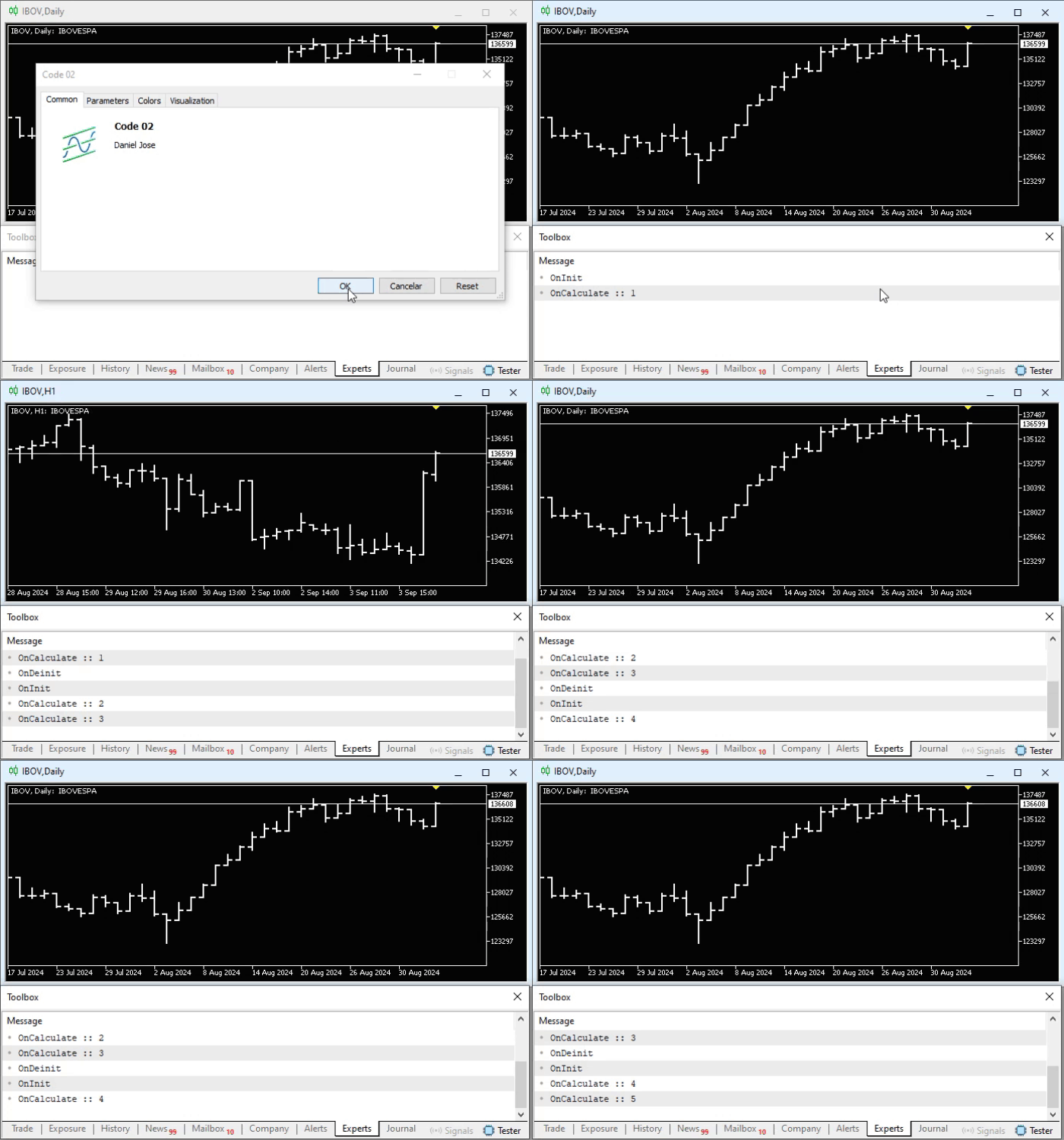
Animation 03
Notice that, despite changing the timeframe, the counter continues to be incremented. This happens because on line 30 of code 04, we are capturing the event that MetaTrader 5 triggers when something needs to be done by our code. In this case, we are not handling any of the causes that made MetaTrader 5 trigger the event. We are simply telling MetaTrader 5 to save a given variable to disk. We could do this in many other ways, as we will discuss shortly. But our goal is to show that there may be situations in which we need to handle an event, while in other situations we can ignore that same event. Everything depends on what we want to achieve and how we intend to reach our ultimate goal.
Note that if the procedure on line 30 did not exist, or if we did not handle it properly, every time we changed the timeframe the counter would restart from zero. This is due to what is happening on line eight, where we start counting how many times OnCalculate was executed. This code is pretty interesting, isn't it? Something simple, yet something that allows us to understand several issues related to events generated by MetaTrader 5.
Final Thoughts
In this article, we began to have much more fun. This is the first in a series of articles in which we will explore event handling. I will try to approach this topic in a playful, simple, and didactic way, showing you that we should not always use the solution proposed by another programmer. This is because, in a wide range of situations, the solution proposed by one person may not be the ideal solution for you at that specific moment.
I know that many may be eager for what will be covered in the next articles. But before trying to dive headfirst into something that will become increasingly complex, try to practice and study what was covered in this article. I guarantee that it will be well worth the effort to practice and try to understand what was presented here. As a tip and an incentive to help you think about what can be practiced, try modifying code 04 which is attached below, so that the counter value is stored if and only if there is a timeframe-change event. For any other type of event that MetaTrader 5 may trigger, the counter should reset to zero again.
In the next article, I will show how you could do this in a very safe and simple way. So get to work, and happy studying.
Translated from Portuguese by MetaQuotes Ltd.
Original article: https://www.mql5.com/pt/articles/15732
Warning: All rights to these materials are reserved by MetaQuotes Ltd. Copying or reprinting of these materials in whole or in part is prohibited.
This article was written by a user of the site and reflects their personal views. MetaQuotes Ltd is not responsible for the accuracy of the information presented, nor for any consequences resulting from the use of the solutions, strategies or recommendations described.

 Python-MetaTrader 5 Strategy Tester (Part 02): Dealing with Bars, Ticks, and Overloading Built-in Functions in a Simulator
 Forex arbitrage trading: A simple synthetic market maker bot to get started
 Larry Williams Market Secrets (Part 5): Automating the Volatility Breakout Strategy in MQL5
 Introduction to MQL5 (Part 34): Mastering API and WebRequest Function in MQL5 (VIII)

- Free trading apps
- Over 8,000 signals for copying
- Economic news for exploring financial markets
You agree to website policy and terms of use