

From Basic to Intermediate: Random Access to Files (I)
 1 372
1 372
 0
0

Introduction
In the previous article, From Basic to Intermediate: FileSave and FileLoad, we introduced the FileLoad and FileSave library functions. Although many developers consider them somewhat limited because certain operations can be cumbersome, they are very useful when it comes to generating log files. For those unfamiliar with them, log files help us understand how code behaves in specific scenarios and are an extremely useful tool for any developer.
Even so, the FileSave and FileLoad functions are mainly aimed at implementations in which access to file data is sequential. This is a consequence of how these functions operate. Developers often need random access to a file, although FileLoad and FileSave can provide it only indirectly by loading the entire file into memory and saving it again.
Therefore, although random access can be emulated, it is not actually performed in the usual way. In this case, the goal is to load only the necessary parts of the file in small blocks. Although this may seem unnecessary now that memory is inexpensive enough to hold large files, it can be very useful in many other scenarios where the goal is to process or access the file in specific fragments.
Random Access to Files (Part 1)
If you study the documentation for various programming languages and examine their built-in procedures and functions, and pay particular attention to the file-handling section, you will notice that they often provide far more capabilities than you are likely to need in practice. Some languages, such as C++, have a very small number of functions and procedures for working with files.
However, C++ provides extensible I/O facilities that can also be adapted to other tasks, enabling a more expressive syntax based on I/O stream operators. We will discuss comparable facilities in MQL5 in future articles. For now, let us stay with the basics, since there is no point in making things complicated too early.
If you then consult the MQL5 documentation, you will notice that it contains many different functions and procedures intended for both reading and writing data to files. The simplest functions are FileLoad and FileSave, which were introduced and explained in the previous article. However, as already mentioned in the introduction to this article, these functions are not intended for random access to file contents. That is why the MQL5 documentation provides several other functions specifically intended for random access to file contents.
This partly explains why the documentation describes so many different functions. However, it does not explain how to work with these functions, nor does it explain how we can handle user-defined types. Yes, dear reader, as a programmer, you are not limited to working only with the types defined by the programming language. Good programming languages, such as MQL5, allow us to create custom types tailored to specific situations. You may not fully understand what I mean, since this may seem rather unusual.
However, in articles from this same series, when we talked about template and typename, that is exactly what we were doing: creating custom types tailored to a particular problem. We can also use unions and structures to build abstractions for specialized data.
We will therefore impose a deliberate restriction to simplify the discussion that follows. Since the goal is to demonstrate certain operations as clearly as possible, there is no need to explain every file-handling function described in the MQL5 documentation, and we can focus on a single modeling approach.
The approach presented here should by no means be regarded as the only way to do this. Depending on the specific situation, using a function or procedure from the MQL5 standard library will certainly be the best way to solve certain types of tasks. This is because, in that case, the process becomes more direct rather than an indirect workaround aimed at achieving a different kind of solution.
Nevertheless, we will use only a small subset of the available functions. However, this should not stop you from experimenting with other functions or procedures in order to understand more specific operations in the MQL5 standard library. So, dear reader, try to consider possibilities beyond those demonstrated here. The same result can often be achieved in several ways, and some approaches may be easier for one programmer to understand than for another. So, let us begin with the code shown below:
01. //+------------------------------------------------------------------+
02. #property copyright "Daniel Jose"
03. //+------------------------------------------------------------------+
04. void OnStart(void)
05. {
06.     int handle;
07.
08.     if ((handle = FileOpen("Hello.txt", FILE_WRITE)) == INVALID_HANDLE)
09.     {
10.         Print("Error...");
11.         return;
12.     };
13.     FileWrite(handle, "This file was created by a script written in MQL5.");
14.     FileWrite(handle, "New information is being added to the file.");
15.     FileWrite(handle, "Version FileWrite...");
16.     FileWrite(handle, "Checking writing values [", 1, "]-[", M_PI, "]");
17.
18.     FileClose(handle);
19.
20.     Print("Success");
21. }
22. //+------------------------------------------------------------------+
Code 01
When we run Code 01, we will see that the file is created in the appropriate runtime sandbox folder. I believe you, dear reader, should have no difficulty understanding which file is involved and where it will be created. However, one detail about the file contents is particularly important. This is where things become interesting.
Pay attention to the following: in Code 01, we specify in line 08 that the file is opened in write mode. If the operation succeeds, the variable receives a valid handle that can be used to work with the file. Up to this point, everything has been very simple. So simple, in fact, that to indicate that file operations are complete, we use line 18, which closes the file and releases the handle for other uses. However, what really interests us is the code between lines 13 and 16. These lines write data to the file.
Before looking at how reading can be performed, let us first examine the write operation, because it is far more important than it may seem at first glance.
We can clearly see what we want to write to the file, since all the content is very simple and understandable. Even so, the question arises: what is actually stored in the file? To answer this question, we can look at the file contents below:

Figure 01
Figure 01 shows the result of writing the data to the file. "Wait, this content looks a little strange." Let us then look at the same file shown in Figure 01, but in binary format. You can see it below:
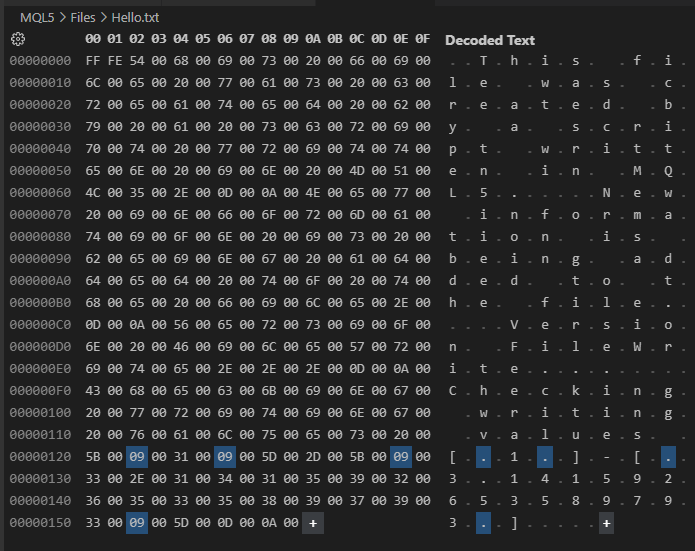
Figure 02
Now pay attention, dear reader: the contents of Figure 02 are exactly the same as the contents of Figure 01. However, in Figure 02 we can see every byte of the file written by Code 01. Figure 02 reveals an important detail that can determine whether, when we read the file using random access, we obtain the correct value or a completely incorrect one.
Although we did not specify anything at the beginning of the file, as can be seen in Figure 01 and in Code 01, at the beginning of the file shown in Figure 02 we see two strange bytes that do not make much sense. These bytes indicate the file format and are not relevant to the present discussion. At the same time, Code 01 clearly shows that they are not explicitly specified anywhere. However, there are also other characters here that do not appear in Code 01 either. These are carriage-return and line-feed characters.
In this same Figure 02, some bytes are highlighted. Why? They are inserted as tab separators, spacing the values written on line 16 of Code 01. It is extremely important to understand the meaning of these tab characters. Depending on the type of content being written and, above all, the purpose for which the file is being created, these extra characters can make it impossible to read the file correctly later. You may not expect these characters to be present, and they may disrupt the indexing scheme used during reading.
"All right, I understand that what is written in the code will not always be represented in exactly the same way when it is written to a file. But is this always the case?" It depends on the situation, dear reader. Note that if we change Code 01 to the code shown below, the result can be completely different:
01. //+------------------------------------------------------------------+
02. #property copyright "Daniel Jose"
03. //+------------------------------------------------------------------+
04. void OnStart(void)
05. {
06.     int handle;
07.
08.     if ((handle = FileOpen("Hello.txt", FILE_WRITE | FILE_ANSI)) == INVALID_HANDLE)
09.     {
10.         Print("Error...");
11.         return;
12.     };
13.     FileWrite(handle, "This file was created by a script written in MQL5.");
14.     FileWrite(handle, "New information is being added to the file.");
15.     FileWrite(handle, "Version FileWrite...");
16.     FileWrite(handle, "Checking writing values [", 1, "]-[", M_PI, "]");
17.
18.     FileClose(handle);
19.
20.     Print("Success");
21. }
22. //+------------------------------------------------------------------+
Code 02
Now note this: the only difference between Code 01 and this Code 02 is precisely the additional flag passed to FileOpen. And just because of this simple change, look at what happens when Code 02 creates the file. You can see this by comparing Figure 03 below with Figure 02:
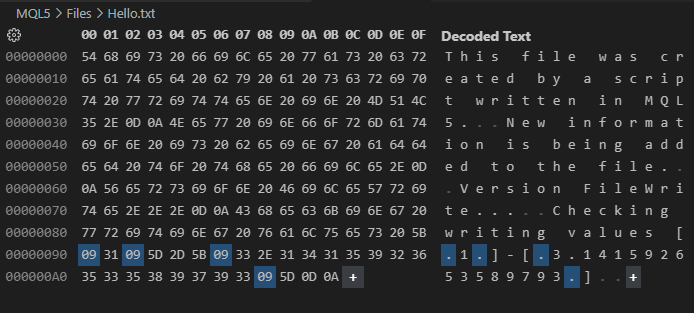
Figure 03
"Wow! I thought small changes in the code would not affect the result very much." Dear reader, there are things you can only really understand by experimenting and observing them in practice. The behavior you have just observed is one such example. That is why I recommend experimenting with the material and applying it in slightly different ways, but most importantly, to check what happens when certain elements of the code are changed.
Continuing with the topic, note that the result shown in Figure 03 is much closer to the content we would expect when looking at Code 02. Even so, we still have the tab, carriage-return, and line-feed characters that are still present. Why does this happen? The reason is that the file is not being written in binary mode.
In any case, we will make a small change to the code. This will allow us to read from a specific position in the file, simply to check one small detail that you need to understand before moving on to binary file writing.
Without understanding when to use binary mode and when to use ordinary text mode, it is quite difficult to make the right choice at different stages of a real implementation.
To clearly see what I want to show, we need to create new code. This code is shown below.
01. //+------------------------------------------------------------------+
02. #property copyright "Daniel Jose"
03. //+------------------------------------------------------------------+
04. void OnStart(void)
05. {
06.     int handle;
07.
08.     if ((handle = FileOpen("Hello.txt", FILE_WRITE | FILE_READ | FILE_ANSI)) == INVALID_HANDLE)
09.     {
10.         Print("Error...");
11.         return;
12.     };
13.     FileWrite(handle, "This file was created by a script written in MQL5.");
14.     FileWrite(handle, "New information is being added to the file.");
15.     FileWrite(handle, "Version FileWrite...");
16.     FileWrite(handle, "Checking writing values [", 1, "]-[", M_PI, "]");
17.
18.     FileFlush(handle);
19.
20.     FileSeek(handle, 0, SEEK_SET);
21.     while (!FileIsEnding(handle))
22.         Print(FileReadString(handle));
23.
24.     FileClose(handle);
25. }
26. //+------------------------------------------------------------------+
Code 03
Code 03, in addition to allowing us to write the file just as Code 02 did, also allows us to read the file contents. To understand what comes next, we first need to understand what to expect from running Code 03.
Essentially, the file we see in Figure 03 will be written. To ensure that the file actually contains the expected information, we use line 18 to flush the buffer to disk. The operation shown in line 18 may be unnecessary at certain times. Depending on how busy the operating system is with disk read or write operations, the writes performed by lines 13 through 16 may be committed immediately. However, at some point it may not. Since I do not want to close the file and then reopen it to read the saved data, we use this library function in line 18 to force the data to be flushed to the file immediately.
Well, once this is done, we can be reasonably sure that the file contains the data shown in Figure 03. Now we move on to reading. Since the file pointer is now positioned at the end, we need to move it somewhere else. In this case, we will point it to the beginning of the file. To do this, we use line 20, where we move the read/write pointer to the beginning of the file. Pay attention to this, dear reader. The reading we will perform will not come from the buffer contents, but from the file on disk itself.
The same principle applies to both writing and reading: we can use the reading function shown in line 21, where reading will continue until the end of the file is reached. What really interests us here is what line 22 does. In this line, we instruct the application to print the content read from the file to the MetaTrader 5 terminal. This is the part that interests us most here.
Now pay attention: in our case, we wrote four lines. They can be seen in Figure 01. So, obviously, when line 22 of Code 03 is executed, we would expect terminal output similar to Figure 01. However, if we look at the MetaTrader 5 terminal, we will see something similar to Figure 04 below:
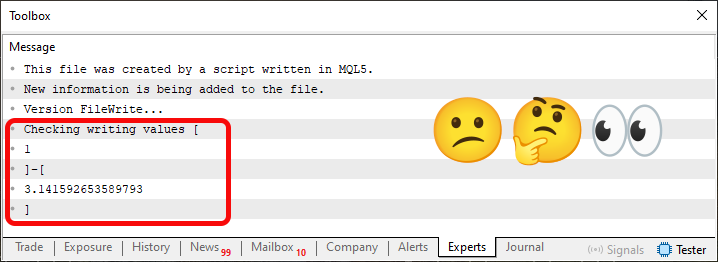
Figure 04
"Hmm, strange. Apparently, the first three lines are displayed correctly. However, the area marked in red shows data that differs from what was expected. Very strange." Well, dear reader, although it may seem that way, the result is actually useful for our purposes. However, I want to remind everyone that here we are doing this in the simplest possible way, to examine what most developers would naturally try, but which would ultimately lead to results different from those expected.
This unexpected result is caused by the tab character. "But wait, how is that possible?" Well, dear reader, because in this non-binary reading mode, FileReadString stops as soon as it encounters a carriage-return/line-feed sequence or a tab character. You only need to consult the documentation for details, although it mentions the use of CSV files. That is not the case here, since the file contents are not intended to represent CSV format.
Well, once again, there is something to learn here. This happens because, among the file reading flags, because we did not specify how the data should be interpreted during reading, the operation on line 22 ends up treating tab characters as delimiters. Thus, to solve this issue, we need to change the code once again, using the version shown below.
01. //+------------------------------------------------------------------+
02. #property copyright "Daniel Jose"
03. //+------------------------------------------------------------------+
04. void OnStart(void)
05. {
06.     int handle;
07.
08.     if ((handle = FileOpen("Hello.txt", FILE_WRITE | FILE_READ | FILE_ANSI | FILE_TXT)) == INVALID_HANDLE)
09.     {
10.         Print("Error...");
11.         return;
12.     };
13.     FileWrite(handle, "This file was created by a script written in MQL5.");
14.     FileWrite(handle, "New information is being added to the file.");
15.     FileWrite(handle, "Version FileWrite...");
16.     FileWrite(handle, "Checking writing values [", 1, "]-[", M_PI, "]");
17.
18.     FileFlush(handle);
19.
20.     FileSeek(handle, 0, SEEK_SET);
21.     while (!FileIsEnding(handle))
22.         Print(FileReadString(handle));
23.
24.     FileClose(handle);
25. }
26. //+------------------------------------------------------------------+
Code 04
Note that, as already mentioned, we need to change only one item in the code: This is line 08, which you can see in Code 04. Even so, the result differs greatly from what was shown in Figure 04. In this case, when Code 04 is executed, the terminal will display the following:
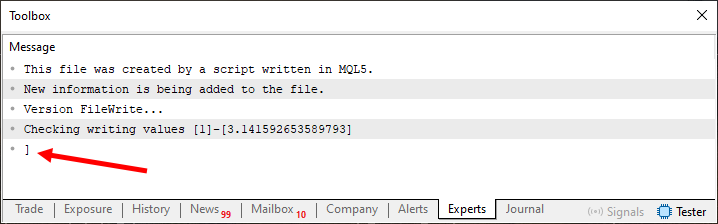
Figure 05
Please note that in this case the output is very close to what we expected from the write statements. Of course, we have a small problem, which can be seen in Figure 05. But this is a secondary problem, since the objective can be considered achieved. The goal was precisely to read the file in such a way as to obtain something very similar to the text that appears between lines 13 and 16 of Code 04.
Excellent. Now that this has been done and shown visually, we can move on to binary reading and writing. This allows us to move on to random access to file contents. However, because the content being written and read resembles ordinary text, it is not very suitable for a clear and simple demonstration of how binary operations and random-access operations are performed in practice. As a first step toward understanding the topic, we need to change the content to something a little simpler. This is done using the code shown below.
01. //+------------------------------------------------------------------+
02. #property copyright "Daniel Jose"
03. //+------------------------------------------------------------------+
04. void OnStart(void)
05. {
06.     int handle;
07.
08.     if ((handle = FileOpen("Hello World.txt", FILE_WRITE| FILE_READ | FILE_BIN)) == INVALID_HANDLE)
09.     {
10.         Print("Error...");
11.         return;
12.     };
13.     for (uchar c = 0; c < 10; c++)
14.         FileWriteInteger(handle, c, CHAR_VALUE);
15.
16.     FileFlush(handle);
17.
18.     FileSeek(handle, 0, SEEK_SET);
19.     Print("The byte value of the ", FileTell(handle), " position in the file is ", FileReadInteger(handle, CHAR_VALUE));
20.
21.     FileClose(handle);
22. }
23. //+------------------------------------------------------------------+
Code 05
When Code 05 is executed, a file will be created with values from zero to nine, as is done in line 14. But there is one small detail, and it is extremely important that you understand it well. Note that when writing, we specify that the value being written is of type CHAR_VALUE. Understanding this is very important, because by default this function writes values of type INT_VALUE. "But why is this important?" Well, to understand the importance of this information, you need to understand how unions work.
Two basic articles on unions have been published in this series, and one of them is From Basic to Intermediate: Union (I). In addition to this knowledge, you will also need to understand how to work with arrays. This has also been explained in other articles from this same series. Given that you have all the necessary knowledge described in the previous articles, we can try to understand why executing this Code 05 gives us the result shown below:
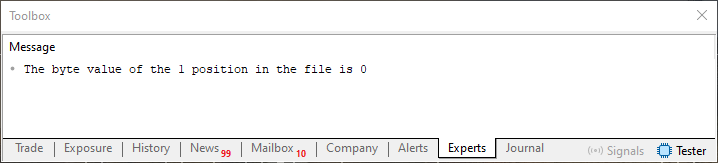
Figure 06
When line 19 of Code 05 is executed, something similar to what is shown in Figure 06 will be displayed. But what does this message printed to the terminal mean? As you can see, this message displays two numeric values. The first value indicates the current position in the file. The second value refers to the contents of that specific position. Now listen carefully. With this reading function, the file should be treated as an array; in other words, it is an array whose index is automatically incremented. We can also specify the index within this array, and this is done using line 18.
Just as counting in an array starts from index zero, when we access data in a file, the index also starts from zero. However, unlike the situation where we specify an index outside an array, here, when working with files, the system will always set the index to a valid position. Try Code 05 to understand it by replacing the zero value used in the function in line 18 with other values. Look at the result. This will help you understand how data access is performed.
But here you also need to understand another aspect. Notice that FileReadInteger also uses CHAR_VALUE. This is because we want to read a single byte. Normally, four bytes would be read, which would advance the index or position in the file by those same four bytes. Pay very close attention to the details I am mentioning. This is exactly why understanding unions will greatly help you make sense of this way of accessing file data.
Before moving on, test Code 05 thoroughly until you fully understand how it works, that is, until you realize that files are nothing more than arrays stored on disk. Once you have absorbed this, it will be much easier for you to understand what we will do next.
01. //+------------------------------------------------------------------+
02. #property copyright "Daniel Jose"
03. //+------------------------------------------------------------------+
04. void OnStart(void)
05. {
06.     int handle;
07.
08.     if ((handle = FileOpen("Hello World.txt", FILE_WRITE| FILE_READ | FILE_BIN)) == INVALID_HANDLE)
09.     {
10.         Print("Error...");
11.         return;
12.     };
13.     for (uchar c = 0; c < 10; c++)
14.         FileWriteInteger(handle, c, CHAR_VALUE);
15.
16.     FileFlush(handle);
17.
18.     FileSeek(handle, 4, SEEK_SET);
19.     FileWriteInteger(handle, 45, CHAR_VALUE);
20.
21.     FileFlush(handle);
22.
23.     FileSeek(handle, 4, SEEK_SET);
24.     Print("The byte value of the ", FileTell(handle), " position in the file is ", FileReadInteger(handle, CHAR_VALUE));
25.
26.     FileClose(handle);
27. }
28. //+------------------------------------------------------------------+
Code 06
Now look at Code 06. As you will see, it is very similar to Code 05. However, here we do something that goes slightly beyond Code 05, since we write to the file using fully random access. There is a not-so-funny catch here if you have not managed to consolidate the concept of an array together with the concept of a file. Code 06 performs an operation that would be impossible with a conventional array, at least if we were working with arrays in the way this is usually done in most cases.
Before examining Code 06, let us look at the result of running it:
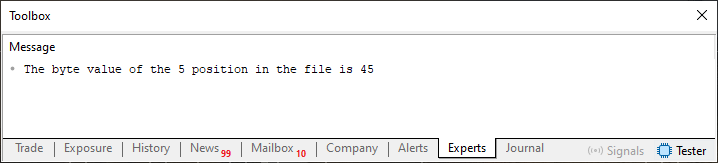
Figure 07
Now comes the most interesting part: understanding how the message in Figure 07 was obtained. First, note that the only changes in Code 06 compared with Code 05 are in lines 18 and 19. These two lines are used to change the value at a specific position in the file. This is equivalent to assigning a new value to a specific array element. Up to this point, everything is very easy to understand, since the specified position is within what is created by the loop in line 13.
You can do the same thing even without creating the position beforehand, or, more precisely, you do not need to preallocate every position before assigning a value to it. Remember that here we are dealing with files. In this case, you can specify a position far beyond the current end of the file, and the operation will still work.
This may sound confusing. In practice, everything is quite simple. Replace the value of the FileSeek function in line 18 with a value greater than the ten elements created by the loop in line 13, for example, 14. Do not forget to also change the value in line 23 to the same value used in line 18. Running this code will produce the result shown below:
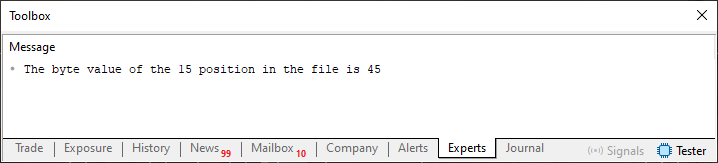
Figure 08
"How strange! I always imagined that data had to be written to a file byte by byte and position by position. So can we write anywhere, regardless of what data already exists?" This is certainly curious. Dear reader, situations like this are what make programming memorable and engaging, although at times it may seem somewhat confusing to those just starting to become familiar with it.
Final Thoughts
In this article, we explored random access to file contents for the first time. Of course, when I say this, I assume, dear reader, that you may not have realized how many subtleties file handling involves.
Since in this article we focused primarily on writing to an arbitrary position within a file, we did not have the opportunity to explain some details related to indexing data inside the file itself. And since this issue is very important, we now have a natural topic for the next article. So try to study and reinforce in practice what was shown in this article, using the source files included in the attachment. I will see you in the next article.
| MQ5 file | Description |
|---|---|
| Code 01 | File access demonstration |
| Code 02 | File access demonstration |
| Code 03 | File access demonstration |
| Code 04 | File access demonstration |
Translated from Portuguese by MetaQuotes Ltd.
Original article: https://www.mql5.com/pt/articles/16246
Warning: All rights to these materials are reserved by MetaQuotes Ltd. Copying or reprinting of these materials in whole or in part is prohibited.
This article was written by a user of the site and reflects their personal views. MetaQuotes Ltd is not responsible for the accuracy of the information presented, nor for any consequences resulting from the use of the solutions, strategies or recommendations described.

 Market Simulation: Position View (V)
 Foundation Models for Trading (Part I): Porting Kronos to Native MQL5
 Monochronic Trading (Part 1): How to Detect Broker Timezone and DST in MQL5
 Entropy-Based Market Efficiency Indicator in MQL5: Measuring Randomness in Price Returns Using Approximate Entropy

- Free trading apps
- Over 8,000 signals for copying
- Economic news for exploring financial markets
You agree to website policy and terms of use