

From Basic to Intermediate: FileSave and FileLoad
 820
820
 0
0

Introduction
In the previous article From Basic to Intermediate: Sandbox and MetaTrader the concept of the sandbox and its effect on the MetaTrader 5 workflow when using MQL5 library functions and procedures to create, process, and read files in general was explained in a very simple and practical way.
That material was intended only to explain what the sandbox is, not to demonstrate optimal methods for working with files. This is because there are much more efficient ways to implement this using pure MQL5, without having to rely on any operating-system functions.
Assuming that the reader is already familiar with the sandbox concept and its effect on the workflow, we can move on to working with files in order to achieve different results. It should be noted that this material is not about developing any particular application. To demonstrate how certain tasks can be implemented, we will use only a few functions and procedures from the MQL5 library. Even so, to understand certain nuances that may raise questions, you need to practice the material yourself. So, following our usual tradition, let us move on to a new topic and examine the basics.
There is no single universal formula
In the previous article, we implemented a read/write scheme for a fairly simple task, and at that point the code could have been left as it was. In practice, however, real-world implementations do not always follow the example we showed earlier. This is because a certain problem may arise. To restore the context, let us once again look at exactly what this problem is. To do that, we will use one of the code examples discussed in the previous article. It is shown below:
01. //+------------------------------------------------------------------+
02. #property copyright "Daniel Jose"
03. //+------------------------------------------------------------------+
04. void OnStart(void)
05. {
06.     const string szText = "This file was created by a script written in MQL5.";
07.     uchar info[];
08.
09.     StringToCharArray(szText, info);
10.
11.     FileSave("Hello.txt", info);
12. }
13. //+------------------------------------------------------------------+
Code 01
When Code 01 is executed, it will create a file whose contents are shown in the following image.
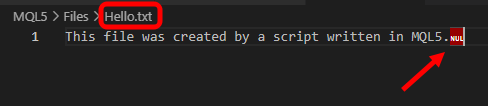
Image 01
Image 01 shows an unusual character — in this case, the null character (NUL). It is used to mark the end of a string and, in the context of an application that uses this type of string representation, it is not a problem. However, in a file intended to store plain text, such a character makes no sense and often becomes a problem depending on the purpose or intended use of the text file.
There are several ways to solve this kind of problem. Some are more direct, while others are indirect and require additional steps to be implemented correctly. Moreover, there is another nuance related to Code 01. Although line 11 can create a file and write data to it directly in the simplest and most straightforward way, this way of solving the task creates another problem, which we will examine in detail shortly: random access to file data.
Although this statement may seem unusual, in practice files on disk do not operate like sequential-reading systems, as happens, for example, with files on magnetic tapes. With tape, when you need to read a file or specific data, you often have to read a significant portion of the tape, which at times makes the reading and writing process much more complicated. With files stored on disk, however, both sequential and random access are possible, which allows any part of the file to be read or written at any time.
Despite this possibility, however, FileSave and FileLoad are not suitable functions for random access, because they read or write a file as a complete block and usually load or save the entire file to disk. For small files this is not a problem, and if the file contents can be ignored for the sake of overwriting them, applications can use FileSave and FileLoad without any real issues, since they provide a very practical and safe way to read and write files.
However, if the task is to modify a file while keeping part of its contents unchanged, using FileSave and FileLoad may not be the best solution, because in that case the entire file has to be kept in memory. This can be completely impractical, since often only a small fragment that is being worked on directly needs to be kept in memory. The rest can remain on disk and be loaded as needed.
For this reason, there is no single universal formula or universal, definitive way to implement tasks. Each case is unique, and the chosen solution should be selected according to the requirements of that particular case so that the user’s experience with your MetaTrader 5 applications remains convenient and practical.
To make the above easier and clearer to understand, we should create a few simple examples that demonstrate why each implementation needs to be designed individually, since many people may not have a clear idea of how strongly certain decisions can affect the way an application is developed.
Let us begin by trying to add new information to a file that has already been saved on disk. In this case, the file being processed will be exactly the same as the file created by Code 01. However, some changes will be made to that same Code 01 to make this kind of file handling possible. Remember: the goal is to add new information to an already saved file. So, in theory, we could consider a solution similar to the one shown below.
01. //+------------------------------------------------------------------+
02. #property copyright "Daniel Jose"
03. //+------------------------------------------------------------------+
04. void OnStart(void)
05. {
06.     SaveInfo("This file was created by a script written in MQL5.");
07.     SaveInfo("New information is being added to the file.");
08. }
09. //+------------------------------------------------------------------+
10. void SaveInfo(const string szArg)
11. {
12.     uchar info[];
13.
14.     StringToCharArray(szArg, info);
15.     FileSave("Hello.txt", info);
16. }
17. //+------------------------------------------------------------------+
Code 02
When Code 02 is executed, we expect the Hello.txt file to contain both the data from Image 01 and the new information. The data that should have appeared in the file is shown in lines 06 and 07 of Code 02. Notice that this is very easy to understand. However, when this script is run in MetaTrader 5, the result is not quite what was expected. It can be seen below:

Image 02
This raises the main question — and an equally important concern. What could have happened to produce the result shown in Image 02? Initially this result is not expected, because both the contents of line 06 and the contents of line 07 should be present in the final file. However, only the message from line 07 is displayed.
In other words, for some reason the contents of line 06 are ignored, and only the contents of line 07 are written. This raises the question of what happens to the contents of line 06. This is one of the hardest problems to understand without the help of someone who can explain the underlying processes in detail. In practice, however, it is quite simple. When line 06 is executed, the function on line 15 writes data to the file. Immediately afterward, when line 07 is executed, that file is overwritten and new contents are written to it. Despite the simplicity of this process, without an external explanation it can be difficult to discover why the code is not writing certain data. This creates the false impression that there is a serious error in the code, while in reality the problem lies elsewhere.
So how can we solve this problem? In other words, how could we store the contents of both line 06 and line 07 in the same file? Well, dear reader, as stated in the title of this section: THERE IS NO SINGLE FORMULA. There are different ways to solve this task, each with its own advantages and disadvantages. Here we will show only one example for illustration. But you can come up with other approaches and try to implement them. Try developing your own solution using FileSave as a starting point. This is because there are other, much simpler solutions, provided they are well planned.
Let us look at the first solution we might propose. It can be seen below:
01. //+------------------------------------------------------------------+
02. #property copyright "Daniel Jose"
03. //+------------------------------------------------------------------+
04. void OnStart(void)
05. {
06.     SaveInfo("This file was created by a script written in MQL5.");
07.     SaveInfo("New information is being added to the file.");
08. }
09. //+------------------------------------------------------------------+
10. void SaveInfo(const string szArg)
11. {
12.     const string FileName = "Hello.txt";
13.     uchar info[], tmp[];
14.
15.     FileLoad(FileName, info);
16.     StringToCharArray(szArg + "\n", tmp);
17.     ArrayCopy(info, tmp, info.Size(), 0, tmp.Size() - 1);
18.     FileSave(FileName, info);
19. }
20. //+------------------------------------------------------------------+
Code 03
After executing Code 03, we will get a result very similar to this:

Image 03
Well, the current result fully matches what was expected. In other words, both the contents of line 06 and the contents of line 07 are added to the file. But that is not all. You can also see that the NULL character mentioned earlier is no longer added. How did we solve two problems at once?
In addition, a closer analysis makes it clear that the SaveInfo procedure on line 10 of Code 03 is practically code for creating log files. In other words, with very little effort or cost, you can create a system that writes what your code is doing to a file. This allows you to study and analyze in detail what happens during execution. Interesting, isn’t it? A simple-to-implement solution with very interesting results and possibilities.
Now let us see what happened here that made it possible to fix Code 02 and make Code 03 much more suitable and, most importantly, able to store the contents of both line 06 and line 07.
To see this, notice that a constant was added. This lets us use the same file-name reference, since on line 15 we will read it and on line 18 we will write it. But why do this? Well, dear reader, the reason is that, as shown in Code 02, FileSave writes the contents of the buffer in a single pass. In other words, if the buffer, which in this case is the info array, contains certain information, that information will overwrite the original data in the file. However, when we read the file, we load its contents into the buffer. Immediately after that, using line 17, we add the new information to what already existed in the original file buffer. It is as if we were literally creating the file in memory and then saving it to disk.
In the example we are considering, this type of operation is performed very quickly. However, as the file size increases, this becomes a problem, because performing read and write operations in this way reduces the efficiency of the application in terms of system-resource usage. Ultimately this affects execution time, because the more data there is in the file, the longer it takes to read and write the data to disk. For simple cases such as the one considered here, however, this solution can be used perfectly well.
All right, but what will happen if we run the application again? At first glance, everything works without problems. In that case, lines 06 and 07 will be written again and again, adding more and more lines with the same information. This will continue until we delete the original file, after which the whole process starts over. In other words, we now have a new task. There are two main ways to handle this in code. Although other options exist, here we will focus on only two.
First solution
The first solution to this problem is to delete the file and start rewriting it as the application runs. To do this, Code 03 needs to be replaced with a solution similar to the one shown below.
01. //+------------------------------------------------------------------+
02. #property copyright "Daniel Jose"
03. //+------------------------------------------------------------------+
04. #define def_FILENAME "Hello.txt"
05. //+------------------------------------------------------------------+
06. void OnStart(void)
07. {
08.     FileDelete(def_FILENAME);
09.     SaveInfo("This file was created by a script written in MQL5.");
10.     SaveInfo("New information is being added to the file.");
11. }
12. //+------------------------------------------------------------------+
13. void SaveInfo(const string szArg)
14. {
15.     uchar info[], tmp[];
16.
17.     FileLoad(def_FILENAME, info);
18.     StringToCharArray(szArg + "\n", tmp);
19.     ArrayCopy(info, tmp, info.Size(), 0, tmp.Size() - 1);
20.     FileSave(def_FILENAME, info);
21. }
22. //+------------------------------------------------------------------+
Code 04
Excellent, Code 04 partially solves the problem that existed in Code 03. However, it is important to emphasize that this solution, while functional, is somewhat dangerous. This is because if the programmer forgets to specify the correct sandbox, serious problems may occur. The reason is that line 08 of Code 04 will indeed delete the specified file. However, if the read operation on line 17 and the write operation on line 20 do not match line 08 in terms of the sandbox being used, we may delete a file that is not exactly the one we intended.
Since Code 04 is provided here, you can modify it to understand what kinds of problems may arise when different sandboxes are used. However, to solve this problem, we can add a definition that synchronizes all aspects of the implementation and thus prevents problems related to using different sandboxes at different moments. This can be done as shown below.
01. //+------------------------------------------------------------------+
02. #property copyright "Daniel Jose"
03. //+------------------------------------------------------------------+
04. #define def_FILENAME        "Hello.txt"
05. #define def_FILE_COMMON                     //If set uses the shared folder
06. //+------------------------------------------------------------------+
07. void OnStart(void)
08. {
09. #ifdef def_FILE_COMMON
10.     FileDelete(def_FILENAME, FILE_COMMON);
11. #else
12.     FileDelete(def_FILENAME);
13. #endif
14.     SaveInfo("This file was created by a script written in MQL5.");
15.     SaveInfo("New information is being added to the file.");
16. }
17. //+------------------------------------------------------------------+
18. void SaveInfo(const string szArg)
19. {
20.     uchar info[], tmp[];
21.
22. #ifdef def_FILE_COMMON
23.     FileLoad(def_FILENAME, info, FILE_COMMON);
24. #else
25.     FileLoad(def_FILENAME, info);
26. #endif
27.     StringToCharArray(szArg + "\n", tmp);
28.     ArrayCopy(info, tmp, info.Size(), 0, tmp.Size() - 1);
29. #ifdef def_FILE_COMMON
30.     FileSave(def_FILENAME, info, FILE_COMMON);
31. #else
32.     FileSave(def_FILENAME, info);
33. #endif
34. }
35. //+------------------------------------------------------------------+
Code 05
Please note that here, in Code 05, we solve the synchronization problem in a very practical way, simply because on line 05 we define which code should be compiled. This avoids various problems that occur when attempting to access a file in one way in one place and another way somewhere else.
All right, it looks like we have made useful changes to the code. But if you have studied and tried to put into practice what is shown in these articles, you have probably thought: could the FileDelete call not be placed inside the SaveInfo procedure? This would make the implementation shown in Code 05 unnecessary while still preserving a certain synchronization of the sandbox itself, since all the library functions would be grouped together, making the code easier and faster to modify.
Yes, dear reader, this can be done. Although it is not exactly the traditional way, it works. Based on what has been shown so far, this can be done with a static variable. A safer way would be to use classes, but since we have not yet covered that concept, we will not show how to implement a class-based solution. We can, however, show a solution that uses a static variable. This is done with the following code:
01. //+------------------------------------------------------------------+
02. #property copyright "Daniel Jose"
03. //+------------------------------------------------------------------+
04. void OnStart(void)
05. {
06.     SaveInfo("This file was created by a script written in MQL5.");
07.     SaveInfo("New information is being added to the file.");
08. }
09. //+------------------------------------------------------------------+
10. void SaveInfo(const string szArg)
11. {
12. //+----------------+
13. #define def_FILENAME "Hello.txt"
14. //+----------------+
15.     static bool b_Clear = false;
16.     uchar info[], tmp[];
17.
18.     if (!b_Clear) FileDelete(def_FILENAME);
19.     FileLoad(def_FILENAME, info);
20.     StringToCharArray(szArg + "\n", tmp);
21.     ArrayCopy(info, tmp, info.Size(), 0, tmp.Size() - 1);
22.     FileSave(def_FILENAME, info);
23.     b_Clear = true;
24. }
25. //+------------------------------------------------------------------+
Code 06
Now listen carefully. Although Code 06 is very similar to Code 04, its behavior is significantly different. This is precisely because of the static variable declared on line 15. But the fact that all operations that need to be performed on the file are concentrated in one place, namely in the SaveInfo procedure, makes it much easier to find and change data according to our needs. This way, we will not have to search through the code for places that may conflict with the operations intended for this file.
All right, I think it is now clear how we can work with the system by deleting the original file. However, we can do this slightly differently and still obtain the same result as with the changes made and shown in this section. To illustrate this, let us move on to a new section where we will present a second type of solution.
Second solution
As mentioned earlier, there are many ways to solve this problem. Here, however, we will look at only two approaches so that we do not get stuck on a single solution. Thinking about ways to solve problems is the task of every good programmer. Let us now see what the second way of solving the problem will look like. You will be surprised by how simple it is. Honestly, the solution should be something between Code 03 and Code 06. However, to make everything clear, I would like you to view this solution as a version of Code 03 after a few simple changes. These changes are shown below:
01. //+------------------------------------------------------------------+
02. #property copyright "Daniel Jose"
03. //+------------------------------------------------------------------+
04. void OnStart(void)
05. {
06.     SaveInfo("This file was created by a script written in MQL5.");
07.     SaveInfo("New information is being added to the file.");
08. }
09. //+------------------------------------------------------------------+
10. void SaveInfo(const string szArg)
11. {
12.     const string FileName = "Hello.txt";
13.     static bool b_isFirst = true;
14.     uchar info[], tmp[];
15.
16.     if (b_isFirst)
17.     {
18.         ArrayFree(info);
19.         b_isFirst = false;
20.     }else
21.         FileLoad(FileName, info);
22.     StringToCharArray(szArg + "\n", tmp);
23.     ArrayCopy(info, tmp, info.Size(), 0, tmp.Size() - 1);
24.     FileSave(FileName, info);
25. }
26. //+------------------------------------------------------------------+
Code 07
Now look at Code 07 and answer honestly. Do you understand what is happening there? Please note that the code itself is very similar to a mixture of Code 03 and Code 06. However, unlike Code 06, where we used FileDelete, here in Code 07 we use the writing system itself to clear the file while still receiving new information as it arrives. But how did we manage to implement this?
Well, my dear reader, if you still have any doubts about how this became possible, you should probably study the first articles in this series, where we explained how to work with static variables. Although many people consider static variables a difficult topic, understanding them is extremely important for solving various tasks simply and smoothly, making the code quite portable between different applications while pursuing the same goal.
I discussed static variables in the article From Basic to Intermediate: Variables (II) . Since Code 07 is very simple, and you understand the basic principles of how it is used, we will not spend time explaining how it works. Instead, we will look at another solution that is very similar, but has a rather interesting result that deserves explanation.
In all the code fragments we have considered, you have probably noticed that we have always been tied to a single file, whose name was defined somewhere in the code. You can even imagine how useful it would be to save data to different files without making any changes to the code at all.
In most cases, we could simply pass the name of the file to be saved as an argument to the SaveInfo procedure. That would be one way to solve the problem, but at the same time it would create other types of problems that may be more or less difficult to solve, depending on the kind of activity our application expects and requires. However, there is a relatively elegant way to solve this problem, allowing data to be saved to different files with little effort.
This approach involves the use of structured programming. We have already discussed it in a small block of articles within this same series. Since this topic has already been addressed in several articles, we will not provide a link here. To properly understand how structured programming actually works, you will most likely need to study the topic from the beginning. However, it would be unfair to those who have followed the articles and studied the information presented there not to show how to solve the problem related to choosing the file name for saving.
So, for those who are already familiar with the basics of structured programming, let us see what the code would look like in order to obtain a much better solution than what we have seen so far, while also requiring fewer disk accesses, as in Code 07. The solution is shown below:
01. //+------------------------------------------------------------------+
02. #property copyright "Daniel Jose"
03. //+------------------------------------------------------------------+
04. struct stFile
05. {
06.     private :
07.         string  FileName;
08.         int     common_flag;
09.         bool    b_isFirst;
10.     public  :
11. //+----------------+
12.         void SetFileName(const string szArg, const int iArg = 0)
13.         {
14.             FileName = szArg;
15.             common_flag = iArg;
16.             b_isFirst = true;
17.         }
18. //+----------------+
19.         void SaveInfo(const string szArg)
20.         {
21.             uchar info[], tmp[];
22.
23.             if (FileName == NULL) return;
24.             if (b_isFirst)
25.             {
26.                 ArrayFree(info);
27.                 b_isFirst = false;
28.             }else
29.                 FileLoad(FileName, info, common_flag);
30.             StringToCharArray(szArg + "\n", tmp);
31.             ArrayCopy(info, tmp, info.Size(), 0, tmp.Size() - 1);
32.             FileSave(FileName, info, common_flag);
33.         }
34. //+----------------+
35. };
36. //+------------------------------------------------------------------+
37. void OnStart(void)
38. {
39.     stFile  file;
40.
41.     file.SetFileName("Hello.txt");
42.     file.SaveInfo("This file was created by a script written in MQL5.\nStructured programming version.");
43.     file.SaveInfo("New information is being added to the file.\nFile saved in the local directory.");
44.
45.     file.SetFileName("Hello.txt", FILE_COMMON);
46.     file.SaveInfo("This file was created by a script written in MQL5.\nStructured programming version.");
47.     file.SaveInfo("New information is being added to the file.\nFile saved in shared directory.");
48. }
49. //+------------------------------------------------------------------+
Code 08
Code 08 is very interesting and even quite engaging, because it applies several concepts at the same time. This is done so that we have a very specific task. Since many people, even those who tried to study the articles in which we explained how structured programming works, may have doubts about how this code works in certain places, we will briefly explain some interesting aspects. It should be noted, however, that a large part of the code closely resembles Code 07. But here we are doing something more complex and therefore much better, at least in my opinion.
Notice that on line 04 we declared a structure. This will serve as the basis for what we are going to do. Inside the structure we have several private fields and two procedures. The procedure on line 12 is used to specify the name of the file we will be working with at any given time. In addition, it allows us to change the sandbox we are using. So now begins the slightly more complex part of this first stage.
Since we are working with structured code rather than a class, we cannot perform certain actions. But we can use other techniques. In this case, when the compiler creates the mechanism for allocating memory to the variables declared between lines 07 and 09, it also pre-initializes the values. It is very important to know what initial value this memory area will have. Strings are usually initialized to null. This makes it possible to perform the test shown on line 23.
The purpose of this test is to make sure a file has been specified for use — in other words, that a file name has been set. In other words, if we have not specified which file to use, this check will succeed and the SaveInfo procedure will immediately exit. The rest of the code is very simple, because it has been covered in other parts of this article.
However, let us move on to the OnStart procedure, since some explanation is needed here so that you can properly study Code 08.
Please note that on line 39 we created a variable to use the structure defined on line 04. Then, when line 41 is executed, we specify which file we will use from that point on. Pay attention to this, dear reader. Without line 41, the subsequent calls would have no practical effect.
But the interesting point is on line 45. At this stage we redirect the flow of information that was previously directed to the file defined on line 41 to the same file name in a different sandbox. But that is not all. Please note that, despite everything, the file name is the same as the one specified on line 41. Here, however, we tell MetaTrader 5 to redirect the data flow to another sandbox.
Can we do that? Yes, this is possible, dear reader. Note that regardless of how the code should or can be implemented, we can easily direct the data flow to any file available to us, provided that we have write access in the specified sandbox.
In practice, this is much more interesting than it appears from this code. So much so that when Code 08 is executed, two files will be created, as shown below.

Image 04

Image 05
Please note that the contents are different, as is the directory highlighted in green.
Final thoughts
In this article, we saw that there is no single formula for working with file systems. We began to put into practice something that may seem difficult to many people, but with time, study, and dedication, you will come to enjoy it, get a taste for it, and feel confident. There is no magic solution. The essence lies in applying different concepts in such a way that, in the end, a specific result is obtained.
So, dear reader, be sure to study and practice what you have seen here. Proper understanding, combined with constant practice and a continuous search for new ways to do the same thing, is what will give you the knowledge you need. In the attachment you can find the code for studying and practicing the information presented here. But do not use the code exactly as it is provided in the attachment. Try modifying the code, especially Code 08, to better understand how lines 41 and 45 affect the overall execution result. In the future, after classes have been explained, we will see that Code 08 has great potential for improvement and easier use, provided it is adapted correctly. But for that, you first need to understand how this structured code works.
| MQ5 file | Description |
|---|---|
| Code 01 | File-access demonstration |
| Code 02 | File-access demonstration |
| Code 03 | File-access demonstration |
| Code 04 | File-access demonstration |
| Code 05 | File-access demonstration |
| Code 06 | File-access demonstration |
| Code 07 | File-access demonstration |
| Code 08 | File-access demonstration |
Translated from Portuguese by MetaQuotes Ltd.
Original article: https://www.mql5.com/pt/articles/16211
Warning: All rights to these materials are reserved by MetaQuotes Ltd. Copying or reprinting of these materials in whole or in part is prohibited.
This article was written by a user of the site and reflects their personal views. MetaQuotes Ltd is not responsible for the accuracy of the information presented, nor for any consequences resulting from the use of the solutions, strategies or recommendations described.

 Market Simulation: Position View (IV)
 Trading Robot Based on a GPT Language Model
 Beyond the Clock (Part 4): Efficacy of Bars on Trending and Mean-Reversion Strategies
 Custom Indicator Workshop (Part 4) : Automating UT Bot Alerts into a Trading Expert Advisor

- Free trading apps
- Over 8,000 signals for copying
- Economic news for exploring financial markets
You agree to website policy and terms of use