

From Basic to Intermediate: Working with Files in the MetaTrader 5 Sandbox
 1 138
1 138
 0
0

Introduction
In the previous article, From Basic to Intermediate: Object Events (IV), we explained and demonstrated how you, dear reader, can develop a methodology for directly resizing certain objects that exist on a chart. Since the goal here is NOT to develop an application, but to demonstrate and show by example how you can use MQL5 to control and manage processes in MetaTrader 5, I see no reason at this point to go deeper into what was covered in that article.
We could expand this type of implementation considerably to achieve even more functionality. But in this case, my interests and goals are different. Therefore, we will begin studying another topic whose understanding is also very important before you decide to take on other programming-related activities.
As usual, we will move on to a new topic and discuss what this article and the next ones will be about.
Working with files
One topic that can become extremely complex, depending on exactly what you want to do, is the need to work with files. Although many people consider this topic simple or even trivial, judging by what most are used to doing or seeing, the reality is very different from what it may seem at first glance.
Working with files is undoubtedly one of the most complex and difficult topics to master. This is due to the simple fact that a file can contain anything. That is all there is to it, literally. File handling is often underestimated because the information involved is usually presented in the simplest, most accessible form.
However, since files can contain binary information — from numeric values or application settings to the program itself in the form of object code or, often, machine opcodes — it is no surprise that this topic can become extremely complex very quickly. This is primarily due to the internal format a file may have.
To make sure everyone can understand and absorb what we can do and how to implement it, we will start, without rushing, with a simpler model — at least at first. Then, as you assimilate and understand the concepts, we will be able to move on to more detailed and complex topics, always trying to keep the explanation instructional.
To begin with, we need to understand something about the MetaTrader 5 platform itself and exactly how it works with files. Yes, there are differences between using MetaTrader 5 when programming everything in pure MQL5 and using it when part of the functionality is implemented outside MQL5. You need to understand this before you really start working with files.
When programming in pure MQL5 to control or manipulate MetaTrader 5, we are limited to what is known as the sandbox. The term “sandbox” is widely used today thanks to modern operating systems, which allow you to create an environment for running unknown applications in a relatively safe way. This is because the application is made to appear as though it can do anything it wants, while any changes remain confined to the sandbox and are discarded once that sandbox is closed.
This ensures that even a potentially malicious application will not damage files or cause the operating system to fail. In other words, a sandbox is a safe area beyond which nothing will be affected.
MetaTrader 5 works on a similar principle. When using pure MQL5, we have a standard sandbox. However, if we use third-party programs or even DLL libraries, we may be able to bypass or compromise the MetaTrader 5 sandbox. This allows access to areas of the disk or file system that are outside the MetaTrader 5 sandbox. “But wait, wouldn’t that be good? After all, we could write data to devices or to areas of the file system that we normally cannot access.”
Well, this is a rather complex matter to explain at this point, dear reader. Accessing anything outside the sandbox has its advantages and disadvantages. For now, however, you should understand that it is more dangerous than beneficial. If any application running in MetaTrader 5 gains access outside the sandbox, it may access things it should not be able to access. In many cases, this can threaten the integrity of all your files.
Consider that you will be running an application that deals with money. Without due care, you may run an application in MetaTrader 5 that ends up gaining access to some of your files, even though it should not originally have access to them precisely because of sandbox restrictions. However, for this to actually happen, you as the user must give the application permission to do so.
This usually happens when you enable the option shown in the following image:
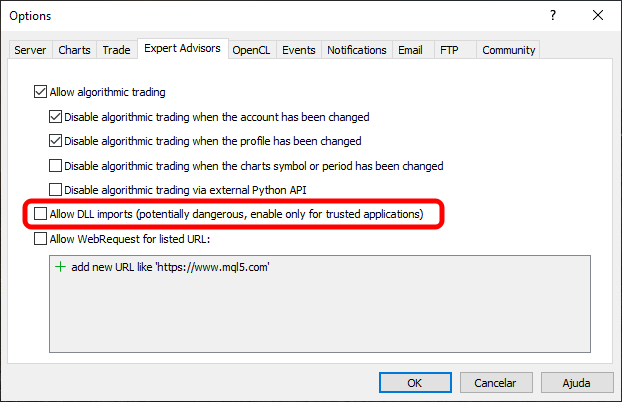
Image 01
Image 01 shows the key point that may allow an application, while running in MetaTrader 5, to go outside the sandbox. There is even a warning that enabling this option may be dangerous for the system. This is precisely because of the risks involved in manipulating files without proper control by MetaTrader 5. Once outside the sandbox, MetaTrader 5 can no longer control what happens. In that case, control will be in the hands of the application and possibly calls to the operating system’s DLL libraries. Although this may seem safe, a malicious application can use the operating system’s own DLL libraries to cause catastrophic damage. SO BE CAREFUL.
“All right, but how does the sandbox protect us in such cases?” This is where things become most interesting, dear reader. The developers of MetaTrader 5 took a very forward-looking approach by dividing everything into small blocks, each of which can be regarded as a separate sandbox, completely isolated from the others. In practice, things are not exactly like that. However, a detailed understanding of these processes will come with time as you put the demonstrated methods and materials into practice.
At the initial stage, we will work exclusively inside the sandbox, in the simplest possible way and without unnecessary complications. This will allow us to create and modify files and directories without unnecessary stress or risk of data loss. The sandbox was designed precisely for this purpose.
All right, then let us start with something very simple and easy to understand. This is done using the code shown below.
01. //+------------------------------------------------------------------+
02. #property copyright "Daniel Jose"
03. //+------------------------------------------------------------------+
04. void OnStart(void)
05. {
06.     const string szText = "This file was created by a script written in MQL5.";
07.     uchar info[];
08.
09.     StringToCharArray(szText, info);
10.
11.     FileSave("Hello.txt", info);
12. }
13. //+------------------------------------------------------------------+
Code 01
This is very simple and straightforward code for writing files. However, when this code is executed, something happens that may intrigue you a little. But let us take things one step at a time. First, line 06 of Code 01 contains the message that will be written to the file. But to which file exactly? “All right, the file name is specified on line 11, but where will this file be saved? Or, more precisely, in which directory on the disk should I look for, or expect to find, this file?” Well, that depends on certain conditions. As the code is written, it will be saved in the standard MetaTrader 5 sandbox directory.
The exact location in the directory structure will depend on whether you run the code in MetaTrader 5 or in a test agent. In any case, let us assume that all the code is run directly in MetaTrader 5. In that case, the file will be saved in the MQL5\Files subfolder. This can be seen in the following image:
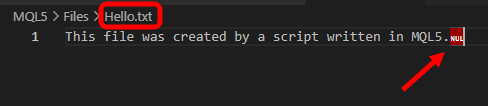
Image 02
Now, in Image 02, you can see that the arrow points to a strange character. This character is part of the file because it was saved in it. However, if we look at the message on line 06, we do not see any sign of this character. So where did it come from? Well, dear reader, this character appeared because of line 09. Since we convert the string into a character array so that the function on line 11 can write the string to a file, the end-of-string character also becomes part of the saved content because it was not removed from the string converted into the array.
All right, but will this cause problems? In principle, this would not be a problem if you knew that it existed. However, since Code 01 is very simple and is intended only as a first introduction to the file system, I see no reason to worry about it at this stage.
So, to prove that at this stage the content shown in Image 02, with this strange-looking character in the file, is not a problem for us, we will modify Code 01 to read the written file and then print its contents to the terminal. This can be seen in Code 02 below.
01. //+------------------------------------------------------------------+
02. #property copyright "Daniel Jose"
03. //+------------------------------------------------------------------+
04. void OnStart(void)
05. {
06. #define szFileName "Hello.txt"
07.
08.     const string szText = "This file was created by a script written in MQL5.";
09.
10.     uchar W[], R[];
11.
12.     StringToCharArray(szText, W);
13.
14.     FileSave(szFileName, W);
15.
16.     FileLoad(szFileName, R);
17.
18.     Print(CharArrayToString(R));
19. }
20. //+------------------------------------------------------------------+
Code 02
So, to ensure that we read the same file that we write, we use the definition on line 06 of Code 02 to specify the name of the file being used. Since the first lines have already been explained, we can move on to line 16. Here we read the contents of the file and place them into an array. On line 18, we convert this character array into a string, which allows us to print the same message as on line 08.
To verify this, when Code 02 is executed, we can see the following result:

Image 03
In other words, everything worked as expected. This is the simplest possible case, where with a minimal amount of code we can save and then read the contents of a file without unnecessary stress or complications.
Now let us make the task a little more complex so that you can begin to understand certain nuances related to reading and writing files. To begin with, let us change the sandbox. To do this, we only need to replace the code shown above with the code below:
01. //+------------------------------------------------------------------+
02. #property copyright "Daniel Jose"
03. //+------------------------------------------------------------------+
04. void OnStart(void)
05. {
06. #define szFileName "Hello.txt"
07.
08.     const string szText = "This file was created by a script written in MQL5.";
09.
10.     uchar W[], R[];
11.
12.     StringToCharArray(szText, W);
13.
14.     FileSave(szFileName, W, FILE_COMMON);
15.
16.     FileLoad(szFileName, R, FILE_COMMON);
17.
18.     Print(CharArrayToString(R));
19. }
20. //+------------------------------------------------------------------+
Code 03
When you run Code 03, you will see the same result as in Image 03. However, if you try to find this file, you will notice that it is not created in the MQL5\Files subfolder; it will be created somewhere else. But where? Before discussing that, note that the only difference between Code 02 and Code 03 is precisely the additional parameter added on lines 14 and 16, as you can see in Code 03.
Now pay attention, dear reader. When saving the file on line 14, this additional parameter tells MetaTrader 5 in which sandbox the file will be stored. However, if this parameter is not specified when reading, which is done on line 16, MetaTrader 5 will look for the file in the standard sandbox, that is, in the MQL5\Files subfolder. As a result, this may lead to an outcome different from what was expected: an error when reading or accessing the file or, in some cases, incomprehensible content that differs greatly from what we expected to see.
Therefore, for the whole process to work correctly, the file storage locations must match when reading and when writing. It is useless to specify one sandbox when writing and another when reading, or vice versa. It makes no sense to expect MetaTrader 5 to understand what you are trying to do or which file you are trying to access. It is under no obligation to do so and has no interest in doing so.
Although in some cases it may find the correct file, you should not rely on that. Most likely, you will end up writing or reading a file in the wrong place. This may not only fail to meet your expectations regarding the type of information you need, but also damage data that already existed in a file that was overwritten with new data because of your mistake.
So now we can finally try to understand exactly which sandbox this additional parameter on lines 14 and 16 of Code 03 points to. This is necessary so that you can find the file with any other editor if you wish. The FILE_COMMON parameter tells MetaTrader 5 to use the \Terminal\Common\Files subfolder. It is very simple. “Wait a minute, let me understand what is happening here. If the FILE_COMMON parameter is absent, we point to the MQL5\Files sandbox, and if it is present, we point to the \Terminal\Common\Files sandbox. Is that all?” Yes, dear reader, that is exactly what happens. “But I assumed that for this change to take effect, we would need to specify a directory. In a way, this seems a little confusing to me.”
In fact, it is not all that complicated, dear reader. It may seem that way precisely because you do not yet understand the concept of a sandbox. But let us not rush, so that you can fully absorb this concept and use it in a wide variety of situations. Correctly understanding this process is very important if you want to get the most out of MetaTrader 5 in many different situations.
Understanding the sandbox
To properly understand the concept of a sandbox, we need some idea of how the file system works. I will give a brief explanation simply so that the terms used later are clear to those who are not yet familiar with them.
The first term you need to understand is the concept of a root, or root directory. The root directory can be imagined as the starting point in a directory tree. The tree idea comes from the fact that each branch of the tree is equivalent to a subfolder within the same directory. Each leaf on one of these branches is equivalent to a file. So, for simplicity, the root is the initial directory. Each directory tree has one single root. From this root, we initially have a branch. Any leaf on that branch will be a file directly associated with the root. One tree has NO direct contact with another tree. In other words, there is NO tree with two different roots. And all of them are attached to the ground.
Having understood this, we can make a visual analogy with how the sandbox is organized in MetaTrader 5. This is shown in the following image:

Image 04
Image 04 shows two sandboxes, exactly like the ones we used in the previous section. Note that the base folder is the MetaQuotes\Terminal subfolder. However, it is NOT THE ROOT, but the base on which these trees are placed.
Now pay attention to the following: tree No. 1 has a root which, in this case, is located in the Common\Files folder. Tree No. 2 has another root, which is located in the MQL5\Files folder. Note that we cannot move directly from one tree to another without first passing through the underlying base. Normally, moving from one branch to another would require going through the underlying base. However, that same kind of transition cannot be used here, because one tree is one sandbox, while the other tree is a different sandbox.
To make this a little clearer and, at the same time, give you a chance to study and try to understand how all this can be implemented, we will modify the code discussed in the previous section so that we can add directories to our branch. This is very simple to do, but the results are quite interesting, and they may help you understand how the sandbox works in practice. This is necessary to keep everything under control. Below is the code we will use at the beginning:
01. //+------------------------------------------------------------------+
02. #property copyright "Daniel Jose"
03. //+------------------------------------------------------------------+
04. void OnStart(void)
05. {
06. #define szFileName "Hello.txt"
07. #define macro_Save(A) Print("Attempting to write in [",A,"] resulted in: ", FileSave(A, buff));
08. //+----------------+
09.     const string szText = "This file was created by a script written in MQL5.\nThis would be the contents of file number #%02d.";
10. //+----------------+
11.     uchar   buff[];
12.     ushort  counter = 1;
13. //+----------------+
14.     StringToCharArray(StringFormat(szText, counter++), buff);
15.     macro_Save(szFileName);
16. //+----------------+
17.     StringToCharArray(StringFormat(szText, counter++), buff);
18.     macro_Save(".\\Test\\" + szFileName);
19. //+----------------+
20.     StringToCharArray(StringFormat(szText, counter++), buff);
21.     macro_Save(".\\Temp\\" + szFileName);
22. //+----------------+
23.     StringToCharArray(StringFormat(szText, counter++), buff);
24.     macro_Save("..\\SandBox\\" + szFileName);
25. }
26. //+------------------------------------------------------------------+
Code 04
In Code 04, we will try to write four different files to different branches inside the MQL5\Files sandbox. However, in one of these attempts, we will try to leave the sandbox and write data to the MQL5 directory. Let us examine this slowly so that you can understand how these attempts were made and how to interpret their results.
First of all, when running Code 04 in MetaTrader 5, we will see a result in the terminal similar to the one shown below:
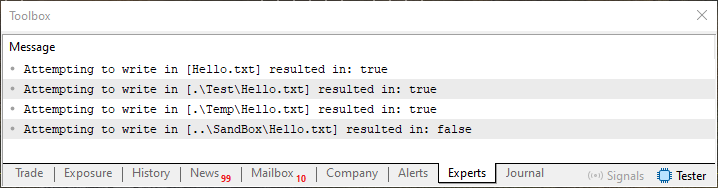
Image 05
Notice that in three cases the file contents were written correctly. Although we did not create any directories using any other calls, MetaTrader 5 detected the need to create two new directories, in case they did not exist before Code 04 was executed.
Now let us look at what kind of content was written to the files and where they are located. This can be seen in the following images:

Image 06

Image 07

Image 08
Please note that in these three images we marked the location and file name in green. But look carefully at the contents of each one. You will see that they are almost identical, except for the numeric value on the second line. This value is there only to distinguish the contents of the files and to show that we can write different files in the same way.
Nevertheless, let us return to Code 04 itself. Notice that on lines 15, 18, 21 and 24 we only change the name of the directory being used. However, as shown in Image 05, an error occurred when trying to create the fourth file. Why? The reason is that we are trying to create something outside the current sandbox. In other words, we are trying to move to a branch that lies outside the sandbox root directory. When we try to do this, MetaTrader 5 interprets it as an error and blocks any disk operations, whether writing or reading the contents of any file.
I understand that this may seem a little strange to many people. The only difference between lines 18, 21 and 24 is the additional dot on line 24, but it tells the system to move in a direction different from the current location. However, since we are inside a sandbox and using MetaTrader 5 calls through MQL5, we are not allowed to leave the sandbox. This would not happen if we used a write function from the operating system itself. In that case, the OS would not know about the sandbox created and maintained by MetaTrader 5. Therefore, outside the sandbox, it would be possible to write, read and even do anything at all with any file.
Since I do not want to overcomplicate what may be your first introduction to the MetaTrader 5 file system, we will make one final change to the code so that you can test reading some of the files that our application writes.
For this, we will use the code below:
01. //+------------------------------------------------------------------+
02. #property copyright "Daniel Jose"
03. //+------------------------------------------------------------------+
04. void OnStart(void)
05. {
06. #define szFileName "Hello.txt"
07. #define macro_Save(A) Print("Attempting to write in [",A,"] resulted in: ", FileSave(A, buff));
08. #define macro_Load(A) Print("Attempt to read the [",A,"] file resulted in: ", FileLoad(A, buff) != INVALID_HANDLE);
09. //+----------------+
10.     const string szText = "This file was created by a script written in MQL5.\nThis would be the contents of file number #%02d.";
11. //+----------------+
12.     uchar   buff[];
13.     ushort  counter = 1;
14. //+----------------+
15.     StringToCharArray(StringFormat(szText, counter++), buff);
16.     macro_Save(szFileName);
17. //+----------------+
18.     StringToCharArray(StringFormat(szText, counter++), buff);
19.     macro_Save(".\\Test\\" + szFileName);
20. //+----------------+
21.     StringToCharArray(StringFormat(szText, counter++), buff);
22.     macro_Save(".\\Temp\\" + szFileName);
23. //+----------------+
24.     StringToCharArray(StringFormat(szText, counter++), buff);
25.     macro_Save("..\\SandBox\\" + szFileName);
26. //+----------------+
27.     Print("+----------------+");
28.     ArrayResize(buff, 0);
29.     macro_Load(".\\Test\\" + szFileName);
30.     if (buff.Size() > 0)
31.         Print("File content:\n", CharArrayToString(buff));
32.     Print("+----------------+");
33.     ArrayResize(buff, 0);
34.     macro_Load(".\\Test 1\\" + szFileName);
35.     if (buff.Size() > 0)
36.         Print("File content:\n", CharArrayToString(buff));
37. }
38. //+------------------------------------------------------------------+
Code 05
Code 05 will help you understand how the sandbox system works. At least, that is its initial purpose. In it, we try both to write and to read the contents of any file at a specific location. Although this may seem confusing, everything is simple if you have absorbed the material from the beginning of the article, as shown in the image.
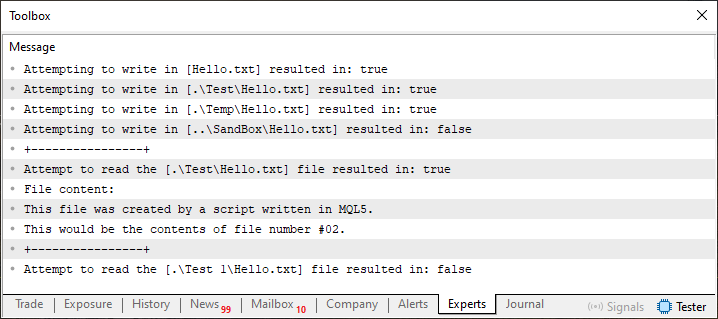
Image 09
To understand all these messages, you need to understand what we implemented in Code 04 and what result we obtained. Given that the result of executing Code 04 is Image 05, and the content of each file can be seen in Images 06, 07 and 08, here in Code 05 we only need to consider a few key points. In essence, we only need to explain what happens starting from line 26. That is where reading, or the attempt to read files, begins.
As you can see, on lines 29 and 34 we run the macro from line 08. The important detail here is that when this macro on line 08 is executed, a message is printed in the terminal indicating which file we are trying to read and whether the result was successful. Up to this point, everything is quite normal and easy to understand. But why are lines 28 and 33 used in this code? The reason is precisely to clear the data array. Since an error may occur during an attempted read, we do not want any previous data to be preserved. Therefore, when the checks on lines 30 and 35 are executed, we will print a message to the terminal only if the array actually contains any data.
Given that on line 34 we will try to read a file that, in principle, SHOULD NOT EXIST, an error message will be printed in the terminal, and the check on line 35 will also fail.
First of all, keep in mind that neither the files nor the directories specified in Code 05 should exist initially. This way the result will be correct and will be displayed properly, as shown in Image 09. If you get a different result, try changing the name or even the directories used in Code 05. The goal is to generate both the error that occurs when trying to read a nonexistent file and the result of attempting to read a file in a specified directory.
Also try modifying the code to use the other sandbox discussed in this article, that is, by adding the additional FILE_COMMON parameter. This will help you understand exactly what is shown in Image 04, where two trees with different roots are displayed.
Final considerations
In this article, we took our first steps in studying the MetaTrader 5 file system in order to understand how the sandbox works and avoid accidentally modifying inappropriate folders in the operating system’s directory tree. Despite its apparent initial complexity, especially from a beginner’s point of view, understanding how to use the sandbox is absolutely necessary for future projects. This is especially important if you really want to actively use files to store data or even create configurations that will be saved and adapted over time
Try to study this material without rushing, dear reader, because this step must be done correctly. If you do not understand how the sandbox works, it will be very difficult for you to solve certain tasks in the future.
| MQ5 file | Description |
|---|---|
| Code 01 | File access demonstration |
| Code 02 | File access demonstration |
| Code 03 | File access demonstration |
| Code 04 | File access demonstration |
| Code 05 | File access demonstration |
Translated from Portuguese by MetaQuotes Ltd.
Original article: https://www.mql5.com/pt/articles/16167
Warning: All rights to these materials are reserved by MetaQuotes Ltd. Copying or reprinting of these materials in whole or in part is prohibited.
This article was written by a user of the site and reflects their personal views. MetaQuotes Ltd is not responsible for the accuracy of the information presented, nor for any consequences resulting from the use of the solutions, strategies or recommendations described.

 Market Simulation: Position View (III)
 Strategy Configuration via External JSON Files in MQL5: Replacing Input Parameters with a Runtime Config Loader
 Building a Traditional Daily Pivot Point Indicator in MQL5
 OrderSend retries and circuit breaker in MQL5

- Free trading apps
- Over 8,000 signals for copying
- Economic news for exploring financial markets
You agree to website policy and terms of use