

MQL5 MVCパラダイムにおけるテーブルのビューおよびコントローラーコンポーネント:サイズ変更可能な要素
 227
227
 2
2

内容
はじめに
現代のユーザーインターフェースにおいて、マウスによる要素のサイズ変更は、ユーザーにとって馴染みがあり、かつ期待される機能です。ユーザーはウィンドウやパネル、その他のビジュアルブロックの境界を「つかんで」ドラッグし、要素のサイズをリアルタイムで変更できます。このようなインタラクティブな操作を実現するには、応答性を維持し、すべてのイベントを正しく処理するための設計が必要です。
複雑なインターフェースを構築する際の代表的なアーキテクチャ手法のひとつがMVC (Model-View-Controller)です。このパラダイムでは以下の役割が定義されます。
- モデル:データとロジックを担当
- ビュー:データの表示とユーザーとの視覚的インタラクションを担当
- コントローラー:ユーザーイベントの処理とモデルとビュー間の通信を担当
マウスによる要素のサイズ変更に関しては、主な処理はビューコンポーネントのレベルでおこなわれます。ビューは要素の視覚的表現を実装し、マウスの動きを追跡し、カーソルが境界上にあるかを判定し、適切なツールチップ(たとえばカーソル形状の変更)を表示します。さらに、要素がドラッグされてサイズ変更されている間、サイズ変更中の要素を描画する役割も担当します。
コントローラーコンポーネントは、必要に応じてビューにコマンドを渡したり、モデルを更新したりすることでマウスイベントの処理に関与することもあります(たとえば、要素のサイズを保存する場合や他のデータに影響がある場合など)。
マウスによるサイズ変更の実装は、MVCアーキテクチャにおけるビューコンポーネントの典型的な動作例であり、ユーザーとの視覚的フィードバックやインタラクションをできるだけ直感的に実装する方法として理解できます。
TableView、DataGrid、Spreadsheetなどのビジュアルテーブルは、現代のインターフェースにおける主要な要素であり、表形式データの表示や編集に使用されます。ユーザーは、テーブルが単にデータを表示するだけでなく、タスクに応じた外観のカスタマイズを手軽に行えることを期待します。
特に、テーブルおよびその個々の部分(列の幅、行の高さ、テーブル全体のサイズ)をマウスでサイズ変更できる機能は、プロフェッショナルアプリケーションにおけるTableViewコントロールの事実上の標準機能です。このような機能が利用可能になることで、次のことが可能になります。
- データ量や構造に応じてインターフェースを調整できる長い値を含む列を広げたり、情報量の少ない列を狭めたりできる
- 情報の可読性や認識を改善できる柔軟なサイズ調整により、横スクロールや不要な空白領域を回避できる
- オフィスや分析ソフトでおなじみの「ライブ感のあるインターフェース」を作れる
- セル、行、列のサイズが動的に変化する複雑なデータシナリオを実装できる
サイズ変更機能がない場合、TableView要素は静的となり、データ操作において不便になります。そのため、マウスによる要素のサイズ変更機構の実装は、現代的で使いやすいプロフェッショナルなテーブルコンポーネントを作るうえで不可欠です。
今回、すべての要素に対して、マウスで要素の端や角をドラッグしてサイズ変更できる機能を追加します。同時に、カーソル付近にグラフィックツールチップ(矢印でサイズ変更方向を示す)が表示されます。カーソルをドラッグ領域に置いてクリックすると(領域をキャプチャ)、サイズ変更モードが有効になり、マウスを離すとモードは解除されます。サイズ変更モードの有効化や方向などのフラグは、共有リソースマネージャに保持され、各グラフィック要素から参照可能です。
すべての要素には、新たにサイズ変更可能なプロパティが追加されます。
この機能を実現するためには、既存クラスの改良と、ツールチップを作成する新しいクラスの追加のみが必要です。ツールチップとは、マウスカーソルが特定領域にホバーした際、短時間の遅延後に自動で表示されるグラフィック要素です。ツールチップには、説明テキスト、画像、または両方を含めることができます。このクラスをベースに、さまざまなツールチップを作成できます。たとえば、カーソル付近に矢印画像を表示し、サイズ変更の方向を示すツールチップです。
今回は、横方向、縦方向、斜め方向の二重矢印を用いて、要素の端や角の移動方向を示すツールチップを作成します。テキストツールチップは、TableViewコントロール作成後にセル、列、ヘッダの視覚設計用として追加可能です。
\MQL5\Indicators\Tables\Controls\にあるライブラリファイルにコードの記述を続けます。前回の記事にあるファイルのバージョンをベースとして、Base.mqhとControl.mqhを改良して実装を進めます。
基底クラスの改良
Base.mqhファイルを開き、ツールチップクラスの前方宣言を入力します。
//+------------------------------------------------------------------+
//|                                                         Base.mqh |
//|                                  Copyright 2025, MetaQuotes Ltd. |
//|                                             https://www.mql5.com |
//+------------------------------------------------------------------+
#property copyright "Copyright 2025, MetaQuotes Ltd."
#property link      "https://www.mql5.com"

//+------------------------------------------------------------------+
//| Include libraries                                                |
//+------------------------------------------------------------------+
#include <Canvas\Canvas.mqh>              // CCanvas class
#include <Arrays\List.mqh>                // CList class

//--- Forward declaration of control element classes
class    CCounter;                        // Delay counter class
class    CAutoRepeat;                     // Event auto-repeat class
class    CImagePainter;                   // Image drawing class
class    CVisualHint;                     // Hint class
class    CLabel;                          // Text label class
class    CButton;                         // Simple button class
class    CButtonTriggered;                // Two-position button class
class    CButtonArrowUp;                  // Up arrow button class
class    CButtonArrowDown;                // Down arrow button class
class    CButtonArrowLeft;                // Left arrow button class
class    CButtonArrowRight;               // Right arrow button class
class    CCheckBox;                       // CheckBox control class
class    CRadioButton;                    // RadioButton control class
class    CScrollBarThumbH;                // Horizontal scrollbar slider class
class    CScrollBarThumbV;                // Vertical scrollbar slider class
class    CScrollBarH;                     // Horizontal scrollbar class
class    CScrollBarV;                     // Vertical scrollbar class
class    CPanel;                          // Panel control class
class    CGroupBox;                       // GroupBox control class
class    CContainer;                      // Container control class

//+------------------------------------------------------------------+
//| Macro substitutions                                              |
//+------------------------------------------------------------------+
各要素は、端に一定の領域を持つ必要があります。この領域にマウスカーソルをホバーすると、オブジェクトのサイズ変更が有効になります。マクロ置換ブロックに、この領域の厚さを入力します。
//+------------------------------------------------------------------+
//| Macro substitutions                                              |
//+------------------------------------------------------------------+
#define  clrNULL              0x00FFFFFF  // Transparent color for CCanvas
#define  MARKER_START_DATA    -1          // Data start marker in a file
#define  DEF_FONTNAME         "Calibri"   // Default font
#define  DEF_FONTSIZE         10          // Default font size
#define  DEF_EDGE_THICKNESS   3           // Zone width to capture the border/corner

//+------------------------------------------------------------------+
//| Enumerations                                                     |
//+------------------------------------------------------------------+
グラフィック要素タイプの列挙型に新しいタイプの「ヒント(ツールチップ)オブジェクト」(ツールチップ)を追加します。
//+------------------------------------------------------------------+
//| Enumerations                                                     |
//+------------------------------------------------------------------+
enum ENUM_ELEMENT_TYPE                    // Enumeration of graphical element types
  {
   ELEMENT_TYPE_BASE = 0x10000,           // Basic object of graphical elements
   ELEMENT_TYPE_COLOR,                    // Color object
   ELEMENT_TYPE_COLORS_ELEMENT,           // Color object of the graphical object element
   ELEMENT_TYPE_RECTANGLE_AREA,           // Rectangular area of the element
   ELEMENT_TYPE_IMAGE_PAINTER,            // Object for drawing images
   ELEMENT_TYPE_COUNTER,                  // Counter object
   ELEMENT_TYPE_AUTOREPEAT_CONTROL,       // Event auto-repeat object
   ELEMENT_TYPE_CANVAS_BASE,              // Basic canvas object for graphical elements
   ELEMENT_TYPE_ELEMENT_BASE,             // Basic object of graphical elements
   ELEMENT_TYPE_HINT,                     // Tooltip
   ELEMENT_TYPE_LABEL,                    // Text label
   ELEMENT_TYPE_BUTTON,                   // Simple button
   ELEMENT_TYPE_BUTTON_TRIGGERED,         // Two-position button
   ELEMENT_TYPE_BUTTON_ARROW_UP,          // Up arrow button
   ELEMENT_TYPE_BUTTON_ARROW_DOWN,        // Down arrow button
   ELEMENT_TYPE_BUTTON_ARROW_LEFT,        // Left arrow button
   ELEMENT_TYPE_BUTTON_ARROW_RIGHT,       // Right arrow button
   ELEMENT_TYPE_CHECKBOX,                 // CheckBox control
   ELEMENT_TYPE_RADIOBUTTON,              // RadioButton control
   ELEMENT_TYPE_SCROLLBAR_THUMB_H,        // Horizontal scroll bar slider
   ELEMENT_TYPE_SCROLLBAR_THUMB_V,        // Vertical scroll bar slider
   ELEMENT_TYPE_SCROLLBAR_H,              // ScrollBarHorisontal control
   ELEMENT_TYPE_SCROLLBAR_V,              // ScrollBarVertical control
   ELEMENT_TYPE_PANEL,                    // Panel control
   ELEMENT_TYPE_GROUPBOX,                 // GroupBox control
   ELEMENT_TYPE_CONTAINER,                // Container control
  };
#define  ACTIVE_ELEMENT_MIN   ELEMENT_TYPE_LABEL         // Minimum value of the list of active elements
#define  ACTIVE_ELEMENT_MAX   ELEMENT_TYPE_SCROLLBAR_V   // Maximum value of the list of active elements
サイズ変更の文脈におけるカーソルと要素の相互作用は、カーソルが要素の境界や角のいずれかにある位置、ならびにその時点で行われている操作など、特定の概念を使用します。
これらの操作や値を表すための新しい列挙型を追加します。
enum ENUM_CURSOR_REGION                   // Enumerate the cursor location on the element borders
  {
   CURSOR_REGION_NONE,                    // None
   CURSOR_REGION_TOP,                     // On the top border
   CURSOR_REGION_BOTTOM,                  // On the bottom border
   CURSOR_REGION_LEFT,                    // On the left border
   CURSOR_REGION_RIGHT,                   // On the right border
   CURSOR_REGION_LEFT_TOP,                // In the upper left corner
   CURSOR_REGION_LEFT_BOTTOM,             // In the lower left corner
   CURSOR_REGION_RIGHT_TOP,               // In the upper right corner
   CURSOR_REGION_RIGHT_BOTTOM,            // In the lower right corner
  };

enum ENUM_RESIZE_ZONE_ACTION              // List interactions with the element dragging zone
  {
   RESIZE_ZONE_ACTION_NONE,               // None
   RESIZE_ZONE_ACTION_HOVER,              // Hovering the cursor over the zone
   RESIZE_ZONE_ACTION_BEGIN,              // Start dragging
   RESIZE_ZONE_ACTION_DRAG,               // Dragging
   RESIZE_ZONE_ACTION_END                 // Finish dragging
  };

//+------------------------------------------------------------------+
//| Functions                                                        |
//+------------------------------------------------------------------+
カーソルと要素境界の相互作用は、以下の5つの段階に分けられます。
- 相互作用なし:要素のイベントは通常通り処理されます。
- カーソルがサイズ変更領域にホバーしている場合:カーソル付近に、可能なサイズ変更の方向を示す矢印ツールチップが表示されます。ここで、他の要素がマウス操作イベントに反応するのを禁止するグローバルフラグを設定することも可能です。ただし、この機能は現時点では実装されていません。
- ユーザーがマウスボタンをクリックしてグラフィック要素の相互作用領域をキャプチャした場合:アクティブなサイズ変更モードのpublicフラグが設定されます。キャプチャした端や角をドラッグすると、矢印ツールチップが表示されます。移動方向の値が共有リソースマネージャに記録されます。グラフィック要素のサイズ変更ハンドラが呼び出されます。
- ユーザーがキャプチャした端や角をドラッグしてカーソルを移動させた場合:ドラッグ方向が共有リソースマネージャに設定されます。この値に応じて、グラフィック要素のサイズ変更ハンドラが呼び出され、カーソルに追随する矢印ツールチップも引き続き表示されます。
- ユーザーがマウスボタンを離した場合(サイズ変更モードがアクティブな状態): 共有リソースマネージャに設定されているフラグはすべてリセットされます。矢印ツールチップは非表示になります。要素は、新しいサイズに変更されます。これは、グラフィック要素のサイズ変更ハンドラ内でカーソルを移動させた結果です。
このロジックは今日実装されます。 今回の実装では、他の要素がマウス操作に反応するのを禁止するフラグは実装しません。これは、端のドラッグによるサイズ変更操作を補助するための機能に該当するためです。
たとえば、要素の下端にスクロールバーが接している場合、カーソルがその端にホバーすると、スクロールバーもカーソル操作に反応してしまいます。この場合、端をドラッグする代わりに、スクロールバーが制御を引き継ぐため、コンテナの内容スクロールが有効になります。また、キャプチャ領域を持たない要素はどこにあるでしょうか。おそらく未完成のコントロールにしか存在せず(現状もその例です)、そのようなサービス機能を実装すると、すでに複雑なグラフィック要素クラスのコードがさらに複雑化してしまいます。
次のステップとして、要素タイプごとの短縮名を返す関数に、名前の新しい値を追加します。
//+------------------------------------------------------------------+
//|  Return the short name of the element by type                    |
//+------------------------------------------------------------------+
string ElementShortName(const ENUM_ELEMENT_TYPE type)
  {
   switch(type)
     {
      case ELEMENT_TYPE_ELEMENT_BASE      :  return "BASE";    // Basic object of graphical elements
      case ELEMENT_TYPE_HINT              :  return "HNT";     // Tooltip
      case ELEMENT_TYPE_LABEL             :  return "LBL";     // Text label
      case ELEMENT_TYPE_BUTTON            :  return "SBTN";    // Simple button
      case ELEMENT_TYPE_BUTTON_TRIGGERED  :  return "TBTN";    // Toggle button
      case ELEMENT_TYPE_BUTTON_ARROW_UP   :  return "BTARU";   // Up arrow button
      case ELEMENT_TYPE_BUTTON_ARROW_DOWN :  return "BTARD";   // Down arrow button
      case ELEMENT_TYPE_BUTTON_ARROW_LEFT :  return "BTARL";   // Left arrow button
      case ELEMENT_TYPE_BUTTON_ARROW_RIGHT:  return "BTARR";   // Right arrow button
      case ELEMENT_TYPE_CHECKBOX          :  return "CHKB";    // CheckBox control
      case ELEMENT_TYPE_RADIOBUTTON       :  return "RBTN";    // RadioButton control
      case ELEMENT_TYPE_SCROLLBAR_THUMB_H :  return "THMBH";   // Horizontal scroll bar slider
      case ELEMENT_TYPE_SCROLLBAR_THUMB_V :  return "THMBV";   // Vertical scroll bar slider
      case ELEMENT_TYPE_SCROLLBAR_H       :  return "SCBH";    // ScrollBarHorisontal control
      case ELEMENT_TYPE_SCROLLBAR_V       :  return "SCBV";    // ScrollBarVertical control
      case ELEMENT_TYPE_PANEL             :  return "PNL";     // Panel control
      case ELEMENT_TYPE_GROUPBOX          :  return "GRBX";    // GroupBox control
      case ELEMENT_TYPE_CONTAINER         :  return "CNTR";    // Container control
      default                             :  return "Unknown"; // Unknown
     }
  }
共有リソースマネージャクラスに、マウスカーソルの座標、サイズ変更モードフラグ、要素の端を取得して返す機能を追加します。
//+------------------------------------------------------------------+
//| Singleton class for common flags and events of graphical elements|
//+------------------------------------------------------------------+
class CCommonManager
  {
private:
   static CCommonManager *m_instance;                          // Class instance
   string            m_element_name;                           // Active element name
   int               m_cursor_x;                               // X cursor coordinate
   int               m_cursor_y;                               // Y cursor coordinate
   bool              m_resize_mode;                            // Resize mode
   ENUM_CURSOR_REGION m_resize_region;                         // The edge of the element where the size is changed

//--- Constructor/destructor
                     CCommonManager(void) : m_element_name("") {}
                    ~CCommonManager() {}
public:
//--- Method for getting a Singleton instance
   static CCommonManager *GetInstance(void)
                       {
                        if(m_instance==NULL)
                           m_instance=new CCommonManager();
                        return m_instance;
                       }
//--- Method for destroying a Singleton instance
   static void       DestroyInstance(void)
                       {
                        if(m_instance!=NULL)
                          {
                           delete m_instance;
                           m_instance=NULL;
                          }
                       }
//--- (1) Set and (2) return the name of the active current element
   void              SetElementName(const string name)            { this.m_element_name=name;   }
   string            ElementName(void)                      const { return this.m_element_name; }

//--- (1) Set and (2) return the X cursor coordinate
   void              SetCursorX(const int x)                      { this.m_cursor_x=x;          }
   int               CursorX(void)                          const { return this.m_cursor_x;     }

//--- (1) Set and (2) return the Y cursor coordinate
   void              SetCursorY(const int y)                      { this.m_cursor_y=y;          }
   int               CursorY(void)                          const { return this.m_cursor_y;     }

//--- (1) Set and return (2) the resizing mode
   void              SetResizeMode(const bool flag)               { this.m_resize_mode=flag;    }
   bool              ResizeMode(void)                       const { return this.m_resize_mode;  }

//--- (1) Set and (2) return the element edge
   void              SetResizeRegion(const ENUM_CURSOR_REGION edge){ this.m_resize_region=edge; }
   ENUM_CURSOR_REGION ResizeRegion(void)                    const { return this.m_resize_region;}

  };
//--- Initialize a static instance variable of a class
CCommonManager* CCommonManager::m_instance=NULL;
イベントハンドラ内で、カーソルの座標をクラス変数に書き込むことで、プログラム内のどこからでも座標にアクセス可能となり、コントロール内での座標利用が簡単になります。同様に、サイズ変更モードのフラグや、カーソルが操作している要素の端を変数に書き込むことで、すべての要素がこのモードを「認識」し、それに応じた処理が可能になります。
次に、グラフィック要素キャンバスの基底クラスに修正を加えます。要素のサイズをインタラクティブに変更できることを示すフラグを宣言します。
//+------------------------------------------------------------------+
//| Base class of graphical elements canvas                          |
//+------------------------------------------------------------------+
class CCanvasBase : public CBaseObj
  {
private:
   bool              m_chart_mouse_wheel_flag;                 // Flag for sending mouse wheel scroll messages
   bool              m_chart_mouse_move_flag;                  // Flag for sending mouse cursor movement messages
   bool              m_chart_object_create_flag;               // Flag for sending messages about the graphical object creation event
   bool              m_chart_mouse_scroll_flag;                // Flag for scrolling the chart with the left button and mouse wheel
   bool              m_chart_context_menu_flag;                // Flag of access to the context menu using the right click
   bool              m_chart_crosshair_tool_flag;              // Flag of access to the Crosshair tool using the middle click
   bool              m_flags_state;                            // State of the flags for scrolling the chart with the wheel, the context menu, and the crosshair

//--- Set chart restrictions (wheel scrolling, context menu, and crosshair)
   void              SetFlags(const bool flag);

protected:
   CCanvas           m_background;                             // Background canvas
   CCanvas           m_foreground;                             // Foreground canvas
   CBound            m_bound;                                  // Object boundaries
   CCanvasBase      *m_container;                              // Parent container object
   CColorElement     m_color_background;                       // Background color control object
   CColorElement     m_color_foreground;                       // Foreground color control object
   CColorElement     m_color_border;                           // Border color control object

   CColorElement     m_color_background_act;                   // Activated element background color control object
   CColorElement     m_color_foreground_act;                   // Activated element foreground color control object
   CColorElement     m_color_border_act;                       // Activated element frame color control object

   CAutoRepeat       m_autorepeat;                             // Event auto-repeat control object

   ENUM_ELEMENT_STATE m_state;                                 // Control state (e.g. buttons (on/off))
   long              m_chart_id;                               // Chart ID
   int               m_wnd;                                    // Chart subwindow index
   int               m_wnd_y;                                  // Cursor Y coordinate offset in the subwindow
   int               m_obj_x;                                  // Graphical object X coordinate
   int               m_obj_y;                                  // Graphical object Y coordinate
   uchar             m_alpha_bg;                               // Background transparency
   uchar             m_alpha_fg;                               // Foreground transparency
   uint              m_border_width_lt;                        // Left frame width
   uint              m_border_width_rt;                        // Right frame width
   uint              m_border_width_up;                        // Top frame width
   uint              m_border_width_dn;                        // Bottom frame width
   string            m_program_name;                           // Program name
   bool              m_hidden;                                 // Hidden object flag
   bool              m_blocked;                                // Blocked element flag
   bool              m_movable;                                // Moved element flag
   bool              m_resizable;                              // Resizing flag
   bool              m_focused;                                // Element flag in focus
   bool              m_main;                                   // Main object flag
   bool              m_autorepeat_flag;                        // Event sending auto-repeat flag
   bool              m_scroll_flag;                            // Flag for scrolling content using scrollbars
   bool              m_trim_flag;                              // Flag for clipping the element to the container borders
   int               m_cursor_delta_x;                         // Distance from the cursor to the left edge of the element
   int               m_cursor_delta_y;                         // Distance from the cursor to the top edge of the element
   int               m_z_order;                                // Graphical object Z-order
共有リソースマネージャからサイズ変更モードフラグと相互作用ゾーンを設定および受信できるメソッドを追加します。
//--- (1) Set, return (2) the name and (3) the active element flag
   void              SetActiveElementName(const string name)   { CCommonManager::GetInstance().SetElementName(name);                               }
   string            ActiveElementName(void)             const { return CCommonManager::GetInstance().ElementName();                               }
   bool              IsCurrentActiveElement(void)        const { return this.ActiveElementName()==this.NameFG();                                   }

//--- (1) Set and (2) return the resize mode flag
   void              SetResizeMode(const bool flag)            { CCommonManager::GetInstance().SetResizeMode(flag);                                }
   bool              ResizeMode(void)                    const { return CCommonManager::GetInstance().ResizeMode();                                }

//--- (1) Set and (2) return the element edge, above which the size is changed
   void              SetResizeRegion(const ENUM_CURSOR_REGION edge){ CCommonManager::GetInstance().SetResizeRegion(edge);                          }
   ENUM_CURSOR_REGION ResizeRegion(void)                 const { return CCommonManager::GetInstance().ResizeRegion();                              }

//--- Return the offset of the initial drawing coordinates on the canvas relative to the canvas and the object coordinates
これで、各グラフィック要素が、すべての要素で共通のサイズ変更モードに関するデータを設定および取得できるようになります。
要素のサイズを、左端または上端、もしくはこれらの端に隣接する角をドラッグして変更する場合、座標も同時に移動させる必要があります。座標移動と要素サイズ変更のそれぞれのメソッドを順番に呼び出すテストをおこなったところ、2つのメソッド呼び出しの間の時間に、ターミナルがチャートを更新して再描画してしまう可能性があることが分かりました。その結果、要素の端をドラッグしてサイズ変更している際に、チャート上で要素の以前のサイズが一瞬表示されるフラッシュのようなアーティファクトが発生します。
このような望ましくない視覚効果を避けるためには、サイズ変更と座標移動の間の遅延を最小限にする必要があります。そのために、要素のサイズと座標を同時に変更する専用メソッドを実装(宣言)します。
//--- Set the graphical object (1) X, (2) Y and (3) both coordinates
   bool              ObjectSetX(const int x);
   bool              ObjectSetY(const int y);
   bool              ObjectSetXY(const int x,const int y)      { return(this.ObjectSetX(x) && this.ObjectSetY(y));                                 }

//--- Set both the coordinates and dimensions of a graphical object
   virtual bool      ObjectSetXYWidthResize(const int x,const int y,const int w,const int h);
グラフィック要素の境界内でのカーソル位置を返すメソッドが必要です。このようなメソッドを宣言します。
//--- (1) Set and (2) relocate the graphical object by the specified coordinates/offset size
   bool              ObjectMove(const int x,const int y)       { return this.ObjectSetXY(x,y);                                                     }
   bool              ObjectShift(const int dx,const int dy)    { return this.ObjectSetXY(this.ObjectX()+dx,this.ObjectY()+dy);                     }

//--- Returns the flag indicating whether the cursor is inside the object
   bool              Contains(const int x,const int y);
//--- Return the cursor location on the object borders
   ENUM_CURSOR_REGION CheckResizeZone(const int x,const int y);
要素の境界でカーソル操作イベントを処理して要素をサイズ変更する仮想ハンドラを宣言します。
//--- Cursor hovering (Focus), (2) button click (Press),
//--- (3) cursor moving (Move), (4) leaving focus (Release), (5) graphical object creation (Create),
//--- (6) wheel scrolling (Wheel) and (7) resizing (Resize) event handlers. Redefined in descendants.
   virtual void      OnFocusEvent(const int id, const long lparam, const double dparam, const string sparam);
   virtual void      OnPressEvent(const int id, const long lparam, const double dparam, const string sparam);
   virtual void      OnMoveEvent(const int id, const long lparam, const double dparam, const string sparam);
   virtual void      OnReleaseEvent(const int id, const long lparam, const double dparam, const string sparam);
   virtual void      OnCreateEvent(const int id, const long lparam, const double dparam, const string sparam);
   virtual void      OnWheelEvent(const int id, const long lparam, const double dparam, const string sparam)         { return;         }  // handler is disabled here
   virtual void      OnResizeZoneEvent(const int id, const long lparam, const double dparam, const string sparam)    { return;         }  // handler is disabled here

//--- Handlers for resizing the element by sides and corners
   virtual bool      OnResizeZoneLeft(const int x, const int y)                                                      { return false;   }  // handler is disabled here
   virtual bool      OnResizeZoneRight(const int x, const int y)                                                     { return false;   }  // handler is disabled here
   virtual bool      OnResizeZoneTop(const int x, const int y)                                                       { return false;   }  // handler is disabled here
   virtual bool      OnResizeZoneBottom(const int x, const int y)                                                    { return false;   }  // handler is disabled here
   virtual bool      OnResizeZoneLeftTop(const int x, const int y)                                                   { return false;   }  // handler is disabled here
   virtual bool      OnResizeZoneRightTop(const int x, const int y)                                                  { return false;   }  // handler is disabled here
   virtual bool      OnResizeZoneLeftBottom(const int x, const int y)                                                { return false;   }  // handler is disabled here
   virtual bool      OnResizeZoneRightBottom(const int x, const int y)                                               { return false;   }  // handler is disabled here
これらのハンドラを継承クラスに実装します。
これまで実行されていなかったいくつかのオブジェクトフラグを返すメソッドを追加します。
//--- Return (1) the object's belonging to the program, the flag (2) of a hidden element, (3) a blocked element,
//--- (4) moved, (5) resized, (6) main element, (7) in focus, (8, 9) graphical object name (background, text)
   bool              IsBelongsToThis(const string name)  const { return(::ObjectGetString(this.m_chart_id,name,OBJPROP_TEXT)==this.m_program_name);}
   bool              IsHidden(void)                      const { return this.m_hidden;                                                             }
   bool              IsBlocked(void)                     const { return this.m_blocked;                                                            }
   bool              IsMovable(void)                     const { return this.m_movable;                                                            }
   bool              IsResizable(void)                   const { return this.m_resizable;                                                          }
   bool              IsMain(void)                        const { return this.m_main;                                                               }
   bool              IsFocused(void)                     const { return this.m_focused;                                                            }
   bool              IsAutorepeat(void)                  const { return this.m_autorepeat_flag;                                                    }
   bool              IsScrollable(void)                  const { return this.m_scroll_flag;                                                        }
   bool              IsTrimmed(void)                     const { return this.m_trim_flag;                                                          }
   string            NameBG(void)                        const { return this.m_background.ChartObjectName();                                       }
   string            NameFG(void)                        const { return this.m_foreground.ChartObjectName();                                       }
以下は、これらのフラグを設定するメソッドです。
//--- Set (1) movability, (2) main object flag for the object and (3) resizability
   void              SetMovable(const bool flag)               { this.m_movable=flag;                                                              }
   void              SetAsMain(void)                           { this.m_main=true;                                                                 }
   virtual void      SetResizable(const bool flag)             { this.m_resizable=flag;                                                            }
   void              SetAutorepeat(const bool flag)            { this.m_autorepeat_flag=flag;                                                      }
   void              SetScrollable(const bool flag)            { this.m_scroll_flag=flag;                                                          }
   void              SetTrimmered(const bool flag)             { this.m_trim_flag=flag;                                                            }
要素をサイズ変更し、同時に新しい座標に移動するメソッドを宣言します。
//--- Set the new (1) X, (2) Y, (3) XY coordinate for the object
   virtual bool      MoveX(const int x);
   virtual bool      MoveY(const int y);
   virtual bool      Move(const int x,const int y);

//--- Set both the element coordinates and dimensions
   virtual bool      MoveXYWidthResize(const int x,const int y,const int w,const int h);
クラスのコンストラクタの初期化リストで、要素のサイズ変更フラグのデフォルト値を設定します。
//--- Constructors/destructor
                     CCanvasBase(void) :
                        m_program_name(::MQLInfoString(MQL_PROGRAM_NAME)), m_chart_id(::ChartID()), m_wnd(0), m_alpha_bg(0), m_alpha_fg(255),
                        m_hidden(false), m_blocked(false), m_focused(false), m_movable(false), m_resizable(false), m_main(false), m_autorepeat_flag(false), m_trim_flag(true), m_scroll_flag(false),
                        m_border_width_lt(0), m_border_width_rt(0), m_border_width_up(0), m_border_width_dn(0), m_z_order(0),
                        m_state(0), m_wnd_y(0), m_cursor_delta_x(0), m_cursor_delta_y(0) { this.Init(); }
                     CCanvasBase(const string object_name,const long chart_id,const int wnd,const int x,const int y,const int w,const int h);
                    ~CCanvasBase(void);
  };
//+------------------------------------------------------------------+
//| CCanvasBase::Constructor                                         |
//+------------------------------------------------------------------+
CCanvasBase::CCanvasBase(const string object_name,const long chart_id,const int wnd,const int x,const int y,const int w,const int h) :
   m_program_name(::MQLInfoString(MQL_PROGRAM_NAME)), m_wnd(wnd<0 ? 0 : wnd), m_alpha_bg(0), m_alpha_fg(255),
   m_hidden(false), m_blocked(false), m_focused(false), m_movable(false), m_resizable(false), m_main(false), m_autorepeat_flag(false), m_trim_flag(true), m_scroll_flag(false),
   m_border_width_lt(0), m_border_width_rt(0), m_border_width_up(0), m_border_width_dn(0), m_z_order(0),
   m_state(0), m_cursor_delta_x(0), m_cursor_delta_y(0)
  {
//--- Get the adjusted chart ID and the distance in pixels along the vertical Y axis
//--- between the upper frame of the indicator subwindow and the upper frame of the chart main window
   this.m_chart_id=this.CorrectChartID(chart_id);

//--- If the graphical resource and graphical object are created
   if(this.Create(this.m_chart_id,this.m_wnd,object_name,x,y,w,h))
     {
      //--- Clear the background and foreground canvases and set the initial coordinate values,
      //--- names of graphic objects and properties of text drawn in the foreground
      this.Clear(false);
      this.m_obj_x=x;
      this.m_obj_y=y;
      this.m_color_background.SetName("Background");
      this.m_color_foreground.SetName("Foreground");
      this.m_color_border.SetName("Border");
      this.m_foreground.FontSet(DEF_FONTNAME,-DEF_FONTSIZE*10,FW_MEDIUM);
      this.m_bound.SetName("Perimeter");

      //--- Remember permissions for the mouse and chart tools
      this.Init();
     }
  }
クラス本体の外側に、宣言されたメソッドを記述します。
以下は、オブジェクト境界上のカーソルの位置を返すメソッドです。
//+--------------------------------------------------------------------+
//|CCanvasBase::Return the cursor location on the object borders       |
//+--------------------------------------------------------------------+
ENUM_CURSOR_REGION CCanvasBase::CheckResizeZone(const int x,const int y)
  {
//--- Coordinates of the element borders
   int top=this.Y();
   int bottom=this.Bottom();
   int left=this.X();
   int right=this.Right();

//--- If outside the object, return CURSOR_REGION_NONE
   if(x<left || x>right || y<top || y>bottom)
      return CURSOR_REGION_NONE;

//--- Left edge and corners
   if(x>=left && x<=left+DEF_EDGE_THICKNESS)
     {
      //--- Upper left corner
      if(y>=top && y<=top+DEF_EDGE_THICKNESS)
         return CURSOR_REGION_LEFT_TOP;
      //--- Bottom left corner
      if(y>=bottom-DEF_EDGE_THICKNESS && y<=bottom)
         return CURSOR_REGION_LEFT_BOTTOM;
      //--- Left edge
      return CURSOR_REGION_LEFT;
     }

//--- Right edge and corners
   if(x>=right-DEF_EDGE_THICKNESS && x<=right)
     {
      //--- Upper right corner
      if(y>=top && y<=top+DEF_EDGE_THICKNESS)
         return CURSOR_REGION_RIGHT_TOP;
      //--- Bottom right corner
      if(y>=bottom-DEF_EDGE_THICKNESS && y<=bottom)
         return CURSOR_REGION_RIGHT_BOTTOM;
      //--- Right side
      return CURSOR_REGION_RIGHT;
     }

//--- Upper edge
   if(y>=top && y<=top+DEF_EDGE_THICKNESS)
      return CURSOR_REGION_TOP;

//--- Bottom edge
   if(y>=bottom-DEF_EDGE_THICKNESS && y<=bottom)
      return CURSOR_REGION_BOTTOM;

//--- The cursor is not on the edges of the element
   return CURSOR_REGION_NONE;
  }
このメソッドは、カーソルが要素境界の周囲にあるDEF_EDGE_THICKNESSの幅の狭いバー内にあるかどうかを判定し、カーソルがどの面または角にあるかを返します。
以下は、グラフィックオブジェクトの座標と寸法を同時に設定するメソッドです。
//+------------------------------------------------------------------+
//| CCanvasBase::Set coordinates                                     |
//| and size of the graphical object simultaneously                  |
//+------------------------------------------------------------------+
bool CCanvasBase::ObjectSetXYWidthResize(const int x,const int y,const int w,const int h)
  {
//--- If new coordinates are set, return the resize result
   if(this.ObjectSetXY(x,y))
      return this.ObjectResize(w,h);
//--- Failed to set new coordinates - return 'false'
   return false;
  }
オブジェクトの座標が正常に設定された場合、グラフィックオブジェクトのサイズ変更結果が返されます。このメソッド内で動作する各メソッドは、グラフィックオブジェクトのプロパティに直接アクセスするため、要素をサイズ変更して新しい座標に移動させる通常のメソッドを使用する場合よりも遅延が小さくなります(通常のメソッドは、さらにオブジェクトのプロパティに対して追加の操作をおこなうためです。)
以下は、要素の座標と寸法を同時に設定するメソッドです。
//+------------------------------------------------------------------+
//| CCanvasBase::Set both the element coordinates and dimensions     |
//+------------------------------------------------------------------+
bool CCanvasBase::MoveXYWidthResize(const int x,const int y,const int w,const int h)
  {
   if(!this.ObjectSetXYWidthResize(x,y,w,h))
      return false;
   this.BoundMove(x,y);
   this.BoundResize(w,h);
   if(!this.ObjectTrim())
     {
      this.Update(false);
      this.Draw(false);
     }
   return true;
  }
まず、グラフィックオブジェクトの座標とサイズを同時に設定するメソッドを呼び出します。その後、グラフィック要素のプロパティを設定します。次に、要素をそのコンテナのサイズに合わせて切り抜きます。
マウスカーソルによるサイズ変更が許可されている要素を処理できるように、イベントハンドラを調整します。新しいグラフィックオブジェクトを作成する際のイベントは、コンテナ要素だけが処理するようにします。ここで、カーソル座標をリソースマネージャに書き込む処理をおこないます。
//+------------------------------------------------------------------+
//| CCanvasBase::Event handler                                       |
//+------------------------------------------------------------------+
void CCanvasBase::OnChartEvent(const int id,const long& lparam,const double& dparam,const string& sparam)
  {
//--- Chart change event
   if(id==CHARTEVENT_CHART_CHANGE)
     {
      //--- adjust the distance between the upper frame of the indicator subwindow and the upper frame of the chart main window
      this.m_wnd_y=(int)::ChartGetInteger(this.m_chart_id,CHART_WINDOW_YDISTANCE,this.m_wnd);
     }

//--- Graphical object creation event
   if(id==CHARTEVENT_OBJECT_CREATE)
     {
      //--- If this is not a container element, leave
      if(this.Type()<ELEMENT_TYPE_PANEL)
         return;
      //--- Call the handler for creating the graphical object
      this.OnCreateEvent(id,lparam,dparam,sparam);
     }

//--- If the element is blocked or hidden, leave
   if(this.IsBlocked() || this.IsHidden())
      return;

   //--- Mouse cursor coordinates
   int x=(int)lparam;
   int y=(int)dparam-this.m_wnd_y;  // Adjust Y by the height of the indicator window

//--- Cursor move event
   if(id==CHARTEVENT_MOUSE_MOVE)
     {
      //--- Send the cursor coordinates to the resource manager
      CCommonManager::GetInstance().SetCursorX(x);
      CCommonManager::GetInstance().SetCursorY(y);

      //--- Do not handle inactive elements, except for the main one
      if(!this.IsMain() && (this.Type()<ACTIVE_ELEMENT_MIN || this.Type()>ACTIVE_ELEMENT_MAX))
         return;

      //--- Hold down the mouse button
      if(sparam=="1")
        {
         //--- Cursor within the object
         if(this.Contains(x, y))
           {
            //--- If this is the main object, disable the chart tools
            if(this.IsMain())
               this.SetFlags(false);

            //--- If the mouse button was clicked on the chart, there is nothing to handle, leave
            if(this.ActiveElementName()=="Chart")
               return;

            //--- Fix the name of the active element over which the cursor was when the mouse button was clicked
            this.SetActiveElementName(this.ActiveElementName());

            //--- If this is the current active element, handle its movement
            if(this.IsCurrentActiveElement())
              {
               this.OnMoveEvent(id,lparam,dparam,sparam);

               //--- If the element has auto-repeat events active, indicate that the button is clicked
               if(this.m_autorepeat_flag)
                  this.m_autorepeat.OnButtonPress();

               //--- For resizable elements
               if(this.m_resizable)
                 {
                  //--- If the resize mode is not activated,
                  //--- call the resize start handler
                  if(!this.ResizeMode())
                     this.OnResizeZoneEvent(RESIZE_ZONE_ACTION_BEGIN,x,y,this.NameFG());
                  //--- otherwise, when the resizing mode is active
                  //--- call the edge dragging handler for resizing
                  else
                     this.OnResizeZoneEvent(RESIZE_ZONE_ACTION_DRAG,x,y,this.NameFG());
                 }
              }
           }
         //--- Cursor outside the object
         else
           {
            //--- If this is the active main object, or the mouse button is clicked on the chart, and this is not the resizing mode, enable graphical tools
            if(this.IsMain() && (this.ActiveElementName()==this.NameFG() || this.ActiveElementName()=="Chart"))
               if(!this.ResizeMode())
                  this.SetFlags(true);

            //--- If this is the current active element
            if(this.IsCurrentActiveElement())
              {
               //--- If the element is not movable
               if(!this.IsMovable())
                 {
                  //--- call the mouse hover handler
                  this.OnFocusEvent(id,lparam,dparam,sparam);
                  //--- If the element has auto-repeat events active, indicate that the button is released
                  if(this.m_autorepeat_flag)
                     this.m_autorepeat.OnButtonRelease();
                 }
               //--- If the element is movable, call the move handler
               else
                  this.OnMoveEvent(id,lparam,dparam,sparam);

               //--- For resizable elements
               //--- call the edge dragging handler for resizing
               if(this.m_resizable)
                  this.OnResizeZoneEvent(RESIZE_ZONE_ACTION_DRAG,x,y,this.NameFG());
              }
           }
        }

      //--- Mouse button not pressed
      else
        {
         //--- Cursor within the object
         if(this.Contains(x, y))
           {
            //--- If this is the main element, disable the chart tools
            if(this.IsMain())
               this.SetFlags(false);

            //--- Call the cursor hover handler and
            //--- set the element as the current active one
            this.OnFocusEvent(id,lparam,dparam,sparam);
            this.SetActiveElementName(this.NameFG());

            //--- For resizable elements
            //--- call the handler for hovering the cursor over the resizing area
            if(this.m_resizable)
               this.OnResizeZoneEvent(RESIZE_ZONE_ACTION_HOVER,x,y,this.NameFG());
           }

         //--- Cursor outside the object
         else
           {
            //--- If this is the main object
            if(this.IsMain())
              {
               //--- Enable chart tools and
               //--- set the chart as the currently active element
               this.SetFlags(true);
               this.SetActiveElementName("Chart");
              }
            //--- Call the handler for removing the cursor from focus
            this.OnReleaseEvent(id,lparam,dparam,sparam);

            //--- For resizable elements
            //--- call the handler for the non-resizing mode
            if(this.m_resizable)
               this.OnResizeZoneEvent(RESIZE_ZONE_ACTION_NONE,x,y,this.NameFG());
           }
        }
     }

//--- Event of clicking the mouse button on an object (releasing the button)
   if(id==CHARTEVENT_OBJECT_CLICK)
     {
      //--- If the click (releasing the mouse button) was performed on this object
      if(sparam==this.NameFG())
        {
         //--- Call the mouse click handler and release the current active object
         this.OnPressEvent(id, lparam, dparam, sparam);
         this.SetActiveElementName("");

         //--- If the element has auto-repeat events active, indicate that the button is released
         if(this.m_autorepeat_flag)
            this.m_autorepeat.OnButtonRelease();

         //--- For resizable elements
         if(this.m_resizable)
           {
            //--- Disable the resizing mode, reset the interaction area,
            //--- call the handler for completing the resizing by dragging the edges
            this.SetResizeMode(false);
            this.SetResizeRegion(CURSOR_REGION_NONE);
            this.OnResizeZoneEvent(RESIZE_ZONE_ACTION_END,x,y,this.NameFG());
           }
        }
     }

//--- Mouse wheel scroll event
   if(id==CHARTEVENT_MOUSE_WHEEL)
     {
      if(this.IsCurrentActiveElement())
         this.OnWheelEvent(id,lparam,dparam,sparam);
     }

//--- If a custom chart event has arrived
   if(id>CHARTEVENT_CUSTOM)
     {
      //--- do not handle its own events
      if(sparam==this.NameFG())
         return;

      //--- bring the custom event in line with the standard ones
      ENUM_CHART_EVENT chart_event=ENUM_CHART_EVENT(id-CHARTEVENT_CUSTOM);
      //--- In case of the mouse click on the object, call the user event handler
      if(chart_event==CHARTEVENT_OBJECT_CLICK)
        {
         this.MousePressHandler(chart_event, lparam, dparam, sparam);
        }
      //--- If the mouse cursor is moving, call the user event handler
      if(chart_event==CHARTEVENT_MOUSE_MOVE)
        {
         this.MouseMoveHandler(chart_event, lparam, dparam, sparam);
        }
      //--- In case of scrolling the mouse wheel, call the user event handler
      if(chart_event==CHARTEVENT_MOUSE_WHEEL)
        {
         this.MouseWheelHandler(chart_event, lparam, dparam, sparam);
        }
      //--- If the graphical element changes, call the user event handler
      if(chart_event==CHARTEVENT_OBJECT_CHANGE)
        {
         this.ObjectChangeHandler(chart_event, lparam, dparam, sparam);
        }
     }
  }
ハンドラは、さまざまな状況に応じて、対応する仮想サイズ変更イベントハンドラを呼び出し、実際の処理はそれらのハンドラ内でおこないます。これらのハンドラは、後でコントロールクラス内に記述します。
これで、基底クラスの改良は完了です。次に、Controls.mqhのグラフィック要素クラスファイルを開き、必要な変更を加えます。
コントロールは手動でサイズ変更できるため、最小サイズの制限を設定する必要があります。
ツールチップクラスは、さまざまなタイプのツールチップを作成する機能を提供します。ツールチップのタイプを指定するために、専用の列挙型を記述します。
//+------------------------------------------------------------------+
//|                                                     Controls.mqh |
//|                                  Copyright 2025, MetaQuotes Ltd. |
//|                                             https://www.mql5.com |
//+------------------------------------------------------------------+
#property copyright "Copyright 2025, MetaQuotes Ltd."
#property link      "https://www.mql5.com"

//+------------------------------------------------------------------+
//| Include libraries                                                |
//+------------------------------------------------------------------+
#include "Base.mqh"

//+------------------------------------------------------------------+
//| Macro substitutions                                              |
//+------------------------------------------------------------------+
#define  DEF_LABEL_W                50          // Text label default width
#define  DEF_LABEL_H                16          // Text label default height
#define  DEF_BUTTON_W               60          // Default button width
#define  DEF_BUTTON_H               16          // Default button height
#define  DEF_PANEL_W                80          // Default panel width
#define  DEF_PANEL_H                80          // Default panel height
#define  DEF_PANEL_MIN_W            60          // Minimum panel width
#define  DEF_PANEL_MIN_H            60          // Minimum panel height
#define  DEF_SCROLLBAR_TH           13          // Default scrollbar width
#define  DEF_THUMB_MIN_SIZE         8           // Minimum width of the scrollbar slider
#define  DEF_AUTOREPEAT_DELAY       500         // Delay before launching auto-repeat
#define  DEF_AUTOREPEAT_INTERVAL    100         // Auto-repeat frequency

//+------------------------------------------------------------------+
//| Enumerations                                                     |
//+------------------------------------------------------------------+
enum ENUM_ELEMENT_SORT_BY                       // Compared properties
  {
   ELEMENT_SORT_BY_ID   =  BASE_SORT_BY_ID,     // Comparison by element ID
   ELEMENT_SORT_BY_NAME =  BASE_SORT_BY_NAME,   // Comparison by element name
   ELEMENT_SORT_BY_X    =  BASE_SORT_BY_X,      // Comparison by element X coordinate
   ELEMENT_SORT_BY_Y    =  BASE_SORT_BY_Y,      // Comparison by element Y coordinate
   ELEMENT_SORT_BY_WIDTH=  BASE_SORT_BY_WIDTH,  // Comparison by element width
   ELEMENT_SORT_BY_HEIGHT= BASE_SORT_BY_HEIGHT, // Comparison by element height
   ELEMENT_SORT_BY_ZORDER= BASE_SORT_BY_ZORDER, // Comparison by element Z-order
   ELEMENT_SORT_BY_TEXT,                        // Comparison by element text
   ELEMENT_SORT_BY_COLOR_BG,                    // Comparison by element background color
   ELEMENT_SORT_BY_ALPHA_BG,                    // Comparison by element background transparency
   ELEMENT_SORT_BY_COLOR_FG,                    // Comparison by element foreground color
   ELEMENT_SORT_BY_ALPHA_FG,                    // Comparison by element foreground transparency color
   ELEMENT_SORT_BY_STATE,                       // Comparison by element state
   ELEMENT_SORT_BY_GROUP,                       // Comparison by element group
  };

enum ENUM_HINT_TYPE                             // Hint types
  {
   HINT_TYPE_TOOLTIP,                           // Tooltip
   HINT_TYPE_ARROW_HORZ,                        // Double horizontal arrow
   HINT_TYPE_ARROW_VERT,                        // Double vertical arrow
   HINT_TYPE_ARROW_NWSE,                        // Double arrow top-left --- bottom-right (NorthWest-SouthEast)
   HINT_TYPE_ARROW_NESW,                        // Double arrow bottom-left --- top-right (NorthEast-SouthWest)
  };
ツールチップクラス
ツールチップオブジェクトクラスは、要素の境界をドラッグしてサイズ変更する方向を示すための各種矢印を描画します。描画には、各種画像を描画する専用のCImagePainterクラスが用意されています。
これに対して、ツールチップ矢印を描画するためのメソッドを追加(宣言)します。
//--- Clear the area
   bool              Clear(const int x,const int y,const int w,const int h,const bool update=true);
//--- Draw a filled (1) up, (2) down, (3) left and (4) right arrow
   bool              ArrowUp(const int x,const int y,const int w,const int h,const color clr,const uchar alpha,const bool update=true);
   bool              ArrowDown(const int x,const int y,const int w,const int h,const color clr,const uchar alpha,const bool update=true);
   bool              ArrowLeft(const int x,const int y,const int w,const int h,const color clr,const uchar alpha,const bool update=true);
   bool              ArrowRight(const int x,const int y,const int w,const int h,const color clr,const uchar alpha,const bool update=true);

//--- Draw (1) horizontal 17х7 and (2) vertical 7х17 double arrow
   bool              ArrowHorz(const int x,const int y,const int w,const int h,const color clr,const uchar alpha,const bool update=true);
   bool              ArrowVert(const int x,const int y,const int w,const int h,const color clr,const uchar alpha,const bool update=true);

//--- Draw a diagonal (1) top-left --- bottom-right and (2) bottom-left --- up-right 17x17 double arrow
   bool              ArrowNWSE(const int x,const int y,const int w,const int h,const color clr,const uchar alpha,const bool update=true);
   bool              ArrowNESW(const int x,const int y,const int w,const int h,const color clr,const uchar alpha,const bool update=true);

//--- Draw (1) checked and (2) unchecked CheckBox
   bool              CheckedBox(const int x,const int y,const int w,const int h,const color clr,const uchar alpha,const bool update=true);
   bool              UncheckedBox(const int x,const int y,const int w,const int h,const color clr,const uchar alpha,const bool update=true);
クラス本体の外側で、宣言された新しいメソッドの実装を記述します。
//+------------------------------------------------------------------+
//| CImagePainter::Draw a horizontal 17x7 double arrow               |
//+------------------------------------------------------------------+
bool CImagePainter::ArrowHorz(const int x,const int y,const int w,const int h,const color clr,const uchar alpha,const bool update=true)
  {
//--- If the image area is not valid, return 'false'
   if(!this.CheckBound())
      return false;

//--- Shape coordinates
   int arrx[15]={0, 3, 4, 4, 12, 12, 13, 16, 13, 12, 12, 4, 4, 3, 0};
   int arry[15]={3, 0, 0, 2,  2,  0,  0,  3,  6,  6,  4, 4, 6, 6, 3};

//--- Draw the white background
   this.m_canvas.Polyline(arrx,arry,::ColorToARGB(clrWhite,alpha));

//--- Draw the line of arrows
   this.m_canvas.Line(1,3, 15,3,::ColorToARGB(clr,alpha));
//--- Draw the left triangle
   this.m_canvas.Line(1,3, 1,3,::ColorToARGB(clr,alpha));
   this.m_canvas.Line(2,2, 2,4,::ColorToARGB(clr,alpha));
   this.m_canvas.Line(3,1, 3,5,::ColorToARGB(clr,alpha));
//--- Draw the right triangle
   this.m_canvas.Line(13,1, 13,5,::ColorToARGB(clr,alpha));
   this.m_canvas.Line(14,2, 14,4,::ColorToARGB(clr,alpha));
   this.m_canvas.Line(15,3, 15,3,::ColorToARGB(clr,alpha));

   if(update)
      this.m_canvas.Update(false);
   return true;
  }
//+------------------------------------------------------------------+
//| CImagePainter::Draw a vertical 7x17 double arrow                 |
//+------------------------------------------------------------------+
bool CImagePainter::ArrowVert(const int x,const int y,const int w,const int h,const color clr,const uchar alpha,const bool update=true)
  {
//--- If the image area is not valid, return 'false'
   if(!this.CheckBound())
      return false;

//--- Shape coordinates
   int arrx[15]={3, 6, 6, 4,  4,  6,  6,  3,  0,  0,  2, 2, 0, 0, 3};
   int arry[15]={0, 3, 4, 4, 12, 12, 13, 16, 13, 12, 12, 4, 4, 3, 0};

//--- Draw the white background
   this.m_canvas.Polyline(arrx,arry,::ColorToARGB(clrWhite,alpha));

//--- Draw the line of arrows
   this.m_canvas.Line(3,1, 3,15,::ColorToARGB(clr,alpha));
//--- Draw the top triangle
   this.m_canvas.Line(3,1, 3,1,::ColorToARGB(clr,alpha));
   this.m_canvas.Line(2,2, 4,2,::ColorToARGB(clr,alpha));
   this.m_canvas.Line(1,3, 5,3,::ColorToARGB(clr,alpha));
//--- Draw the bottom triangle
   this.m_canvas.Line(1,13, 5,13,::ColorToARGB(clr,alpha));
   this.m_canvas.Line(2,14, 4,14,::ColorToARGB(clr,alpha));
   this.m_canvas.Line(3,15, 3,15,::ColorToARGB(clr,alpha));

   if(update)
      this.m_canvas.Update(false);
   return true;
  }
//+-------------------------------------------------------------------+
//| CImagePainter::Draws a diagonal line from top-left to bottom-right|
//| 13х13 double arrow (NorthWest-SouthEast)                          |
//+-------------------------------------------------------------------+
bool CImagePainter::ArrowNWSE(const int x,const int y,const int w,const int h,const color clr,const uchar alpha,const bool update=true)
  {
//--- If the image area is not valid, return 'false'
   if(!this.CheckBound())
      return false;

//--- Shape coordinates
   int arrx[19]={0, 4, 5, 4, 4, 9, 10, 11, 12, 12,  8,  7,  8, 8, 3, 2, 1, 0, 0};
   int arry[19]={0, 0, 1, 2, 3, 8,  8,  7,  8, 12, 12, 11, 10, 9, 4, 4, 5, 4, 0};

//--- Draw the white background
   this.m_canvas.Polyline(arrx,arry,::ColorToARGB(clrWhite,alpha));

//--- Draw the line of arrows
   this.m_canvas.Line(3,3, 9,9,::ColorToARGB(clr,alpha));
//--- Draw the top-left triangle
   this.m_canvas.Line(1,1, 4,1,::ColorToARGB(clr,alpha));
   this.m_canvas.Line(1,2, 3,2,::ColorToARGB(clr,alpha));
   this.m_canvas.Line(1,3, 3,3,::ColorToARGB(clr,alpha));
   this.m_canvas.Line(1,4, 1,4,::ColorToARGB(clr,alpha));
//--- Draw the bottom-right triangle
   this.m_canvas.Line(11,8, 11, 8,::ColorToARGB(clr,alpha));
   this.m_canvas.Line(9, 9, 11, 9,::ColorToARGB(clr,alpha));
   this.m_canvas.Line(9,10, 11,10,::ColorToARGB(clr,alpha));
   this.m_canvas.Line(8,11, 11,11,::ColorToARGB(clr,alpha));

   if(update)
      this.m_canvas.Update(false);
   return true;
  }
//+------------------------------------------------------------------+
//| CImagePainter::Draw a diagonal line from bottom-left to top-right|
//| 13х13 double arrow (NorthEast-SouthWest)                         |
//+------------------------------------------------------------------+
bool CImagePainter::ArrowNESW(const int x,const int y,const int w,const int h,const color clr,const uchar alpha,const bool update=true)
  {
//--- If the image area is not valid, return 'false'
   if(!this.CheckBound())
      return false;

//--- Shape coordinates
   int arrx[19]={ 0, 0, 1, 2, 3, 8, 8, 7, 8, 12, 12, 11, 10, 9, 4,  4,  5,  4,  0};
   int arry[19]={12, 8, 7, 8, 8, 3, 2, 1, 0,  0,  4,  5,  4, 4, 9, 10, 11, 12, 12};

//--- Draw the white background
   this.m_canvas.Polyline(arrx,arry,::ColorToARGB(clrWhite,alpha));

//--- Draw the line of arrows
   this.m_canvas.Line(3,9, 9,3,::ColorToARGB(clr,alpha));
//--- Draw the bottom-left triangle
   this.m_canvas.Line(1, 8, 1,8, ::ColorToARGB(clr,alpha));
   this.m_canvas.Line(1, 9, 3,9, ::ColorToARGB(clr,alpha));
   this.m_canvas.Line(1,10, 3,10,::ColorToARGB(clr,alpha));
   this.m_canvas.Line(1,11, 4,11,::ColorToARGB(clr,alpha));
//--- Draw the top-right triangle
   this.m_canvas.Line(8, 1, 11,1,::ColorToARGB(clr,alpha));
   this.m_canvas.Line(9, 2, 11,2,::ColorToARGB(clr,alpha));
   this.m_canvas.Line(9, 3, 11,3,::ColorToARGB(clr,alpha));
   this.m_canvas.Line(11,4, 11,4,::ColorToARGB(clr,alpha));

   if(update)
      this.m_canvas.Update(false);
   return true;
  }
指定された座標に、最初に白い下線が描画され、次にその上に双方向矢印が描画されます。
次に、ツールチップオブジェクトのクラスを実装します。
//+------------------------------------------------------------------+
//| Hint class                                                       |
//+------------------------------------------------------------------+
class CVisualHint : public CButton
  {
protected:
   ENUM_HINT_TYPE    m_hint_type;                              // Hint type

//--- Draw (1) a tooltip, (2) a horizontal, (3) a vertical arrow,
//--- arrows (4) top-left --- bottom-right, (5) bottom-left --- top-right
   void              DrawTooltip(void);
   void              DrawArrHorz(void);
   void              DrawArrVert(void);
   void              DrawArrNWSE(void);
   void              DrawArrNESW(void);

//--- Initialize colors for the hint type (1) Tooltip, (2) arrows
   void              InitColorsTooltip(void);
   void              InitColorsArrowed(void);

public:
//--- (1) Set and (2) return the hint type
   void              SetHintType(const ENUM_HINT_TYPE type);
   ENUM_HINT_TYPE    HintType(void)                      const { return this.m_hint_type;             }

//--- Draw the appearance
   virtual void      Draw(const bool chart_redraw);

//--- Virtual methods of (1) comparing, (2) saving to file, (3) loading from file, (4) object type
   virtual int       Compare(const CObject *node,const int mode=0) const;
   virtual bool      Save(const int file_handle)               { return CButton::Save(file_handle);   }
   virtual bool      Load(const int file_handle)               { return CButton::Load(file_handle);   }
   virtual int       Type(void)                          const { return(ELEMENT_TYPE_HINT);           }

//--- Initialize (1) the class object and (2) default object colors
   void              Init(const string text);
   virtual void      InitColors(void);

//--- Constructors/destructor
                     CVisualHint(void);
                     CVisualHint(const string object_name, const long chart_id, const int wnd, const int x, const int y, const int w, const int h);
                    ~CVisualHint (void) {}


  };
このクラスで宣言されたメソッドを検討します。
以下は、クラスコンストラクタです。
//+------------------------------------------------------------------+
//| CVisualHint::Default constructor.                                |
//| Builds an element in the main window of the current chart        |
//| at 0,0 coordinates with default dimensions                       |
//+------------------------------------------------------------------+
CVisualHint::CVisualHint(void) : CButton("HintObject","",::ChartID(),0,0,0,DEF_BUTTON_W,DEF_BUTTON_H)
  {
//--- Initialization
   this.Init("");
  }
//+------------------------------------------------------------------+
//| CVisualHint::Parametric constructor.                             |
//| Builds an element in the specified window of the specified chart |
//| with the specified text, coordinates and dimensions              |
//+------------------------------------------------------------------+
CVisualHint::CVisualHint(const string object_name,const long chart_id,const int wnd,const int x,const int y,const int w,const int h) :
   CButton(object_name,"",chart_id,wnd,x,y,w,h)
  {
//--- Initialization
   this.Init("");
  }
コンストラクタに渡されたパラメータは親クラスのオブジェクトに設定され、オブジェクト初期化メソッドが呼び出されます。
以下は、クラスオブジェクト初期化メソッドです。
//+------------------------------------------------------------------+
//| CVisualHint::Initialization                                      |
//+------------------------------------------------------------------+
void CVisualHint::Init(const string text)
  {
//--- Initialize the default colors
   this.InitColors();
//--- Set the offset and dimensions of the image area
   this.SetImageBound(0,0,this.Width(),this.Height());

//--- The object is not clipped to the container boundaries
   this.m_trim_flag=false;

//--- Initialize the auto-repeat counters
   this.m_autorepeat_flag=true;

//--- Initialize the properties of the event auto-repeat control object
   this.m_autorepeat.SetChartID(this.m_chart_id);
   this.m_autorepeat.SetID(0);
   this.m_autorepeat.SetName("VisualHintAutorepeatControl");
   this.m_autorepeat.SetDelay(DEF_AUTOREPEAT_DELAY);
   this.m_autorepeat.SetInterval(DEF_AUTOREPEAT_INTERVAL);
   this.m_autorepeat.SetEvent(CHARTEVENT_OBJECT_CLICK,0,0,this.NameFG());
  }
ここでは、オブジェクトに対してコンテナ境界に沿った切り抜きを禁止するフラグを設定します。すべてのツールチップは、各UI要素のツールチップリストに格納されます。ツールチップオブジェクト自体は最初は非表示であり、要素境界へのカーソル操作イベントに応じてのみ表示されるべきです。コンテナサイズの切り抜きフラグが設定されている場合、矢印ツールチップは常に非表示になります。これは、矢印ツールチップの位置が常に要素の外側になるためです。
ツールチップのタイプに関しては、常にコンテナ境界に沿って切り抜かれてしまいますが、これは正しくありません。ツールチップは、要素内に完全に収まる場合もあれば、部分的または完全に要素外に出る場合もあるためです。そのため、ツールチップ用にコンテナ境界に沿った切り抜きフラグもリセットする必要があります。
以下は、ツールチップタイプのヒントの色の初期化メソッドです。
//+------------------------------------------------------------------+
//| CVisualHint::Initialize colors for the Tooltip hint type         |
//+------------------------------------------------------------------+
void CVisualHint::InitColorsTooltip(void)
  {
//--- The background and foreground are opaque
   this.SetAlpha(255);

//--- Initialize the background colors for the normal and activated states and make it the current background color
   this.InitBackColors(clrWhiteSmoke,clrWhiteSmoke,clrWhiteSmoke,clrWhiteSmoke);
   this.InitBackColorsAct(clrWhiteSmoke,clrWhiteSmoke,clrWhiteSmoke,clrWhiteSmoke);
   this.BackColorToDefault();

//--- Initialize the foreground colors for the normal and activated states and make it the current text color
   this.InitForeColors(clrBlack,clrBlack,clrBlack,clrSilver);
   this.InitForeColorsAct(clrBlack,clrBlack,clrBlack,clrSilver);
   this.ForeColorToDefault();

//--- Initialize the border colors for the normal and activated states and make it the current border color
   this.InitBorderColors(clrLightGray,clrLightGray,clrLightGray,clrLightGray);
   this.InitBorderColorsAct(clrLightGray,clrLightGray,clrLightGray,clrLightGray);
   this.BorderColorToDefault();

//--- Initialize the border color and foreground color for the disabled element
   this.InitBorderColorBlocked(clrNULL);
   this.InitForeColorBlocked(clrNULL);
  }
以下は、矢印付きタイプのヒントの色の初期化メソッドです。
//+------------------------------------------------------------------+
//| CVisualHint::Initialize colors for the Arrowed tooltip type      |
//+------------------------------------------------------------------+
void CVisualHint::InitColorsArrowed(void)
  {
//--- Background is transparent, foreground is opaque
   this.SetAlphaBG(0);
   this.SetAlphaFG(255);

//--- Initialize the background colors for the normal and activated states and make it the current background color
   this.InitBackColors(clrNULL,clrNULL,clrNULL,clrNULL);
   this.InitBackColorsAct(clrNULL,clrNULL,clrNULL,clrNULL);
   this.BackColorToDefault();

//--- Initialize the foreground colors for the normal and activated states and make it the current text color
   this.InitForeColors(clrBlack,clrBlack,clrBlack,clrSilver);
   this.InitForeColorsAct(clrBlack,clrBlack,clrBlack,clrSilver);
   this.ForeColorToDefault();

//--- Initialize the border colors for the normal and activated states and make it the current border color
   this.InitBorderColors(clrNULL,clrNULL,clrNULL,clrNULL);
   this.InitBorderColorsAct(clrNULL,clrNULL,clrNULL,clrNULL);
   this.BorderColorToDefault();

//--- Initialize the border color and foreground color for the disabled element
   this.InitBorderColorBlocked(clrNULL);
   this.InitForeColorBlocked(clrNULL);
  }
各ツールチップタイプは、それぞれ背景色、前景色、枠線の色を持ちます。デフォルトの色はいつでも再定義でき、再定義後はツールチップは新しく設定された色を使用します。
以下は、オブジェクトのデフォルト色の初期化メソッドです。
//+------------------------------------------------------------------+
//| CVisualHint::Initialize the object default colors                |
//+------------------------------------------------------------------+
void CVisualHint::InitColors(void)
  {
   if(this.m_hint_type==HINT_TYPE_TOOLTIP)
      this.InitColorsTooltip();
   else
      this.InitColorsArrowed();
  }
ツールチップのタイプごとに、対応するデフォルト色の初期化メソッドが呼び出されます。
以下は、ツールチップのタイプを設定するメソッドです。
//+------------------------------------------------------------------+
//| CVisualHint::Set the hint type                                   |
//+------------------------------------------------------------------+
void CVisualHint::SetHintType(const ENUM_HINT_TYPE type)
  {
//--- If the passed type matches the set one, leave
   if(this.m_hint_type==type)
      return;
//--- Set a new hint type
   this.m_hint_type=type;
//--- Depending on the hint type, set the object dimensions
   switch(this.m_hint_type)
     {
      case HINT_TYPE_ARROW_HORZ  :  this.Resize(17,7);   break;
      case HINT_TYPE_ARROW_VERT  :  this.Resize(7,17);   break;
      case HINT_TYPE_ARROW_NESW  :
      case HINT_TYPE_ARROW_NWSE  :  this.Resize(13,13);  break;
      default                    :  break;
     }
//--- Set the offset and dimensions of the image area,
//--- initialize colors based on the hint type
   this.SetImageBound(0,0,this.Width(),this.Height());
   this.InitColors();
  }
1つのオブジェクトには、ツールチップと4つの双方向矢印の5種類のツールチップを設定できます。このメソッドは、指定された種類を設定し、オブジェクトをサイズ変更し、設定されたヒントタイプに従ってオブジェクトの色を初期化します。
以下は、オブジェクトの外観を描画するメソッドです。
//+------------------------------------------------------------------+
//| CVisualHint::Draw the appearance                                 |
//+------------------------------------------------------------------+
void CVisualHint::Draw(const bool chart_redraw)
  {
//--- Depending on the type of hint, call the corresponding drawing method
   switch(this.m_hint_type)
     {
      case HINT_TYPE_ARROW_HORZ  :  this.DrawArrHorz(); break;
      case HINT_TYPE_ARROW_VERT  :  this.DrawArrVert(); break;
      case HINT_TYPE_ARROW_NESW  :  this.DrawArrNESW(); break;
      case HINT_TYPE_ARROW_NWSE  :  this.DrawArrNWSE(); break;
      default                    :  this.DrawTooltip(); break;
     }

//--- If specified, update the chart
   if(chart_redraw)
      ::ChartRedraw(this.m_chart_id);
  }
設定されたツールチップのタイプに応じて、対応する描画メソッドが呼び出されます。
以下は、さまざまな種類のツールチップを描画する方法です。
//+------------------------------------------------------------------+
//| CVisualHint::Draw the tooltip                                    |
//+------------------------------------------------------------------+
void CVisualHint::DrawTooltip(void)
  {
//--- Fill the object with the background color, draw the frame and update the background canvas
   this.Fill(this.BackColor(),false);
   this.m_background.Rectangle(this.AdjX(0),this.AdjY(0),this.AdjX(this.Width()-1),this.AdjY(this.Height()-1),::ColorToARGB(this.BorderColor(),this.AlphaBG()));
   this.m_background.Update(false);
  }
//+------------------------------------------------------------------+
//| CVisualHint::Draw the horizontal arrow                           |
//+------------------------------------------------------------------+
void CVisualHint::DrawArrHorz(void)
  {
//--- Clear the drawing area
   this.m_painter.Clear(this.AdjX(this.m_painter.X()),this.AdjY(this.m_painter.Y()),this.m_painter.Width(),this.m_painter.Height(),false);
//--- Draw the double horizontal arrow
   this.m_painter.ArrowHorz(this.AdjX(this.m_painter.X()),this.AdjY(this.m_painter.Y()),this.m_painter.Width(),this.m_painter.Height(),this.ForeColor(),this.AlphaFG(),true);
  }
//+------------------------------------------------------------------+
//| CVisualHint::Draw the vertical arrow                             |
//+------------------------------------------------------------------+
void CVisualHint::DrawArrVert(void)
  {
//--- Clear the drawing area
   this.m_painter.Clear(this.AdjX(this.m_painter.X()),this.AdjY(this.m_painter.Y()),this.m_painter.Width(),this.m_painter.Height(),false);
//--- Draw the double vertical arrow
   this.m_painter.ArrowVert(this.AdjX(this.m_painter.X()),this.AdjY(this.m_painter.Y()),this.m_painter.Width(),this.m_painter.Height(),this.ForeColor(),this.AlphaFG(),true);
  }
//+------------------------------------------------------------------+
//| CVisualHint::Draw arrows from top-left --- bottom-right          |
//+------------------------------------------------------------------+
void CVisualHint::DrawArrNWSE(void)
  {
//--- Clear the drawing area
   this.m_painter.Clear(this.AdjX(this.m_painter.X()),this.AdjY(this.m_painter.Y()),this.m_painter.Width(),this.m_painter.Height(),false);
//--- Draw a double diagonal arrow from top-left to bottom-right
   this.m_painter.ArrowNWSE(this.AdjX(this.m_painter.X()),this.AdjY(this.m_painter.Y()),this.m_painter.Width(),this.m_painter.Height(),this.ForeColor(),this.AlphaFG(),true);
  }
//+------------------------------------------------------------------+
//| CVisualHint::Draws arrows bottom-left --- top-right              |
//+------------------------------------------------------------------+
void CVisualHint::DrawArrNESW(void)
  {
//--- Clear the drawing area
   this.m_painter.Clear(this.AdjX(this.m_painter.X()),this.AdjY(this.m_painter.Y()),this.m_painter.Width(),this.m_painter.Height(),false);
//--- Draw a double diagonal arrow from bottom-left to top-right
   this.m_painter.ArrowNESW(this.AdjX(this.m_painter.X()),this.AdjY(this.m_painter.Y()),this.m_painter.Width(),this.m_painter.Height(),this.ForeColor(),this.AlphaFG(),true);
  }
矢印ツールチップを描画するメソッドのみが完全に実装済みです。Tooltip型のヒントを表示するには、描画メソッドを改良し、指定したテキストを背景キャンバスに表示するメソッドを実装する必要があります。
コントロールの改良
CListObjオブジェクトリストクラスの要素作成メソッドで、ツールチップオブジェクトを追加します。
//+------------------------------------------------------------------+
//| List element creation method                                     |
//+------------------------------------------------------------------+
CObject *CListObj::CreateElement(void)
  {
//--- Create a new object depending on the object type in m_element_type
   switch(this.m_element_type)
     {
      case ELEMENT_TYPE_BASE              :  return new CBaseObj();           // Basic object of graphical elements
      case ELEMENT_TYPE_COLOR             :  return new CColor();             // Color object
      case ELEMENT_TYPE_COLORS_ELEMENT    :  return new CColorElement();      // Color object of the graphical object element
      case ELEMENT_TYPE_RECTANGLE_AREA    :  return new CBound();             // Rectangular area of the element
      case ELEMENT_TYPE_IMAGE_PAINTER     :  return new CImagePainter();      // Object for drawing images
      case ELEMENT_TYPE_CANVAS_BASE       :  return new CCanvasBase();        // Basic object of graphical elements
      case ELEMENT_TYPE_ELEMENT_BASE      :  return new CElementBase();       // Basic object of graphical elements
      case ELEMENT_TYPE_HINT              :  return new CVisualHint();        // Hint
      case ELEMENT_TYPE_LABEL             :  return new CLabel();             // Text label
      case ELEMENT_TYPE_BUTTON            :  return new CButton();            // Simple button
      case ELEMENT_TYPE_BUTTON_TRIGGERED  :  return new CButtonTriggered();   // Toggle button
      case ELEMENT_TYPE_BUTTON_ARROW_UP   :  return new CButtonArrowUp();     // Up arrow button
      case ELEMENT_TYPE_BUTTON_ARROW_DOWN :  return new CButtonArrowDown();   // Down arrow button
      case ELEMENT_TYPE_BUTTON_ARROW_LEFT :  return new CButtonArrowLeft();   // Left arrow button
      case ELEMENT_TYPE_BUTTON_ARROW_RIGHT:  return new CButtonArrowRight();  // Right arrow button
      case ELEMENT_TYPE_CHECKBOX          :  return new CCheckBox();          // CheckBox control
      case ELEMENT_TYPE_RADIOBUTTON       :  return new CRadioButton();       // RadioButton control
      case ELEMENT_TYPE_PANEL             :  return new CPanel();             // Panel control
      case ELEMENT_TYPE_GROUPBOX          :  return new CGroupBox();          // GroupBox control
      case ELEMENT_TYPE_CONTAINER         :  return new CContainer();         // GroupBox control
      default                             :  return NULL;
     }
  }
グラフィック要素の基底クラスに新しい変数とメソッドを追加(宣言)します。
//+------------------------------------------------------------------+
//| Graphical element base class                                     |
//+------------------------------------------------------------------+
class CElementBase : public CCanvasBase
  {
protected:
   CImagePainter     m_painter;                                // Drawing class
   CListObj          m_list_hints;                             // List of hints
   int               m_group;                                  // Group of elements
   bool              m_visible_in_container;                   // Visibility flag in the container

//--- Add the specified hint object to the list
   bool              AddHintToList(CVisualHint *obj);
//--- Create and add a new hint object to the list
   CVisualHint      *CreateAndAddNewHint(const ENUM_HINT_TYPE type, const string user_name, const int w, const int h);
//--- Add an existing hint object to the list
   CVisualHint      *AddHint(CVisualHint *obj, const int dx, const int dy);
//--- (1) Add to the list and (2) remove tooltip objects with arrows from the list
   bool              AddHintsArrowed(void);
   bool              DeleteHintsArrowed(void);
//--- Displays the resize cursor
   bool              ShowCursorHint(const ENUM_CURSOR_REGION edge,int x,int y);

//--- Handler for dragging element edges and corners
   virtual void      ResizeActionDragHandler(const int x, const int y);

//--- Handlers for resizing the element by sides and corners
   virtual bool      ResizeZoneLeftHandler(const int x, const int y);
   virtual bool      ResizeZoneRightHandler(const int x, const int y);
   virtual bool      ResizeZoneTopHandler(const int x, const int y);
   virtual bool      ResizeZoneBottomHandler(const int x, const int y);
   virtual bool      ResizeZoneLeftTopHandler(const int x, const int y);
   virtual bool      ResizeZoneRightTopHandler(const int x, const int y);
   virtual bool      ResizeZoneLeftBottomHandler(const int x, const int y);
   virtual bool      ResizeZoneRightBottomHandler(const int x, const int y);

//--- Return the pointer to a hint by (1) index, (2) ID and (3) name
   CVisualHint      *GetHintAt(const int index);
   CVisualHint      *GetHint(const int id);
   CVisualHint      *GetHint(const string name);

//--- Create a new hint
   CVisualHint      *CreateNewHint(const ENUM_HINT_TYPE type, const string object_name, const string user_name, const int id, const int x, const int y, const int w, const int h);
//--- (1) Show the specified tooltip with arrows and (2) hide all tooltips
   void              ShowHintArrowed(const ENUM_HINT_TYPE type,const int x,const int y);
   void              HideHintsAll(const bool chart_redraw);

public:
//--- Return the pointer to (1) the drawing class and (2) the list of hints
   CImagePainter    *Painter(void)                             { return &this.m_painter;           }
   CListObj         *GetListHints(void)                        { return &this.m_list_hints;        }

//--- Create and add (1) a new and (2) previously created hint object (tooltip only) to the list
   CVisualHint      *InsertNewTooltip(const ENUM_HINT_TYPE type, const string user_name, const int w, const int h);
   CVisualHint      *InsertTooltip(CVisualHint *obj, const int dx, const int dy);

//--- (1) Set the coordinates and (2) change the image area size
   void              SetImageXY(const int x,const int y)       { this.m_painter.SetXY(x,y);        }
   void              SetImageSize(const int w,const int h)     { this.m_painter.SetSize(w,h);      }
//--- Set the area coordinates and image area dimensions
   void              SetImageBound(const int x,const int y,const int w,const int h)
                       {
                        this.SetImageXY(x,y);
                        this.SetImageSize(w,h);
                       }
//--- Return the (1) X, (2) Y coordinate, (3) width, (4) height, (5) right, (6) bottom image area border
   int               ImageX(void)                        const { return this.m_painter.X();        }
   int               ImageY(void)                        const { return this.m_painter.Y();        }
   int               ImageWidth(void)                    const { return this.m_painter.Width();    }
   int               ImageHeight(void)                   const { return this.m_painter.Height();   }
   int               ImageRight(void)                    const { return this.m_painter.Right();    }
   int               ImageBottom(void)                   const { return this.m_painter.Bottom();   }

//--- (1) Set and (2) return the group of elements
   virtual void      SetGroup(const int group)                 { this.m_group=group;               }
   int               Group(void)                         const { return this.m_group;              }

//--- Set the resizing flag
   virtual void      SetResizable(const bool flag);

//--- (1) Set and (2) return the flag of visibility in the container
   virtual void      SetVisibleInContainer(const bool flag)    { this.m_visible_in_container=flag; }
   bool              IsVisibleInContainer(void)          const { return this.m_visible_in_container;}

//--- Return the object description
   virtual string    Description(void);

//--- Resize handler (Resize)
   virtual void      OnResizeZoneEvent(const int id, const long lparam, const double dparam, const string sparam);

//--- Virtual methods of (1) comparing, (2) saving to file, (3) loading from file, (4) object type
   virtual int       Compare(const CObject *node,const int mode=0) const;
   virtual bool      Save(const int file_handle);
   virtual bool      Load(const int file_handle);
   virtual int       Type(void)                          const { return(ELEMENT_TYPE_ELEMENT_BASE);}

//--- Constructors/destructor
                     CElementBase(void) { this.m_painter.CanvasAssign(this.GetForeground()); this.m_visible_in_container=true; }
                     CElementBase(const string object_name, const string text, const long chart_id, const int wnd, const int x, const int y, const int w, const int h);
                    ~CElementBase(void) {}
  };
要素に追加されるすべてのツールチップオブジェクトは、リストm_list_hintsに配置されます。m_visible_in_containerフラグは、要素がコンテナ内で表示されるかどうかを設定します。フラグがセットされている場合、要素の表示/非表示はコンテナのShow()/Hide()メソッドによって制御されます。フラグがリセットされている場合、要素の表示/非表示はプログラマが制御します。
たとえば、コンテナのスクロールバーが非表示(コンテナの内容が表示領域に完全に収まっている)場合、かつコンテナ自体が非表示の場合に、コンテナのShow()メソッドが呼ばれると、フラグがセットされているスクロールバーも表示されてしまいます。これは望ましくありません。そのため、スクロールバーについては、m_visible_in_containerフラグをリセットし、スクロールバーはコンテナ内部の論理に従って表示されるようにします。
クラスコンストラクタで、要素のコンテナ内表示フラグを設定します。
//--- Constructors/destructor
                     CElementBase(void) { this.m_painter.CanvasAssign(this.GetForeground()); this.m_visible_in_container=true; }
                     CElementBase(const string object_name, const string text, const long chart_id, const int wnd, const int x, const int y, const int w, const int h);
                    ~CElementBase(void) {}
  };
//+----------------------------------------------------------------------------------+
//| CElementBase::Parametric constructor. Builds an element in the specified         |
//| window of the specified chart with the specified text, coordinates and dimensions|
//+----------------------------------------------------------------------------------+
CElementBase::CElementBase(const string object_name,const string text,const long chart_id,const int wnd,const int x,const int y,const int w,const int h) :
   CCanvasBase(object_name,chart_id,wnd,x,y,w,h),m_group(-1)
  {
//--- Assign the foreground canvas to the drawing object and
//--- reset the coordinates and dimensions, which makes it inactive,
//--- set the visibility flag of the element in the container
   this.m_painter.CanvasAssign(this.GetForeground());
   this.m_painter.SetXY(0,0);
   this.m_painter.SetSize(0,0);
   this.m_visible_in_container=true;
  }
以下は、サイズ変更可能フラグを設定するメソッドです。
//+------------------------------------------------------------------+
//| CElementBase::Set the resizing flag                              |
//+------------------------------------------------------------------+
void CElementBase::SetResizable(const bool flag)
  {
//--- Set the flag to the parent object
   CCanvasBase::SetResizable(flag);
//--- If the flag is passed as 'true', create four hints with arrows for the cursor,
   if(flag)
      this.AddHintsArrowed();
//--- otherwise, remove the arrow hints for the cursor
   else
      this.DeleteHintsArrowed();
  }
指定されたフラグ値をオブジェクトに設定します。フラグがtrueとして渡された場合、要素に対して4つの矢印ツールチップが作成されます。フラグがfalseとして渡された場合、以前に作成された矢印ツールチップを削除します。
以下は、ヒントへのポインタを返すメソッドです。
//+------------------------------------------------------------------+
//| CElementBase::Return the pointer to a hint by index              |
//+------------------------------------------------------------------+
CVisualHint *CElementBase::GetHintAt(const int index)
  {
   return this.m_list_hints.GetNodeAtIndex(index);
  }
//+------------------------------------------------------------------+
//| CElementBase::Return the pointer to a hint by ID                 |
//+------------------------------------------------------------------+
CVisualHint *CElementBase::GetHint(const int id)
  {
   int total=this.m_list_hints.Total();
   for(int i=0;i<total;i++)
     {
      CVisualHint *obj=this.GetHintAt(i);
      if(obj!=NULL && obj.ID()==id)
         return obj;
     }
   return NULL;
  }
//+------------------------------------------------------------------+
//|CElementBase:: Return the pointer to a hint by name               |
//+------------------------------------------------------------------+
CVisualHint *CElementBase::GetHint(const string name)
  {
   int total=this.m_list_hints.Total();
   for(int i=0;i<total;i++)
     {
      CVisualHint *obj=this.GetHintAt(i);
      if(obj!=NULL && obj.Name()==name)
         return obj;
     }
   return NULL;
  }
指定されたプロパティ値を持つツールチップオブジェクトをリスト内で検索し、見つかった場合はそのオブジェクトへのポインタを返します。
以下は、指定されたツールチップオブジェクトをリストに追加するメソッドです。
//+------------------------------------------------------------------+
//| CElementBase::Add the specified hint object to the list          |
//+------------------------------------------------------------------+
bool CElementBase::AddHintToList(CVisualHint *obj)
  {
//--- If an empty pointer is passed, report this and return 'false'
   if(obj==NULL)
     {
      ::PrintFormat("%s: Error. Empty element passed",__FUNCTION__);
      return false;
     }
//--- Set the sorting flag for the list by ID
   this.m_list_hints.Sort(ELEMENT_SORT_BY_ID);
//--- If such an element is not in the list, return the result of adding it to the list
   if(this.m_list_hints.Search(obj)==NULL)
      return(this.m_list_hints.Add(obj)>-1);
//--- An element with this ID is already in the list - return 'false'
   return false;
  }
リストに追加するオブジェクトへのポインタが、メソッドに渡されます。ツールチップオブジェクトは、追加時にそのIDによって管理されます。つまり、各オブジェクトは固有の識別子を持つ必要があります。
以下は、新しいツールチップオブジェクトを作成するメソッドです。
//+------------------------------------------------------------------+
//| CElementBase::Create a new hint                                  |
//+------------------------------------------------------------------+
CVisualHint *CElementBase::CreateNewHint(const ENUM_HINT_TYPE type,const string object_name,const string user_name,const int id, const int x,const int y,const int w,const int h)
  {
//--- Create a new hint object
   CVisualHint *obj=new CVisualHint(object_name,this.m_chart_id,this.m_wnd,x,y,w,h);
   if(obj==NULL)
     {
      ::PrintFormat("%s: Error: Failed to create Hint object",__FUNCTION__);
      return NULL;
     }
//--- Set the hint ID, name, and type
   obj.SetID(id);
   obj.SetName(user_name);
   obj.SetHintType(type);

//--- Return the pointer to a created object
   return obj;
  }
このメソッドは新しいオブジェクトを作成し、ユーザーの名前、ID、およびツールチップの種類を設定します。作成されたオブジェクトへのポインタを返します。
以下は、新しいヒントオブジェクトを実装してリストに追加するメソッドです。
//+------------------------------------------------------------------+
//| CElementBase::Create and add a new hint object to the list       |
//+------------------------------------------------------------------+
CVisualHint *CElementBase::CreateAndAddNewHint(const ENUM_HINT_TYPE type,const string user_name,const int w,const int h)
  {
//--- Create a graphical object name
   int obj_total=this.m_list_hints.Total();
   string obj_name=this.NameFG()+"_HNT"+(string)obj_total;

//--- Calculate the coordinates of the object below and to the right of the lower right corner of the element
   int x=this.Right()+1;
   int y=this.Bottom()+1;

//--- Create a new hint object
   CVisualHint *obj=this.CreateNewHint(type,obj_name,user_name,obj_total,x,y,w,h);

//--- If a new object is not created, return NULL
   if(obj==NULL)
      return NULL;

//--- Set the image bounds, container, and z-order
   obj.SetImageBound(0,0,this.Width(),this.Height());
   obj.SetContainerObj(&this);
   obj.ObjectSetZOrder(this.ObjectZOrder()+1);

//--- If the created element is not added to the list, report this, remove the created element and return NULL
   if(!this.AddHintToList(obj))
     {
      ::PrintFormat("%s: Error. Failed to add Hint object with ID %d to list",__FUNCTION__,obj.ID());
      delete obj;
      return NULL;
     }

//--- Return a pointer to the created and attached object
   return obj;
  }
以下は、ツールチップを作成し、それを要素ヒントのリストに配置するメインメソッドです。
以下は、既存のツールチップオブジェクトをリストに追加するメソッドです。
//+------------------------------------------------------------------+
//| CElementBase::Add the existing hint object to the list           |
//+------------------------------------------------------------------+
CVisualHint *CElementBase::AddHint(CVisualHint *obj,const int dx,const int dy)
  {
//--- If the passed object is not of the hint type, return NULL
   if(obj.Type()!=ELEMENT_TYPE_HINT)
     {
      ::PrintFormat("%s: Error. Only an object with the Hint type can be used here. The element type \"%s\" was passed",__FUNCTION__,ElementDescription((ENUM_ELEMENT_TYPE)obj.Type()));
      return NULL;
     }
//--- Save the object ID and set a new one
   int id=obj.ID();
   obj.SetID(this.m_list_hints.Total());

//--- Add an object to the list; if adding fails, report it, set the initial ID, and return NULL
   if(!this.AddHintToList(obj))
     {
      ::PrintFormat("%s: Error. Failed to add Hint object to list",__FUNCTION__);
      obj.SetID(id);
      return NULL;
     }
//--- Set new coordinates, container, and z-order of the object
   int x=this.X()+dx;
   int y=this.Y()+dy;
   obj.Move(x,y);
   obj.SetContainerObj(&this);
   obj.ObjectSetZOrder(this.ObjectZOrder()+1);

//--- Return the pointer to the attached object
   return obj;
  }
このメソッドを使用すると、以前に作成したツールチップオブジェクトを要素ヒントのリストに追加できます。
以下は、矢印ヒントオブジェクトをリストに追加するメソッドです。
//+------------------------------------------------------------------+
//| CElementBase::Add hint objects with arrows to the list           |
//+------------------------------------------------------------------+
bool CElementBase::AddHintsArrowed(void)
  {
//--- Arrays of names and hint types
   string array[4]={"HintHORZ","HintVERT","HintNWSE","HintNESW"};
   ENUM_HINT_TYPE type[4]={HINT_TYPE_ARROW_HORZ,HINT_TYPE_ARROW_VERT,HINT_TYPE_ARROW_NWSE,HINT_TYPE_ARROW_NESW};

//--- In the loop, create four hints with arrows
   bool res=true;
   for(int i=0;i<(int)array.Size();i++)
      res &=(this.CreateAndAddNewHint(type[i],array[i],0,0)!=NULL);

//--- If there were errors during creation, return 'false'
   if(!res)
      return false;

//--- In the loop through the array of names of hint objects
   for(int i=0;i<(int)array.Size();i++)
     {
      //--- get the next object by name,
      CVisualHint *obj=this.GetHint(array[i]);
      if(obj==NULL)
         continue;
      //--- hide the object and draw the appearance (arrows according to the object type)
      obj.Hide(false);
      obj.Draw(false);
     }
//--- All is successful
   return true;
  }
このメソッドは、4種類の矢印ツールチップをすべて順番に作成し、要素ツールチップのリストに追加します。
以下は、リストからすべての矢印ツールチップオブジェクトを削除するメソッドです。
//+------------------------------------------------------------------+
//| CElementBase::Remove tooltip objects with arrows from the list   |
//+------------------------------------------------------------------+
bool CElementBase::DeleteHintsArrowed(void)
  {
//--- In the loop through the list of hint objects
   bool res=true;
   for(int i=this.m_list_hints.Total()-1;i>=0;i--)
     {
      //--- get the next object and, if it is not a tooltip, delete it
      CVisualHint *obj=this.m_list_hints.GetNodeAtIndex(i);
      if(obj!=NULL && obj.HintType()!=HINT_TYPE_TOOLTIP)
         res &=this.m_list_hints.DeleteCurrent();
     }
//--- Return the result of removing the hints with arrows
   return res;
  }
ループ内で、ツールチップリストを検索し、Tooltip型ではないオブジェクトを探し出し、リストから削除します。
以下は、Tooltip型の新しいツールチップオブジェクトをリストに追加し実装するメソッドです。
//+------------------------------------------------------------------+
//| CElementBase::Create and add a new hint object to the list       |
//+------------------------------------------------------------------+
CVisualHint *CElementBase::InsertNewTooltip(const ENUM_HINT_TYPE type,const string user_name,const int w,const int h)
  {
//--- If the hint type is not a tooltip, report this and return NULL
   if(type!=HINT_TYPE_TOOLTIP)
     {
      ::PrintFormat("%s: Error. Only a tooltip can be added to an element",__FUNCTION__);
      return NULL;
     }
//--- Create and add a new hint object to the list;
//--- Return a pointer to the created and attached object
   return this.CreateAndAddNewHint(type,user_name,w,h);
  }
以下は、以前に作成したヒントオブジェクトをリストに追加するメソッドです。
//+------------------------------------------------------------------+
//| CElementBase::Add a previously created hint object to the list   |
//+------------------------------------------------------------------+
CVisualHint *CElementBase::InsertTooltip(CVisualHint *obj,const int dx,const int dy)
  {
//--- If empty or invalid pointer to the object is passed, return NULL
   if(::CheckPointer(obj)==POINTER_INVALID)
     {
      ::PrintFormat("%s: Error. Empty element passed",__FUNCTION__);
      return NULL;
     }
//--- If the hint type is not a tooltip, report this and return NULL
   if(obj.HintType()!=HINT_TYPE_TOOLTIP)
     {
      ::PrintFormat("%s: Error. Only a tooltip can be added to an element",__FUNCTION__);
      return NULL;
     }
//--- Add the specified hint object to the list;
//--- Return a pointer to the created and attached object
   return this.AddHint(obj,dx,dy);
  }
これらのメソッドにより、新しいツールチップオブジェクトでも既存のオブジェクトでも、要素のヒントリストに追加することができます。これは、要素が動的に、ツールチップを表示すべき領域をホバー時に示す場合に便利です。
以下は、指定された座標にツールチップを表示するメソッドです。
//+------------------------------------------------------------------+
//| CElementBase::Display the specified hint                         |
//| at the specified coordinates                                     |
//+------------------------------------------------------------------+
void CElementBase::ShowHintArrowed(const ENUM_HINT_TYPE type,const int x,const int y)
  {
   CVisualHint *hint=NULL; // Pointer to the object being searched for
//--- In a loop through the list of hint objects
   for(int i=0;i<this.m_list_hints.Total();i++)
     {
      //--- get the pointer to the next object
      CVisualHint *obj=this.GetHintAt(i);
      if(obj==NULL)
         continue;
      //--- If this is the required hint type, save the pointer,
      if(obj.HintType()==type)
         hint=obj;
      //--- otherwise - hide the object
      else
         obj.Hide(false);
     }
//--- If the desired object is found and it is hidden
   if(hint!=NULL && hint.IsHidden())
     {
      //--- place the object at the specified coordinates,
      //--- draw the appearance and bring the object to the front, making it visible
      hint.Move(x,y);
      hint.Draw(false);
      hint.BringToTop(true);
     }
  }
このメソッドは、指定された型のツールチップをリストから検索し、メソッドの仮パラメータで指定された座標に表示します。指定型の最初のカウンタ用ツールチップを表示し、それ以外のツールチップはすべて非表示にします。このメソッドは、矢印ツールチップを表示するために設計されており、リストには4つのオブジェクトが存在する想定です。まず、ループ内ですべてのツールチップを非表示にし、その後で目的のツールチップだけを表示します。
以下は、すべてのツールチップを非表示にするメソッドです。
//+------------------------------------------------------------------+
//| CElementBase::Hide all hints                                     |
//+------------------------------------------------------------------+
void CElementBase::HideHintsAll(const bool chart_redraw)
  {
//--- In the loop through the list of hint objects
   for(int i=0;i<this.m_list_hints.Total();i++)
     {
      //--- get the next object and hide it
      CVisualHint *obj=this.GetHintAt(i);
      if(obj!=NULL)
         obj.Hide(false);
     }
//--- If specified, redraw the chart
   if(chart_redraw)
      ::ChartRedraw(this.m_chart_id);
  }
ツールチップオブジェクトのリストをループし、リスト内のすべての通常オブジェクトを非表示にします。
以下は、カーソルの横にツールチップを表示するメソッドです。
//+------------------------------------------------------------------+
//| CElementBase::Displays the resize cursor                         |
//+------------------------------------------------------------------+
bool CElementBase::ShowCursorHint(const ENUM_CURSOR_REGION edge,int x,int y)
  {
   CVisualHint *hint=NULL;          // Pointer to the hint
   int hint_shift_x=0;              // Hint offset by X
   int hint_shift_y=0;              // Hint offset by Y

//--- Depending on the location of the cursor on the element borders
//--- specify the tooltip offsets relative to the cursor coordinates,
//--- display the required hint on the chart and get the pointer to this object
   switch(edge)
     {
      //--- Cursor on the right or left border - horizontal double arrow
      case CURSOR_REGION_RIGHT         :
      case CURSOR_REGION_LEFT          :
         hint_shift_x=1;
         hint_shift_y=18;
         this.ShowHintArrowed(HINT_TYPE_ARROW_HORZ,x+hint_shift_x,y+hint_shift_y);
         hint=this.GetHint("HintHORZ");
        break;

      //--- Cursor at the top or bottom border - vertical double arrow
      case CURSOR_REGION_TOP           :
      case CURSOR_REGION_BOTTOM        :
         hint_shift_x=12;
         hint_shift_y=4;
         this.ShowHintArrowed(HINT_TYPE_ARROW_VERT,x+hint_shift_x,y+hint_shift_y);
         hint=this.GetHint("HintVERT");
        break;

      //--- Cursor in the upper left or lower right corner - a diagonal double arrow from top left to bottom right
      case CURSOR_REGION_LEFT_TOP      :
      case CURSOR_REGION_RIGHT_BOTTOM  :
         hint_shift_x=10;
         hint_shift_y=2;
         this.ShowHintArrowed(HINT_TYPE_ARROW_NWSE,x+hint_shift_x,y+hint_shift_y);
         hint=this.GetHint("HintNWSE");
        break;

      //--- Cursor in the lower left or upper right corner - a diagonal double arrow from bottom left to top right
      case CURSOR_REGION_LEFT_BOTTOM   :
      case CURSOR_REGION_RIGHT_TOP     :
         hint_shift_x=5;
         hint_shift_y=12;
         this.ShowHintArrowed(HINT_TYPE_ARROW_NESW,x+hint_shift_x,y+hint_shift_y);
         hint=this.GetHint("HintNESW");
        break;

      //--- By default, do nothing
      default: break;
     }

//--- Return the result of adjusting the position of the tooltip relative to the cursor
   return(hint!=NULL ? hint.Move(x+hint_shift_x,y+hint_shift_y) : false);
  }
要素のどの端や角にカーソルがあるかに応じて、対応するツールチップをカーソルの近くに表示します。
以下は、サイズ変更のためのハンドラです。
//+------------------------------------------------------------------+
//| CElementBase::Resize handler                                     |
//+------------------------------------------------------------------+
void CElementBase::OnResizeZoneEvent(const int id,const long lparam,const double dparam,const string sparam)
  {
   int x=(int)lparam;               // Cursor X coordinate
   int y=(int)dparam;               // Cursor Y coordinate
   int shift_x=0;                   // Offset by X
   int shift_y=0;                   // Offset by Y

//--- Get the cursor position relative to the element borders and the interaction mode
   ENUM_CURSOR_REGION edge=(this.ResizeRegion()==CURSOR_REGION_NONE ? this.CheckResizeZone(x,y) : this.ResizeRegion());
   ENUM_RESIZE_ZONE_ACTION action=(ENUM_RESIZE_ZONE_ACTION)id;

//--- If the cursor is outside the resizing boundaries or has just hovered over the interaction zone
   if(action==RESIZE_ZONE_ACTION_NONE || (action==RESIZE_ZONE_ACTION_HOVER && edge==CURSOR_REGION_NONE))
     {
      //--- disable the resizing mode and the interaction region,
      //--- hide all hints
      this.SetResizeMode(false);
      this.SetResizeRegion(CURSOR_REGION_NONE);
      this.HideHintsAll(true);
     }

//--- The cursor is on one of the resizing boundaries
   if(action==RESIZE_ZONE_ACTION_HOVER)
     {
      //--- Display a hint with the arrow for the interaction region
      if(this.ShowCursorHint(edge,x,y))
         ::ChartRedraw(this.m_chart_id);
     }

//--- Start resizing
   if(action==RESIZE_ZONE_ACTION_BEGIN)
     {
      //--- enable the resizing mode and the interaction region,
      //--- display the corresponding cursor hint
      this.SetResizeMode(true);
      this.SetResizeRegion(edge);
      this.ShowCursorHint(edge,x,y);
     }

//--- Drag the border of an object to resize the element
   if(action==RESIZE_ZONE_ACTION_DRAG)
     {
      //--- Call the handler for dragging the object borders to resize,
      //--- display the corresponding cursor hint
      this.ResizeActionDragHandler(x,y);
      this.ShowCursorHint(edge,x,y);
     }
  }
イベント識別子(id)として、インタラクション領域内でのカーソル操作(ゾーンにポイント、ボタンを押しながら移動、ボタンを離す)がハンドラに渡されます。次に、イベントが発生した要素の境界を取得し、処理をおこないます。全体のロジックはコード内のコメントに記載されており、特に疑問は生じないはずです。すべての状況は、以下で説明する専用ハンドラによって処理されます。
以下は、要素の端と角をドラッグするためのハンドラです。
//+------------------------------------------------------------------+
//| CElementBase::Handler for dragging element edges and corners     |
//+------------------------------------------------------------------+
void CElementBase::ResizeActionDragHandler(const int x, const int y)
  {
//--- Resize beyond the right border
   if(this.ResizeRegion()==CURSOR_REGION_RIGHT)
      this.ResizeZoneRightHandler(x,y);
//--- Resize beyond the bottom border
   if(this.ResizeRegion()==CURSOR_REGION_BOTTOM)
      this.ResizeZoneBottomHandler(x,y);
//--- Resize beyond the left border
   if(this.ResizeRegion()==CURSOR_REGION_LEFT)
      this.ResizeZoneLeftHandler(x,y);
//--- Resize beyond the upper border
   if(this.ResizeRegion()==CURSOR_REGION_TOP)
      this.ResizeZoneTopHandler(x,y);
//--- Resize by the lower right corner
   if(this.ResizeRegion()==CURSOR_REGION_RIGHT_BOTTOM)
      this.ResizeZoneRightBottomHandler(x,y);
//--- Resize by the upper right corner
   if(this.ResizeRegion()==CURSOR_REGION_RIGHT_TOP)
      this.ResizeZoneRightTopHandler(x,y);
//--- Resize by the lower left corner
   if(this.ResizeRegion()==CURSOR_REGION_LEFT_BOTTOM)
      this.ResizeZoneLeftBottomHandler(x,y);
//--- Resize by the upper left corner
   if(this.ResizeRegion()==CURSOR_REGION_LEFT_TOP)
      this.ResizeZoneLeftTopHandler(x,y);
  }
要素のどの端や角とインタラクションがおこなわれているかに応じて、これらのイベント用の専用ハンドラが呼び出されます
//+------------------------------------------------------------------+
//| CElementBase::Bottom edge resize handler                         |
//+------------------------------------------------------------------+
bool CElementBase::ResizeZoneBottomHandler(const int x,const int y)
  {
//--- Calculate and set the new element height
   int height=::fmax(y-this.Y(),DEF_PANEL_MIN_H);
   if(!this.ResizeH(height))
      return false;
//--- Get the pointer to the hint
   CVisualHint *hint=this.GetHint("HintVERT");
   if(hint==NULL)
      return false;
//--- Shift the hint by the specified values relative to the cursor
   int shift_x=12;
   int shift_y=4;
   return hint.Move(x+shift_x,y+shift_y);
  }
//+------------------------------------------------------------------+
//| CElementBase::Resize beyond the left border                      |
//+------------------------------------------------------------------+
bool CElementBase::ResizeZoneLeftHandler(const int x,const int y)
  {
//--- Calculate the new X coordinate and element width
   int new_x=::fmin(x,this.Right()-DEF_PANEL_MIN_W+1);
   int width=this.Right()-new_x+1;
//--- Set the new X coordinate and element width
   if(!this.MoveXYWidthResize(new_x,this.Y(),width,this.Height()))
      return false;
//--- Get the pointer to the hint
   CVisualHint *hint=this.GetHint("HintHORZ");
   if(hint==NULL)
      return false;
//--- Shift the hint by the specified values relative to the cursor
   int shift_x=1;
   int shift_y=18;
   return hint.Move(x+shift_x,y+shift_y);
  }
//+------------------------------------------------------------------+
//| CElementBase::Resize beyond the upper border                     |
//+------------------------------------------------------------------+
bool CElementBase::ResizeZoneTopHandler(const int x,const int y)
  {
//--- Calculate the new Y coordinate and element height
   int new_y=::fmin(y,this.Bottom()-DEF_PANEL_MIN_H+1);
   int height=this.Bottom()-new_y+1;
//--- Set the new Y coordinate and element height
   if(!this.MoveXYWidthResize(this.X(),new_y,this.Width(),height))
      return false;
//--- Get the pointer to the hint
   CVisualHint *hint=this.GetHint("HintVERT");
   if(hint==NULL)
      return false;
//--- Shift the hint by the specified values relative to the cursor
   int shift_x=12;
   int shift_y=4;
   return hint.Move(x+shift_x,y+shift_y);
  }
//+------------------------------------------------------------------+
//| CElementBase::Resize by the lower right corner                   |
//+------------------------------------------------------------------+
bool CElementBase::ResizeZoneRightBottomHandler(const int x,const int y)
  {
//--- Calculate and set the new element width and height
   int width =::fmax(x-this.X()+1, DEF_PANEL_MIN_W);
   int height=::fmax(y-this.Y()+1, DEF_PANEL_MIN_H);
   if(!this.Resize(width,height))
      return false;
//--- Get the pointer to the hint
   CVisualHint *hint=this.GetHint("HintNWSE");
   if(hint==NULL)
      return false;
//--- Shift the hint by the specified values relative to the cursor
   int shift_x=10;
   int shift_y=2;
   return hint.Move(x+shift_x,y+shift_y);
  }
//+------------------------------------------------------------------+
//| CElementBase::Resize by the upper right corner                   |
//+------------------------------------------------------------------+
bool CElementBase::ResizeZoneRightTopHandler(const int x,const int y)
  {
//--- Calculate and set the new X coordinate, element width and height
   int new_y=::fmin(y, this.Bottom()-DEF_PANEL_MIN_H+1);
   int width =::fmax(x-this.X()+1, DEF_PANEL_MIN_W);
   int height=this.Bottom()-new_y+1;
   if(!this.MoveXYWidthResize(this.X(),new_y,width,height))
      return false;
//--- Get the pointer to the hint
   CVisualHint *hint=this.GetHint("HintNESW");
   if(hint==NULL)
      return false;
//--- Shift the hint by the specified values relative to the cursor
   int shift_x=5;
   int shift_y=12;
   return hint.Move(x+shift_x,y+shift_y);
  }
//+------------------------------------------------------------------+
//| CElementBase::Resize by the lower left corner                    |
//+------------------------------------------------------------------+
bool CElementBase::ResizeZoneLeftBottomHandler(const int x,const int y)
  {
//--- Calculate and set the new Y coordinate, element width and height
   int new_x=::fmin(x, this.Right()-DEF_PANEL_MIN_W+1);
   int width =this.Right()-new_x+1;
   int height=::fmax(y-this.Y()+1, DEF_PANEL_MIN_H);
   if(!this.MoveXYWidthResize(new_x,this.Y(),width,height))
      return false;
//--- Get the pointer to the hint
   CVisualHint *hint=this.GetHint("HintNESW");
   if(hint==NULL)
      return false;
//--- Shift the hint by the specified values relative to the cursor
   int shift_x=5;
   int shift_y=12;
   return hint.Move(x+shift_x,y+shift_y);
  }
//+------------------------------------------------------------------+
//| CElementBase::Resize by the upper left corner                    |
//+------------------------------------------------------------------+
bool CElementBase::ResizeZoneLeftTopHandler(const int x,const int y)
  {
//--- Calculate and set the new X and Y coordinates, element width and height
   int new_x=::fmin(x,this.Right()-DEF_PANEL_MIN_W+1);
   int new_y=::fmin(y,this.Bottom()-DEF_PANEL_MIN_H+1);
   int width =this.Right() -new_x+1;
   int height=this.Bottom()-new_y+1;
   if(!this.MoveXYWidthResize(new_x, new_y,width,height))
      return false;
//--- Get the pointer to the hint
   CVisualHint *hint=this.GetHint("HintNWSE");
   if(hint==NULL)
      return false;
//--- Shift the hint by the specified values relative to the cursor
   int shift_x=10;
   int shift_y=2;
   return hint.Move(x+shift_x,y+shift_y);
  }
ハンドラは、要素の新しいサイズを計算し、必要に応じて新しい座標も計算します。その後、新しい寸法(および座標)を設定し、カーソルの近くに矢印付きツールチップを表示します。
ファイル操作メソッド内では、ツールチップのリストおよびコンテナ内の表示フラグの保存と読み込みを追加します。
//+------------------------------------------------------------------+
//| CElementBase::Save to file                                       |
//+------------------------------------------------------------------+
bool CElementBase::Save(const int file_handle)
  {
//--- Save the parent object data
   if(!CCanvasBase::Save(file_handle))
      return false;

//--- Save the list of hints
   if(!this.m_list_hints.Save(file_handle))
      return false;
//--- Save the image object
   if(!this.m_painter.Save(file_handle))
      return false;
//--- Save the group
   if(::FileWriteInteger(file_handle,this.m_group,INT_VALUE)!=INT_VALUE)
      return false;
//--- Save the visibility flag in the container
   if(::FileWriteInteger(file_handle,this.m_visible_in_container,INT_VALUE)!=INT_VALUE)
      return false;

//--- All is successful
   return true;
  }
//+------------------------------------------------------------------+
//| CElementBase::Load from file                                     |
//+------------------------------------------------------------------+
bool CElementBase::Load(const int file_handle)
  {
//--- Load parent object data
   if(!CCanvasBase::Load(file_handle))
      return false;

//--- Load the list of hints
   if(!this.m_list_hints.Load(file_handle))
      return false;
//--- Load the image object
   if(!this.m_painter.Load(file_handle))
      return false;
//--- Load the group
   this.m_group=::FileReadInteger(file_handle,INT_VALUE);
//--- Load the visibility flag in the container
   this.m_visible_in_container=::FileReadInteger(file_handle,INT_VALUE);

//--- All is successful
   return true;
  }
コンテナ(パネル、要素のグループ、コンテナ)には、独自のサイズ変更メソッドが必要です。
CPanelクラスにこれらの仮想メソッドを実装し、要素のサイズと座標を同時に変更するメソッドを追加するだけです。
//+------------------------------------------------------------------+
//| Panel class                                                      |
//+------------------------------------------------------------------+
class CPanel : public CLabel
  {
private:
   CElementBase      m_temp_elm;                // Temporary object for element searching
   CBound            m_temp_bound;              // Temporary object for area searching
protected:
   CListObj          m_list_elm;                // List of attached elements
   CListObj          m_list_bounds;             // List of areas
//--- Add a new element to the list
   bool              AddNewElement(CElementBase *element);

public:
//--- Return the pointer to the list of (1) attached elements and (2) areas
   CListObj         *GetListAttachedElements(void)             { return &this.m_list_elm;                         }
   CListObj         *GetListBounds(void)                       { return &this.m_list_bounds;                      }

//--- Return the attached element by (1) index in the list, (2) ID and (3) specified object name
   CElementBase     *GetAttachedElementAt(const uint index)    { return this.m_list_elm.GetNodeAtIndex(index);    }
   CElementBase     *GetAttachedElementByID(const int id);
   CElementBase     *GetAttachedElementByName(const string name);

//--- Return the area by (1) index in the list, (2) ID and (3) specified area name
   CBound           *GetBoundAt(const uint index)              { return this.m_list_bounds.GetNodeAtIndex(index); }
   CBound           *GetBoundByID(const int id);
   CBound           *GetBoundByName(const string name);

//--- Create and add (1) a new and (2) a previously created element to the list
   virtual CElementBase *InsertNewElement(const ENUM_ELEMENT_TYPE type,const string text,const string user_name,const int dx,const int dy,const int w,const int h);
   virtual CElementBase *InsertElement(CElementBase *element,const int dx,const int dy);

//--- Create and add a new area to the list
   CBound           *InsertNewBound(const string name,const int dx,const int dy,const int w,const int h);

//--- Resize the object
   virtual bool      ResizeW(const int w);
   virtual bool      ResizeH(const int h);
   virtual bool      Resize(const int w,const int h);
//--- Draw the appearance
   virtual void      Draw(const bool chart_redraw);

//--- Virtual methods of (1) comparing, (2) saving to file, (3) loading from file, (4) object type
   virtual int       Compare(const CObject *node,const int mode=0) const;
   virtual bool      Save(const int file_handle);
   virtual bool      Load(const int file_handle);
   virtual int       Type(void)                          const { return(ELEMENT_TYPE_PANEL);                      }

//--- Initialize (1) the class object and (2) default object colors
   void              Init(void);
   virtual void      InitColors(void);

//--- Set new XY object coordinates
   virtual bool      Move(const int x,const int y);
//--- Shift the object by XY axes by the specified offset
   virtual bool      Shift(const int dx,const int dy);
//--- Set both the element coordinates and dimensions
   virtual bool      MoveXYWidthResize(const int x,const int y,const int w,const int h);

//--- (1) Hide and (2) display the object on all chart periods,
//--- (3) bring the object to the front, (4) block, (5) unblock the element,
   virtual void      Hide(const bool chart_redraw);
   virtual void      Show(const bool chart_redraw);
   virtual void      BringToTop(const bool chart_redraw);
   virtual void      Block(const bool chart_redraw);
   virtual void      Unblock(const bool chart_redraw);

//--- Display the object description in the journal
   virtual void      Print(void);

//--- Print a list of (1) attached objects and (2) areas
   void              PrintAttached(const uint tab=3);
   void              PrintBounds(void);

//--- Event handler
   virtual void      OnChartEvent(const int id,const long& lparam,const double& dparam,const string& sparam);

//--- Timer event handler
   virtual void      TimerEventHandler(void);

//--- Constructors/destructor
                     CPanel(void);


                     CPanel(const string object_name, const string text, const long chart_id, const int wnd, const int x, const int y, const int w, const int h);
                    ~CPanel (void) { this.m_list_elm.Clear(); this.m_list_bounds.Clear(); }
  };
クラス本体の外側に、パネルのサイズ変更メソッドを記述します。
//+------------------------------------------------------------------+
//| CPanel::Change the object width                                  |
//+------------------------------------------------------------------+
bool CPanel::ResizeW(const int w)
  {
   if(!this.ObjectResizeW(w))
      return false;
   this.BoundResizeW(w);
   this.SetImageSize(w,this.Height());
   if(!this.ObjectTrim())
     {
      this.Update(false);
      this.Draw(false);
     }
   return true;
  }
//+------------------------------------------------------------------+
//| CPanel::Change the object height                                 |
//+------------------------------------------------------------------+
bool CPanel::ResizeH(const int h)
  {
   if(!this.ObjectResizeH(h))
      return false;
   this.BoundResizeH(h);
   this.SetImageSize(this.Width(),h);
   if(!this.ObjectTrim())
     {
      this.Update(false);
      this.Draw(false);
     }
   return true;
  }
//+------------------------------------------------------------------+
//| CPanel::Change the object size                                   |
//+------------------------------------------------------------------+
bool CPanel::Resize(const int w,const int h)
  {
   if(!this.ObjectResize(w,h))
      return false;
   this.BoundResize(w,h);
   this.SetImageSize(w,h);
   if(!this.ObjectTrim())
     {
      this.Update(false);
      this.Draw(false);
     }
   return true;
  }
まず、グラフィックオブジェクトの寸法が変更され、次に要素と描画領域の新しい寸法が設定されます。その後、要素をコンテナの境界に沿って切り抜きます。
スクロールバーは、描画用メソッド内ではスキップします。スクロールバーの描画は、他の専用メソッドが担当するためです。
//+------------------------------------------------------------------+
//| CPanel::Draw the appearance                                      |
//+------------------------------------------------------------------+
void CPanel::Draw(const bool chart_redraw)
  {
//--- Fill the object with background color
   this.Fill(this.BackColor(),false);

//--- Clear the drawing area
   this.m_painter.Clear(this.AdjX(this.m_painter.X()),this.AdjY(this.m_painter.Y()),this.m_painter.Width(),this.m_painter.Height(),false);
//--- Set the color for the dark and light lines and draw the panel frame
   color clr_dark =(this.BackColor()==clrNULL ? this.BackColor() : this.GetBackColorControl().NewColor(this.BackColor(),-20,-20,-20));
   color clr_light=(this.BackColor()==clrNULL ? this.BackColor() : this.GetBackColorControl().NewColor(this.BackColor(),  6,  6,  6));
   this.m_painter.FrameGroupElements(this.AdjX(this.m_painter.X()),this.AdjY(this.m_painter.Y()),
                                     this.m_painter.Width(),this.m_painter.Height(),this.Text(),
                                     this.ForeColor(),clr_dark,clr_light,this.AlphaFG(),true);

//--- Update the background canvas without redrawing the chart
   this.m_background.Update(false);

//--- Draw the list elements
   for(int i=0;i<this.m_list_elm.Total();i++)
     {
      CElementBase *elm=this.GetAttachedElementAt(i);
      if(elm!=NULL && elm.Type()!=ELEMENT_TYPE_SCROLLBAR_H && elm.Type()!=ELEMENT_TYPE_SCROLLBAR_V)
         elm.Draw(false);
     }
//--- If specified, update the chart
   if(chart_redraw)
      ::ChartRedraw(this.m_chart_id);
  }
以下は、パネルの座標と寸法を同時に設定するメソッドです。
//+------------------------------------------------------------------+
//| CPanel::Set both the element coordinates and dimensions          |
//+------------------------------------------------------------------+
bool CPanel::MoveXYWidthResize(const int x,const int y,const int w,const int h)
  {
   //--- Calculate the element movement distance
   int delta_x=x-this.X();
   int delta_y=y-this.Y();

   //--- Move the element to the specified coordinates with a resize
   if(!CCanvasBase::MoveXYWidthResize(x,y,w,h))
      return false;
   this.BoundMove(x,y);
   this.BoundResize(w,h);
   this.SetImageBound(0,0,this.Width(),this.Height());
   if(!this.ObjectTrim())
     {
      this.Update(false);
      this.Draw(false);
     }

//--- Move all bound elements by the calculated distance
   bool res=true;
   int total=this.m_list_elm.Total();
   for(int i=0;i<total;i++)
     {
      //--- Move the bound element taking into account the offset of the parent element
      CElementBase *elm=this.GetAttachedElementAt(i);
      if(elm!=NULL)
         res &=elm.Move(elm.X()+delta_x,elm.Y()+delta_y);
     }
//--- Return the result of moving all bound elements
   return res;
  }
まず、グラフィックオブジェクトをサイズ変更して移動します。次に、パネルの新しい座標と寸法を設定し、画像領域の新しいサイズを設定します。その後、要素をコンテナの境界に沿って切り抜きます。さらに、すべてのアンカー付き要素を、パネルのオフセット距離に従って移動させます。
すべてのチャート期間にオブジェクトを表示するメソッドでは、スクロールバーおよび特別な表示フラグを持つオブジェクトの表示は除外する必要があります。これらの要素の表示は、コンテナオブジェクトクラスのメソッドで制御されます。
//+------------------------------------------------------------------+
//| CPanel::Display the object on all chart periods                  |
//+------------------------------------------------------------------+
void CPanel::Show(const bool chart_redraw)
  {
//--- If the object is already visible, or it should not be displayed in the container, leave
   if(!this.m_hidden || !this.m_visible_in_container)
      return;

//--- Display the panel
   CCanvasBase::Show(false);
//--- Display attached objects
   for(int i=0;i<this.m_list_elm.Total();i++)
     {
      CElementBase *elm=this.GetAttachedElementAt(i);
      if(elm!=NULL)
        {
         if(elm.Type()==ELEMENT_TYPE_SCROLLBAR_H || elm.Type()==ELEMENT_TYPE_SCROLLBAR_V)
            continue;
         elm.Show(false);
        }
     }
//--- If specified, redraw the chart
   if(chart_redraw)
      ::ChartRedraw(this.m_chart_id);
  }
同様に、オブジェクトを前景に配置するメソッドでは、スクロールバーをスキップする必要があります。
//+------------------------------------------------------------------+
//| CPanel::Bring an object to the foreground                        |
//+------------------------------------------------------------------+
void CPanel::BringToTop(const bool chart_redraw)
  {
//--- Bring the panel to the foreground
   CCanvasBase::BringToTop(false);
//--- Bring attached objects to the foreground
   for(int i=0;i<this.m_list_elm.Total();i++)
     {
      CElementBase *elm=this.GetAttachedElementAt(i);
      if(elm!=NULL)
        {
         if(elm.Type()==ELEMENT_TYPE_SCROLLBAR_H || elm.Type()==ELEMENT_TYPE_SCROLLBAR_V)
            continue;
         elm.BringToTop(false);
        }
     }
//--- If specified, redraw the chart
   if(chart_redraw)
      ::ChartRedraw(this.m_chart_id);
  }
スクロールバー自体には、コンテナ境界に沿った切り抜きを禁止するフラグを設定する必要があります。これをおこなわないと、ObjectTrim()メソッドによって、コンテナの表示領域の境界を超えたすべてのオブジェクトが非表示になり、スクロールバーもこの領域に含まれるため、意図せず非表示になってしまいます。
両方のスクロールバーオブジェクトのInitメソッド内で、以下のフラグを設定します。
//+------------------------------------------------------------------+
//| CScrollBarThumbH::Initialization                                 |
//+------------------------------------------------------------------+
void CScrollBarThumbH::Init(const string text)
  {
//--- Initialize a parent class
   CButton::Init("");
//--- Set the chart relocation and update flags
   this.SetMovable(true);
   this.SetChartRedrawFlag(false);
//--- The element is not clipped by the container borders
   this.m_trim_flag=false;

//+------------------------------------------------------------------+
//| CScrollBarThumbV::Initialization                                 |
//+------------------------------------------------------------------+
void CScrollBarThumbV::Init(const string text)
  {
//--- Initialize a parent class
   CButton::Init("");
//--- Set the chart relocation and update flags
   this.SetMovable(true);
   this.SetChartRedrawFlag(false);
//--- The element is not clipped by the container borders
   this.m_trim_flag=false;
  }
水平スクロールバークラスに、サム(つまみ)の位置を設定するメソッドとコンテナ内での表示フラグを設定するメソッドの2つを追加します。
//+------------------------------------------------------------------+
//| Horizontal scrollbar class                                       |
//+------------------------------------------------------------------+
class CScrollBarH : public CPanel
  {
protected:
   CButtonArrowLeft *m_butt_left;                              // Left arrow button
   CButtonArrowRight*m_butt_right;                             // Right arrow button
   CScrollBarThumbH *m_thumb;                                  // Scrollbar slider

public:
//--- Return the pointer to the (1) left, (2) right button and (3) slider
   CButtonArrowLeft *GetButtonLeft(void)                       { return this.m_butt_left;                                              }
   CButtonArrowRight*GetButtonRight(void)                      { return this.m_butt_right;                                             }
   CScrollBarThumbH *GetThumb(void)                            { return this.m_thumb;                                                  }

//--- (1) Sets and (2) return the chart update flag
   void              SetChartRedrawFlag(const bool flag)       { if(this.m_thumb!=NULL) this.m_thumb.SetChartRedrawFlag(flag);         }
   bool              ChartRedrawFlag(void)               const { return(this.m_thumb!=NULL ? this.m_thumb.ChartRedrawFlag() : false);  }

//--- Return (1) the track length (2) start and (3) the slider position
   int               TrackLength(void)    const;
   int               TrackBegin(void)     const;
   int               ThumbPosition(void)  const;

//--- Set the slider position
   bool              SetThumbPosition(const int pos)     const { return(this.m_thumb!=NULL ? this.m_thumb.MoveX(pos) : false);         }
//--- Change the slider size
   bool              SetThumbSize(const uint size)       const { return(this.m_thumb!=NULL ? this.m_thumb.ResizeW(size) : false);      }

//--- Change the object width
   virtual bool      ResizeW(const int size);

//--- Set the flag of visibility in the container
   virtual void      SetVisibleInContainer(const bool flag);

//--- Draw the appearance
   virtual void      Draw(const bool chart_redraw);

//--- Object type
   virtual int       Type(void)                          const { return(ELEMENT_TYPE_SCROLLBAR_H);                                     }

//--- Initialize (1) the class object and (2) default object colors
   void              Init(void);
   virtual void      InitColors(void);

//--- Wheel scroll handler (Wheel)
   virtual void      OnWheelEvent(const int id, const long lparam, const double dparam, const string sparam);

//--- Constructors/destructor
                     CScrollBarH(void);
                     CScrollBarH(const string object_name, const string text, const long chart_id, const int wnd, const int x, const int y, const int w, const int h);
                    ~CScrollBarH(void) {}
  };
クラス本体の外側で、コンテナ内の可視性フラグを設定するメソッドを実装します。
//+------------------------------------------------------------------+
//| CScrollBarH::Set the flag of visibility in the container         |
//+------------------------------------------------------------------+
void CScrollBarH::SetVisibleInContainer(const bool flag)
  {
   this.m_visible_in_container=flag;
   if(this.m_butt_left!=NULL)
      this.m_butt_left.SetVisibleInContainer(flag);
   if(this.m_butt_right!=NULL)
      this.m_butt_right.SetVisibleInContainer(flag);
   if(this.m_thumb!=NULL)
      this.m_thumb.SetVisibleInContainer(flag);
  }
ここでは、メソッドに渡されたフラグをスクロールバーの各コンポーネントに設定します。
初期化メソッドでは、スクロールバーの各コンポーネントのフラグを設定します。
//+------------------------------------------------------------------+
//| CScrollBarH::Initialization                                      |
//+------------------------------------------------------------------+
void CScrollBarH::Init(void)
  {
//--- Initialize a parent class
   CPanel::Init();
//--- background - opaque
   this.SetAlphaBG(255);
//--- Frame width and text
   this.SetBorderWidth(0);
   this.SetText("");
//--- The element is not clipped by the container borders
   this.m_trim_flag=false;

//--- Create scroll buttons
   int w=this.Height();
   int h=this.Height();
   this.m_butt_left = this.InsertNewElement(ELEMENT_TYPE_BUTTON_ARROW_LEFT, "","ButtL",0,0,w,h);
   this.m_butt_right= this.InsertNewElement(ELEMENT_TYPE_BUTTON_ARROW_RIGHT,"","ButtR",this.Width()-w,0,w,h);
   if(this.m_butt_left==NULL || this.m_butt_right==NULL)
     {
      ::PrintFormat("%s: Init failed",__FUNCTION__);
      return;
     }
//--- Customize the colors and appearance of the left arrow button
   this.m_butt_left.SetImageBound(1,1,w-2,h-4);
   this.m_butt_left.InitBackColors(this.m_butt_left.BackColorFocused());
   this.m_butt_left.ColorsToDefault();
   this.m_butt_left.InitBorderColors(this.BorderColor(),this.m_butt_left.BackColorFocused(),this.m_butt_left.BackColorPressed(),this.m_butt_left.BackColorBlocked());
   this.m_butt_left.ColorsToDefault();
   this.m_butt_left.SetTrimmered(false);
   this.m_butt_left.SetVisibleInContainer(false);

//--- Customize the colors and appearance of the right arrow button
   this.m_butt_right.SetImageBound(1,1,w-2,h-4);
   this.m_butt_right.InitBackColors(this.m_butt_right.BackColorFocused());
   this.m_butt_right.ColorsToDefault();
   this.m_butt_right.InitBorderColors(this.BorderColor(),this.m_butt_right.BackColorFocused(),this.m_butt_right.BackColorPressed(),this.m_butt_right.BackColorBlocked());
   this.m_butt_right.ColorsToDefault();
   this.m_butt_right.SetTrimmered(false);
   this.m_butt_right.SetVisibleInContainer(false);

//--- Create a slider
   int tsz=this.Width()-w*2;
   this.m_thumb=this.InsertNewElement(ELEMENT_TYPE_SCROLLBAR_THUMB_H,"","ThumbH",w,1,tsz-w*4,h-2);
   if(this.m_thumb==NULL)
     {
      ::PrintFormat("%s: Init failed",__FUNCTION__);
      return;
     }
//--- Set the slider colors and set its movability flag
   this.m_thumb.InitBackColors(this.m_thumb.BackColorFocused());
   this.m_thumb.ColorsToDefault();
   this.m_thumb.InitBorderColors(this.m_thumb.BackColor(),this.m_thumb.BackColorFocused(),this.m_thumb.BackColorPressed(),this.m_thumb.BackColorBlocked());
   this.m_thumb.ColorsToDefault();
   this.m_thumb.SetMovable(true);
   this.m_thumb.SetTrimmered(false);
   this.m_thumb.SetVisibleInContainer(false);
//--- Prohibit independent chart redrawing
   this.m_thumb.SetChartRedrawFlag(false);
//--- Initially not displayed in the container
   this.m_visible_in_container=false;
  }
垂直スクロールバークラスでもまったく同じ改善をおこないます。
//+------------------------------------------------------------------+
//| Vertical scrollbar class                                         |
//+------------------------------------------------------------------+
class CScrollBarV : public CPanel
  {
protected:
   CButtonArrowUp   *m_butt_up;                                // Up arrow button
   CButtonArrowDown *m_butt_down;                              // Down arrow button
   CScrollBarThumbV *m_thumb;                                  // Scrollbar slider

public:
//--- Return the pointer to the (1) left, (2) right button and (3) slider
   CButtonArrowUp   *GetButtonUp(void)                         { return this.m_butt_up;      }
   CButtonArrowDown *GetButtonDown(void)                       { return this.m_butt_down;    }
   CScrollBarThumbV *GetThumb(void)                            { return this.m_thumb;        }

//--- (1) Sets and (2) return the chart update flag
   void              SetChartRedrawFlag(const bool flag)       { if(this.m_thumb!=NULL) this.m_thumb.SetChartRedrawFlag(flag);         }
   bool              ChartRedrawFlag(void)               const { return(this.m_thumb!=NULL ? this.m_thumb.ChartRedrawFlag() : false);  }

//--- Return (1) the track length (2) start and (3) the slider position
   int               TrackLength(void)    const;
   int               TrackBegin(void)     const;
   int               ThumbPosition(void)  const;

//--- Set the slider position
   bool              SetThumbPosition(const int pos)     const { return(this.m_thumb!=NULL ? this.m_thumb.MoveY(pos) : false);         }
//--- Change the slider size
   bool              SetThumbSize(const uint size)       const { return(this.m_thumb!=NULL ? this.m_thumb.ResizeH(size) : false);      }

//--- Change the object height
   virtual bool      ResizeH(const int size);

//--- Set the flag of visibility in the container
   virtual void      SetVisibleInContainer(const bool flag);

//--- Draw the appearance
   virtual void      Draw(const bool chart_redraw);

//--- Object type
   virtual int       Type(void)                          const { return(ELEMENT_TYPE_SCROLLBAR_V);                                     }

//--- Initialize (1) the class object and (2) default object colors
   void              Init(void);
   virtual void      InitColors(void);

//--- Wheel scroll handler (Wheel)
   virtual void      OnWheelEvent(const int id, const long lparam, const double dparam, const string sparam);

//--- Constructors/destructor
                     CScrollBarV(void);
                     CScrollBarV(const string object_name, const string text, const long chart_id, const int wnd, const int x, const int y, const int w, const int h);
                    ~CScrollBarV(void) {}
  };

//+------------------------------------------------------------------+
//| CScrollBarV::Initialization                                      |
//+------------------------------------------------------------------+
void CScrollBarV::Init(void)
  {
//--- Initialize a parent class
   CPanel::Init();
//--- background - opaque
   this.SetAlphaBG(255);
//--- Frame width and text
   this.SetBorderWidth(0);
   this.SetText("");
//--- The element is not clipped by the container borders
   this.m_trim_flag=false;

//--- Create scroll buttons
   int w=this.Width();
   int h=this.Width();
   this.m_butt_up = this.InsertNewElement(ELEMENT_TYPE_BUTTON_ARROW_UP, "","ButtU",0,0,w,h);
   this.m_butt_down= this.InsertNewElement(ELEMENT_TYPE_BUTTON_ARROW_DOWN,"","ButtD",0,this.Height()-w,w,h);
   if(this.m_butt_up==NULL || this.m_butt_down==NULL)
     {
      ::PrintFormat("%s: Init failed",__FUNCTION__);
      return;
     }
//--- Customize the colors and appearance of the up arrow button
   this.m_butt_up.SetImageBound(1,0,w-4,h-2);
   this.m_butt_up.InitBackColors(this.m_butt_up.BackColorFocused());
   this.m_butt_up.ColorsToDefault();
   this.m_butt_up.InitBorderColors(this.BorderColor(),this.m_butt_up.BackColorFocused(),this.m_butt_up.BackColorPressed(),this.m_butt_up.BackColorBlocked());
   this.m_butt_up.ColorsToDefault();
   this.m_butt_up.SetTrimmered(false);
   this.m_butt_up.SetVisibleInContainer(false);

//--- Customize the colors and appearance of the down arrow button
   this.m_butt_down.SetImageBound(1,0,w-4,h-2);
   this.m_butt_down.InitBackColors(this.m_butt_down.BackColorFocused());
   this.m_butt_down.ColorsToDefault();
   this.m_butt_down.InitBorderColors(this.BorderColor(),this.m_butt_down.BackColorFocused(),this.m_butt_down.BackColorPressed(),this.m_butt_down.BackColorBlocked());
   this.m_butt_down.SetTrimmered(false);
   this.m_butt_down.SetVisibleInContainer(false);

//--- Create a slider
   int tsz=this.Height()-w*2;
   this.m_thumb=this.InsertNewElement(ELEMENT_TYPE_SCROLLBAR_THUMB_V,"","ThumbV",1,w,w-2,tsz/2);
   if(this.m_thumb==NULL)
     {
      ::PrintFormat("%s: Init failed",__FUNCTION__);
      return;
     }
//--- Set the slider colors and set its movability flag
   this.m_thumb.InitBackColors(this.m_thumb.BackColorFocused());
   this.m_thumb.ColorsToDefault();
   this.m_thumb.InitBorderColors(this.m_thumb.BackColor(),this.m_thumb.BackColorFocused(),this.m_thumb.BackColorPressed(),this.m_thumb.BackColorBlocked());
   this.m_thumb.ColorsToDefault();
   this.m_thumb.SetMovable(true);
   this.m_thumb.SetTrimmered(false);
   this.m_thumb.SetVisibleInContainer(false);
//--- prohibit independent chart redrawing
   this.m_thumb.SetChartRedrawFlag(false);
//--- Initially not displayed in the container
   this.m_visible_in_container=false;
  }

//+------------------------------------------------------------------+
//| CScrollBarV::Set the flag of visibility in the container         |
//+------------------------------------------------------------------+
void CScrollBarV::SetVisibleInContainer(const bool flag)
  {
   this.m_visible_in_container=flag;
   if(this.m_butt_up!=NULL)
      this.m_butt_up.SetVisibleInContainer(flag);
   if(this.m_butt_down!=NULL)
      this.m_butt_down.SetVisibleInContainer(flag);
   if(this.m_thumb!=NULL)
      this.m_thumb.SetVisibleInContainer(flag);
  }
CContainerコンテナオブジェクトのクラスで、新しい変数とメソッドを宣言します。
//+------------------------------------------------------------------+
//| Container class                                                  |
//+------------------------------------------------------------------+
class CContainer : public CPanel
  {
private:
   bool              m_visible_scrollbar_h;                    // Visibility flag for the horizontal scrollbar
   bool              m_visible_scrollbar_v;                    // Vertical scrollbar visibility flag
   int               m_init_border_size_top;                   // Initial border size from the top
   int               m_init_border_size_bottom;                // Initial border size from the bottom
   int               m_init_border_size_left;                  // Initial border size from the left
   int               m_init_border_size_right;                 // Initial border size from the right

//--- Return the type of the element that sent the event
   ENUM_ELEMENT_TYPE GetEventElementType(const string name);

protected:
   CScrollBarH      *m_scrollbar_h;                            // Pointer to the horizontal scrollbar
   CScrollBarV      *m_scrollbar_v;                            // Pointer to the vertical scrollbar

//--- Handler for dragging element edges and corners
   virtual void      ResizeActionDragHandler(const int x, const int y);

//--- Check the dimensions of the element to display scrollbars
   void              CheckElementSizes(CElementBase *element);
//--- Calculate and return the size (1) of the slider, (2) the full size, (3) the working size of the horizontal scrollbar track
   int               ThumbSizeHorz(void);
   int               TrackLengthHorz(void)               const { return(this.m_scrollbar_h!=NULL ? this.m_scrollbar_h.TrackLength() : 0);       }
   int               TrackEffectiveLengthHorz(void)            { return(this.TrackLengthHorz()-this.ThumbSizeHorz());                           }
//--- Calculate and return the size (1) of the slider, (2) the full size, (3) the working size of the vertical scrollbar track
   int               ThumbSizeVert(void);
   int               TrackLengthVert(void)               const { return(this.m_scrollbar_v!=NULL ? this.m_scrollbar_v.TrackLength() : 0);       }
   int               TrackEffectiveLengthVert(void)            { return(this.TrackLengthVert()-this.ThumbSizeVert());                           }
//--- The size of the visible content area (1) horizontally and (2) vertically
   int               ContentVisibleHorz(void)            const { return int(this.Width()-this.BorderWidthLeft()-this.BorderWidthRight());       }
   int               ContentVisibleVert(void)            const { return int(this.Height()-this.BorderWidthTop()-this.BorderWidthBottom());      }

//--- Full content size (1) horizontally and (2) vertically
   int               ContentSizeHorz(void);
   int               ContentSizeVert(void);

//--- Content position (1) horizontally and (2) vertically
   int               ContentPositionHorz(void);
   int               ContentPositionVert(void);
//--- Calculate and return the amount of content offset (1) horizontally and (2) vertically depending on the slider position
   int               CalculateContentOffsetHorz(const uint thumb_position);
   int               CalculateContentOffsetVert(const uint thumb_position);
//--- Calculate and return the slider offset (1) horizontally and (2) vertically depending on the content position
   int               CalculateThumbOffsetHorz(const uint content_position);
   int               CalculateThumbOffsetVert(const uint content_position);

//--- Shift the content (1) horizontally and (2) vertically by the specified value
   bool              ContentShiftHorz(const int value);
   bool              ContentShiftVert(const int value);

public:
//--- Return pointers to scrollbars, buttons, and scrollbar sliders
   CScrollBarH      *GetScrollBarH(void)                       { return this.m_scrollbar_h;                                                     }
   CScrollBarV      *GetScrollBarV(void)                       { return this.m_scrollbar_v;                                                     }
   CButtonArrowUp   *GetScrollBarButtonUp(void)                { return(this.m_scrollbar_v!=NULL ? this.m_scrollbar_v.GetButtonUp()   : NULL);  }
   CButtonArrowDown *GetScrollBarButtonDown(void)              { return(this.m_scrollbar_v!=NULL ? this.m_scrollbar_v.GetButtonDown() : NULL);  }
   CButtonArrowLeft *GetScrollBarButtonLeft(void)              { return(this.m_scrollbar_h!=NULL ? this.m_scrollbar_h.GetButtonLeft() : NULL);  }
   CButtonArrowRight*GetScrollBarButtonRight(void)             { return(this.m_scrollbar_h!=NULL ? this.m_scrollbar_h.GetButtonRight(): NULL);  }
   CScrollBarThumbH *GetScrollBarThumbH(void)                  { return(this.m_scrollbar_h!=NULL ? this.m_scrollbar_h.GetThumb()      : NULL);  }
   CScrollBarThumbV *GetScrollBarThumbV(void)                  { return(this.m_scrollbar_v!=NULL ? this.m_scrollbar_v.GetThumb()      : NULL);  }

//--- Set the content scrolling flag
   void              SetScrolling(const bool flag)             { this.m_scroll_flag=flag;                                                       }

//--- Return the visibility flag of the (1) horizontal and (2) vertical scrollbar
   bool              ScrollBarHorzIsVisible(void)        const { return this.m_visible_scrollbar_h;                                             }
   bool              ScrollBarVertIsVisible(void)        const { return this.m_visible_scrollbar_v;                                             }

//--- Return the attached element (the container contents)
   CElementBase     *GetAttachedElement(void)                  { return this.GetAttachedElementAt(2);                                           }

//--- Create and add (1) a new and (2) a previously created element to the list
   virtual CElementBase *InsertNewElement(const ENUM_ELEMENT_TYPE type,const string text,const string user_name,const int dx,const int dy,const int w,const int h);
   virtual CElementBase *InsertElement(CElementBase *element,const int dx,const int dy);

//--- (1) Display the object on all chart periods and (2) brings the object to the foreground
   virtual void      Show(const bool chart_redraw);
   virtual void      BringToTop(const bool chart_redraw);

//--- Draw the appearance
   virtual void      Draw(const bool chart_redraw);

//--- Object type
   virtual int       Type(void)                          const { return(ELEMENT_TYPE_CONTAINER);                                                }

//--- Handlers for custom events of the element when hovering, clicking, and scrolling the wheel in the object area
   virtual void      MouseMoveHandler(const int id, const long lparam, const double dparam, const string sparam);
   virtual void      MousePressHandler(const int id, const long lparam, const double dparam, const string sparam);
   virtual void      MouseWheelHandler(const int id, const long lparam, const double dparam, const string sparam);

//--- Initialize a class object
   void              Init(void);

//--- Constructors/destructor
                     CContainer(void);
                     CContainer(const string object_name, const string text, const long chart_id, const int wnd, const int x, const int y, const int w, const int h);
                    ~CContainer (void) {}
  };
初期化メソッドでは、境界線の元の寸法を維持します。
//+------------------------------------------------------------------+
//| CContainer::Initialization                                       |
//+------------------------------------------------------------------+
void CContainer::Init(void)
  {
//--- Initialize the parent object
   CPanel::Init();
//--- Border width
   this.SetBorderWidth(0);
//--- Save the set border width on each side
   this.m_init_border_size_top   = (int)this.BorderWidthTop();
   this.m_init_border_size_bottom= (int)this.BorderWidthBottom();
   this.m_init_border_size_left  = (int)this.BorderWidthLeft();
   this.m_init_border_size_right = (int)this.BorderWidthRight();

//--- Create a horizontal scrollbar
   this.m_scrollbar_h=dynamic_cast<CScrollBarH *>(CPanel::InsertNewElement(ELEMENT_TYPE_SCROLLBAR_H,"","ScrollBarH",0,this.Height()-DEF_SCROLLBAR_TH-1,this.Width()-1,DEF_SCROLLBAR_TH));
   if(m_scrollbar_h!=NULL)
     {
      //--- Hide the element and disable independent redrawing of the chart
      this.m_scrollbar_h.Hide(false);
      this.m_scrollbar_h.SetChartRedrawFlag(false);
     }
//--- Create a vertical scrollbar
   this.m_scrollbar_v=dynamic_cast<CScrollBarV *>(CPanel::InsertNewElement(ELEMENT_TYPE_SCROLLBAR_V,"","ScrollBarV",this.Width()-DEF_SCROLLBAR_TH-1,0,DEF_SCROLLBAR_TH,this.Height()-1));
   if(m_scrollbar_v!=NULL)
     {
      //--- Hide the element and disable independent redrawing of the chart
      this.m_scrollbar_v.Hide(false);
      this.m_scrollbar_v.SetChartRedrawFlag(false);
     }
//--- Allow content scrolling
   this.m_scroll_flag=true;
  }
以下は、コンテナを表示するメソッドです。
//+------------------------------------------------------------------+
//| CContainer::Display the object on all chart periods              |
//+------------------------------------------------------------------+
void CContainer::Show(const bool chart_redraw)
  {
//--- If the object is already visible, or it should not be displayed in the container, leave
   if(!this.m_hidden || !this.m_visible_in_container)
      return;

//--- Display the panel
   CCanvasBase::Show(false);
//--- Display attached objects
   for(int i=0;i<this.m_list_elm.Total();i++)
     {
      CElementBase *elm=this.GetAttachedElementAt(i);
      if(elm!=NULL)
        {
         if(elm.Type()==ELEMENT_TYPE_SCROLLBAR_H && !this.m_visible_scrollbar_h)
            continue;
         if(elm.Type()==ELEMENT_TYPE_SCROLLBAR_V && !this.m_visible_scrollbar_v)
            continue;
         elm.Show(false);
        }
     }
//--- If specified, redraw the chart
   if(chart_redraw)
      ::ChartRedraw(this.m_chart_id);
  }
まず、基底パネルを表示し、その後、添付オブジェクトのリストをループしてコンテナ内の内容を表示します。ただし、スクロールバーについては、表示フラグが設定されていない場合は表示しません。
以下は、コンテナを前景に配置するメソッドです。
//+------------------------------------------------------------------+
//| CContainer::Bring an object to the foreground                    |
//+------------------------------------------------------------------+
void CContainer::BringToTop(const bool chart_redraw)
  {
//--- Bring the panel to the foreground
   CCanvasBase::BringToTop(false);
//--- Bring attached objects to the foreground
   for(int i=0;i<this.m_list_elm.Total();i++)
     {
      CElementBase *elm=this.GetAttachedElementAt(i);
      if(elm!=NULL)
        {
         if(elm.Type()==ELEMENT_TYPE_SCROLLBAR_H && !this.m_visible_scrollbar_h)
           {
            elm.Hide(false);
            continue;
           }
         if(elm.Type()==ELEMENT_TYPE_SCROLLBAR_V && !this.m_visible_scrollbar_v)
           {
            elm.Hide(false);
            continue;
           }
         elm.BringToTop(false);
        }
     }
//--- If specified, redraw the chart
   if(chart_redraw)
      ::ChartRedraw(this.m_chart_id);
  }
すべては前のメソッドと同様です。
スクロールバーを表示するために要素のサイズをチェックするメソッドを改良します。
//+------------------------------------------------------------------+
//| CContainer::Checks the dimensions of the element                 |
//| to display scrollbars                                            |
//+------------------------------------------------------------------+
void CContainer::CheckElementSizes(CElementBase *element)
  {
//--- If an empty element is passed, scrolling is prohibited or scrollbars are not created, leave
   if(element==NULL || !this.m_scroll_flag || this.m_scrollbar_h==NULL || this.m_scrollbar_v==NULL)
      return;

//--- Get the element type and, if it is a scrollbar, leave
   ENUM_ELEMENT_TYPE type=(ENUM_ELEMENT_TYPE)element.Type();
   if(type==ELEMENT_TYPE_SCROLLBAR_H || type==ELEMENT_TYPE_SCROLLBAR_V)
      return;

//--- Initialize the scrollbar display flags
   this.m_visible_scrollbar_h=false;
   this.m_visible_scrollbar_v=false;

//--- If the width of the element is greater than the width of the container visible area,
//--- set the flag for displaying the horizontal scrollbar
//--- and display flag in the container
   if(element.Width()>this.ContentVisibleHorz())
     {
      this.m_visible_scrollbar_h=true;
      this.m_scrollbar_h.SetVisibleInContainer(true);
     }
//--- If the height of the element is greater than the height of the container visible area,
//--- set the flag for displaying the vertical scrollbar
//--- and display flag in the container
   if(element.Height()>this.ContentVisibleVert())
     {
      this.m_visible_scrollbar_v=true;
      this.m_scrollbar_v.SetVisibleInContainer(true);
     }

//--- If both scrollbars should be displayed
   if(this.m_visible_scrollbar_h && this.m_visible_scrollbar_v)
     {
      //--- Adjust the size of both scrollbars to the scrollbar width and
      //--- set the slider sizes to the new track sizes
      if(this.m_scrollbar_v.ResizeH(this.Height()-DEF_SCROLLBAR_TH))
         this.m_scrollbar_v.SetThumbSize(this.ThumbSizeVert());
      if(this.m_scrollbar_h.ResizeW(this.Width() -DEF_SCROLLBAR_TH))
         this.m_scrollbar_h.SetThumbSize(this.ThumbSizeHorz());
     }

//--- If the horizontal scrollbar should be displayed
   if(this.m_visible_scrollbar_h)
     {
      //--- Reduce the size of the visible container window at the bottom by the scrollbar width + 1 pixel
      this.SetBorderWidthBottom(this.m_scrollbar_h.Height()+1);
      //--- Adjust the size of the slider to the new size of the scroll bar and
      //--- move the scrollbar to the foreground, making it visible
      this.m_scrollbar_h.SetThumbSize(this.ThumbSizeHorz());

      int end_track=this.X()+this.m_scrollbar_h.TrackBegin()+this.m_scrollbar_h.TrackLength();
      int thumb_right=this.m_scrollbar_h.GetThumb().Right();
      if(thumb_right>=end_track)
        {
         int pos=end_track-this.ThumbSizeHorz();
         this.m_scrollbar_h.SetThumbPosition(pos);
        }
      this.m_scrollbar_h.SetVisibleInContainer(true);
      this.m_scrollbar_h.MoveY(this.Bottom()-DEF_SCROLLBAR_TH);
      this.m_scrollbar_h.BringToTop(false);
     }
   else
     {
      //--- Restore the size of the visible container window below,
      //--- hide the horizontal scrollbar, disable its display in the container
      //--- and set the height of the vertical scrollbar to the height of the container
      this.SetBorderWidthBottom(this.m_init_border_size_bottom);
      this.m_scrollbar_h.Hide(false);
      this.m_scrollbar_h.SetVisibleInContainer(false);
      if(this.m_scrollbar_v.ResizeH(this.Height()-1))
         this.m_scrollbar_v.SetThumbSize(this.ThumbSizeVert());
     }

//--- If the vertical scrollbar should be displayed
   if(this.m_visible_scrollbar_v)
     {
      //--- Reduce the size of the visible container window to the right by the scrollbar width + 1 pixel
      this.SetBorderWidthRight(this.m_scrollbar_v.Width()+1);
      //--- Adjust the size of the slider to the new size of the scroll bar and
      //--- move the scrollbar to the foreground, making it visible
      this.m_scrollbar_v.SetThumbSize(this.ThumbSizeVert());

      int end_track=this.Y()+this.m_scrollbar_v.TrackBegin()+this.m_scrollbar_v.TrackLength();
      int thumb_bottom=this.m_scrollbar_v.GetThumb().Bottom();
      if(thumb_bottom>=end_track)
        {
         int pos=end_track-this.ThumbSizeVert();
         this.m_scrollbar_v.SetThumbPosition(pos);
        }
      this.m_scrollbar_v.SetVisibleInContainer(true);
      this.m_scrollbar_v.MoveX(this.Right()-DEF_SCROLLBAR_TH);
      this.m_scrollbar_v.BringToTop(false);
     }
   else
     {
      //--- Restore the size of the visible container window at the right,
      //--- hide the vertical scrollbar, disable its display in the container
      //--- and set the width of the horizontal scrollbar to the width of the container
      this.SetBorderWidthRight(this.m_init_border_size_right);
      this.m_scrollbar_v.Hide(false);
      this.m_scrollbar_v.SetVisibleInContainer(false);
      if(this.m_scrollbar_h.ResizeW(this.Width()-1))
         this.m_scrollbar_h.SetThumbSize(this.ThumbSizeHorz());
     }
//--- If any of the scrollbars is visible, trim the anchored element to the new dimensions of the visible area
   if(this.m_visible_scrollbar_h || this.m_visible_scrollbar_v)
     {
      element.ObjectTrim();
     }
  }
このメソッドのロジックは、コード内のコメントに詳しく記載されており、特に疑問は生じないはずです。いずれにしても、質問がある場合は記事のディスカッションでいつでもご質問ください。
以下は、要素の端と角をドラッグするためのハンドラです。
//+------------------------------------------------------------------+
//| CContainer::Handler for dragging element edges and corners       |
//+------------------------------------------------------------------+
void CContainer::ResizeActionDragHandler(const int x, const int y)
  {
//--- Check the validity of the scrollbars
   if(this.m_scrollbar_h==NULL || this.m_scrollbar_v==NULL)
      return;

//--- Depending on the region of interaction with the cursor
   switch(this.ResizeRegion())
     {
      //--- Resize beyond the right border
      case CURSOR_REGION_RIGHT :
         //--- If the new width is successfully set
         if(this.ResizeZoneRightHandler(x,y))
           {
            //--- check the size of the container contents for displaying scrollbars,
            //--- shift the content to the new position of the horizontal scrollbar slider
            this.CheckElementSizes(this.GetAttachedElement());
            this.ContentShiftHorz(this.m_scrollbar_h.ThumbPosition());
           }
        break;

      //--- Resize beyond the bottom border
      case CURSOR_REGION_BOTTOM :
         //--- If the new height is successfully set
         if(this.ResizeZoneBottomHandler(x,y))
           {
            //--- check the size of the container contents for displaying scrollbars,
            //--- shift the content to the new position of the vertical scrollbar slider
            this.CheckElementSizes(this.GetAttachedElement());
            this.ContentShiftVert(this.m_scrollbar_v.ThumbPosition());
           }
        break;

      //--- Resize beyond the left border
      case CURSOR_REGION_LEFT :
         //--- If the new X coordinate and width are successfully set
         if(this.ResizeZoneLeftHandler(x,y))
           {
            //--- check the size of the container contents for displaying scrollbars,
            //--- shift the content to the new position of the horizontal scrollbar slider
            this.CheckElementSizes(this.GetAttachedElement());
            this.ContentShiftHorz(this.m_scrollbar_h.ThumbPosition());
           }
        break;

      //--- Resize beyond the upper border
      case CURSOR_REGION_TOP :
         //--- If the new X coordinate and height are successfully set
         if(this.ResizeZoneTopHandler(x,y))
           {
            //--- check the size of the container contents for displaying scrollbars,
            //--- shift the content to the new position of the vertical scrollbar slider
            this.CheckElementSizes(this.GetAttachedElement());
            this.ContentShiftVert(this.m_scrollbar_v.ThumbPosition());
           }
        break;

      //--- Resize by the lower right corner
      case CURSOR_REGION_RIGHT_BOTTOM :
         //--- If the new width and height are successfully set
         if(this.ResizeZoneRightBottomHandler(x,y))
           {
            //--- check the size of the container contents for displaying scrollbars,
            //--- shift the content to the new positions of the scrollbar sliders
            this.CheckElementSizes(this.GetAttachedElement());
            this.ContentShiftHorz(this.m_scrollbar_h.ThumbPosition());
            this.ContentShiftVert(this.m_scrollbar_v.ThumbPosition());
           }
        break;

      //--- Resize by the upper right corner
      case CURSOR_REGION_RIGHT_TOP :
         //--- If the new Y coordinate, width, and height are successfully set
         if(this.ResizeZoneRightTopHandler(x,y))
           {
            //--- check the size of the container contents for displaying scrollbars,
            //--- shift the content to the new positions of the scrollbar sliders
            this.CheckElementSizes(this.GetAttachedElement());
            this.ContentShiftHorz(this.m_scrollbar_h.ThumbPosition());
            this.ContentShiftVert(this.m_scrollbar_v.ThumbPosition());
           }
        break;

      //--- Resize by the lower left corner
      case CURSOR_REGION_LEFT_BOTTOM :
         //--- If the new X coordinate, width, and height are successfully set
         if(this.ResizeZoneLeftBottomHandler(x,y))
           {
            //--- check the size of the container contents for displaying scrollbars,
            //--- shift the content to the new positions of the scrollbar sliders
            this.CheckElementSizes(this.GetAttachedElement());
            this.ContentShiftHorz(this.m_scrollbar_h.ThumbPosition());
            this.ContentShiftVert(this.m_scrollbar_v.ThumbPosition());
           }
        break;

      //--- Resize by the upper left corner
      case CURSOR_REGION_LEFT_TOP :
         //--- If the new X and Y coordinate, width, and height are successfully set
         if(this.ResizeZoneLeftTopHandler(x,y)) {}
           {
            //--- check the size of the container contents for displaying scrollbars,
            //--- shift the content to the new positions of the scrollbar sliders
            this.CheckElementSizes(this.GetAttachedElement());
            this.ContentShiftHorz(this.m_scrollbar_h.ThumbPosition());
            this.ContentShiftVert(this.m_scrollbar_v.ThumbPosition());
           }
        break;

      //--- By default - leave
      default: return;
     }
   ::ChartRedraw(this.m_chart_id);
  }
ここでは、どの端や角をドラッグして要素の寸法(および座標)を変更するかに応じて、対応するサイズ変更用ハンドラが呼び出されます。 ハンドラが正常に動作した後は、スクロールバーのサムの位置に従ってコンテナ内の内容の新しい位置が調整されます。
これで、マウスカーソルを使用した要素のサイズ変更に必要なすべての改良は完了です。ここでは、コードの理解やメソッド、要素とマウスカーソルのインタラクション時の視覚的コンポーネントの改善に関わる、些細な修正や変更については触れていません。すべての変更内容は、記事に添付されたコードを参照してください。
動作確認
テスト用に、ターミナルのディレクトリ\MQL5\Indicators\のTables\サブフォルダに、新しいインジケーター「iTestResize.mq5」を作成します。
//+------------------------------------------------------------------+
//|                                                  iTestResize.mq5 |
//|                                  Copyright 2025, MetaQuotes Ltd. |
//|                                             https://www.mql5.com |
//+------------------------------------------------------------------+
#property copyright "Copyright 2025, MetaQuotes Ltd."
#property link      "https://www.mql5.com"
#property version   "1.00"
#property indicator_separate_window
#property indicator_buffers 0
#property indicator_plots   0

//+------------------------------------------------------------------+
//| Include libraries                                                |
//+------------------------------------------------------------------+
#include "Controls\Controls.mqh"    // Controls library

CContainer       *container=NULL;   // Pointer to the Container graphical element

//+------------------------------------------------------------------+
//| Custom indicator initialization function                         |
//+------------------------------------------------------------------+
int OnInit()
  {
//--- Search for the chart subwindow
   int wnd=ChartWindowFind();

//--- Create "Container" graphical element
   container=new CContainer("Container","",0,wnd,100,40,300,200);
   if(container==NULL)
      return INIT_FAILED;

//--- Set the container parameters
   container.SetID(1);                    // ID
   container.SetAsMain();                 // The chart should have one main element
   container.SetBorderWidth(1);           // Border width (one pixel margin on each side of the container)
   container.SetResizable(true);          // Ability to resize by dragging edges and corners
   container.SetName("Main container");   // Name

//--- Attach the GroupBox element to the container
   CGroupBox *groupbox=container.InsertNewElement(ELEMENT_TYPE_GROUPBOX,"","Attached Groupbox",4,4,container.Width()*2+20,container.Height()*3+10);
   if(groupbox==NULL)
      return INIT_FAILED;
   groupbox.SetGroup(1);         // Group index

//--- In a loop, create and attach 30 rows of "Text label" elements to the GroupBox element
   for(int i=0;i<30;i++)
     {
      string text=StringFormat("This is test line number %d to demonstrate how scrollbars work when scrolling the contents of the container.",(i+1));
      int len=groupbox.GetForeground().TextWidth(text);
      CLabel *lbl=groupbox.InsertNewElement(ELEMENT_TYPE_LABEL,text,"TextString"+string(i+1),8,8+(20*i),len,20);
      if(lbl==NULL)
         return INIT_FAILED;
     }
//--- Draw all created elements on the chart and display their description in the journal
   container.Draw(true);
   container.Print();

//--- Successful
   return(INIT_SUCCEEDED);
  }
//+------------------------------------------------------------------+
//| Custom deindicator initialization function                       |
//+------------------------------------------------------------------+
void OnDeinit(const int reason)
  {
//--- Remove the Container element and destroy the library's shared resource manager
   delete container;
   CCommonManager::DestroyInstance();
  }
//+------------------------------------------------------------------+
//| Custom indicator iteration function                              |
//+------------------------------------------------------------------+
int OnCalculate(const int rates_total,
                const int prev_calculated,
                const datetime &time[],
                const double &open[],
                const double &high[],
                const double &low[],
                const double &close[],
                const long &tick_volume[],
                const long &volume[],
                const int &spread[])
  {
//---

//--- return value of prev_calculated for the next call
   return(rates_total);
  }
//+------------------------------------------------------------------+
//| ChartEvent function                                              |
//+------------------------------------------------------------------+
void OnChartEvent(const int id,
                  const long &lparam,
                  const double &dparam,
                  const string &sparam)
  {
//--- Call the OnChartEvent handler of the Container element
   container.OnChartEvent(id,lparam,dparam,sparam);
  }
//+------------------------------------------------------------------+
//| Timer                                                            |
//+------------------------------------------------------------------+
void OnTimer(void)
  {
//--- Call the OnTimer handler of the Container element
   container.OnTimer();
  }
このインジケーターは、前の記事のテストインジケーターと実質的に変わりません。
インジケーターをコンパイルし、チャート上で実行します。
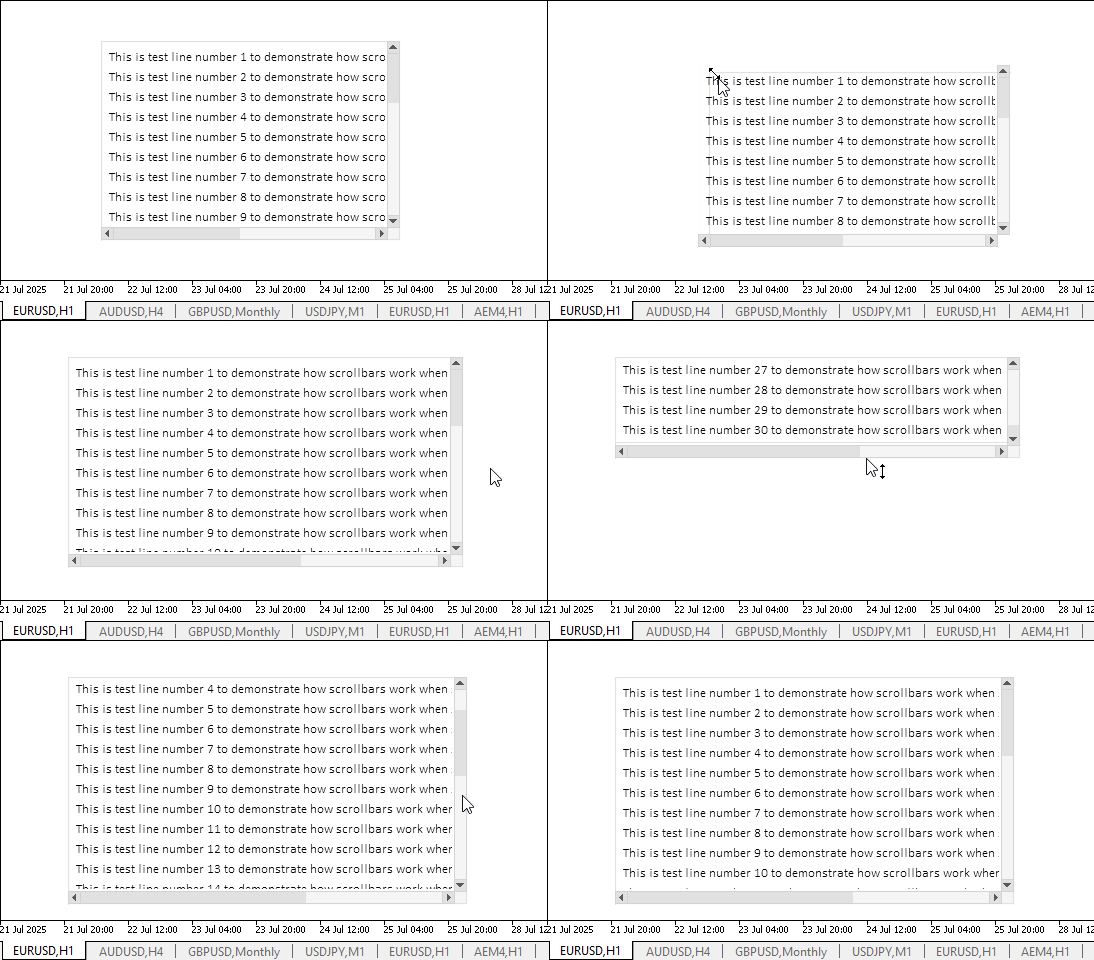
明らかに、ここで述べた機能は正しく動作しています。ただし、要素の端がスクロールバーと接している場合、その端をキャプチャするのはやや難しくなります。しかし、サイズ変更可能な要素は通常、単一のコントロールだけで構成されることはありません。例えばFormのようなグラフィック要素では、各コントロールとの間に十分な余白が設けられており、そのおかげで、マウスを使って要素境界をドラッグするためのキャプチャポイントを容易に見つけることができます。
現時点ではまだいくつかの不十分な点が残っていますが、TableViewグラフィック要素の開発を進めていく中で、これらは段階的に解消していく予定です。
結論
今日は、TableViewコントロールの完成に一歩近づきました。これにより、プログラム内で表形式データを作成および表示できるようになります。ビューコンポーネントの実装は非常に大規模で複雑ですが、その結果として、 表形式データの表現および操作に関するほとんどの要件を満たすことができるはずです。
次回の記事では、テーブルの列や行を操作可能な、インタラクティブなテーブルヘッダの作成に取り掛かります。
以下は本稿で使用されているプログラムです。
| # | 名前 | 種類 | 詳細 |
|---|---|---|---|
| 1 | Base.mqh | クラスライブラリ | コントロールの基底オブジェクトを作成するクラス |
| 2 | Controls.mqh | クラスライブラリ | 制御クラス |
| 3 | iTestResize.mq5 | テストインジケーター | コントロールクラスの操作をテストするためのインジケーター |
| 4 | MQL5.zip | アーカイブ | クライアントターミナルのMQL5ディレクトリに解凍するための上記のファイルのアーカイブ |
すべての作成ファイルは、記事に添付されています。アーカイブファイルはターミナルフォルダに解凍できます。すべてのファイルは「\MQL5\Indicators\Tables\」に配置されます。
MetaQuotes Ltdによってロシア語から翻訳されました。
元の記事: https://www.mql5.com/ru/articles/18941
警告: これらの資料についてのすべての権利はMetaQuotes Ltd.が保有しています。これらの資料の全部または一部の複製や再プリントは禁じられています。
この記事はサイトのユーザーによって執筆されたものであり、著者の個人的な見解を反映しています。MetaQuotes Ltdは、提示された情報の正確性や、記載されているソリューション、戦略、または推奨事項の使用によって生じたいかなる結果についても責任を負いません。



 初心者からエキスパートへ:市場構造を認識したRSI取引
 機械学習を用いたトレンド取引戦略の開発
 初級から中級まで:インジケーター(I)
 MQL5での戦略の可視化:基準チャートに最適化結果をレイアウトする

- 無料取引アプリ
- 8千を超えるシグナルをコピー
- 金融ニュースで金融マーケットを探索