Forex Factory Calendar Expert for MT4
- Utilità
- Mehnoosh Karimi
- Versione: 3.3
- Attivazioni: 10
Forex Factory Calendar Indicator for MetaTrader 4
The Forex Factory Calendar Indicator MT4 allows traders to track upcoming economic events directly on MetaTrader 4 charts. This MT4 news indicator provides real-time access to key macroeconomic releases such as employment reports, inflation data, and GDP announcements, helping traders stay aligned with market-moving fundamentals.
By using the WebRequest feature, the indicator automatically retrieves live data from the Forex Factory calendar and displays it clearly within the trading platform.
How to Set Up the Forex Factory Calendar Indicator in MT4
To enable the FF Calendar Indicator, a few configuration steps are required in MetaTrader 4.
Step 1: Open the Forex Factory Calendar
Visit the Forex Factory website and navigate to the Calendar section. In the Weekly Export area, generate and copy the CSV link for the weekly economic calendar. Make sure the complete URL is copied for use in MT4.
Step 2: Access MT4 Options
In MetaTrader 4, open the Tools menu and select Options.
Step 3: Enable WebRequest and Load the Indicator
Go to the Expert Advisors tab and enable “Allow WebRequest for listed URL.”
Click Add New URL, paste https://nfs.faireconomy.media link, and save the settings. You can now attach the indicator to any chart in MT4.
Forex Factory Calendar Indicator Specifications
| Feature | Description |
| Category | News – Trading Utility – Liquidity |
| Platform | MetaTrader 4 |
| Skill Level | Intermediate |
| Indicator Type | Reversal & Continuation |
| Timeframes | Multi-Timeframe |
| Trading Style | Intraday Trading |
| Markets | Forex, Equities, Commodities |
Indicator Display Overview
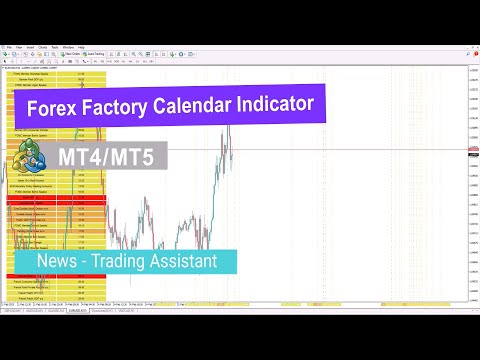
The FF Calendar Indicator presents economic events in a well-organized on-chart table, displaying event names and release times. Each event is color-coded by impact level:
- 🔴 High impact
- 🟠 Medium impact
- 🟡 Low impact
Vertical lines are plotted on the chart to mark the exact time of each news release, allowing traders to evaluate market reactions more accurately.
Bullish Market Example
On the 1-hour USD/CAD chart, the indicator highlights upcoming news events with color-coded vertical markers. In this scenario, the market responds positively after the news release, resulting in a bullish price movement from the marked area.
Bearish Market Example
On the 30-minute EUR/USD chart, the FF Calendar Indicator demonstrates its value during bearish conditions. As economic data is released, the price drops sharply, with the indicator clearly identifying the event that triggered the movement.
Forex Factory Calendar Indicator Settings
The indicator includes several customizable parameters:
- Alerts: Enable or disable sound alerts
- Notifications: Activate push notifications
- Alert Before News: Set the time interval before releases
- High-Impact News: Display major events (red)
- Medium-Impact News: Show moderate-impact events (orange)
- Low-Impact News: Include minor events (yellow)
Conclusion
The Forex Factory Calendar Indicator MT4 integrates real-time economic news directly into MetaTrader 4 charts. By sourcing data from Forex Factory and visualizing it through tables and time markers, the indicator helps traders monitor fundamental drivers without leaving their platform.
Since different instruments react differently to economic releases, this tool supports a more effective combination of fundamental and technical analysis, improving trade timing and execution.