Ultimate Trailing Stop EA

4.33
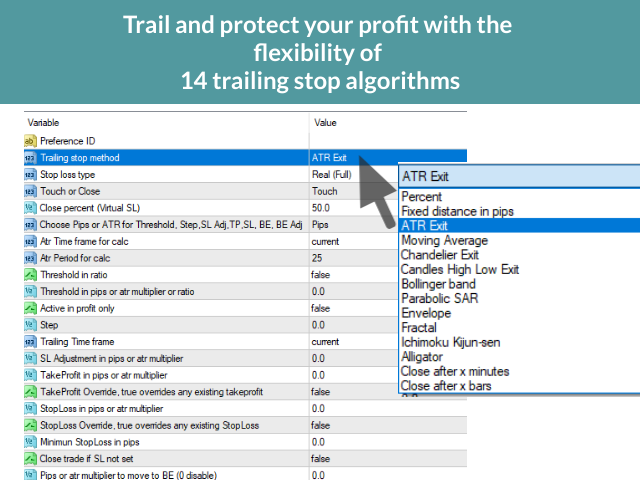
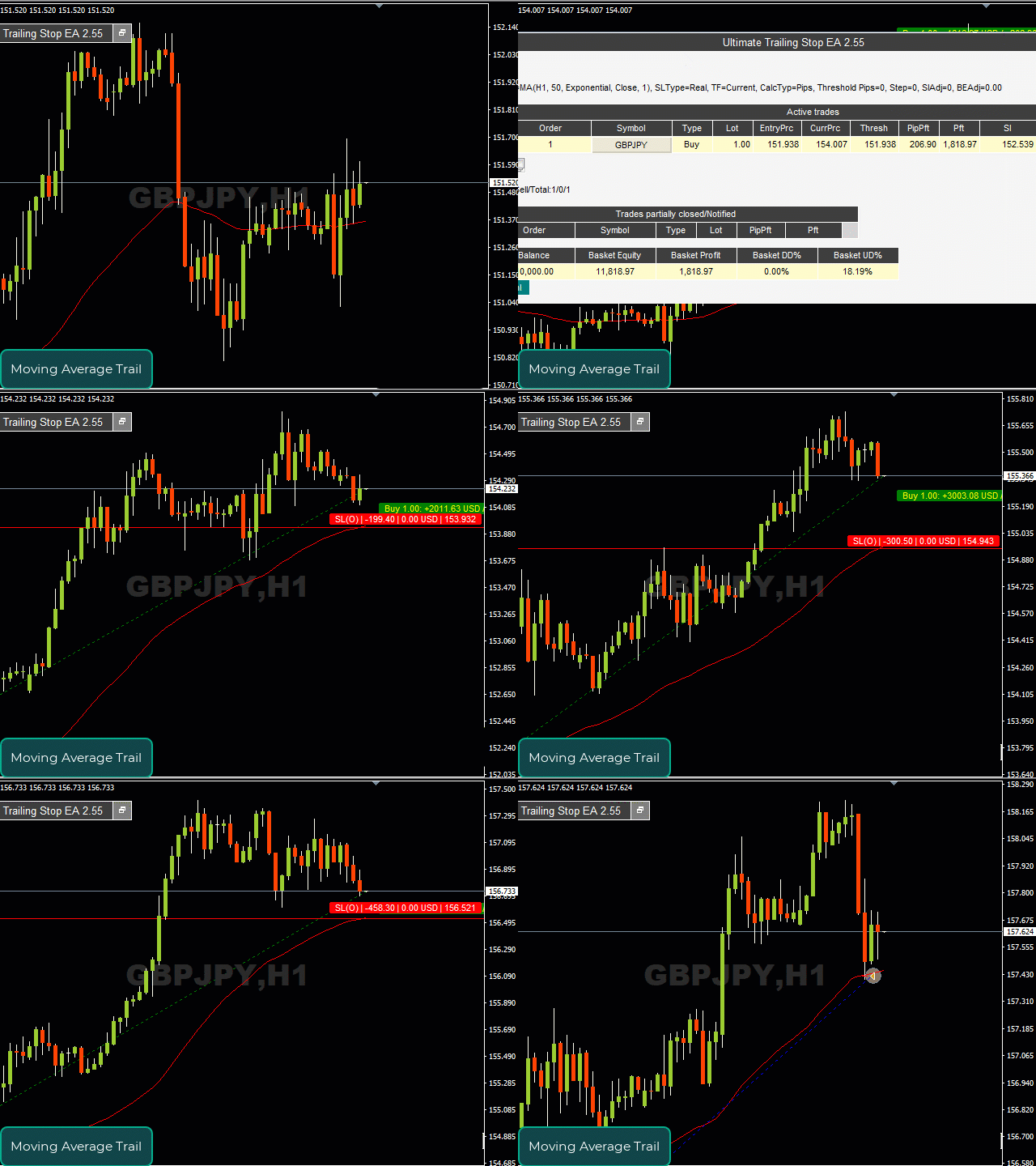
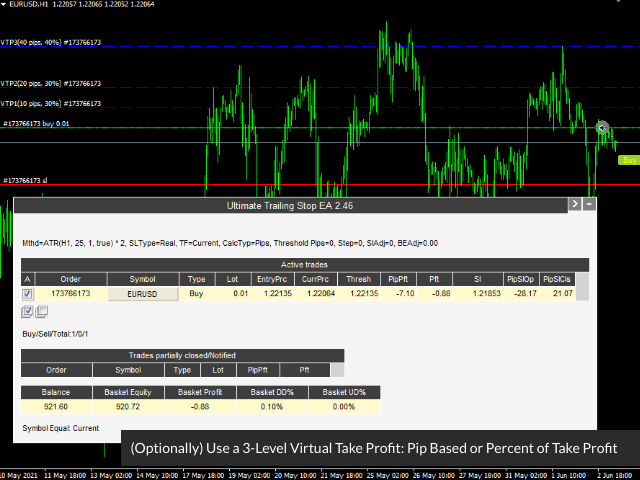
This EA Utility allows you to manage (with advanced filtering) unlimited open orders (manual or EA) with 16 trailing stop methods: fixed, percent, ATR Exit, Chandelier Exit, Moving Average, Candle High Low Exit, Bollinger Bands, Parabolic, Envelope, Fractal, Ichimoku Kijun-Sen, Alligator, Exit After X Minutes or Bars, RSI and Stochastic. The trailing stop can be either real or virtual, and you can exit fully or with a partial close percent on touch or bar close. 

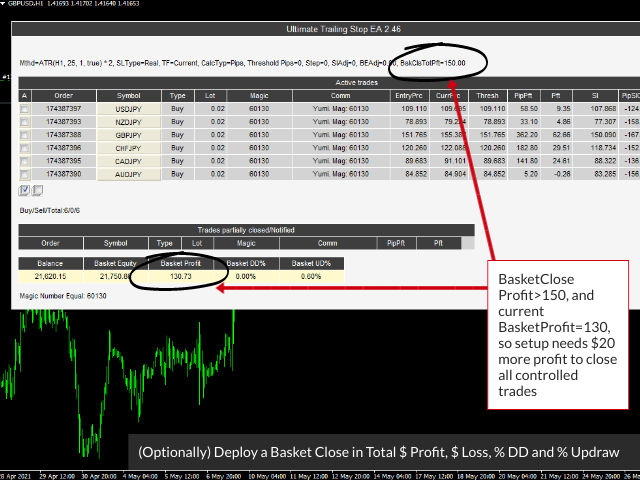
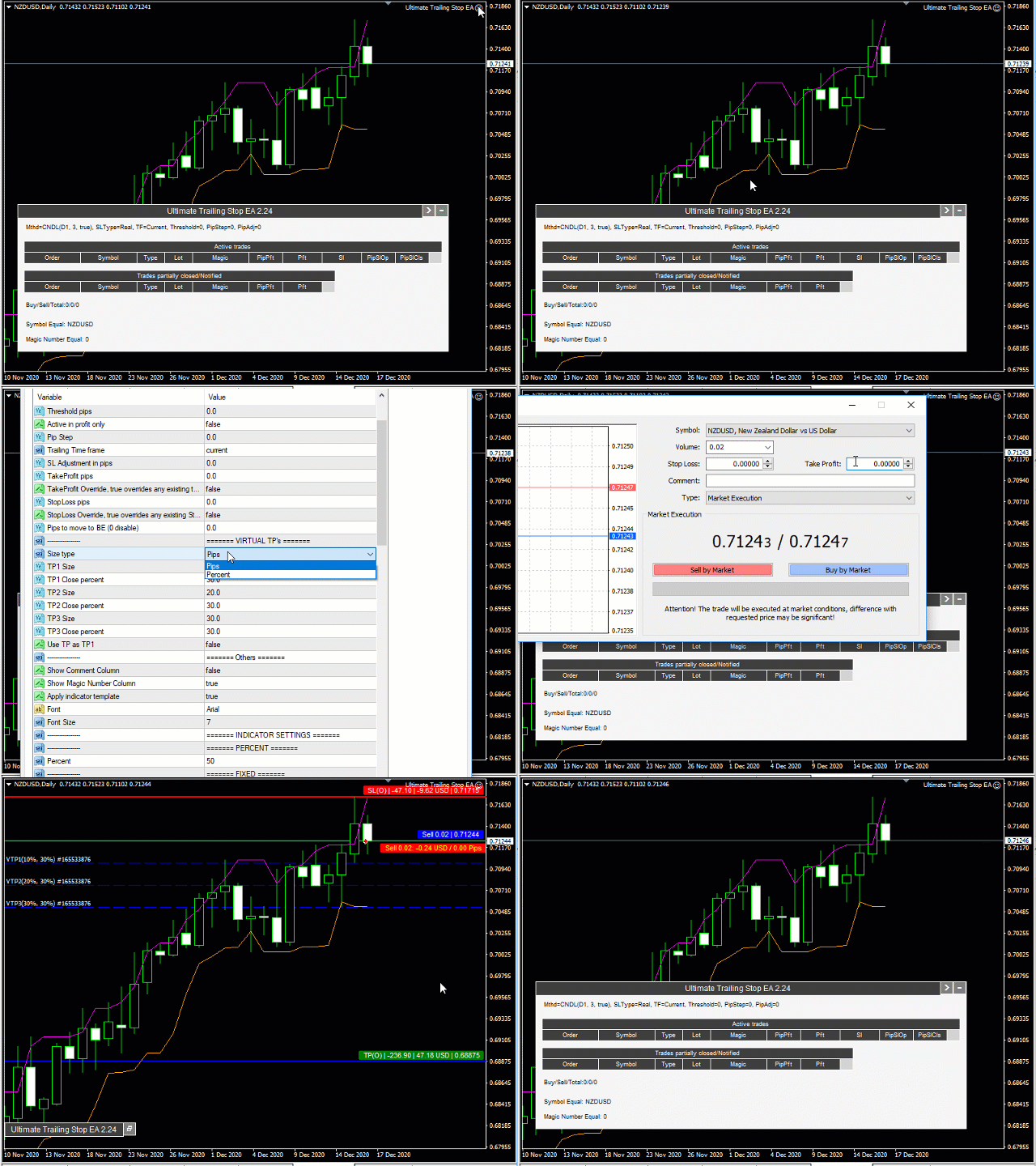
Moreover, you can add (override) stop loss, take profit and breakeven, add three partial take profit levels, and manage basket close in total dollar profit or loss, and/or percent drawdown or up draw.

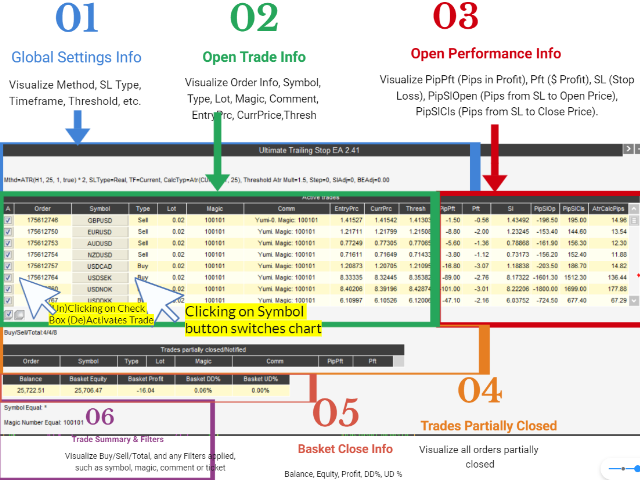
Visualize all orders and their trailing stop levels in a beautiful trade control panel. Visualize trailing SL (and open price & TP) on chart, and deploy mini trade panel for fast partial closing and order info.

How the Ultimate Trailing Stop EA is unique?

Most trailing stops classify as simple trailing stop systems that protect a fixed pip or percentage of the open trade profit, and some follow a single indicator. But this can: 
  1. Automatically trail your open positions using one of 16 trailing algorithms.  
     
  2. Choose between a real or virtual trailing stop, and get out fully or partial percent, on bar touch or bar close.

  3. Manage unlimited open orders (manual or EA) of different symbols on one chart. 

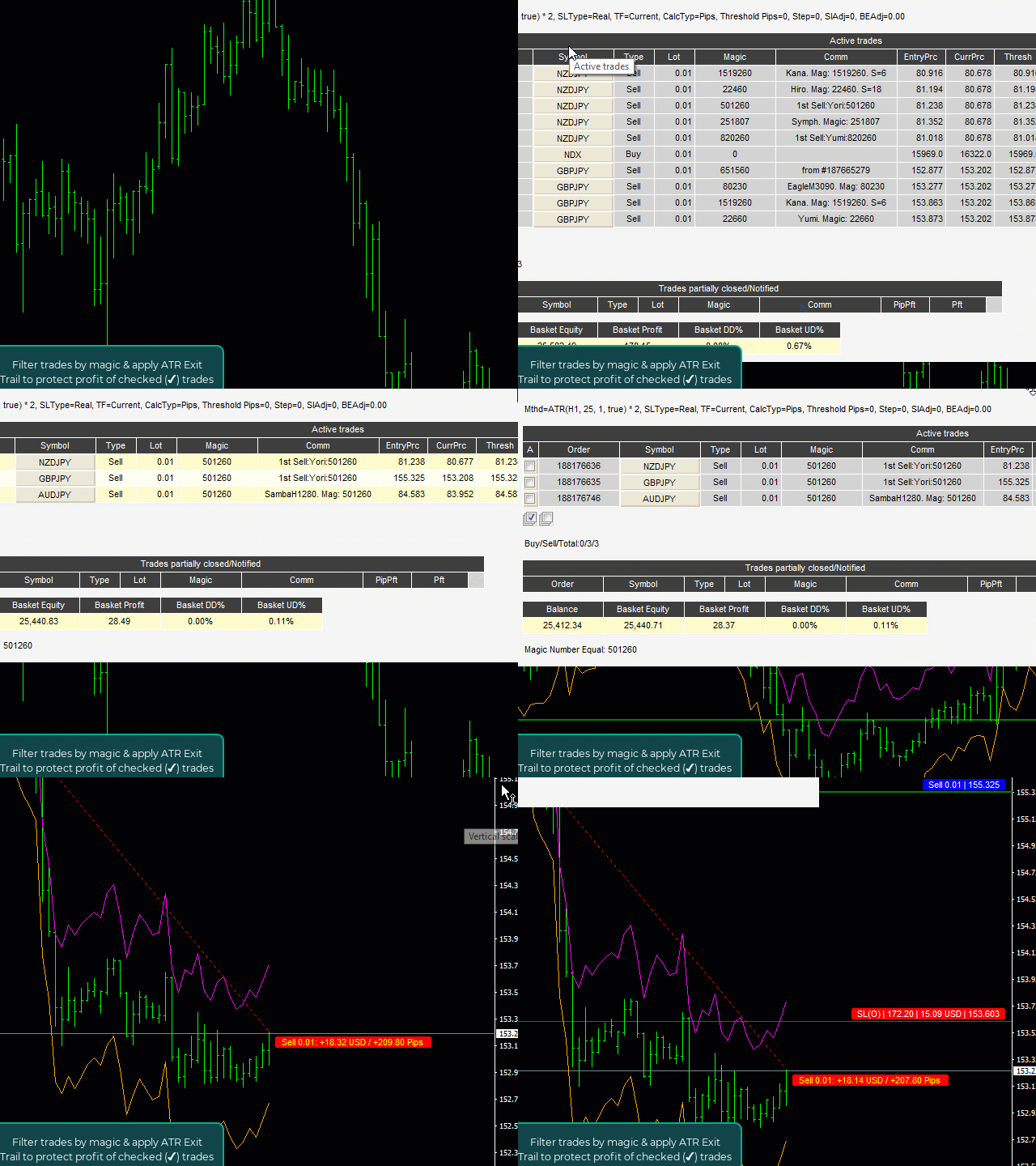
  4. Filter open orders based on symbol, magic number, comment, or ticket.

  5. Display all controlled orders in an advanced display showing each trade's open trade info and trailing stop levels, along with dynamically updating pips to level, pips & dollar profit. 

  6. Visualize indicators on chart, along with open order arrows, pip & profit visual tracking. 

  7. Basket Close in Total $ Profit | Total $ Loss | % Drawdown | % Updraw

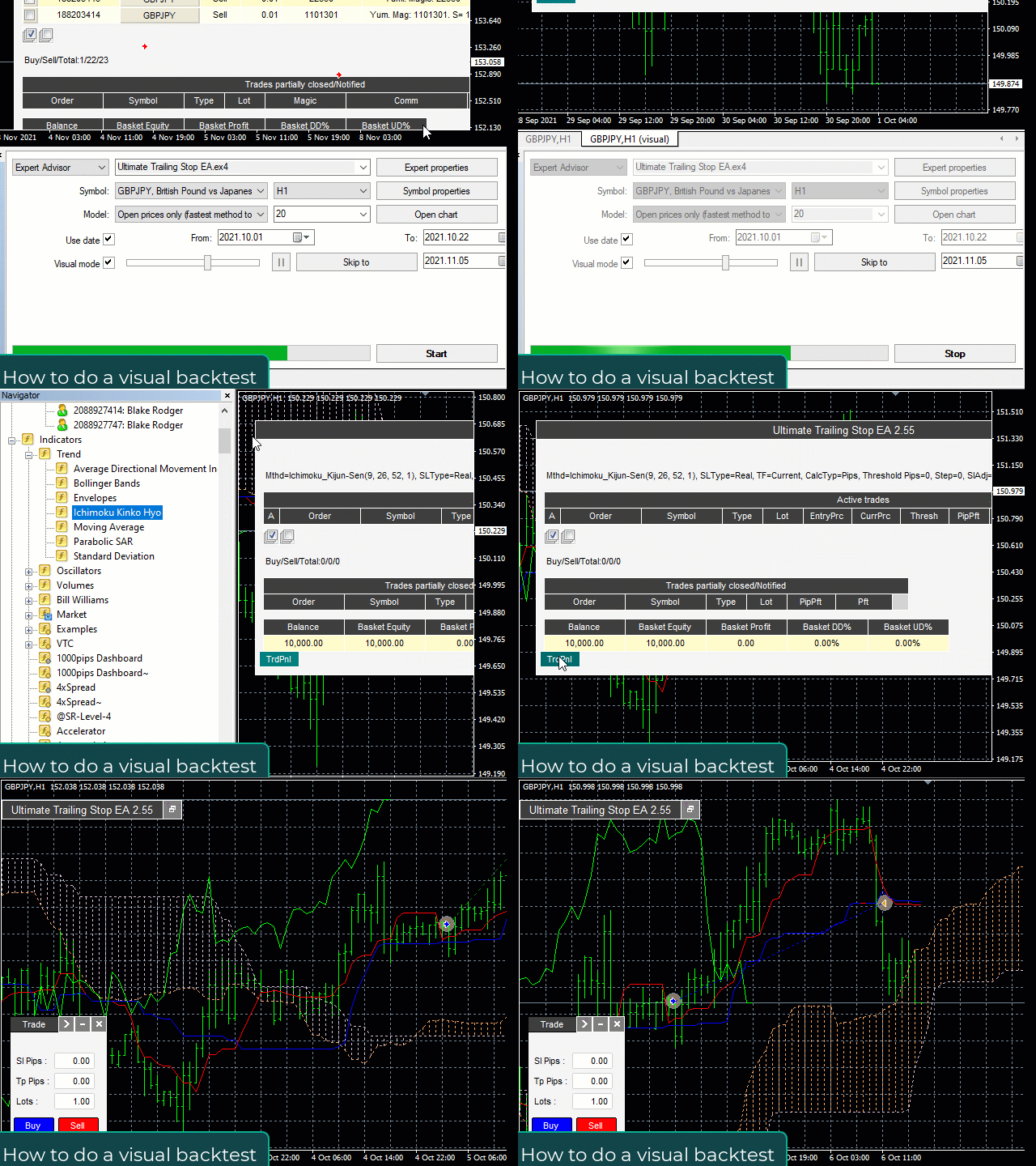
  8. [NEW] Backtest / optimize CSV file of trade signal history to discover optimimal settings

How this expert advisor works

The working process looks like this:

  1. You open any number of orders, manual or EA.

  2. UTS monitors these orders and moves the SL value in favor of selected algorithm.

  3. UTS closes all or part of the position at SL value.


Inputs:

DETAILED MANUAL
  • Trailing Stop Method — Choose from 16 different trailing stops. 

  • Stop Loss Type —  Choose between Real or Virtual Stop.   

  • Touch or Close  —  Close on touch (default), or when Bar closes over(under) virtual stop. Close method works only when virtual stop is enabled.

  • Close Percent  — Works with virtual to partially close your position at a desired percent. 

  • Threshold in Pips or ATR — Start trailing stop when your trade reaches X pips in profit. 

  • StopLoss in Pips or ATR- Set the SL in pips or atr multiplier

  • TakeProfit Pips or ATR - Set the TP in pips or atr multiplier

  • Breakeven in Pips or ATR - Set the BE in pips or atr multiplier

  • Indicator Settings  : 

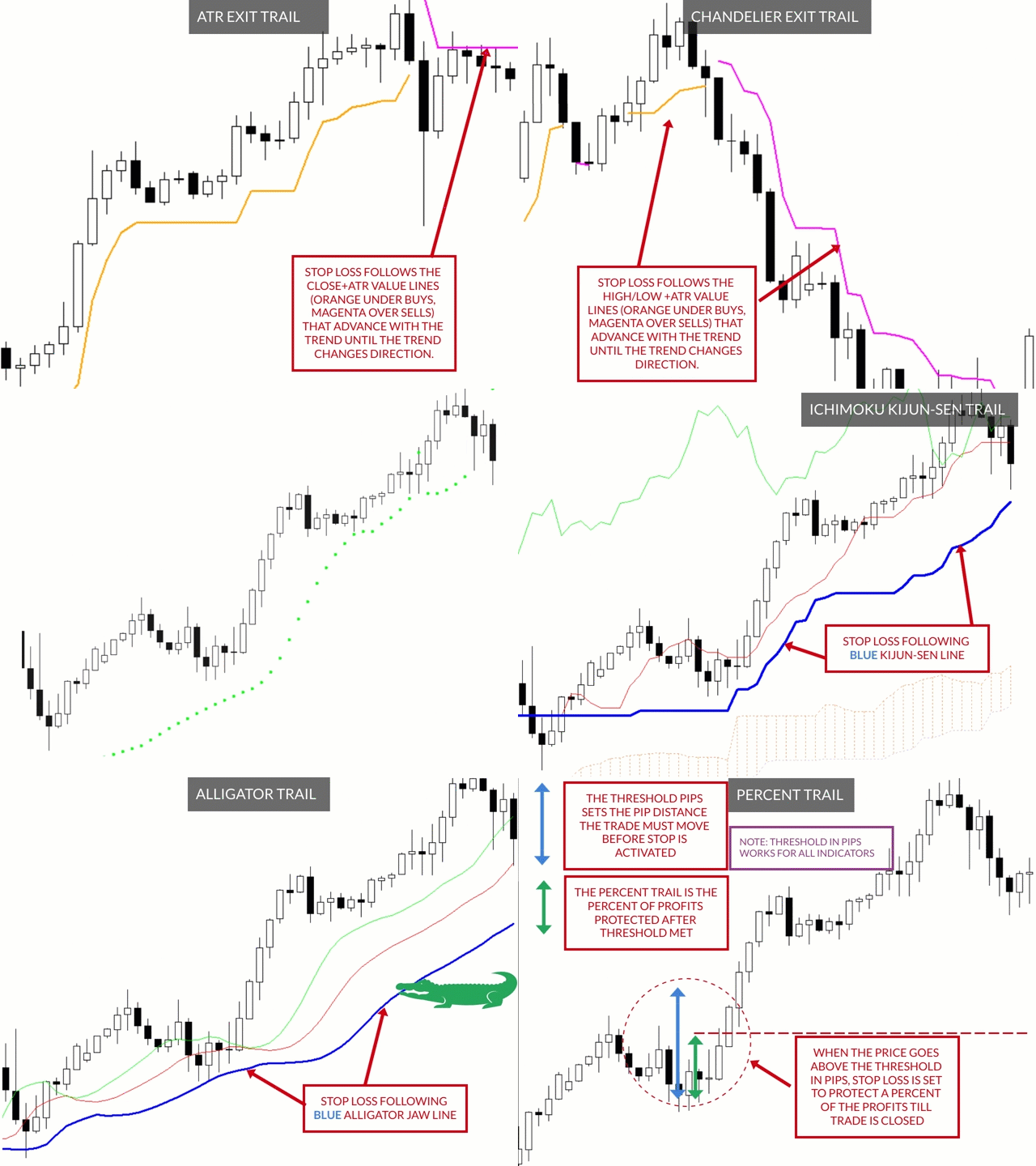
    • Percent — trails at percent profit
    • Fixed — trails at a fixed pip profit
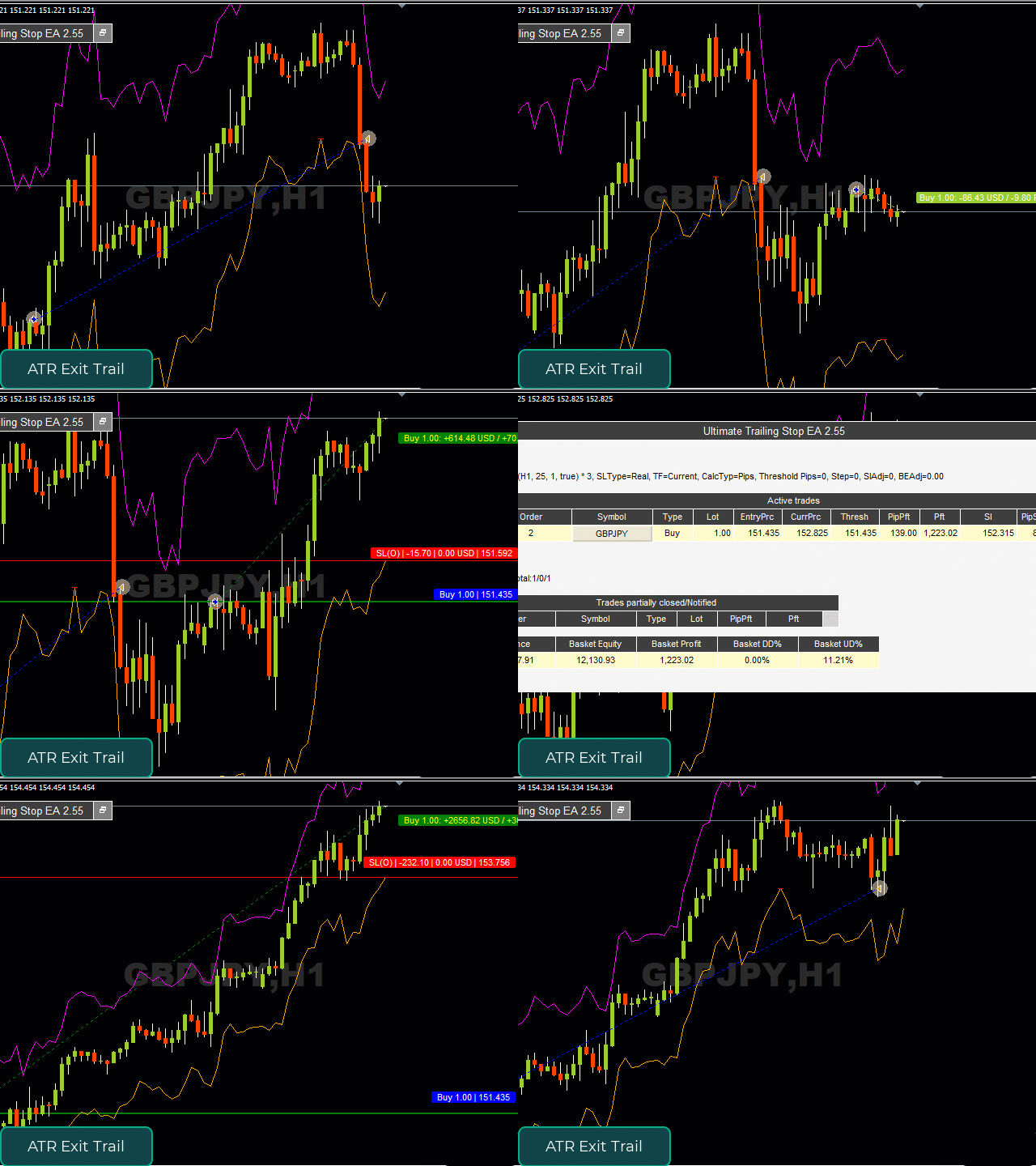
    • ATR Exit — trails at close +/- multiple of atr
    • Moving Average — trails at moving average line
    • Chandelier Exit  — trails at highest high / lowest low +/- multiple of atr
    • Candle High Low Exit — trails at the highest / lowest candle range
    • Bollinger Bands—  trails at Bollinger Bands
    • Parabolic SAR—  trails at Parabolic SAR levels 
    • Envelope —  trails at Envelope Bands 
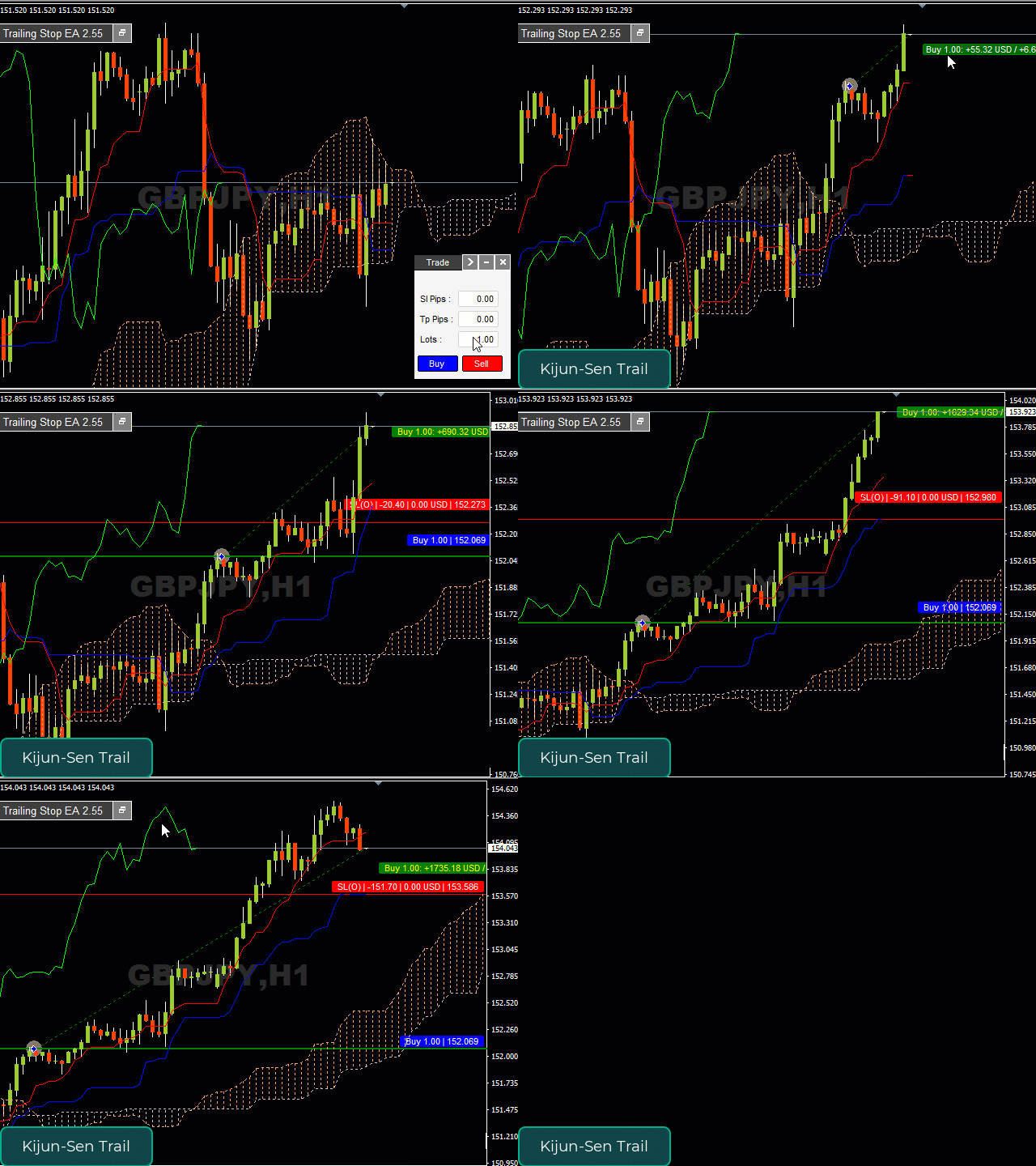
    • Ichimoku Kijun-Sen — trails at the the Ichimoku Kijun-Sen (Blue) line
    • Alligator —  trails at the jaw, teeth or lips of the Alligator indicator
    • Exit After X Minutes  — exits after custom minutes
    • Exit After X Bars  —  exits after custom bars
    • RSI - trail RSI level
    • Stochastic - trail Stochastic level
    • Filter (Symbol, Magic Number, Comment, Ticket) — With dropdown menu: None, Equal, Not Equal, Contain, Not Contain. These filters allow you to include (exclude) specific symbols, magic numbers, comments, tickets or parts of them. For example, if Symbol contains USD, you will trade all USD based symbols. If Magic Number equals 80260, 40260, you will manage only these magic numbers.
    Recensioni 17
    gairey99
    257
    gairey99 2022.11.23 01:20 
     

    I have just purchased both the Ultimate Trailing Stop EA (UTS) and the Visual Order Tracker EA (VOT) and can honestly say they are a fantastic addition to my trading 'toolkit!' The two EA's complement each other perfectly in that one manages open trades and offers multiple automatic exit solutions and the other displays the order history on the chart. They have also helped 'unshackle' me from the screens, taken the psychology out of my trading decisions and ultimately made me a far more profitable trader, so thanks Blake! Both are great products that I would definitely recommend to anyone that wants to automate trailing stops from their trading plan and fine tune their craft as a trader via visualising where historical trades have opened and closed.

    Adelfo Tuazon
    47
    Adelfo Tuazon 2022.11.16 10:46 
     

    Superb trailing EA, take profit management and supportive creator. I had a dilemma creating my set file, then I contacted Blake to help me and he setup a specific set file for my request. Thank you!

    newsun0251
    643
    newsun0251 2021.11.15 07:47 
     

    The professional, rigorous and kind Mr. Blake Steven Rodger has developed excellent and very useful tools. Customers can always give timely support in case of difficulties. Thank you, Mr. Blake Steven Rodger!

    Prodotti consigliati
    Have you ever struggled to calculate the correct position size when trading on MT4 or MT5 from your mobile device? Often, while using clunky external calculators, you miss crucial trading opportunities or end up making costly mistakes. Our app is specifically designed to solve this problem and revolutionize your mobile trading experience. With this innovative solution, you can: Save Time: Forget about frustrating calculators. Our script integrates seamlessly with your MT4 account to automaticall
    TakeProfit Catcher
    Mikhail Kontsevoy
    It is so very disappointing when the price does not have enough points to achieve Take Profit and makes a reversal. This EA sets virtual levels near the TakeProfit levels. This EA sets virtual levels next to TakeProfit orders. If these levels are reached by price, breakeven or trailing stop is applied for an order. Features This EA does not set new orders. The aim of this EA is to manage stop losses of existing orders that are set by another EA or manually (magic number equals 0). For correct w

    AnyChart MT4
    Irek Gilmutdinov
    AnyChart is a multifunctional tool allowing you to work with non-standard charts in MetaTrader 4. It includes collector of ticks and generator of charts for trading (hst files) and testing (fxt files). Supported chart types are second, tick and renko ones. Settings Starting Date - start date for chart plotting. Ending Date - end date for chart plotting. Chart Type - chart type: Time - time chart, each bar contains a certain time interval; Tick - volume chart, each bar contains a certain number


    This panel is a part of the SupDem-Pro trading system and is used to search for the best opportunities for any available instruments. Which can be selected manually in the Market Watch (open it with CTRL + M). Using this trading panel in combination with ShvedSupDem-Pro_Zone allows to analyze multiple currency pairs with a single click. The panel allows to load any instruments from the Market Watch, from 6 major currency pairs up to all instruments (480). The indicator parameters Button Width -
    TSTrendLineSymbol
    Salvatore Labriola
    Utility, which draws buy or sell trendlines, which can also become support or resistances able to close any position on the screen Algorithm that calculates the gain of the position, at the touch closure of the line.   The benefits you get: Works on forex and CFD, timeframe from M1 to Weekly. Easy to use screen control panel. Audible warning messages at the touch of the line. Easy to use.
    Grid Maestro
    Ruslan Brezovskiy
    Grid Maestro – un'utilità che costruisce automaticamente una griglia di ordini in base a parametri specificati: passo della griglia, numero di ordini e moltiplicatore del volume. L'apertura della prima operazione avviene premendo un pulsante sullo schermo. È prevista anche una funzione di selezione automatica dei parametri, calcolata in base all'analisi del massimo drawdown dello strumento. Caratteristiche: Funziona solo con ordini aperti premendo i pulsanti sullo schermo. Quando si utilizza la
    The Best One Scalping Trade Panel functional manual trade panel with risk reward, auto SL by candle ( original solution), lot size calculation, one-click trading, scale in and out of trades (partial close),  Works with all symbols not just currency pairs, perfect works on DAX, NASDAQ, GOLD, ...... I earn every day during live stream on ZakopiecFX - join Me Risk by lot Risk by percent SL by points SL by Candle, Renko, RangeBar ( original solution) TP by point TP by Risk/Reward Auto Trailing by P
    Now, you have your very own   PROP FIRM AUTO-CLOSER   program! Once your account target or drawdown hits, all open orders will close automatically. ========================================== INPUTS: Account target (exact amount):   Put the exact account target. Once the equity hits your specied account balance target, all open orders will close. Make sure to add some buffer to consider slippage. Use fixed value or dynamic value:   Choose whether you will need a fixed value or dynamic value for
    Istruzioni per l'uso: https://www.mql5.com/zh/blogs/post/754946 Versione MT4: https://www.mql5.com/zh/market/product/88205 Versione MT5: https://www.mql5.com/zh/market/product/88204 -------------------------------------------------- 1. Copia ordini, da 12 account master a 100 account slave. Il numero di account slave può essere personalizzato, da 12 a 100. 2. Supporta da MT4 a MT4, da MT4 a MT5, da MT5 a MT4, da MT5 a MT5. 3. Identificare i suffissi delle varietà di trading su diverse piattafor
    Angry bull Option Binary
    Fabio Oliveira Magalhaes
    1 (1)
    Angry Bull Option Binary   This is a Binary Options robot, which contains 7 strategies, you can backtest it to check what the best strategies are Settings Initial Batch Value Dynamic Investment = If activated it will use an automatic lot according to its capital Balance ($) w/ backtest = Starting balance to backtest PorcRiscoInvestment = It will be the value of % for the automatic lot if it is activated Expiration (in minutes) = It will be the expiration time of orders in Binary Options Magic
    Gold Titan King Scalper
    Dodong Christian Arnon
    Indicator Description GOLD TITAN KING SIGNAL INDICATOR High-Precision Gold Scalping Buy/Sell Signals – Manual Trading Assistant Overview The Gold Titan King Signal Indicator is a manual trading assistant tool designed for high-frequency scalping on Gold (XAUUSD) and other major pairs. It generates clear BUY/SELL signals with precise entry levels, along with adjustable Stop Loss and Take Profit levels displayed directly on the chart. ️ This tool is NOT an EA. It does not execute trades
    Lucky Trade Panel MT4
    Nina Yermolenko
    5 (1)
    Trading panel for manual trading. Has a fairly wide functionality. Allows you to automatically calculate the order size, open both market and pending orders. It has a wide range of options for closing orders, it is possible to partially close orders, close orders after reaching a certain profit or loss, separately close profitable and unprofitable, buy and sell, as well as pending orders. The panel also contains a simple implementation of a grid of pending orders, reverse and lock functions, tr
    Una delle sequenze numeriche è chiamata "Sequenza di incendi boschivi". È stata riconosciuta come una delle nuove sequenze più belle. La sua caratteristica principale è che questa sequenza evita andamenti lineari, anche quelli più brevi. È questa proprietà che ha costituito la base di questo indicatore. Quando si analizza una serie temporale finanziaria, questo indicatore cerca di rifiutare tutte le possibili opzioni di tendenza. E solo se fallisce, riconosce la presenza di una tendenza e dà il
    L'indicatore SMC Venom Model BPR è uno strumento professionale per i trader che operano nell'ambito del concetto di Smart Money (SMC). Identifica automaticamente due modelli chiave sul grafico dei prezzi: FVG   (Fair Value Gap) è una combinazione di tre candele, in cui c'è un gap tra la prima e la terza candela. Forma una zona tra livelli in cui non c'è supporto di volume, il che spesso porta a una correzione dei prezzi. BPR   (Balanced Price Range) è una combinazione di due modelli FVG che for
    Close Trades Premium MT4
    Obiajulu Chukwudi Nwosa
    Like you when I first started trading, It was overwhelming...learning about indicators, about lotsize, leverage and many more things. Its been almost 3 years. I am more knowledgeable in trading. My trading continues to improve as I work on my strategy, technical analysis, trading psychology and trade management. One thing I am not worried about though is being able to close my trades quicky if a trade goes against me or if the trade has reached my take profit level with the help of my Close Tra
    Smartility
    Syed Oarasul Islam
    This utility is designed to help you with your Manual Trading. It allows different ways of closing trades. It can display total number of BUY and SELL orders individually and also their individual profits. It can enter trades without stopl loss and take profits. However upon selecting UseStopLossTakeProfit from the settings it can use best possible stop loss and take profits based on the market conditions. Upon selecting the CloseOppositeTrades  from the settings it can close opposite trades. Fo
    VN Trade Panel II
    Vyacheslav Nekipelov
    4 (1)
    The new version of the trading panel, which now has the ability to separately close Buy and Sell orders, display targets for all orders on the chart, as well as the ability to use the panel to trade with brokers working on the FIFO rule. Also, the new version adds option buttons for separate management of open orders. It has a convenient visualized interface and intuitive control without a lot of additional tabs to which traders have to be distracted and switch their attention. Thanks to this,
    Margin Call Shield – Defend Your Margin on Your Terms Margin Call Shield   is a tool for MetaTrader 4 traders who want to decide for themselves which open positions are closed during margin call situations before the platform does so automatically based on its internal rules. By default, the broker or platform decides which positions to close, often using undisclosed algorithms. Margin Call Shield lets you set this order according to your own strategy. Why Was Margin Call Shield Created? In a  
    Noize Absorption Index MT4
    Ekaterina Saltykova
    5 (1)
    Noize Absorption Index - is the manual trading system that measures the difference of pressure between bears forces and bulls forces. Green line - is a noize free index that showing curent situation. Zero value of index shows totally choppy/flat market.Values above zero level shows how powerfull bullish wave is and values below zero measures bearish forces.Up arrow appears on bearish market when it's ready to reverse, dn arrow appears on weak bullish market, as a result of reverse expectation. S
    Questo è un pannello comune che espone una rete di ordini di acquisto e vendita. Chiude questo consulente per l'ordine di profitto definito nelle impostazioni. Quindi, c'è un parametro e si chiama Ladder che include che la distanza tra gli ordini inizia ad aumentare di punti specificati dal parametro ladder (qui, nelle impostazioni principali è di 10 punti) significa un secondo ordine di 10 punti, un terzo ordine di 20 punti, un quarto ordine di 40 punti, ecc. Quindi, cosa c'è in questo consul
    This tool allows you to place pending orders that cannot be triggered by wicks . You set your desired entry price and order type, and the EA watches the level. A trade will only be opened if a full candle body closes beyond your price , ensuring the move is real and confirmed — not just a spike or spread touch. This gives you cleaner entries, eliminates premature triggers, and keeps your strategy disciplined and intentional.
    Virtual Collider Manual   is a trading assistant with a built-in panel for manual trading. It automatically moves a position opened by a trader in profit using innovative adaptive grid algorithm of averaging and adaptive pyramiding Know-how of the grid algorithm of averaging and pyramiding of the   Virtual Collider Manual   trading robot is based on fully automatic adaptation of all characteristics of dynamically build order grid and pyramid with actual price movement with no need for adjusting
    Expert Advisor for MT4 Useful utility MUST have for all traders.  With 1 click button, you're able to close all your open positions. Its come with a warning pop up notification when you click to close all your trades, to avoid an accident press the button. Just press 'Yes' to confirm or 'No' to cancel it. The expert will close all your open positions no matter what pairs you currently open or directions. Just attach the expert on 1 of your chart, and you're good to go.
    Automate Risk Management with Smart Trailing Stop Manager for MetaTrader 4 Looking for MetaTrader 5 version? Check the author's profile for more tools Struggling with manually adjusting stops and securing profits? Smart Trailing Stop Manager MT4 is an intelligent utility for MetaTrader 4 that automates trailing stops, break-even management, partial closes, and auto SL. Optimized specifically for MT4 users, it ensures your profits are secured efficiently. Trade smarter — Automate your exit strate
    Short Description: FTMO Protector PRO MT4 is an EA designed to protect your funded account by managing risk and ensuring compliance with the Prop Firm's trading rules. This EA automatically monitors equity levels, closes trades when profit targets or drawdown limits are reached, and provides a visual display of key account metrics. EA w orks with all different Prop Firm service providers. Overview: FTMO Protector PRO MT4 is an Drawdown Safeguard Expert Advisor meticulously crafted for traders
    Extra Time Bar
    Mostafa Saad Saeed Shawara
    Barra del tempo extra / Extra Time Scale Bar MT5 version è uno strumento progettato per migliorare il tuo trading permettendoti di aggiungere una barra temporale personalizzata ai tuoi grafici. Con questo strumento, non sei più limitato solo al tempo del server: puoi impostare il grafico per visualizzare qualsiasi fuso orario di tua scelta, come l'ora locale, l'ora del meridiano di Greenwich o qualsiasi altra. Caratteristiche della barra del tempo extra: 1. Personalizzazione del fuso orario:
    SmartTrader Pro — Advanced Order Management Panel Type: Order Management Platform: MetaTrader 4 Version: 1.0 Created by: HANI MABAD * 2025  --- Overview SmartTrader Pro is a professional multi-order launcher and manager designed for traders who want precise USD-based control over profits and losses. It enables you to open, manage, and close trades with a single click — across market and pending orders — while keeping full visibility through an integrated smart panel. Whether you tra
    Semi Auto Recovery Zone
    Sirinya Pakkaman
    5 (1)
    Details of each condition Type 1. Set no use Hedging Martingale, to open the order by yourself only through the push button. TP and SL follow setting. Set Setting_Hedging =false;     Use_Signal =false;  Type 2. Semi Auto Recovery Zone You have to open the order by yourself only through the push button. If in the wrong direction and Set true on Hedging Martingale, EA will fix the order with the zone system by use Hedging Martingale Set Setting_Hedging =true;     Use_Signal =false;  Type 3. Use
    Account Protector Metatrader 4
    Emmanuel Lovski Ijeawele Maduagwuna
    Account Protector Meta Trader 4 This utility prevents risk of ruin per trading cycle.  Retail forex trading accounts are designed with   stop out levels   that make it impossible to quickly restore lost trading capital   (to initial levels)   in the event of a human or algorithm trader  " blowing"   an account. This hampers the efforts of a trader who after growing an account investment to a multiple of its initial value, suddenly suffers irreparable loss because of several trade entry mishaps.
    Gli utenti di questo prodotto hanno anche acquistato
    The product will copy all telegram signal to MT4   ( which you are member  ) , also it can work as remote copier.  Easy to set up, copy order instant, can work with almost signal formats, image signal, s upport to translate other language to English Work with all type of channel or group, even channel have "Restrict Saving Content", work with  multi channel, multi MT5 Work as remote copier: with signal have ticket number, it will copy exactly via ticket number. Support to backtest signal. How to
    Your Smart Trading Assistant for the Forex Market Introducing a powerful MetaTrader tool designed to revolutionize the way you trade. This intelligent assistant goes beyond traditional indicators to provide a comprehensive, AI-driven market analysis — so you can trade with clarity and confidence. What It Does This advanced tool continuously monitors and analyzes a wide range of market data to deliver high-quality trading insights. It reads between the lines of financial news, scans the forex ma
    EasyInsight AIO MT4
    Alain Verleyen
    3 (1)
    EASY Insight AIO – La soluzione all-in-one per un trading intelligente e senza sforzo Panoramica Immagina di poter analizzare l’intero mercato — Forex, Oro, Cripto, Indici e persino Azioni — in pochi secondi, senza dover controllare manualmente i grafici, installare indicatori o affrontare configurazioni complicate. EASY Insight AIO è il tuo strumento definitivo di esportazione per il trading alimentato dall’IA, pronto all’uso. Offre una panoramica completa del mercato in un unico file CSV pul
    Telegram To MT4 Receiver
    Levi Dane Benjamin
    4.2 (5)
    Copia i segnali da qualsiasi canale di cui sei membro (inclusi quelli privati e restrittivi) direttamente sul tuo MT4.  Questo strumento è stato progettato con l'utente in mente offrendo molte funzionalità necessarie per gestire e monitorare le negoziazioni. Questo prodotto è presentato in un'interfaccia grafica facile da usare e visivamente attraente. Personalizza le tue impostazioni e inizia a utilizzare il prodotto in pochi minuti! Guida dell'utente + Demo  | Versione MT5 | Versione Discord
    Unlimited Trade Copier Pro
    Vu Trung Kien
    3.86 (7)
    Unlimited Trade Copier Pro is a tool to copy trade remotely to multiple MT4, MT5 and cTrader accounts at different computers/locations over internet. This is an ideal solution for you if you are a signal provider and want to copy your trades to other receivers globally on your own rules. One provider can copy trades to multiple receivers and one receiver can get trade from multiple providers as well. The provider can even set the subscription expiry for each receiver, so that receiver will not b
    Remote Trade Copier   is an advanced tool designed for efficiently copying trades between accounts in both   local   and   remote   modes. It allows for lightning-fast order replication from a master account to a slave account. In local mode, trades are copied instantly, while in remote mode, the copying process takes a second.  In new version, in remote mode , the copy operation can be performed with a delay of milliseconds or zero . After purchase, ask how to activate it MT4 Version (Only Loc
    Custom Alerts AIO: Monitora tutti i mercati — senza alcuna configurazione Panoramica Custom Alerts AIO è una soluzione di monitoraggio dei mercati pronta all’uso che non richiede alcuna configurazione. Tutti gli indicatori necessari — FX Power, FX Volume, FX Dynamic, FX Levels, IX Power — sono integrati internamente. Non vengono mostrati grafici, rendendolo ideale per generare alert in tempo reale in modo discreto ed efficiente. Supporta tutte le classi di asset offerte dal tuo broker: Forex,
    Gann Model Forecast
    Kirill Borovskii
    5 (1)
    I present to your attention a powerful utility for predicting the future movement of an asset based on W.D. Ganna’s law of vibration. This utility analyzes the selected market model and provides codes for future possible market movement patterns. If you enter the selected code into the appropriate box, you will receive a forecast of the potential market movement. The utility has the ability to display several potential forecast models. The forecast is not yet tied to time and price and gives th
    Averaging Helper
    Sergey Batudayev
    5 (2)
    Strumento di supporto al trading: questo tipo di strumento di supporto al trading ti aiuterà a calcolare la media delle tue posizioni precedentemente non redditizie utilizzando due tecniche: media standard copertura con successiva apertura di posizioni in base all'andamento L'utility permette   di gestire contemporaneamente diverse posizioni aperte in direzioni diverse, sia per l'acquisto che per la vendita. Ad esempio, se hai aperto una posizione per la vendita e la seconda per l'acquisto, entr
    Mentfx Mmanage
    Anton Jere Calmes
    5 (15)
    The added video will show you the full functionality, effectiveness, and simplicity of this trade manager. Drag and Drop Trade Manager. Draw your entry and have the tool calculate the rest. Advanced targeting and close portions of a trade directly available in tool (manage trades while you sleep). Market order or limit order on either side with factored spread. Just draw the entry, the tool does the rest. Hotkey setup to make it simple. Draw where you want to enter, and the stop loss, the tool c
    News Trapper EA
    Noha Mohamed Fathy Younes Badr
    4.85 (13)
    Hi, all.  News trapper EA It is an expert for trading news very safe expert  Automated Trading on the news of the economic calendar. It shows stable trading during last 10  years. EA doesn't use dangerous technologies like martingale, grid. The Expert is very simple to use.      sale will end after 48 h how to install it     and set files     read the blog         after purchase contact me to add you to   VIP   channel  The program contains flexible settings for trading on the news of the econo
    Multiple Orders
    Opengates Success International
    5 (1)
    UTILITÀ ORDINI MULTIPLI L’Utilità Ordini Multipli è stata creata per facilitare operazioni redditizie con piccoli movimenti di prezzo, senza dover attendere ampie escursioni per ottenere il profitto desiderato. Questo strumento apre più ordini contemporaneamente, nella stessa direzione e sulla stessa coppia di valute, in base al numero impostato dall’utente o al massimo consentito dal broker. L’idea è che, invece di puntare a 100–200 pips (che in tempi brevi potrebbe non essere raggiungibile o a
    Trade Copier Pro
    Vu Trung Kien
    4.57 (14)
    Trade Copier Pro is a tool to copy trade remotely to MT4, MT5 and cTrader accounts at different computers/locations over internet. This is an ideal solution for you if you are a signal provider and want to copy your trades to other receivers globally on your own rules. One provider can copy trades to multiple receivers and one receiver can get trade from multiple providers as well. The provider can even set the subscription expiry for each receiver, so that receiver will not be able to receive t
    The product will copy all  Discord  signal   to MT4   ( which you are member  ) , also it can work as remote copier.  Easy to set up. Work with almost signal formats, support to translate other language to English Work with multi channel, multi MT4. Work with Image signal. Copy order instant, auto detect symbol. Work as remote copier: with signal have ticket number, it will copy exactly via ticket number. How to setup and guide: Let read all details about setup and download Discord To MetaTrader
    Telegram Signal pro
    Sara Sabaghi
    4.86 (7)
    What is it? Think about it, you can send all the orders/positions info to your telegram channel or group to create your community or VIP signals on telegram. Position info means this EA forward all of your new positions open details (Open price, Open time, Position Type, position Symbol and volume), positions changes ( SL or TP modifying or pending price changes) and position close (Close price, profit or loss, position duration time) and also EA Send NEWS alert (Economic calendar event) on your
    RedFox Copier Pro
    Rui Manh Tien
    4.7 (10)
    Time saving and fast execution Whether you’re traveling or sleeping, always know that Telegram To Mt4 performs the trades for you. In other words, Our   Telegram MT4 Signal Trader  will analyze the trading signals you receive on your selected Telegram channels and execute them to your Telegram to MT4 account. Reduce The Risk Telegram To Mt4   defines the whole experience of copying signals from   Telegram signal copier to mt4 platforms. Users not only can follow all instructions from the signa
    Online Accounts Manager MT4
    Kyra Nickaline Watson-gordon
    5 (1)
    OneClick Online Account Manager is a powerful utility that helps you to manage all your accounts from a centralized panel. It is suitable for all single account traders and specially for multiple accounts traders. The utility help you to : Monitor status of all accounts on a private web page. Some information such as account connection status, account profit, DD, Balance, Equity, Margin Level, Number of positions and orders, Daily and Weekly profit/loss and also overall summation of all these p
    Discord To MT4 Receiver
    Levi Dane Benjamin
    5 (1)
    Copia i segnali da qualsiasi canale di cui sei membro (   senza la necessità di un Token Bot o Permessi di Amministratore  direttamente nel tuo MT4. È stato progettato con l'utente in mente offrendo molte delle funzionalità di cui hai bisogno Questo prodotto è presentato in un'interfaccia grafica facile da usare e visivamente attraente. Personalizza le tue impostazioni e inizia ad utilizzare il prodotto in pochi minuti! Guida Utente + Demo  | Versione MT5 | Versione Telegram Se desideri provar
    50% off. Original price: $375 Reward Multiplier is a semi-automatic trade manager based on pyramid trading that opens additional orders with the running profit of your trades to maximize return exponentially without increasing the risk. Unlike other similar EAs, this tool shows potential profit/loss and reward to risk ratio before even entering the first trade! Download Demo here  (starting lot is fixed at 0.01) Guide + tips here MT5 version   here You only open the first order. When your tr
    The FFx Hidden Manager panel will help you to manage easily your orders directly on the chart. Below all features described: TP, SL and TrailingStop are hidden Each order has its own lines on chart Drag & Drop any line to change the TP/SL as per your need Option to move automatically the SL line at breakeven when TP #1 is reached Option to choose the TP/SL type (by pips or price) Option to choose the TrailingStop type (by pips, MA, Fractals, PSAR or ATR) Define which order(s) you want to manage
    FFx Risk Calculator
    Eric Venturi-Bloxs
    FFx Risk Calculator panel will help you to calculate very easily your trades size, SL or the risk directly on the chart. All features are described below: Option to select which parameter to calculate: Risk, Stop Loss or Lot Size The panel will show if the lot size is allowed according to the current account free margin Button to maximize/minimize the panel Drag and Drop the panel anywhere on the chart How to use it? Select the parameter you want to be calculated. It will be based on the 2 other
    News Trader Pro
    Vu Trung Kien
    4.38 (16)
    News Trader Pro is a unique robot that allows you to trade the news by your predefined strategy. It loads every piece of news from several popular Forex websites. You can choose any news and preset the strategy to trade it, and then News Trader Pro will trade that news by selected strategy automatically when the news comes. News release gives opportunity to have pips since the price usually has big move at that time. Now, with this tool, trading news becomes easier, more flexible and more exciti
    FFx Watcher PRO
    Eric Venturi-Bloxs
    The FFx Watcher PRO is a dashboard displaying on a single chart the current direction of up to 15 standard indicators and up to 9 timeframes. It has 2 different modes: 1. Watcher mode: Multi Indicators User is able to select up to 15 indicators to be displayed User is able to select up to 9 timeframes to be displayed 2. Watcher mode: Multi Pairs User is able to select any number of pairs/symbols User is able to select up to 9 timeframes to be displayed This mode uses one of the standard indicat
    Transaction Repeater Full
    Alexandr Bryzgalov
    5 (4)
    Copies transactions between MT4 terminals. Possibilities: quick copy start minimum processor load direct and reverse (reverse) copying. copying Take Profit and Stop Loss levels copying deferred and their changes copy transactions one to many copy trades many to one local copy only Attention: The product is designed for copying trades only within a single computer or VPS with access to the desktop. The product will not work on the built-in Virtual Hosting of the terminal. We will help you set up
    The product combines a manual trade panel with the ability to perform actions automatically in a highly configurable way. Actions include capturing indicator values and then based on those values raising alerts, open/close or partially close trades, scale-in, setting up pending orders, adjusting stop loss, take profit and more. On-chart controls can be configured, such as tick boxes and buttons, so can be fully interactive. The EA also handles money management, news events, hidden stop loss, tak
    Binary Options Copier Remote is an EA that allows to copy binary options trades between MT4 accounts at different computers. This is an ideal solution for signal provider, who want to share his trade with the others globally on his own rules. Provider can give free bonus license to 10 receivers. That means those 10 receivers can copy from provider by using Binary Options Receiver Free (no cost). From 11th one, receiver have to buy Binary Options Receiver Pro (paid version) in order to copy from
    Price Action DashBoard
    Chantal Sala
    4.17 (6)
    The Price Action Dashboard is an innovative tool to help the trader to control a large number of financial instruments. This tool is designed to automatically suggest signals and price conditions. The Dashboard analyzes all major Time Frame suggesting price action conditions with graphic elements. The Dashboard can suggest you the strength of the trend identifying directional movement, it is an indispensable tool for those who want to open position themselves using market trends identifiers. The
    Elliott Wave Counter è un pannello per il markup manuale rapido e intuitivo delle onde di Elliott. Si può selezionare un colore e un livello di segni. Sono inoltre disponibili funzioni per la rimozione dell'ultimo markup e dell'intero markup effettuato dallo strumento. Il markup viene eseguito con un clic. Fai clic cinque volte: ottieni cinque onde! Elliott Wave Counter sarà un ottimo strumento sia per i principianti che per gli analisti professionisti delle onde di Elliott. Guida all'installazi
    If you wish to draw Support and Resistance lines, view: daily market opening, classical pivot levels, Fibonacci pivot levels, trend lines, Fibonacci levels, the remaining time to candle closing, and current spread. If you seek to place your orders with the exact lot that meets your desired stop loss risk. If you wish to do all this and more with just one click, then this is the perfect tool to use. This tool will allow you to feel more relaxed when deciding to open orders, as well as predicting
    Partial Close Expert   è uno strumento che combina numerose funzioni in un unico sistema automatizzato. Questo EA può aiutare i trader a gestire le proprie posizioni in modo più efficace, offrendo molteplici opzioni per gestire il rischio e massimizzare i potenziali guadagni. Con Partial Close Expert, i trader possono impostare un       chiusura parziale       livello per bloccare i profitti, un       stop mobile       livello per proteggere i profitti e limitare le perdite, un       pareggiare
    Altri dall’autore
    Ultimate Trailing Stop EA MT5
    BLAKE STEVEN RODGER
    4.13 (8)
    This EA Utility allows you to manage (with advanced filtering) unlimited open orders (manual or EA) with 16 trailing stop methods: fixed, percent, ATR Exit, Chandelier Exit, Moving Average, Candle High Low Exit, Bollinger Bands, Parabolic, Envelope, Fractal, Ichimoku Kijun-Sen, Alligator, Exit After X Minutes or Bars, RSI and Stochastic. The trailing stop can be either real or virtual, and you can exit fully or with a partial close percent on touch or bar close.  Moreover, you can add (override
    Ultimate Trade Copier
    BLAKE STEVEN RODGER
    5 (2)
    This trade copy utility allows you to instantly and seamlessly replicate and synchronize unlimited orders from multiple master accounts to multiple slave accounts on your local machine. You can create custom channels (or portfolios) with advanced filtering capabilities to copy from multiple master accounts to multiple slave accounts. Moreover, you can tailor these channels with a range of lot sizing and trade condition options to ensure that copied trades outperform the original source. You can
    Chandelier Exit MT5
    BLAKE STEVEN RODGER
    5 (1)
    Developed by Chuck LeBeau, the Chandelier Exit indicator uses the highest high / lowest low -/+ a multiple of the ATR value to draw trailing stop lines (orange under buys, magenta over sells) that advance with the trend until the trend changes direction.The value of this trailing stop is that it rapidly moves upward in response to the market action. LeBeau chose the chandelier name because "just as a chandelier hangs down from the ceiling of a room, the chandelier exit hangs down from the high
    FREE
    ATR Exit MT5
    BLAKE STEVEN RODGER
    4.75 (4)
    The ATR Exit indicator uses the candle close + ATR value to draw trailing stop lines (orange under buys, magenta over sells) that advance with the trend until the trend changes direction. It uses a multiple of the Average True Range (ATR), subtracting it’s value from the close on buy, adding its value to the close on sell. Moreover, the trailing stop lines are generated to support the order’s trend direction (long or short):  In an upward trend, the long trailing stop line (orange line under bu
    FREE
    Ultimate MT5 to Telegram (UMT) sends controlled trades (via symbol, magic, comment) to your telegram channel. It sends open and closed trades, including pending orders and TP/SL modifications, along with chart screenshots, to any telegram channel. Additionally, you can send trade reports of open trades and summary profit/pip reports for day, week, or month. You can customize the design of the trade actions or reports with variables and emoticons.  A beautiful panel allows you to visualize all t
    Ultimate MT5 to Telegram Public Channel sends controlled trades (via symbol, magic, comment) to a public telegram channel. It sends open and closed trades, including pending orders and TP/SL modifications, along with chart screenshots, to this public telegram channel. Additionally, you can send trade reports of open trades and summary profit/pip reports for day, week, or month. You can customize the design of the trade actions or reports with variables and emoticons.  A beautiful panel allows
    FREE
    Zone Guardian
    BLAKE STEVEN RODGER
    Zone Guardian is an advanced Expert Advisor (EA) designed to automate trade management. This EA manages trades within specified risk parameters using automatic lot calculation and multi-layered trade activation. It supports up to 5 layers within the entry zone, each with customizable risk percentages. Visual aids on the chart display entry zones, stop loss (SL), and take profits (TP), ensuring easy level adjustments. The EA adapts to market conditions by closing trades at each TP and moving SLs
    Ultimate Partial Profit EA
    BLAKE STEVEN RODGER
    4.67 (3)
    This EA Utility delivers a robust solution for managing an unlimited array of open orders, both manual and automated. It enables customizable partial profit levels utilizing metrics such as pips, ratios, ATR (Average True Range), and profit amounts for precise trade management. The utility features an advanced on-screen display, offering clear visualization of all orders and their profit levels to enhance strategic decision-making and control. To evaluate its performance and interface, the EA s
    ATR Exit
    BLAKE STEVEN RODGER
    4.63 (8)
    The ATR Exit indicator uses the candle close + ATR value to draw trailing stop lines (orange under buys, magenta over sells) that advance with the trend until the trend changes direction. It uses a multiple of the Average True Range (ATR), subtracting it’s value from the close on buy, adding its value to the close on sell. Moreover, the trailing stop lines are generated to support the order’s trend direction (long or short):  In an upward trend, the long trailing stop line (orange line under bu
    FREE
    Chandelier Exit
    BLAKE STEVEN RODGER
    4 (4)
    Developed by Chuck LeBeau, the Chandelier Exit indicator uses the highest high / lowest low -/+ a multiple of the ATR value to draw trailing stop lines (orange under buys, magenta over sells) that advance with the trend until the trend changes direction.The value of this trailing stop is that it rapidly moves upward in response to the market action. LeBeau chose the chandelier name because "just as a chandelier hangs down from the ceiling of a room, the chandelier exit hangs down from the high
    FREE
    Candle High Low Exit MT5
    BLAKE STEVEN RODGER
    5 (3)
    The Candle High Low Exit indicator uses the highest high and the lowest low of a range to draw trailing stop lines (orange under buys, magenta over sells) that advance with the trend until the trend changes direction.  Moreover, the trailing stop lines are generated to support the order’s trend direction (long or short):  In an upward trend, the long trailing stop line (orange line under buy) appears and advances upward until the close crosses under the line.  In a downward trend, the short trai
    FREE
    Ultimate MT4 to Telegram Public Channel sends controlled trades (via symbol, magic, comment) to a public telegram channel. It sends open and closed trades, including pending orders and TP/SL modifications, along with chart screenshots, to this public telegram channel. Additionally, you can send trade reports of open trades and summary profit/pip reports for day, week, or month. You can customize the design of the trade actions or reports with variables and emoticons.  A beautiful panel allows
    FREE
    Ultimate MT4 to Telegram (UMT) sends controlled trades (via symbol, magic, comment) to your telegram channel. It sends open and closed trades, including pending orders and TP/SL modifications, along with chart screenshots, to any telegram channel. Additionally, you can send trade reports of open trades and summary profit/pip reports for day, week, or month. You can customize the design of the trade actions or reports with variables and emoticons.  A beautiful panel allows you to visualize all t
    Zone Guardian MT5
    BLAKE STEVEN RODGER
    Zone Guardian is an advanced Expert Advisor (EA) designed to automate trade management. This EA manages trades within specified risk parameters using automatic lot calculation and multi-layered trade activation. It supports up to 5 layers within the entry zone, each with customizable risk percentages. Visual aids on the chart display entry zones, stop loss (SL), and take profits (TP), ensuring easy level adjustments. The EA adapts to market conditions by closing trades at each TP and moving SLs
    Candle High Low Exit
    BLAKE STEVEN RODGER
    5 (2)
    The Candle High Low Exit indicator uses the highest high and the lowest low of a range to draw trailing stop lines (orange under buys, magenta over sells) that advance with the trend until the trend changes direction.  Moreover, the trailing stop lines are generated to support the order’s trend direction (long or short):  In an upward trend, the long trailing stop line (orange line under buy) appears and advances upward until the close crosses under the line.  In a downward trend, the short trai
    FREE
    Visual Order Tracking
    BLAKE STEVEN RODGER
    5 (1)
    The Visual Order Tracking (VOT) indicator makes trade history and performance metrics visible on the chart in three ways: 1) Draw History of closed and open trades with arrows, lines and trade result numbers (pips, $ profit, % profit, % change); 2) Summary Trade Panel to show open and closed trade summaries by symbol, lots, pips, profit and advanced stats; and 3)  Open Trades Panel to show open trades by Symbol Ticket, Type, Lots, Profit, pips, SL pips, StopLoss, TakeProfit, Spread, Magic, Comme
    Visual Order Tracking EA
    BLAKE STEVEN RODGER
    5 (1)
    The Visual Order Tracking (VOT) EA makes trade history and performance metrics visible on the chart in four ways: 1) Draw History of closed and open trades with arrows, lines and trade result numbers (pips, $ profit, % profit, % change); 2) Trade Manager to show Open, SL and TP levels as vivid horizontal lines with dynamic specs and partial closing options; 3)  Summary Trade Panel to show sortable table of open and closed trade summaries by symbol, lots, pips, profit and advanced stats; and 4) 
    EA Schedule Launcher
    BLAKE STEVEN RODGER
    5 (1)
    It may be true that “Time waits for no one [human],” but at least now you can control the marching time of all your robots. EA Schedule Launcher (ESL) can launch and close any number of your EAs and/or indicators at custom beginning and ending times. You save your EA and/or indicator to a template and input when to open and close them. The power to control your EAs trading time window can improve both strategy performance and terminal/computer performance. Note: EA cannot be run with the visual
    Cutting-edge solution for Trend Trading with statistically robust signals! Kana Trend’s smart algorithm detects the trend on any instrument, any timeframe, and gives powerful entry signals with exit levels.  Its advanced statistics gives you deep insight as to success and profitability of its signals -- while being fully transparent on any potential for loss.  Because this is an indicator, not an EA, you cannot see it in action in visual tester if you download the Free Demo. Instead, please down
    Promo price: $199 for the first 5 buyers.  Kana Trend EA is a short term, always-in-market trend trading system that shows great results on multiple symbols.  You can place this EA on any instrument without worry about missing out on a trend, for if there is one, it is bound to get it. It is always-in-market, trending and reversing into new trends, on small timeframes like H1, a difficult to accomplish feat in a noisy environment. You can place this EA on your account without worry about cat
    EA Schedule Launcher MT5
    BLAKE STEVEN RODGER
    1 (1)
    It may be true that “Time waits for no one [human],” but at least now you can control the marching time of all your robots. EA Schedule Launcher (ESL) can launch and close any number of your EAs and/or indicators at custom beginning and ending times. You save your EA and/or indicator to a template and input when to open and close them. The power to control your EAs trading time window can improve both strategy performance and terminal/computer performance. Note: EA cannot be run with the visual
    Ultimate Trade Copier MT5
    BLAKE STEVEN RODGER
    5 (2)
    This trade copy utility allows you to instantly and seamlessly replicate and synchronize unlimited orders from multiple master accounts to multiple slave accounts on your local machine. You can create custom channels (or portfolios) with advanced filtering capabilities to copy from multiple master accounts to multiple slave accounts. Moreover, you can tailor these channels with a range of lot sizing and trade condition options to ensure that copied trades outperform the original source. You can
    Filtro:
    hua tian
    237
    hua tian 2024.02.16 08:52 
     

    Also a piece of trash. I read the instructions thoroughly. It is simply impossible to achieve the moving stop loss of the average price. It’s really rubbish. Please don’t buy it ,After the author sells the product,Configuration files are also sold as commodities. The seller's character is very poor.

    BLAKE STEVEN RODGER
    29627
    Risposta dello sviluppatore BLAKE STEVEN RODGER 2024.03.29 00:40
    As explained in my telegram group when you brought up the moving average issue, UTS does not track the average price of several trades; instead, it provides a trailing stop for each trade individually. You said you found another product that did what you wanted, which is great. Also, as explained and you confirmed, a scammer was pretending to me to sell you set files and additional EAs, which I never do. So, given that my EA was never designed to do what you wanted, and I never tried to upsell you anything, both of which facts you confirmed in the telegram group, can you please change or delete your review?
    Kind Regards, Blake.
    Avinash Raju
    67
    Avinash Raju 2023.04.18 12:25 
     

    L'utente non ha lasciato alcun commento sulla valutazione.

    Seven Majestic
    23
    Seven Majestic 2023.03.02 13:07 
     

    Works but no source file access so I cant save anything. Meaning the saved settings I put when using the EA on MT4 get reset EVERY SINGLE TIME I close the app. Its aggravating to the point where im contemplating asking for refund, I spend more time placing the settings in every time than it would take just to manually manage the trades. Please help, email the source code so I can save my preffered settings please

    BLAKE STEVEN RODGER
    29627
    Risposta dello sviluppatore BLAKE STEVEN RODGER 2023.03.30 18:54
    You stated in your review that there was no source code for Ultimate Trailing Stop EA; however, no MLQ5 marketplace products provide source code, and the reason is that when source code is provided, then so is the intellectual property, and any other developer can copy and sell rip-offs or duplicates. Have you considered using a .set file to store your settings? When you configure the inputs, click Save, and save your .set file; when you modify, save again; when you want to use your saved .set file, click Open and look for the saved .set file.
    gairey99
    257
    gairey99 2022.11.23 01:20 
     

    I have just purchased both the Ultimate Trailing Stop EA (UTS) and the Visual Order Tracker EA (VOT) and can honestly say they are a fantastic addition to my trading 'toolkit!' The two EA's complement each other perfectly in that one manages open trades and offers multiple automatic exit solutions and the other displays the order history on the chart. They have also helped 'unshackle' me from the screens, taken the psychology out of my trading decisions and ultimately made me a far more profitable trader, so thanks Blake! Both are great products that I would definitely recommend to anyone that wants to automate trailing stops from their trading plan and fine tune their craft as a trader via visualising where historical trades have opened and closed.

    Adelfo Tuazon
    47
    Adelfo Tuazon 2022.11.16 10:46 
     

    Superb trailing EA, take profit management and supportive creator. I had a dilemma creating my set file, then I contacted Blake to help me and he setup a specific set file for my request. Thank you!

    S J
    232
    S J 2022.07.28 19:48 
     

    Would be amazing if it worked as intended. I've had almost all trades opened with this EA closing within 1 minute saying it hit SL which it didn't... I tried to contact the creator for more than 2 weeks now with no reply. Giving it a 2 because i'm not really benefiting at all from it and zero support.

    BLAKE STEVEN RODGER
    29627
    Risposta dello sviluppatore BLAKE STEVEN RODGER 2022.09.05 21:36
    Hi Saeed, are you satisfied with the solutions we given you, and if everything is ok can you please change the review.
    Adeoluwa Okunade
    322
    Adeoluwa Okunade 2022.05.02 11:09 
     

    An amazing EA. Changed my trading life!

    BLAKE STEVEN RODGER
    29627
    Risposta dello sviluppatore BLAKE STEVEN RODGER 2022.09.05 21:37
    Thanks Adeolowa, I'm glad UTS has had a measurable impact on your trading!
    newsun0251
    643
    newsun0251 2021.11.15 07:47 
     

    The professional, rigorous and kind Mr. Blake Steven Rodger has developed excellent and very useful tools. Customers can always give timely support in case of difficulties. Thank you, Mr. Blake Steven Rodger!

    BLAKE STEVEN RODGER
    29627
    Risposta dello sviluppatore BLAKE STEVEN RODGER 2022.09.05 21:39
    Thanks newsun for your kind review. Trading is difficult and I want to help increase trader's edge with useful tools as much as I can.
    Jag Paruchuri
    68
    Jag Paruchuri 2021.09.11 09:03 
     

    Excellent EA. Very useful.

    BLAKE STEVEN RODGER
    29627
    Risposta dello sviluppatore BLAKE STEVEN RODGER 2022.09.05 21:39
    Thanks for the kind review Jag :)
    Abraham Usman Asanji
    488
    Abraham Usman Asanji 2021.05.07 12:27 
     

    It really deserved its name ULTIMATE Trailing Stop. For all those who want to ride the trend, let your winner go and cut the losses this tool is a MUST for you. It include all types of trailing stop that you desires. Amazingly it also automatically set stop loss base on your TS parameter in case you forget your stop loss.

    BLAKE STEVEN RODGER
    29627
    Risposta dello sviluppatore BLAKE STEVEN RODGER 2021.05.21 20:44
    Thanks for the kind review :)
    aRka3579
    160
    aRka3579 2021.03.30 13:24 
     

    Manque la N.L.M.A dans la liste des MOVING AVERAGES. (No Lag Mov Average) Une V.W.A.P. serait peut être judicieux, également.

    BLAKE STEVEN RODGER
    29627
    Risposta dello sviluppatore BLAKE STEVEN RODGER 2021.04.01 00:06
    Thanks for the recommendation. I'll put it on my roadmap.
    Alexander Dubenskiy
    2329
    Alexander Dubenskiy 2021.02.26 22:20 
     

    Simply most comprehensive multi EA position management solution on MT market per my research. (There are 2 other solutions but these require certain level of scripting and/or "visual assembly".) If you work with hundreds and hundreds of EAs/magic numbers and multiple MT instances/multiple hardware and need position management for external EAs to enhance/tune this solution is for you. Excellent GUI, one of the best I've seen over the years for MT, I'd confidently say one of.... Top 3! Superb work BLAKE STEVEN RODGER and highly recommended to anyone who owns multiple EAs and would like to enhance performance with UTS position management!

    BLAKE STEVEN RODGER
    29627
    Risposta dello sviluppatore BLAKE STEVEN RODGER 2021.04.01 00:26
    Thanks for the generous review. I could not have captured better in words the essence of UTS. I'm happy to have developed the most comprehensive multi-symbol/multi-strategy position manager solution to help all the brilliant traders in this community.
    Neil Milligan
    80
    Neil Milligan 2021.02.17 10:27 
     

    Brilliant EA Does exactly what it says - So Impressed - Have tried several Exit Managers previously and this is the best by far

    BLAKE STEVEN RODGER
    29627
    Risposta dello sviluppatore BLAKE STEVEN RODGER 2022.09.05 21:42
    Thanks for the generous and kind review Neil :) One day I should do a review blog comparing UTS feature by feature with the most popular Exit Managers to show others how ours differentiates itself from the pack.
    Febe
    77
    Febe 2021.01.20 16:31 
     

    Congratulations

    Edwin Luk
    282
    Edwin Luk 2021.01.12 17:48 
     

    This is a very intelligent and flexible EA that I have been looking for to maximise profitability in different scenarios.

    ubaldopersichini
    203
    ubaldopersichini 2020.11.26 09:17 
     

    perfect EA the best one that you can find on the market. you can find everithig for adapt the stop to your style. strongly raccomandate

    cool2btony
    78
    cool2btony 2020.08.15 01:05 
     

    Thank you for making this awesome tool available. It's awesome, I manage my manual trade positions using trailing stops based with indicators like MAs and Bollingers and Candle bar counts. After some settings adjustments to fit my trading style, I have found this to be amazingly accurate and time saving. I have dreamt of something like this for the longest time and this is reality now. There are other products for trailing stops but most of them are % or fixed value, some are trendlines stops, well most are just useless and basic, at least for in retail trading world. But UTS EA has such advanced detailed features and functions that make life much much easier. Adjusting many stops manually is a pain sometimeswhen you happen to work on some other trades at the same time and u forget to move your stops in a timely manner, you can end up losing a lot of $$$. So to me UTS' pays for itself in the long run ! there are many EAs for entry into trade but the other half of the money making is trade management and it seems that's been a forgotten art... Here are my humble user suggestions to authors for future update version improvements: 1.please make 'dashboard' not so big it covers most of charts space, or changeable background color, or could be semi-transparent ? 2. provide a way to change trailing stop type and/or period values for indicator stops directly from dashboard buttons/menu maybe, not from settings popup window. 3 Also if u could create a visual 'virtual' line or arrow representation of any virtual stops that displays on the chart while in live open positions management instead of just having the current plain numbers displayed. it would help to see at a glance where the virtual EA stop would execute at. 4. A 'check' marker next to each positions line for the UTS EA to select positions we want to manage or not. 5. The possibility to 'split'-manage many partial portions of same position with different trailing stop type for each portions. exp: full 1lot EURUSD = .30 trail w/ EMA20 + .40 trail w/bollingerband2std + .30 trail w/ last5barbreak + etc.... from same chart.( currently i would need to open a new chart for each portion sizes of the same FX pairs I want to manage with its own new UTS EA instance running, that's so cumbersome!) 6.I would love to have it also be able ENTER trades to OPEN positions using similar various indicator/bars/lines/etc trailing stop methods in same manner that UTS ea currently does too. Great for discretionary entry trigger techniques. I believe the possibilities are endless for UTS EA , it is the best EA for productively increasing trading profits! Cheers !

    Rispondi alla recensione