Basket Toolkit
- Utilità
- Tshidiso Ephraim Mpakanyane
- Versione: 1.0
- Attivazioni: 16
Basket Toolkit is a professional multi-symbol trade and risk management tool for MetaTrader 5. It allows traders to detect, organize, visualize, and control trades as unified baskets, with advanced risk management features and a clean, interactive dashboard.
Key Features
1. Multi-Symbol Basket Management
- Detect manual trades, EA trades, or specific trades by magic number.
- Group trades from multiple symbols into unified baskets for centralized control.
- Supports both full account monitoring and individual symbol tracking.
2. Advanced Risk & Trade Control
- Unified Stop Loss, Take Profit, Trailing Stop, and BreakEven applied at the basket level.
- Adjustable risk modes: Points, Percentage, or Money.
- Automatic basket closure when profit or loss thresholds are reached.
- Averaging support for SL and TP.
3. Grid & Basket Automation
- Optional grid support to manage additional entries intelligently.
- Maintains proper basket integrity, avoiding skipped positions or inconsistencies.
4. Interactive Dashboard
- Clean, professional GUI.
- Top-row global actions: close all profitable or losing trades.
- Basket-specific controls anchored at the bottom.
- Active basket list fills the main area with selectable rows.
- Live statistics: total baskets, total profit.
5. Safety & Account Protection
- Account-level stop-loss and max profit enforcement.
- Designed to prevent accidental overexposure or runaway grid losses.
- Intelligent position detection ensures no duplicate processing.
Key Benefits
- Consolidate multiple trades into a single actionable view.
- Reduce risk and protect your account automatically.
- Improve trade monitoring efficiency for manual or automated trading.
- Visual, easy-to-use interface that scales with chart size.
Who This Utility Is For
- Manual traders who want unified basket control.
- Multi-symbol strategies and portfolios.
- Grid or averaging systems seeking account-level risk safety.
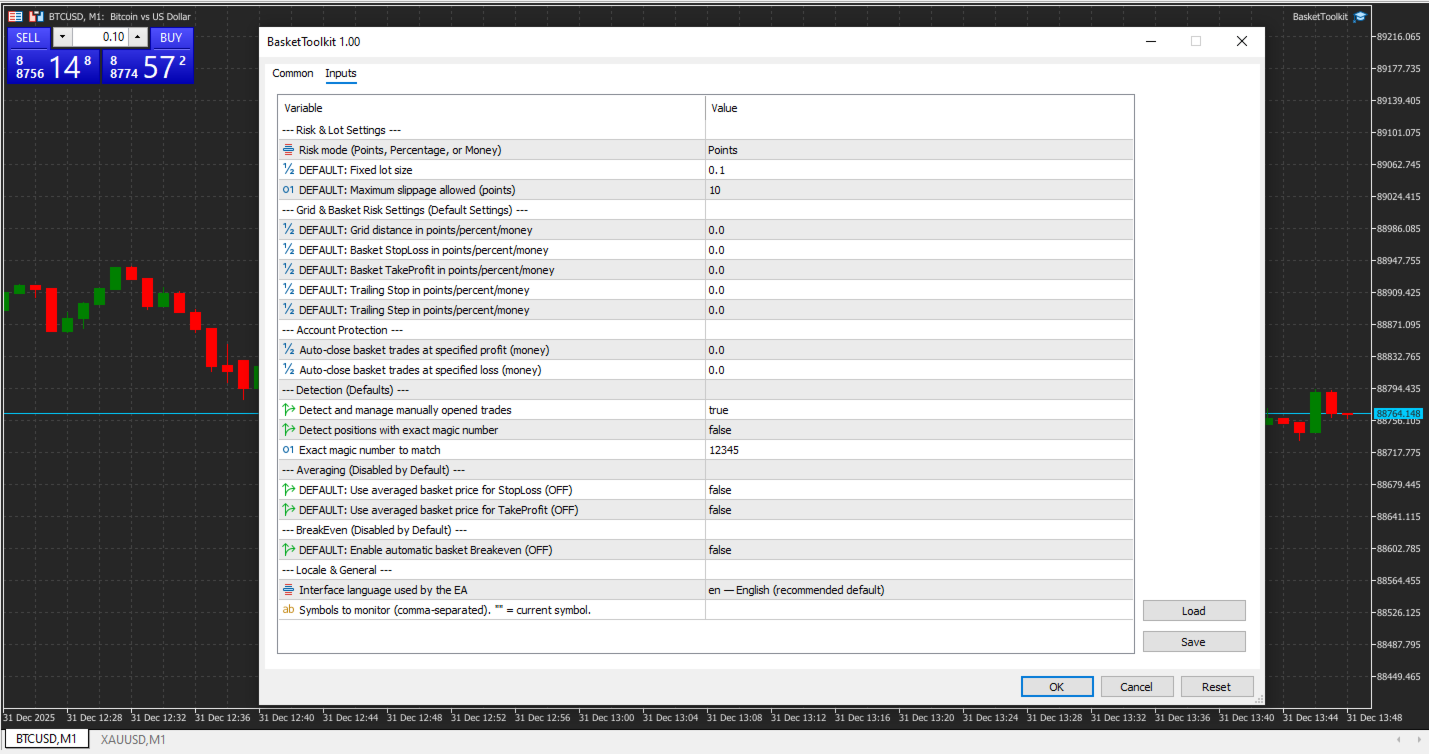
Input Parameters
| Parameter | Default | Description |
|---|---|---|
| Risk Mode | Points • | Determines how risk is calculated for each basket. Options: • Points — risk measured in points • Percentage — risk measured as a % of account balance (%) • Money — risk measured in account currency ($) |
| Lot Size | 0.10 | Fixed lot size to use if manual lot sizing is selected. |
| Slippage | 5 | Maximum allowed slippage in points for trade execution. |
| Grid & Basket Risk Settings (set 0 to disable) | ||
| Grid Step | 0 | Distance between grid levels in points/percentage/money. |
| Basket StopLoss | 0 | Stop Loss applied at the basket level in points/percentage/money. |
| Basket TakeProfit | 0 | Take Profit applied at the basket level in points/percentage/money. |
| Trailing Stop | 0 | Trailing stop distance for the basket. |
| Trailing Step | 0 | Step for trailing stop updates. |
| Account Protection (set 0 to disable) | ||
| Max Profit | 0.0 $ | Automatically closes basket trades when total profit exceeds this value. |
| Max Loss | 0.0 $ | Automatically closes basket trades when total loss exceeds this value. |
| Trade Detection | ||
| Detect Manual Trades | true | Enables detection and management of manually opened trades. |
| Detect by Magic Number | false | Only detect trades with the exact magic number. |
| Magic Number | 12345 | Magic number to match if Detect by Magic Number is enabled. |
| Averaging Options | ||
| Averaging for StopLoss | false | Use the averaged basket price when calculating StopLoss. |
| Averaging for TakeProfit | false | Use the averaged basket price when calculating TakeProfit. |
| BreakEven Options | ||
| Enable Basket BreakEven | false | Automatically adjust basket StopLoss to break-even when profitable. |
| Locale & General | ||
| Interface Language | LOCALE_ENG | Language used in the EA interface and logs. |
| Symbols | "" | Comma-separated list of symbols to monitor. Leave empty ("") for the current chart symbol. |
| Future Updates
|
Summary
- Basket Toolkit does not open trades automatically — it manages existing trades.
- Designed to work alongside other EAs or manual trading.
- Grid and averaging features are optional and configurable per basket.