MultiCharts Symbols Changer MT5 Lite

5

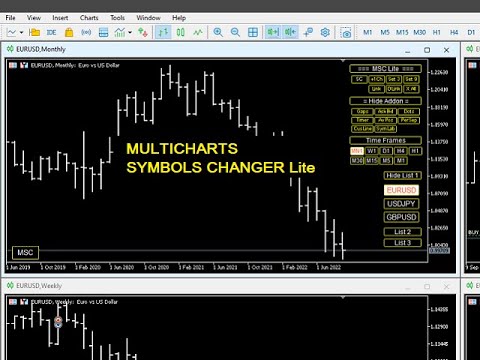
This utility can compare simultaneously time frames of different instruments and keep under control the nine major time frames of an instrument.

It is composed by two changers, a crosshair and some additional components:

  • the multicharts time frames changer  is designed to compare simultaneously up to thirty time frames of different symbols with the keyboard or the button
  • the multicharts symbols changer can linkup to nine charts and control simultaneously the nine major time frame
  • both the changers are provided of customizable shortcuts 
  • it is possibile to switch bewteen multicharts and the single charts changer using a button
  • the crosshair multicharts draws a crosshair in any linked chart. It can be used for comparison of symbol price levels in different time frame or to compare candles of different instruments in the same time frame
  • the addons that works in a single charts, They can be activated directly from the gui


         MT4 version       Full decription       All my products                     


    The additional components are:

    Button's Color: it is possible to highlight, through the color of the list buttons, the positivity/negativity of the returns in the selected time interval of other symbols present in the lists. It contributes to a better view of the market

    Average price positions calculator: it draws an average line and label that show your average price positions. The label show the average price in terms of price, pips and percentage. The average price is calculated considering the commissions and the swaps of all the opened positions on the instrument.

    Candle Timer countdown: it shows the time/percentage remaining until the end of the candle. The time can be displayed on the chart's corner or nearby the candle

    Dot on closing price: it sets a dot on closing price when you use the price line representation. It clearly show whether a price is above or below a level
    Gap on price: it shows gaps on price

    Periods Separator: it sets up lines that define the upper period

    Ask-Bid lines and spreadit draws Bid-Ask lines and a label with the relative spread. It's possible to setup two more dynamic lines that in every instant of time represent the stop loss and the take profit 

    Label Symbols/Time Frames/Returns/Swaps:  they are drawn in the upper left corner of the chart and help when you navigate with keyboard. One of them show the return of candle

    Custom TIme Lines:  it draws a time line in a chosen day, hour, minutes


    Inputs

    • The utility can be moved in two different screen positions: right and left
    • There are 7 lists max in which to divide max 30 symbols: e.g.: the 'list1' from Symbol 1 to Symbol 4 and 'list2' from Symbol 5 to Symbol 8 ect.
    • You can choose the position of the utility relative to the chart window in terms of pixels
    • Shortcut keys can be personalized and disabled
    • It is possible to choose addons customizations


      Recensioni 1
      Multi Disipliner
      352
      Multi Disipliner 2022.02.21 21:20 
       

      its very nice

      Prodotti consigliati
      Trade Panel Pro MT5
      Elvis Wangai Muriithi
      Trade Panel Pro is a powerful and easy-to-use trading utility designed for traders who need fast execution, accurate position sizing, and complete risk management directly from the chart. Whether you scalp on the 1-minute chart or swing trade on the 4H, Trade Panel Pro gives you the tools to manage trades with confidence and precision — all in one clean interface. Price will double after 5 purchases. Grab this offer Key Features Fast Trade Execution Open Buy/Sell positions instantly from the pan
      Fast Manager (MT5 Manager) is a high-speed utility designed for traders who need rapid execution and automated trade management. Built to streamline manual trading, this EA provides on-chart buttons for instant Buy/Sell execution and "Close All" functions, while automatically handling risk management behind the scenes. MT4 Version: https://www.mql5.com/en/market/product/132477?source=Site+Profile+Seller Key Features: One-Click Trading Panel: execute trades instantly using the on-chart Buy, Sel
      Object Synchronizer MT5 : Better focus/analysis of the price chart in many timeframes. Are you bored to save and load template many times for the same symbol for many chart timeframes? Here is the alternative. With this indicator, you enjoy creating objects across many charts, you can modify the same object in any chart, you can delete the same object in any chart. All objects you created/modified are always synchronized across all chart windows (with the same symbol). Save your time, you can fo
      TP & SL Calculator Indicator for MT5 The Take Profit & Stop Loss Calculator Indicator is an effective risk and capital management tool designed for MetaTrader 5. It helps traders easily determine and set take profit (TP) and stop loss (SL) levels directly on the chart. This indicator improves trading efficiency through its dedicated control panel, which includes: Creating and managing TP and SL levels for both Buy and Sell positions Calculating trade volume in lots Displaying the Risk-to-Reward
      FREE
      RenkoChart EA
      Paulo Henrique Da Silva
      4.6 (5)
      The RenkoChart tool presents an innovative and highly flexible approach to visualizing market data in MetaTrader 5. This expert creates a custom symbol with Renko bricks directly on the chart, displaying accurate prices at the respective opening date/time for each brick. This feature makes it possible to apply any indicator to the Renko chart. Furthermore, this tool also allows access to historical brick data through native methods in the MQL5 programming language, such as iOpen, iHigh, iLow and
      FREE
      It has never been so easy to manage the risk of your account until now, this tool will allow you to have full control of your capital and manage your entries in the synthetic index derivative markets, in an easy, practical and safe way. The available input and configuration parameters are as follows :  RISK MANAGEMENT 1. Value of your account: Here as its name says you will place the value corresponding to the size of your account, for example if your account is 150 dollars the corresponding val
      MT5 Trades To Telegram
      Mohammad Taher Halimi Tabrizi
      The Trades To Telegram is a powerful and customizable trading assistant designed to bridge the gap between the MetaTrader 5 platform and the popular messaging app, Telegram. This bot serves as a crucial tool for traders, providing them with timely and accurate trading signals, alerts, and updates directly to their Telegram accounts. Key Features: Real-Time Signals: The bot monitors the MetaTrader 5 platform continuously, detecting trading signals, such as Opening/Closing of  buy/sell orders , a
      RiskManagerCalc
      Ramadhan Omurana
      Use for risk management and opening positions as per the user settings. The user is allowed to set the stop loss and take profits in pips. The user can also choose the risk percentage per trade that he/she wants to use while opening the trade. The volume of the trade that the user wants to sent shall be calculator according to the stoploss and the risk percentage that the user has selected.
      Trade Mate
      Sotirios Apostolos Adaloglou
      Trade Mate is the trading tool for manual traders who want to take their trading to the next level. Packed with advanced features like automatic trailing stop loss, lot size calculation, pending orders, partial close, open trade management, and daily drawdown protection(makes it easier to stick to your daily equity risk).  Trade Mate offers everything you need to trade with precision and confidence. Don't settle for less - try Trade Mate today and see the difference for yourself! Check it on You
      Close All Pro MT5 – Fast PnL Control is a powerful trade manager MT5 utility that gives you total control over your trades. With a single click, you can close all MT5 orders, monitor real-time profit and loss, and manage your floating PnL directly from a clean on-chart panel. The tool is lightweight, responsive, and built to help traders save time, reduce emotional stress, and maintain focus. Whether you trade manually or through an EA, this MT5 profit panel provides the visibility and precisio
      JohnApollo
      Jonathan Mboya Kinaro
      JOHN EA - MANUAL TRADING ASSISTANT Professional Order Management and Risk Control Tool PRODUCT OVERVIEW JOHN EA is a manual trading assistant designed to help you efficiently manage multiple pending orders in MetaTrader 5. This is NOT an automated trading robot - you maintain complete control over all trading decisions while the EA provides advanced order management tools, risk management features, and monitoring capabilities. LICENSING & ACTIVATION Activation Policy: Your purchase includes
      FREE
      Powerful and beautiful trading panel helps you in scheduling or placing multiple trades based on your presets in a single click. It is designed to execute orders immediately or schedule trades in advance to be executed at certain time using multiple filters to avoid non favorable market conditions (wide spread, reduced leverage etc.). Additional functionality developed to sycnhronize two instances of the expert over the internet (Master - Slave Mode), which means trader can open the panel in loc
      Symbol Manager for MT5
      Taras Slobodyanik
      5 (3)
      Symbol Manager or Grid Manager, designed to group orders into one position (by Symbol or by Magic Number). This utility will be useful to multi-currency traders (many EAs), who can have multiple orders on several pairs. You will be able to see the total number of lots, the total profit, and set virtual stop loss and virtual take profit. To set a real TP (or SL), you must first set the virtual value, and then enter the command in this cell: "set". If you want to set real TP/SL for all orders at
      Gerenciador de ordens manuais
      Rodrigo Oliveira Malaquias
      Robot Manual Order Manager is a tool that allows you to automatically include Stop Loss, Breakeven, Take Profit and partials in open trades. Be it a market order or a limit order. Besides, it automatically conducts your trade, moving your stop or ending trades, according to the parameters you choose. To make your operations more effective, the Manual Orders Manager Robot has several indicators that can be configured to work on your trade. Among the options you can count on the features: Conducti

      This tool will assist all those who trade the forex market manually. It will help them in a sense that it will calculate the required margin in order to initiate a trade. This calculator is so simple to use that a  that the user only inputs only 2 pieces of information. which are   Price   and   Lot size   the trader wishes to take. All other information needed to calculate the calculator will work it out by itself. It will run or calculate  on the current opened chart. As the name suggest it's
      Kronos is a multi-timer that displays local time, server time and the countdown of the current period. The programme is multilingual, with a choice of English, Italian and Spanish Language selectables in input. Available in four colours and with the choise of five types of font to be used. Like any other programme we have created, the graphic interface is developed to be non-invasive and intuitive. At start-up, the three windows that make up the graphic interface of Kronos are closed on the left
      Trend Risk Monitor
      Kenneth Michael Chambers
      TREND RISK MONITOR EA - USER GUIDE ---------------------------------------------------- 1. OVERVIEW The Trend Risk Monitor is not a trading robot that opens new positions. Instead, it is a sophisticated risk management utility designed to work alongside another Expert Advisor (EA) on your trading account. Its primary purpose is to actively monitor trades opened by a specific EA (identified by a "Magic Number") and provide a real-time assessment of the market risk associated with each open posit
      The Position Control is an intuitive yet powerful trading tool that facilitates risk management from entry to exit.  It includes automatic lot sizing, fixed stop loss and take profit features, or determines them using the ATR indicator. After opening a position, you can set automatic break-even points, trailing stops, and choose from three types of partial closures. Moreover, if you open a 0.01 lot position from your phone, the expert will automatically close it and open a risk-managed position
      AW Metatrader to Telegram MT5
      AW Trading Software Limited
      5 (1)
      Un sistema automatizzato per l'invio di notifiche in modo che nessuno dei tuoi abbonati perda i tuoi eventi di trading dal tuo terminale di trading. Un'utilità che invia notifiche al messenger di Telegram su qualsiasi operazione di trading sul tuo account. Istruzioni passo passo per collegare l'utility a un canale in Telegram ->   QUI   / MT4 ->   QUI vantaggi: Installazione semplice e istruzioni dettagliate, Possibilità di inviare screenshot regolabili, Testo di notifica personalizzabile tramit
      Utility professionale per la gestione automatizzata del trading che imposta istantaneamente Take Profit e Stop Loss su tutte le tue operazioni, con funzionalità avanzate di Punto di Pareggio (Breakeven) e Stop Mobile (Trailing Stop). Perfetta per scalper e day trader che desiderano una gestione del rischio automatica e senza intervento manuale. Caratteristiche Principali: Posizionamento istantaneo di TP/SL su tutte le operazioni (manuali o automatizzate) Sistema Smart di Punto di Pareggio (
      EasyTradePad for MT5
      Sergey Batudayev
      5 (5)
      EasyTradePad – Pannello di trading per MetaTrader 5 EasyTradePad   è uno strumento per il trading manuale e semi-automatico. Il pannello consente una rapida gestione di ordini e posizioni, nonché calcoli di gestione del rischio con un solo clic. Caratteristiche del pannello: Apri e chiudi le negoziazioni con rischio predefinito (% o valuta di deposito) Imposta SL e TP in punti, percentuali o valori monetari Calcola automaticamente il rapporto rischio/rendimento Sposta lo stop loss al pareggio C
      Questo EA è utilizzato principalmente per lo scalping su XAUUSD. Scopo   Rimuove l’emozione dalla gestione delle operazioni — protegge automaticamente le posizioni e prende profitto così non devi prendere decisioni difficili sotto pressione. Cosa fa   ️ Stop Loss automatico   Imposta SL basandosi su recenti massimi/minimi + buffer   Niente più stress per la collocazione manuale   Profitti parziali automatici   Due modalità:   Movimento fisso: chiude il 50% dopo uno spostamento di prezzo
      Introducing   Order Blocks Breaker , a brand-new way to identify and leverage order blocks in your trading strategy. After developing multiple order block tools with unique concepts, I’m proud to present this tool that takes things to the next level. Unlike previous tools,   Order Blocks Breaker   not only identifies order blocks but also highlights   Breaker Order Blocks —key areas where the price is likely to retest after a breakout. MT4 -  https://www.mql5.com/en/market/product/124101/ This t
      R.E.A. Automatic Risk Monetary (MT5) – Per-symbol manager for manual entries & pending orders Summary (hero) Automate risk management for manual trades (magic 0) and pending orders on the chart’s symbol : SL/TP by % of balance or fixed amount , BreakEven and Trailing (for positions), with instant reaction on order placement/execution. What it does Locked to the symbol where you attach it, this EA manages only: Your manual positions on that symbol. Your pending orders on that symbol (limit/stop/s
      FREE
      N-second K-line chart, customizable, monitoring multiple seconds of multiple symbols simultaneously, all Chinese parameters, easy to use -------------------------------------------------------------------------------------------------------------- You can ask me any questions in private messages https://www.mql5.com/en/users/chaoping0326 Customization of indicators and EA for MT4 and MT5 is available Long term programming project (MT4 from 2012, MT5 from 2016). Good programming skills, reasonabl
      The Trailing with Levels utility is designed for trailing a profitable position with different coefficients, depending on the degree of deviation of the current trading symbol from the opening price of the transaction. The closer the current price is to the trade opening price, the further the stoploss is set from the current price, and vice versa, if the current price is far from the trade opening price, the closer the stoploss is. Advisor options: TrailingStart - minimum distance as a pe
      MT5 to Binance
      Roman Zhitnik
      4 (4)
      The MT5 to Binance trading panel is the perfect tool for cryptocurrency traders looking to maximize their purchases on Binance and Binance US exchanges. To get started, simply input your API Key and Secret Key created in the client area of Binance and select the Enable Spot & Margin Trading and Enable Futures checkboxes and start trading Once launched, the trading panel automatically loads all Spot and Futures symbols into the Symbols section. To start trading, select your desired instrument fr
      This utility tool draws the ticker symbol and timeframe information as a watermark in the background of the chart. It may come in handy if you have multiple charts on the screen at the same time. Inputs: Font Name:  You can change text font by typing in the name of your favorite font installed on your operating system. (e.g.: Verdana, Palatino Linotype, Roboto, etc...)   Font Color: You can choose your favorite from the available colors or type in a custom RGB color (values from 0 to 255, e.g.:
      Spread Eliminator
      Wouter Dries Bijnens

      5 (1)
      I'm proudly introducing "Spread Eliminator" - Your Ultimate Solution against High Spreads in Forex Trading! Are you tired of hitting Stop Losses or having pending orders triggered at a bad price due to high spreads while trading? All this is now over with our revolutionary EA , Spread Eliminator! Can be used on Prop Firms that enforce high overnight spreads and/or high spreads during high volatile market conditions. Key Features: Smart Spread Monitoring: Spread Eliminator constantly monitors mar
      Visual Dolphin Indicator
      AL MOOSAWI ABDULLAH JAFFER BAQER
      Visual Dolphin Indicator Unlock the rhythm of the market with the Visual Dolphin Indicator, your ultimate tool for identifying and capitalizing on market trends with clarity and confidence. Designed for both novice and experienced traders, this indicator eliminates the noise and guesswork, providing crystal-clear buy and sell signals directly on your chart. The Logic Behind the Waves The core of the Visual Dolphin Indicator is a sophisticated yet intuitive dual-wave system based on moving avera
      Gli utenti di questo prodotto hanno anche acquistato
      Trade Assistant MT5
      Evgeniy Kravchenko
      4.42 (204)
      It helps to calculate the risk per trade, the easy installation of a new order, order management with partial closing functions, trailing stop of 7 types and other useful functions. Additional materials and instructions Installation instructions - Application instructions - Trial version of the application for a demo account Line function -   shows on the chart the Opening line, Stop Loss, Take Profit. With this function it is easy to set a new order and see its additional characteristics bef
      Forex Trade Manager MT5
      InvestSoft
      4.98 (574)
      Benvenuto a Trade Manager EA, lo strumento definitivo per la gestione del rischio , progettato per rendere il trading più intuitivo, preciso ed efficiente. Non è solo uno strumento per l'esecuzione degli ordini, ma una soluzione completa per la pianificazione delle operazioni, la gestione delle posizioni e il controllo del rischio. Che tu sia un principiante, un trader avanzato o uno scalper che necessita di esecuzioni rapide, Trade Manager EA si adatta alle tue esigenze, offrendo flessibilità s
      Local Trade Copier EA MT5
      Juvenille Emperor Limited
      4.96 (116)
      Sperimenta una copia di trading eccezionalmente veloce con il   Local Trade Copier EA MT5 . Con la sua facile configurazione in 1 minuto, questo copiatore di trading ti consente di copiare i trades tra diversi terminali di MetaTrader sullo stesso computer Windows o su Windows VPS con velocità di copia ultra veloci inferiori a 0.5 secondi. Che tu sia un trader principiante o professionista,   Local Trade Copier EA MT5   offre una vasta gamma di opzioni per personalizzarlo alle tue esigenze speci
      TradePanel MT5
      Alfiya Fazylova
      4.86 (143)
      Trade Panel è un assistente commerciale multifunzionale. L'applicazione contiene più di 50 funzioni di trading per il trading manuale e consente di automatizzare la maggior parte delle operazioni di trading. Attenzione, l'applicazione non funziona nel tester di strategia. Prima dell'acquisto, puoi testare la versione demo su un conto demo. Versione demo qui . Istruzioni complete qui . Commercio. Ti consente di eseguire operazioni di trading con un clic: Apri ordini e posizioni pendenti con calco
      Trade Dashboard MT5
      Fatemeh Ameri
      4.96 (103)
      Tired of complex order placement and manual calculations? Trade Dashboard is your solution. With its user-friendly interface, placing orders becomes effortless, by a single click, you can open trades, set stop loss and take profit levels, manage trade lot size, and calculate risk to reward ratios, allowing you to only focus on your strategy. Say goodbye to manual calculations and streamline your trading experience with Trade Dashboard. Download  Demo Version  right now. You can find  Details of
      Ultimate Extractor
      Clifton Creath
      5 (7)
      Ultimate Extractor - Professional Trading Analytics for MT5 Ultimate Extractor transforms your MetaTrader 5 trading history into actionable insights with comprehensive analytics, interactive charts, and real-time performance tracking. What It Does Automatically analyzes your MT5 trading history across all Expert Advisors and generates detailed HTML reports with interactive visualizations. Tracks live performance metrics including open positions, floating P/L, and drawdown in real-time. Supports
      Versione Beta Telegram to MT5 Signal Trader è quasi pronto per il rilascio ufficiale in versione alpha. Alcune funzionalità sono ancora in fase di sviluppo e potresti riscontrare piccoli bug. Se riscontri problemi, ti preghiamo di segnalarli, il tuo feedback aiuta a migliorare il software per tutti. Il prezzo aumenterà dopo 20 vendite. Copie rimanenti a $90:   2/20 . Telegram to MT5 Signal Trader è uno strumento potente che copia automaticamente segnali di trading da canali o gruppi Telegram a
      Smart Stop Scanner – Analisi multi-asset degli stop-loss basata sulla reale struttura di mercato Panoramica Smart Stop Scanner offre un monitoraggio professionale dei livelli di stop-loss su più mercati. Il sistema identifica automaticamente le zone di stop più rilevanti basandosi sulla reale struttura di mercato, sulle rotture significative e sulla logica del price action, presentando tutte le informazioni in un pannello chiaro, coerente e ottimizzato per schermi ad alta risoluzione (DPI-awar
      Copy Cat More Trade Copier MT5 (Gatto Copiatore MT5) è un copiatore di trade locale e un framework completo di gestione del rischio ed esecuzione progettato per le sfide di trading odierne. Dalle sfide delle prop firm alla gestione di portafogli personali, si adatta a ogni situazione con una combinazione di esecuzione robusta, protezione del capitale, configurazione flessibile e gestione avanzata dei trade. Il copiatore funziona sia in modalità Master (mittente) che Slave (ricevente), con sincro
      Smart Stop Manager – Esecuzione automatica dello stop-loss con precisione professionale Panoramica Smart Stop Manager è il livello di esecuzione della linea Smart Stop, progettato per i trader che richiedono una gestione dello stop-loss strutturata, affidabile e completamente automatizzata su più posizioni aperte. Monitora continuamente tutte le operazioni attive, calcola il livello di stop ottimale utilizzando la logica di struttura di mercato Smart Stop e aggiorna gli stop automaticamente se
      Trade Manager DashPlus
      Henry Lyubomir Wallace
      5 (11)
      DashPlus è uno strumento avanzato di gestione delle operazioni progettato per migliorare l'efficienza e l'efficacia del trading sulla piattaforma MetaTrader 5. Offre una suite completa di funzionalità, tra cui calcolo del rischio, gestione degli ordini, sistemi di griglia avanzati, strumenti basati su grafici e analisi delle prestazioni. Caratteristiche Principali 1. Griglia di Recupero Implementa un sistema di griglia flessibile e di media per gestire le operazioni in condizioni di mercato avve
      MT5 to Telegram Signal Provider è un'utilità facile da usare e completamente personalizzabile che consente l'invio di segnali specificati a una chat, canale o gruppo Telegram, rendendo il tuo account un fornitore di segnali. A differenza della maggior parte dei prodotti concorrenti, non utilizza importazioni DLL. [ Dimostrativo ] [ Manuale ] [ Versione MT4 ] [ Versione Discord ] [ Canale Telegram ]  New: [ Telegram To MT5 ] Configurazione Una guida utente passo-passo è disponibile. Nessuna cono
      Seconds Chart MT5
      Boris Sedov
      4.59 (17)
      Seconds Chart — uno strumento unico per creare grafici in secondi su MetaTrader 5 . Con Seconds Chart , puoi generare grafici con timeframe definiti in secondi, ottenendo una flessibilità e una precisione d'analisi ideali, non disponibili nei grafici standard in minuti o ore. Ad esempio, il timeframe S15 indica un grafico con candele di 15 secondi. Puoi utilizzare qualsiasi indicatore e Expert Advisor con supporto per simboli personalizzati. Lavorare con loro è comodo quanto operare sui grafici
      HINN MagicEntry Extra
      ALGOFLOW OÜ
      4.6 (10)
      HINN MAGIC ENTRY – the ultimate tool for entry and position management! Place orders by selecting a level directly on the chart! Key features: - Market, limit, and pending orders - Automatic lot size calculation - Automatic spread and commission accounting - Unlimited partitial take-profits  - Breakeven and trailing stop-loss  functions - Intuitive, adaptive, and customizable interface - Session and strong algorithmic level visualization - Works with any assets and account types Join the   ALG
      Exp COPYLOT CLIENT for MT5
      Vladislav Andruschenko
      3.82 (34)
      Trade copyr per MT5 è un trade copyr per la piattaforma МetaТrader 5   . Copia le negoziazioni forex   tra       eventuali conti   MT5   -   MT5, MT4   -   MT5 per la versione COPYLOT MT5 (o MT4   -   MT4 MT5   -   MT4 per la versione COPYLOT MT4) Fotocopiatrice affidabile! Versione MT4 Descrizione completa   +DEMO +PDF Come comprare Come installare     Come ottenere i file di registro     Come testare e ottimizzare     Tutti i prodotti di Expforex Puoi anche copiare le operazioni nel termina
      Trade Manager DaneTrades
      Levi Dane Benjamin
      4.33 (27)
      Trade Manager per aiutarti a entrare e uscire rapidamente dalle operazioni calcolando automaticamente il tuo rischio. Incluse funzionalità che ti aiutano a prevenire l'eccessivo trading, il vendetta trading e il trading emotivo. Le operazioni possono essere gestite automaticamente e i parametri di performance del conto possono essere visualizzati in un grafico. Queste caratteristiche rendono questo pannello ideale per tutti i trader manuali e aiuta a migliorare la piattaforma MetaTrader 5. Suppo
      EasyInsight AIO MT5
      Alain Verleyen
      4.91 (11)
      EASY Insight AIO – La soluzione all-in-one per un trading intelligente e senza sforzo Panoramica Immagina di poter analizzare l’intero mercato — Forex, Oro, Cripto, Indici e persino Azioni — in pochi secondi, senza dover controllare manualmente i grafici, installare indicatori o affrontare configurazioni complicate. EASY Insight AIO è il tuo strumento definitivo di esportazione per il trading alimentato dall’IA, pronto all’uso. Offre una panoramica completa del mercato in un unico file CSV pul
      Cerberus Equity Watcher
      Samuel Bandi Roccatello
      5 (3)
      Cerberus the Equity Watcher è uno strumento di gestione del rischio che monitora costantemente il valore della tua equity ed evita grosse perdite causate da EA difettosi o dall'emotivitá. È estremamente utile per i trader sistematici che si affidano a EA che potrebbero contenere bug o che potrebbero non funzionare bene in condizioni di mercato impreviste. Cerberus ti consente di impostare un valore minimo della equity e (opzionalmente) un valore massimo, se uno di questi valori viene raggiunto,
      VirtualTradePad One Click Trading Panel
      Vladislav Andruschenko
      4.58 (72)
      Pannello di trading per il trading in 1 clic.   Lavorare con posizioni e ordini!   Trading dal grafico o dalla tastiera. Con il nostro pannello di trading, puoi eseguire operazioni con un solo clic direttamente dal grafico ed eseguire operazioni di trading 30 volte più velocemente rispetto al controllo MetaTrader standard. I calcoli automatici di parametri e funzioni rendono il trading più veloce e conveniente per i trader. Suggerimenti grafici, etichette informative e informazioni complete sugl
      Telegram to MT5 Coppy
      Sergey Batudayev
      5 (7)
      Da Telegram a MT5:   la soluzione definitiva per la copia del segnale Semplifica il tuo trading con Telegram su MT5, il moderno strumento che copia i segnali di trading direttamente dai canali e dalle chat di Telegram sulla tua piattaforma MetaTrader 5, senza bisogno di DLL. Questa potente soluzione garantisce un'esecuzione precisa dei segnali, ampie opzioni di personalizzazione, fa risparmiare tempo e aumenta la tua efficienza. [ Instructions and DEMO ] Caratteristiche principali Integrazione d
      Trade Assistant 38 in 1
      Makarii Gubaydullin
      4.91 (22)
      Ultimate Trade Assistant MT5 — Assistente di Trading Multifunzionale Oltre 66 strumenti integrati per analisi, gestione del rischio e automazione del trading. L’assistente combina gestione del rischio, ordini intelligenti, analisi di mercato e controllo delle posizioni in un’unica interfaccia semplice e potente. Ideale per Forex, azioni, indici e criptovalute. Perché i trader lo scelgono Esecuzione rapida e gestione completa con un clic Calcolo automatico di lotto e rischio in base al saldo Ordi
      Zentral Trading Manager
      Ray Zeanrik Parreno Fredeluces
      5 (4)
      Zentral Trading Manager Your Command Center for Precision Trading — Now Stronger than Ever Take control of your trades like never before. Zentral Trading Manager is your all-in-one manual trading panel for MetaTrader 5 — built for scalpers, day traders, and serious strategy execution. Fully compatible with both Mac and Windows laptops. High-DPI safe. No more layout issues. Key Features (Latest 2025 Update): • One-Click Close – Instantly close Buy/Sell, winning/losing trades, or even half positi
      Copiatrice->Interazione dell'interfaccia comoda e veloce, gli utenti possono utilizzarla subito       ->>>> Si consiglia di utilizzarlo su computer Windows o VPS Windows Caratteristiche: Impostazioni di copy trading diversificate e personalizzate: 1. È possibile impostare diverse modalità di lotto per diverse fonti di segnale 2. È possibile impostare diverse fonti di segnale per il copy trading forward e reverse 3. I segnali possono essere impostati con commenti 4. Se calibrare il lotto in base
      MT5 To Tradovate
      Laurent Xavier Richer
      MT5 → Tradovate Bridge (Prop-Firm Ready) Mirror your MT5 trades into Tradovate in real time—perfect for running your favorite indices/gold EA on MT5 while meeting the rules of top prop firms like Apex , etc. What it does Live mirroring: Replicates MT5 market executions (open/close) to Tradovate as market orders. Symbol routing:  Map your chart (e.g., US100/USTEC) to the right futures contract (MNQ/NQ/MES/ES/…); roll-aware (quarterly/monthly). Position cap: Limit how many MT5 positions are mirro
      The product will copy all telegram signal to MT5 ( which you are member) , also it can work as remote copier.  Easy to set up, copy order instant, can work with almost signal formats, image signal,  s upport to translate other language to English Work with all type of channel or group, even channel have "Restrict Saving Content", work with  multi channel, multi MT5 Work as remote copier: with signal have ticket number, it will copy exactly via ticket number. Support to backtest signal. How to s
      Auto Trade Copier for MT5
      Vu Trung Kien
      4.36 (25)
      Auto Trade Copier is designed to copy trades to multiple MT4, MT5 and cTrader accounts/terminals with 100% accuracy. The provider and receiver accounts must be on the same PC/VPS. With this tool, you can copy trades to receiver accounts on the same PC/VPS. All trading actions will be copied from provider to receiver perfectly. This version can be used on MT5 accounts only. For MT4 accounts, you must use Auto Trade Copier (for MT4). Reference: - For MT4 receiver, please download Trade Receiver Fr
      Custom Alerts AIO: Monitora tutti i mercati — senza alcuna configurazione Panoramica Custom Alerts AIO è una soluzione di monitoraggio dei mercati pronta all’uso che non richiede alcuna configurazione. Tutti gli indicatori necessari — FX Power, FX Volume, FX Dynamic, FX Levels, IX Power — sono integrati internamente. Non vengono mostrati grafici, rendendolo ideale per generare alert in tempo reale in modo discreto ed efficiente. Supporta tutte le classi di asset offerte dal tuo broker: Forex,
      EasyTrade MT5
      Alain Verleyen
      5 (2)
      Easy Trade – Gestione Operativa Intelligente, Semplice e Potente Easy Trade è la soluzione tutto-in-uno per la gestione delle operazioni su MetaTrader, ideale per chi desidera mantenere il rischio sotto controllo e garantire un’esecuzione fluida. Progettato da zero con il feedback reale dei trader, Easy Trade rende semplice eseguire, monitorare e gestire operazioni su più simboli – senza complicare il tuo flusso di lavoro. Che tu faccia scalping manuale o gestisca un piccolo portafoglio di str
      Entry In The Zone and SMC Multi Timeframe   è uno strumento di analisi di mercato in tempo reale sviluppato sulla base degli Smart Money Concepts (SMC). È progettato per aiutare i trader ad analizzare la struttura del mercato in modo sistematico e ottenere una visione più chiara della direzione generale del mercato. Il sistema analizza automaticamente i Punti di Inversione, le Zone Chiave e la Market Structure su più timeframe, mostrando Point of Interest (POI), segnali No Repaint e Auto Fibona
      Il Local Trade Copier EA è una soluzione per i singoli trader o account manager che devono eseguire segnali commerciali da fonti esterne o che devono gestire più account contemporaneamente, senza la necessità di un account MAM o PAMM. Copia da un massimo di 8 account master su account slave illimitati [ Guida all'installazione | Guida all'aggiornamento | Risoluzione dei problemi | Domande frequenti | Tutti i prodotti ] 100% self-hosted Facile da installare e utilizzare Nessun programma di insta
      Altri dall’autore
      The Better Volume indictator improves the comprehension on volume by coloring the classical histogram bars . The colors point out differents nature of volume . The Better Volume OnOff   allows to  open/close the subwindow   through  a botton   or using the keyboard   only.  There is the possibility to customize 3 symbols  and assign them  different parameters   for each time frame . The indicator   improves the comprehension   on volume by coloring the classical histogram bars : CLIMAX UP - 
      The Bolliger Bands On-Off let you control the indicator  using  the keyboard  or a  button . You can choose if you want the indicator always shown or always hided while switching among different time frames or financial instruments .    --->  This indicator is part of Combo Indicator OnOff The Bollinger Bands identify the degree of real-time volatility for a financial instruments . A lower amplitude corresponds to a low volatility, conversely a greater bandwidth corresponds to high volatility.
      FREE
      Moving Averages OnOff MT5
      Fabrizio Malavasi
      5 (3)
      The Moving Averages On-Off  let you  control the indicator  using  the keyboard  or a  button . You can choose if you want the indicator always shown or always hided while switching among different time frames or financial instruments .    --->  This indicator is part of Combo Indicator OnOff It's possible to  setup three Moving Averages : Short ,  Medium ,  Long   Input You can customize the price type used for calculation : close, open, high, low, median price, typical price, weighted It's
      FREE
      Moving Averages OnOff MT4
      Fabrizio Malavasi
      5 (2)
      The Moving Averages On-Off  let you  control the indicator  using  the keyboard  or a  button . You can choose if you want the indicator always shown or always hided while switching among different time frames or financial instruments . --->  This indicator is part of Combo Indicator OnOff It's possible to use three Moving Averages , defined as  Short ,  Medium ,  Long or Raimbow MA 5,10,20,50,100,200. Input MOVING AVERAGES You can customize the price type used for calculation : close, open
      FREE
      Questa utility consente di passare da un simbolo all'altro. Basta inserire i tuoi ticker preferiti negli input. É possibile personaljzzare fino a 5 simboli.   Tasti di scelta rapida:   navigare fra i symboli:   A  -Avanti    D  -Indietro Inputs Puoi configurare i tuoi  tasti  preferiti per passare da un simbolo all'altro È possibile personalizzare il  colore  di sfondo e il bordo dei  pulsanti Puoi personalizzare le label: dimensione e carattere  
      FREE
      Bollinger Bands OnOff MT4
      Fabrizio Malavasi
      5 (3)
      The Bolliger Bands On-Off let you control the indicator  using  the keyboard  or a  button . You can choose if you want the indicator always shown or always hided while switching among different time frames or financial instruments . --->  This indicator is part of Combo Indicator OnOff The Bollinger Bands identify the degree of real-time volatility for a financial instruments . A lower amplitude corresponds to a low volatility, conversely a greater bandwidth corresponds to high volatility. Na
      FREE
      Returns MT5
      Fabrizio Malavasi
      This indicator shows the value of returns in the selected time frame They are calculated as logarithm of returns , rather than price or raw returns. For small returns, arithmetic and logarithmic returns will be similar. The benefit of using returns, versus prices, is normalization. It is possible measures all variables in a comparable metric despite originating from price series of unequal values Inputs You can display data both as a Histogram  or a   Line It's also possible to display  the a
      FREE
      Questa utility consente di passare da un simbolo all'altro. Basta inserire i tuoi ticker preferiti negli input. É possibile personaljzzare fino a 5 simboli.   Tasti di scelta rapida:   navigare fra i symboli:   A  -Avanti    D  -Indietro Inputs Puoi configurare i tuoi tasti  preferiti per passare da un simbolo all'altro È possibile personalizzare il  colore  di sfondo e il bordo dei  pulsanti Puoi personalizzare le label: dimensione e carattere  
      FREE
      Returns MT4
      Fabrizio Malavasi
      This indicator shows the value of returns in the selected time frame . They are calculated as logarithm of returns , rather than price or raw returns. For small returns, arithmetic and logarithmic returns will be similar. The benefit of using returns, versus prices, is normalization. It is possible measures all variables in a comparable metric despite originating from price series of unequal values. Inputs You can display data both as a Histogram  or a    Line It's also possible to display th
      FREE
      The purpose   of this utility is to manage one or more subwindow in the same chart by opening and closing them through a button or the keyboard keys How it works: If you want to handle more than one subwindow you need to reinstall the indicator . In this case some setups has to be customized onlu in the last subwindow installed and others setups in the installed subwindow during the first time installation. They are denoted in the input rispectively as ' LW ' and ' IW '. First of all install
      The utility helps to locate in the  lower time frames  the maximum and minimum of the upper  time frame.  The length of time frame level line  represents the temporal  length of the upper time frame. The indicator draws lines that delimit the upper time frames candle and highlights his high-low price, the pips candle range, the returns and the volatility. How it works: Firstly . Choose which time frames levels to represent in the lower ones : monthly, weekly, daily, H4, H1, M30, M15, M5. The
      The Better Volume indictator improves the comprehension on volume by coloring the classical histogram bars . The colors point out differents nature of volume . Further through two buttons and without change the main chart it is possibile to change the time frames and navigate among three symbols . The alerts will work accordingly. For each symbol can be  choosed the LookBack and Ma periods . The possibility to show/hide the indicator allows you to focus on the price . The subwindow can be hide
      This utility can compare simultaneously time frames of different instruments and keep under control   the nine major time frames  of an instrument. It is composed by two changers, a crosshair and some additional components : the  multicharts time frames changer   is designed to  compare  simultaneously  up to thirty time frames  of different symbols with the  keyboard or the button the multicharts symbols changer can  link up to nine charts and control simultaneously the nine major time frame b
      The Multicharts Crosshair draws a cross hair in any linked chart. The indicator can be used for comparison of symbol price levels in different time frame or to compare candles of different instruments in the same time frame How it works: It can works from every linked charts where the indicator is installed towards the others or from the chart where is istalled towards the following linked charts . It can be shown just pressing a the key of keyboard. After installing the indicators in the char
      The purpose of the Combo OnOff indicator is combine differerent tecniques and approachs to the market in order to spot signals that occur simultaneosly. A signal is more accurate if it is validate from more indicators as the adaptive expectations can be used to predict prices.The On-Off  feature and alarms help to look for the better prices to enter/exit in the markets Moving Averages are statistics that captures the average change in a data series over time Bollinger Bands is formed by upper
      The purpose   of this utility is to manage one or more subwindow in the same chart by opening and closing them through a button or the keyboard keys How it works: If you want to handle more than one subwindow you need to reinstall the indicator . In this case some setups has to be customized onlu in the last subwindow installed and others setups in the installed subwindow during the first time installation. They are denoted in the input rispectively as ' LW ' and ' IW '. First of all install
      The utility helps to locate in the  lower time frames  the maximum and minimum of the upper  time frame.  The length of time frame level line  represents the temporal  length of the upper time frame. It's possible to OnOff the levels with a button or keys The indicator draws lines that delimit the upper time frames candle and highlights his high-low price and the pips candle range. How it works: Firstly . Choose which time frames levels to represent in the lower ones : monthly, weekly, daily
      The Multicharts Crosshair draws a cross hair in any linked chart. The indicator can be used for comparison of symbol price levels in different time frame or to compare candles of different instruments in the same time frame How it works: It can works from every linked charts where the indicator is installed towards the others or from the chart where is istalled towards the following linked charts . It can be shown just pressing a the key of keyboard. After installing the indicators in the char
      The purpose of the Combo OnOff indicator is combine differerent tecniques and approachs to the market in order to spot signals that occur simultaneosly. A signal is more accurate if it is validate from more indicators as the adaptive expectations can be used to predict prices.The On-Off  feature and alarms help to look for the better prices to enter/exit in the markets Moving Averages are statistics that captures the average change in a data series over time Bollinger Bands is formed by upper
      Filtro:
      Multi Disipliner
      352
      Multi Disipliner 2022.02.21 21:20 
       

      its very nice

      Fabrizio Malavasi
      7633
      Risposta dello sviluppatore Fabrizio Malavasi 2022.02.21 21:38
      Thank you!
      Rispondi alla recensione