Margin Call Shield MT5
- Utilità
-
DigitalPrime
 Automating trading for consistent profits.
Smart solutions for traders & investors.
📊 Trading bots • Automation tools • Risk management - Versione: 1.1
- Aggiornato: 27 maggio 2025
- Attivazioni: 10
Margin Call Shield is a tool for MetaTrader 5 traders who want to decide for themselves which open positions are closed during margin call situations before the platform does so automatically based on its internal rules. By default, the broker or platform decides which positions to close, often using undisclosed algorithms. Margin Call Shield lets you set this order according to your own strategy.
Why Was Margin Call Shield Created?
In a margin call or stop out scenario, brokers and platforms automatically close selected positions, and the user has no control over this process or knowledge of its full logic. Margin Call Shield was created to enable traders to:
-
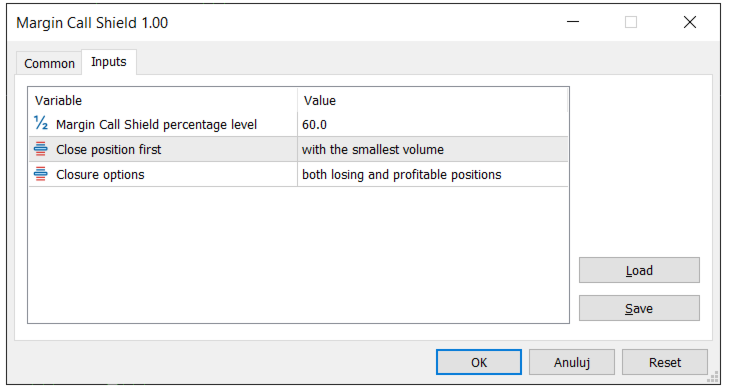
set their own, proactive safety margin level (e.g., 65% Margin Level),
-
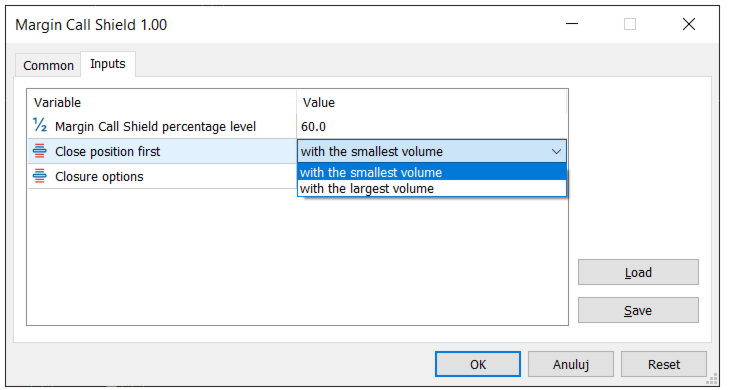
choose whether to close positions with the smallest or largest volume,
-
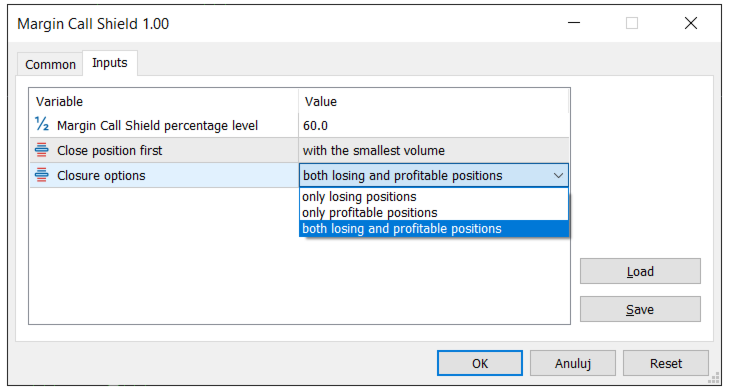
specify if the system should select positions only from losing ones, only from profitable ones, or from all currently open positions,
-
have positions closed one by one each closure aims to gradually increase the margin level and minimize portfolio impact.
Comparison: Platform/Broker vs Margin Call Shield
| Situation | Platform/Broker (default) | Margin Call Shield |
|---|---|---|
| Trigger Level | Predefined by broker (e.g., 50% stop out) | User-defined (e.g., 65%) |
| Selection Criteria | Broker’s internal algorithm | Your chosen criteria (among losers, winners, or all open positions) |
| Which Position Gets Closed | Usually largest loss, oldest position | Smallest/largest volume – your strategy |
| Level of Personalization | None | Full control on your side |
Key Features of Margin Call Shield
-
Automatic protection of your capital on your terms before the broker’s automation kicks in
-
Precise, customizable strategy – you decide which positions to close and according to what criteria (e.g., smallest/largest volume, particular type of position)
-
Positions are closed one at a time – this means the margin level is increased gradually, minimizing the impact on your portfolio
-
Runs independently – no need for constant monitoring
How to Use
-
Set the Margin Call Shield Level – define the margin level for activating protection (e.g., 65%).
-
Select your closing strategy:
-
Decide whether to close the smallest or largest volume positions,
-
Specify if positions should be chosen only among losers, only among profitable, or from all open positions.
-
-
Load Margin Call Shield as an Expert Advisor on your chosen chart in MetaTrader 5.
-
Make sure “AutoTrading” (MT5) or “Expert Advisors” (MT5) is enabled in your terminal otherwise, the EA won’t function.
-
Check proper installation:
-
In MT4: a smiling face in the upper-right corner of the chart indicates the EA is active.
-
In MT5: the EA status is shown in the toolbox/expert log, and absence of errors/log messages means it is running properly.
-
-
The program works automatically after your set conditions are met each selected position is closed one by one to gradually increase your margin level.
Important Notice About Margin Call Levels!
Every broker has individual margin call and stop out levels. Before using the tool, check with your broker (or test on a demo account) at what margin level the platform starts closing your positions automatically. Set your Margin Call Shield level above the broker’s stop out threshold—only then will your system act first.
FAQ – Frequently Asked Questions
1. Does Margin Call Shield work on every MT5 account and with any broker? Yes, if your broker allows EAs to close positions and does not set unusual restrictions. Check your broker’s terms or ask support for confirmation.
2. How do I check my broker’s margin call and stop out levels? The best ways:
-
Consult your account agreement or terms/conditions page,
-
Ask your broker’s customer support directly,
-
Test on a demo account by observing at which margin level the platform starts closing positions.
3. Does Margin Call Shield open new positions? No. This tool is designed only to protect your margin by selecting which of your already open positions to close when the margin drops. It does not initiate new positions.
4. Can I use this EA together with other Expert Advisors (robots)? Yes, but remember that the platform allows only one EA per chart. Margin Call Shield can work alongside other EAs provided each runs on a separate chart/instrument. For complex setups, always test on a demo account.
5. Does Margin Call Shield record information about closed positions in the Experts tab?
Yes, every position closed automatically by Margin Call Shield is recorded in the Experts tab of the MetaTrader 5 platform. You will find detailed information there, such as the ticket number of the closed position, instrument, volume, closing time, and the achieved profit (profit or loss). This allows you to easily track which position was closed as a result of this tool's action and what the financial outcome of the operation was.
Margin Call Shield gives you the power to anticipate and decide which positions will be closed in stressful situations according to your own preferences and strategy, before the platform acts automatically. This means you keep more control over your portfolio and your risk management.
If you have any questions or doubts, feel free to reach out—happy to help!