Forex Trading Panel MT5

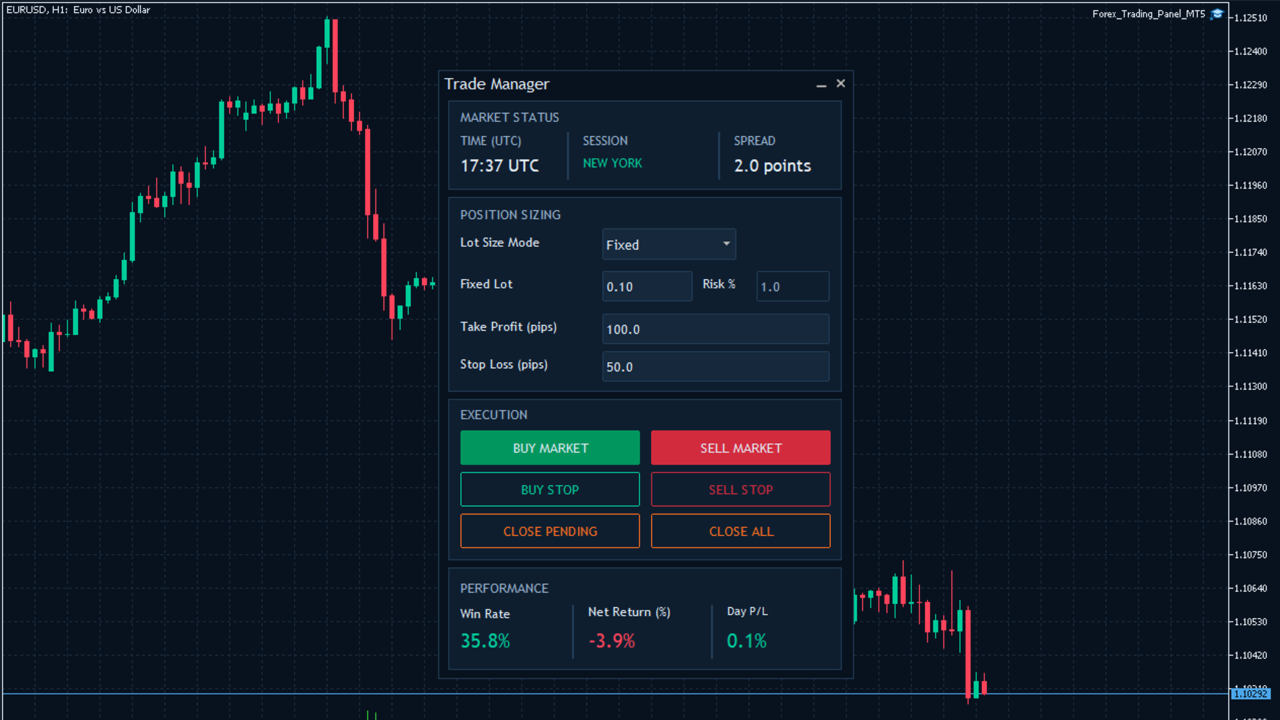
Forex Trading Panel MT5 is a manual trading assistant for MetaTrader 5 designed to simplify order execution and trade management directly from the trading chart.

It provides an integrated trading panel that allows traders to open market positions, place pending orders, configure position sizes, and manage existing trades without relying on the standard MT5 trading interface.

The EA combines essential manual trading functions with configurable money management, automated Stop Loss management, and risk protection features in one convenient interface.

Forex Trading Panel does not generate trading signals, analyze market direction, or use technical indicators to determine trade entries. All trading decisions, including when to buy or sell, are made by the trader. The EA executes and manages orders according to the trader's actions and configured parameters.

Whether you trade manually using price action, technical analysis, fundamental analysis, or your own trading methodology, Forex Trading Panel provides tools to make order execution and position management more convenient and systematic.

How It Works

Forex Trading Panel operates as a chart-based manual trading panel. Once attached to a chart, it displays its trading interface and provides access to order execution, position sizing, market information, and trade management functions.

1. Manual Order Execution

The trading panel provides four execution buttons:

  • BUY MARKET: Opens a market buy position at the current Ask price.

  • SELL MARKET: Opens a market sell position at the current Bid price.

  • BUY STOP: Places a Buy Stop pending order above the current market price.

  • SELL STOP: Places a Sell Stop pending order below the current market price.

The EA automatically calculates the order volume, Stop Loss, and Take Profit according to the configured trading parameters.

Pending order placement distance can also be customized.

2. Position Sizing

Forex Trading Panel supports two position-sizing methods:

  • Fixed Lot: Uses a predefined lot size for each new trade.

  • Automatic Lot: Calculates the trading volume according to the selected risk percentage and the distance between the entry price and Stop Loss.

Users can switch between the two methods directly from the trading panel.

A maximum lot-size restriction is also available to limit the calculated trading volume.

3. Stop Loss and Take Profit Management

The EA automatically calculates Stop Loss and Take Profit levels when placing market and pending orders.

Users can customize both distances through the trading panel.

Two Stop Loss management methods are available:

  • Virtual Stop Loss: Stores the Stop Loss level locally and monitors the market price. When the specified level is reached, the EA sends a market order to close the position.

  • Trailing Stop Loss: Automatically advances the Stop Loss as the market moves in a favorable direction, following the configured trailing distance and step.

Both features can be independently enabled or disabled through the EA settings.

4. Position and Pending Order Management

The trading panel includes dedicated buttons for managing existing trades:

  • CLOSE PENDING: Removes pending orders managed by the EA on the current chart symbol.

  • CLOSE ALL: Closes open market positions managed by the EA on the current chart symbol.

These functions allow traders to manage their pending orders and open positions directly from the chart.

5. Market Status and Performance Monitoring

The interface also provides market information and account performance statistics.

Market Status displays:

  • Current UTC time.

  • Indicative active trading sessions: Sydney, Tokyo, London, and New York.

  • Current market spread in points.

Performance displays:

  • Win Rate: Percentage of winning completed positions.

  • Net Return (%): Net realized return relative to reconstructed starting account balance.

  • Day P/L: Net result of eligible positions fully closed during the current broker server day.

The displayed performance statistics are calculated from account trading history and are not limited to trades executed by Forex Trading Panel MT5.

Key Features

  • Integrated Manual Trading Panel: Execute market and pending orders directly from the MT5 chart without navigating the standard trading interface.

  • Market and Pending Order Execution: Open Buy and Sell market positions or place Buy Stop and Sell Stop pending orders.

  • Flexible Position Sizing: Choose between fixed lot sizing and automatic lot calculation based on a configurable risk percentage.

  • Customizable Stop Loss and Take Profit: Automatically calculate protective Stop Loss and Take Profit levels for new orders.

  • Virtual Stop Loss: Monitor hidden Stop Loss levels locally and automatically submit position-closing requests when triggered.

  • Automatic Trailing Stop Loss: Advance Stop Loss levels as positions move into profit using configurable trailing distance and step settings.

  • Pending Order Management: Remove managed pending orders directly from the trading panel.

  • One-Click Position Management: Close all open positions managed by the EA on the current chart symbol.

  • Maximum Exposure Control: Limit the combined number of managed open positions and pending orders.

  • Maximum Spread Filter: Restrict new order placement when the market spread exceeds the configured threshold.

  • Daily Equity Loss Protection: Temporarily block new orders when the configured daily equity-loss limit is reached.

  • Market Session Display: Monitor indicative global trading session hours and current UTC time.

  • Live Spread Monitoring: Display the current spread of the chart symbol.

  • Performance Statistics: Monitor account-wide win rate, net return, and daily realized P/L.

  • Execution Controls: Configure maximum slippage and order filling preferences.

  • Customizable Trading Parameters: Adjust trading volume, risk percentage, Stop Loss, Take Profit, and other execution settings.

Trading Conditions

  • Supported Instruments: The current chart symbol, provided the broker supports trading and the required order operations for that instrument.

  • Recommended Timeframes: Any chart timeframe. The EA does not use timeframe-based indicators or trading signals.

  • Trading Style: Manual trading, discretionary trading, and trader-directed order execution.

  • Platform: MetaTrader 5 (MT5).

  • Trading Direction: Buy and Sell.

  • Order Types: Market orders, Buy Stop, and Sell Stop pending orders.

  • Position Sizing: Fixed lot and automatic risk-based lot calculation.

  • Trading Sessions: No mandatory trading-session restriction. The trader decides when to execute orders.

  • Broker Requirements: A broker that supports the requested trading operations, order types, and execution settings.

  • Magic Number: Each EA instance should use an appropriate Magic Number to identify and manage its own trades.

Input Parameters

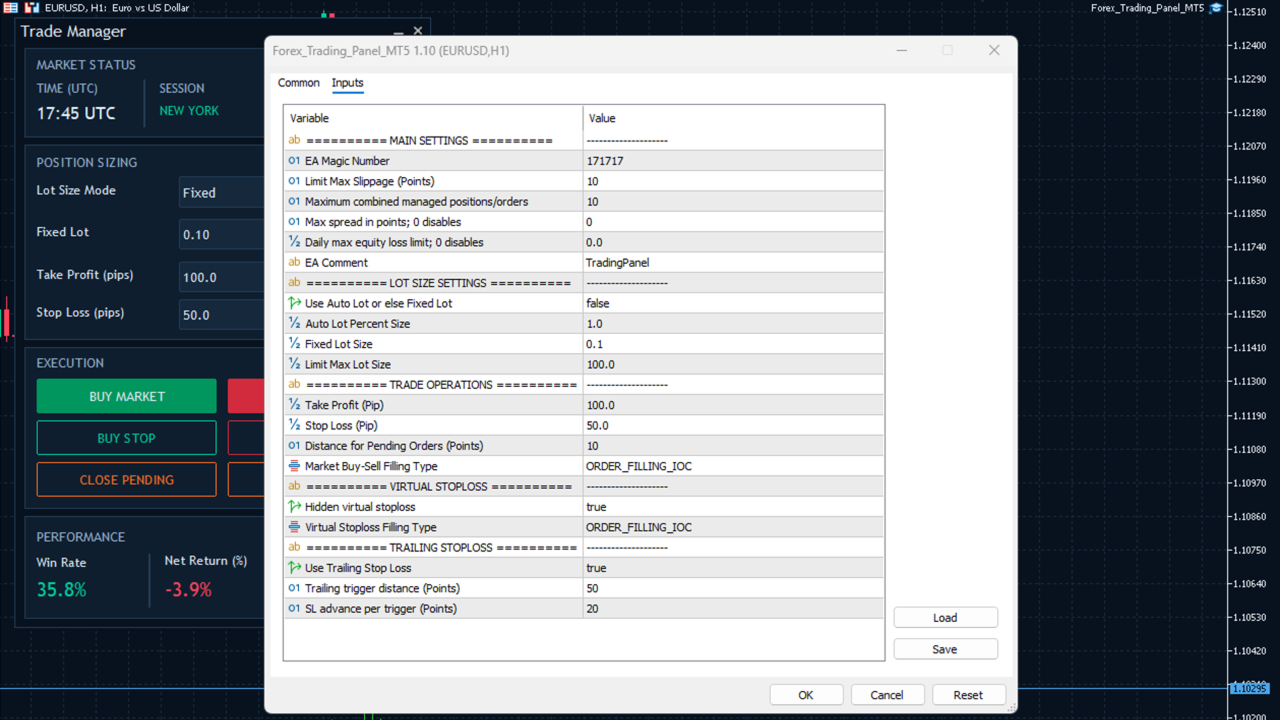
The EA provides configurable input parameters organized into several categories.

1. Main Settings

  • Magic_Number: Unique identifier used to distinguish and manage positions and pending orders belonging to the EA.

  • Max_Slippage: Maximum permitted execution deviation in points for trade requests.

  • Max_Open_Position: Maximum combined number of managed open positions and pending orders for the current chart symbol.

  • Max_Spread_Points: Maximum permitted spread in points for new orders. Set to 0 to disable the spread filter.

  • Max_Daily_Loss_Percent: Maximum daily equity-loss percentage relative to the recorded server-day starting equity. Set to 0 to disable this protection.

  • EA_comment: Custom comment attached to submitted orders.

2. Lot Size Settings

  • Enable_AutoLot: Enables automatic risk-based position sizing. When disabled, fixed lot sizing is used.

  • Risk_Percent: Percentage used to calculate position volume based on the modeled loss at the Stop Loss price.

  • Lot_Size: Default fixed trading volume.

  • Max_Lot_Size: Maximum permitted calculated or requested lot volume.

3. Trade Operations

  • Take_Profit: Default Take Profit distance in pips.

  • Stop_Loss: Default Stop Loss distance in pips.

  • Pending_Order_Offset: Minimum configurable distance for pending order placement in points, subject to broker restrictions.

  • Market_Filling: Preferred order filling mode for market orders. The EA checks the symbol's supported filling modes.

4. Virtual Stop Loss

  • EnableVirtualStopLoss: Enables or disables terminal-monitored virtual Stop Loss protection.

  • Position_Filling: Preferred filling mode for position-closing requests generated by the virtual Stop Loss function.

5. Trailing Stop Loss

  • EnableTrailingStopLoss: Enables or disables automatic trailing Stop Loss management.

  • TrailingStop: Favorable price movement in points required to trigger a trailing adjustment.

  • TrailingStep: Distance in points by which the Stop Loss advances for each completed trailing trigger interval.

The EA also provides interactive trading controls for changing lot-sizing mode, fixed lot size, risk percentage, Take Profit, and Stop Loss directly from the chart panel.

Testing Results

Forex Trading Panel MT5 is a manual trade execution and management utility rather than an automated trading strategy.

It does not independently generate entry signals or execute trades according to a predefined market-entry strategy. Trading activity depends on the user's manual order execution.

Important Notes

  • Forex Trading Panel MT5 is a manual trading assistant. It does not provide trading signals, predict market direction, or use technical indicators to generate trade entries.

  • All trading decisions and order initiation are the responsibility of the trader.

  • Virtual Stop Loss is monitored by the EA locally. It requires MetaTrader 5 to remain running, connected, and able to process incoming price updates. It is not a broker-side Stop Loss and cannot provide protection while the terminal or VPS is disconnected.

  • Actual execution prices may differ from requested prices because of slippage, requotes, liquidity, and market conditions.

  • Automatic lot sizing estimates risk using the modeled loss at the configured Stop Loss price. Actual losses may exceed the selected percentage because of gaps, slippage, commissions, and other trading costs.

  • The daily equity-loss protection blocks new orders when its threshold is reached. It does not automatically close existing positions.

  • The CLOSE ALL and CLOSE PENDING functions apply only to trades associated with the configured Magic Number and current chart symbol. They do not close unrelated account positions or orders.

  • Market session information is indicative and does not account for every public holiday or exceptional market closure.

  • Trading results and execution behavior depend on broker conditions, account specifications, and market liquidity.

  • Test the EA on a demo account and familiarize yourself with its functions and settings before using it on a live trading account.
Recommended products
Trade Assistant 38 in 1
Makarii Gubaydullin
4.91 (23)
Multifunctional tool: Lot Calculator, Grid Orders, R/R ratio, Trade Manager, Supply and Demand zones, Price Action and much more Demo version   |   User manual Trade Assistant   doesn't work in the strategy tester : you can download the   Demo Version HERE  to test the utility . Contact me   for any questions  / ideas for improvement / in case of a bug found If you need a MT4 version, it is available here Simplify, speed up and automate your trading   process . Expand the standard terminal capa
VTB High Watermark Drawdown Lock EA for MT5 Advanced Equity Protection & Drawdown Management System VTB High Watermark Drawdown Lock is a professional risk management Expert Advisor designed to protect trading accounts, funded accounts, and proprietary trading challenges from excessive drawdown. Unlike traditional drawdown protection systems that calculate risk from the initial account balance, this EA uses a dynamic High Watermark (HWM) model that continuously protects both your original capita
Advance Trade Manager
Jose Rodrgues Chaves
ADVANCE TRADE MANAGER A complete, tabbed trade-management dashboard for MetaTrader 5 that puts every routine trade operation on one compact panel. No more hunting through menus — open, protect, scale and manage positions from a single interface. The panel is a pure GUI overlay . It never touches your existing chart objects, indicators, arrows or manual lines. All chart objects it creates use the dedicated EGF_Z_ (zones) prefix, and trigger lines use the panel's own object names — so nothing else
MyFxDesk
Truong Nguyen
MyFxDesk is a powerful reversal-continuation analysis indicator designed to uncover developing shifts in market direction before they become obvious. MyFxDesk was developed by combining next-generation AI-driven quantitative research and market intelligence with analysis shaped by years of real-world trading experience. Chart structure. Multiple timeframes. Entry timing. Risk. As discretionary traders, we already invest considerable focus in planning a trade. Reading a currency-strength dashboa
RRtoolBox
David Ruiz Moreno
RRtoolbox - Professional Tools: Risk:Reward Trading Tool (SL/TP Horizontals + Pending orders + Diagonals), Alerts set on trend lines (for alerts on diagonal levels), SelfManagement (BE, partials...), close/cancelling by time, Statistics, Info and trading on chart. One-Click Trading with Visual Risk:Reward Management RRtoolbox is a comprehensive trading panel that combines one-click order execution,  statistics and  powerful visual Risk:Reward tools, alerts set with trendlines, on chart butt
Overview Mirror Signals Service EA (Text only)   is a powerful monitoring Expert Advisor that automatically sends   real-time Telegram notifications   for all important trade events on your MetaTrader 5 account. It is engineered specifically for   signal providers ,   trade-copier operators ,   auditors ,   educators , and   professional trading services   that require immediate, detailed, and reliable reporting. Everything from   entries, exits, SL/TP changes, comment changes, trailing sto

SFG Grid Manager MT5 – Smart Grid & Mirror System SFG Grid Manager MT5 is a professional automatic grid manager that follows an existing position (manual or EA) and opens one averaging trade per defined step (GridPips). When the primary trade closes or disappears, all the grid trades opened by the manager are closed automatically. It works on any broker with Netting or Hedging accounts and is fully compatible with manual trading or external Expert Advisors. ️ Main Features Follows a primar
Bastion is a monitor-and-close-only risk manager for prop-firm traders. It watches your account against your firm's daily-loss and maximum-drawdown limits in real time and force-closes your open positions BEFORE you cross a line. It never opens a trade of its own, so it stays fully within the tools allowed by FTMO, FundedNext, The5ers, FTUK and FXIFY. Why traders fail challenges A large share of failed evaluations end on a single daily-loss breach: a moment of inattention, a news spike, one tra
Truvana Trend Campaign Manager EA (TCM) Advanced Basket Management & Profit Locking Tool for Trend Traders Short Description Turn strong trends into managed campaigns. Truvana TCM is a professional trade management EA designed for traders who already know how to identify trends and execute entries. The EA automatically manages basket expansion, validates risk before adding positions, and locks profits using a broker-side Basket Stop Price (BSP). No martingale. No grid recovery. No signal genera
CRYPTO ZEUS DUAL-CORE PROTOCOL  Advanced Crypto Matrix: Supertrend AI + External Sync Module - [NEW] 24/7 Crypto Unlock: The EA now fully supports weekend trading by auto-detecting Crypto assets. - [NEW] Continuous Trend Rider: Re-enters trades continuously on pullbacks if the macro-trend remains strong, maximizing profit on long runs. - [NEW] Ghost Trailing Stop: Added a virtual trailing stop to fully ride breakouts instead of exiting at fixed Fibo targets. - [NEW] Preset System: Added a buil
Ultimate Pro Trading Panel — All-In-One Manual & Grid Trading Dashboard Pro Trading Panel   is an all-in-one on-chart control panel that gives discretionary and semi-automated traders a complete toolkit for entries, exits, risk management, and grid trading — without leaving the chart. Every function is visual, draggable, and updates in real time. If you want to test this utility feel free to download the basic preview version of this tool here:  https://www.mql5.com/en/market/product/181435 Who
Advanced 1-Click Risk Panel is a precise and lightning-fast risk management utility for MetaTrader 5. It automatically calculates your exact position size based on chart drag-and-drop Stop Loss line and account risk percentage. Key Features Dynamic SL Line & Dynamic Lot: Simply drag the horizontal SL line on your chart—the panel dynamically calculates your exact lot size instantly. 1-Click Execution: Place instant BUY/SELL orders with automated Stop Loss and Take Profit based on your predefin
Key Benefits at a Glance: Lorentzian ML signal generation Majority voting across 3 timeframes Automatic market regime detection Smart equity recovery with group profit targets 1% risk‑based adaptive lot sizing ATR‑based dynamic SL/TP & trailing Emergency drawdown cut Live on‑chart info panel Hybrid Lorentzian Gold ML EA v2.0 – Intelligent Adaptive Trading for XAUUSD Next‑Gen Machine Learning Core A Lorentzian KNN classifier analyzes 5 normalized features (RSI, WaveTren
FREE
Product Name: Smart Switch Dashboard STOP WASTING SECONDS. SECONDS COST MONEY. Are you losing trades because you're fumbling through the Market Watch? Is your workspace messy and slowing you down? In trading, Speed is everything. If you aren't organized, you are losing money to traders who are. Smart Switch Dashboard is not just a tool—it is your COMMAND CENTER . Designed for serious Scalpers and Day Traders who demand Speed, Precision, and Zero Lag. DOMINATE YOUR WORKFLOW 1. ULTRA-FAST SY
PZ Mean Reversion MT5
PZ TRADING SLU
1 (1)
Outperform traditional strategies: effective mean reversion for savvy traders Unique indicator that implements a professional and quantitative approach to mean reversion trading. It capitalizes on the fact that the price diverts and returns to the mean in a predictable and measurable fashion, which allows for clear entry and exit rules that vastly outperform non-quantitative trading strategies. [ Installation Guide | Update Guide | Troubleshooting | FAQ | All Products ] Clear trading signals Ama
BTC Trading Assistant EA (MT5) Manual trading assistant that helps place and manage trades with automated risk and stop management. Overview BTC Trading Assistant EA is a utility Expert Advisor for MetaTrader 5 intended for manual traders. It provides a chart interface to execute BUY/SELL/CLOSE actions and automates selected trade management functions such as position sizing, initial SL/TP placement, break-even, trailing stop and optional partial profit taking. This EA does not generate trade si
Reverse Trader
ELITE FOREX TRADERS LLC
ELITE REVERSE TRADER (MT5) Instantly hedge or invert any trade opened on your account—manual or EA. Reverse Mirror EA monitors your live positions and opens an opposite trade using your chosen lot mode (Fixed or Multiplier). When the original position is closed (manual close, SL/TP hit, EA exit—any method), the mirrored position closes automatically. Because it runs in the same terminal, it reacts faster than third-party copy tools. WHY THIS MATTERS It is widely cited that a large majority of
RetraceX Scalper MT5
Mazhar Ul Hassan Noorul Hassan Noor Ul Hassan
Overview RetraceX Scalper is an advanced pullback scalping bot that utilizes Support & Resistance levels to identify high-probability retracement entries. It ensures precise trade execution with minimal risk and maximum reward, making it an ideal tool for traders who focus on quick pullback opportunities. Key Features Support & Resistance Detection: Identifies strong market zones for accurate trade setups. Pullback Entry Optimization: Scans for high-probability retracement entries to maximize
Pattern Recognition EA
Claudiu-georgian Zavera
Pattern Recognition EA - From Learn to Earn. The market repeats itself. This EA finds every past repeat of the current candle sequence - and lets history vote the direction. ONE SHAPE. EVERY REPEAT IN HISTORY VOTES. The last N candles on your signal timeframe form a shape. The EA scans the history you choose - a fixed number of bars or everything your broker provides - for the SAME shape, and checks what happened next, every single time. Only when enough repeats exist AND a clear majority of t
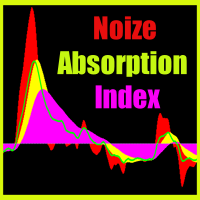
Noize Absorption Index - is the manual trading system that measures the difference of pressure between bears forces and bulls forces. Green line - is a noize free index that showing curent situation. Zero value of index shows totally choppy/flat market.Values above zero level shows how powerfull bullish wave is and values below zero measures bearish forces.Up arrow appears on bearish market when it's ready to reverse, dn arrow appears on weak bullish market, as a result of reverse expectation.
PipFinite Impulse PRO MT5
Karlo Wilson Vendiola
4.88 (16)
Are You Tired Of Getting Hunted By Spikes And Whipsaws? Don't become a victim of the market's erratic moves.. Do Something About It! Instantly make smarter decisions with Impulse Pro's precise balance of filters and accurate statistics. Timing Is Everything In Trading To learn more, please visit www.mql5.com/en/blogs/post/718212 Anticipate the next big move before it unfolds in 3 Simple Steps! Advantages You Get Early impulse detection algorithm. Flexible combination to different trading s
CoPilot dashboard MT5
Frederic Jacques Collomb
CoPilot — Daily Trading Dashboard Know your numbers. Trade with clarity. MT4 version What is CoPilot? CoPilot is a professional-grade trading assistant that displays in real time all your daily performance statistics directly on the chart — with a live equity curve that updates trade by trade. Designed for active traders who need instant visibility into their session without leaving the chart, CoPilot aggregates every closed trade of the day across all symbols and presents them in a clean, color
Trade Shot 99
Ricardo Copio Bejenaru Martins
Trade shot is a management tool. Automatically closes pending orders at X profit or Y loss. You define the $ you want to earn or lose per trade, the advantage in relation to take or stop loss is that here you define the money to be gained or lost and not based on points. Ideal for Scalp day trade strategies Your trades will easily be better managed based on what you want to win or lose, orders are closed automatically without worrying about managing money.
pex Structure Scalper Pro M5 Apex Structure Scalper Pro M5 is an advanced, rule-based algorithmic Expert Advisor engineered specifically for the M5 timeframe . It combines multi-bar structural lookbacks, institutional market structure concepts (BOS & CHoCH), adaptive volatility filters, and strict risk-management gates to trade micro-accounts and standard setups systematically. Key Features Constant 40-Bar Macro Structure Detection: Evaluates rolling price channels across a fixed lookback to est
CYGNIX RISK GLADIATOR — Professional Trade Manager & Risk Guardian for MT5 Guard every position. Manage every trade. Sleep at night. Cygnix Risk Gladiator is a professional-grade position management Expert Advisor that watches every open trade on your account and automatically applies institutional-level risk controls in real time. It does not generate signals — it protects, manages, and exits trades opened by you, your strategies, or any other EA. Built for IC Markets and fully compatible w
The Stop Loss Manger - SL Mange With the Stop Loss Manager you can finally sleep peacefully while it effectively manages your risk in stock market trading. Simply set your individual stop loss limits and let the manager trade for you. Never worry about losses again - the Stop Loss Manager takes care of it for you! Get the ultimate support for your trading now and maximize your profits with ease. Join the community of successful traders who swear by Stop Loss Manager today. Function overview: 1.
Risk Guardian — Ultimate Equity & Drawdown Protection Protect your capital. Stay disciplined. Trade smarter. Risk Guardian is a powerful utility that helps traders automatically control daily risk and secure profits based on equity. Designed for MetaTrader 5, it’s lightweight, efficient, and extremely easy to use. Key Features: Daily Drawdown Limit (% based) Absolute Equity Target (e.g., stop trading after reaching 110,200 USD) Auto-close All Positions, Orders & Charts Visual Dashboard on C
Order Type Ledger reads this account's own order history - not its trade history - and counts what happened to every order that was placed. It does not predict and it does not advise. It never looks at trade results; it only counts outcomes: filled, cancelled, expired, rejected. WHY THIS EXISTS Most trading tools only look back at trades that filled. A pending order that expired untouched, a stop order that got rejected, an order that sat for hours before it filled - none of that shows up in a
Anti Grid Position Protector
Konstantinos Kalaitzidis
Anti Grid Position Protector is a utility tool designed to protect you from the temptation of adding to a losing position in a hope of a drawdown recovery, or trying to hedge when you're not intended too. --------------------------Inputs--------------------------- Allow Hedging on Losing Positions? - It's a true/false input (double click to switch its value) which allows/disallows opening a trade (either pending order or market execution) in the opposite direction on an existing losing position
Prop Firm Shield Full
Pablo Adolfo Cantos
Prop Firm Shield is a risk management panel for MetaTrader 5, built for prop firm traders who need control over their daily limits. You configure each limit and the tool watches the account around the clock, acting automatically when a limit is reached: closing positions, deleting pending orders and blocking new trading until the next day. Features: - Daily Take Profit - three modes: fixed USD, percent of the day-start balance, or target balance - Daily Stop Loss - three modes: fixed USD, percen
Buyers of this product also purchase
Trade Assistant MT5
Evgeniy Kravchenko
4.43 (216)
It helps to calculate the risk per trade, the easy installation of a new order, order management with partial closing functions, trailing stop of 7 types and other useful functions. Additional materials and instructions Installation instructions - Application instructions Line function -   shows on the chart the Opening line, Stop Loss, Take Profit. With this function it is easy to set a new order and see its additional characteristics before opening.   Risk management  - The risk calculation
FarmedHedge Pair Trading Dashboard
Tanapisit Tepawarapruek
5 (7)
Farmed Hedge Yield Farming | All Markets (Manual - Hybrid - Semi/Automated EA) VERIFIED TRADING RESULTS - Farmed Hedge Yield Axi Copy:  https://www.mql5.com/en/signals/2356376 - Farmed Hedge Yield Exn Copy:   https://www.mql5.com/en/signals/2356404 - Farmed Hedge Yield V Copy:  https://www.mql5.com/en/signals/2357156 IMPORTANT NOTICE: FarmedHedge is a MANUAL-FOCUSED TRADING UTILITY ,not a fully automated EA. Results shown on this Signal include manual trades and overall strategic management.
Forex Trade Manager MT5
InvestSoft
4.98 (690)
Trade Manager MT5 is an advanced position size calculator and trade management tool for MetaTrader 5, designed to help traders plan trades faster, control risk more precisely, and manage open positions directly from the chart. It combines order placement, risk based lot calculation, Stop Loss and Take Profit management, Break Even, Trailing Stop, Partial Close, Equity Protection, and external trade management in one panel. Whether you trade forex, indices, metals, commodities, crypto, or future
Telegram to MT5 MultiChannel Copier
Sergio Marquez Uroz
4.68 (22)
Telegram to MT5 Multi-Channel Copier   automatically copies trading signals from your Telegram and Discord channels straight to MetaTrader 5. No bots, no browser extensions, no manual copying. A signal arrives in Telegram or Discord and the EA opens the trade in your terminal within seconds. And before you copy a channel, the built-in backtester shows you what that channel would have done in your account. The product has two components: a Windows application that listens to your Telegram channel
TradePanel MT5
Alfiya Fazylova
4.89 (174)
Trade Panel is a multi-functional trading assistant. The app contains over 50 trading functions for manual trading and allows you to automate most trading tasks. Application instructions: https://www.mql5.com/en/blogs/post/756482 Trial version of the application for a demo account: https://www.mql5.com/en/blogs/post/750865 How to install the application: https://www.mql5.com/en/blogs/post/756239 How to test the application in visual mode: https://www.mql5.com/en/blogs/post/770277 How to install
EA Overfitter
Stephen J Martret
5 (4)
That backtest looks great. But will it still be making money tomorrow, next week, next month? EA Overfitter re-runs your EA on 100 price histories it has never seen. One score tells you if the edge is real. A backtest tells you what an EA did on one price history — the one that happened to occur. What you cannot tell from it is how much of that result was the strategy and how much was the particular path. EA Overfitter answers that. It builds up to 100 synthetic price histories your EA has n
Copy Telegram signals with your own trading rules Telegram to MT5 Signal Trader automatically copies text-based trading signals from public and private Telegram channels and groups into MetaTrader 5. Manage multiple providers and MT5 accounts from one desktop app, with individual risk and trade settings for each provider . No Telegram bot or API setup needed for copying. Simply sign in with your own Telegram account by phone or QR code and select the channels or groups you have already joined. Y
News Trade EA MT5
Konstantin Kulikov
4.55 (11)
Present to you the useful robot that I have been using for several years. It can be used in both semi-automatic mode and fully automatic mode. >>> Chat <<< The program contains flexible settings for trading on the news of the economic calendar. It cannot be checked in the strategy tester. Only real work. Download the latest archive of settings: https://www.mql5.com/en/blogs/post/747929 Signals monitoring: https://www.mql5.com/en/signals/author/test-standart When creating your own sets of setti
================================================================================ POC BREAKOUT - V20.72. Full Professional Grade Toolkit ================================================================================ POC Breakout is a full MetaTrader 5 trading dashboard for discretionary traders who want breakout signals, Point of Control (POC) context, volume profiles, order flow, market structure, news, alerts, and advanced trade planning in one professional workspace. Attached directly to you
The product will copy all telegram signal to MT5 ( which you are member) , also it can work as remote copier.  Easy to set up, copy order instant, can work with almost signal formats, image signal,  s upport to translate other language to English Work with all type of channel or group, even channel have "Restrict Saving Content", work with  multi channel, multi MT5 Work as remote copier: with signal have ticket number, it will copy exactly via ticket number. Support to backtest signal. How to s
Welcome to Entry In The Zone with SMC Multi Timeframe  —  COMPLETE SMC ANALYSIS SYSTEM — ALL IN ONE INDICATOR  Entry In The Zone with SMC Multi Timeframe  An indicator designed for market analysis based on Smart Money Concepts (SMC), displaying Market Structure, Key Zones (Order Blocks, Supply & Demand Zones, and Fair Value Gaps), Liquidity, and real-time BUY / SELL signals. It supports both Single-Timeframe and Multi-Timeframe analysis, along with the Confluence at Zone feature, which helps you
EA Auditor
Stephen J Martret
5 (7)
EA Auditor is an independent analysis tool for traders evaluating Expert Advisors and trading signals on MetaTrader 5. It audits backtest reports, reviews posted developer signals, and cross-verifies the two against each other to help traders assess strategies before committing capital. The MQL5 market offers a wide range of Expert Advisors from many developers, with varying approaches, quality, and transparency. EA Auditor provides a consistent, data-driven framework for reviewing them, answer
MT5 to Telegram Signal Provider turns your trading account into a signal provider. Every trade action, whether manual, by EA or from your phone, is instantly sent as a message to Telegram. You can fully customize the format or use a ready-made template for quick setup. [ Demo ] [ Manual ] [ MT4 Version ] [ Discord Version ]     New: [ Telegram To MT5 ] Setup A step by step user guide is available. Key Features Ability to customize order details sent to subscribers You can create a tiered subs
VirtualTradePad PRO SE MT5 — professional trading control center for MetaTrader 5 VirtualTradePad PRO SE is a premium chart-based trading panel and trade-management workspace for MetaTrader 5 . It is designed for traders who want faster execution, clearer position control, structured trade management, visual level planning and a professional workflow directly from the chart. This is not only a BUY / SELL panel. PRO SE combines manual trading, pending orders, position management, partial exits, b
Trader Evolution
Siarhei Vashchylka
5 (7)
" Trader Evolution " - A utility designed for traders who use wave and technical analysis in their work. One tab of the utility is capable of money management and opening orders, and the other can help in making Elliott wave and technical analysis. Manual (Be sure to read before purchasing) | Version for MT4 Advantages 1. Trading in a few clicks. Immediate and pending orders are available in the panel 2. Money management. The program automatically selects the appropriate lot size 3. Simplifies
AW Trade Manager
AW Trading Software Limited
AW Trade Manager is a trade panel for MetaTrader 5 with a risk/reward tool on the chart. A trade is planned with Entry, Stop Loss and Take Profit lines dragged with the mouse: plates show price, distance and money, zones show profit and loss, and the volume is calculated from the risk. Before sending, the confirmation window shows the whole trade with risk, margin and the rules of the position. Manual and instruction -> HERE / Free LIVE Demo -> HERE To manage a position after the entry the panel
RETAILBERG FOOTPRINT CHART PRO — Order-Flow Workspace for MetaTrader 5 Version 7.00  |  Professional System  |  31 tools  |  One chart A full 150-page illustrated User Manual is included. Please read the full manual to understand this feature packed footprint chart elements and ui. https://www.mql5.com/en/blogs/post/777982 DEMO / STRATEGY TESTER — PLEASE READ FIRST
On-Chart Trade Assistant & Risk Management Panel Ergotick Trade Manager gives you a complete set of trading tools directly on your MetaTrader 5 chart: a trade panel with lot size calculator, visual R:R tool, and daily loss limit protection; a separate statistics panel that tracks your performance and past trades; and an economic calendar you can toggle with one click. Built for scalpers, day traders, and prop firm traders. Ergotick Trade Manager is fast , light on resources , and stable , so it
Master Your Trading Discipline   Stop losing your hard-earned gains to overtrading and emotional decisions. The Discipline Tool is your ultimate trading assistant, ensuring strict risk management in real-time. Key Protection Features: Advanced Drawdown Defense : Automatically halts trading if your daily drawdown exceeds a preset threshold (percentage or dollar amount). Real-Time Equity Lock : Safeguard profits by referencing peak equity, ensuring drawdown stays within control. Hard Profit Target
Dealer Panel
Mian Rameez Ali
Dealer's Panel No signal decides anything here — a hand does. One click, and the panel calculates what's underneath: lot size from risk, target from a 30-step balance ladder that remembers exactly how far an account has climbed. Toggle between market and pending without touching an input field. Set a stop, and the take-profit can write itself — a fixed share of the balance, translated into price with no arithmetic left for the trader to get wrong. One trade live at a time; it won't let a seco
Astro Trade MT5
Indra Maulana
5 (8)
25% discount on the release of the tool: only for the next 3 buyers Send a message to receive a demo version. AstroTrade Trading Assistant AstroTrade is a comprehensive multi-functional trading utility developed for the MetaTrader 5 platform. It integrates essential tools for trade execution, risk management, and technical monitoring into a single unified interface. The application is designed to assist traders in managing their daily operations through a visual and structured environment. Vi
Bneu Prop Firm Pass System
Marvinson Salavia Caballero
5 (1)
BNEU PROP FIRM PASS SYSTEM v2.37 PRODUCT OVERVIEW Bneu Prop Firm Pass System is a professional risk management and account protection utility for MetaTrader 5. Attach to any chart and configure your account rules. The system monitors daily loss, maximum drawdown, profit target, trading days, open risk, margin usage, news events, pending orders, weekend restrictions, and rollover restrictions from one dashboard. It includes a 5-tab premium dashboard, prop firm presets, custom rules, Risk Sentine
Anchor Trade Manager
Kalinskie Gilliam
5 (8)
Your EAs cannot see each other, but Anchor can. Anchor gives you one place to coordinate your EAs, manage risk, and decide when trading is allowed. It works alongside the trading bots you already use without any changes to them. The Problem One EA opens a trade. Then another starts trading. The next thing you know, you wake up to multiple grids built across your account. Each EA may be doing exactly what it was designed to do, but together they can place far more risk on your account than you in

REVDEN AI Desk: Run Your Trading From One Conversation With Your Own AI, on REVDEN's Market Context Imagine running your trading from one conversation. REVDEN AI Desk brings it into MetaTrader 5: you ask your own AI how it reads the market, and it answers from REVDEN's full context on the symbols you trade, with their state, their risk picture and the releases ahead. Its proposals arrive with entry, stop, target and risk, and you approve the ones that fit. Your rules change the same way: write w
Power Candles Strategy Scanner - Self-Optimizing Multi-Symbol Setup Finder Self-optimizing settings work one chart at a time, and finding where they pay off right now means opening chart after chart. Power Candles Strategy Scanner runs the same self-optimizing engine as the Power Candles indicator on every symbol in your Market Watch, side by side. One panel ranks where it pays off: the winning strategy per symbol, its optimized Stop Loss and Take Profit. An alert fires the moment a fresh signal
Smart Renko Chart
Gianny Alexander Lugo Sanchez
This Expert Advisor creates a custom symbol (for example EURUSD_RK) from the symbol of the chart and converts the same chart to Renko. The chart keeps updating tick by tick. A control panel on the chart lets you change the Renko type and the way the brick size is calculated without restarting. Markets It works on any symbol that your broker offers in the terminal: forex pairs, stocks, indices, metals, energies, cryptocurrencies and synthetic indices. The brick size can be set in points, as a per
Telegram Signal Copier copies the trade signals of the Telegram channels you follow into MetaTrader 5 — including entry zones, several take profits, edited messages and every follow-up the provider posts later: break-even, close all, close half or a percentage, move SL or TP, cancel the pending order, "TP1 hit", "SL hit". It is built around one question every copier buyer has: "Is it reading MY channel right?" — and lets you check that before real money is involved. Works with Windows, macOS and
Trade Manager DaneTrades
Levi Dane Benjamin
4.13 (31)
DaneTrades Trade Manager is a professional trade panel for MetaTrader 5, designed for fast, accurate execution with built‑in risk control. Place market or pending orders directly from the chart while the panel automatically calculates position size from your chosen risk, helping you stay consistent and avoid emotional decision‑making. The Trade Manager is built for manual traders who want structure: clear risk/reward planning, automation for repeatable management, and safeguards that help reduc
Signal Trading View to MT5 Pro
Mirel Daniel Gheonu
4.5 (2)
Signal TradingView to MT5 Pro  Instant professional execution between TradingView and MetaTrader 5 Automate your trading strategy with the most robust communication bridge between TradingView alerts and real execution in MT5. Designed for traders who demand speed, flexibility, and impeccable risk management, this Expert Advisor transforms any alert message into a precise market or limit order.   Install and TEST the TRIAL version HERE STRENGTHS AND ADVANTAGES Universal Parsing Engine (Propriet
EasyInsight AIO MT5
Alain Verleyen
4.92 (12)
EASY Insight AIO – All-In-One Power for AI-Driven Trading Want to skip the setup and start scanning the entire market – Forex, Gold, Crypto, Indices, and even Stocks – in seconds? EASY Insight AIO is the complete plug-and-play solution for AI-powered trade analysis. It includes all core Stein Investments indicators built-in and automatically exports clean, structured CSV files – perfect for backtesting, AI prompts, and live market decision-making. No need to install or configure indicators manu
Filter:
No reviews
Reply to review