Forex Trading Panel MT5
- Utilitários
-
Alexis Brian Luna
 Hi, I'm Alexis. I've been trading stocks and Forex for over 5 years, and along the way, I've developed a strong interest in creating trading tools and automated strategies.
- Versão: 1.10
- Ativações: 10
Forex Trading Panel MT5 is a manual trading assistant for MetaTrader 5 designed to simplify order execution and trade management directly from the trading chart.
It provides an integrated trading panel that allows traders to open market positions, place pending orders, configure position sizes, and manage existing trades without relying on the standard MT5 trading interface.
The EA combines essential manual trading functions with configurable money management, automated Stop Loss management, and risk protection features in one convenient interface.
Forex Trading Panel does not generate trading signals, analyze market direction, or use technical indicators to determine trade entries. All trading decisions, including when to buy or sell, are made by the trader. The EA executes and manages orders according to the trader's actions and configured parameters.
Whether you trade manually using price action, technical analysis, fundamental analysis, or your own trading methodology, Forex Trading Panel provides tools to make order execution and position management more convenient and systematic.
How It Works
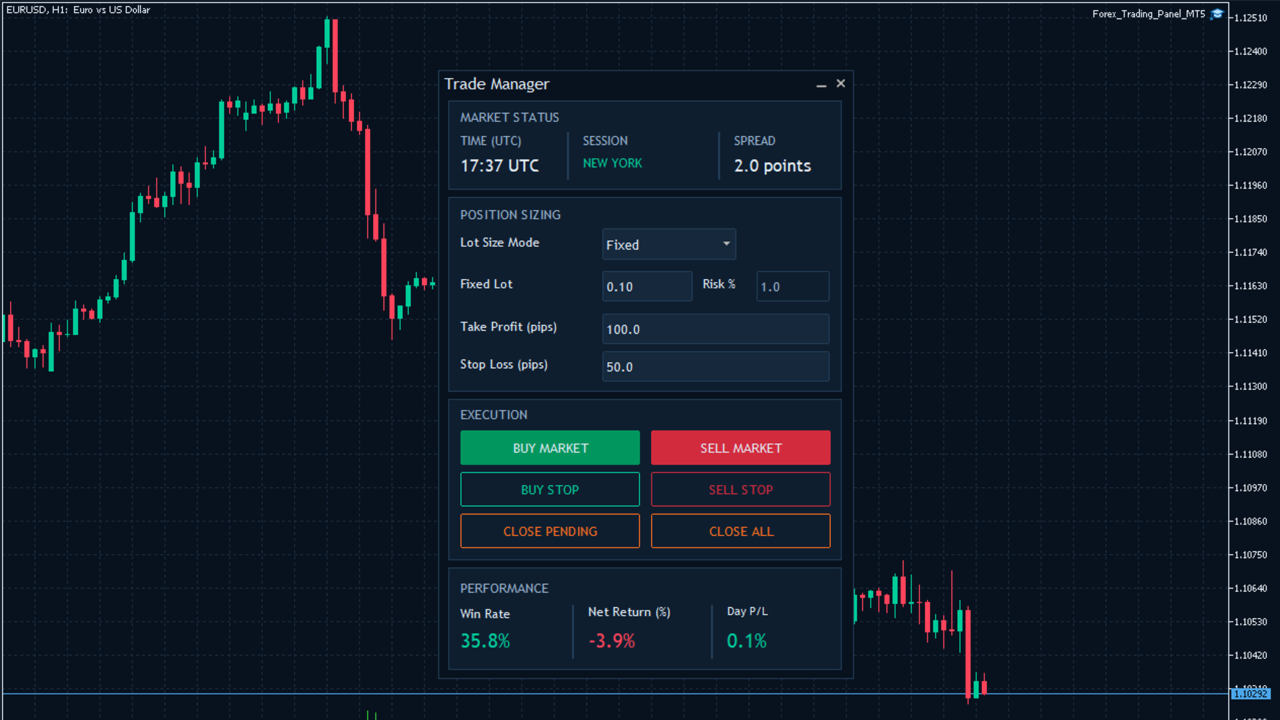
Forex Trading Panel operates as a chart-based manual trading panel. Once attached to a chart, it displays its trading interface and provides access to order execution, position sizing, market information, and trade management functions.
1. Manual Order Execution
The trading panel provides four execution buttons:
-
BUY MARKET: Opens a market buy position at the current Ask price.
-
SELL MARKET: Opens a market sell position at the current Bid price.
-
BUY STOP: Places a Buy Stop pending order above the current market price.
-
SELL STOP: Places a Sell Stop pending order below the current market price.
The EA automatically calculates the order volume, Stop Loss, and Take Profit according to the configured trading parameters.
Pending order placement distance can also be customized.
2. Position Sizing
Forex Trading Panel supports two position-sizing methods:
-
Fixed Lot: Uses a predefined lot size for each new trade.
-
Automatic Lot: Calculates the trading volume according to the selected risk percentage and the distance between the entry price and Stop Loss.
Users can switch between the two methods directly from the trading panel.
A maximum lot-size restriction is also available to limit the calculated trading volume.
3. Stop Loss and Take Profit Management
The EA automatically calculates Stop Loss and Take Profit levels when placing market and pending orders.
Users can customize both distances through the trading panel.
Two Stop Loss management methods are available:
-
Virtual Stop Loss: Stores the Stop Loss level locally and monitors the market price. When the specified level is reached, the EA sends a market order to close the position.
-
Trailing Stop Loss: Automatically advances the Stop Loss as the market moves in a favorable direction, following the configured trailing distance and step.
Both features can be independently enabled or disabled through the EA settings.
4. Position and Pending Order Management
The trading panel includes dedicated buttons for managing existing trades:
-
CLOSE PENDING: Removes pending orders managed by the EA on the current chart symbol.
-
CLOSE ALL: Closes open market positions managed by the EA on the current chart symbol.
These functions allow traders to manage their pending orders and open positions directly from the chart.
5. Market Status and Performance Monitoring
The interface also provides market information and account performance statistics.
Market Status displays:
-
Current UTC time.
-
Indicative active trading sessions: Sydney, Tokyo, London, and New York.
-
Current market spread in points.
Performance displays:
-
Win Rate: Percentage of winning completed positions.
-
Net Return (%): Net realized return relative to reconstructed starting account balance.
-
Day P/L: Net result of eligible positions fully closed during the current broker server day.
The displayed performance statistics are calculated from account trading history and are not limited to trades executed by Forex Trading Panel MT5.
Key Features
-
Integrated Manual Trading Panel: Execute market and pending orders directly from the MT5 chart without navigating the standard trading interface.
-
Market and Pending Order Execution: Open Buy and Sell market positions or place Buy Stop and Sell Stop pending orders.
-
Flexible Position Sizing: Choose between fixed lot sizing and automatic lot calculation based on a configurable risk percentage.
-
Customizable Stop Loss and Take Profit: Automatically calculate protective Stop Loss and Take Profit levels for new orders.
-
Virtual Stop Loss: Monitor hidden Stop Loss levels locally and automatically submit position-closing requests when triggered.
-
Automatic Trailing Stop Loss: Advance Stop Loss levels as positions move into profit using configurable trailing distance and step settings.
-
Pending Order Management: Remove managed pending orders directly from the trading panel.
-
One-Click Position Management: Close all open positions managed by the EA on the current chart symbol.
-
Maximum Exposure Control: Limit the combined number of managed open positions and pending orders.
-
Maximum Spread Filter: Restrict new order placement when the market spread exceeds the configured threshold.
-
Daily Equity Loss Protection: Temporarily block new orders when the configured daily equity-loss limit is reached.
-
Market Session Display: Monitor indicative global trading session hours and current UTC time.
-
Live Spread Monitoring: Display the current spread of the chart symbol.
-
Performance Statistics: Monitor account-wide win rate, net return, and daily realized P/L.
-
Execution Controls: Configure maximum slippage and order filling preferences.
-
Customizable Trading Parameters: Adjust trading volume, risk percentage, Stop Loss, Take Profit, and other execution settings.
Trading Conditions
-
Supported Instruments: The current chart symbol, provided the broker supports trading and the required order operations for that instrument.
-
Recommended Timeframes: Any chart timeframe. The EA does not use timeframe-based indicators or trading signals.
-
Trading Style: Manual trading, discretionary trading, and trader-directed order execution.
-
Platform: MetaTrader 5 (MT5).
-
Trading Direction: Buy and Sell.
-
Order Types: Market orders, Buy Stop, and Sell Stop pending orders.
-
Position Sizing: Fixed lot and automatic risk-based lot calculation.
-
Trading Sessions: No mandatory trading-session restriction. The trader decides when to execute orders.
-
Broker Requirements: A broker that supports the requested trading operations, order types, and execution settings.
-
Magic Number: Each EA instance should use an appropriate Magic Number to identify and manage its own trades.
Input Parameters
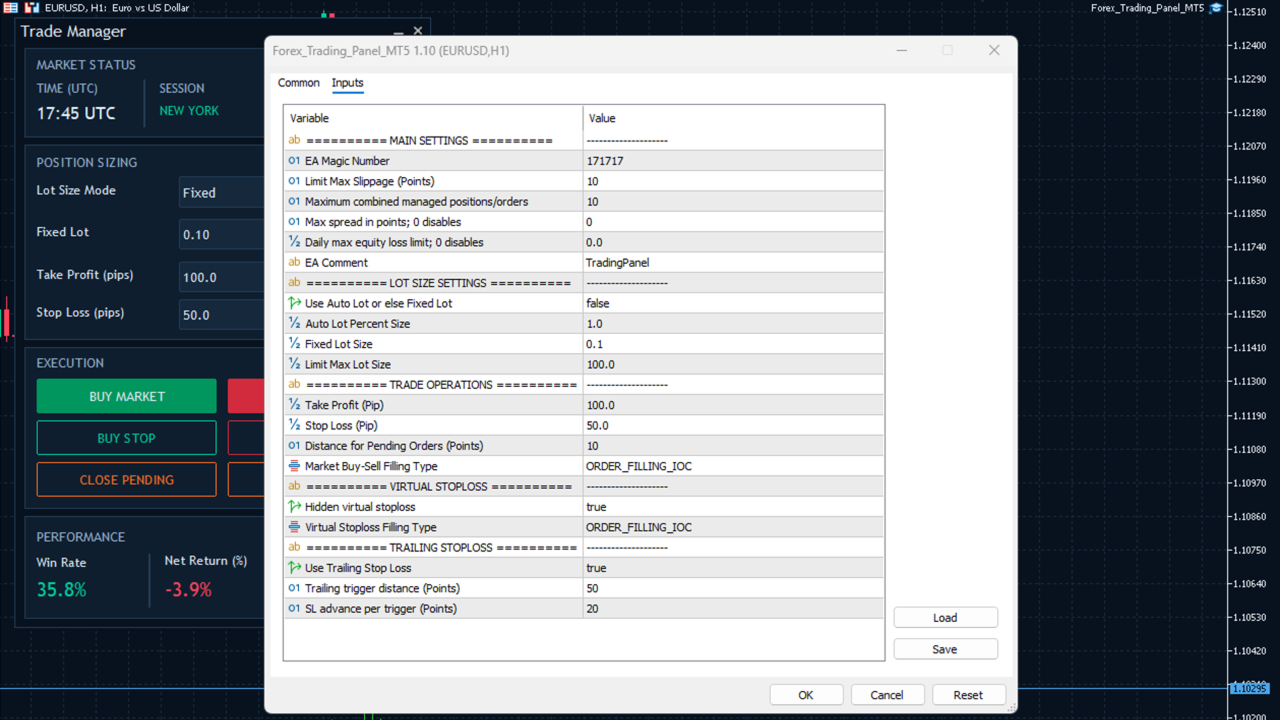
The EA provides configurable input parameters organized into several categories.
1. Main Settings
-
Magic_Number: Unique identifier used to distinguish and manage positions and pending orders belonging to the EA.
-
Max_Slippage: Maximum permitted execution deviation in points for trade requests.
-
Max_Open_Position: Maximum combined number of managed open positions and pending orders for the current chart symbol.
-
Max_Spread_Points: Maximum permitted spread in points for new orders. Set to 0 to disable the spread filter.
-
Max_Daily_Loss_Percent: Maximum daily equity-loss percentage relative to the recorded server-day starting equity. Set to 0 to disable this protection.
-
EA_comment: Custom comment attached to submitted orders.
2. Lot Size Settings
-
Enable_AutoLot: Enables automatic risk-based position sizing. When disabled, fixed lot sizing is used.
-
Risk_Percent: Percentage used to calculate position volume based on the modeled loss at the Stop Loss price.
-
Lot_Size: Default fixed trading volume.
-
Max_Lot_Size: Maximum permitted calculated or requested lot volume.
3. Trade Operations
-
Take_Profit: Default Take Profit distance in pips.
-
Stop_Loss: Default Stop Loss distance in pips.
-
Pending_Order_Offset: Minimum configurable distance for pending order placement in points, subject to broker restrictions.
-
Market_Filling: Preferred order filling mode for market orders. The EA checks the symbol's supported filling modes.
4. Virtual Stop Loss
-
EnableVirtualStopLoss: Enables or disables terminal-monitored virtual Stop Loss protection.
-
Position_Filling: Preferred filling mode for position-closing requests generated by the virtual Stop Loss function.
5. Trailing Stop Loss
-
EnableTrailingStopLoss: Enables or disables automatic trailing Stop Loss management.
-
TrailingStop: Favorable price movement in points required to trigger a trailing adjustment.
-
TrailingStep: Distance in points by which the Stop Loss advances for each completed trailing trigger interval.
The EA also provides interactive trading controls for changing lot-sizing mode, fixed lot size, risk percentage, Take Profit, and Stop Loss directly from the chart panel.
Testing Results
Forex Trading Panel MT5 is a manual trade execution and management utility rather than an automated trading strategy.
It does not independently generate entry signals or execute trades according to a predefined market-entry strategy. Trading activity depends on the user's manual order execution.
Important Notes
-
Forex Trading Panel MT5 is a manual trading assistant. It does not provide trading signals, predict market direction, or use technical indicators to generate trade entries.
-
All trading decisions and order initiation are the responsibility of the trader.
-
Virtual Stop Loss is monitored by the EA locally. It requires MetaTrader 5 to remain running, connected, and able to process incoming price updates. It is not a broker-side Stop Loss and cannot provide protection while the terminal or VPS is disconnected.
-
Actual execution prices may differ from requested prices because of slippage, requotes, liquidity, and market conditions.
-
Automatic lot sizing estimates risk using the modeled loss at the configured Stop Loss price. Actual losses may exceed the selected percentage because of gaps, slippage, commissions, and other trading costs.
-
The daily equity-loss protection blocks new orders when its threshold is reached. It does not automatically close existing positions.
-
The CLOSE ALL and CLOSE PENDING functions apply only to trades associated with the configured Magic Number and current chart symbol. They do not close unrelated account positions or orders.
-
Market session information is indicative and does not account for every public holiday or exceptional market closure.
-
Trading results and execution behavior depend on broker conditions, account specifications, and market liquidity.
-
Test the EA on a demo account and familiarize yourself with its functions and settings before using it on a live trading account.