RiskGuard Pro MT5

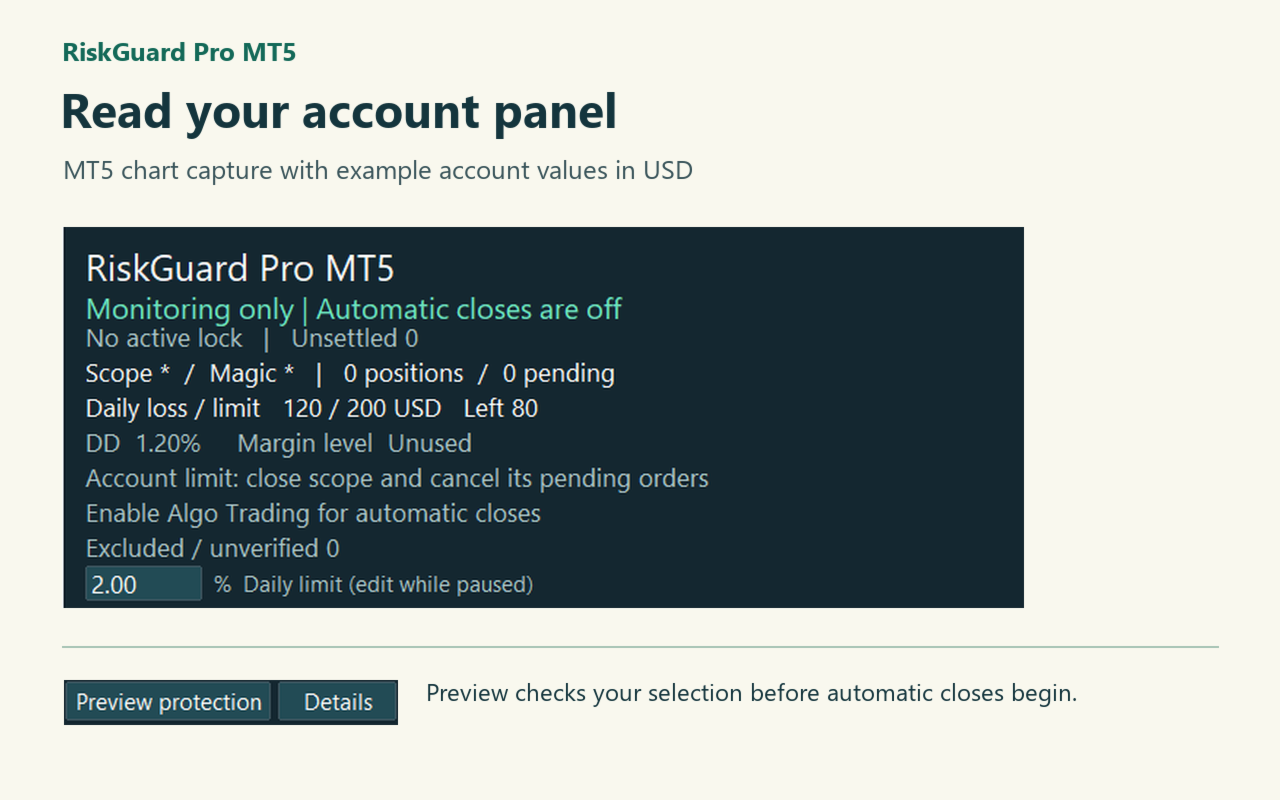
複数のEAや手動取引を使っているときも、チャート1枚で「今日の損失」「設定した上限」「上限までの残り」を確認できます。RiskGuardは新しい売買を始めるEAではありません。どの取引の決済を任せるかは、開始前に自分で選べます。

まずはデモ口座で試す

  1. チャートを1枚開いてRiskGuardを追加します。初回は「監視のみ」で、取引を閉じません。
  2. 日次上限を決め、「開始前に確認」で決済対象の建玉と予約注文の件数を確認します。
  3. 対象が正しければMT5とEAのアルゴリズム取引を許可し、「この内容で開始」を押します。「監視のみに戻す」で新たな決済依頼を止められます。

1日の損失上限を決める

たとえば開始残高100万円の口座で上限を2%にすると、1日の枠は2万円です。現在の損失が1万2,000円なら、残りは8,000円。決済済みの損益と、保有中の取引の含み損益を合わせて計算します。前日から持ち越した含み損も含みます。入出金は取引損益と区別します。

上限に達したらどうなる?

対象の建玉に決済を依頼し、対象の予約注文を取り消します。日次の停止は次の区切り時刻まで続き、その間に新しく成立した対象取引も決済します。時刻はブローカーのサーバー基準です。決済対象から外した取引の損失も、口座全体の損失には含まれます。

操作画面は日本語と英語に対応します。自動決済には、MT5の接続とアルゴリズム取引の許可が必要です。他のEAの注文は成立後に検知する場合があります。価格が飛んだときや通信が途切れたときは、実際の損失が上限を超えることがあります。

入力パラメータ:最初に確認する項目

  • Japanese: チャートの表示言語。falseは英語、trueは日本語。チャート上でも切り替えられます。
  • DailyUnit / DailyLimit: 1日の損失上限の単位と値。初期値は開始残高の2%。AccountMoneyは口座通貨での金額、PercentOfBalanceは開始残高に対する割合、Disabledは無効です。
  • ManagedSymbols / ManagedMagics: 決済を許可する銘柄名とEAの識別番号。各欄の * はすべて。複数指定はカンマ区切りです。銘柄名はブローカーの表記に合わせます。
  • IncludeManual: 手動取引(Magic番号0)を対象に含めるか。初期値はtrue。銘柄・番号の指定も適用されます。

必要なときだけ使う設定

  • WeeklyUnit / WeeklyLimit / MonthlyUnit / MonthlyLimit: 週・月それぞれの損失上限の単位と値。単位は日次と共通で、初期設定ではどちらも無効です。
  • EquityFloor / MaxDrawdownPct: 有効証拠金(含み損益を含む口座の現在価値)の下限額と、監視開始後の高値から許容する下落率。通常設定では各0で無効です。
  • UseMarginStages / WarningLevel / ReduceLevel / EmergencyLevel: 証拠金維持率に応じた3段階の動作。初期は無効。有効にすると、初期値では300%以下で警告、200%以下で維持率改善が見込める対象を削減、120%以下で対象全体の決済を依頼します。
  • BasketProfit / BasketLoss / BuyProfit / BuyLoss / SellProfit / SellLoss: 対象全体・買いのみ・売りのみの順に、一括決済する利益額と損失額を指定します。口座通貨で正の値を入力し、使わない欄は0にします。
  • MaxHoldingHours / FridayExit / FridayTime: 保有期限は時間数で指定(0は無効)。金曜決済をtrueにすると指定時刻から対象を決済します。初期時刻はサーバー時間20:00です。
  • PropPreset / ContractCapital / PropDailyPct / PropTotalPct: CustomRulesは通常設定。FixedFloorは契約開始資金を基準に下限額を固定し、TrailingFloorは観測した有効証拠金の高値からの下落率を使います。後ろの3項目は契約開始資金・日次損失率・全体の許容損失率です。評価会社の規定と照合してください。
  • DayReset: 日次の区切り時刻。初期値はブローカーのサーバー時間00:00です。
  • NewsAction / MinutesBefore / MinutesAfter: 高重要度指標の前後に取る動作と、その前後の分数。初期は前後15分・通知のみ。NewsOffは無効、CloseAffectedは該当する対象の決済・予約注文の取消を依頼します。
  • CFDNewsMap: CFDの銘柄と指標通貨の対応表。例:XAUUSD=USD,US500=USD。ブローカーの銘柄名を使います。
  • DeviationPoints / PopupAlerts: 決済依頼時の許容価格差(初期30ポイント)と、MT5のポップアップ通知(初期は無効)です。

パネルでは通貨別の保有量も確認できます。同じ端末を再起動すると保存済みの保護状態を読み込むので、再開時は現在のモードを確認してください。
おすすめのプロダクト
Grid Trading EA is a semi-automated one-click trading EA for both Normal Trading and Grid/Martingale Trading . Normal Trading Simply click Buy or Sell directly from the chart. The EA will automatically manage trades by: Setting Stop Loss and Take Profit Managing Trailing Stop Grid / Martingale Trading (For Hedging Account Type Only) When Grid Trading mode is enabled, the EA will automatically open additional grid orders at specified distances while increasing the lot size based on your settings.
Protect your funded accounts and personal capital with military-grade precision. This utility continuously monitors your floating equity against your daily starting balance. The moment your custom drawdown threshold is breached, it instantly liquidates all open positions, deletes pending orders, and completely unloads from the chart. Stop revenge trading and never fail a prop firm evaluation due to a margin breach again.
FREE
TradeManager is an automatic stop loss, breakeven and trailing stop utility for MetaTrader 5. It manages the exits on your open positions by fixed rules: auto-breakeven, a fixed or ATR-based trailing stop, and a one-shot partial take-profit. It is not a trading panel - no buttons, no clicking, nothing to babysit. Attach it once and it works on positions opened manually, from your phone, or by another EA. This makes it a set-and-forget trade management tool for traders who want consistent risk ma
no Trade operation, Robot Set auto SL to every manually Trade from a Phone Automatic Phone TradeManager Need just Set on 1 Symbol Auto BE Trigger is added that immediately sets a stop-loss for every () But does NOT calculate position size based on risk, allows the fixed  SL to   adjusted dynamically drag on Chart or Menu. It protects capital around the clock, reduces emotional mistakes, and ensures consistent risk management.
FREE
すべての注文をワンクリックで。 買い・売り・ロットをリアルタイム価格で 全決済、利益決済、損失決済、建値移動 注文ゼロでパネルに慣れる練習モード アニメーションパネルで、どの画面でも鮮明に表示されます。ボタンひとつで細いバーに折りたたみ、チャート上の好きな位置へドラッグできます。 パネルはキャンバス上に滑らかなトランジションで描画されます。チャート上の位置と、開いているか折りたたまれているかの状態は記憶されます。数値は口座の動きに合わせてなめらかに変化します。 すべての銘柄と時間足で動作します。MetaTrader 5向けEudora Expert Advisorを手がけるラボ、Eudora Labが開発しました。チャートに追加するだけで、すぐに使い始められます。入力項目はパネルの位置、サイズ、アクセントカラーなど、必要なものだけに絞っています。 無料。Eudora Instruments シリーズの一つです。
FREE
Apex StopLoss Manager
Muhammad Hassan Muhammad Ahmad Atiyah
Apex StopLoss Manager MT5 Script – Stop Loss Control Utility Overview Apex StopLoss Manager is a trade management script for MetaTrader 5 designed to provide precise, rule-based control over Stop Loss behavior on existing open positions . The script focuses on manual execution and accuracy. It does not use automated trading logic, does not open trades, and runs once per attachment . Core Functionality The script provides two independent Stop Loss control functions, both enabled only through exp
Telegram Trade Notifier EA Enhanced Utility Expert Advisor Real-time Telegram notifications for new positions AND TP/SL closures on its chart symbol Core Functionality Monitors all new positions (manual/EA/script) on its attached chart Alerts when positions close via Take Profit or Stop Loss Sends Telegram alerts within 0.5-2 seconds Works concurrently with other EAs New Position Alerts Include : • Symbol • Direction (Buy/Sell) • Entry Price • Take Profit Level • Stop Loss Level • Position Tick
Overview FiT Panel Pro is a professional-grade trade management panel designed for MetaTrader 5 traders who demand speed, precision, and full control over their trades. Built with a modern dark-theme UI, it combines one-click execution with advanced risk management, visual SL/TP drag lines, automatic Fibonacci-based levels, and comprehensive order management — all in a single, compact panel. Whether you are a scalper, day trader, or swing trader, FiT Panel Pro gives you the edge you need to exec
FREE
The purpose   of this utility is to manage one or more subwindow in the same chart by opening and closing them through a button or the keyboard keys How it works: If you want to handle more than one subwindow you need to reinstall the indicator . In this case some setups has to be customized onlu in the last subwindow installed and others setups in the installed subwindow during the first time installation. They are denoted in the input rispectively as ' LW ' and ' IW '. First of all install
## Operating Principle **Manual Order Manager PRO BTC** is an Expert Advisor for MetaTrader 5 designed to **automatically manage trades opened manually by the trader**. The EA does not decide when to buy or sell. The user analyzes the market, chooses the direction, sets the lot size, and opens the position manually. From that point on, the system monitors the trade and applies the configured protection and management rules. The goal is to help the trader maintain a more disciplined approach
All In One Trade Manager is a trade manager and one-click trading panel for manual traders on MetaTrader 5. It works as a trading assistant, risk manager and position size calculator in one dashboard. It brings together everything below in one panel: order entry with risk sizing automatic trade management advanced order types account protection statistics Its entry checks run in the background and tell you, before you click BUY or SELL, when something speaks against the trade. Also available
Quant Panel
Kevin Craig E Gittins
Quant Panel is a strategy analysis utility for MetaTrader 5. It helps traders review several Expert Advisors or trading strategies running on the same account. The panel groups closed positions by Expert Advisor comment or magic number and calculates each strategy's results separately. You can compare strategy performance, review individual drawdowns and export detailed reports from one dashboard. Independent strategy analysis Each strategy has its own virtual starting balance and closed-trade b
Dual Symbol Bars は、チャートと同じ時間足・同じ時間軸で、2つ目のシンボルをローソク足として専用サブウィンドウに描画します。 任意の2つ目のシンボルを、チャートの時間に合わせたローソク足として別ウィンドウに表示します。ゴールドとドル指数の並べ表示や、ブローカーが提供する他の通貨ペアに使えます。 Dual Symbol Bars はメインチャートの下に2つ目のローソク足チャートを追加します。両方のウィンドウは同じ時間足と同じ始値時刻を使うため、別チャートを開かずに2銘柄を比較できます。 例: メインが XAUUSD、ペインがドル指数。シンボルは固定ではありません。ペインに表示するシンボルへ、ブローカーの正式名称を入力してください。その名称がない場合、一般的なドル指数名(USDIndex、USDX、DXY など)も探します。 各バーは始値時刻で対応付けます。陽線(終値が始値以上)は陽線色、陰線は陰線色を使います。ヒゲ、実体、枠線の色は別々に設定できます。シンボル名はペインに表示されます。サーバーに名称がない場合、ラベルに見つからない旨が出ます。 設定項目: ペインに表示する
FREE
Imagine flying a real aircraft without ever stepping into a flight simulator. That's what trading is like. You have to simulate your strategy before you can take it to a live market. It is good if you can simulate things speedily before even stepping into any live market, or before coming up with an automated system.  People don't have all day to stare at a higher timeframe chart until the entry signal finally arrives. That's why I built this so that you can simulate your strategy with speed. Th
FREE
Time-Based Auto-Close Order Management Tool (MT5) — Technical Description Overview This is an automated order management EA based on time-algorithm logic. Its core function is to automatically execute preset closing operations when user-defined holding periods expire, aiming to help traders enforce predetermined rules mechanically and reduce emotional interference. Core Closing Modes Closing Mode Functional Definition Close All Closes all eligible positions when the set time is reached. Close
Prop firm risk manager for MT5: daily loss limit and max drawdown protection for FTMO-style challenges. Closes all trades and blocks trading before a limit is breached. HOW IT WORKS 1. Monitors equity every second against your limits. 2. Warns you (popup / push) when 50% of a limit is used. 3. Acts before the limit is reached (default: when 80% is used): closes all positions and deletes pending orders. 4. Locks trading: positions opened during a lock are closed immediately. A daily lock is relea
Automated Timeframe cycling with Symbols centered.  Force every timeframe onto one clock window, so the story you see on Daily is the same story you are slicing on H4, H1, and M1.  Traders usually flip timeframes and lose the span. A Daily chart shows a few weeks, then M15 shows a few hours, and the eye treats them as different markets. This indicator locks the window to N bars of the highest enabled timeframe — default 10 Daily — and maps every lower timeframe to that same stretch. You stay ins
FREE
Tick Volume Chart は、 MetaTrader 5 上でティックボリュームに基づいたチャートを作成するためのユニークなツールです。 Tick Volume Chart を使用すると、時間ではなく、指定したティック数ごとにローソク足が形成されるチャートを構築できます。これにより、標準的な時間足チャートでは得られない、市場活動の極めて正確な分析が可能になります。カスタムシンボルに対応したインジケーターやEA(自動売買プログラム)であれば、すべてご利用いただけます。作成したチャートは、標準チャートと同様に快適に操作できます。 標準ツールとは異なり、 Tick Volume Chart は時間間隔ではなく、実際の取引強度に基づいて市場を分析することを可能にします。 Tick Volume Chart の利点 各バーに 固定ティックボリューム を設定したチャートを作成可能。 内蔵ティックデータベースにより、履歴データの 高速な読み込み を実現。 リアルタイムデータが、 通常のチャートと同期し、遅延なく 更新されます。 複数の ティックボリュームチャートを同時に作成 することが可能
================================================================ MATRIX CONDITION MONITOR Live Trade Condition Panel for MetaTrader 5 Fully Automatic -- Works with ALL Matrix EAs ================================================================ NEVER MISS A TRADE SETUP AGAIN Matrix Condition Monitor is a free utility that attaches to any chart and automatically checks all 10 trade conditions in real time -- showing you exactly why a trade will or will not open, and alerting you the moment ever
FREE
DeletePendingTimer is a simple yet powerful Expert Advisor for MetaTrader 5 that automatically deletes all pending orders once a user-defined countdown timer has expired. No manual intervention is required at any point — simply enter the desired number of seconds in the settings, place your orders according to your trading strategy, and let the EA handle everything else automatically and efficiently. Whether you are trading high-impact news events, executing breakout strategies based on support
This is a common, simple and easy to use but effective tool to manage trading risks for all traders. It also help trader places stop loss and take profit levels at the same time the order is filled. How to set the expert advisor's parameters to support your trading style? Lots size. Fixed lots size - For traders who prefered to trade with fixed lots size, they can input the lots size in 'User lots' menu in the expert advisor's properties. The input value should be from the 'Minimum Volume' to th
Risk Ruler
AL MOOSAWI ABDULLAH JAFFER BAQER
Risk Ruler Plan every trade with precision before you enter the market. Risk Ruler is a professional on-chart position sizing and risk management tool for MetaTrader that helps traders calculate the optimal trade size based on their predefined risk. By simply dragging the Entry, Stop Loss, and Take Profit lines directly on the chart, all essential trading calculations update instantly, allowing you to make informed decisions before placing a trade. Designed for both manual and professional trade
Margin Call Shield – Defend Your Margin on Your Terms Margin Call Shield is a tool for MetaTrader 5 traders who want to decide for themselves which open positions are closed during margin call situations before the platform does so automatically based on its internal rules. By default, the broker or platform decides which positions to close, often using undisclosed algorithms. Margin Call Shield lets you set this order according to your own strategy. Why Was Margin Call Shield Created? In a mar
Chart Pro Classic Dark v1.00 Chart Pro Classic Dark is a professional MT5 chart styling and customization tool designed to give your charts a clean, modern, and professional dark appearance. Key Features Dark Black Background — Applies a clean black background to the chart. ️ Candlestick Chart — Automatically configures the chart to use candlesticks. Bullish Candles — Green/Lime bullish candles. Bearish Candles — White bearish candles. Grid Removal — Hides the chart grid for a clean
FREE
RMT Visual Trade Planner is a lot size calculator, position size calculator and order planner for MetaTrader 5: you plan a trade with three lines on the chart. Drag the stop loss and take profit, and it shows the lot size for your risk, the money at risk, the reward and the margin. The order is sent only after you press SEND and then CONFIRM. The problem it solves Working out the lot size for a given stop and a given risk takes a calculator, and a mistake there costs more than a bad entry. The o
口座の各 EA が本当はいくら稼いでいるかが分かります。Halberd Portfolio Monitor は口座の取引履歴をマジック番号ごとに分け、戦略ごとに取引数、勝率、プロフィットファクター、純損益、ドローダウン、保有ポジションと健康状態を表示します。読み取り専用で、取引は一切しません。 1つの口座で複数の EA を動かすと、MetaTrader に表示される残高は全部の合計だけです。静かに負け続けている戦略が、勝っている戦略の陰に隠れてしまうことがあります。Halberd Portfolio Monitor は口座の履歴を読み、EA ごとに1行ずつ並べます。どの EA が口座を支えていて、どの EA が崩れ始めているかが分かります。 このプログラムは注文の発注・変更・決済を行いません。ご自分の口座の履歴と保有ポジションを読むだけです。データがターミナルの外に出ることはありません。 戦略ごとに表示するもの 取引数、勝率、プロフィットファクター。 純損益、最大ドローダウン、その戦略の最高値からの現在のドローダウン(決済済みの取引、口座通貨)。 直近の期間(既定は30日)の損益。 保
The script allows you to quickly control positions from the keyboard.: Arrow ↑ → Open BUY Arrow → Open a SELL Arrow → → Close ALL positions Key functions: Automatic closing of opposing positions When a BUY is opened, all SALES are closed, and vice versa. Positions in the same direction remain intact (they can be accumulated). Flexible settings: LotSize. Take Profit in points (TP_Points). Stop Loss is disabled (but can be added if necessary). Safety: Checking the connection to the market. Sup
Trade Manager Panel ## Short description  Manage your manual trades with one click: automatic break-even, trailing stop, two-level partial close and risk-based lot sizing — all from a single on-chart panel. --- ## Full description Trade Manager Panel is an on-chart utility that takes care of your open trades so you can focus on the market instead of the order ticket. Drop it on any chart and it manages every position on that symbol automatically, while an interactive panel lets you size new
Trading tool combining a sophisticated equity stop-loss, dynamic take-profit management (Breakeven & Trailing), and symbol-group-based closing logic. It is a complete risk management and trade supervision tool. Features: All features of `Equity Master Stop v1` (floating profit/loss limits, exit protection, skip hours). Take-Profit Override: Can force a TP on any order to lock in a `MAX_FLOATING_PROFIT`. Step Breakeven: Locks in increasing amounts of profit as a trade moves favorably (e.g., aft
Noetrix Partial Entry
Julien Jeremy Rodrigue Gazagnaire
Noetrix Partial Entry Noetrix Partial Entry is a visual scale-in planning utility for MetaTrader 5. It helps discretionary traders build and manage a staggered pending-entry plan directly on the chart. The utility does not generate trading signals and does not place orders automatically. A plan is sent only after an explicit click on PLACE ALL and, by default, a confirmation dialog. MAIN FEATURES • Build from 1 to 5 Buy Limit or Sell Limit entries. • Split a total volume across the enabled e
FREE
このプロダクトを購入した人は以下も購入しています
Trade Assistant MT5
Evgeniy Kravchenko
4.43 (216)
取引 ごとのリスクの 計算、新規注文 の 簡単 な 設置、部分的 な 決済機能 を 持 つ 注文管理、 7 種類 のトレーリングストップなど 、便利 な 機能 を 備 えています 。 追加の資料と説明書 インストール手順   -   アプリケーションの手順   ライン機能 チャート上にオープニングライン、ストップロス、テイクプロフィットを表示します。この機能により、新規注文を簡単に設定することができ、注文を出す前にその特徴を確認することができます。   リスク計算 リスク計算機能は、設定されたリスクとストップロス注文のサイズを考慮して、新規注文のボリュームを計算します。ストップロスの大きさを自由に設定できると同時に、設定したリスクを守ることができます。 Lot calc ボタン - リスク 計算 を 有効 / 無効 にします 。 Risk フィールドでは 、必要 なリスクの 値 を 0 から 100 までのパーセンテージまたは 預金通貨 で 設定 します 。 設定」 タブで 、 リスク 計算 の 種類 を 選択 します :「 $ 通貨」、「 % 残高」、「 % エクイティ 」、「
Trade Manager EAへようこそ。これは、取引をより直感的、正確、そして効率的にするために設計された究極の リスク管理ツール です。これは単なるオーダー実行ツールではなく、包括的な取引計画、ポジション管理、リスク管理のためのソリューションです。初心者から上級者、迅速な実行を必要とするスキャルパーまで、Trade Manager EAはあらゆるニーズに対応し、為替、指数、商品、暗号通貨などさまざまな市場で柔軟に対応します。 Trade Manager EAを使用すると、複雑な計算が過去のものになります。市場を分析し、エントリーポイント、ストップロス、テイクプロフィットのレベルをチャート上のラインでマークし、リスクを設定するだけで、Trade Managerが最適なポジションサイズを即座に計算し、SLとTPをピップ、ポイント、口座通貨でリアルタイムに表示します。すべての取引が簡単かつ効果的に管理されます。 主な機能: ポジションサイズ計算機 :定義されたリスクに基づいて取引サイズを瞬時に決定します。 簡単な取引計画 :エントリー、ストップロス、テイクプロフィットを設定するためのド
Farmed Hedge Yield Farming | All Markets (Manual - Hybrid - Semi/Automated EA) VERIFIED TRADING RESULTS - Farmed Hedge Yield Axi Copy:  https://www.mql5.com/en/signals/2356376 - Farmed Hedge Yield Exn Copy:   https://www.mql5.com/en/signals/2356404 - Farmed Hedge Yield V Copy:  https://www.mql5.com/en/signals/2357156 IMPORTANT NOTICE: FarmedHedge is a MANUAL-FOCUSED TRADING UTILITY ,not a fully automated EA. Results shown on this Signal include manual trades and overall strategic management.
Telegram to MT5 Multi-Channel Copier   は、 Telegram と Discord チャンネルのトレードシグナルを MetaTrader 5 へ自動コピーします。ボット不要、ブラウザ拡張不要、手動コピー不要。Telegram や Discord にシグナルが届くと、EA が数秒であなたのターミナルに注文を出します。 さらに、チャンネルをコピーする前に、内蔵バックテスターでそのチャンネルがあなたの口座でどう動いたかを確認できます。 製品は 2 つのコンポーネントで構成されます:Telegram チャンネルを監視する Windows アプリと、MT5 ターミナルでシグナルを執行する本 EA です。MT4 版もあります   こちら . 購入前にお試しください:   アプリは無料でダウンロードできます。ご自身のチャンネルを接続し、各シグナルがどのように読み取られるかをご確認ください。Backtest タブと実際の取引には、購入またはレンタルした EA が必要です。このページの無料デモはストラテジーテスターでのみ動作し、テスターでは Telegram と D
TradePanel MT5
Alfiya Fazylova
4.88 (173)
Trade Panelは多機能なトレーディングアシスタントです。アプリには手動取引用の50以上のトレーディング機能が搭載されており、ほとんどの取引作業を自動化することができます。 アプリの説明書: https://www.mql5.com/en/blogs/post/756482 デモ口座用アプリの試用版: https://www.mql5.com/en/blogs/post/750865 アプリのインストール方法: https://www.mql5.com/en/blogs/post/756239 アプリをビジュアルモードでテストする方法: https://www.mql5.com/en/blogs/post/770277 VPSのMetaTraderにアプリをインストールする方法: https://www.mql5.com/en/blogs/post/770190 取引。 ワンクリックで取引操作を行うことができます: リスクを自動計算して指値注文やポジションを開く。 複数の注文やポジションをワンクリックで開く。 注文のグリッドを開く。 保留中の注文やポジションをグループごとに閉じる
自分の取引ルールで Telegram のシグナルをコピー Telegram to MT5 Signal Trader は、Telegram の公開・非公開チャンネルやグループから、テキスト形式の取引シグナルを MetaTrader 5 へ自動でコピーします。1つのデスクトップアプリで複数の配信者と MT5 口座を管理し、 配信者ごとにリスクと取引設定を個別に指定 できます。 シグナルのコピーに Telegram ボットや API 設定は必要ありません。 電話番号または QR コードでご自身の Telegram アカウントにログインし、すでに参加しているチャンネルやグループを選ぶだけです。ボットの作成や、Telegram API トークン、API ID、API hash の入力は不要です。 ポジションサイズを選び、複数の利確水準に分けて決済し、建値へのストップ移動やトレーリングストップを自動化できます。配信者のシグナルを受け取りながら、実際の取引方法は自分で管理できます。 本製品は、この MT5 エキスパートアドバイザ(EA)と、必須の Windows 連携アプリで構成されます。 インス
EA Overfitter
Stephen J Martret
5 (4)
That backtest looks great. But will it still be making money tomorrow, next week, next month? EA Overfitter re-runs your EA on 100 price histories it has never seen. One score tells you if the edge is real. A backtest tells you what an EA did on one price history — the one that happened to occur. What you cannot tell from it is how much of that result was the strategy and how much was the particular path. EA Overfitter answers that. It builds up to 100 synthetic price histories your EA has n
The product will copy all telegram signal to MT5 ( which you are member) , also it can work as remote copier.  Easy to set up, copy order instant, can work with almost signal formats, image signal,  s upport to translate other language to English Work with all type of channel or group, even channel have "Restrict Saving Content", work with  multi channel, multi MT5 Work as remote copier: with signal have ticket number, it will copy exactly via ticket number. Support to backtest signal. How to s
News Trade EA MT5
Konstantin Kulikov
4.55 (11)
僕自身が数年間使っている便利なロボットをご紹介します。半自動モードでも完全自動モードでもお使いいただけます。 >>> Chat <<< 当プログラムは経済指標カレンダーで発表されるニュースをもとにした取引の柔軟な設定が可能です。戦略テスターでは確認不可です。実際の取引のみです。 最新の設定アーカイブをダウンロードしてください: https://www.mql5.com/en/blogs/post/747929 シグナルモニタリング: https://www.mql5.com/en/signals/author/test-standart 当該エキスパート・アドバイザーのためのカスタマイズ設定セットを作る場合は、ブログの全パラメータの説明を参照してください :   https://www.mql5.com/en/blogs/post/748545 。 基本的なデフォルト設定について 一つのチャートからGBPとの通貨ペア(GBPUSD、EURGBP、GBPJPY、GBPCAD、GBPAUD、GBPCHF)で取引をします。GBPは最もボラティリティの高い通貨のため、取引が成功するチ
================================================================================ POC BREAKOUT - V20.72. Full Professional Grade Toolkit ================================================================================ POC Breakout is a full MetaTrader 5 trading dashboard for discretionary traders who want breakout signals, Point of Control (POC) context, volume profiles, order flow, market structure, news, alerts, and advanced trade planning in one professional workspace. Attached directly to you
次回アップデート — バージョン 2.52 近日公開!【新機能】 市場分析とトレードワークフローを強化する、4つの主要な新機能にご期待ください 皆様のトレードニーズに応える4つの新機能により、市場分析を次のレベルへと引き上げます。新機能をご紹介します: 1. TRADE OVERVIEW DASHBOARD 2. CONFLUENCE AT ZONE 3. STRONG & WEAK HIGH/LOW 4. OTE 1. TRADE OVERVIEW DASHBOARD 市場全体の状況をより簡単に把握できるダッシュボードです。トレード判断をサポートするガイダンスを提供し、市場分析とトレード計画を体系的に行えるよう支援します。すべてを1つの画面で確認できます。 マルチタイムフレーム市場概要(Multi-Timeframe Market Overview) 市場の方向性と価格構造をより明確に把握 市場状況をすばやく確認 体系的な市場分析とエントリー計画のためのガイダンス 2. CONFLUENCE AT ZONE 価格が重要なゾーンに入るとき…いくつのサポート要因が一致しているかを確認で
EA Auditor
Stephen J Martret
5 (7)
EA Auditor is an independent analysis tool for traders evaluating Expert Advisors and trading signals on MetaTrader 5. It audits backtest reports, reviews posted developer signals, and cross-verifies the two against each other to help traders assess strategies before committing capital. The MQL5 market offers a wide range of Expert Advisors from many developers, with varying approaches, quality, and transparency. EA Auditor provides a consistent, data-driven framework for reviewing them, answer
News Filter EA: Advanced Algo Trading Assistant News Filter EA is an advanced algo trading assistant designed to enhance your trading experience. By using the News Filter EA , you can integrate a Forex economic news filter into your existing expert advisor, even if you do not have access to its source code. In addition to the news filter, you can also specify trading days and hours for your expert. The News Filter EA also includes risk management  and equity protection features. MT4 Version Ma
MT5 to Telegram Signal Provider は、Telegramのチャット、チャンネル、またはグループに 指定された シグナルを送信することができる、完全にカスタマイズ可能な簡単なユーティリティです。これにより、あなたのアカウントは シグナルプロバイダー になります。 競合する製品とは異なり、DLLのインポートは使用していません。 [ デモ ] [ マニュアル ] [ MT4版 ] [ Discord版 ] [ Telegramチャンネル ]  New: [ Telegram To MT5 ] セットアップ ステップバイステップの ユーザーガイド が利用可能です。 Telegram APIの知識は必要ありません。必要な全ては開発者から提供されます。 主な特長 購読者に送信する注文の詳細をカスタマイズする機能 例えば、Bronze、Silver、Goldといった階層型のサブスクリプションモデルを作成できます。Goldサブスクリプションでは、すべてのシグナルが提供されます。 id、シンボル、またはコメントによって注文をフィルターできます 注文が実行されたチャート
RETAILBERG FOOTPRINT CHART PRO — Order-Flow Workspace for MetaTrader 5 Version 7.00  |  Professional System  |  31 tools  |  One chart A full 150-page illustrated User Manual is included. Please read the full manual to understand this feature packed footprint chart elements and ui. https://www.mql5.com/en/blogs/post/777982 DEMO / STRATEGY TESTER — PLEASE READ FIRST
VirtualTradePad PRO SE MT5 — MetaTrader 5向けプロフェッショナル取引コントロールセンター VirtualTradePad PRO SE は、 MetaTrader 5 向けのプレミアムなチャートベースの取引パネルであり、トレード管理ワークスペースです。より速い執行、明確なポジション管理、構造化されたトレード管理、視覚的なレベル計画、そしてチャート上で完結するプロフェッショナルなワークフローを求めるトレーダー向けに設計されています。 これは単なる BUY / SELL パネルではありません。PRO SE は、手動取引、予約注文、ポジション管理、部分決済、バスケット損益管理、平均化レベル、ATMルール、シグナル監視、リアルタイム市場情報、ストラテジーテスター (Strategy Tester) ワークフロー、VPS向け運用を、1つの連携されたインターフェースに統合します。 MT4版 | 完全な説明とスクリーンショット | 購入方法 | インストール方法 | ログファイルの取得方法 | テストと最適化の方法 | Expforex のすべての製品 PRO
Trader Evolution
Siarhei Vashchylka
5 (7)
" Trader Evolution " - A utility designed for traders who use wave and technical analysis in their work. One tab of the utility is capable of money management and opening orders, and the other can help in making Elliott wave and technical analysis. Manual (Be sure to read before purchasing) | Version for MT4 Advantages 1. Trading in a few clicks. Immediate and pending orders are available in the panel 2. Money management. The program automatically selects the appropriate lot size 3. Simplifies
AW Trade Manager
AW Trading Software Limited
AW Trade Manager は、チャート上のリスクリワードツールを備えた MetaTrader 5 用のトレードパネルです。トレードは Entry、Stop Loss、Take Profit の線をマウスでドラッグして計画します。ラベルには価格、距離、金額が表示され、ゾーンで利益と損失を示し、ロットはリスクから計算されます。発注前には確認ウィンドウに、リスク、証拠金、ポジションのルールを含むトレード全体が表示されます。 マニュアルと説明 -> こちら / 無料 LIVE デモ版 -> こちら エントリー後のポジション管理のために、パネルにはブレークイーブン、トレーリング、部分決済、時間による決済、非表示の水準が用意されています。これらは Rules タブですべての新規トレードに対して、またはポジションのウィンドウで個別のポジションに対して有効にします。個々のトレードとは別に、口座のリスク制限、バスケット、スケジュールされたタスク、アラート、MT5 の経済指標カレンダーが機能します。 特長: チャート上のトレードプラン: ラベル、ゾーン、R:R 付きの Entry、Stop Los
チャート型トレードアシスタント&リスク管理パネル マルチモードSL&TP(ATR、リスクリワード比R:R、ポイント、口座通貨)、リアルタイム分析、経済指標カレンダーを搭載した多機能チャート上ツール Ergotick Trade Manager は、裁量トレーダー、プロップファーム挑戦中のトレーダー、およびスキャルパー向けに設計された、オールインワンのプロフェッショナルなトレード用パネルです。ロット数の自動・瞬時計算、マルチモードでのストップロス(SL)やテイクプロフィット(TP)の設定、高度な一括決済(Basket)管理、口座のリアルタイム統計、そしてチャート上に経済指標を表示するニュースカレンダー機能を、MetaTrader 5の洗練された1つのユーザーインターフェースに統合しました。 ポジションサイズの計算に手動で時間を取られるのはもう終わりにしましょう。ミリ秒単位でロットサイズを自動計算し、適切にリスク管理された注文を瞬時に執行するとともに、内蔵された「日次損失制限保護」機能で大切な資金を保護します。 主な特徴 1. インタラクティブなビジュアルツール&自動ロット数計算機能 チャ
Master Your Trading Discipline   Stop losing your hard-earned gains to overtrading and emotional decisions. The Discipline Tool is your ultimate trading assistant, ensuring strict risk management in real-time. Key Protection Features: Advanced Drawdown Defense : Automatically halts trading if your daily drawdown exceeds a preset threshold (percentage or dollar amount). Real-Time Equity Lock : Safeguard profits by referencing peak equity, ensuring drawdown stays within control. Hard Profit Target
Dealer's Panel No signal decides anything here — a hand does. One click, and the panel calculates what's underneath: lot size from risk, target from a 30-step balance ladder that remembers exactly how far an account has climbed. Toggle between market and pending without touching an input field. Set a stop, and the take-profit can write itself — a fixed share of the balance, translated into price with no arithmetic left for the trader to get wrong. One trade live at a time; it won't let a seco
25% discount on the release of the tool: only for the next 3 buyers Send a message to receive a demo version. AstroTrade Trading Assistant AstroTrade is a comprehensive multi-functional trading utility developed for the MetaTrader 5 platform. It integrates essential tools for trade execution, risk management, and technical monitoring into a single unified interface. The application is designed to assist traders in managing their daily operations through a visual and structured environment. Vi
Bneu Prop Firm Pass System
Marvinson Salavia Caballero
5 (1)
BNEU PROP FIRM PASS SYSTEM v2.37 PRODUCT OVERVIEW Bneu Prop Firm Pass System is a professional risk management and account protection utility for MetaTrader 5. Attach to any chart and configure your account rules. The system monitors daily loss, maximum drawdown, profit target, trading days, open risk, margin usage, news events, pending orders, weekend restrictions, and rollover restrictions from one dashboard. It includes a 5-tab premium dashboard, prop firm presets, custom rules, Risk Sentine
Your EAs cannot see each other, but Anchor can. Anchor gives you one place to coordinate your EAs, manage risk, and decide when trading is allowed. It works alongside the trading bots you already use without any changes to them. The Problem One EA opens a trade. Then another starts trading. The next thing you know, you wake up to multiple grids built across your account. Each EA may be doing exactly what it was designed to do, but together they can place far more risk on your account than you in
AlgoRadar
Stephen J Martret
5 (4)
AlgoRadar is an on-chart analytics dashboard for MT5 that aggregates Expert Advisor performance across multiple accounts, brokers, and platforms, including both MT4 and MT5 data, into a single live view on your MT5 chart. All analysis runs from the chart interface, with no external applications or manual report processing required. EA Analysis and Ranking For traders running multiple Expert Advisors, AlgoRadar provides a consolidated view of each EA's performance across accounts. Active EAs a
REVDEN AI Desk:あなた自身の AI との一つの会話で、REVDEN のマーケットコンテキストをもとにトレードを運営する トレードのすべてを一つの会話で運営する姿を想像してみてください。 REVDEN AI Desk はそれを MetaTrader 5 にもたらします。あなた自身の AI に相場をどう読んでいるかを尋ねると、AI はあなたが取引する銘柄について REVDEN の完全なコンテキストをもとに答えます。銘柄の状態、リスク像、今後の指標発表まで含めてです。AI の提案はエントリー、ストップ、ターゲット、リスクとともに届き、合うものをあなたが承認します。ルールの変更も同じ方法です。変えたい点を書けば、AI が新しいルールブックの草案を作り、採用するかどうかはあなたが決めます。会話の周りには、マーケット全体が一つの画面にまとまっています。 デスクとセットアップガイドをご覧ください。 すべての画面、すべての設定、そしてあなた自身の AI との最初のステップ: stein.investments/products/revden-ai-desk AI との一つの会話、マーケッ
Power Candles Strategy Scanner:自己最適化するマルチシンボル・セットアップファインダー わずかな動きのたびに鳴るスキャナーは、やがて無視されるようになります。慌ただしいローソク足の確定ひとつでアラートが次々と届き、本当にトレードしたい唯一のセットアップがノイズに埋もれてしまう。 Power Candles Strategy Scanner は、自己最適化する Power Candles エンジンを Market Watch のすべてのシンボルで動かし、あなた自身のフィルターを通過したものだけを知らせます。基準は、直近の確定足の強さ、セットアップのリスクリワード、リアルタイムのスプレッド、そしてあなたがトレードする資産クラスです。シンボルがリストに入った瞬間、スキャナーがあなたを呼びます。フィルターで外したものはすべて静かなまま。同じローソク足の確定で出たヒットは、すべて1通のメッセージにまとめて届きます。 購入前にパネルとすべてのフィルターをご覧ください。 スクリーンショット、全機能のツアー、Power Candles との連携ワークフロー: stein.

Smart Renko Chart
Gianny Alexander Lugo Sanchez
This Expert Advisor creates a custom symbol (for example EURUSD_RK) from the symbol of the chart and converts the same chart to Renko. The chart keeps updating tick by tick. A control panel on the chart lets you change the Renko type and the way the brick size is calculated without restarting. Markets It works on any symbol that your broker offers in the terminal: forex pairs, stocks, indices, metals, energies, cryptocurrencies and synthetic indices. The brick size can be set in points, as a per
Trade Manager は、リスクを自動的に計算しながら、取引を迅速に開始および終了するのに役立ちます。 過剰取引、復讐取引、感情的な取引を防止する機能が含まれています。 取引は自動的に管理され、アカウントのパフォーマンス指標はグラフで視覚化できます。 これらの機能により、このパネルはすべてのマニュアル トレーダーにとって理想的なものとなり、MetaTrader 5 プラットフォームの強化に役立ちます。多言語サポート。 MT4バージョン  |  ユーザーガイド + デモ Trade Manager はストラテジー テスターでは機能しません。 デモについてはユーザーガイドをご覧ください。 危機管理 % または $ に基づくリスクの自動調整 固定ロットサイズを使用するか、ボリュームとピップに基づいた自動ロットサイズ計算を使用するオプション RR、Pips、または価格を使用した損益分岐点ストップロス設定トレーリングストップロス設定 目標に達したときにすべての取引を自動的に終了するための 1 日あたりの最大損失 (%)。 過度のドローダウンからアカウントを保護し、オーバートレードを防ぎます
EASY Insight AIO – スマートで手間いらずな取引のオールインワンソリューション 概要 数秒で市場全体——FX、ゴールド、暗号資産、指数、さらには株式まで——を、手作業のチャート確認や複雑なセットアップ・インジケーター導入なしにスキャンできたらどうでしょうか? EASY Insight AIO はAIトレードのための究極のプラグ&プレイ型エクスポートツールです。市場全体のスナップショットを、クリーンなCSVファイルで一括出力。ChatGPT、Claude、Gemini、Perplexityなど、さまざまなAIプラットフォームで即座に解析できます。 ウィンドウの切り替えやグラフのごちゃごちゃしたオーバーレイはもう不要。自動エクスポートされる純粋で構造化されたインサイトだけで、無駄なチャート監視に悩まされず、スマートなデータ主導の判断に集中できます。 なぜEASY Insight AIOなのか? 本当のオールインワン • セットアップ不要、インジケーターのインストール不要、チャートへのオーバーレイ不要。インストールして起動し、エクスポートするだけです。 マルチアセット対
作者のその他のプロダクト
東京の仲値とロンドンの月末フィックスを、ドル円のチャート1枚で追えるMT5用の自動売買プログラムです。チャートには次の判定時刻と直前の判断が表示されます。初めての方は、購入前に無料デモで10月30日の21分間を再生し、EAがいつ判断し、いくらで取引したかを確かめられます。 東京では、五十日(ごとおび)や月末の所定日にドル円・ユーロ円・ポンド円を確認します。ロンドンでは月の最後の平日に、米国株価指数が月初からどれだけ動いたかを調べ、条件がそろうと米ドルを含む通貨ペアを取引します。片方だけでも使えます(図解A・H)。 無料デモで10月30日の仲値を再現する 準備(図解B〜D)。デスクトップ版MT5で無料デモを入手し、Ctrl+Rでストラテジーテスターを開きます。Tokyo London Fix、USDJPY、M1(1分足)、2026年10月29日〜31日を選びます。「リアルティックに基づいたすべてのティック」とビジュアルモードを選び、ブローカーのサーバー時差を合わせます。 1回目は判断を見る(図解E)。「Observe only (no new orders)」をtrueにして開始します。
Gold Morning Compassは、MT5で金(XAUUSD)を取引するEAです。平日の朝に一度、金がその日の始値からどれだけ動いたかを確かめます。チャートに判定ラインが2本出るので、取引した理由も、見送った理由も目で確認できます。 朝の2本のラインの読み方 ラインは当日の始値から上下に、直近14日分の平均的な値幅(ATR)の30%だけ離れています。初期設定では、ブローカー時刻08:00以降の最初の1分足の始値で判定します。 上のライン以上なら、買いの候補になります。 下のライン以下なら、売りの候補になります。 2本の間なら、その日は見送ります。午後にラインを越えても入りません。 注文の大きさと決済 たとえば口座の有効証拠金(含み損益を含む資金)が10,000米ドルなら、初期設定で損切りまでに見込む損失は費用を除いて50米ドルです。EAはその金額に収まるよう数量を切り下げ、最小ロットでも大きすぎる日は見送ります。売値と買値の差が広い間は待ち、判定時刻から30分で新規受付を終えます。 新規注文は1日最大1回。注文と一緒に損切り(ATRの0.75倍)と利確(損切り幅の2倍)を設定し
フィルタ:
レビューなし
レビューに返信