Aethon Crest
- Experts
-
Sukhwinder Singh
 # AETHON | Algorithmic Trading Systems
**12+ Years of Trading Experience | Quantitative Research | Advanced Trading Automation**
Welcome to **AETHON**, where market experience meets intelligent trading technology. - Version: 1.45
- Activations: 10
AETHON Crest — Machine-Learning Trend EA for XAUUSD
IMPORTANT: SEND US A PRIVATE MESSAGE ONCE YOU PURCHASE OR DECIDE TO BACKTEST. WE WILL SHARE .SET FILE & INSTALLATION INSTRUCTION.
The Price will increase by $100 after every 10 purchases
One hourly decision. Hard stops on every trade. Fully automatic.
AETHON Crest is an Expert Advisor built only for gold (XAUUSD). Once an hour it reads the market with an embedded machine-learning model (two neural-network ensembles of seven networks each) and answers two questions: which way is gold leaning for the coming hour, and is that lean strong enough to trade? Crest trades only when the answer to the second question is yes, and only in the direction of the first.
Every trade has a fixed stop loss and take profit from the moment it opens. There is no grid, no martingale and no averaging without a stop.
HOW IT DECIDES
At every new H1 bar the model reads 1,296 values describing the market: the shape of the last 272 hourly candles, close structure, candle shape, oscillators, and the H4 and D1 context. From those it produces two outputs:
- Tide: the expected direction for the next hour, long or short.
- Crest: whether that direction is strong enough to act on. In a typical month the Crest is on in roughly a third to a half of the hours, more often when gold is active and volatile.
Everything runs inside the EA. The model is compiled into the file, so there are no DLLs, no external servers and no internet connection needed to trade.
HOW A TRADE WORKS
1. Entry. When the Crest is on, Crest opens one trade in the Tide direction.
2. Waves. If price moves against the open trade, Crest can add up to two more trades in the same direction (three in total). A new Wave needs the previous one to be at least 180 minutes old and the price to be at least 2.50 USD worse. Each Wave has its own stop loss and take profit. The lot size stays the same; it is never doubled.
3. Bank. When a trade reaches +10 USD, half of it is closed and the profit is banked. This happens once per trade.
4. Ride. From +32.80 USD the stop loss follows price at a distance of 25.30 USD, moved in steps of at least 9.90 USD.
5. Tide exit. If the Tide turns against an open trade, Crest closes it instead of waiting for the stop.
6. Hard exits. Stop loss 42.90 USD and take profit 47.30 USD from the entry price, on every trade, set at the broker when the trade opens.
KEY FEATURES
- Built and trained for XAUUSD only
- Embedded machine-learning model (neural-network ensembles), one decision per hour
- Stop loss and take profit on every trade, placed with the order
- Up to 3 trades in one direction, flat lot size, never martingale
- Partial profit (Bank) and trailing stop (Ride)
- Closes trades early when the model's direction turns against them
- Automatic lot size from your balance, or a fixed lot
- Trading window and trading days you can set
- Optional spread filter for new trades
- Works on any chart timeframe (decisions are made on H1, checked every minute)
- Safe restarts: after a restart or reconnection the EA does not bank a trade twice, and it waits for the hourly history to load before it acts
- Small on-chart panel showing the current Tide, Crest and open Waves
- No DLLs, no web requests, runs on the MQL5 VPS
BACKTEST RESULTS
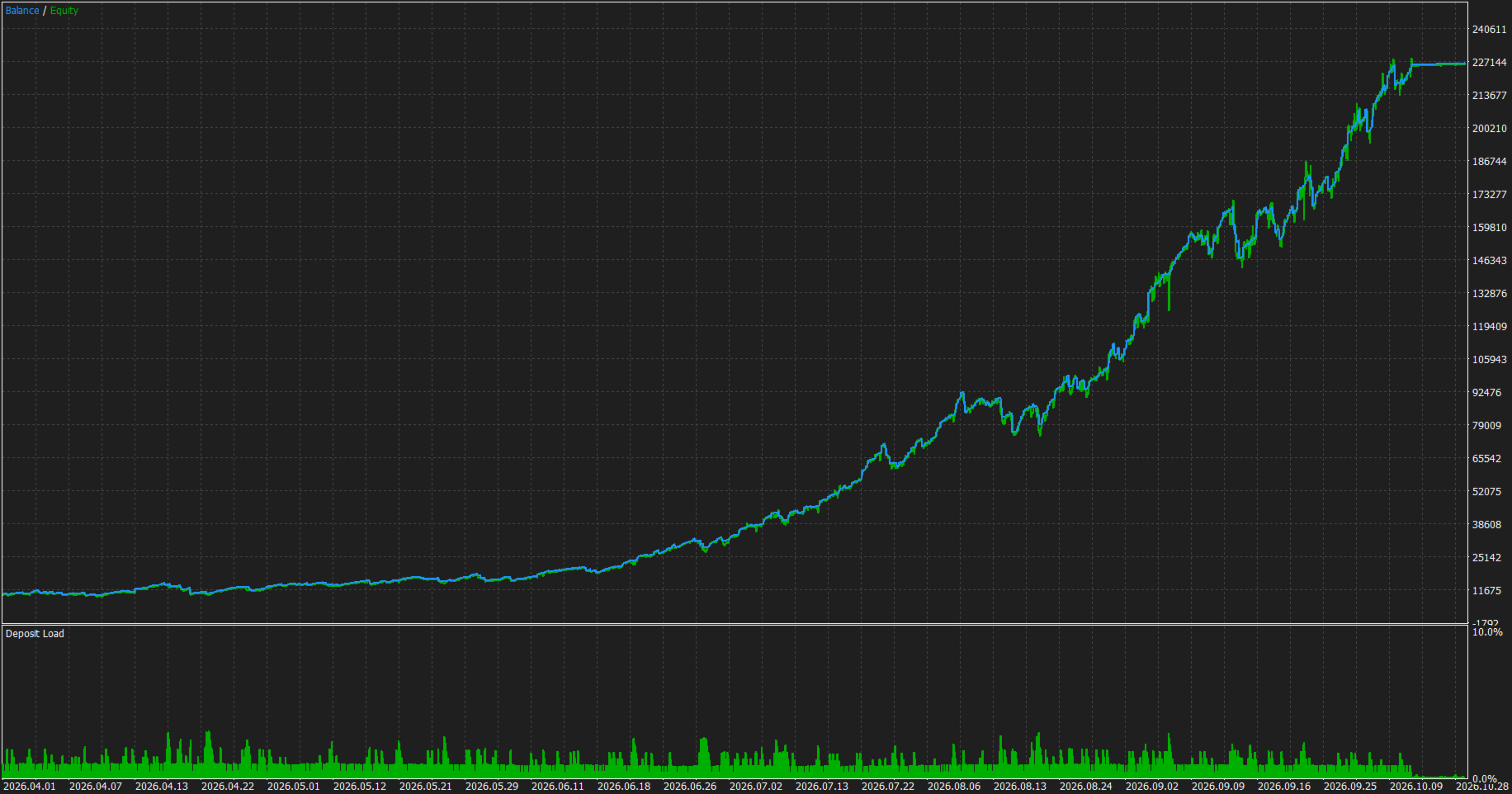
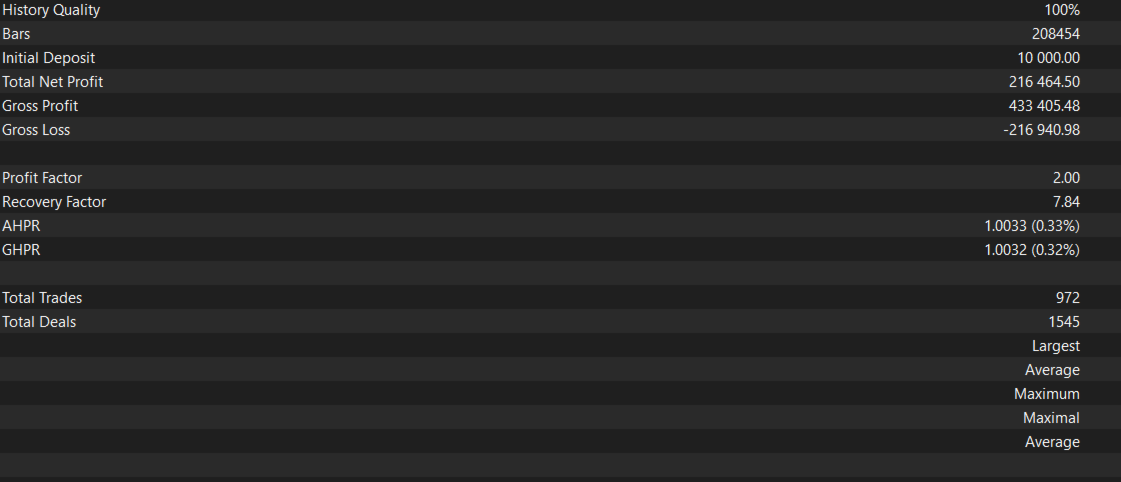
XAUUSD, every tick based on real ticks, IC Markets, $10,000 deposit, leverage 1:500, settings exactly as they ship (0.1 lots per $10,000). 1st April to 31st October 2026
- Net profit: +$216464.50
- Profit factor: 2.00
- Trades: 972 (608 buy, 364 sell)
- Profitable trades: 82.19%
- Maximum consecutive losses: 2
- Balance drawdown: 12.34%
- Equity drawdown: about 16.15%
How to read these figures:
- The lot size grows with the balance, so a large part of the long-window profit is compounding. Profit factor and drawdown say more about the strategy than the total.
- MT5 counts each close as a trade. A position that banks half at +10 USD and then hits its stop shows up as one winning and one losing trade. That is why the profitable-trades figure is high; it does not mean 8 out of 10 positions win.
Download the free demo and run it in the Strategy Tester on your own broker's data with "Every tick based on real ticks".
RECOMMENDED SETUP
- Symbol: XAUUSD (gold). Use your broker's gold symbol, for example XAUUSD, XAUUSD.m or GOLD
- Chart timeframe: any. Attach to ONE gold chart only
- Account type: HEDGING recommended, so that each Wave stays a separate position with its own stop
- Broker server time: GMT+2 in winter / GMT+3 in summer (New York close), which is what most gold brokers use. The model takes the hour of day into account, so a broker on a different clock will trade at different hours than the backtest above
- Lot size: the default is 0.05 lots per $10,000. At that size one stopped-out trade costs about 2.1% of the balance, and three stopped-out Waves about 6.4%. 0.10 is available but doubles the risk and the drawdown
- Minimum balance: $2,000 (the smallest lot, 0.01, matches $2,000 at the default size; below that every trade risks more than the default), or a cent account for smaller deposits
- Leverage: 1:100 or higher
- Broker: low spread, fast execution, ECN or Raw account preferred
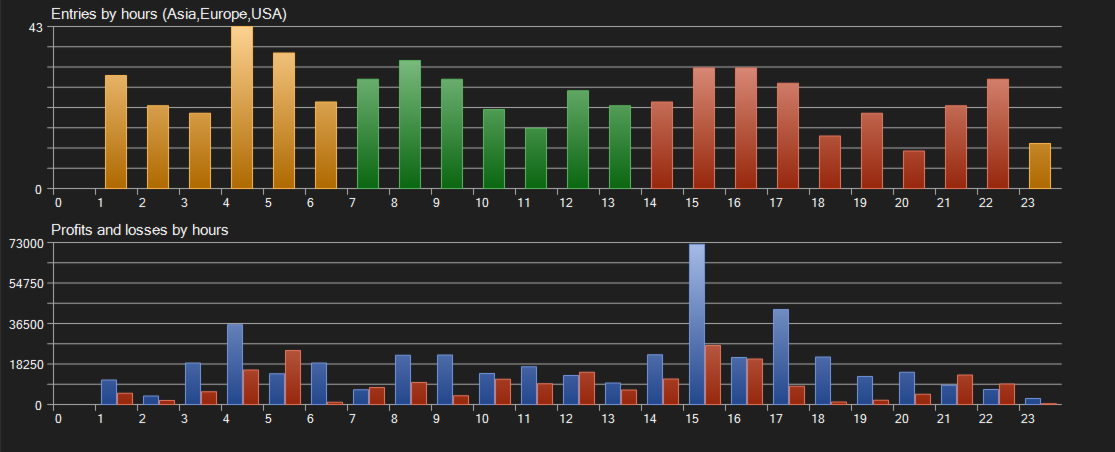
- VPS: strongly recommended, because Crest trades from 01:00 to 23:00 server time
QUICK START
1. Attach AETHON Crest to one XAUUSD chart (any timeframe) and enable Algo Trading.
2. Check the panel. It shows the Tide, the Crest and the number of open Waves. If the hourly history is still loading, the EA waits for it before it acts.
3. Leave the settings at default and let it trade. The first trade opens in the first hour the Crest is on, which can take a few hours on a quiet day.
If you want to discuss settings or the risk, write in the product's Comments tab or send me a message through my MQL5 profile. I answer there, and the discussion stays where other buyers can read it too.
MAIN INPUTS
- CloseOnTideTurn: close trades when the Tide turns against them (default on)
- MaxWaves: maximum number of open trades, all in the Tide direction (default 3)
- WaveSpacingMin / WaveStepUsd: a new Wave needs the last one to be older than this many minutes and the price this many USD worse (defaults 180 / 2.50)
- AutoLots / LotsPer10k: lot size from balance (default 0.05 lots per $10,000)
- FixedLots: lot size when AutoLots is off
- StopUsd / TargetUsd: stop loss and take profit distance in USD (defaults 42.90 / 47.30)
- BankOn / BankAtUsd / BankPercent: partial close (defaults on, +10 USD, 50%)
- RideOn / RideStartUsd / RideGapUsd / RideStepUsd: trailing stop (defaults on, 32.80 / 25.30 / 9.90)
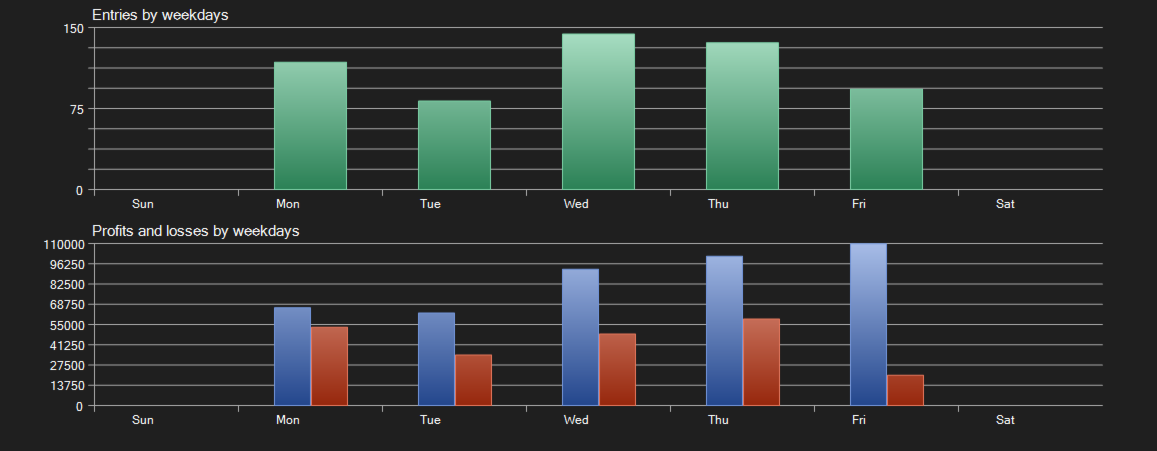
- ScheduleOn / FromHour / ToHour / TradeMon … TradeFri: trading window for new trades, server time (default 01:00–23:00, Monday to Friday). Exits run around the clock
- MaxSpreadUsd: maximum spread for new trades (default 0 = no limit)
- MagicNumber / OrderTag: identify Crest's trades (defaults 742200 / CREST)
Stops and distances are set in USD of gold price, so they work the same on 2-digit and 3-digit gold symbols.
RISK — PLEASE READ
Crest has a stop loss on every trade, so a single trade cannot take the account. That does not make it safe, and you should know where the losses come from:
- Losing streaks happen. The backtests above include runs of 6 losing trades in a row and a losing month.
- Waves add to a trade that is going against you. When the Tide is wrong for long enough, up to three trades in the same direction can all reach their stop.
- The model was learned from past gold prices. It behaves accordingly to grab profits.
- Raising LotsPer10k raises every number in the drawdown lines above by the same factor.
- Trade only with money you can afford to lose
- Start on a demo account or a cent account
- Do not raise the lot size above default without testing it first
- Do not run other EAs on the same symbol on the same account
WHY CREST
Crest makes one decision an hour, stays out when the model has no clear view, and puts a hard stop on everything it opens. The results above are shown the way the tester reports them, including the losing month.
Download the demo, test it on your broker's real tick data, and see how it fits your trading.