SAOTrade Replay

SAOTrade Replay — Historical Market Replay & Virtual Trading Simulator for MT5

Practice your trading decisions on historical charts without risking real money.

SAOTrade Replay is an interactive historical chart replay and virtual trading practice utility for MetaTrader 5. Revisit market movements, practice entries and exits, and evaluate your trading decisions using historical price data available in your MT5 terminal.

This is a manual trading practice tool, not an automated trading robot. All orders and account results are simulated.

Main Features

Historical Chart Replay

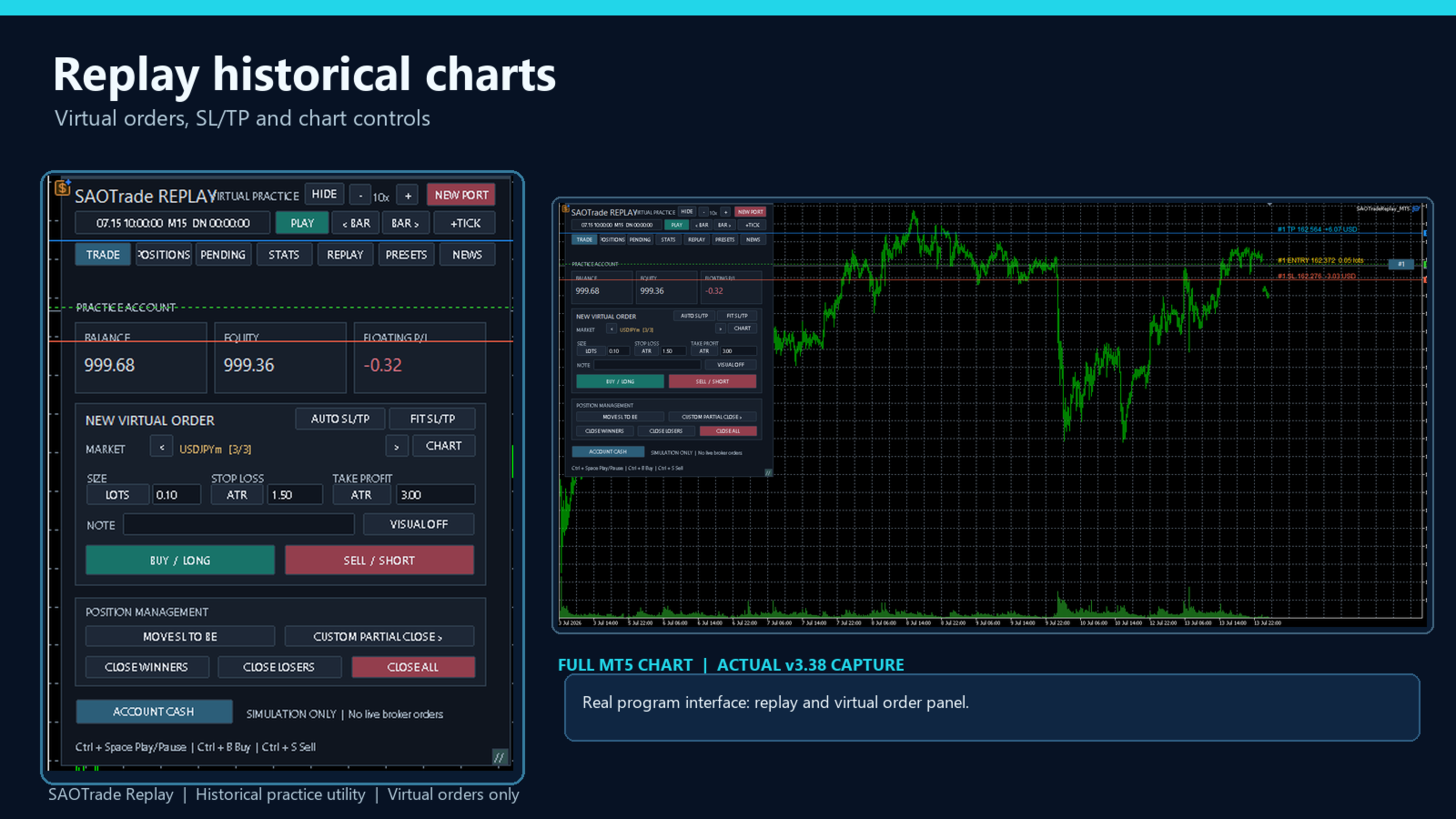
  • Play, pause, and navigate through historical market data.

  • Step forward or backward through candles.

  • Adjust replay speed.

  • Choose a historical starting date based on available data.

Virtual Trading

  • Practice Buy and Sell market orders.

  • Place simulated Buy Limit, Sell Limit, Buy Stop, and Sell Stop orders.

  • Set virtual Stop Loss and Take Profit levels.

  • Drag SL/TP lines directly on the chart.

  • View price levels and estimated virtual profit or loss.

Multi-Symbol Replay

  • Practice multiple symbols within one MT5 terminal.

  • Connect additional replay charts using JOIN.

  • Share a virtual account balance and replay clock across linked charts.

  • Manage virtual positions on different instruments.

Position Management

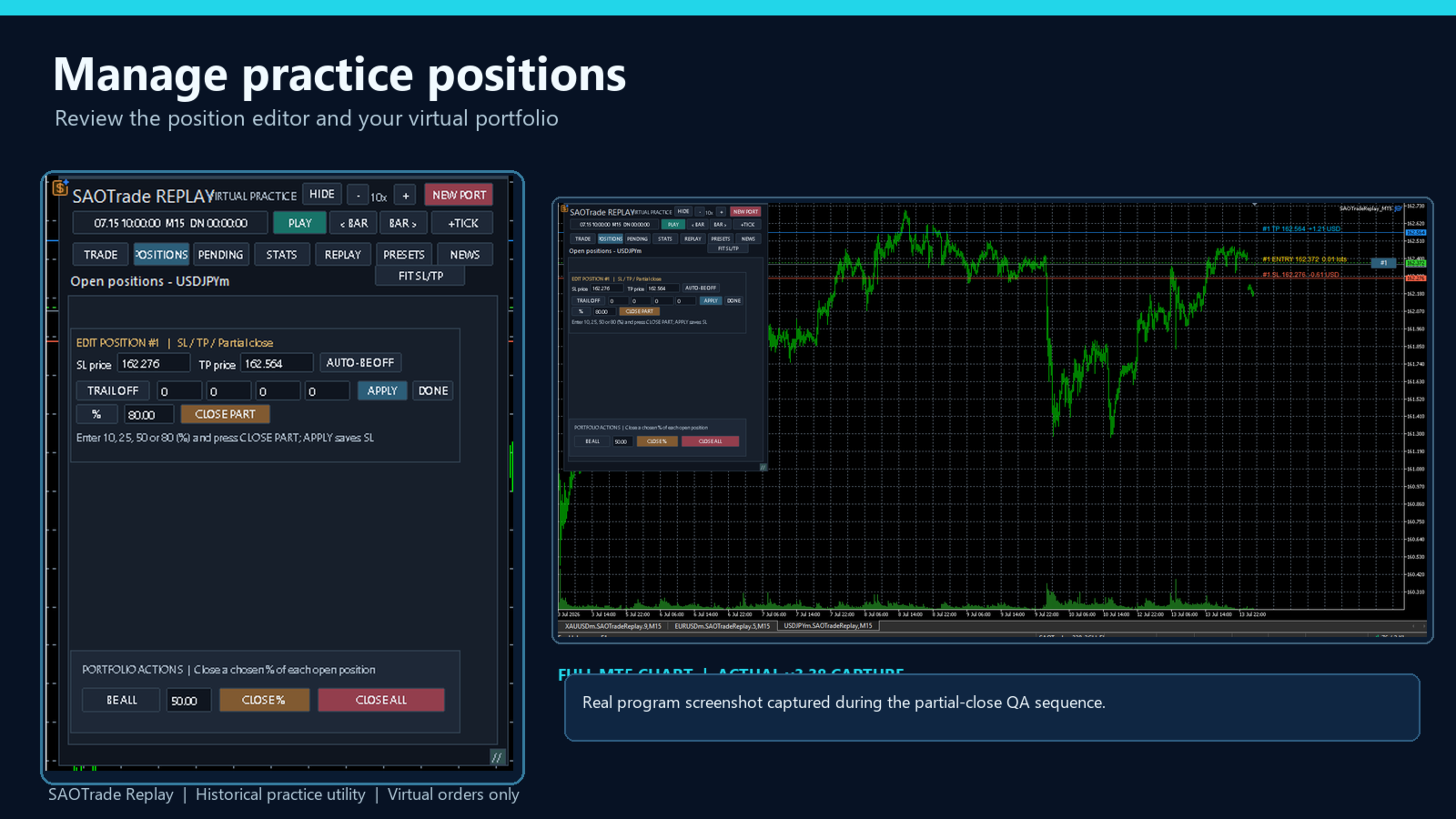
  • Close virtual positions manually.

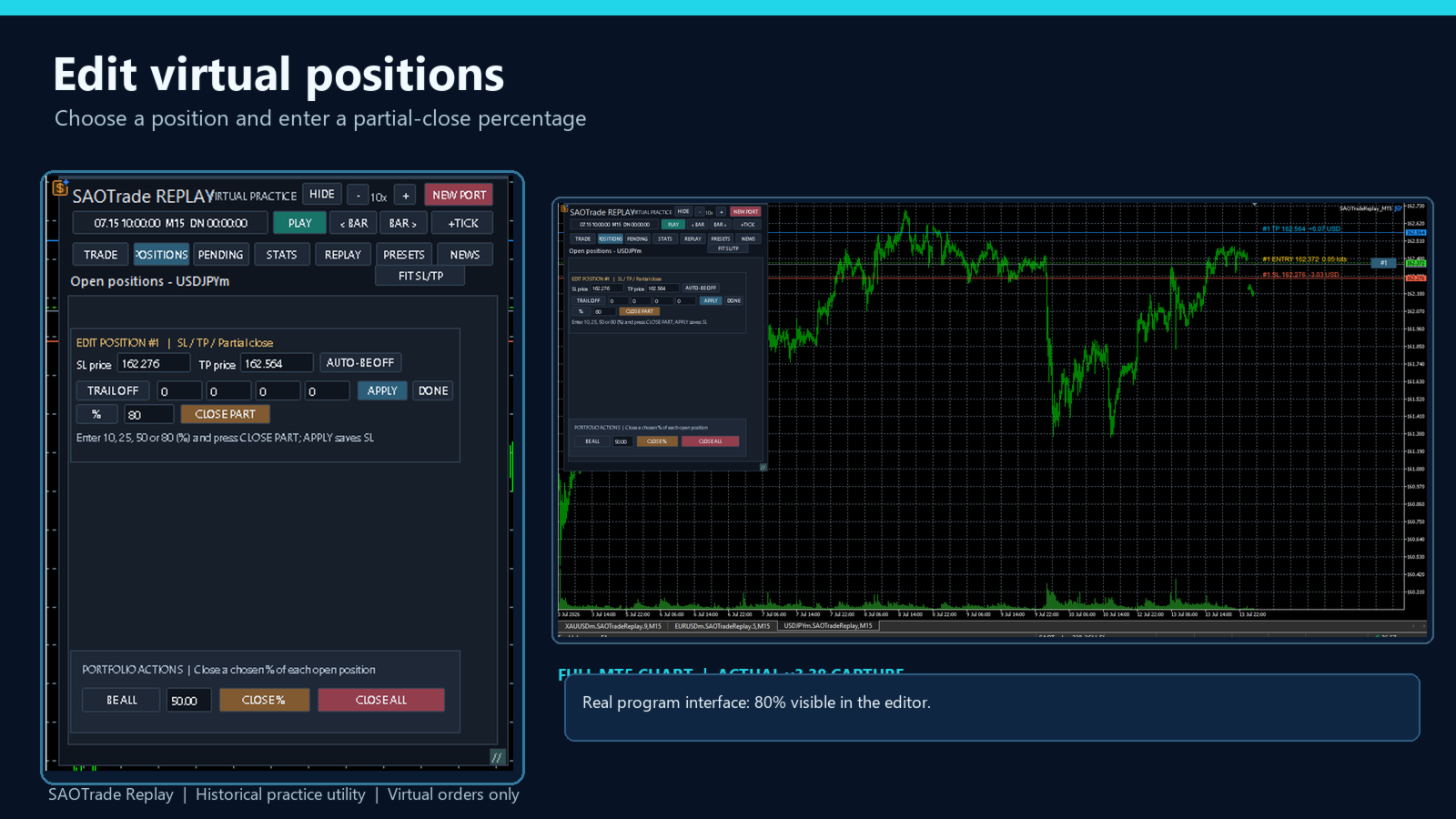
  • Partial close by percentage or lot size, subject to symbol volume requirements.

  • Move Stop Loss to break-even.

  • Manage trailing stops and pending orders.

Practice Account & Statistics

  • Monitor virtual balance, equity, and floating profit/loss.

  • Review trading activity and performance statistics.

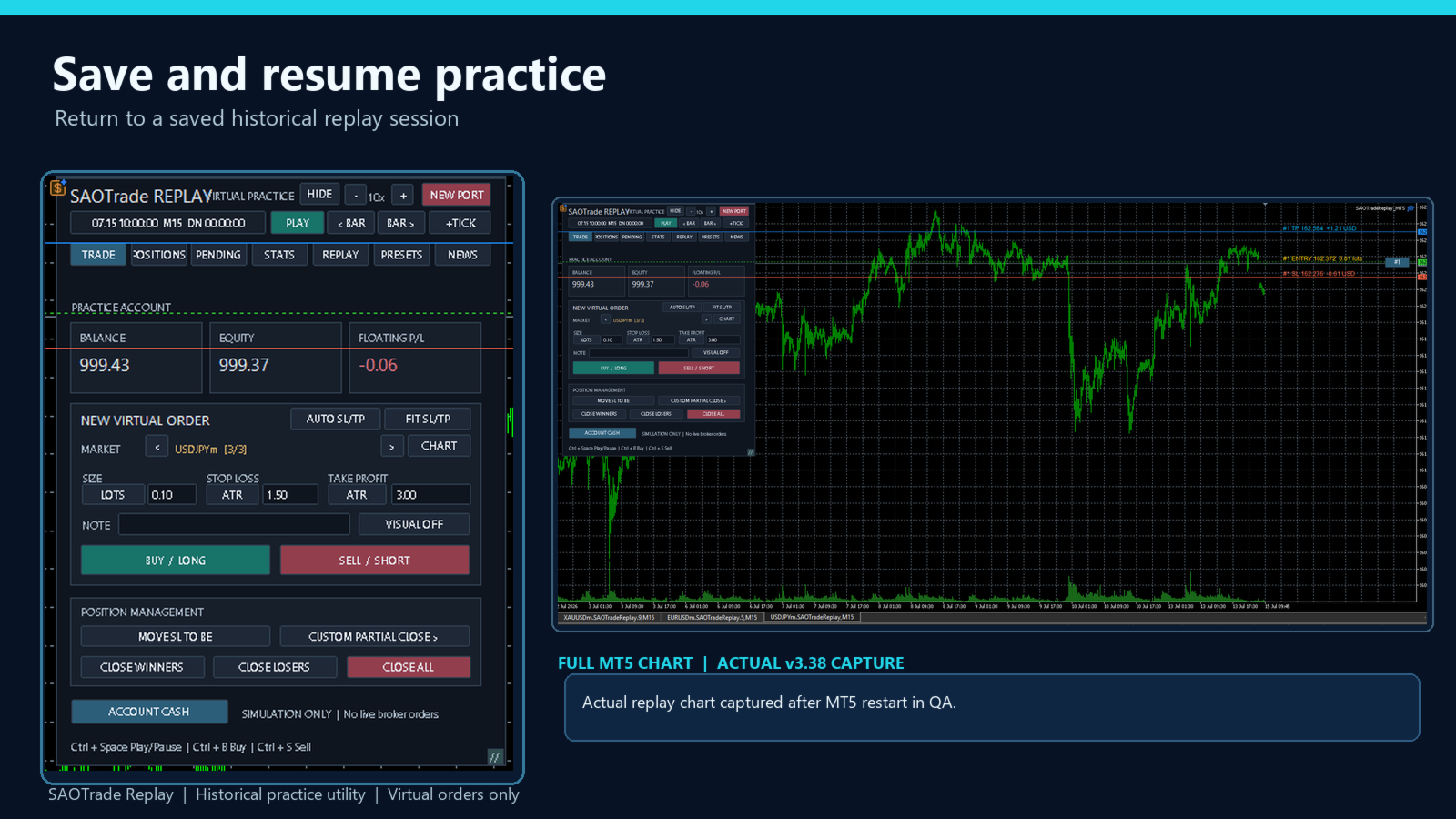
  • Save and resume practice sessions.

  • Review historical practice results and reports.

How to Get Started

  1. Install SAOTrade Replay in MetaTrader 5.

  2. Attach it to a chart with available historical market data.

  3. Select a replay starting date.

  4. Create a virtual practice account and begin replaying.

  5. Open virtual orders and manage their SL/TP levels.

  6. Attach the utility to additional charts and use JOIN for multi-symbol practice.

When opening a virtual position, replay pauses so you can review and adjust the initial SL/TP levels before continuing.

Use FIT SL/TP if your order lines are outside the visible chart area.

Historical Data Requirements

SAOTrade Replay uses historical price data available through your MetaTrader 5 terminal and connected broker.

  • Historical coverage varies by broker and symbol.

  • Tick data and Bid/Ask availability may differ.

  • Some historical periods may not be available.

  • No external historical data subscription or paid API is included.

  • Historical price files are not supplied with the product.

Important Information

  • Simulation only: No real broker orders are sent.

  • All positions, balances, and profit/loss values are virtual.

  • Simulated results may differ from real trading conditions.

  • This product does not provide trading signals or guarantee profitability.

  • It is not an automated trading strategy.

  • No external DLL or separate software activation service is required.

Requirements: MetaTrader 5 desktop, an accessible broker account, and suitable historical price data.

SAOTrade Replay is designed for traders who want to practice, review decisions, and develop their trading skills in a simulated historical market environment.
Recommended products
Pattern Recognition EA
Claudiu-georgian Zavera
Pattern Recognition EA - From Learn to Earn. The market repeats itself. This EA finds every past repeat of the current candle sequence - and lets history vote the direction. ONE SHAPE. EVERY REPEAT IN HISTORY VOTES. The last N candles on your signal timeframe form a shape. The EA scans the history you choose - a fixed number of bars or everything your broker provides - for the SAME shape, and checks what happened next, every single time. Only when enough repeats exist AND a clear majority of t
The Supply and Demand Zone Indicator is a powerful and easy-to-use tool designed to help traders identify critical supply and demand zones on the chart. These zones can provide valuable insight into potential market reversals, breakouts, and important price levels where buyers or sellers are likely to take control. The best   FREE Trade Manager . If you want to create your own Hedging or Grid strategies without any coding make sure to check out the   ManHedger Key Features: Automatic Zone Detect
FREE
Risk Guardian — Ultimate Equity & Drawdown Protection Protect your capital. Stay disciplined. Trade smarter. Risk Guardian is a powerful utility that helps traders automatically control daily risk and secure profits based on equity. Designed for MetaTrader 5, it’s lightweight, efficient, and extremely easy to use. Key Features: Daily Drawdown Limit (% based) Absolute Equity Target (e.g., stop trading after reaching 110,200 USD) Auto-close All Positions, Orders & Charts Visual Dashboard on C
BTC Trading Assistant EA (MT5) Manual trading assistant that helps place and manage trades with automated risk and stop management. Overview BTC Trading Assistant EA is a utility Expert Advisor for MetaTrader 5 intended for manual traders. It provides a chart interface to execute BUY/SELL/CLOSE actions and automates selected trade management functions such as position sizing, initial SL/TP placement, break-even, trailing stop and optional partial profit taking. This EA does not generate trade si

Trade Link
Lie Tony Candra
Trade Link is a powerful trading utility designed to simplify and enhance trade mirroring between multiple accounts. Built with a focus on speed, reliability, and precision, it allows traders to seamlessly copy trades from one account to another in real time. Despite its simplicity, Trade Link offers sophisticated control features, enabling users to manage risk, lot sizing, and execution with ease. The application can operate as both a trading server and a trading client, providing flexible depl
Helios Pulse
Jonathan Mboya Kinaro
Helios Pulse v1.03 — Real-Time Probability Dashboard for Manual Traders Helios Pulse transforms how you read the market. Instead of juggling multiple indicator windows and conflicting signals, you get one clear answer: a live probability percentage showing the market's directional bias right now, updated continuously with every tick. This is not another signal arrow panel. Helios Pulse is a probability engine that measures the degree of agreement across multiple technical dimensions and delivers
FREE
ScalperTraderPanel
Andres Daniel Leonel Lusin
Overview:   ScalperTradePanel is the ultimate assistant for manual traders and scalpers who need speed, precision, and automated trade management. Unlike standard one-click panels, this tool combines manual entry with an   automated Grid system , allowing you to average your entry price intelligently. It features a unique   Dual-Mode Interface : switch instantly between   Market Execution   for speed, or   Visual Pending Mode   to plan your trades directly on the chart with drag-and-drop lines t
Official BlueDigitsFx Ecosystem Access Get infrastructure updates, workflow resources, product releases, and ecosystem access through the official BlueDigitsFx ecosystem. Telegram Ecosystem Website MT4 Version BlueDigitsFx Spike And Strike Reversal MT5 — Mixed Oscillator for Market Reversal & Momentum Analysis BlueDigitsFx Spike And Strike Reversal is a composite oscillator that combines multiple indicator signals to help traders identify possible market reversals, momentum shifts, and exhau
The Stop Loss Manger - SL Mange With the Stop Loss Manager you can finally sleep peacefully while it effectively manages your risk in stock market trading. Simply set your individual stop loss limits and let the manager trade for you. Never worry about losses again - the Stop Loss Manager takes care of it for you! Get the ultimate support for your trading now and maximize your profits with ease. Join the community of successful traders who swear by Stop Loss Manager today. Function overview: 1.
Reverse Trader
ELITE FOREX TRADERS LLC
ELITE REVERSE TRADER (MT5) Instantly hedge or invert any trade opened on your account—manual or EA. Reverse Mirror EA monitors your live positions and opens an opposite trade using your chosen lot mode (Fixed or Multiplier). When the original position is closed (manual close, SL/TP hit, EA exit—any method), the mirrored position closes automatically. Because it runs in the same terminal, it reacts faster than third-party copy tools. WHY THIS MATTERS It is widely cited that a large majority of
NINJA MT5 DOCTOR PRO OVERVIEW NINJA MT5 Doctor Pro is a read-only MT5 utility that includes every detailed check from the free Doctor and adds continuous environment monitoring. It runs in Expert Advisor format, but it is neither a trading EA nor an indicator. A one-time FULL CHECK and timer-driven monitoring are available from one dashboard. Panel and input names are in English. FULL DIAGNOSIS FULL CHECK performs 15 environment checks: connection; terminal, account and Doctor permissions; open
Multi Timeframe Smc Bias Finder Trading in alignment with higher timeframe structure is one of the most consistently profitable habits a trader can build. The difficulty has always been execution: switching between timeframes, manually reading structure, and keeping track of whether the Daily, 4-Hour and 1-Hour are all pointing in the same direction before committing to a position. Multi Timeframe Smc Bias Finder resolves that entirely. Three tools in one indicator: A live multi-timeframe bias d
Martingale panel MT5
Mohammadbagher Ramezan Akbari
In this article, we would like to introduce the trade panel product with the Martingale panel. This panel is made in such a way that it can meet the needs of traders to a great extent. This trade panel actually consists of two trade panels at the same time, with the first one you can take positions with certain profit and loss limits, and with the second one, you can have positions with profit limits but without loss limits. When positions lose, a new position will be added based on the settings
Atlas Trade Desk
Bernhard Wurzlbauer
Atlas Trade Desk MT5 Atlas Trade Desk MT5 is a visual trade panel, risk manager and lot calculator for manual MetaTrader 5 traders. Plan market and pending orders directly on the chart, calculate position size from your selected risk, adjust Entry, Stop Loss and Take Profit visually, and manage open positions from one clean dashboard. The tool is built for discretionary traders who want faster order preparation, clearer risk control and safer position management without switching between multipl
PZ Mean Reversion MT5
PZ TRADING SLU
1 (1)
Outperform traditional strategies: effective mean reversion for savvy traders Unique indicator that implements a professional and quantitative approach to mean reversion trading. It capitalizes on the fact that the price diverts and returns to the mean in a predictable and measurable fashion, which allows for clear entry and exit rules that vastly outperform non-quantitative trading strategies. [ Installation Guide | Update Guide | Troubleshooting | FAQ | All Products ] Clear trading signals Ama
Product Name MT5 Gold & Silver Multi-Language Trading Panel V17.00 Introduction This is a professional trading panel designed specifically for manual gold and silver traders. It supports five languages: English, Chinese, Spanish, Arabic, and German. The panel automatically detects gold and silver symbols, so users do not need to enter symbol codes manually. It is compatible with most brokers worldwide, including standard accounts, zero spread accounts, and raw spread accounts. Users only need t
Fabii Half Trend Baseline
Fabien Georges Andre Guillemaud
Stop trading against the higher timeframe trend. Two baselines, one chart. No repaint. Any pair, any timeframe. On your chart in 2 minutes. Free demo in the Strategy Tester. Get more indicators here Baselines, volatility filters and oscillators. No repaint. Why you need it You enter a trade because a line turned green on your chart. Then you open a higher timeframe and see that the bigger trend points the other way. The signal was real. The trend behind it was not on your side. Every trade ta
RiskRider Pro
Stephane Paul Heritier
RiskRider Pro is a professional manual trading panel for MetaTrader 5. It puts every essential risk management tool at your fingertips without interrupting your chart analysis. KEY FEATURES One-click BUY / SELL Instant market execution with automatic stop-loss calculation. No confirmation dialogs, no delays. Risk:Reward Take Profit Define your R:R ratio once (default 2.0). The take-profit level is calculated automatically on every trade based on your stop-loss distance. Dynamic Lot Sizing W
Price Action Builder Premium
Florea E. Sorin-Mihai Persoana Fizica Autorizata
The Price Action Builder Premium expert advisor is an extension of the freely available Price Action Builder Basic :     it provides 2 new candlestick patterns besides the pinbar (already available in the basic edition);     in most configurations, backtesting usually shows an average yearly return rate increased by approximately 50%;     the account growth curve is also smoother, due to larger number of trades, almost double (2x) compared to the free version. While aimed primarily at obtaining
Onnyx Indicator is a non-repainting supply and demand analysis indicator for MetaTrader 5. It identifies confirmed swing-based zones, scores their quality, and displays clear BUY and SELL signals directly on the chart. MAIN FEATURES • Supply and demand zones based on confirmed price swings • ATR-adaptive zone width for changing market volatility • Zone quality displayed as a percentage inside each zone • Clear BUY and SELL arrows with enlarged signal markers • Closed-candle signal logic designed
Our   Basic Support and Resistance   indicator is the solution you need to boost your technical analysis. This indicator allows you to project support and resistance levels on the chart /   MT4 Version Features Integration of Fibonacci Levels:  With the option to display Fibonacci levels alongside support and resistance levels, our indicator gives you an even deeper insight into market behavior and possible reversal areas. Performance Optimization:  With the option to update extended lines onl
ApeX Journal MT5
Korakot Santithammarak
View User Manual       ApeX Trade Manager MT5  →     ApeX Journal MT5  →     ApeX Indicator SMC MT5  →     ApeX Indicator ICT Concepts MT5  →     ApeX Indicator Volume Profile MT5  →    ApeX Indicator ICT Macros MT5  → Your broker keeps a list of your trades. It does not keep a record of your trading. ApeX Journal turns the history already sitting in MetaTrader into the journal you keep meaning to write. Powered by ApeX Journal A complete trading journal, built directly inside MetaTrader 5.
CoPilot dashboard MT5
Frederic Jacques Collomb
CoPilot — Daily Trading Dashboard Know your numbers. Trade with clarity. MT4 version What is CoPilot? CoPilot is a professional-grade trading assistant that displays in real time all your daily performance statistics directly on the chart — with a live equity curve that updates trade by trade. Designed for active traders who need instant visibility into their session without leaving the chart, CoPilot aggregates every closed trade of the day across all symbols and presents them in a clean, color
Ultimate Pro Trading Panel — All-In-One Manual & Grid Trading Dashboard Pro Trading Panel   is an all-in-one on-chart control panel that gives discretionary and semi-automated traders a complete toolkit for entries, exits, risk management, and grid trading — without leaving the chart. Every function is visual, draggable, and updates in real time. If you want to test this utility feel free to download the basic preview version of this tool here:  https://www.mql5.com/en/market/product/181435 Who
️ Trade Manager oneclick  ( Reverse Trade,  Partial Close,  Breakeven, Close All Running Trade )   control – Smart Manual Trade Control for MT5 Trade Manager oneclick control is a powerful yet lightweight trade management utility built for manual traders who want precise control over their open positions — directly from the MT5 chart. This EA does not open or close trades automatically based on any strategy. It simply provides one-click management tools to handle your running trades efficient
FREE
A good backtest is not proof. It can come from luck, from a few outsized trades, from costs that are too optimistic, or from parameters fitted to the past. EdgeProof Lab takes the closed trades of any strategy and puts them through eight stress tests, then gives one clear robustness score from 0 to 100 with a grade from A to F. THE TESTS - Monte Carlo drawdown: 2,000 resampled trade sequences. Shows the 95th percentile drawdown compared with the backtest, and the share of paths that end in pro
Fibonacci Sniper XAUUSD
Luis Paulo de Oliveira
GOLD FIBONACCI SNIPER M5 Description GOLD FIBONACCI SNIPER M5 is a professional MetaTrader 5 indicator specially developed for XAUUSD (Gold) on the M5 timeframe. The indicator uses Fibonacci retracements combined with trend analysis, volatility filters, candle rejection patterns, and market strength confirmation to identify high-probability entry opportunities. The system automatically detects retracement zones between the 38.2, 50, and 61.8 Fibonacci levels, which are commonly considered instit
Risk Validator
Thiago Chagas Brito
Evaluate operational viability in each timeframe and in any instrument, according to their respective spread and percentage volatility, which are essential for correct risk management in your trades. This indicator is essential for both Day Traders and Swing Traders, as in addition to evaluating operational viability in each timeframe, it is also possible to identify the fair minimum stop for each period and instrument. Example in Swing Trade: your broker charges a spread equivalent to 0.05%
MT5 Trade Copier Transmitter & Receiver EA A flexible MetaTrader 5 trade copier system designed to transmit and mirror positions across multiple broker accounts with accurate symbol mapping, including gold/XAU instruments. It supports reliable snapshot-based synchronization, position lifecycle tracking, and broker-specific symbol translation so trades can be copied even when brokers use different contract names or suffixes. Features Copies live positions from transmitter to receiver in near rea
The indicator automatically identifies and labels essential elements of market structure shift, including: Break of Structure (BoS): Detected when there is a significant price movement breaking previous structural points. It mark possible uptrend and downtrend lines(UP & DN, It means constantly update high and low ), and once the price breaks through these lines, mark the red (BEAR) and green (BULL) arrows. BoS typically occurs when the price decisively moves through swing lows or swing highs t
Buyers of this product also purchase
Trade Assistant MT5
Evgeniy Kravchenko
4.43 (216)
It helps to calculate the risk per trade, the easy installation of a new order, order management with partial closing functions, trailing stop of 7 types and other useful functions. Additional materials and instructions Installation instructions - Application instructions Line function -   shows on the chart the Opening line, Stop Loss, Take Profit. With this function it is easy to set a new order and see its additional characteristics before opening.   Risk management  - The risk calculation
Forex Trade Manager MT5
InvestSoft
4.98 (688)
Trade Manager MT5 is an advanced position size calculator and trade management tool for MetaTrader 5, designed to help traders plan trades faster, control risk more precisely, and manage open positions directly from the chart. It combines order placement, risk based lot calculation, Stop Loss and Take Profit management, Break Even, Trailing Stop, Partial Close, Equity Protection, and external trade management in one panel. Whether you trade forex, indices, metals, commodities, crypto, or future
Telegram to MT5 MultiChannel Copier
Sergio Marquez Uroz
4.67 (21)
Telegram to MT5 Multi-Channel Copier   automatically copies trading signals from your Telegram and Discord channels straight to MetaTrader 5. No bots, no browser extensions, no manual copying. A signal arrives in Telegram or Discord and the EA opens the trade in your terminal within seconds. And before you copy a channel, the built-in backtester shows you what that channel would have done in your account. The product has two components: a Windows application that listens to your Telegram channel
FarmedHedge Pair Trading Dashboard
Tanapisit Tepawarapruek
5 (6)
Farmed Hedge Yield Farming | All Markets (Manual - Hybrid - Semi/Automated EA) VERIFIED TRADING RESULTS - Farmed Hedge Yield Axi Copy:  https://www.mql5.com/en/signals/2356376 - Farmed Hedge Yield Exn Copy:   https://www.mql5.com/en/signals/2356404 - Farmed Hedge Yield V Copy:  https://www.mql5.com/en/signals/2357156 IMPORTANT NOTICE: FarmedHedge is a MANUAL-FOCUSED TRADING UTILITY ,not a fully automated EA. Results shown on this Signal include manual trades and overall strategic management.
Copy Telegram signals with your own trading rules Telegram to MT5 Signal Trader automatically copies text-based trading signals from public and private Telegram channels and groups into MetaTrader 5. Manage multiple providers and MT5 accounts from one desktop app, with individual risk and trade settings for each provider . No Telegram bot or API setup needed for copying. Simply sign in with your own Telegram account by phone or QR code and select the channels or groups you have already joined. Y
TradePanel MT5
Alfiya Fazylova
4.88 (170)
Trade Panel is a multi-functional trading assistant. The app contains over 50 trading functions for manual trading and allows you to automate most trading tasks. Application instructions: https://www.mql5.com/en/blogs/post/756482 Trial version of the application for a demo account: https://www.mql5.com/en/blogs/post/750865 How to install the application: https://www.mql5.com/en/blogs/post/756239 How to test the application in visual mode: https://www.mql5.com/en/blogs/post/770277 How to install
================================================================================ POC BREAKOUT - V20.72. Full Professional Grade Toolkit ================================================================================ POC Breakout is a full MetaTrader 5 trading dashboard for discretionary traders who want breakout signals, Point of Control (POC) context, volume profiles, order flow, market structure, news, alerts, and advanced trade planning in one professional workspace. Attached directly to you
News Trade EA MT5
Konstantin Kulikov
4.55 (11)
Present to you the useful robot that I have been using for several years. It can be used in both semi-automatic mode and fully automatic mode. >>> Chat <<< The program contains flexible settings for trading on the news of the economic calendar. It cannot be checked in the strategy tester. Only real work. In the terminal settings, you need to add the news site to the list of allowed URLs. Click Tools > Options > Expert Advisors. Check the option "Allow WebRequests for listed URL:". Add this (de
Master Your Trading Discipline   Stop losing your hard-earned gains to overtrading and emotional decisions. The Discipline Tool is your ultimate trading assistant, ensuring strict risk management in real-time. Key Protection Features: Advanced Drawdown Defense : Automatically halts trading if your daily drawdown exceeds a preset threshold (percentage or dollar amount). Real-Time Equity Lock : Safeguard profits by referencing peak equity, ensuring drawdown stays within control. Hard Profit Target
Entry In The Zone with SMC Multi Timeframe is a real-time market analysis tool based on Smart Money Concepts (SMC), designed to analyze market structure, price direction, and key trading zones. It supports both Single-Timeframe and Multi-Timeframe Analysis, providing a clearer view of overall market structure across multiple timeframes, with real-time BUY / SELL signals designed with a strict focus on No-Repaint principles.   The signals are designed to help filter unclear setups and evaluate tr
The product will copy all telegram signal to MT5 ( which you are member) , also it can work as remote copier.  Easy to set up, copy order instant, can work with almost signal formats, image signal,  s upport to translate other language to English Work with all type of channel or group, even channel have "Restrict Saving Content", work with  multi channel, multi MT5 Work as remote copier: with signal have ticket number, it will copy exactly via ticket number. Support to backtest signal. How to s
EasyInsight AIO MT5
Alain Verleyen
4.92 (12)
EASY Insight AIO – All-In-One Power for AI-Driven Trading Want to skip the setup and start scanning the entire market – Forex, Gold, Crypto, Indices, and even Stocks – in seconds? EASY Insight AIO is the complete plug-and-play solution for AI-powered trade analysis. It includes all core Stein Investments indicators built-in and automatically exports clean, structured CSV files – perfect for backtesting, AI prompts, and live market decision-making. No need to install or configure indicators manu
MT5 to Telegram Signal Provider turns your trading account into a signal provider. Every trade action, whether manual, by EA or from your phone, is instantly sent as a message to Telegram. You can fully customize the format or use a ready-made template for quick setup. [ Demo ] [ Manual ] [ MT4 Version ] [ Discord Version ]     New: [ Telegram To MT5 ] Setup A step by step user guide is available. Key Features Ability to customize order details sent to subscribers You can create a tiered subs
Power Candles Strategy Scanner - Self-Optimizing Multi-Symbol Setup Finder Self-optimizing settings work one chart at a time, and finding where they pay off right now means opening chart after chart. Power Candles Strategy Scanner runs the same self-optimizing engine as the Power Candles indicator on every symbol in your Market Watch, side by side. One panel ranks where it pays off: the winning strategy per symbol, its optimized Stop Loss and Take Profit. An alert fires the moment a fresh signal
The Patch
Mian Rameez Ali
The Patch It never opens a trade. It walks behind the ones that did. Every open position, every pending order — checked twice a second for the one thing that's easy to forget: a stop, a target. Found bare, it doesn't ask. It writes the missing number in, measured in points from wherever the position began, and moves on to the next. No strategy, no opinion on direction. Just the quiet assumption that nothing should ever sit on the market unprotected — not because someone decided it shouldn't,
Grid Manual MT5
Alfiya Fazylova
4.73 (22)
Grid Manual is a trading panel for working with grid strategies. The utility is universal, has flexible settings and an intuitive interface. It works with a grid of orders not only in the direction of averaging losses, but also in the direction of increasing profits. The trader does not need to create and maintain a grid of orders, the utility will do it. It is enough to open an order and the "Grid manual" will automatically create a grid of orders for it and will accompany it until the close. F
Anchor Trade Manager
Kalinskie Gilliam
5 (9)
Your EAs cannot see each other, but Anchor can. Anchor gives you one place to coordinate your EAs, manage risk, and decide when trading is allowed. It works alongside the trading bots you already use without any changes to them. The Problem One EA opens a trade. Then another starts trading. The next thing you know, you wake up to multiple grids built across your account. Each EA may be doing exactly what it was designed to do, but together they can place far more risk on your account than you in
RETAILBERG FOOTPRINT CHART PRO — Order-Flow Workspace for MetaTrader 5 Version 7.00  |  Professional System  |  31 tools  |  One chart A full 150-page illustrated User Manual is included. Please read the full manual to understand this feature packed footprint chart elements and ui. https://www.mql5.com/en/blogs/post/777982 DEMO / STRATEGY TESTER — PLEASE READ FIRST
Trade Indicator Assistant   is a powerful MT5 utility designed to turn indicators into automated trading systems. Its main feature is the ability to automatically detect an indicator’s   BUY and SELL signal buffers , without requiring you to know the buffer numbers, search through indicator settings, or modify the indicator source code. Bonus Indicator:   After purchasing Trade Indicator Assistant, contact me to receive   Trade Signal Pro   completely free as a bonus indicator. [Download Demo V
Floor Watch
Syed Tauqeer Hussain Shah
Floor Watch One number, watched every thirty seconds: how far equity has fallen since the day began — or since its highest point, if it's told to trail the peak instead of the open. Cross the line and it doesn't argue. Every open position closes, every pending order vanishes, and anything that slips through afterward gets shut the moment it appears. Not asked. Removed. The floor holds until the clock turns 5 AM Pakistan time — then, and only then, does the day start over. One rule. No except
Buy once. Get all my MT4 and MT5 indicators - available now and released in the future - at no extra cost. Contact me after purchase for instructions to receive them. The price is planned to rise by 50$ after every 10 purchases, up to 999$. The Market price at checkout applies. Keep the indicator you trust. Automate the work around it. Your signal. Your rules. Your execution. Already have an MT5 indicator you rely on, but still need to watch the chart, wait for a signal, calculate the lot, plac
Trader Evolution
Siarhei Vashchylka
5 (7)
" Trader Evolution " - A utility designed for traders who use wave and technical analysis in their work. One tab of the utility is capable of money management and opening orders, and the other can help in making Elliott wave and technical analysis. Manual (Be sure to read before purchasing) | Version for MT4 Advantages 1. Trading in a few clicks. Immediate and pending orders are available in the panel 2. Money management. The program automatically selects the appropriate lot size 3. Simplifies
EA Overfitter
Stephen J Martret
5 (1)
That backtest looks great. But will it still be making money tomorrow, next week, next month? EA Overfitter re-runs your EA on 100 price histories it has never seen. One score tells you if the edge is real. A backtest tells you what an EA did on one price history — the one that happened to occur. What you cannot tell from it is how much of that result was the strategy and how much was the particular path. EA Overfitter answers that. It builds up to 100 synthetic price histories your EA has n
Trade Manager DaneTrades
Levi Dane Benjamin
4.13 (31)
DaneTrades Trade Manager is a professional trade panel for MetaTrader 5, designed for fast, accurate execution with built‑in risk control. Place market or pending orders directly from the chart while the panel automatically calculates position size from your chosen risk, helping you stay consistent and avoid emotional decision‑making. The Trade Manager is built for manual traders who want structure: clear risk/reward planning, automation for repeatable management, and safeguards that help reduc
YuClusters
Yury Kulikov
4.93 (43)
Attention: You can view the program operation in the free version  YuClusters DEMO .  YuClusters is a professional market analysis system. The trader has unique opportunities to analyze the flow of orders, trade volumes, price movements using various charts, profiles, indicators, and graphical objects. YuClusters operates on data based on Time&Sales or ticks information, depending on what is available in the quotes of a financial instrument. YuClusters allows you to build graphs by combining da
Quant AI Agents
Ho Tuan Thang
5 (1)
Quant AI Agents are independent trading Expert Advisors. Instead of trading using a fixed strategy like other conventional EAs, Quant AI Agents   is a   multi-agent AI trading framework   that turns natural-language strategy prompts into live.  WANT THE SAME RESULTS AS MY LIVE SIGNAL?   Use the exact same brokers I do:   IC MARKETS , IC TRADING   .  Unlike the centralized stock market, Forex has no single, unified price feed.  Every broker sources liquidity from different providers, creating un
Daily Trading Limiter
AL MOOSAWI ABDULLAH JAFFER BAQER
5 (8)
• Please test the product in the Strategy Tester before purchasing to understand how it works. • If you face any issues, contact me via private message—I’m always available to help. • After purchase, send me a screenshot of your order to receive a FREE EA as a gift. Daily Trading Limiter — the rule you cannot break Every trader knows the number. Three trades. Two percent. One bad day and stop. And every trader has watched themselves take the fourth trade anyway. The problem was never knowing th
Premium Trade Manager - The Trade Panel With a Coach Built In Premium Trade Manager puts a trading coach inside your chart, with a full execution engine underneath it. Set the trade up the way you always do, then let Max, your AI trading coach, read that exact setup against your live account and give you a straight verdict before you commit: is the stop disciplined, is the risk sane, is a high-impact release minutes away, are you near a prop-firm limit. Below sits the engine that runs everything
FUTURES ORDERFLOW FOOTPRINT CHART Professional OrderFlow EA for MetaTrader 5 Version 1.01| Professional tool for real traders | Institutional-Grade Visualization STRATEGY TESTER USERS - PLEASE SELECT EVERY REAL TICK WHEN TESTING AND YOU HAVE DOWNLOADED HISTORICAL DATA. IF YOU SEE A WAITING SCREEN AND IT IS NOT DOWNLOADING, IT MEANS YOU HAVE LOW HISTORICAL DATA. TRY 1 MIN AND 5 MIN FIRST ON 1 DAY DATA. ONE DAY DATA SHOULD BE THE NEWEST AND MOST CURRENT DATE. PLEASE WAIT UNTIL THE MARKET HAS ROL
Trading Chaos Expert
Hennadii Stanilevych
5 (11)
This software has no equals in the world and represents a universal trade "console" covering trading signals, automated market entry, setting of Stop Loss and Take Profit, as well as Trailing Profit for multiple trades at the same time in a single open window. Intuitive control of the Expert Advisor in "three clicks" ensures a comprehensive use of all its functions on different computers, including tablets PCs. Interacting with additional signal indicators that mark the chart to give a real mark
Filter:
No reviews
Reply to review