OmniTrend Multisignal
- Experts
-
Iurii Cherepanov
 I have been active in the financial markets since 2008. The core of my work involves Forex trading as a signal provider on ZuluTrade, where I have successfully operated and weathered three corporate reorganizations. I have accumulated extensive experience in manual trading. I have incorporated years
 - Version: 3.1
- Updated: 16 October 2026
- Activations: 5
🔥 OMNITREND PRO MULTISIGNAL
THREE SIGNAL MODES • SEQUENTIAL TRADING • PROFIT MANAGEMENT • MT5
OmniTrend PRO MultiSignal is an automated multi-currency trading advisor for MetaTrader 5 that combines three signal generation modes across 6 currency pairs and 5 timeframes. It manages positions sequentially and employs trading risk control mechanisms.
You can split your main trading account into separate sub-accounts for specific trading pairs using custom allocation ratios. Each sub-account includes a full suite of trading settings:
- Choice of one of three trading signal modes (via a selector switch).
- A two-position setup. You can set a specific volume for each position. You can disable one position by setting its volume to 0.00, effectively trading with a single position using a custom monetary Stop Loss (SL).
- A Take Profit (TP) value is set for the first trade.
- The second position begins looking for its own signal if the first position starts accumulating a loss. The minimum gap between the first and second positions is user-defined in the settings (minimum value: 100). The second position's TP is determined based on the gap distance (where 100% equals the distance between positions); values exceeding 100% are also possible.
- Each signal type has its own indicator settings. Experiment with these settings to suit different market conditions. For example, if a trade closes at SL, it may be time to re-evaluate the signal (i.e., adjust the indicator settings).
- Includes a ProfitLock function (25–45%). This feature sets a Stop Loss to secure accrued profits once the price has covered 50% of the distance to the second position's TP.
- A separate monetary Stop Loss for each trading instrument. If the SL is triggered, trading for that specific pair is automatically suspended and must be manually reactivated by the user via an on-screen button. - a global Stop Loss (SL) for the entire deposit (%). If the global SL is triggered, trading is halted; it resumes only after the deposit is topped up or the deposit size is adjusted in the account settings.
The key feature of MultiSignal is the ability to select a specific entry algorithm for each trading pair.
Instead of being limited to a single fixed strategy, the trader can choose from three operational modes utilizing the MACD, Awesome Oscillator (AO), and Stochastic indicators. Each tool can be configured according to the chosen algorithm, and its behavior can be analyzed using historical data.
This Expert Advisor (EA) is designed for traders who prefer to independently test trading systems, analyze results, and fine-tune settings for specific instruments.
⚡ THREE SIGNAL MODES
1. MACD + AO — standalone algorithm
In this mode, the trading signal is generated based on the sequence of Awesome Oscillator (AO) bars and the position of the indicators relative to a specified zero level.
BUY
AO forms a sequence: a decline followed by two consecutive rises.
The AO bars being analyzed are below the specified zero level.
The MACD main line is below this level.
MACD confirms the direction based on the setting for the number of closed candles.
SELL
AO forms a sequence: a rise followed by two consecutive declines.
The AO bars being analyzed are above the specified zero level.
The MACD main line is above this level.
MACD confirms the direction based on the setting for the number of closed candles.
Once the AO condition is met, the EA waits for MACD confirmation. The maximum waiting time can be limited via a specific parameter.
This mode allows for testing a standalone strategy combining AO and MACD, without involving the Stochastic indicator.
2. MACD + AO + Stochastic — additional confirmation
The second mode utilizes the MACD + AO algorithm with the additional inclusion of the Stochastic indicator. The core idea is to evaluate the trading situation not only based on MACD and AO conditions but also to incorporate the Stochastic indicator as an additional confirming factor.
This mode is designed to compare the results of the base algorithm with those of the algorithm supplemented by the Stochastic indicator.
The specific Stochastic confirmation condition is determined by the Expert Advisor's implementation. Therefore, the specific type of crossover or indicator line position should be described in the documentation in strict accordance with the code.
3. Stochastic + MACD — sequential algorithm
This is the initial algorithm where the Stochastic condition comes first, followed by a requirement for MACD confirmation.
BUY
The Stochastic crosses a specified level from bottom to top.
The Expert Advisor records the signal and begins counting bars.
A confirming MACD pattern is awaited within a set range.
A buy signal is generated when the conditions are met.
SELL
The Stochastic crosses a specified level from top to bottom.
The Expert Advisor records the signal and begins counting bars.
A confirming MACD pattern is awaited within a set range.
A sell signal is generated when the conditions are met.
Minimum and maximum waiting intervals are set by the user. If confirmation is not r...appears within the specified timeframe, the pending signal is discarded according to the algorithm's rules.
The sequence of events is crucial here: first Stochastic, then MACD.
🔧 INDEPENDENT SETTINGS — INDIVIDUAL CONFIGURATION FOR EACH PAIR
OmniTrend PRO MultiSignal allows you to select signal modes independently for each supported trading pair.
For example:
EURUSD — MACD + AO;
GBPUSD — MACD + AO + Stochastic;
XAUUSD — Stochastic + MACD.
This is merely an example of mode allocation, not a ready-made trading recommendation.
This approach enables the testing of different strategies within a single Expert Advisor. You can select specific settings for available indicators and confirmation parameters for each instrument.
🔄 SEQUENTIAL TRADING — SEQUENTIAL POSITION MANAGEMENT
OmniTrend PRO MultiSignal manages not only the initial entry but also the subsequent development of the trade.
The first position opens once a signal is generated.
Stop Loss and Take Profit levels are set for it according to the configuration.
If the Take Profit is not reached and the price moves in the opposite direction, the Expert Advisor can wait for conditions to open a second position in the same direction as the first.
The minimum step between positions is user-defined, subject to established limits.
The Take Profit for the second position is calculated based on a specified percentage of the distance between the first and second positions.
Thus, the trading logic incorporates sequential position management following the initial entry.
💰 PROFIT MANAGEMENT — PROFIT MANAGEMENT
The Expert Advisor features automatic Take Profit management and a Profit Lock mechanism.
When the price covers a set portion of the distance to the Take Profit, the Profit Lock mechanism moves the protective Stop Loss according to the settings to secure a portion of the gains achieved during the price movement. In the described configuration, activation occurs when 50% of the distance to the Take Profit level has been covered, and the magnitude of the protected price movement is determined by the ProfitLock parameter.
The actual result depends on order execution and subsequent price action. A protective Stop Loss does not guarantee that the trade will close in profit.
🛡️ RISK CONTROL
The Expert Advisor includes several levels of loss control.
Global SL (%). An overall loss threshold calculated based on the aggregate base across trading pairs as defined by the algorithm.
Individual Monetary SL. A separate loss limit for each pair.
Trading Suspension. If the corresponding Stop Loss is triggered, trading for that specific pair ceases, while other pairs continue to operate.
Manual Restart. Trading for a suspended pair can be resumed using the on-screen button.
Test Mode. The strategy tester allows trading to continue after a Stop Loss is triggered, enabling the user to observe subsequent market movements.
These mechanisms facilitate risk management but do not eliminate the possibility of losses or guarantee the preservation of the deposit under all market conditions.
⚙️ FLEXIBLE SETTINGS
OmniTrend PRO MultiSignal is designed to allow for the customization of parameters.
Depending on the selected mode, the user can analyze the impact of:
MACD periods and parameters;
Stochastic parameters and crossover levels;
MACD and AO zero levels;
The number of candles for MACD confirmation;
Confirmation wait intervals;
Minimum step between positions;
Take Profit, Stop Loss, and Profit Lock parameters.
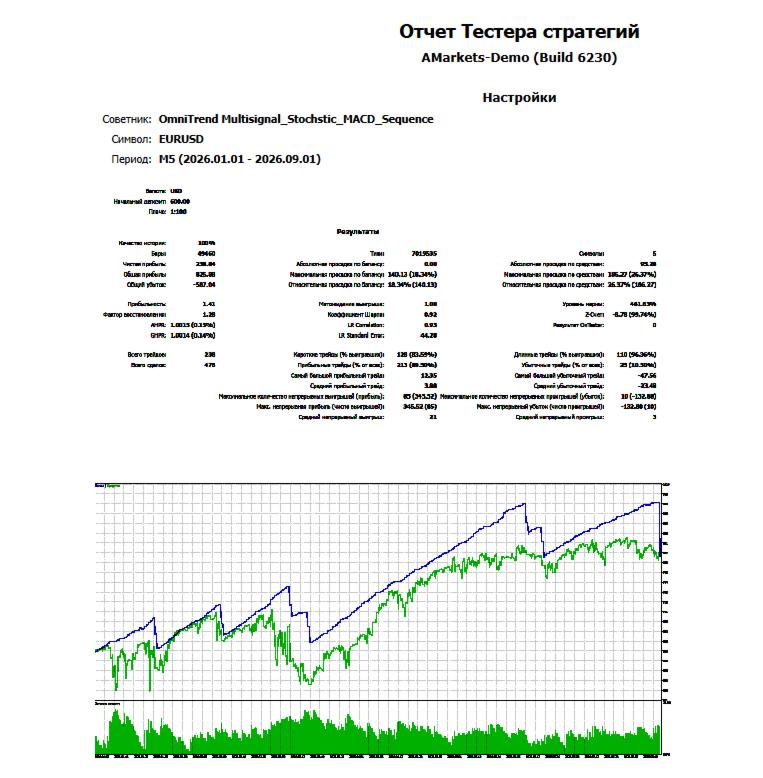
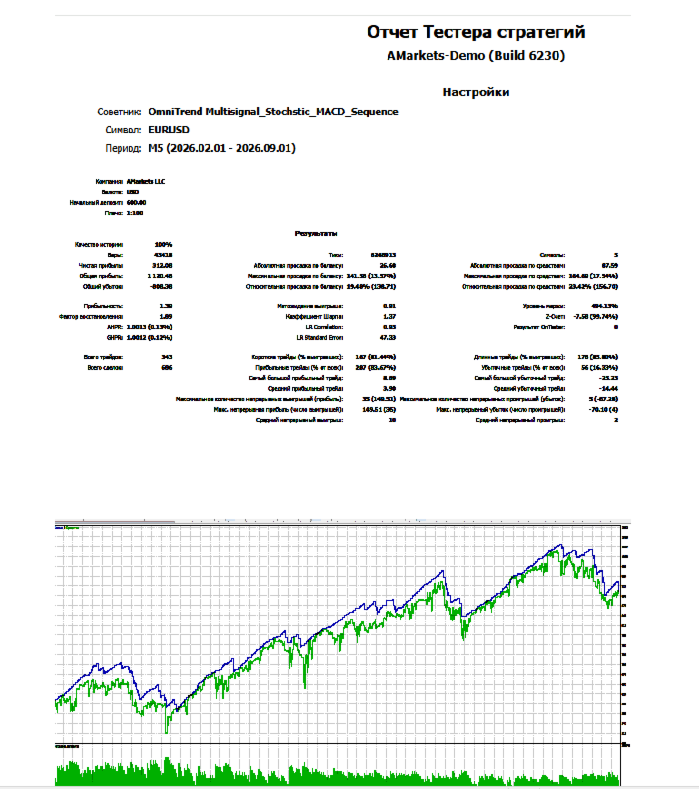
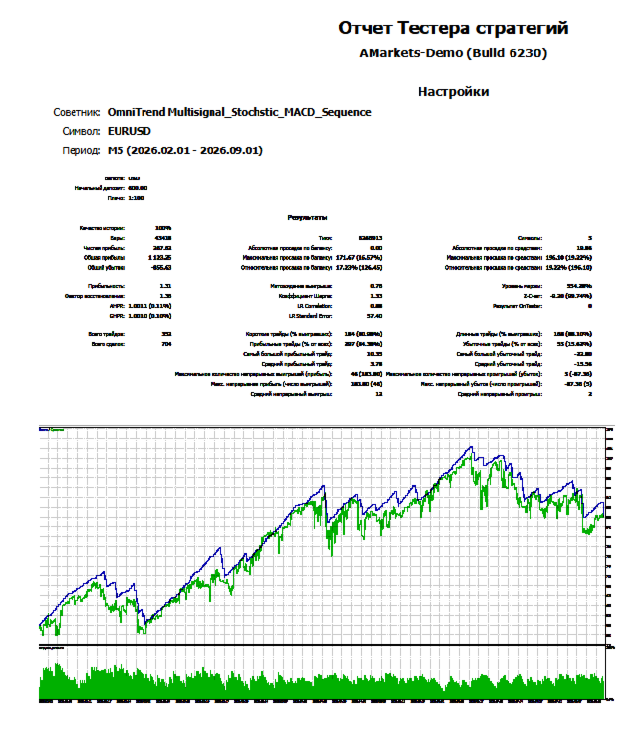
The default values are intended for testing purposes. They are not universally optimal for all trading instruments. It is recommended to adjust parameters gradually, comparing not only the final profit but also the maximum drawdown, the number of trades, the profit-to-loss ratio, and the consistency of results across different historical periods.
🚀 MAIN ADVANTAGES
Three Signal Modes — three signal generation modes.
Independent Per-Symbol Selection — separate algorithm selection for each pair.
MACD + AO — a standalone algorithm based on two indicators.
MACD + AO + Stochastic — additional confirmation of trading conditions.
Stochastic + MACD — sequential signal confirmation using two indicators.
Sequential Trading — management of position sequences.
Profit Lock — a mechanism to secure a portion of the gains made during a price move.
Global and Individual SL — global and individual loss limits.
Multi-Symbol Trading — operation across multiple instruments.
Flexible Parameters — ability to customize parameters for the chosen market.
MetaTrader 5 — operates within the MT5 trading environment.
🎯 WHO IS IT FOR?
OmniTrend PRO MultiSignal is suitable for traders who:
want to automate trading in MetaTrader 5;
prefer to select parameters themselves;
want to compare multiple algorithms within a single Expert Advisor;
use various trading instruments and do not want to be limited to a single signal scheme;
are willing to test strategies using historical data and demo accounts.
⚠️ IMPORTANT
OmniTrend PRO MultiSignal does not guarantee profit and does not......entails the risk of losing funds.
Automated trading results depend on market conditions, settings, volatility, spreads, commissions, slippage, order execution quality, and other factors.
Before using real funds, it is recommended to conduct your own testing in the MetaTrader 5 Strategy Tester, verify settings across various historical periods, and additionally test the Expert Advisor on a demo account.
🔥 OMNITREND PRO MULTISIGNAL
THREE SIGNAL MODES
SEQUENTIAL TRADING