EA Pro Risk Manager
- Utilities
-
Sayed Ali Ordibehesht
 EA PRO TEAM is an independent trading software brand founded by Sayed Ali Ordibehesht, a trader and software developer.
We build professional MetaTrader 5 tools and trader productivity solutions for risk management, trade execution, automation and performance analysis. - Version: 4.1
- Activations: 5
EA Pro Risk Manager — Trade Management, Partial Exits & Drawdown Control for MT5
An all-in-one MT5 trading panel for planning trades, managing open positions and applying configurable daily, weekly, monthly and total drawdown controls — for prop-firm and personal accounts.
Try it free: open the demo in the Strategy Tester, turn on Visual mode and press Start. The panel appears on the chart and you can place test trades. Phone and Telegram alerts do not work in the tester.
- Lot size from your risk — before you click Buy
- Three partial TP levels with break-even and SL shift
- Three trailing-stop methods: TP Levels, Candle, Classic
- Daily, weekly, monthly & total loss limits with breach actions
- Drawdown alerts on your phone — MT5 mobile push or Telegram
- You make the decisions — the panel helps you execute and manage them
What Pro adds to the free EA Pro Risk Panel
- Risk Pro: three trailing-stop methods and quick position controls
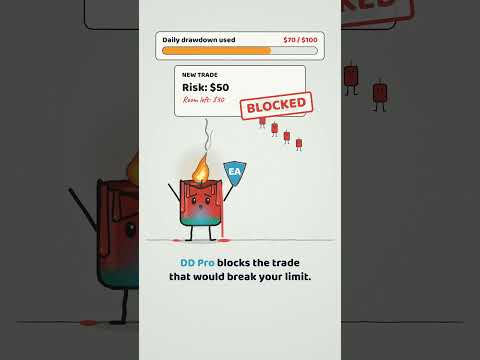
- DD Pro: loss limits, breach actions, preventive checks and drawdown alerts
- TG Pro: Telegram alerts, economic news and scheduled reports
- Plus everything in the free version: trade planning, position sizing and partial closes
All trading, risk and drawdown features work right after purchase — no extra token, license key or Telegram connection required. Drawdown alerts can reach your phone through the MetaTrader 5 mobile app without Telegram. Telegram is needed only for TG Pro alerts and reports.
Trade planning & position sizing
- Calculate lot size from your risk setting and stop-loss distance.
- Set your risk percentage or a fixed risk amount in account currency.
- Plan entries and exits using on-chart Entry, Stop Loss and Take Profit levels.
- Manage market and pending orders from the panel.
Partial close & break-even
- Configure up to three take-profit levels with separate partial-close percentages.
- Manage individual trades with their own exit settings.
- Move the stop loss to entry at TP1 or TP2.
- Alternatively, apply a custom stop-loss shift after those levels.
- Save default settings for future trades.
Risk Pro — advanced position management
Choose from three trailing-stop methods:
- TP Levels: move the stop loss progressively using risk-based levels.
- Candle: trail behind candle structure on your selected timeframe, with an adjustable buffer.
- Classic: start trailing after a specified profit distance and maintain a chosen distance from price.
Quick controls: move positions to break-even, close profitable positions, close all positions or use Panic Close.
These commands operate on the current chart symbol. Panic Close also removes pending orders for that symbol.
DD Pro — drawdown monitoring & controls
- Set daily, weekly, monthly and total loss limits.
- Define limits as a percentage or a fixed amount in account currency.
- Select Balance, Equity or the lower of Balance and Equity as the monitoring basis.
- Include floating profit and loss when using Equity-based monitoring.
- Track used drawdown and remaining allowance, with a progress bar showing the share of the limit used.
- Configure the daily reset time using broker server time.
- Enable daily trailing high-water-mark tracking.
- Choose breach actions: close and block, close only, or lock panel entries.
- Apply preventive checks to panel orders against your remaining daily risk allowance.
- Preventive: when it is on, a manual trade is closed immediately if it has no stop loss or if its risk exceeds what is left of your loss limit.
- Filter panel entries using spread limits and economic-news controls.
Note: a panel entry lock does not prevent orders placed manually outside the panel or by another EA.
Drawdown alerts
- Warning at your chosen level, plus a critical warning at 90% when your warning level is below 90%.
- Each alert shows the amount used, the limit, the percentage, the monitoring basis and the reset time.
Example: Daily DD warning: 81% (used USD 325.26 / limit USD 400.00). Basis: Equity. Reset: 00:00.
- Each warning level is sent once per period and is not repeated after a terminal or EA restart.
- When a breach action closes positions, a follow-up message reports how many positions were closed and the result.
- Delivered as an on-chart alert, plus optional MT5 mobile push (via your MetaQuotes ID) and optional Telegram — each can be turned on or off separately.
TG Pro — Telegram alerts & reports
- Receive notifications for trade activity, partial closes and SL/TP changes.
- Enable pending-order and drawdown notifications.
- Select economic-news alerts by impact level.
- Schedule daily and weekly trading summaries.
- Attach chart screenshots to supported trade and drawdown alerts.
Setup: Telegram connection is optional and supports two methods — your own bot created with @BotFather, or the EA PRO TEAM connection service. Each method requires MT5 WebRequest permission; the panel shows the exact address to allow if permission is missing.
Important information
- This is a trade-management utility, not an autonomous trading strategy or a signal provider.
- Keep MetaTrader 5 running and connected, with Algo Trading enabled, for automated management.
- Trailing-stop modes and Partial-tab break-even/SL-shift actions cannot run simultaneously for the same trade.
- Configure drawdown settings to match your own account requirements; prop-firm rules can differ.
- Test your setup on a demo account before using it live.
- Mobile push requires your MetaQuotes ID in MT5 (Tools > Options > Notifications). Push and Telegram delivery depend on external services and are not guaranteed.
- Stop-loss, closing and protection actions depend on market conditions, terminal connectivity and broker execution. They cannot guarantee a maximum loss or prevent every drawdown breach.
- Trading involves risk. The product does not guarantee profits or passing a funded-account evaluation.