Gold Reign
- Experts
- Version: 2.0
- Activations: 5

Automated Expert Advisor for XAUUSD
GOLD REIGN MT5 is an automated Expert Advisor developed specifically for trading XAUUSD (Gold) on MetaTrader 5.
The system is designed around a rule-based trading approach that evaluates market conditions before opening a position rather than continuously entering the market.
The objective is not to maximize the number of trades. The objective is to filter market conditions and allow the EA to participate only when the predefined trading conditions are satisfied.
Main InstrumentPrimary Symbol: XAUUSD / Gold
Platform: MetaTrader 5
Recommended Timeframe: M15
Trading Type: Automated
Execution: Market orders
Trading Approach: Rule-based automated trading
How GOLD REIGN MT5 WorksThe exact symbol name may differ depending on the broker, for example XAUUSD, XAUUSDm, XAUUSD.a, or another broker-specific Gold symbol.
GOLD REIGN does not rely on a single market signal.
Before a trade is considered, the EA evaluates a combination of predefined conditions designed to identify suitable trading environments and avoid lower-quality situations.
The EA continuously monitors the XAUUSD chart and waits for the required conditions to align.
When the conditions are not satisfied, the EA simply remains inactive.
This is an important part of the system.
No valid setup = No trade.
Market FilteringThe EA is designed to filter market conditions before allowing an entry.
Depending on the configured parameters and version, the filtering process can include:
-
Market direction
-
Price movement
-
Candle structure
-
Market volatility
-
Entry confirmation
-
Trading session conditions
-
Spread conditions
-
Abnormal market movement
-
News-related trading restrictions
-
Risk and position conditions
The purpose of these filters is to reduce unnecessary entries during unsuitable market conditions.
News FilterGold can react sharply to major economic events.
For this reason, GOLD REIGN can use a news-filtering mechanism when the corresponding news-filter functionality is enabled in the EA settings.
The purpose of the filter is to prevent new positions from being opened around selected high-impact economic events.
This is particularly relevant for events that can cause sudden movements in Gold, such as:
-
Federal Reserve decisions
-
FOMC announcements
-
Interest-rate decisions
-
CPI
-
NFP
-
Employment reports
-
Major U.S. economic releases
-
Other high-impact USD events
The news filter is primarily intended to control new entries around major events.
It should not be interpreted as a guarantee against volatility or losses. Existing positions may still be affected by sudden market movements, spreads, slippage, or gaps.
Risk ManagementGOLD REIGN is not designed around a fixed promise of profit.
Risk management is an essential part of using any automated trading system.
The appropriate lot size depends on:
-
Account balance
-
Account currency
-
Broker contract specifications
-
Leverage
-
Stop-loss configuration
-
Maximum acceptable drawdown
-
Individual risk tolerance
For this reason, users should select the lot size according to their own account and risk profile rather than simply copying the lot size used in a backtest.
General Risk Guidelines
Conservative: approximately 0.5%–1% risk per trade
Moderate: approximately 1%–2% risk per trade
High Risk: above 2%
Higher risk can significantly increase both potential returns and drawdown.
The EA itself cannot eliminate market risk.
Capital ManagementA reasonable approach is to keep the trading risk proportional to account equity.
For example, if an account is larger, the position size should be calculated according to the percentage of capital that the trader is willing to risk.
The objective is to prevent a single trade or a short sequence of losing trades from causing disproportionate damage to the account.
Users should also avoid increasing lot size aggressively after losses.
Do not use martingale-style position increases unless specifically supported and understood.
Capital preservation should remain the priority.
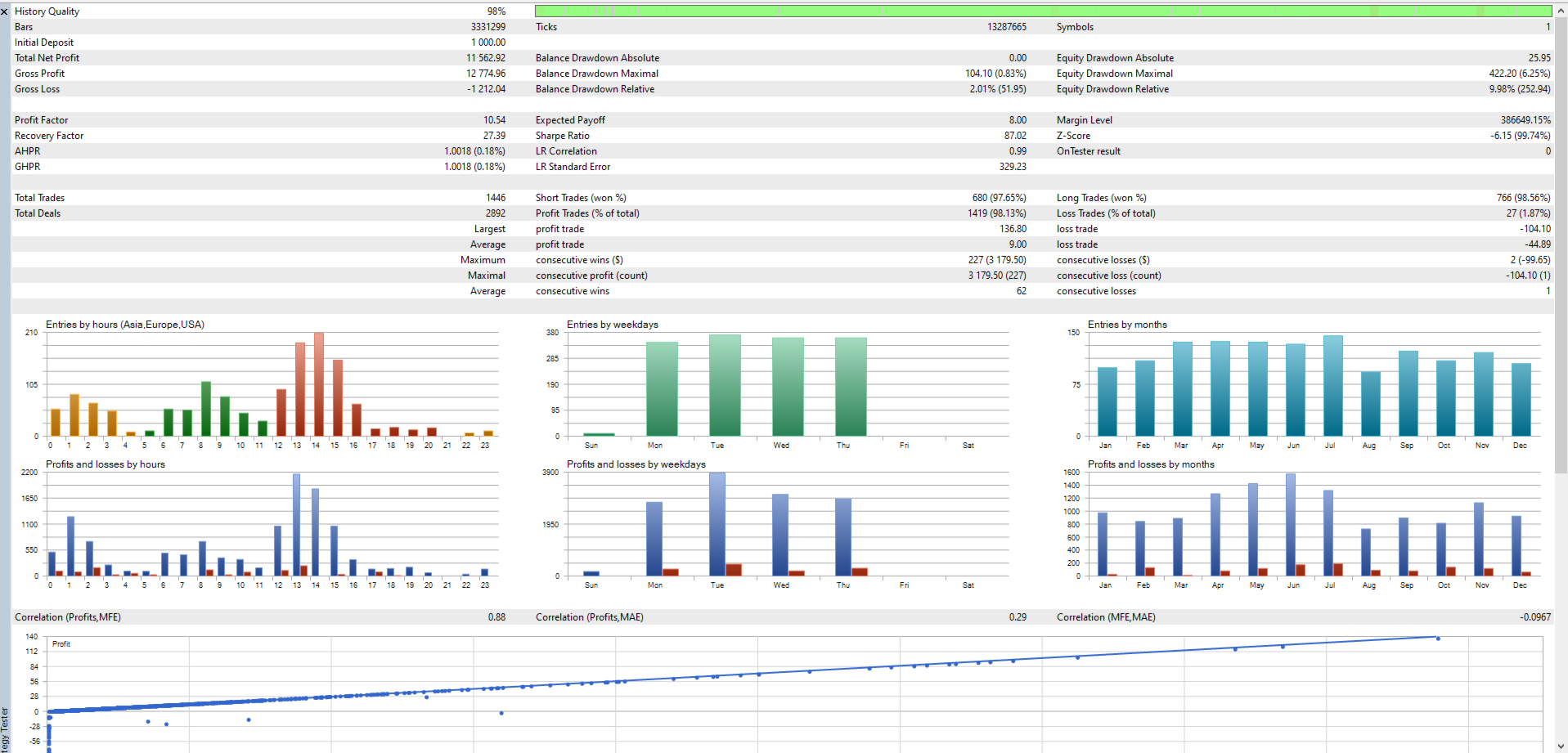
Backtest ResultsThe following results should be considered historical test results and not a prediction of future performance.
Example Backtest
Initial Deposit: $1,000
Net Profit: $7,527
Maximum Drawdown: 10.39%
Testing Instrument: XAUUSD
Platform: MetaTrader 5
These results represent historical testing under specific conditions.
Actual live performance can differ because of:
-
Spread
-
Commission
-
Slippage
-
Execution speed
-
Broker conditions
-
Liquidity
-
Market volatility
-
Trading environment
-
Different data quality
-
Different account specifications
Therefore, backtest results should not be interpreted as guaranteed future returns.
DrawdownMaximum drawdown is one of the most important statistics when evaluating an automated trading system.
A system can generate high historical returns while still experiencing significant periods of decline.
For this reason, GOLD REIGN should not be evaluated only by its total profit.
Users should also consider:
-
Maximum drawdown
-
Recovery periods
-
Consecutive losses
-
Average trade
-
Profit factor
-
Number of trades
-
Trading frequency
-
Balance/equity curve
A lower drawdown does not mean that future losses are impossible.
Recommended UsageFor the standard configuration:
Symbol: XAUUSD
Timeframe: M15
EA: GOLD REIGN MT5
The recommended approach is to start with a Demo account and verify that the EA behaves correctly with your broker before moving to a live account.
It is also recommended to monitor the EA during the first period of operation to confirm:
-
Correct symbol
-
Correct lot size
-
Correct trading permissions
-
Correct spread conditions
-
Correct news-filter behavior
-
Correct execution
-
Correct stop-loss and take-profit behavior
Step 1 — Open MetaTrader 5
Launch MetaTrader 5 and log in to your trading account.
Make sure the account is connected and the market data is updating normally.
Step 2 — Open XAUUSD
Open the Market Watch window.
Find your broker's Gold symbol.
For example:
XAUUSD
or a broker-specific version such as:
XAUUSDm
Open the Gold chart.
Step 3 — Select M15
Set the chart timeframe to:
M15 — 15 Minutes
This is the recommended operating timeframe for GOLD REIGN MT5.
Step 4 — Open Navigator
If the Navigator window is not visible, press:
Ctrl + N
Then locate:
Expert Advisors
Find:
GOLD REIGN MT5
Step 5 — Attach the EA to the Chart
Drag GOLD REIGN MT5 from the Navigator and drop it onto the XAUUSD M15 chart.
The Expert Advisor settings window will appear.
Step 6 — Configure the Inputs
Review the available settings.
If you are using the EA for the first time, it is recommended to begin with the default settings.
If you change the risk, lot size, stop-loss, trading hours, or other parameters, make sure you understand the effect of each setting before using the EA on a live account.
Step 7 — Allow Algorithmic Trading
In the EA settings, make sure algorithmic trading is allowed.
Then click:
OK
Step 8 — Enable AutoTrading
At the top of MetaTrader 5, make sure:
AutoTrading
is enabled.
The EA should now be attached to the chart and monitoring the market.
The EA will not necessarily open a trade immediately.
It will wait until its predefined conditions are satisfied.
ImportantGOLD REIGN is an automated trading system, not a guarantee of profit.
Financial markets are unpredictable, and losses can occur.
Historical backtests are useful for evaluating a strategy, but they cannot guarantee future results.
The user is responsible for selecting appropriate risk, lot size, leverage, and account conditions.
Always test the EA on a Demo account before using it with real funds.
Never risk capital that you cannot afford to lose.
GOLD REIGN MT5Instrument: XAUUSD
Platform: MetaTrader 5
Recommended Timeframe: M15
Trading: Fully Automated
Approach: Rule-Based Market Filtering & Trade Execution
Risk: User-Controlled
GOLD REIGN is designed to operate according to predefined trading rules and to remain inactive when the required conditions are not present.
Recommended Starting Lot Size
Important: These are general starting guidelines for XAUUSD and are not guaranteed risk levels. Actual exposure depends on the broker's contract specifications, leverage, spread, execution conditions, stop-loss configuration, and account currency. Users are strongly advised to start with conservative settings and test GOLD REIGN MT5 on a Demo account before using real funds. |
|---|