
BKT SmoothBand EA
- Experts
-
Khac Thanh Bui
 Turning trading logic into algorithmic precision. I develop professional-grade tools for FX and Gold, bridging the gap between practical trading needs and high-end software development.
WHAT I BUILD: - Version: 1.300
- Updated: 1 October 2026
- Activations: 5
BKT SmoothBand EA
A smoothed Bollinger Band breakout system for MetaTrader 5 that arms virtual pending orders ahead of price and manages exits at the portfolio level.
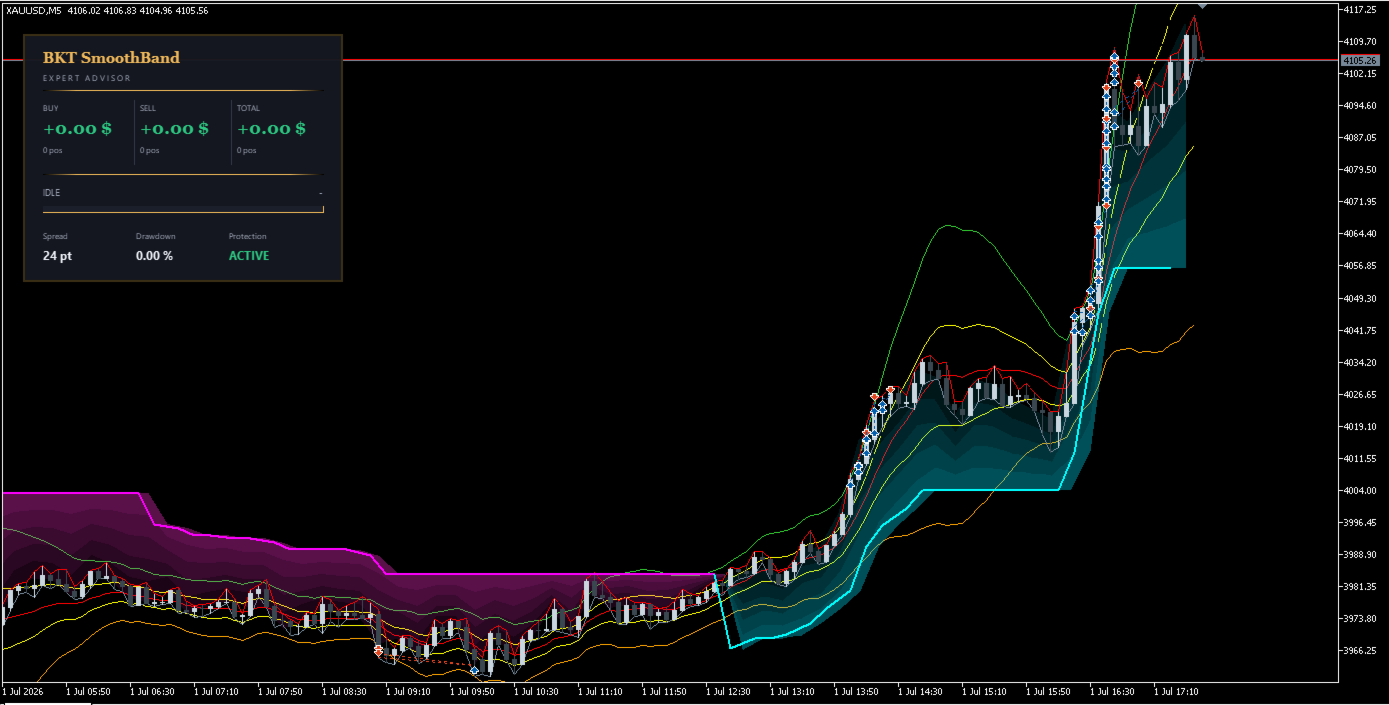
BKT SmoothBand EA is an automated trading system for MetaTrader 5 built around a single, heavily smoothed Bollinger Band with an inner band that ends unconfirmed breakouts early. Instead of sending pending orders to the broker, it tracks a breakout level on the chart and only opens a market position once price reaches it. Take profit is evaluated on total open positions, not per position, and the band basis can be smoothed with one of eleven methods.
Overview
The band basis uses a selectable smoothing method, from simple and exponential averages to Hull, T3, Kaufman adaptive, Arnaud Legoux and an Ehlers Super Smoother filter, with an optional second smoothing pass and a smoothable deviation to cut short-term flicker. When price closes beyond the outer band, a virtual order is armed ahead of price, shifting by a fixed step against it or discarded if price falls back through the inner band. A real market order is only sent once price reaches the virtual level, and minimum spacing rules stop new virtual orders from being armed inside the range already covered by existing same-direction positions.
Key Features
- Selectable band smoothing: eleven methods, including Super Smoother, T3, Hull, Kaufman adaptive and Arnaud Legoux.
- Virtual pending orders: breakout levels are tracked on the chart and only become market orders once price reaches them.
- Optional trend filter: new entries can be restricted to the direction confirmed by an adaptive filter.
- Grid spacing control: minimum distances keep new orders from arming too close to existing positions.
- Progressive position sizing: lot size can grow with each additional same-direction position.
- Portfolio-level exits: take profit and trailing are evaluated on the combined profit of every open position, not per trade.
- Optional cross pruning: a losing position can be closed, fully or partially, using profit from an opposite position.
- Independent risk controls: equity drawdown, daily loss, spread and position limits are configurable.
How It Works
On each new bar the EA recalculates the band using the selected smoothing method. When price trades beyond the band, a virtual breakout order is armed, shown on the chart, and repositioned as price moves; a market order opens once price reaches that level. With one position open, a fixed profit target applies; once a second opens, combined portfolio profit is measured against a basket target, with an optional trailing stop protecting profit as that target nears.
Recommended Settings
Default parameters are calibrated for XAUUSD, where point-based distances correspond to fractions of a dollar; review them for other symbols. A hedging account is required — the EA will not start on a netting account, since it holds positions in both directions at once.
Input Parameters
Band Settings
- Band period — bars used for basis and deviation — Default: 20
- Smoothing method — basis algorithm, 11 options — Default: Hull Moving Average
- Outer / inner deviation multiplier — outer and inner band width, inner must be smaller — Default: 1.5 and 0.5
- Smooth deviation — smooths the deviation series to cut band flicker — Default: enabled
Virtual Order Settings
- Virtual order distance — distance from price where a breakout order arms, points — Default: 300
- Adverse move threshold and shift step, points — Default: 150 and 150
- Minimum gap, adverse and favorable side, points — Default: 500 and 500
Trend Filter
- Enable trend filter — restricts new entries to the confirmed trend direction — Default: enabled
- Timeframe — separate from the band's own timeframe — Default: 12 minutes
- ATR period and factor — sensitivity of the trend calculation — Default: 10 and 3.4
Trade Execution
- Base lot size — lot size for the first order per direction — Default: 0.01
- Lot growth factor — grows lot size per additional same-direction order, min 1.0 — Default: 1.0
- Maximum slippage — allowed slippage on execution, points — Default: 30
Take Profit and Trailing
- Single position target — profit target with one position open — Default: 5.0
- Basket target — combined profit target with two or more positions — Default: 15.0
- Trailing arm level and step — activation profit, and retracement that closes the basket — Default: 5.0 and 3.0
Cross Pruning
- Enable cross pruning — closes a losing position using profit from an opposite-direction position — Default: disabled
- Minimum positions and trigger loss — conditions before pruning starts — Default: 4 and 10.0
- Maximum winners per prune — positions consumed in a single prune — Default: 3
Risk Protection
- Maximum positions per direction — limits exposure per direction — Default: 5
- Maximum spread — blocks entries above this spread, points — Default: 50
- Drawdown protection — halts new entries at this drawdown %, can also close all positions — Default: 10.0, force-close enabled
- Daily loss limit — halts new entries at this daily loss — Default: 50.0
Display
- Show info panel — live position and protection status on the chart — Default: enabled
Important
This EA can open multiple positions in the same direction, with lot size optionally growing per position, and, when cross pruning is enabled, will realize a loss on one position using profit from another. Assess combined exposure and drawdown using the position, lot growth and risk settings before running on a live account.























User didn't leave any comment to the rating