Averaging Phoenix MT5
- Experts
-
Dmitrii Sintsov
 I am a trader with 5 years of experience, trading inside the day and making money on scalping, I have been developing robots and various strategies for them for a year.
 - Version: 1.0
- Activations: 10
Grid averaging Expert Advisor for XAUUSD — MetaTrader 4 & MetaTrader 5
The philosophy of recovery
A phoenix does not fear the fall — it uses it to rise higher. Averaging Phoenix is built on the same principle.
Instead of exiting the market at a loss on every adverse move, the EA averages the position across a predefined grid of levels and holds it until the market returns to the average entry price. When that happens, the whole series is closed at a single target level in profit. Drawdown becomes not the end of the trade, but part of the path to closing it.
This is not a prediction system or a "holy grail." It is a disciplined averaging mechanism with transparent, understandable logic — no black boxes and no loud promises.
How it works
Averaging Phoenix opens the first position and, if price moves against it, adds subsequent grid orders at a defined step (in points or as a percentage of price). The volume of each next order is increased by a defined multiplier, which lowers the average entry price of the series. As soon as price returns to the averaged level plus the target offset, the entire basket is closed by a common take profit.
Key mechanisms:
- Grid averaging — a flexible step in points or percent, adapting to gold's volatility.
- Basket closing at a single level — all positions in the series are closed at once at the average price in profit.
- Classic and dynamic trailing stop — profit protection on single positions through two independent modes.
- Virtual equity stop loss — a protective mechanism that closes all positions when a defined account drawdown level is reached. Enabled by default.
- Trading session filter — the EA does not send orders while the market is closed.
- State recovery after restart — continues working correctly after a terminal restart.
Features
- Support for MetaTrader 4 and MetaTrader 5 — both versions included.
- Optimized for XAUUSD (gold), works on any symbol.
- Three direction modes: buy only, sell only, or both ways.
- Its own magic number — works correctly alongside other EAs on the same account.
- All input parameters are available for optimization in the strategy tester.
- Clean, tested code with no unnecessary dependencies.
- Simple, grouped settings in English.
Usage recommendations
- Symbol: XAUUSD (gold) with a two-digit quote.
- Timeframe: any (H1 recommended).
- Account type: ECN / RAW / Low-spread, hedging or netting.
- Leverage: from 1:100, 1:500 recommended.
- Minimum deposit: $500.
- Recommended deposit: $1000.
- VPS: recommended for uninterrupted operation.
Parameters
General
- Magic Number — unique identifier for the EA's trades.
Trade Direction
- Trade Direction — BuyAndSell / SellOnly / BuyOnly.
Grid Settings
- Grid Step Mode — grid step in points (UsePoints) or percent (UsePercent).
- Grid Step — size of the step between grid levels.
- Starting Lot Size — starting volume.
- Martingale Multiplier — volume multiplier for each next grid order (value 1 = plain grid without martingale).
- Average TP Offset (points) — take profit offset from the average price.
- Max Allowed Spread (points) — maximum spread for entry.
- Slippage (points) — allowed slippage.
- Timeframe for New Bar — timeframe for new bar detection.
Virtual Stop Loss
- Enable Virtual Stop Loss — enable equity drawdown protection.
- Equity Drawdown % to Close All — drawdown level to close all positions.
- Pause Trading After Virtual SL Hit — pause until restart, or resume trading after a trigger.
Trailing Stop
- Enable Classic Trailing Stop — classic trailing.
- Trailing Activation (points) — trailing activation distance.
- Enable Dynamic Trailing Stop — dynamic (parabolic) trailing.
- Dynamic Trailing Size (points) — dynamic trailing curve parameter.
- Dynamic Trailing Tighten % — tightening degree.
- Initial SL Distance (points) — initial stop loss distance.
Important risk warning
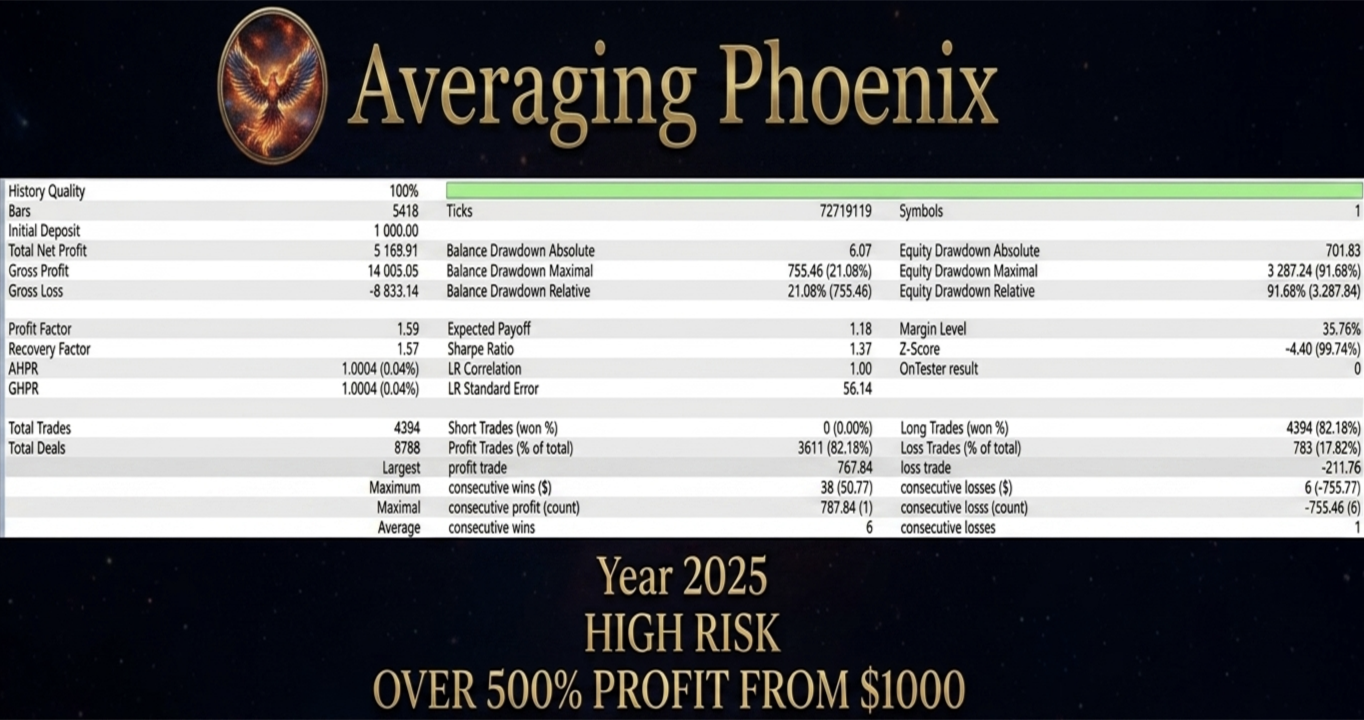
Averaging Phoenix uses an averaging strategy with increasing volume (martingale). This means that during a prolonged move against an open series, the total volume and drawdown grow. Such a strategy can show a stable curve on history, but carries elevated risk during strong one-directional trends.
Martingale can be fully disabled. Set Martingale Multiplier = 1 — all grid orders will open with the same volume, and the EA turns into a classic grid bot without lot increase. This significantly reduces risk, though it also slows down drawdown recovery.
To manage this risk:
- Use the built-in virtual equity stop loss (enabled by default).
- Choose the starting lot and multiplier conservatively relative to your deposit.
- Test settings on historical data and a demo account before live trading.
The results presented in this description are obtained from backtesting on historical data. Past results do not guarantee future returns.
Disclaimer
Trading Forex and CFDs involves a high level of risk and is not suitable for every investor. High leverage can work both for and against you. Before using the EA, make sure you understand the associated risks and, if necessary, seek independent financial advice. Trade responsibly and test the EA on a demo account first.