AlgoDevMT5 Professional Risk Suite

Professional Risk Management and Trade Monitoring Suite for MetaTrader 5

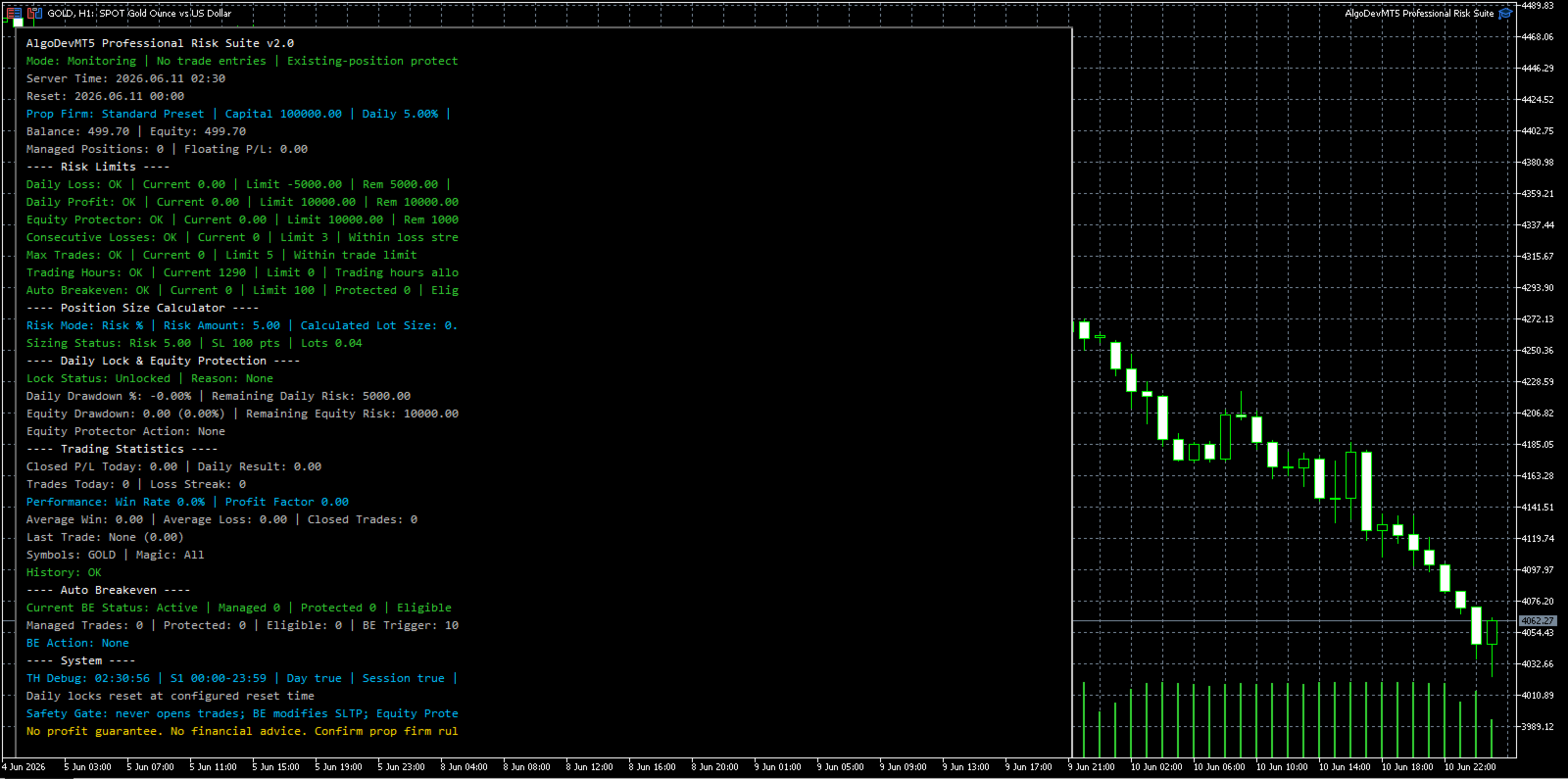
AlgoDev Risk Manager is a professional MetaTrader 5 utility designed to help traders monitor risk, track performance, and maintain disciplined account management.

This utility focuses on risk visibility, drawdown monitoring, position management, and account protection. It is suitable for discretionary traders, funded-account traders, and traders running Expert Advisors who require additional account-level monitoring.

Important: AlgoDev Risk Manager does not generate trading signals, open trades, place pending orders, or increase market exposure.

Key Features

Professional Risk Dashboard

Monitor critical account statistics directly on the chart:

  • Account Balance

  • Account Equity

  • Floating Profit/Loss

  • Daily Profit/Loss

  • Daily Drawdown

  • Remaining Daily Risk

  • Managed Position Count

  • Trading Session Status

  • Performance Statistics

  • Consecutive Loss Tracking

Daily Loss Monitoring

Track daily account performance against configurable risk limits.

Features include:

  • Daily Loss Limit tracking

  • Daily Drawdown monitoring

  • Remaining Daily Risk display

  • Configurable daily reset time

  • Daily Loss Lock functionality

Equity Protection

Monitor overall account drawdown and equity performance.

Features include:

  • Equity drawdown tracking

  • Remaining equity risk calculation

  • Equity protection dashboard visibility

  • Account-level monitoring

Position Size Calculator

Built-in position sizing tools help traders calculate trade volume based on predefined risk parameters.

Features include:

  • Risk amount calculation

  • Lot size calculation

  • Stop loss based sizing

  • Risk percentage display

Auto Breakeven Protection

Automatically move stop losses on existing positions to breakeven when predefined profit levels are reached.

Configurable options include:

  • Trigger distance in points

  • Breakeven offset

  • Existing stop-loss handling

  • Retry cooldown settings

Auto Breakeven modifies existing positions only and never opens trades.

Trading Statistics

The dashboard provides ongoing performance visibility including:

  • Trades Today

  • Closed P/L Today

  • Daily Result

  • Win Rate

  • Average Win

  • Average Loss

  • Profit Factor

  • Consecutive Loss Count

  • Last Trade Result

Prop Firm Style Monitoring

The software includes configurable monitoring tools commonly used by traders operating under proprietary trading firm style risk objectives.

Features include:

  • Maximum Daily Loss monitoring

  • Profit Target tracking

  • Maximum Drawdown visibility

  • Custom risk configurations

  • Dashboard-based rule monitoring

Users should always verify current account rules with their broker or funding provider before live use.

Suitable For

  • Manual Traders

  • Swing Traders

  • Day Traders

  • Scalpers

  • Funded Account Traders

  • Portfolio Traders

  • Expert Advisor Users

Safety Notice

AlgoDev Risk Manager is an independent software product.

This software is not affiliated with, endorsed by, sponsored by, or certified by any broker, proprietary trading firm, or third-party company.

The software is provided as a monitoring and risk-management utility only.

It cannot:

  • Guarantee profits

  • Prevent losses

  • Guarantee compliance with account rules

  • Provide financial advice

Trading financial markets carries substantial risk.

Recommended Usage

  1. Install the utility on any chart.

  2. Configure risk-management settings.

  3. Verify account currency and broker settings.

  4. Test on a demo account before live deployment.

  5. Confirm all parameters before using on a live or funded account.

Version 2.0 Highlights

  • Enhanced Professional Dashboard

  • Daily Loss Lock System

  • Equity Protection Module

  • Position Size Calculator

  • Auto Breakeven Functionality

  • Advanced Trading Statistics

  • Improved Performance Monitoring

  • Expanded Risk Visibility Tools


Quick Start Guide

This guide gets you from download to first dashboard view in a few minutes.

What This Utility Does

AlgoDevMT5 Professional Risk Suite is a risk management and position monitoring utility for MetaTrader 5.

It does not open trades. It does not generate trade signals. It is designed to help you monitor existing positions, daily risk, account drawdown, position size, breakeven status, and trading statistics.

1. Install the File

  1. Open MetaTrader 5.
  2. Click File.
  3. Click Open Data Folder.
  4. Open MQL5.
  5. Open Experts.
  6. Create or open the folder AlgoDevMT5.

  7. Copy AlgoDevMT5 Professional Risk Suite.ex5 into that folder.
  8. Go back to MetaTrader 5.
  9. In Navigator, right-click Expert Advisors.
  10. Click Refresh.

You should now see AlgoDevMT5 Professional Risk Suite under Expert Advisors.

2. Attach It to a Chart

  1. Open a chart, for example EURUSD H1.
  2. Drag AlgoDevMT5 Professional Risk Suite onto the chart.
  3. Open the Common tab.
  4. Allow Algo Trading if you want Auto Breakeven or Equity Protector to manage existing positions.
  5. Open the Inputs tab.
  6. Review the settings.
  7. Click OK.

The dashboard should appear on the chart.

3. Beginner Setup

Use this simple setup for your first demo test:

  • EnableRiskManager: true
  • ManagedSymbols: SYMBOL_SCOPE_CURRENT
  • ManagedMagicNumbers: MAGIC_SCOPE_ALL
  • DailyResetTime: 00:00
  • EnableDailyLossLimit: true
  • EnableDailyLossLock: true
  • EnablePositionSizeCalculator: true
  • EnableAutoBreakeven: false
  • EnableEquityProtector: true
  • ShowDashboard: true
  • ScreenshotMode: false

Watch the dashboard before using advanced settings.

4. Prop Firm Style Setup

For common prop-firm style monitoring:

  • PropFirmMode: PROP_FIRM_STANDARD
  • PropFirmInitialCapital: your account size
  • PropFirmDailyLossPercent: 5.0
  • PropFirmMaxDrawdownPercent: 10.0
  • PropFirmProfitTargetPercent: 10.0
  • PropFirmOverrideRiskLimits: true
  • EnableDailyLossLock: true
  • DailyResetTime: match the account reset time

Always confirm the exact rules for your account before trading.

5. Enable Auto Breakeven

Auto Breakeven modifies stop loss on existing managed positions only.

  1. Set EnableAutoBreakeven to true.
  2. Set BreakevenTriggerPoints.
  3. Set BreakevenOffsetPoints.
  4. Keep AllowImproveExistingStopLoss enabled if you want the EA to improve an existing stop.
  5. Confirm your open positions match the symbol and magic filters.

Example:

  • BreakevenTriggerPoints: 100
  • BreakevenOffsetPoints: 10

When a managed position reaches the trigger distance, the utility attempts to move stop loss to breakeven plus offset.

6. Use the Position Size Calculator

  1. Set EnablePositionSizeCalculator to true.
  2. Choose PositionRiskMode.
  3. For percent risk, set PositionRiskPercent.
  4. For fixed money risk, set PositionFixedRiskAmount.
  5. Set PositionStopLossPoints.
  6. Read Calculated Lot Size on the dashboard.

The calculator is informational. You still place trades manually.

7. Read the Dashboard

  • Green means normal.
  • Yellow means warning or attention needed.
  • Red means locked, breached, or outside the configured rules.
  • Blue means informational.

Key rows:

  • Daily Loss: daily risk usage.
  • Daily Profit: progress toward daily target.
  • Equity Protector: maximum drawdown status.
  • Trading Hours: whether current server time is allowed.
  • Auto Breakeven: breakeven status.
  • Performance: win rate and profit factor.
  • Lock Status: whether management actions are locked.

8. Three Example Profiles

Conservative trader:

  • PositionRiskPercent: 0.25
  • DailyLossPercent: 2.0
  • EquityProtectorPercent: 4.0
  • EnableAutoBreakeven: false until tested

Prop firm trader:

  • PropFirmDailyLossPercent: 5.0
  • PropFirmMaxDrawdownPercent: 10.0
  • PropFirmProfitTargetPercent: 10.0
  • EnableDailyLossLock: true
  • PropFirmOverrideRiskLimits: true

Swing trader:

  • ManagedSymbols: SYMBOL_SCOPE_LIST
  • DailyLossCalculation: DAILY_CLOSED_PLUS_FLOATING
  • EnableTradingHoursFilter: optional
  • EnableAutoBreakeven: true
  • Use wider breakeven triggers based on timeframe

9. Common Problems

If the EA does not show in Navigator, refresh Expert Advisors or restart MetaTrader 5.

If the dashboard does not show, confirm ShowDashboard=true.

If Auto Breakeven does not work, confirm the trade is profitable enough, matches filters, and broker stop-level rules allow the change.

If values look like sample data, set ScreenshotMode=false.

Recommended products
CosmiCLab SMC FIBO CosmiCLab SMC FIBO is a professional trading indicator designed for traders who use Smart Money Concepts (SMC), market structure analysis and Fibonacci retracement levels. The indicator automatically detects market swings and builds Fibonacci levels based on the latest impulse movement. It also identifies market structure changes such as BOS (Break of Structure) and CHOCH (Change of Character), helping traders understand the current market direction. CosmiCLab SMC FIBO also pr
Crypto_Forex Indicator "WPR with 2 Moving Averages" for MT5, No Repaint. - WPR itself is one of the best oscillators for scalping. - "WPR and 2 Moving Averages" Indicator allows you to see Fast and Slow Moving Averages of WPR oscillator. - Indicator gives opportunities to see the price corrections very early. - It is very easy to set up this indicator via parameters, it can be used on any time-frame. - You can see Buy and Sell entry conditions on the pictures. - With PC and Mobile alerts on WP
Inverted_Chart_EA Utility Expert Advisor Inverted_Chart_EA creates and maintains a mirror-inverted chart of any symbol and timeframe. It automatically generates a custom instrument (e.g. US30_INV ) and keeps its price history updated in real time, with bars mirrored around a chosen pivot. This utility gives traders a new way to analyze the market from a different perspective by flipping the chart upside down. Why use an inverted chart? Highlight hidden patterns – price formations that look ordin
Overview Mirror Signals EA is a powerful monitoring Expert Advisor that automatically sends real-time Telegram notifications for all important trade events on your MetaTrader 5 account. It is engineered specifically for signal providers , trade-copier operators , auditors , educators , and professional trading services that require immediate, detailed, and reliable reporting. Everything from entries, exits, SL/TP changes, comment changes, trailing stop activations, pending order modifications
Introducing   Order Blocks Breaker , a brand-new way to identify and leverage order blocks in your trading strategy. After developing multiple order block tools with unique concepts, I’m proud to present this tool that takes things to the next level. Unlike previous tools,   Order Blocks Breaker   not only identifies order blocks but also highlights   Breaker Order Blocks —key areas where the price is likely to retest after a breakout. MT4 -  https://www.mql5.com/en/market/product/124101/ This t
Overview Mirror Signals Service EA (Text only)   is a powerful monitoring Expert Advisor that automatically sends   real-time Telegram notifications   for all important trade events on your MetaTrader 5 account. It is engineered specifically for   signal providers ,   trade-copier operators ,   auditors ,   educators , and   professional trading services   that require immediate, detailed, and reliable reporting. Everything from   entries, exits, SL/TP changes, comment changes, trailing sto
SolarTrade Suite Financial Robot: LaunchPad Market Expert - designed to open trades! This is a trading robot that uses special innovative and advanced algorithms to calculate its values, Your Assistant in the World of Financial Markets. Use our set of indicators from the SolarTrade Suite series to better choose the moment to launch this robot. Check out our other products from the SolarTrade Suite series at the bottom of the description. Do you want to confidently navigate the world of inves
HAS RSI Signal — Professional Trend Indicator with SL/TP Calculation HAS RSI Signal is a powerful trading tool that combines time-tested classics with modern noise-filtering algorithms. The indicator analyzes the market through the prism of Heiken Ashi Smoothed candles and the RSI oscillator, providing clear entry signals at trend reversals or when exiting overbought/oversold zones. Key Advantages: Double Filtration: Using Heiken Ashi Smoothed eliminates market "noise," while RSI confirms the mo
TradePilotmt5
Hossein Khalil Alishir
TradePilot Expert Advisor (EA) for MetaTrader 5 TradePilot is a professional and user-friendly Expert Advisor (EA) for MetaTrader 5 (MT5) . It simplifies automated trading , risk management , and trade execution with a smart trading panel . Perfect for beginners and experienced traders looking for a reliable trade manager EA with automated lot size calculation and smart position management. Key Advantages User-Friendly Trading Panel: Customizable panel with buttons and hotkeys for fast ex
RBreaker
Zhong Long Wu
RBreaker Gold Indicators is a short-term intraday trading strategy for gold futures that combines trend following and intraday reversal approaches. It not only captures profits during trending markets but also enables timely profit-taking and counter-trend trading during market reversals. This strategy has been ranked among the top ten most profitable trading strategies by the American magazine   Futures Truth   for 15 consecutive years. It boasts a long lifecycle and remains widely used and st
Price Magnet — Price Density and Attraction Levels Indicator Price Magnet is a professional analytical tool designed to identify key support and resistance levels based on statistical Price Density. The indicator analyzes a specified historical period and detects price levels where the market spent the most time. These zones act as “magnets,” attracting price action or forming a structural base for potential reversals. Unlike traditional Volume Profile tools, Price Magnet focuses on price-time d
Trading Utility for Forex Currency Pairs Only not for Gold  Functions Auto Lot Calculation based on Risk Auto stoploss  Auto TakeProfit Breakeven Auto Close Half % Close in percentage with respect to the PIPs Pending Orders BuyLimit Sell Limit with distances BuyStop Sell Stop    with distances Trading Informations Risk in percentage For Multiple trades Combine Takeprofit and Combine Stoplosses
Noize Absorption Index - is the manual trading system that measures the difference of pressure between bears forces and bulls forces. Green line - is a noize free index that showing curent situation. Zero value of index shows totally choppy/flat market.Values above zero level shows how powerfull bullish wave is and values below zero measures bearish forces.Up arrow appears on bearish market when it's ready to reverse, dn arrow appears on weak bullish market, as a result of reverse expectation.
Breakevan Utility
Jose Luis Thenier Villa
BreakEvan Utility  Is a simple tool in a panel with this utilities: This utility will draw a Golden Line in the chart applied showing the breakeven price, considering all the positions opened for that specific symbol. Also the information panel shows: Balance Breakeven Price for that chart Force Breakeven (for that symbol) as ON/OFF Force Breakeven Global (takes into account all trades opened) as ON/OFF Total Lots opened for Symbol Total Lots opened Global And two buttons: Force Breakeven: Whe
Expert TP SL v04
Mikhail Ostashov
Expert TP SL v04 - Professional Trading Assistant with AI Motivation System Advanced manual trading tool with automatic risk management, overtrading protection, and intelligent psychological support for disciplined trading. PRODUCT OVERVIEW Expert TP SL v04 is a comprehensive trading assistant designed for manual traders who want to maintain emotional discipline while automating risk calculations. This isn't just another order placement tool - it's a complete trading psychology system that pr
Candlestick Pattern Scanner is a multi-timeframe and multi-symbol dashboard and alert system that checks all timeframes and currency pairs for different candlestick patterns that are formed in them. Scanner is integrated   with support and resistance zones so you can check the candlestick patterns in most important areas of the chart to find breakout and reversal patterns in the price chart. Download demo version   (works on M4,M6,M12,H3,H8 timeframes and 20 symbols of Market Watch window) Read
Price Action Trade Panel EA MT5
Juvenille Emperor Limited
5 (4)
Price Action Trade Panel MT5  calculates the buying/selling force level balance of any symbol/instrument, based on pure price action data of the specified (8 by default) past candles. This will give you the closest market sentiment possible by monitoring the price action of 32 symbols/instruments that are available on the indicator's panel. A buying/selling force level over 60% gives a quite solid level for buy/sell the specific symbol (using the default settings).  Price Action Trade Panel MT5
CoPilot dashboard MT5
Frederic Jacques Collomb
CoPilot — Daily Trading Dashboard Know your numbers. Trade with clarity. MT4 version What is CoPilot? CoPilot is a professional-grade trading assistant that displays in real time all your daily performance statistics directly on the chart — with a live equity curve that updates trade by trade. Designed for active traders who need instant visibility into their session without leaving the chart, CoPilot aggregates every closed trade of the day across all symbols and presents them in a clean, color
Bneu Execution Scaling System
Marvinson Salavia Caballero
Bneu Execution and Scaling System — Professional Trading Command Center Premium on-chart command center with 5 dashboard tabs. 28-pair opportunity radar scans every 8 seconds. Dual-gate qualification: indicator engine + AI confidence scoring. One-click execution with auto SL/TP and smart lot sizing. Full autopilot mode with 6 built-in safeguards. Multi-account trade copier (publisher or receiver in one EA). Adaptive Money Management protects every position automatically. WHAT IT DOES Attach
Mine Farm
Maryna Kauzova
Mine Farm is one of the most classic and time-tested scalping strategies based on the breakdown of strong price levels. Mine Farm is the author's modification of the system for determining entry and exit points into the market... Mine Farm - is the combination of great potential with reliability and safety. Why Mine Farm?! - each order has a short dynamic Stop Loss - the advisor does not use any risky methods (averaging, martingale, grid, locking, etc.) - the advisor tries to get the most
RRtoolBox
David Ruiz Moreno
RRtoolbox - Professional Tools: Risk:Reward Trading Tool (SL/TP Horizontals + Pending orders + Diagonals), Alerts set on trend lines (for alerts on diagonal levels), SelfManagement (BE, partials...), close/cancelling by time, Statistics, Info and trading on chart. One-Click Trading with Visual Risk:Reward Management RRtoolbox is a comprehensive trading panel that combines one-click order execution,  statistics and  powerful visual Risk:Reward tools, alerts set with trendlines, on chart butt
My products:   https://www.mql5.com/ru/users/astra077/seller In the product line: Candlestick Pattern Detector   — a free basic version. Candlestick Patterns Standard   — a paid single-chart version with extended patterns and filters:  https://www.mql5.com/ru/market/product/174530 Japanese Candlestick Patterns Pro MT5   — a professional single-chart version with a summary table:  https://www.mql5.com/ru/market/product/173411 Multi-Currency Candlestick Pattern Scanner   — the ultimate version: a
The indicator detects and displays М. Gartley's Butterfly pattern. The pattern is plotted by the extreme values of the ZigZag indicator (included in the resources, no need to install). After detecting the pattern, the indicator notifies of that by the pop-up window, a mobile notification and an email. The pattern and wave parameters are displayed on the screenshots. The default parameters are used for demonstration purposes only in order to increase the amount of detected patterns. Parameters z
AI Trade Copier
Heri Yusufu Kaniugu
AI Trade Copier – Real time Copy Trading, Prop Firm Hedging & Adaptive Equity Curve Trading AI Trade Copier is a professional Expert Advisor designed to automatically copy trades across multiple accounts while adapting to market conditions and account performance. With advanced AI logic, it supports prop firm hedging ,  adaptive   equity curve trading , exponential growth compounding , and robust account risk management. Price increases by $100 for every 10 purchases, up to $2000. Private Messag
Classic SNR MetaTrader 5 Expert Advisor | Multi-Symbol Support & Resistance Trading with Trend-Based Logic Overview Classic SNR Breakout EA is a professional trading robot that identifies structural Support & Resistance levels using daily swing points and executes trades based on H1 price action relative to these levels. The EA applies   dual logic : in an uptrend, it sells on H1 rejection below an SNR level; in a downtrend, it buys on H1 rejection above an SNR level. Breakout confirmations are
Crypto_Forex Indicator "Hammer and Shooting Star pattern" for MT5, No repaint, No delay. - Indicator "Hammer and Shooting Star pattern" is very powerful indicator for Price Action trading. - Indicator detects bullish Hammer and bearish Shooting Star patterns on chart: - Bullish Hammer - Blue arrow signal on chart (see pictures). - Bearish Shooting Star - Red arrow signal on chart (see pictures). - With PC, Mobile alerts. - Indicator "Hammer and Shooting Star pattern" is excellent to combine wit
Exp5 Duplicator
Vladislav Andruschenko
4.78 (9)
Duplicator for MetaTrader 5 — professional position duplicator inside one terminal A reliable Expert Advisor for traders who want to automatically duplicate already opened positions in MetaTrader 5, increase volume, apply custom lot settings, and manage duplicates with precise rules. It is a practical tool for manual trading, algorithmic systems, and flexible management of existing positions inside one terminal. Duplicator for MT5 does not open positions by its own trading strategy. Its role is
Local Copy Trader Utility - Professional Copy Trading System Overview Local Copy Trader Utility is the complete solution for mirroring trades between MetaTrader 5 accounts. With both Master and Slave functionality in one powerful Expert Advisor, it delivers reliable, lightning-fast trade copying with zero external dependencies. Perfect for managing multiple accounts, following trading signals, or transferring trades between brokers, this system ensures your positions stay perfectly synchronized
Total Trade Manager SL BE TP
Izzet Deniz Erpolat
3 (2)
Total trade manager allows you to manage your trade to maximise your profits and minimise your losses. This is an essential for traders that are looking for consistency within their trading.  The features: Partial Stop Loss: This feature allows you to close a partial percentage of your trade once it goes into negative. So if your stop loss is 20 pips, you could close 75% of your trade at 10 pips and let the remainder of the position to continue running. Auto Stop Loss: This means that once you p
Auto Optimized RSI   is a smart and easy-to-use arrow indicator designed for precision trading. It automatically finds the most effective RSI Buy and Sell levels for your selected symbol and timeframe using real historical data simulations. The indicator can be used as a standalone system or as part of your existing trading strategy. It is especially useful for intraday trading. Unlike traditional RSI indicators that rely on fixed 70/30 levels,   Auto Optimized RSI   dynamically adjusts its lev
Buyers of this product also purchase
Trade Assistant MT5
Evgeniy Kravchenko
4.43 (211)
It helps to calculate the risk per trade, the easy installation of a new order, order management with partial closing functions, trailing stop of 7 types and other useful functions. Additional materials and instructions Installation instructions - Application instructions - Trial version of the application for a demo account Line function -   shows on the chart the Opening line, Stop Loss, Take Profit. With this function it is easy to set a new order and see its additional characteristics bef
Forex Trade Manager MT5
InvestSoft
4.98 (661)
Welcome to Trade Manager MT5 - the ultimate risk management tool designed to make trading more intuitive, precise, and efficient. This is not just an order placement tool; it's a comprehensive solution for seamless trade planning, position management, and enhanced control over risk. Whether you're a beginner taking your first steps, an advanced trader, or a scalper needing rapid executions, Trade Manager MT5 adapts to your needs, offering flexibility across all markets, from forex and indices t
Local Trade Copier EA MT5
Juvenille Emperor Limited
4.96 (139)
Experience exceptionally fast trade copying with the   Local Trade Copier EA MT5 . With its easy 1-minute setup, this trade copier allows you to copy trades between multiple MetaTrader terminals on the same Windows computer or Windows VPS with lightning-fast copying speeds of under 0.5 seconds. Whether you're a beginner or a professional trader, the   Local Trade Copier EA MT5   offers a wide range of options to customize it to your specific needs. It's the ultimate solution for anyone looking t
TradePanel MT5
Alfiya Fazylova
4.87 (157)
Trade Panel is a multi-functional trading assistant. The app contains over 50 trading functions for manual trading and allows you to automate most trading tasks. Before making a purchase, you can test the demo version on a demo account. Download the trial version of the application for a demonstration account: https://www.mql5.com/en/blogs/post/750865 . Full instructions here . Trade. Allows you to perform trading operations in one click: Open pending orders and positions with automatic risk cal
Beta Release The Telegram to MT5 Signal Trader is nearly at the official alpha release. Some features are still under development and you may encounter minor bugs. If you experience issues, please report them, your feedback helps improve the software for everyone. Telegram to MT5 Signal Trader is a powerful tool that automatically copies trading signals from Telegram channels or groups directly to your MetaTrader 5 account. It supports both public and private Telegram channels, and you can conn
Quant AI Agents
Ho Tuan Thang
5 (1)
Quant AI Agents are independent trading Expert Advisors. Instead of trading using a fixed strategy like other conventional EAs, Quant AI Agents   is a   multi-agent AI trading framework   that turns natural-language strategy prompts into live.  WANT THE SAME RESULTS AS MY LIVE SIGNAL?   Use the exact same brokers I do:   IC MARKETS , IC TRADING   .  Unlike the centralized stock market, Forex has no single, unified price feed.  Every broker sources liquidity from different providers, creating un
AI Agents Supervisor
Ho Tuan Thang
5 (1)
AI Agent Supervisor is NOT an Expert Advisor. AI Agent Supervisor   is a   multi-agent AI risk & portfolio supervisor   that watches every EA on your account and intervenes in real time.  WANT AN AI PORTFOLIO MANAGER WATCHING YOUR FLEET 24/7?   Run your fleet on the same brokers I do:   IC MARKETS , IC TRADING   .  Unlike the centralized stock market, Forex has no single, unified price feed.  Every broker sources liquidity from different providers, creating unique data streams. The Supervisor r
Trade Dashboard MT5
Fatemeh Ameri
4.95 (129)
Trade Dashboard simplifies how you open, manage, and control your trades, with built-in lot size calculation. It allows you to execute trades, manage risk, and control positions directly on the chart, with tools such as partial close, breakeven, and trailing stop. Designed to reduce manual work and help you stay focused on your trading decisions. A demo version is available for testing. Detailed explanations of features are provided within the MQL5 platform. Installation instructions are include
Exp COPYLOT CLIENT for MT5
Vladislav Andruschenko
3.91 (33)
Professional Trade Copier for MetaTrader 5 Fast, professional, and reliable trade copier for MetaTrader . COPYLOT allows you to copy Forex trades between MT4 and MT5 terminals with support for Hedge and Netting accounts. COPYLOT MT5 version supports: - MT5 Hedge to MT5 Hedge - MT5 Hedge to MT5 Netting - MT5 Netting to MT5 Hedge - MT5 Netting to MT5 Netting - MT4 to MT5 Hedge - MT4 to MT5 Netting MT4 version Full Description +DEMO +PDF How To Buy How To Install How to get Log Files H
Premium Trade Manager - Fast, Disciplined Trade Management for MetaTrader 5 Premium Trade Manager is for traders who want their focus on the decision while the panel runs the routine: sizing, placement, partials, trailing, news and prop-firm limits, handled the same disciplined way on every trade. It is a fast on-chart panel for MetaTrader 5 that takes the mechanical work out of every trade. You decide direction, symbol and timing; the panel sizes the position to your risk, places the order with
FarmedHedge Pair Trading Dashboard
Tanapisit Tepawarapruek
5 (3)
Farmed Hedge Yield Farming | All Markets (Manual - Hybrid - Semi/Automated EA) MULTI-ASSET SUPPORT Trade any asset available on your broker - Forex: Major, Minor, Exotic pairs - Crypto: BTC, ETH, XRP, SOL, BNB - Stocks: Apple, Tesla, Amazon, Google, etc. - Commodities: Gold, Silver, Oil, Gas - Indices: US30, NAS100, SPX500, DAX40 - Any CFD your broker offers VERIFIED TRADING RESULTS - Farmed Hedge Yield Axi Copy:  https://www.mql5.com/en/signals/2356376 - Farmed Hedge Yield Exn Copy:   https:/
Footprint Chart Pro — Professional OrderFlow EA for MetaTrader 5 Version 6.34 | Professional tool for real traders | Institutional-Grade Visualization DEMO USERS - PLEASE SELECT EVERY TICK / REAL TICK WHEN TESTING AND YOU HAVE DOWNLOADED HISTORICAL DATA. IF YOU SEE A WAITING SCREEN AND IT IS NOT DOWNLOADING, IT MEANS YOU HAVE LOW HISTORICAL DATA. TRY 1 MIN AND 5 MIN FIRST ON 1 DAY DATA. ONE DAY DATA SHOULD BE THE NEWEST AND MOST CURRENT DATE. PLEASE WAIT UNTIL THE MARKET HAS ROLLED OVER PERIOD.
The product will copy all telegram signal to MT5 ( which you are member) , also it can work as remote copier.  Easy to set up, copy order instant, can work with almost signal formats, image signal,  s upport to translate other language to English Work with all type of channel or group, even channel have "Restrict Saving Content", work with  multi channel, multi MT5 Work as remote copier: with signal have ticket number, it will copy exactly via ticket number. Support to backtest signal. How to s
The News Filter MT5
Leolouiski Gan
4.78 (23)
This product filters   all expert advisors and manual charts   during news time.  It is able to remove any of your EA during news and automatically reattach them after news ends. This product also comes with a complete  order management system   that can handle your open positions and pending orders before the release of any news. Once you purchase   The News Filter , you will no longer need to rely on built-in news filters for future expert advisors, as this product can filter them all from her
Prop Firm Os
Gayathiri Gopalakrishnan
5 (1)
PROP FIRM OS Structured Trading Assistant for MetaTrader 5 PROP FIRM OS is a structured trading assistant designed for MetaTrader 5 users who prefer rule-based market analysis and organized trading workflows. The Expert Advisor combines market analysis tools, scanner functions, dashboard monitoring, alerts, risk-control settings, and trade management features inside one system. PROP FIRM OS is designed to help traders follow selected rules, filters, and monitoring conditions during trading activ
Custom Alerts AIO: All-in-One Market Scanner – No Setup Required Overview Custom Alerts AIO is the fastest and easiest way to monitor multiple markets for real-time trading signals—without any setup or extra licenses. It comes with all required Stein Investments indicators already embedded, making it the perfect plug-and-play solution for traders who value simplicity and performance. Just load it to any chart and start receiving alerts across Forex, Metals, Crypto, and Indices. Shares can be a
AntiOverfit PRO MT5
Enrique Enguix
5 (6)
Before you buy an EA, check whether it really holds up or just got lucky in a backtest. Most robots are sold with a beautiful backtest. Rising equity curve. Good profit factor. Very few doubts. And yet, many of those EAs fall apart as soon as the market stops moving the way it did in that historical run. Why? Because a backtest only proves one thing: that the strategy worked on one specific price path. It does not prove it will hold up under different paths. It does not prove it is robust. And i
Power Candles Strategy Scanner - Self-Optimizing Multi-Symbol Setup Finder Power Candles Strategy Scanner runs the same self-optimizing engine that powers the Power Candles indicator - on every symbol in your Market Watch, side by side. One panel tells you which symbols are statistically tradable right now, which strategy wins on each, the optimal Stop Loss / Take Profit pair, and pings you the moment a fresh signal fires. This tool is part of the Stein Investments ecosystem - 18+ tools plus Max
Timeless Charts
Samuel Manoel De Souza
5 (6)
Timeless Charts is an all-in-one trading utility for professional traders. It combines custom chart types such as Seconds Charts and Renko with advanced order flow analysis using Footprints , Clusters , Volume Profiles , VWAP studies, and anchored analysis tools for deeper market insight. Trading and position management are handled directly from the chart through an integrated trade management panel , while Market Replay and Virtual Accounts provide environments for practicing trading skills and
YuClusters
Yury Kulikov
4.93 (42)
Attention: You can view the program operation in the free version  YuClusters DEMO .  YuClusters is a professional market analysis system. The trader has unique opportunities to analyze the flow of orders, trade volumes, price movements using various charts, profiles, indicators, and graphical objects. YuClusters operates on data based on Time&Sales or ticks information, depending on what is available in the quotes of a financial instrument. YuClusters allows you to build graphs by combining da
Trade Manager DaneTrades
Levi Dane Benjamin
4.28 (29)
DaneTrades Trade Manager is a professional trade panel for MetaTrader 5, designed for fast, accurate execution with built‑in risk control. Place market or pending orders directly from the chart while the panel automatically calculates position size from your chosen risk, helping you stay consistent and avoid emotional decision‑making. The Trade Manager is built for manual traders who want structure: clear risk/reward planning, automation for repeatable management, and safeguards that help reduc
SMC Trade Pilot MT5
Prime Horizon
5 (1)
SMC Trade Pilot MT5 Semi-automatic trading assistant for Smart Money Concepts traders. Receive rich signals on Telegram with chart screenshot, then place the trade with a single tap. Manage your positions from your phone, even when you are away from your computer. The problem this solves Smart Money setups don't wait for you. Order Blocks and Liquidity Sweeps form during the London open, the New York open, or in the middle of the Asian session, often when you are at work, in a meeting, or simply
Seconds Chart MT5
Boris Sedov
4.59 (17)
Seconds Chart is a unique tool for creating second-based charts in MetaTrader 5 . With Seconds Chart , you can construct charts with timeframes set in seconds, providing unparalleled flexibility and precision in analysis that is unavailable with standard minute or hourly charts. For example, the S15 timeframe indicates a chart with candles lasting 15 seconds. You can use any indicators and Expert Advisors that support custom symbols. Working with them is just as convenient as on standard charts.
================================================================================ POC BREAKOUT - V20.72. Full Professional Grade Toolkit ================================================================================ POC Breakout is a full MetaTrader 5 trading dashboard for discretionary traders who want breakout signals, Point of Control (POC) context, volume profiles, order flow, market structure, news, alerts, and advanced trade planning in one professional workspace. Attached directly to you
Copy Cat More Trade Copier MT5 is a local trade copier and a complete risk management and execution framework designed for today’s trading challenges. From prop firm challenges to personal portfolio management, it adapts to every situation with a blend of robust execution, capital protection, flexible configuration, and advanced trade handling. The copier works in both Master (sender) and Slave (receiver) modes, with real-time synchronization of market and pending orders, trade modifications, pa
MT5 to Telegram Signal Provider turns your trading account into a signal provider. Every trade action, whether manual, by EA or from your phone, is instantly sent as a message to Telegram. You can fully customize the format or use a ready-made template for quick setup. [ Demo ] [ Manual ] [ MT4 Version ] [ Discord Version ]     New: [ Telegram To MT5 ] Setup A step by step user guide is available. Key Features Ability to customize order details sent to subscribers You can create a tiered subs
Signal TradingView to MT5 Pro  Instant professional execution between TradingView and MetaTrader 5 Automate your trading strategy with the most robust communication bridge between TradingView alerts and real execution in MT5. Designed for traders who demand speed, flexibility, and impeccable risk management, this Expert Advisor transforms any alert message into a precise market or limit order.   Install and TEST the TRIAL version HERE STRENGTHS AND ADVANTAGES Universal Parsing Engine (Propriet
Telegram to MT5 Multi-Channel Copier automatically copies trading signals from your Telegram channels directly into MetaTrader 5. No bots, no browser extensions, no manual copying. You receive a signal on Telegram and the EA opens the trade on your terminal in a few seconds. The product includes two components: a Windows application that listens to your Telegram channels, and this Expert Advisor that executes the signals on your MT5 terminal. An MT4 version is also available. Setup guide and app
VirtualTradePad One Click Trading Panel
Vladislav Andruschenko
4.59 (74)
Trading Panel for MetaTrader 5 — professional one-click trading from chart and keyboard A powerful trading panel for active manual trading, designed to open, manage, and close trades far faster and more efficiently than the standard MetaTrader interface. This panel is built for traders who want full control over positions, pending orders, profit management, and trading execution inside one professional workspace. This is not just another utility. It is a complete trading cockpit for MetaTrader
Trading View ToMT5
Mirel Daniel Gheonu
The Ultimate TradingView to MT5 Bridge Automation Stop manual trading and latency issues. TradingView to MT5 Copier PRO is the fastest and most reliable bridge to execute your TradingView alerts directly on MetaTrader 5. This EA executes your trades instantly using High-Speed WebSocket technology . Installation instructions and Trial version  Key Features  Trade Copier  Ultra-Fast Execution: Uses WebSocket connectivity (faster than standard WebRequest) to minimize slippage.  Universal Broker
Filter:
No reviews
Reply to review