Mattrix Day Levels
- Indicators
-
MATTRIX 8x
 Developer of the MATTRIX 8x Currency Strength System — a multi-timeframe framework analyzing all 28 major forex pairs across 8 currencies.
 - Version: 1.6
Short Description
Yesterday H/L, Today H/L and ADR% on any chart. Color-coded gradient signals overextension at a glance.
Full Description
Mattrix Day Levels is a clean, lightweight indicator that displays the four key reference levels every day trader needs:
- Yesterday High and Low (YH, YL)
- Today High and Low (TH, TL)
- Average Daily Range percentage (ADR%)
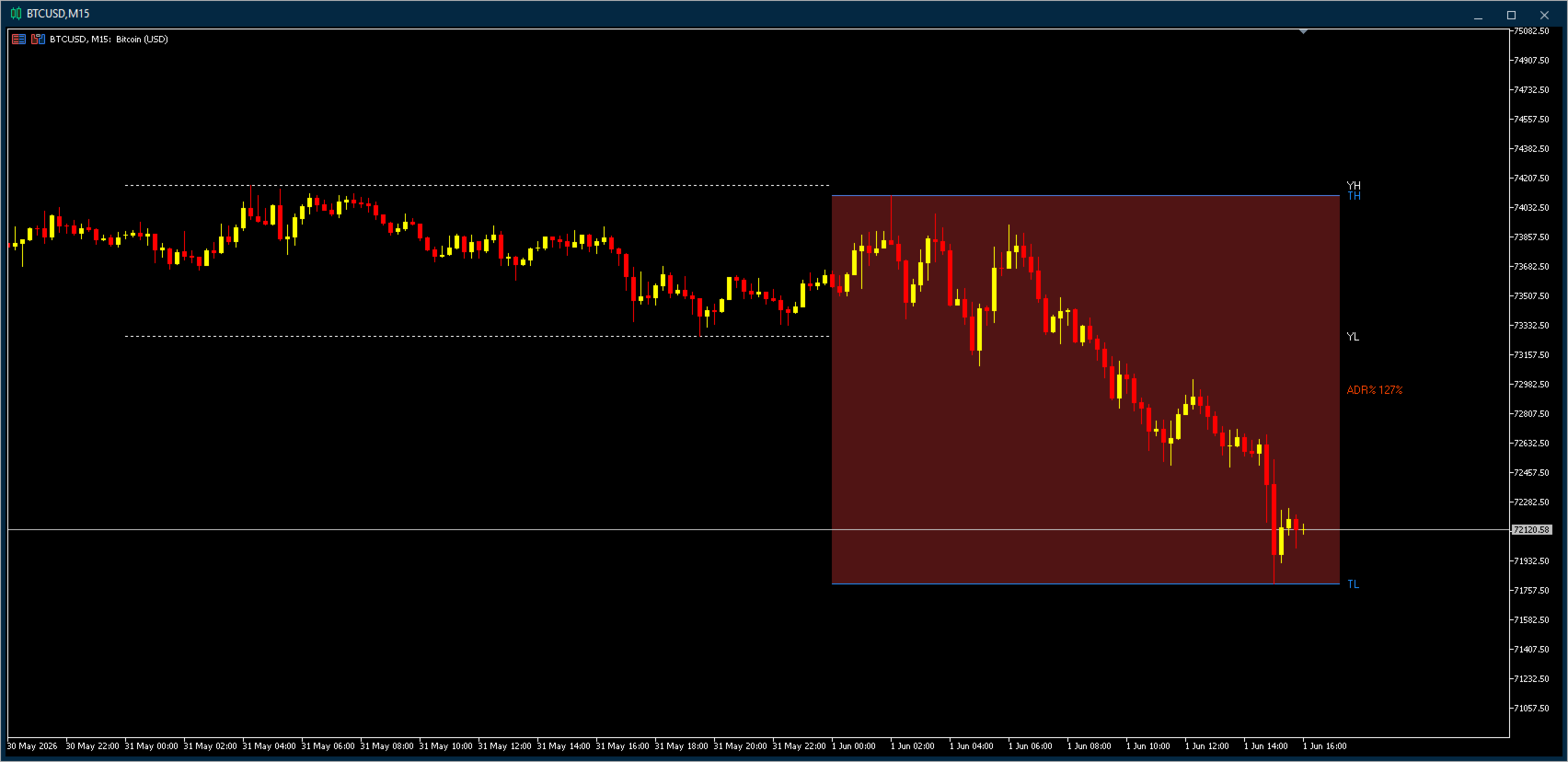
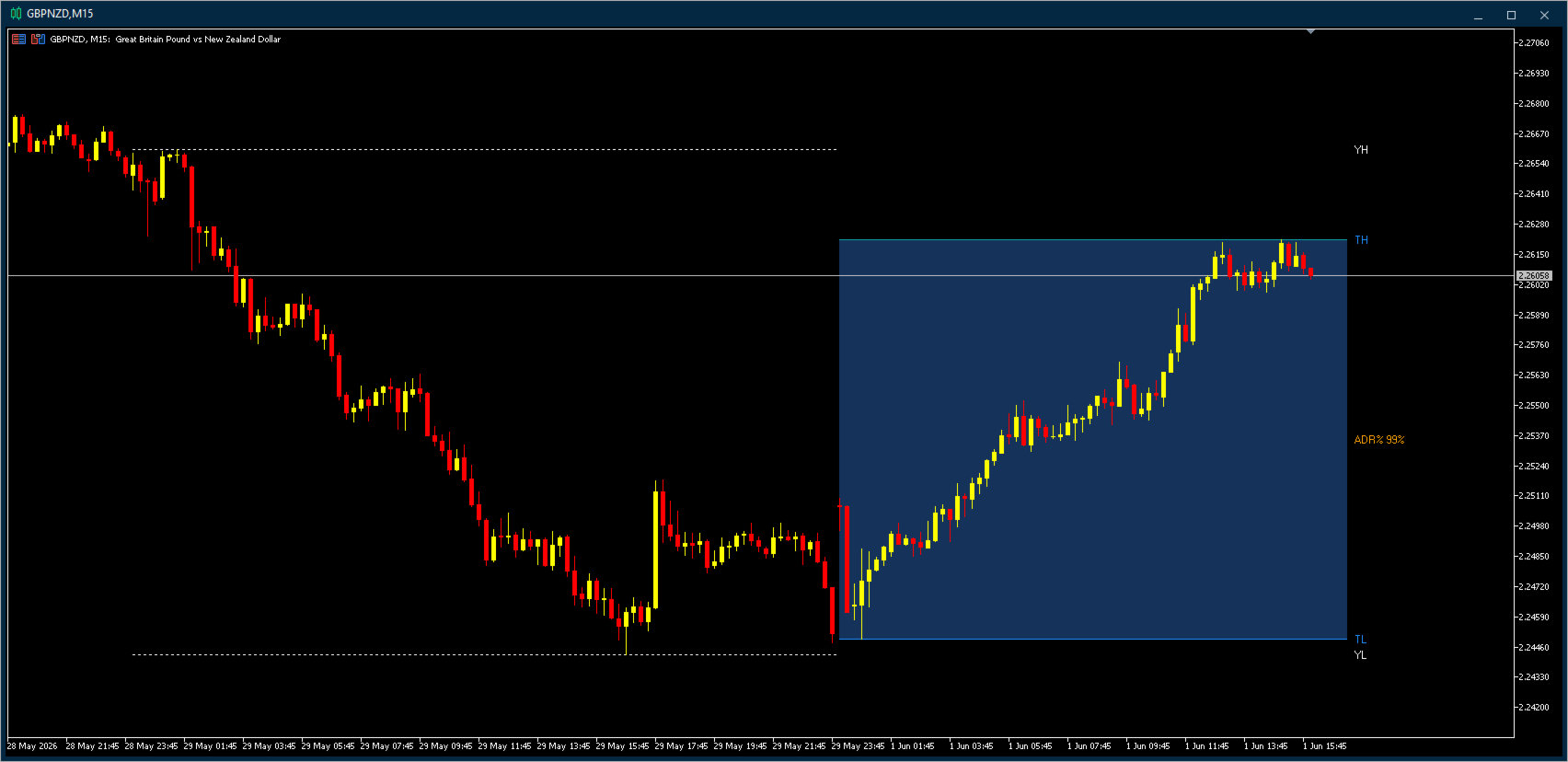
Drawn directly on the chart, the indicator marks the current trading day's progression against its historical range. The today range is shown as a filled box between TH and TL, with horizontal level lines extending into the future for clean breakout reference.
Why this matters
Daily highs and lows are natural support and resistance levels watched by every serious participant. A break above Yesterday High often triggers stop-runs and momentum continuation. A rejection at Today Low can signal exhaustion. The ADR% tells you instantly how much of the typical daily range has already been consumed, helping you avoid late-day entries when the move is statistically already done.
Most traders calculate these levels manually or rely on cluttered indicators that draw dozens of unnecessary lines. Day Levels keeps it focused: four lines, one number, immediate readability.
ADR% color gradient
The ADR% label changes color based on how much of the average daily range has been consumed:
- Lime (0-49%): early in the day, ample room remains
- Yellow (50-74%): mid-range, attention warranted
- Orange (75-99%): approaching average exhaustion
- Red (>=100%): overextended, statistical reversal risk
When the day's range exceeds 100% of the ADR, the entire filled box switches to a darker red tone as an immediate visual warning.
Universal compatibility
This indicator works on any symbol available on your broker. No custom symbols, no setup, no companion EAs required. Attach it to any chart and the levels appear instantly.
Input parameters
- ADR Period: Number of days used to calculate the Average Daily Range (default 14)
- Yesterday H/L color: Color for yesterday levels (default subtle blue-gray)
- Today H/L color: Color for today levels (default Dodger Blue)
- Filled range color: Color for the today range box (default dark blue)
- Overextended color: Color when ADR% exceeds 100% (default dark red)
- Label offset: Distance of labels from the current bar in bars (default 5)
Note
About Free Demo: Due to MetaTrader 5 platform restrictions, the demo version runs only in the Strategy Tester, which cannot meaningfully display this on-chart indicator. For a real-world impression, please refer to the screenshots above or ask any question in the Comments section.
This indicator does not generate buy or sell signals. It provides objective reference levels to support your own trading decisions.
THE MATTRIX 8x FAMILY ON MQL5
FOUNDATION (free):
- Synthetic Chart - creates the 11 custom symbols every basket tool needs https://www.mql5.com/en/market/product/177905
- Auto Refresh - keeps custom symbol charts up to date https://www.mql5.com/en/market/product/176191
ANALYSIS:
- Basket Viewer - live 8-currency strength dashboard https://www.mql5.com/en/market/product/175595
- Basket Strength - on-chart strength breakdown per basket https://www.mql5.com/en/market/product/176196
- Position Monitor - 8x8 matrix of all open positions https://www.mql5.com/en/market/product/178031
- Risk Meter - Risk-On / Risk-Off sentiment indicator https://www.mql5.com/en/market/product/178043
EXECUTION:
- One Click Basket Trade - one-click basket entry & management https://www.mql5.com/en/market/product/178117
Full ecosystem: mattrix8x.com
(c) 2026 Matthias Scholz | mattrix8x.com