Dashboard Trade Manager MT5

Dashboard.mq5 – The Ultimate All-In-One Trading Command Center

In trading, time is money.

Stop wrestling with clunky interfaces, scattered tools, and slow execution. **Dashboard** is not just a trade manager; it is a complete professional trading terminal designed for MT4. It combines execution, risk management, technical analysis, and market news into one lightning-fast, intuitive interface.

Designed for the serious manual trader, Dashboard replaces your chart clutter with precision tools that help you analyze, enter, and manage trades with surgical accuracy.

Why Choose Dashboard?

Most traders juggle multiple indicators and scripts to do what Dashboard does instantly. We consolidated the essentials into a single, lightweight tool that doesn't slow down your terminal.


CORE FEATURES

⚡ Lihtning-Fast Execution & Management

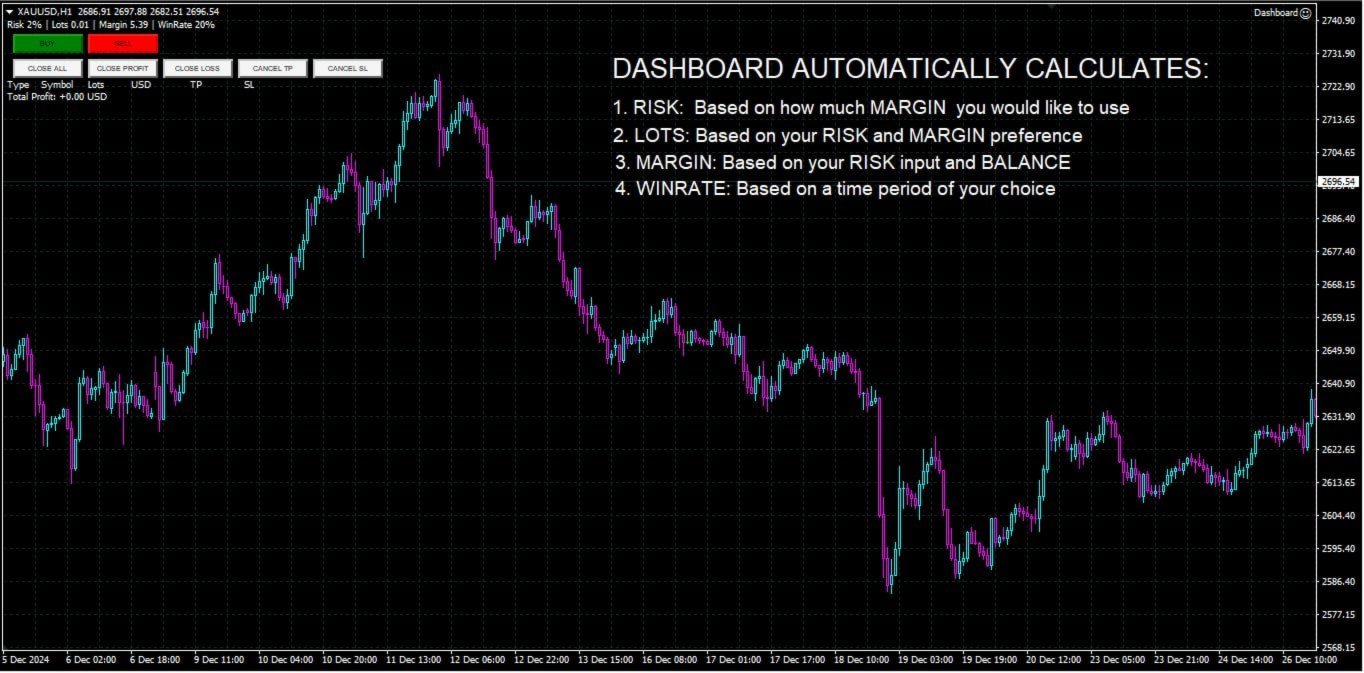
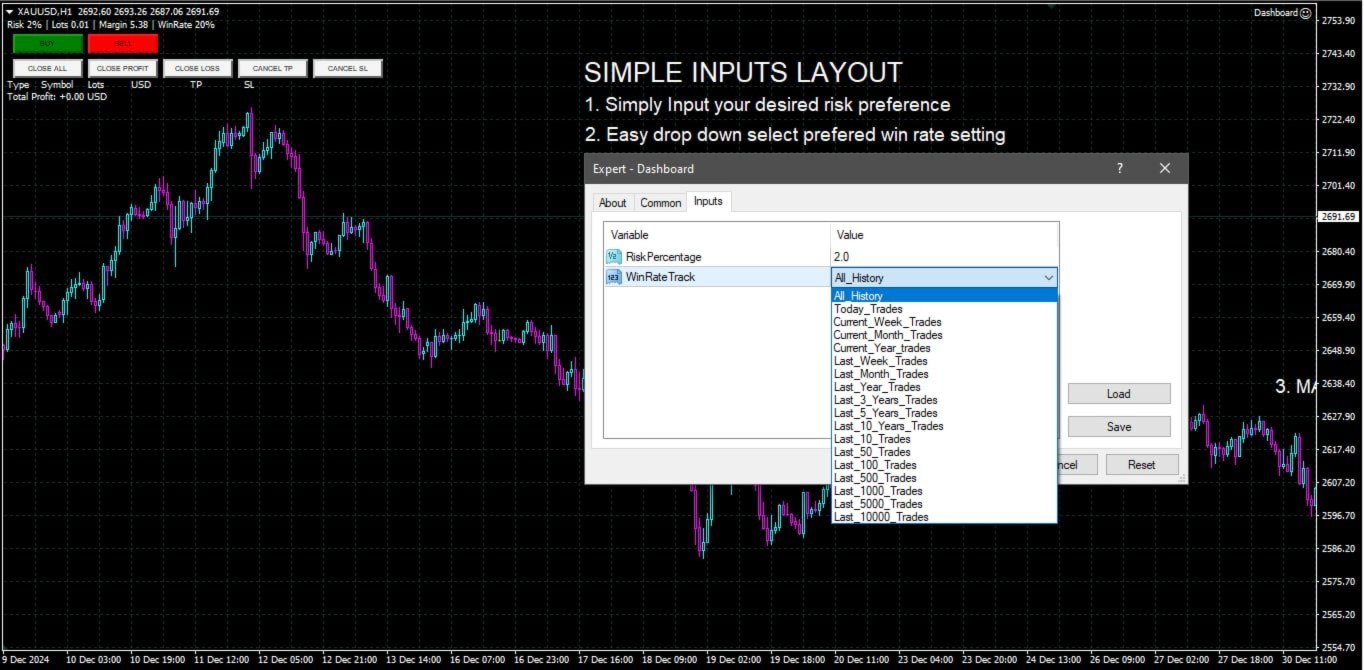
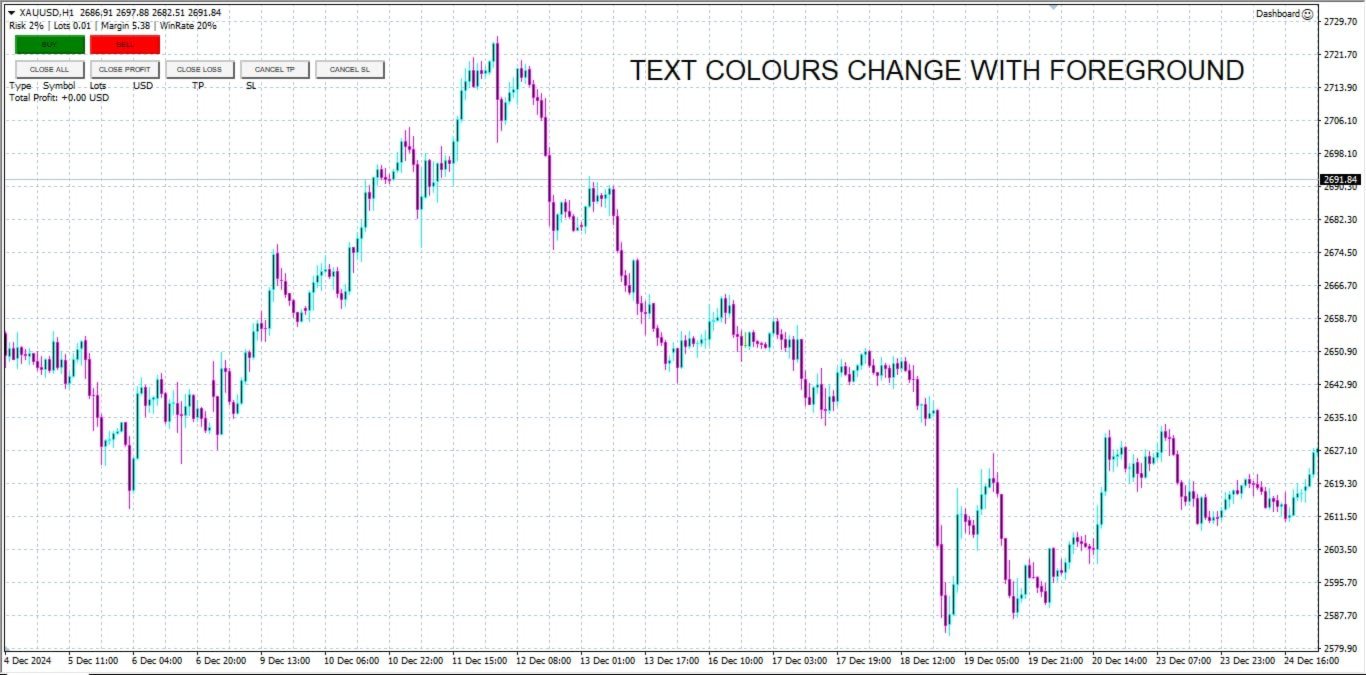
*   One-Click Trading: Instant Buy/Sell buttons with automatic lot size calculation based on your risk percentage.

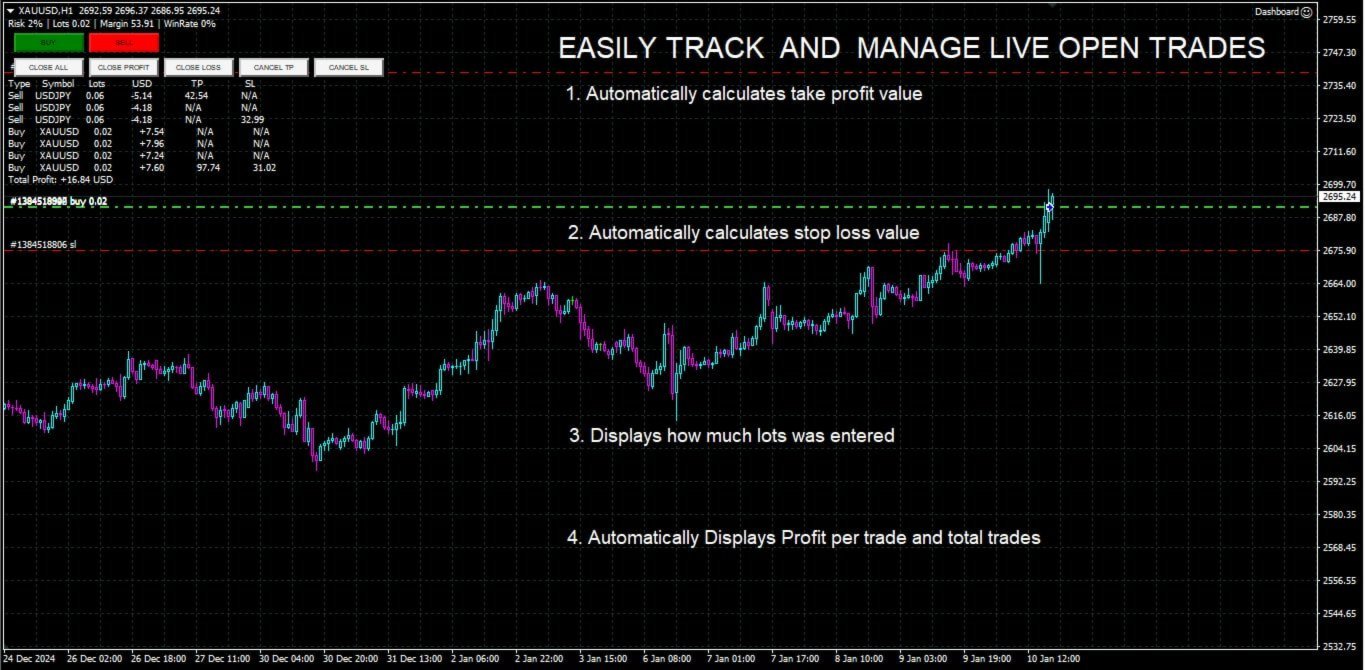
*   Visual Order Panel: A clear, color-coded trade table showing Profit/Loss, Lots, and potential TP/SL values in real-time.

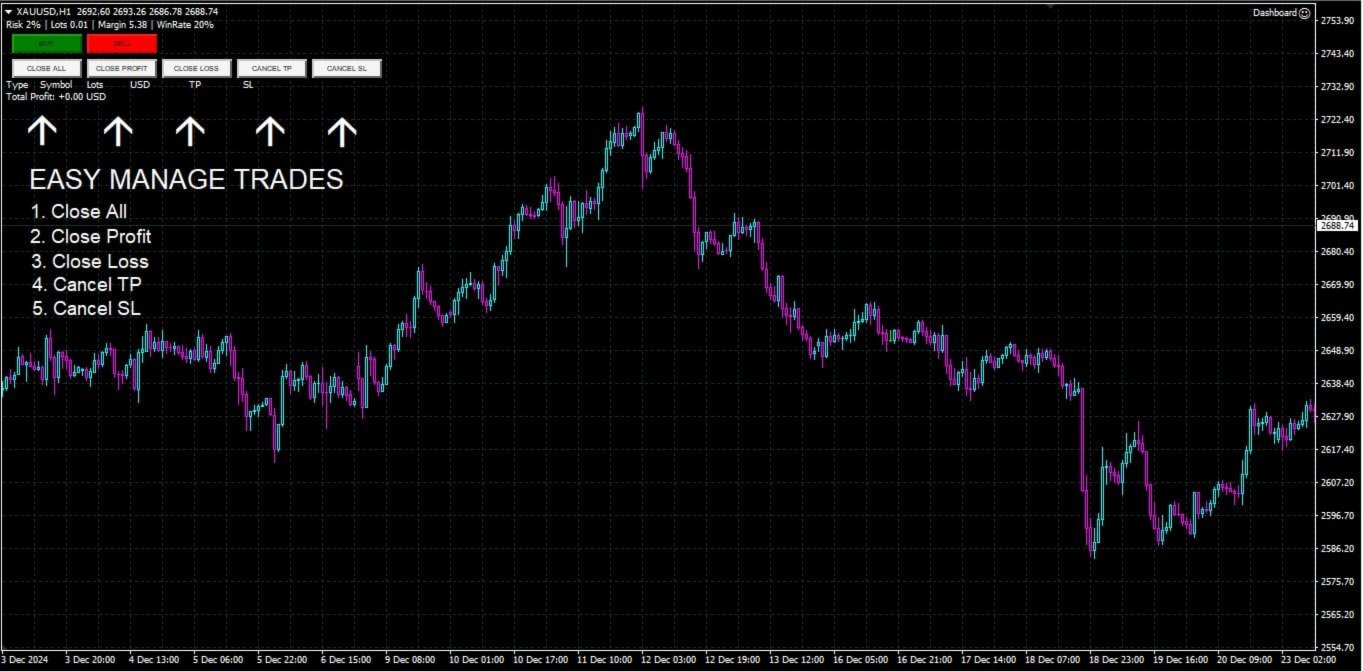
*   Smart Actions: Close All, Close Winners, or Close Losers instantly. Cancel All TP or SL levels with a single click.

*   Line Trading (Semi-Automated):

    *   Draw a Trendline, Horizontal Line, or Vertical Line to trigger orders automatically when price hits your level.

    *   Supports "Confirmation Candle" or "Instant Touch" execution.

    *   Set Lime lines for Buys and Red lines for Sells for instant visual recognition.


 🛡️ Advanced Risk & Exit Strategies

*   Dynamic Target System (Press 'Q'):

    *   Set global account targets (e.g., "Close all if account reaches +$500 or -$200") or per-trade targets.

    *   Toggle between Percentage ($) or Amount (%) modes instantly using hotkeys.

*   3-TP Laddering (New):

    *   Don't just close at one target. Activate **3-Level Take Profit** per trade.

    *   Automatically close 33% at TP1, 33% at TP2, and the remainder at TP3.

    *   Optional "Guard Mode" moves Stop Loss to Breakeven as targets are hit.

*   Smart Trailing Stop:

    *   Activate per-trade trailing stops. Drag the "TS" line on the chart to set your trail distance visually. The system handles the rest.

*   Visual "Trade Zones":

    *   See your risk visually. The tool draws shaded zones between your Entry and TP/SL. Overlapping zones create a "Heat Map" of your market exposure.


📊 Built-In Market Analysis

*   Economic Calendar:

    *   Live news feed integrated directly into the chart.

    *   Filter news by impact (High/Medium/Low) and currency.

    *   Auto-draws news lines on the chart so you never trade blindly into an event.

*   Candle Pattern Detector:

    *   Automatically scans and labels key patterns (Engulfing, Hammer, Doji, Morning/Evening Stars) directly on your chart.

*   Session Boxes:

    *   Visualizes Asian, London, and New York sessions with High/Low ranges and percentage moves.

*   Currency Strength Meter:

    *  Real-time dashboard showing the strength of major FX pairs and Cryptocurrencies (BTC, ETH, etc.).

*   Volume Profile:

    *  Toggle Volume Profile to see where the true price acceptance lies.

*   Previous Day/Week/Month High/Low:

    *   Auto-draws critical support/resistance levels from previous periods with audio/push alerts.


🚀 Professional Navigation

*   Chart Cycling: Automatically cycle through your watchlist or only charts with open trades.

*   Custom Watchlist: Monitor daily performance of all your favorite pairs at the bottom of the screen.

*   Hotkeys: Control almost everything without touching the mouse (Numpad navigation, Timeframe switching, Quick Close, etc.).


Who is this for?

Dashboard is for the trader who values speed and precision. If you are tired of calculating lot sizes manually, missing news events, or struggling to manage multiple open trades across different pairs, this is the tool you need to level up.

Simplicity and Convenience at your fingertips.

Recommended products
Orders Executor
Claudio Aguiar De Aragao
Introducing Orders Executor , your powerful and efficient trading companion designed to seamlessly execute orders directly from a user-specified text file . This innovative trading tool streamlines your trading process, providing a convenient and automated solution for executing trades with precision and speed. Key Features : **Text File Integration:**     Orders Executor is designed to effortlessly read and interpret orders from a plain text file, eliminating the need for manual input. Simpl
EA SB8 Panel Trade
Juan Manuel Bernal Martin
SB-8 – Manual Trading Panel with Fixed Risk & TradingView-Style Visualization for MT5 SB-8 is an advanced manual trading panel for MetaTrader 5 , designed to execute trades visually, quickly and without calculations . It is especially built for traders coming from TradingView , who often find MT5 confusing when it comes to risk management and trade visualization. With SB-8, you don’t calculate lot size, percentages or risk . You simply move the Stop Loss line , and the panel handles everything a
Quick Close
Nikitha Lilitha Mathangana
Quick Close Button provides you with a quick, fast, effective, and handy way to close orders, positions, bearish and bullish open, profiting and losing positions. Available options: Close All: close all orders and positions. Close Profit: close all positions in profit. Close Loss: close all positions in loss. Close Stop: close all stop orders. Close Buy: close all buy positions. Close Sell: close all sell positions. Close Orders: close all orders Close Positions: close all positions # : Hides /

SmartTrade EA is a manual trading panel that docks on the chart. It brings order entry, position management, risk limits, statistics, the economic calendar and price alerts into one interface, so you can open, protect and close a trade without leaving the chart or opening a dialog. It is a tool, not a strategy. It does not place trades on its own and does not generate signals. Every entry is yours. What it handles is the work after the click: moving stops, closing in parts, and keeping you ins
DGem Trade Manager Panel
Damien Jean Michel Gremillet
Trade Manager Panel ## Short description  Manage your manual trades with one click: automatic break-even, trailing stop, two-level partial close and risk-based lot sizing — all from a single on-chart panel. --- ## Full description Trade Manager Panel is an on-chart utility that takes care of your open trades so you can focus on the market instead of the order ticket. Drop it on any chart and it manages every position on that symbol automatically, while an interactive panel lets you size new
The AZT Profit Locker is an advanced automated risk-management utility designed specifically for MetaTrader 5 (MT5) traders who want to remove emotional interference and protect their hard-earned profits. Traders aren't just fighting the Forex market, they're fighting their own biology. Fear, Greed and Anxiety lead to holding losers too long and cutting winners too early. The utility flips the script by removing emotion from risk management. Operating as a dedicated automated risk manager, this
A professional manual trading and position management panel for MetaTrader 5 with risk-based sizing, SL/TP protection, partial reduction, break even and trailing stop tools. Strategy Engine Trade Panel is a manual trading and position management utility for MetaTrader 5. It is designed to simplify order execution, risk sizing, position protection and account management directly from the chart. The product does not generate entry signals and does not open trades automatically without a user a
Spread Costs refers to the amount of the loss caused by the spread, and Swap Benefits refers to the amount of the income gained by overnight positions. Spread Costs is an important indicator for short-term traders, especially for scalping traders, and Swap Benefits is an important indicator for long-term traders. Since the spreads and swaps on the MetaTrader 5 platform are all expressed in points, we need to convert it into the amount expressed in the account currency. This tool can display the
Position Prime
Mariana Cordeiro Neves Fernandes
Download the free demo version now and test all the risk management features within your Strategy Tester before you buy! Position Prime is an institutional-grade visual execution assistant and risk manager for MetaTrader 5. Designed for traders who demand speed and precision, it eliminates the need for manual lot calculations and transforms your chart into a true trading desk. Plan, execute, and protect your trades in fractions of a second. ️ Risk Management & Automatic Lot Calculation Dyna
All In One Trade Manager is a trade manager and one-click trading panel for manual traders on MetaTrader 5. It works as a trading assistant, risk manager and position size calculator in one dashboard. It brings together everything below in one panel: order entry with risk sizing automatic trade management advanced order types account protection statistics Its entry checks run in the background and tell you, before you click BUY or SELL, when something speaks against the trade. Also available
One Click Trader  is a tool designed for MetaTrader 4 platform, which enables you to take your trading to the next level. It enables you to open, manage and close your trades in simple an efficient way by just one click of your mouse button. "-"   ,  "+"  change OCT window size  Up arrow minimizes the OCT panel Down arrow maximizes the OCT panel Right arrow displays the next panel with additional features Left arrow hides the panel with additional features Red  SELL  button enables you to open s
This Expert Advisor is an One-click trading panel for multi pairs. Click   OPEN   button to open orders for the selected pairs. Click   CLOSE   button to close orders for the selected pairs. The lots of order is the number entered by users.The positive number is for buy order and the negative is for sell order. Click  CLOSE  button is to close the whole order ,instead of partial close.Close action has nothing to do with the number of lots. Set the input Magic Number to 0, the EA can close manua
LotCalculatorPro
Reynaldo Jr Audencial Pascual
LotCalculatorPro + Smart Trading Panel LotCalculatorPro is a powerful all-in-one trading assistant designed to simplify risk management, lot size calculation, and trade execution directly from your chart. This tool helps traders control risk, calculate precise lot sizes, and manage trades automatically with smart features like break-even, partial close, and daily profit/loss protection. It is ideal for Forex traders, prop firm traders, and risk-focused traders who want a clean and efficient trad
Quant Panel
Kevin Craig E Gittins
Quant Panel is a strategy analysis utility for MetaTrader 5. It helps traders review several Expert Advisors or trading strategies running on the same account. The panel groups closed positions by Expert Advisor comment or magic number and calculates each strategy's results separately. You can compare strategy performance, review individual drawdowns and export detailed reports from one dashboard. Independent strategy analysis Each strategy has its own virtual starting balance and closed-trade b
This QuickClose help you to close all orders having profit immediately with only ONE CLICK, its work is very fast. You can choose which symbol you want or close all symbols so it will helpful for you in your trading to manage trading faster. This EA can quick close all Buy and Sell Orders by a selected symbol or total, And delete all pending orders. This SymbolButton is designed for closing orders. There is available Manual and Automatic closing functions. Automatic closing function will close t
Order Flow Footprint Workspace is a read-only order-flow and market microstructure workspace for MetaTrader 5. It transforms the tick data provided by your broker into an interactive session-based footprint view with price-level activity, profiles, historical navigation and diagnostics. The workspace automatically adapts to the information actually available in the broker feed and does not invent trade direction when the source data cannot support it. MAIN FEATURES • Footprint candles with S
DDKiller Pro
Njaratahiry Michael Randrianiaina
Stop Blowing Your Account. Once and For All. DDKiller Pro is the MT5 risk guardian that runs silently on your chart and shuts down trading the moment you hit a limit — whether you're grinding a prop firm challenge or managing your own CFD account. The problem every trader knows: You set your rules. You break them anyway. One revenge trade. One overleveraged position. One session that erases a month of gains. DDKiller Pro removes that decision from your hands entirely. What it does: The second yo
️ EquityShield is your automated risk management guardian for MetaTrader 5. If you've ever exceeded your daily loss limit, struggled to enforce your own trading rules during volatile markets, or wanted to automatically lock in profits when you hit your targets, EquityShield is built for you. This is not a trading strategy - it's a safety system that watches your account 24/7, automatically closes positions when your risk limits are breached, and helps you maintain consistent trading discipline
# Universal Smart Manual Trade Manager MT5 v1.00 ## What the EA does Universal Smart Manual Trade Manager MT5 is a protective and management Expert Advisor for manually opened trades. It does not open new entries by itself. It only adopts already open positions that pass the selected filters, and can add missing SL/TP, manage break-even, profit lock, ATR trailing, send Telegram notifications, and display status information on the chart. The default setup is intentionally safe: the EA manages
Telegram Notify MT5 Telegram Notify MT5 is an utility tool to bridge your MetaTrader 5 activities to your Telegram chat/channel. It is useful for monitoring your MetaTrader 5 account by sending a notification to your particular Telegram chat/channel when someone/EA is placing trades, modifying order's TP/SL, closing trades and etc. This EA does not place any trade for your account. This EA also could be a convenient tool for monitoring other's EA trading activities or a tool for publishing your
Close All Pro MT5 – Fast PnL Control is a powerful trade manager MT5 utility that gives you total control over your trades. With a single click, you can close all MT5 orders, monitor real-time profit and loss, and manage your floating PnL directly from a clean on-chart panel. The tool is lightweight, responsive, and built to help traders save time, reduce emotional stress, and maintain focus. Whether you trade manually or through an EA, this MT5 profit panel provides the visibility and precisio
Drawdown Terminator
Sivakumar Paul Suyambu
5 (1)
Drawdown Terminator – Account-wide Equity Guardian for MT5 Protect your capital. Lock your profits. Sleep without watching every tick. ️ 1. What is Drawdown Terminator? Drawdown Terminator is an MT5 utility (non-trading Expert Advisor) designed to protect your entire account equity – not just a single EA or symbol. It continuously monitors your total account equity / capital , and when your Equity Profit Target or Equity Loss Limit is reached, it can automatically: Close all open position
Check an MQL5 signal before you subscribe. A signal can look convincing on the provider page and still be a poor fit for your account. Different symbol names, minimum lots, leverage, hedging or netting, copy latency and a fixed monthly fee can materially change what happens on your account. MT5 Signal Sentinel is not a trading robot and not a signal. It does not trade. It analyzes available data and explains technical and historical risks in plain language. Why this tool was created Many problem
Ogs
Matimu Romeo Ngoveni
# Omega — Session-Cycle Visualization & Analytics for MT5 **Omega** turns your chart into a structured map of the trading day. It automatically divides every session into 9 recurring time-cycles, draws them as color-coded rectangles, overlays a live Fibonacci fan, and silently logs every box, breakout, and structural event to a local SQLite database you can query, chart, or build a dashboard on top of — all with zero manual input. This is a **visualization and analytics tool** , not a signal
Tick Volume Chart is a unique tool for building charts based on tick volumes in MetaTrader 5 . With Tick Volume Chart , you can create charts where each candle is formed not by time, but by a specified number of ticks. This gives you perfect precision in analyzing market activity, which is unattainable on standard time-based charts. You can use any indicators and Expert Advisors that support custom symbols. Working with the resulting charts is just as convenient as with standard ones. Unlike sta
Garner Trade Pad EA
Garner Edward Bennie
Garner Trade Pad EA is an MT5 Expert Advisor that brings trade planning and position sizing directly onto your chart. Position your Stop Loss and Take Profit, choose the amount you want to risk, and view the calculated lot size before placing an order.TP1 buy The dark navy panel with blue accents provides a clear view of your proposed trade. It is a manually operated calculator and order-entry tool: you choose the direction, levels and timing of every trade. ## Movable chart panel - Drag t
Dynamic Volatility-Based Trade Management for MetaTrader 5 ATR Trade Assistant is a dynamic trade-management Expert Advisor for MetaTrader 5, designed to manage a trade from the moment of entry through to its final exit. Whether you prefer to enter trades manually using the custom BUY and SELL buttons directly on your trading chart, or use the included Sample Strategy for automated entries, ATR Trade Assistant provides a complete volatility-based framework for position sizing, initial Stop Loss,
A simple script that closes all current orders. Terminate once close all positions, so no worries about constantly closing your order. How to use : Drag the script from the navigator to the chart, and it will be activated. Do remember to enable algo trading to use this script. There are different version of the script that can choose whether to close all buy/sell posiitons, if you need this, do contact me in MQL5.
Objects Copier
Vladimir Pokora
This utility copies graphic objects from the MASTER chart to the SLAVE chart. Install it as an indicator. The version for MT4 is here: https://www.mql5.com/en/market/product/61937 It can work in the following modes: Master CHART to Slave CHART in one MT4 or MT5 Master MT4 to Slave MT4 (one or more) Master MT4 to Slave MT5 (one or more) Master MT5 to Slave MT5 (one or more) Master MT5 to Slave MT4 (one or more) You can use multiple Master-Slave groups by setting the ID parameter . You can copy al
Blade Position Manager Pro – MT5 Trade Management Utility Take Control of Your Trades with One Professional Dashboard Blade Position Manager Pro is a MetaTrader 5 trade management utility designed to help traders manage open positions, control risk, protect floating profits, and simplify everyday trading operations. Whether you trade Gold (XAUUSD), Forex, indices, or other supported instruments, Blade Position Manager Pro provides practical tools for managing your trades from a compact, easy-to-
Buyers of this product also purchase
News Trade EA MT5
Konstantin Kulikov
4.55 (11)
Present to you the useful robot that I have been using for several years. It can be used in both semi-automatic mode and fully automatic mode. >>> Chat <<< The program contains flexible settings for trading on the news of the economic calendar. It cannot be checked in the strategy tester. Only real work. In the terminal settings, you need to add the news site to the list of allowed URLs. Click Tools > Options > Expert Advisors. Check the option "Allow WebRequests for listed URL:". Add this (de
FarmedHedge Pair Trading Dashboard
Tanapisit Tepawarapruek
5 (7)
Farmed Hedge Yield Farming | All Markets (Manual - Hybrid - Semi/Automated EA) VERIFIED TRADING RESULTS - Farmed Hedge Yield Axi Copy:  https://www.mql5.com/en/signals/2356376 - Farmed Hedge Yield Exn Copy:   https://www.mql5.com/en/signals/2356404 - Farmed Hedge Yield V Copy:  https://www.mql5.com/en/signals/2357156 IMPORTANT NOTICE: FarmedHedge is a MANUAL-FOCUSED TRADING UTILITY ,not a fully automated EA. Results shown on this Signal include manual trades and overall strategic management.
Dealer Panel
Mian Rameez Ali
Dealer's Panel No signal decides anything here — a hand does. One click, and the panel calculates what's underneath: lot size from risk, target from a 30-step balance ladder that remembers exactly how far an account has climbed. Toggle between market and pending without touching an input field. Set a stop, and the take-profit can write itself — a fixed share of the balance, translated into price with no arithmetic left for the trader to get wrong. One trade live at a time; it won't let a seco
The Patch
Mian Rameez Ali
The Patch It never opens a trade. It walks behind the ones that did. Every open position, every pending order — checked twice a second for the one thing that's easy to forget: a stop, a target. Found bare, it doesn't ask. It writes the missing number in, measured in points from wherever the position began, and moves on to the next. No strategy, no opinion on direction. Just the quiet assumption that nothing should ever sit on the market unprotected — not because someone decided it shouldn't,
Floor Watch
Syed Tauqeer Hussain Shah
Floor Watch One number, watched every thirty seconds: how far equity has fallen since the day began — or since its highest point, if it's told to trail the peak instead of the open. Cross the line and it doesn't argue. Every open position closes, every pending order vanishes, and anything that slips through afterward gets shut the moment it appears. Not asked. Removed. The floor holds until the clock turns 5 AM Pakistan time — then, and only then, does the day start over. One rule. No except
YuClusters
Yury Kulikov
4.93 (43)
Attention: You can view the program operation in the free version  YuClusters DEMO .  YuClusters is a professional market analysis system. The trader has unique opportunities to analyze the flow of orders, trade volumes, price movements using various charts, profiles, indicators, and graphical objects. YuClusters operates on data based on Time&Sales or ticks information, depending on what is available in the quotes of a financial instrument. YuClusters allows you to build graphs by combining da
Buy once. Get all my MT4 and MT5 indicators - available now and released in the future - at no extra cost. Contact me after purchase for instructions to receive them. The price is planned to rise by 50$ after every 10 purchases, up to 999$. The Market price at checkout applies. Keep the indicator you trust. Automate the work around it. Your signal. Your rules. Your execution. Already have an MT5 indicator you rely on, but still need to watch the chart, wait for a signal, calculate the lot, plac
Master Your Trading Discipline   Stop losing your hard-earned gains to overtrading and emotional decisions. The Discipline Tool is your ultimate trading assistant, ensuring strict risk management in real-time. Key Protection Features: Advanced Drawdown Defense : Automatically halts trading if your daily drawdown exceeds a preset threshold (percentage or dollar amount). Real-Time Equity Lock : Safeguard profits by referencing peak equity, ensuring drawdown stays within control. Hard Profit Target
EasyInsight AIO MT5
Alain Verleyen
4.92 (12)
EASY Insight AIO – All-In-One Power for AI-Driven Trading Want to skip the setup and start scanning the entire market – Forex, Gold, Crypto, Indices, and even Stocks – in seconds? EASY Insight AIO is the complete plug-and-play solution for AI-powered trade analysis. It includes all core Stein Investments indicators built-in and automatically exports clean, structured CSV files – perfect for backtesting, AI prompts, and live market decision-making. No need to install or configure indicators manu
Quant AI Agents
Ho Tuan Thang
5 (1)
Quant AI Agents are independent trading Expert Advisors. Instead of trading using a fixed strategy like other conventional EAs, Quant AI Agents   is a   multi-agent AI trading framework   that turns natural-language strategy prompts into live.  WANT THE SAME RESULTS AS MY LIVE SIGNAL?   Use the exact same brokers I do:   IC MARKETS , IC TRADING   .  Unlike the centralized stock market, Forex has no single, unified price feed.  Every broker sources liquidity from different providers, creating un
FUTURES ORDERFLOW FOOTPRINT CHART Professional OrderFlow EA for MetaTrader 5 Version 1.01| Professional tool for real traders | Institutional-Grade Visualization STRATEGY TESTER USERS - PLEASE SELECT EVERY REAL TICK WHEN TESTING AND YOU HAVE DOWNLOADED HISTORICAL DATA. IF YOU SEE A WAITING SCREEN AND IT IS NOT DOWNLOADING, IT MEANS YOU HAVE LOW HISTORICAL DATA. TRY 1 MIN AND 5 MIN FIRST ON 1 DAY DATA. ONE DAY DATA SHOULD BE THE NEWEST AND MOST CURRENT DATE. PLEASE WAIT UNTIL THE MARKET HAS ROL
Trading Chaos Expert
Hennadii Stanilevych
5 (11)
This software has no equals in the world and represents a universal trade "console" covering trading signals, automated market entry, setting of Stop Loss and Take Profit, as well as Trailing Profit for multiple trades at the same time in a single open window. Intuitive control of the Expert Advisor in "three clicks" ensures a comprehensive use of all its functions on different computers, including tablets PCs. Interacting with additional signal indicators that mark the chart to give a real mark
Copy your MT5 trades to Interactive Brokers You keep using MT5. Every order you open or close is sent to your IB account. In real time. No coding. No changes to your strategy or EA. Try it first Rent 1 month: $30. Test on a live or paper account. What it does Real-time copying: same direction, reverse, or one side only. Map any MT5 symbol to any IB symbol. Set a lot ratio for each. Forex, Futures, Stocks, CFDs, Metals and Crypto. Position sync: both accounts checked, any difference fixed. Optio
Easy Strategy Builder 5
Gheis Mohammadi
5 (4)
The  Easy Strategy Builder (ESB)  is a " Do It Yourself " solution that allows you to create a wide range of the automated trading strategies without any line of codes. This is the world’s easiest method to automate your strategies that can be used in STP, ECN and FIFO brokers. No drag and drop is needed. Just by set conditions of your trading strategy and change settings on desired values and let it work in your account. ESB has hundreds of modules to define unlimited possibilities of strategi
HINN Lazy Trader
ALGOFLOW OÜ
5 (1)
The core idea: using the user interface, you configure the parameters the chart must meet before entering a position (or positions), choose which entry models to use, and set the rules for when trading and planning should end. Lazy Trader  handles the rest: it  takes over all the routine chart watching and execution! full description  :: 3 key videos [1] ->  [2]   ->  [3] What can it do? - Understands Larry Williams market structure - Understands swing market structure by Michael Huddleston
AI Arbitron — an MT5 Spot vs Future Gold Arbitrage Bot designed to capture price discrepancies between correlated Spot and Future instruments through hedged, non-directional trading. Platform: MT5 Use Swap Free Accounts, many of the regulated broker gives swap free accounts for 7 days, make use of it by only buying lower price asset and selling higher price asset, hold your position for 2-3 days. Asset: Mainly Gold (XAUUSD) using Spot + Future/CFD price feeds. Core strategy: It monitors the p
Mentfx Mmanage mt5
Anton Jere Calmes
4.25 (8)
The added video will showcase all functionality, effectiveness, and uses of the trade manager. Drag and Drop Trade Manager. Draw your entry and have the tool calculate the rest. Advanced targeting and close portions of a trade directly available in tool (manage trades while you sleep). Market order or limit order on either side with factored spread. Just draw the entry, the tool does the rest. Hotkey setup to make it simple. Draw where you want to enter, and the stop loss, the tool calculates al
MT5 Trading Deck
Manuel Michiels
5 (2)
One button. One trade. MT5 Trading Deck is a hotkey trading panel for MetaTrader 5 that turns the platform into a keyboard-driven execution cockpit. Stop loss, take profit and lot size are pre-calculated for every key; the moment you press, a market order is live on the broker. A complete technical user manual is attached in the product Comments section. It documents every input parameter, the full hotkey map, the recommended Stream Deck XL layout, and the advanced workflows for Pre-Limit orders
Global Investing FX Terminal
Santiago Nicolas Pla Casuriaga
5 (1)
The Global Investing FX Terminal is an all-in-one FX dashboard for MetaTrader 5 — CB policy rates, CFTC COT positioning, carry rankings, economic surprises, options skew, retail sentiment, and correlations, thirteen panels in total — rendered on a single zero-flicker canvas overlay and refreshing every 10 seconds from one attached EA. No external software required. Professional FX analysis requires simultaneous access to data that normally lives in separate platforms: rate derivatives, governmen
Features   With MT5 to Interactive Brokers(IB) Trader, you can: 1. Load chart data from IB to MT5, and Analyze with all standard or customer Indicators. 2. Place Orders to IB Account Directly in MT5. 3. Make your Own EAs upon IB Securities by only making minus changes of the trading function. Usage 1) Installation Copy the "Mt5ToIBTraderEn.ex4" and sample files to [MT5 Data Folder]->MQL5->Experts.  2)  MT5 Settings Add the IP Address to the MT5 Allowed URLs in 'Tools->Options->Expert Adviso
Unlimited Trade Copier Pro MT5 is a tool to copy trade remotely to multiple MT4, MT5 and cTrader accounts at different computers/locations over internet. This is an ideal solution for you if you are a signal provider and want to copy your trades to other receivers globally on your own rules. One provider can copy trades to multiple receivers and one receiver can get trade from multiple providers as well. The provider can even set the subscription expiry for each receiver, so that receiver will n
Custom Alerts AIO: All-in-One Market Scanner – No Setup Required Overview Custom Alerts AIO is the fastest and easiest way to monitor multiple markets for real-time trading signals—without any setup or extra licenses. It comes with all required Stein Investments indicators already embedded, making it the perfect plug-and-play solution for traders who value simplicity and performance. Just load it to any chart and start receiving alerts across Forex, Metals, Crypto, and Indices. Shares can be a
Adam FTMO MT5
Vyacheslav Izvarin
5 (2)
ADAM EA Special Version for FTMO Please use ShowInfo= false for backtesting ! Our 1st EA created using ChatGPT technology Trade only GOOD and checked PROP FIRMS  Default parameters for Challenge $100,000 Tested on EURUSD and GBPUSD only  Use 15MIN Time Frame Close all deals and Auto-trading  before Weekend at 12:00 GMT+3  Friday For Prop Firms MUST use special Protector  https://www.mql5.com/en/market/product/94362 --------------------------------------------------------------------------------
ManHedger MT5
Peter Mueller
4.83 (6)
THIS EA IS A SEMI-AUTO EA, IT NEEDS USER INPUT. Manual & Test Version Please TEST this product before BUYING  and watch my video about it. The price of the ManHedger will increase to 250$ after 20 copies sold. Contact me for user support or bug reports or if you want the MT4 version! MT4 Version  I do not guarantee any profits or financial success using this EA. With this Expert Advisor, you can: Implement your own Zone Recovery strategy to capitalize on trending markets. Create Grid trading s
Prop Firm Os
Gayathiri Gopalakrishnan
5 (1)
PROP FIRM OS Structured Trading Assistant for MetaTrader 5 PROP FIRM OS is a structured trading assistant designed for MetaTrader 5 users who prefer rule-based market analysis and organized trading workflows. The Expert Advisor combines market analysis tools, scanner functions, dashboard monitoring, alerts, risk-control settings, and trade management features inside one system. PROP FIRM OS is designed to help traders follow selected rules, filters, and monitoring conditions during trading activ
The product will copy all  Discord  signal   to MT5   ( which you are member  ) , also it can work as remote copier.  Easy to set up. Work with almost signal formats, support to translate other language to English Work with multi channel, multi MT5. Work with Image signal. Copy order instant, auto detect symbol. Work as remote copier: with signal have ticket number, it will copy exactly via ticket number. How to setup and guide: Let read all details about setup and download Discord To MetaTrader
QCML Assistant
Maxime Turcotte-lafreniere
QCML Assistant MT5 Your Trading. Our Assistant. Your Edge. Looking for a tool that completely transforms your experience on MetaTrader 5? QCML Assistant is the all-in-one solution built by traders, for traders. Just one tool installed on your chart, and you get access to an ultra-complete, ultra-fast, and ultra-simple trading platform. No more hours wasted setting up your workspace. No more complicated trade entries. With QCML Assistant, everything becomes simple, smooth, and efficient right fro
Latency Arbitrage
Heri Yusufu Kaniugu
Latency Arbitrage – Ultra Fast Execution & Price Inefficiency Capture Latency Arbitrage  utility tool is designed to exploit short-term price inefficiencies between fast and slow price feeds. Instead of predicting market direction, the EA focuses on execution speed and price deviation opportunities, allowing traders to capture micro-movements before the market fully adjusts. With built-in risk controls and smart filtering, it ensures precise and disciplined trading performance. Price increases b
Crystal Trade Manager – Advanced MT5 Risk and Trade Control Utility Overview Crystal Trade Manager (CTM) is a professional MetaTrader 5 utility designed for risk management, trade automation, and instant execution control. It provides traders with an integrated system for protecting equity, managing daily drawdowns, controlling lot sizes, and applying automation features such as automatic SL/TP, break-even, and trailing stop. The tool is suitable for manual traders, prop-firm challenge particip
Forex Analyzer Pro MT5 Trading Account Analytics Dashboard Forex Analyzer Pro is a web-based trading analytics platform designed for Meta Trader 5 users. Forex Analyzer Pro synchronizes account activity from Meta Trader 5 and organizes trading information into analytics, reporting, monitoring, and journaling tools through a structured dashboard. The platform allows users to access their trading dashboard through supported desktop and mobile web browsers. Forex Analyzer Pro connects with your MT5
More from author
Smarter Trend Channel
Moegamat Luqmaan Titus
Smarter Trend Channel Indicator Description: The Smarter Trend Channel Indicator is a powerful and adaptive tool designed to help traders visually identify key market trends by drawing dynamic support and resistance channels on the price chart. It uses advanced fractal calculations to plot trendlines that adjust based on market conditions, helping traders spot potential breakout zones and market turning points. Key Features: Customizable Trend Channel Display: Easily show or hide the trend chan
FREE
Coloured MACD
Moegamat Luqmaan Titus
The Colored MACD indicator is a versatile and powerful tool designed to enhance your technical analysis by providing an intuitive visualization of market momentum and trend changes. Built on the foundation of the popular Moving Average Convergence Divergence (MACD) indicator, this version introduces color-coded histograms to easily distinguish between bullish and bearish momentum. Key Features: Color-Coded Visualization : The indicator features a lime-colored histogram when the MACD is above the
FREE
Coloured Bollinger Bands
Moegamat Luqmaan Titus
Coloured Bollinger Bands The Coloured Bollinger Bands indicator is an enhanced version of the standard Bollinger Bands, offering customizable features to suit your trading needs. It uses the classic Simple Moving Average (SMA) as the middle band, and allows you to easily change the appearance of the bands, including the option to select colors and line types, ensuring better visual clarity and adaptability on your charts
FREE
Coloured Parabolic SAR
Moegamat Luqmaan Titus
Overview: The Coloured Parabolic SAR Indicator is a visually enhanced trading tool designed to make trend-following and trade identification easier. This customizable indicator provides clear visual cues with color-coded signals for bullish (buy) and bearish (sell) trends directly on your MT4 chart. Key Features: Color-Coded Signals : Lime green "o" symbol for Buy signals. Red "o" symbol for Sell signals. Customizable Inputs : Adjustable Step and Maximum parameters to fine-tune the Parabolic SA
FREE
Bull and Bear Strength
Moegamat Luqmaan Titus
Bull and Bear Strength Indicator Overview: The   Bull and Bear Strength Indicator   is a versatile and intuitive tool designed to give traders a decisive edge. It captures the balance of power between bulls and bears, providing actionable insights into market sentiment and momentum for any timeframe or instrument. The Bull and bears strength indicator allows you to see the areas where momentum and volume has peaked. It highlights areas of strength within a range. A truly simple indicator with p
Dashboard Trade Manager
Moegamat Luqmaan Titus
Dashboard.mq4 – The Ultimate All-In-One Trading Command Center In trading, time is money. Stop wrestling with clunky interfaces, scattered tools, and slow execution. **Dashboard** is not just a trade manager; it is a complete professional trading terminal designed for MT4. It combines execution, risk management, technical analysis, and market news into one lightning-fast, intuitive interface. Designed for the serious manual trader, Dashboard replaces your chart clutter with precision tools that
Adjustable Volume Profile Indicator The Adjustable Volume Profile is a custom MetaTrader 4 (MT4) indicator designed to visually display the volume distribution of a financial instrument across a specific price range and time period. This indicator allows traders to analyze the volume profile based on either real volume or tick volume, helping to identify key levels of support, resistance, and market activity. Key Features: Customizable Timeframe: The indicator can be set to any available timefr
Trend Master ZA
Moegamat Luqmaan Titus
Trend Master ZA Indicator Unlock the power of trend analysis with the Trend Master ZA Indicator, a sophisticated tool designed for traders who seek to combine multiple technical strategies into one seamless solution. Built with advanced features and customization options, this indicator provides deep insights into market trends and price action dynamics. Key Features: Trend Analysis with Bollinger Bands : Utilize the power of Bollinger Bands to identify market trends, with customizable period a
Smarter Support and Resistance Indicator The Smarter Support and Resistance Indicator is designed to enhance your technical analysis by automatically identifying key support and resistance levels on multiple timeframes, helping traders make informed decisions. This tool efficiently calculates the highest and lowest price points over a specified lookback period based on the most tested levels then calculates the average of those levels to dynamically plot them on your chart. This means that the s
Filter:
No reviews
Reply to review