Trade Panel Risk

Stop losing money on bad lot sizes. Trade Panel Risk calculates exactly how much to buy or sell, executes your trade in one click, and protects your account automatically — all from a single panel on your chart.

You tell it: "I want to risk 1% of my balance with a 20-pip stop loss." It tells you: "Buy 0.43 lots." You click BUY. Done.

No spreadsheets. No mental math. No mistakes.

─────────────────────────────────────────── THE PROBLEM MOST TRADERS HAVE ───────────────────────────────────────────

Most traders lose money not because they have bad trade ideas — but because they manage risk poorly.

They open positions that are too big when they're feeling confident. They forget to move their stop loss to breakeven. They hold losing trades too long hoping they'll recover. They blow prop firm accounts by exceeding the daily drawdown limit.

These are not strategy problems. They are execution problems.

Trade Panel Risk solves all of them.

─────────────────────────────────────────── WHAT IT DOES — SIMPLE VERSION ───────────────────────────────────────────

Imagine you have $10,000 in your account. You want to risk $100 (1%) on a trade. Your stop loss is 20 pips away.

Without this panel: you open a calculator, look up the pip value for your symbol, do the math, type in the lot size, and hope you didn't make a mistake.

With Trade Panel Risk: you type "1%" and "20 pips." The panel shows you "0.50 lots." You click BUY or SELL. The trade opens at the correct size, with SL and TP already set.

That's it.

─────────────────────────────────────────── TAB 1 — TRADE (Open Positions) ───────────────────────────────────────────

This is where you open trades.

▸ RISK CALCULATOR Choose how you want to define your risk:

Mode 1 — Percentage: risk X% of your balance per trade Example: 1% of $10,000 = $100 at risk

Mode 2 — Fixed Dollar: risk a fixed amount every trade Example: always risk $50 per trade, no matter the balance

Mode 3 — Fixed Lot: always trade the same lot size Example: always open 0.10 lots

The panel reads your stop loss distance and calculates the correct lot size automatically. You see the result before you click.

▸ BUY / SELL BUTTONS One click opens the trade with the calculated lot size, at your defined SL and TP. No confirmation dialogs. No delays.

▸ CLOSE BUTTONS Close All — closes every open position Close Profitable — closes only winning positions Close Losing — closes only losing positions

▸ CHART LINES (Visual Mode) Toggle Entry, SL, and TP lines directly on your chart. Drag them to the exact price you want. The panel reads the distances and recalculates everything in real time.

Lines are color coded: Entry line — Gold Stop Loss line — Red Take Profit line — Green

Each line shows the price and the distance in pips.

▸ R:R LOCK (Risk:Reward Lock) Enable R:R Lock and set your ratio (example: 1:2). When you move your Stop Loss, the Take Profit moves automatically to maintain your ratio. When you move your Entry, both SL and TP move together, keeping all distances intact.

Default ratio: 1:2 (active by default)

─────────────────────────────────────────── TAB 2 — MANAGE (Control Open Positions) ───────────────────────────────────────────

This is where you manage trades that are already open.

▸ BREAKEVEN Breakeven means moving your Stop Loss to your Entry price so you cannot lose money on that trade.

Set a trigger distance (in pips). When price moves that many pips in your favor, the panel automatically moves your SL to entry. You no longer have to watch the screen.

Example: you open a BUY at 1.1000 with SL at 1.0980 (20 pips). You set breakeven trigger to 15 pips. When price reaches 1.1015, your SL automatically moves to 1.1000. Your trade is now risk-free.

▸ TRAILING STOP A trailing stop follows the price as it moves in your favor, locking in profit automatically.

Three modes:

Fixed Pips — SL trails at a fixed distance behind price Example: price moves up 30 pips, SL moves up 30 pips

ATR-Based — SL distance adjusts based on market volatility Good for: markets that change speed frequently

Step Trailing — SL moves only when price advances by a full "step" Example: step = 10 pips. SL only moves after every 10-pip gain.

▸ PARTIAL CLOSE Close part of your position to lock in profit while keeping the rest open.

Buttons: 25% / 50% / 75% Example: you have 1.00 lot open. Click 50% → closes 0.50 lots. The rest stays open.

─────────────────────────────────────────── TAB 3 — STATS (Your Performance) ───────────────────────────────────────────

See how you are performing without leaving your chart.

▸ P&L TRACKING Today — profit/loss since today's market open This Week — profit/loss since Monday This Month — profit/loss since the 1st of the month

▸ OPEN POSITIONS Floating P&L — total unrealized profit/loss right now Number of open trades

▸ WIN RATE Wins and losses counted automatically Win rate shown as a percentage Example: 7 wins, 3 losses = 70% win rate

▸ ACCOUNT INFO Current Balance Current Equity Margin used

Everything updates every second.

─────────────────────────────────────────── TAB 4 — SETTINGS (Prop Firms & Language) ───────────────────────────────────────────

▸ PROP FIRM PRESETS If you are trading a funded account or a prop firm challenge, this is critical.

Prop firms give you a maximum drawdown limit. If you exceed it, you fail the challenge and lose your account. Trade Panel Risk monitors this for you in real time.

Built-in presets:

FTMO — Daily drawdown limit: 5% — Total drawdown limit: 10%

E8 Funding — Daily drawdown limit: 4% — Total drawdown limit: 8%

MyFundedFX — Daily drawdown limit: 5% — Total drawdown limit: 10%

The5ers — Daily drawdown limit: 4% — Total drawdown limit: 6%

Select your firm from the dropdown. The panel shows a visual progress bar for both limits.

Color system: Green — you are safe Yellow — you are getting close to the limit (caution) Red — you are near the limit (stop trading)

This alone can save your funded account.

▸ LANGUAGE Switch between English and Spanish with one click. The entire panel rebuilds in the selected language instantly. Your language preference is saved and remembered next time you open MT5.

─────────────────────────────────────────── WORKS ON ANY MARKET ───────────────────────────────────────────

Forex pairs — EURUSD, GBPUSD, USDJPY, etc. Gold — XAUUSD Indices — US30, NAS100, SP500, DE40 Crypto — BTCUSD, ETHUSD Commodities — Oil, Silver

The panel reads the correct pip/point value for each symbol automatically. No manual configuration needed when you switch charts.

─────────────────────────────────────────── WORKS ON ANY ACCOUNT TYPE ───────────────────────────────────────────

Hedging accounts — you can have BUY and SELL open at the same time Netting accounts — only one position per symbol at a time

The panel detects your account type automatically and adjusts.

─────────────────────────────────────────── SETTINGS ARE SAVED ───────────────────────────────────────────

Every setting you change — risk mode, risk value, SL/TP, prop firm preset, language, panel position — is saved automatically when you close MT5.

Next time you open the platform, everything is exactly as you left it. You do not have to set it up again.

─────────────────────────────────────────── INPUT PARAMETERS ───────────────────────────────────────────

Risk Mode — Percentage / Fixed USD / Fixed Lot (default: Percentage) Risk Value — how much to risk (default: 1.0) Default SL — stop loss in pips (default: 20) Default TP — take profit in pips (default: 40) Prop Firm Preset — None / FTMO / E8 / MyFundedFX / The5ers (default: None) Language — English / Spanish (default: English) Magic Number — unique ID for this panel's trades (default: 202603) Panel X Position — horizontal position on screen (default: 10) Panel Y Position — vertical position on screen (default: 20)

─────────────────────────────────────────── HOW TO GET STARTED ───────────────────────────────────────────

Step 1 — Attach the panel to any chart in MetaTrader 5

Step 2 — Select your risk mode and set your risk value

Step 3 — Set your SL and TP in pips, or enable chart lines to place them visually

Step 4 — Click BUY or SELL — correct lot size opens automatically

Step 5 — Go to Manage tab, enable Breakeven and/or Trailing Stop

Step 6 — Check Stats tab to monitor your daily P&L and win rate

Step 7 — If trading a prop firm: go to Settings, select your firm, watch the drawdown bars

─────────────────────────────────────────── FREQUENTLY ASKED QUESTIONS ───────────────────────────────────────────

Q: Does it place trades automatically? A: No. You decide when to trade. You click BUY or SELL. The panel calculates the lot size and manages your open trades — it never opens a trade on its own.

Q: Does it work on Gold (XAUUSD)? A: Yes. It automatically reads the correct pip value for Gold. No extra setup needed.

Q: Can I use it on multiple charts at the same time? A: Yes. Attach one panel per chart, each with a different Magic Number.

Q: What happens to my settings when I close MetaTrader 5? A: Everything is saved automatically. When you reopen MT5, the panel is exactly as you left it.

Q: Does it work with prop firms? A: Yes. Select your firm in Settings. The panel monitors your daily and total drawdown in real time.

Q: Does it support Spanish? A: Yes. Go to Settings → Language → Español. The entire panel switches instantly.

Q: Does it work on demo accounts? A: Yes. Works identically on demo and live accounts.

Q: Is it compatible with 5-digit brokers? A: Yes. Handles both 4-digit and 5-digit pricing automatically.

─────────────────────────────────────────── DEVELOPED BY CHCORP ───────────────────────────────────────────

Trade Panel Risk is built for traders who take risk management seriously — whether you are learning to trade, growing a personal account, or trying to pass a prop firm challenge.

Every feature answers one question: how do I not blow this account?

Know your risk before you enter. Protect your trades while they are open. Stop before you exceed your limits.

That is what Trade Panel Risk does.


Recommended products
EZ Trends
Guillermo Pineda
EZ Trends  is a precision trend detection indicator designed to make market structure shifts easier to spot in real time. Using a unique EMA–HMA hybrid band system, it highlights trend direction with adaptive candle coloring, andplots reaction levels at the start of each new trend The result is a practical tool that keeps traders aligned with momentum while filtering out market noise. KEY FEATURES Trend Detection Logic A three-line channel built from the average of an EMA and HMA (midline). Exp
CRT Pro Scanner
Frank Jose Olivo Flores
CRT Pro Scanner ===============   Stop wasting hours watching multiple charts and missing setups while you blink. CRT Pro Scanner solves the most painful problem every trader faces: being in the wrong chart at the right moment. Instead of jumping between pairs and constantly asking yourself "did I miss something?", the scanner does the watching for you. It monitors all your symbols simultaneously, detects Candle Range Theory setups the instant they form, and alerts you immediately — so you can
Big Us100 Us30
Cristiano Rodrigo Olegini
BigMoney Forex — Fully Automated Forex Expert Advisor BigMoney Forex is a 100% automated Expert Advisor developed by TraderEA that manages the entire trading process—from market analysis and trade execution to position management and exit—without manual intervention. It is designed to keep your trading consistent, disciplined, and free from emotional decisions, featuring a complete on-chart dashboard along with advanced risk management and capital protection tools. Key Features 100% Automated Tr
Partial
Pablo Filipe Soares De Almeida
Partial Close Manager – Trade Volume Adjustment Tool This tool enables users to perform partial closes on open trades in MetaTrader 5. Functionality Partial Close: Close a portion of open trades with one action. Volume Calculation: Automatically calculates the volume to be closed, eliminating manual input. Multi-Order Support: Applies partial closes to all open orders on the same symbol simultaneously. Draggable Table: Click and hold the header to move the table anywhere on the chart.
Draws high of the day and low of the day anchored VWAPs for multiple days.                   DaysBack = Today only, today + 1 day back, today + 2 days back...               Today recalculates live                             Historical days are computed ONCE and frozen (static).                Colors tab shows exactly 2 entries:                                  High of the day VWAP color  (default: Green)                                   Low of the day VWAP color  (default: Red)               
SwiftEdge Scalper Professional Tick Scalping EA with Full Manual Control Scalping demands split-second decisions, precise risk management, and seamless order execution. Managing breakeven calculations, trailing stops, and multiple positions while watching price action is overwhelming without the right tools. SwiftEdge Scalper is your professional trading assistant designed for active scalpers and day traders. Execute trades with one click or keyboard shortcut, while the EA handles breakeven, tra
General Description Auto SL/TP Manager is a professional utility for MetaTrader 5 designed to automate the management of Stop Loss and Take Profit levels on open positions. The levels are calculated based on monetary risk values defined by the user, rather than fixed pip distances. This tool helps maintain consistent risk discipline without manual intervention. Main Functionality The EA continuously monitors all open positions and automatically applies Stop Loss and Take Profit levels when they

Lot calculator tool MT5
Ernestas Kvedaras
3.67 (3)
More stable MetaTrader 4 version is available here:  Lot Calculator Tool . This tool helps you to automatically calculate and manage risk, conveniently place orders visually, schedule orders, trail stops, move them to break-even and more. Features Place market or pending orders using draggable lines Schedule orders Calculate and limit risk using various methods See current spread See time till next candle Set custom order comments Trail stops Move stops to break-even See order profit/loss in p
Trade Manager Pad MT5
Rajadurai Thiyagarajan
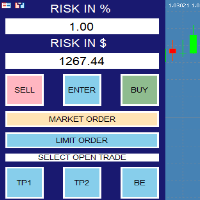
Trade Manager — Risk-Based Trade Panel Trade Manager is a MetaTrader 5 Expert Advisor that provides an on-chart panel for planning and executing trades with precise risk control. It is designed for traders who want to define their risk in advance and have their lot size calculated automatically before each trade. Core Functionality The panel sits on your chart and lets you set a risk amount either as a percentage of your account balance or as a fixed dollar amount. Both fields stay in sync — ch
Take the manual stress out of risk management with AutoShield. This utility automatically applies Stop Loss and Take Profit levels to every trade you open, ensuring no position is ever left unprotected . Universal Protection: Automatically detects and updates both active positions and pending orders . Multi-Pair Compatibility: Choose to manage only the current chart or every open symbol on your account simultaneously . Clean Visual Interface: Features a customizable on-chart display showing your
Professional risk management utility. Auto lot-size calculator + live risk panel. Works alongside any other EA — does not open trades independently. - **Auto lot size**: calculated from % risk per trade + SL distance in pips + balance - **Live dashboard**: Balance | Equity | Drawdown % | Suggested Lot | R:R ratio - **Daily drawdown alert**: notification when daily DD exceeds threshold - **Auto-close option**: closes all positions on daily DD breach (configurable) - Zero trade opening — purely a
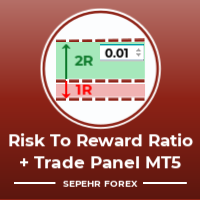
Hello guys "Trader Assistant Mini" is a handy tool to calculate risk per trade with a fluent R:R panel. Risk to Reward Ratio plus Trade Panel: It is handy for every trader to calculate the size of loss concerning the size of profit and also manage the risk per trader so that he can judge whether it's a good trade or not. Also, it shows the loss and Profit in pips and percentages and loss and profit. It has partial exit (TP1) capability too. How to install the demo version + Demo file: Trader As
Trade Manager JM
Jonathan Ferreira De Magalhaes
Efficient Manual Trading Panel for Professional Traders === TRADING SESSIONS DISPLAY & BAR TIMER INCLUDED === Trade Manager JM is a comprehensive, intuitive utility designed to revolutionize manual order execution and management on MetaTrader 5. Built for speed and precision, this panel consolidates everything a serious manual trader needs into a single, sleek interface. Stop wasting precious seconds calculating lot sizes or manually setting SL/TP levels. Trade Manager JM allows you to focus pur
RISK CALCULATOR - TRADING PANEL - CHART OVERLAY with:   PARTIAL TAKE PROFIT  ("virtual TP")   % RISK LOT SIZE  TRAILING STOP LOSS  Fast and simple control of your trades Easy lot size calculation with easy SL/TP setting. Your trading will be much more comfortable with this tool!   Works like any EA, add it to selected chart and trade ! (this version is converted from MT4) Features: start trade with   calculated lot   based on   % of account balance * that you want to risk/ or based on
Protect your capital and lock in profits automatically with Account Guard Pro . This indispensable account management Expert Advisor ensures strict adherence to your daily risk limits. Set a maximum daily loss and a daily profit target—once either is reached, Guardian Pro instantly closes all open positions and pending orders, and halts all trading activity until the start of the next day. Its integrated visual dashboard provides a clear, real-time view of your daily P/L and current status. A cr
This is a common, simple and easy to use but effective tool to manage trading risks for all traders. It also help trader places stop loss and take profit levels at the same time the order is filled. How to set the expert advisor's parameters to support your trading style? Lots size. Fixed lots size - For traders who prefered to trade with fixed lots size, they can input the lots size in 'User lots' menu in the expert advisor's properties. The input value should be from the 'Minimum Volume' to th
Trade Assistance AlgoMatrix v2.0 – Advanced Trade Management Utility for MetaTrader 5 Trade Assistance AlgoMatrix v2.0 is a professional trade management utility for MT5 designed for traders who want better control over positions, exits, and risk directly from the chart. Many traders spend most of their time searching for entries, but long-term consistency often depends on how trades are managed after entry. This utility was created to make that process easier by providing a structured and pract
EasyTradePad for MT5
Sergey Batudayev
5 (5)
EasyTradePad – Trading Panel for MetaTrader 5 EasyTradePad is a tool for manual and semi-automated trading. The panel allows quick management of orders and positions, as well as risk management calculations in one click. [ DEMO and Instruction ] Panel Features: Open and close trades with predefined risk (% or deposit currency) Set SL and TP in points, percentages, or monetary values Calculate risk-to-reward ratio automatically Move stop loss to breakeven Partial position closing Trailing stop
Grid Trading EA is a semi-automated one-click trading EA for both Normal Trading and Grid/Martingale Trading . Normal Trading Simply click Buy or Sell directly from the chart. The EA will automatically manage trades by: Setting Stop Loss and Take Profit Managing Trailing Stop Grid / Martingale Trading (For Hedging Account Type Only) When Grid Trading mode is enabled, the EA will automatically open additional grid orders at specified distances while increasing the lot size based on your settings.
Levels Map
AL MOOSAWI ABDULLAH JAFFER BAQER
Levels Map See the market through its most important price levels. Levels Map is a professional MetaTrader utility that automatically identifies and displays significant market price levels directly on your chart. Designed to help traders visualize key areas of support, resistance, and market structure, Levels Map provides a clearer understanding of where price is likely to react before making trading decisions. Instead of manually drawing horizontal lines and constantly updating your charts, Le
Quickly Helper is a tool to help us deal with multiple orders quickly. It has five function keys. They are: The "清空" button to quickly level out all orders;  Quick flat out the long position "平多单" button;  Quick flat out the short position "平空单" button;  The "买多" button to quickly buy at the current price;  The "买空" button to sell quickly at the current price;  It has seven display information items. They are: bp: the total income of multiple orders; (  profit of  buy/long position ) avgb: avera
Overview Harmonic Patterns MT5 is a technical analysis indicator designed for the MetaTrader 5 platform. It identifies and displays harmonic price patterns, such as Butterfly, Cypher, Crab, Bat, Shark, and Gartley, in both bullish and bearish directions. The indicator calculates key price levels, including entry, stop loss, and three take-profit levels, to assist traders in analyzing market movements. Visual elements and customizable alerts enhance usability on the chart. Features Detects six ha
Imagine flying a real aircraft without ever stepping into a flight simulator. That's what trading is like. You have to simulate your strategy before you can take it to a live market. It is good if you can simulate things speedily before even stepping into any live market, or before coming up with an automated system.  People don't have all day to stare at a higher timeframe chart until the entry signal finally arrives. That's why I built this so that you can simulate your strategy with speed. Th
FREE
Capital Management EA – Smart Risk Management & Profit Optimization for MT5 Take control of your trading capital with smart, automated strategies — fully optimized for MetaTrader 5 (MT5). Looking to protect your capital and maximize profits through automated money management strategies ? Capital Management EA is the all-in-one Expert Advisor for MetaTrader 5 (MT5) that helps you trade smarter, not harder. Core Features: 5-in-1 Capital Management Strategies – Built-in versatility Gr
Harmonic Pattern Structure Harmonic Pattern Structure is a professional MetaTrader 5 indicator that automatically detects classic harmonic patterns using strict Fibonacci ratio validation and XABCD price structure. Designed for traders who value precision, clean visuals, and structured analysis, the indicator highlights potential reversal zones based on price geometry, supporting consistent and objective decision-making. SUPPORTED HARMONIC PATTERNS Gartley (222) Butterfly Bat Crab Shark Cy
Ora Trade Manager Dashbord
Galauda Kandalage Buddika Prasad Athukorala
Overview ORA Trade Manager 2 MT5 is a powerful manual trade management dashboard designed for MetaTrader 5. It provides traders with quick and efficient control over their open positions, allowing them to modify SL/TP, set breakeven, and close trades with just one click. This EA is not an automated trading system—it’s a manual trade assistant that helps traders manage multiple positions efficiently without manually adjusting each one. Key Features One-Click Trade Management Modify Stop
Auto Volume & Risk Management Tool  - Effortless Position Sizing & Entry It helps to calculate the risk per trade, the easy installation of a new order, order management Precise Position Sizing – A Critical Step Toward Successful Trading In the world of professional trading, accurately calculating position size while managing risk is one of the most crucial aspects of long-term success. Time and again, traders with solid, profitable strategies end up with negative statements. Upon review, it oft
FREE
MetaTrader 5 Trade Manager — Virtual SL/TP, OCO Orders, Multi-Position TheMegathron Trade Manager Professional Trade Execution and Risk Management Panel for MetaTrader 5 ================================================================================ OVERVIEW -------- TheMegathron Trade Manager is a trade execution panel I built out of necessity. Most panels on the market either do too little or bury the useful features behind complicated menus. This one is designed to get out of your way —
Title:   Smart Position Manager PRO - Advanced Risk & Position Manager Description: Smart Position Manager PRO is an all-in-one visual trade management and risk calculation tool designed for serious traders who prioritize iron discipline and strict risk management. Whether you are executing precise SMC or ICT setups on personal capital or managing large funded accounts on strict prop firms, this tool ensures you focus on counting percentages rather than emotional money swings. With a highly int
FREE
Pare de seguir as "sardinhas" e comece a operar como big player, de forma automática. O robô Imbalance Autotrader é a mais recente tecnologia de trade que monitora os big players (grandes investidores) do mercado financeiro. Com estratégia de rompimento ( breakout ) ou pullback (Fair Value Gap FVG e Order Block) , você consegue configurar o robô para o ativo, conforme condições que você deseja operar. Além disso, o robô pode ter stops configuráveis, dinâmicos ou fixos. Na questão de gerenciamen
Buyers of this product also purchase
Trade Assistant MT5
Evgeniy Kravchenko
4.43 (214)
It helps to calculate the risk per trade, the easy installation of a new order, order management with partial closing functions, trailing stop of 7 types and other useful functions. Additional materials and instructions Installation instructions - Application instructions - Trial version of the application for a demo account Line function -   shows on the chart the Opening line, Stop Loss, Take Profit. With this function it is easy to set a new order and see its additional characteristics bef
Forex Trade Manager MT5
InvestSoft
4.98 (668)
Trade Manager MT5 is an advanced position size calculator and trade management tool for MetaTrader 5, designed to help traders plan trades faster, control risk more precisely, and manage open positions directly from the chart. It combines order placement, risk based lot calculation, Stop Loss and Take Profit management, Break Even, Trailing Stop, Partial Close, Equity Protection, and external trade management in one panel. Whether you trade forex, indices, metals, commodities, crypto, or future
Beta Release The Telegram to MT5 Signal Trader is nearly at the official alpha release. Some features are still under development and you may encounter minor bugs. If you experience issues, please report them, your feedback helps improve the software for everyone. Telegram to MT5 Signal Trader is a powerful tool that automatically copies trading signals from Telegram channels or groups directly to your MetaTrader 5 account. It supports both public and private Telegram channels, and you can conn
TradePanel MT5
Alfiya Fazylova
4.88 (162)
Trade Panel is a multi-functional trading assistant. The app contains over 50 trading functions for manual trading and allows you to automate most trading tasks. Before making a purchase, you can test the demo version on a demo account. Download the trial version of the application for a demonstration account: https://www.mql5.com/en/blogs/post/750865 . Full instructions here . Trade. Allows you to perform trading operations in one click: Open pending orders and positions with automatic risk cal
FarmedHedge Pair Trading Dashboard
Tanapisit Tepawarapruek
5 (3)
Farmed Hedge Yield Farming | All Markets (Manual - Hybrid - Semi/Automated EA) MULTI-ASSET SUPPORT Trade any asset available on your broker - Forex: Major, Minor, Exotic pairs - Crypto: BTC, ETH, XRP, SOL, BNB - Stocks: Apple, Tesla, Amazon, Google, etc. - Commodities: Gold, Silver, Oil, Gas - Indices: US30, NAS100, SPX500, DAX40 - Any CFD your broker offers VERIFIED TRADING RESULTS - Farmed Hedge Yield Axi Copy:  https://www.mql5.com/en/signals/2356376 - Farmed Hedge Yield Exn Copy:   https:/
Power Candles Strategy Scanner - Self-Optimizing Multi-Symbol Setup Finder Power Candles Strategy Scanner runs the same self-optimizing engine that powers the Power Candles indicator - on every symbol in your Market Watch, side by side. One panel tells you which symbols are statistically tradable right now, which strategy wins on each, the optimal Stop Loss / Take Profit pair, and pings you the moment a fresh signal fires. This tool is part of the Stein Investments ecosystem - 18+ tools plus Max
================================================================================ POC BREAKOUT - V20.72. Full Professional Grade Toolkit ================================================================================ POC Breakout is a full MetaTrader 5 trading dashboard for discretionary traders who want breakout signals, Point of Control (POC) context, volume profiles, order flow, market structure, news, alerts, and advanced trade planning in one professional workspace. Attached directly to you
Footprint Chart Pro — Professional OrderFlow EA for MetaTrader 5 Version 6.34 | Professional tool for real traders | Institutional-Grade Visualization DEMO USERS - PLEASE SELECT EVERY TICK / REAL TICK WHEN TESTING AND YOU HAVE DOWNLOADED HISTORICAL DATA. IF YOU SEE A WAITING SCREEN AND IT IS NOT DOWNLOADING, IT MEANS YOU HAVE LOW HISTORICAL DATA. TRY 1 MIN AND 5 MIN FIRST ON 1 DAY DATA. ONE DAY DATA SHOULD BE THE NEWEST AND MOST CURRENT DATE. PLEASE WAIT UNTIL THE MARKET HAS ROLLED OVER PERIOD.
EasyInsight AIO MT5
Alain Verleyen
4.92 (12)
EASY Insight AIO – All-In-One Power for AI-Driven Trading Want to skip the setup and start scanning the entire market – Forex, Gold, Crypto, Indices, and even Stocks – in seconds? EASY Insight AIO is the complete plug-and-play solution for AI-powered trade analysis. It includes all core Stein Investments indicators built-in and automatically exports clean, structured CSV files – perfect for backtesting, AI prompts, and live market decision-making. No need to install or configure indicators manu
The product will copy all telegram signal to MT5 ( which you are member) , also it can work as remote copier.  Easy to set up, copy order instant, can work with almost signal formats, image signal,  s upport to translate other language to English Work with all type of channel or group, even channel have "Restrict Saving Content", work with  multi channel, multi MT5 Work as remote copier: with signal have ticket number, it will copy exactly via ticket number. Support to backtest signal. How to s
Premium Trade Manager - The Trade Panel With a Coach Built In Premium Trade Manager puts a trading coach inside your chart, with a full execution engine underneath it. Set the trade up the way you always do, then let Max, your AI trading coach, read that exact setup against your live account and give you a straight verdict before you commit: is the stop disciplined, is the risk sane, is a high-impact release minutes away, are you near a prop-firm limit. Below sits the engine that runs everything
Trade Manager DaneTrades
Levi Dane Benjamin
4.28 (29)
DaneTrades Trade Manager is a professional trade panel for MetaTrader 5, designed for fast, accurate execution with built‑in risk control. Place market or pending orders directly from the chart while the panel automatically calculates position size from your chosen risk, helping you stay consistent and avoid emotional decision‑making. The Trade Manager is built for manual traders who want structure: clear risk/reward planning, automation for repeatable management, and safeguards that help reduc
EA Auditor
Stephen J Martret
5 (4)
EA Auditor is an independent analysis tool for traders evaluating Expert Advisors and trading signals on MetaTrader 5. It audits backtest reports, reviews posted developer signals, and cross-verifies the two against each other to help traders assess strategies before committing capital. The MQL5 market offers a wide range of Expert Advisors from many developers, with varying approaches, quality, and transparency. EA Auditor provides a consistent, data-driven framework for reviewing them, answer
HINN Lazy Trader
ALGOFLOW OÜ
5 (1)
LIMITED SUMMER SALE -40% ! ONLY $470 insead of $790!  Maximum real discount! ONLY UNTIL 08/22 The core idea: using the user interface, you configure the parameters the chart must meet before entering a position (or positions), choose which entry models to use, and set the rules for when trading and planning should end. Lazy Trader  handles the rest: it  takes over all the routine chart watching and execution! full description  :: 3 key videos [1] ->  [2]   ->  [3] What can it do? - Understand
Welcome to ENTRY IN THE ZONE WITH SMC MULTI TIMEFRAME Entry In The Zone with  SMC Multi Timeframe  is a professional trading indicator built on Smart Money Concepts (SMC), combining market structure analysis with a No Repaint BUY / SELL signal system in a single indicator. It helps traders understand market structure more clearly, identify key price zones, and focus on higher-quality trading opportunities. By combining Multi-Timeframe Analysis, Points of Interest (POIs), and real-time signals, t
Quant AI Agents
Ho Tuan Thang
5 (1)
Quant AI Agents are independent trading Expert Advisors. Instead of trading using a fixed strategy like other conventional EAs, Quant AI Agents   is a   multi-agent AI trading framework   that turns natural-language strategy prompts into live.  WANT THE SAME RESULTS AS MY LIVE SIGNAL?   Use the exact same brokers I do:   IC MARKETS , IC TRADING   .  Unlike the centralized stock market, Forex has no single, unified price feed.  Every broker sources liquidity from different providers, creating un
Trader Evolution
Siarhei Vashchylka
5 (7)
" Trader Evolution " - A utility designed for traders who use wave and technical analysis in their work. One tab of the utility is capable of money management and opening orders, and the other can help in making Elliott wave and technical analysis. Manual (Be sure to read before purchasing) | Version for MT4 Advantages 1. Trading in a few clicks. Immediate and pending orders are available in the panel 2. Money management. The program automatically selects the appropriate lot size 3. Simplifies
YuClusters
Yury Kulikov
4.93 (43)
Attention: You can view the program operation in the free version  YuClusters DEMO .  YuClusters is a professional market analysis system. The trader has unique opportunities to analyze the flow of orders, trade volumes, price movements using various charts, profiles, indicators, and graphical objects. YuClusters operates on data based on Time&Sales or ticks information, depending on what is available in the quotes of a financial instrument. YuClusters allows you to build graphs by combining da
FUTURES ORDERFLOW FOOTPRINT CHART Professional OrderFlow EA for MetaTrader 5 Version 1.01| Professional tool for real traders | Institutional-Grade Visualization STRATEGY TESTER USERS - PLEASE SELECT EVERY REAL TICK WHEN TESTING AND YOU HAVE DOWNLOADED HISTORICAL DATA. IF YOU SEE A WAITING SCREEN AND IT IS NOT DOWNLOADING, IT MEANS YOU HAVE LOW HISTORICAL DATA. TRY 1 MIN AND 5 MIN FIRST ON 1 DAY DATA. ONE DAY DATA SHOULD BE THE NEWEST AND MOST CURRENT DATE. PLEASE WAIT UNTIL THE MARKET HAS ROL
Telegram To MT5 Receiver
Levi Dane Benjamin
4.53 (15)
Copy trade signals from Telegram channels you already belong to (including private and restricted channels) directly into MetaTrader 5. Set your risk rules once, monitor execution, and manage positions with built-in protections designed to reduce mistakes and overtrading. Fast setup : configure your channels, select what to copy, and start within minutes using a clean on-chart interface. User Guide + Demo | MT4 Version Who this is for Traders who follow one or more signal providers and want cons
AlgoRadar
Stephen J Martret
5 (4)
AlgoRadar is an on-chart analytics dashboard for MT5 that aggregates Expert Advisor performance across multiple accounts, brokers, and platforms, including both MT4 and MT5 data, into a single live view on your MT5 chart. All analysis runs from the chart interface, with no external applications or manual report processing required. EA Analysis and Ranking For traders running multiple Expert Advisors, AlgoRadar provides a consolidated view of each EA's performance across accounts. Active EAs a
AI Agents Supervisor
Ho Tuan Thang
5 (1)
AI Agent Supervisor is NOT an Expert Advisor. AI Agent Supervisor   is a   multi-agent AI risk & portfolio supervisor   that watches every EA on your account and intervenes in real time.  WANT AN AI PORTFOLIO MANAGER WATCHING YOUR FLEET 24/7?   Run your fleet on the same brokers I do:   IC MARKETS , IC TRADING   .  Unlike the centralized stock market, Forex has no single, unified price feed.  Every broker sources liquidity from different providers, creating unique data streams. The Supervisor r
Telegram to mt5 pro
Janet Abu Khalil
4 (4)
Telegram to MT5 Pro — Advanced Telegram Signal Copier with Auto-Fix, Multi-TP, Risk Control and Full Trade Management Telegram to MT5 Pro — Professional Telegram Signal Copier Telegram to MT5 Pro is a high-performance trade copier that automatically executes signals from Telegram directly into your MetaTrader 5 account, with full control over risk, execution, and trade management. The system consists of two components: • The Expert Advisor (EA) running inside MetaTrader 5 • A companion desktop
Trade Manager DashPlus
Henry Lyubomir Wallace
4.85 (13)
DashPlus is an advanced trade management tool designed to enhance your trading efficiency and effectiveness on the MetaTrader 5 platform. It offers a comprehensive suite of features, including risk calculation, order management, advanced grid systems, chart-based tools, and performance analytics. Key Features 1. Recovery Grid Implements an averaging and flexible grid system to manage trades during adverse market conditions. Allows for strategic entry and exit points to optimize trade recovery
This is a multi-currency converter script that can convert the currency of the account history to another currency and output it. Since it supports multiple currencies, it is possible to exchange USD, EUR mutual conversion, JPY, GBP, AUD, or other minor currencies. Currency Exchanger can be converted to other currencies immediately by executing it once, so anyone can easily exchange currency. Let Currency Exchanger do the tedious work! The exchange result from the account history can be output a
Grid Manual MT5
Alfiya Fazylova
4.73 (22)
Grid Manual is a trading panel for working with grid strategies. The utility is universal, has flexible settings and an intuitive interface. It works with a grid of orders not only in the direction of averaging losses, but also in the direction of increasing profits. The trader does not need to create and maintain a grid of orders, the utility will do it. It is enough to open an order and the "Grid manual" will automatically create a grid of orders for it and will accompany it until the close. F
Signal Trading View to MT5 Pro
Mirel Daniel Gheonu
4.5 (2)
Signal TradingView to MT5 Pro  Instant professional execution between TradingView and MetaTrader 5 Automate your trading strategy with the most robust communication bridge between TradingView alerts and real execution in MT5. Designed for traders who demand speed, flexibility, and impeccable risk management, this Expert Advisor transforms any alert message into a precise market or limit order.   Install and TEST the TRIAL version HERE STRENGTHS AND ADVANTAGES Universal Parsing Engine (Propriet
QCML Assistant
Maxime Turcotte-lafreniere
QCML Assistant MT5 Your Trading. Our Assistant. Your Edge. Looking for a tool that completely transforms your experience on MetaTrader 5? QCML Assistant is the all-in-one solution built by traders, for traders. Just one tool installed on your chart, and you get access to an ultra-complete, ultra-fast, and ultra-simple trading platform. No more hours wasted setting up your workspace. No more complicated trade entries. With QCML Assistant, everything becomes simple, smooth, and efficient right fro
Ultimate Extractor
Clifton Creath
5 (8)
Ultimate Extractor - Professional Trading Analytics for MT5 *****this is the local HTML version of Ultimate Extractor. !!!!!it is not compatible with Cloud!!!! For the online version please reach out to me directly****** Ultimate EA manager also now available when you use cloud pro and above for free!! Ultimate Extractor transforms your MetaTrader 5 trading history into actionable insights with comprehensive analytics, interactive charts, and real-time performance tracking. What It Does Automa
*** available for free for cloud pro users and above****  Ultimate EA Manager is a utility for traders running multiple Expert Advisors on a single MT5 terminal. It does not place trades itself — it coordinates the EAs you already use.     Features:   - Auto-detect every EA attached to charts in your terminal, grouped by EA name   - Slot management: cap how many EAs may hold open positions concurrently (waiting EAs pause until a slot frees up)   - Account-level drawdown circuit breake
Filter:
No reviews
Reply to review