
Trade Copier Ultimate
- Utilità
-
Janitha Sandaruwan Amaradasa Wickramasingha Arachchilage
 Full-Stack Trading Developer | MQL5 & Python
I'm a developer focused on building practical tools for serious traders. I don't just write code - I understand trading, risk management, and what traders actually need. - Versione: 8.30
- Aggiornato: 28 settembre 2026
- Attivazioni: 20
Trade Copier Ultimate - Telegram to MT5 Signal Copier
Trade Copier Ultimate automatically copies Telegram trading signals into MetaTrader 5. The EA can read signal messages, detect the symbol, order type, entry price, Stop Loss, Take Profit levels and selected update commands, then execute or manage the trade in MT5 using your lot and risk settings.
It is more than a basic Telegram to MT5 copier. TCU also supports Bot API and user-account Bridge workflows, Discord signal routing, local MT5 to MT5 trade copying, MT5 trade broadcasting to Telegram or Discord, image signal processing, multi-TP execution up to TP5, TP OPEN runner trades, Virtual Multi TP mode, entry zone handling, pending orders, broker symbol matching and prop firm risk controls.
| Additional materials and instructions Download Free Demo Version - Quick Setup and Manual - Download NTS Bridge |
TEST YOUR SIGNAL FORMAT HERE --->>>
Free demo: Test full EA and bridge on a demo before buying, Send me a message or send a messge in the demo group chat if you need support plus add your own signal format if none of the 500+ signal formats we have work for you. this demo is 100% same as live version just only works on a demo account :)
Main Features
- Telegram to MT5 Copying: Copy supported Telegram trading signals into MetaTrader 5 using Telegram Bot API mode or the NTS Bridge workflow.
- Private Channels and Groups: Use the Telegram user-account Bridge workflow for selected public channels, private channels, groups, chats and providers where your Telegram account has access.
- Discord to MT5: Route supported Discord trading signals into MetaTrader 5 through NTS Bridge.
- Local MT5 to MT5 Copier: Copy trades from one MT5 terminal to one or more receiver MT5 terminals on the same PC or Windows VPS.
- MT5 to Telegram Trade Broadcasting: Send MT5 trade activity or account updates to Telegram or Discord destinations when configured.
- Image Signal Processing: NTS Bridge can process supported image-based signal formats when configured. Results depend on image quality, font, layout, language and provider format.
- Simplified Chinese Interface: Use the EA and NTS Bridge interface in Simplified Chinese, with English fallback where required.
- Multi TP Handling: Process TP1, TP2, TP3, TP4 and TP5 multi-target signals using your selected lot distribution and execution settings.
- TP OPEN / Runner Support: Supported signal formats can use TP OPEN as the final no-TP runner leg, so the last position can remain open for manual close, trailing stop or later management.
- Virtual Multi TP Mode: Use signal TP levels on one main trade instead of splitting the signal into separate trades, when you prefer one-position multi-target management.
- Delayed Virtual Multi TP: Apply a later SL and TP1-TP5 reply to one eligible existing trade when the original signal arrived without those levels.
- Live Targets View: See actively tracked Virtual Multi TP trades, their remaining volume, completed targets and targets still pending.
- Advanced TP Ladder: Move remaining positions to breakeven or previous TP levels after allocated TP positions close.
- Moving TP: Extend the broker Take Profit farther away as price approaches it, using configurable approach distance, extension size, extension count and total limits.
- Profit Lock: Protect accumulated profit by progressively moving the broker Stop Loss according to your selected activation and pullback settings.
- Entry Zone Handling: NTS Bridge can read supported entry zones and route the signal according to the selected zone handling setup.
- Pending Orders: Handle supported buy limit, sell limit, buy stop and sell stop signals, together with normal market orders.
- Single-Price Pending Conversion: Optionally convert supported single-price signals into Buy Limit, Buy Stop, Sell Limit or Sell Stop orders.
- Signal Updates: Supports selected close, breakeven, SL update, TP update and reply-based management commands where the source format allows correct matching.
- Synchronized Bridge Control: Bridge ON/OFF controls on the EA Home and Source pages stay synchronized.
- Broker Symbol Matching: Helps match common broker symbols and suffixes such as XAUUSD, GOLD, XAUUSDm, EURUSD.r, NAS100, US30, USOIL, BTCUSD and similar variations.
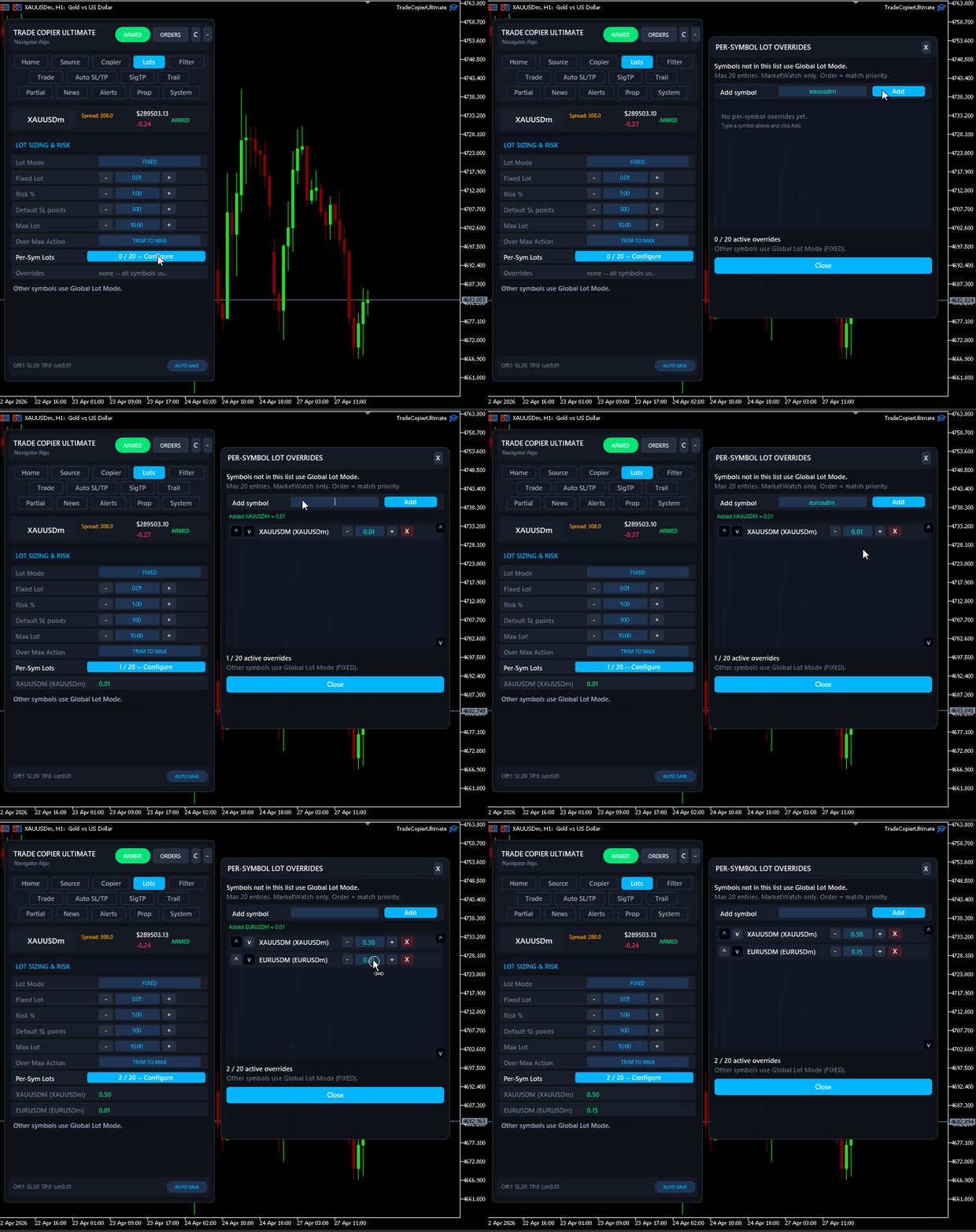
- Lot Management: Use fixed lots, per-symbol lots, signal-based lot handling and fallback behavior according to your setup.
- Prop Firm Risk Controls: Use daily loss limits, overall drawdown controls, maximum open trades, maximum position rules and other account protection settings.
- Execution Filters: Control spread, slippage, entry distance, duplicate signals, allowed symbols, blocked symbols, skip keywords and provider routing.
- News and Session Controls: Pause copying around configured news events or restrict trading to selected times.
- Restart-Safe Memory: Persistent trade tracking helps the EA remember copied trades after MT5, VPS, Bridge or terminal restarts.
NTS Bridge
NTS Bridge is the companion Windows application used for Telegram user-account mode, Discord signals, image signal processing, group routing, local copier workflows, entry zone handling and advanced dashboards. It helps route signals from selected sources to the correct MT5 terminal and shows recent activity, parser output, delivery status and logs for troubleshooting.
Requirements
- MetaTrader 5 terminal with AutoTrading enabled.
- Windows computer or Windows VPS for Bridge-based workflows.
- NTS Bridge for Telegram user-account mode, Discord, image signal processing, local copier, entry zone handling and advanced routing workflows.
- Telegram Bot API mode can be used for suitable bot-based Telegram setups.
- Demo testing is recommended before using the copier on any live account.
What You Get
- The MT5 Expert Advisor installed from the MQL5 Market.
- NTS Bridge Windows application for supported advanced workflows.
- Free demo version for testing on demo accounts.
- Setup guide, documentation and support through MQL5 messages or product comments.
Important Notes
- Some workflows require WebRequest permissions in MetaTrader 5. The exact steps are shown in the Quick Setup and Manual page.
- Bridge-based workflows require MT5, the EA and NTS Bridge to run on the same PC or Windows VPS.
- Signal parsing depends on the format used by the provider. Please test your real signal format with the demo version.
- TP5, TP OPEN runner, Virtual Multi TP and entry zone workflows depend on using a supported signal format and the correct EA/Bridge settings.
- If you need help, send screenshots, logs, signal examples, broker symbol details and your selected workflow through MQL5 messages or product comments.
Disclaimer: Trade Copier Ultimate is an execution, copying, routing, filtering, trade management and risk-control tool. It does not provide trading signals, investment advice, profit guarantees, prop firm guarantees or protection from trading losses. Results depend on the signal provider, master account, broker execution, spread, slippage, liquidity, account type, VPS stability, MT5 settings, Bridge configuration, risk settings and user setup. Prop firm users should confirm that EAs, trade copiers, signal copying, local copying, broadcasting and automated execution are allowed by their firm's rules before using this tool on a funded account.
(c) 2026 Navigator Trading Systems



















































I’ve been testing TCU with XAUUSD and I’m genuinely impressed with how well it works. The copier receives the signals reliably, handles Multi-TP correctly, opens the separate positions as expected, and manages the SL adjustments automatically. I’ve also tested pending BUY LIMIT and SELL LIMIT signals, and the execution and order handling have been very solid. What I especially like is the detailed logging. When something is rejected or behaves differently from expected, the logs make it much easier to understand exactly what happened. So far, TCU has been stable, reliable, and much more sophisticated than I expected. I’m continuing to test it with real signals, but based on my experience so far, I’m very happy with it and would definitely recommend it to other traders looking for a reliable trade copier.