Trade Copier Ultimate

5

Trade Copier Ultimate - Telegram to MT5 Copier (Plus Discord & MT5 to MT5)

Copy trades from Telegram straight into MetaTrader 5 — automatically, with built-in risk control and prop firm protection. Also supports Discord signals and MT5 to MT5 local copying, so you're not getting three separate tools as your setup grows.

Most copiers only do Telegram to MT5. This one does Telegram to MT5, Discord to MT5, MT5 to MT5, and MT4 compatibility, all in a single package — built for traders searching for a Telegram to MT5 copier, Telegram signal copier, MT5 to MT5 trade copier, multi-channel copier, multi TP copier, pending order copier, and prop firm risk manager.

Free demo available — test it on your own broker and signal format before you get it.

Note: this tool does not generate trading signals and does not provide investment advice. It helps you receive, filter, route, copy, and execute the signals or master-account trades that you choose to use.

Quick Setup & Manual   |   Download NTS Bridge   |   Support & Documentation   |   Download Free Demo Version

Free demo: The demo EX5 is available through the demo/support chat. Use it to test Telegram formats, Discord formats, broker suffixes, lot settings, group routing, MT5 execution behavior, and Bridge setup before using the full version on a live account.

Best for traders who need more than a basic Telegram copier

Many simple copiers focus only on Telegram to MT5. Trade Copier Ultimate is designed as a wider execution workflow: Telegram, Telegram MTProto, Telegram Bot API, Discord, local MT5 to MT5 copying, multi-account routing, prop firm controls, and optional MT4 compatibility through the free companion MT4 slave plugin where supported.


Fast Setup Workflow

  1. Install the EA in MetaTrader 5 from MQL5 Market.
  2. Download and run the NTS Bridge application when using Telegram MTProto, Discord, OCR, group routing, or Bridge mode.
  3. Connect your Telegram account, Telegram bot, Discord source, or local copier setup.
  4. Select the groups or channels that should send signals to each MT5 terminal.
  5. Attach the EA, enable AutoTrading, configure risk settings, and start copying.


Main Copying Modes

  • Telegram to MT5 Copier: Copy formatted Telegram trading signals into MetaTrader 5 using supported Telegram Bot API or Bridge workflows.
  • Telegram MTProto Multi-Channel Copier: Use your Telegram user account through NTS Bridge to monitor selected public channels, private channels, private chats, groups, and bots where supported by Telegram access permissions.
  • Discord to MT5 Copier: Route supported Discord trading signals into MT5 through the Bridge workflow.
  • Local MT5 to MT5 Copier: Copy trades from a master MT5 terminal to one or more receiver MT5 terminals on the same PC or VPS.
  • Telegram and Discord Broadcasting: Send executed MT5 trade activity or account updates to a Telegram or Discord destination when configured.
  • MT4 Compatibility: Copy to or from MT4 using the free companion MT4 slave plugin where supported by your setup.


NTS Bridge Dashboard and Routing

  • Group Assignment System: Choose which Telegram groups, Telegram channels, Discord sources, or signal sources should route to each connected MT5 account.
  • Multi-Account Routing: Send different providers to different MT5 accounts, brokers, prop accounts, or strategies.
  • Live Bridge Dashboard: View Telegram, Discord, HTTP/EA server, MT5 client status, recent signals, parser output, queue delivery, and activity logs.
  • Signal History: Track received, parsed, routed, delivered, skipped, and managed signals for easier troubleshooting.
  • Lite Mode: Keep the Bridge running in the background when you do not need the full dashboard open.
  • Verified Updates: The Bridge can notify you when a signed update is available, so you can keep the workflow current.


Smart Signal Parsing and Trade Execution

  • Multi TP Copier: Handle TP1, TP2, TP3 and multi-target signals according to your configured lot distribution and execution settings.
  • Pending Order Copier: Process buy limit, sell limit, buy stop, and sell stop signals alongside market orders.
  • Signal Updates: Support for selected close, breakeven, SL update, TP update, and reply-based management commands where the source format allows matching.
  • Smart Parser: Recognizes many common forex, gold, indices, crypto, and provider-style signal formats, including compact messages, entry ranges, sequential TP lines, and common update messages.
  • English and Spanish Support: English parsing is always available, and optional Spanish signal support can be enabled for supported terms such as COMPRAR, VENDER, Entrada, Salida, Objetivo, Perdida, Riesgo, SL, and TP.
  • OCR Image Signals: Use Bridge OCR tools for supported image-based signals when configured. Note: OCR depends on image quality, font, layout, language, and source format. If your image signals are not being read correctly, contact me with sample screenshots so I can check the format and help make it work where possible.
  • Duplicate Protection: Helps reduce repeated execution from duplicate posts, edits, reconnects, or repeated provider messages.


Broker Symbol Matching

  • Auto Prefix and Suffix Matching: Helps resolve broker symbols such as XAUUSD, GOLD, XAUUSDm, XAUUSD.pro, EURUSD.r, NAS100, USTEC, US30, USOIL, BTCUSD, and similar variations.
  • Custom Symbol Mapping: Configure symbol exceptions when your broker uses special names.
  • Per-Account Settings: Use different symbol behavior and routing logic for different MT5 accounts where needed.


Risk Management and Prop Firm Controls

  • Prop Firm Risk Manager: Includes tools for daily loss limits, overall drawdown control, max position rules, max open trades, and account safety settings.
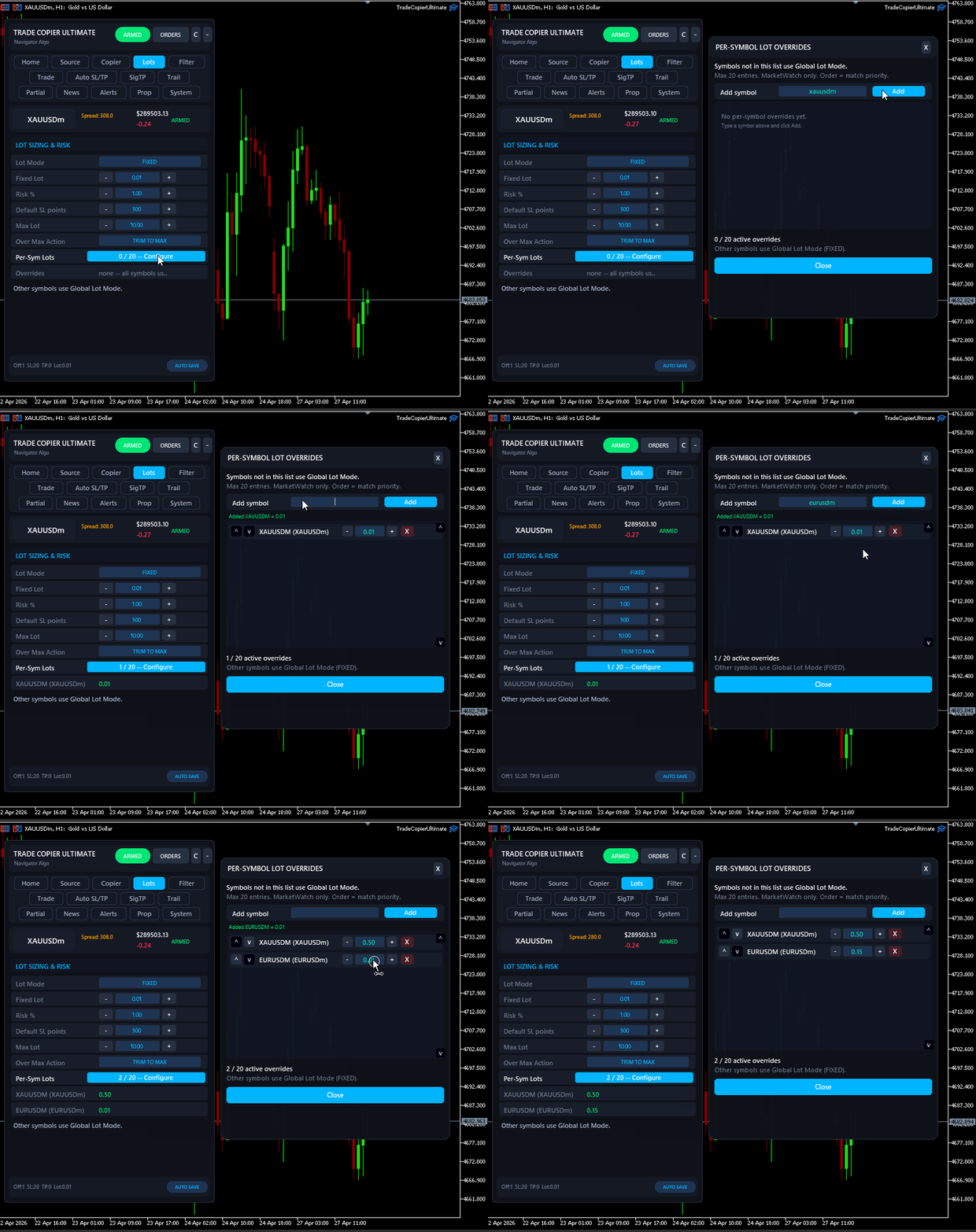
  • Lot Management: Use fixed lots, per-symbol lots, signal-based lot handling, and risk settings depending on your strategy.
  • Price and Execution Filters: Control spread, slippage, entry distance, duplicate signals, symbol filters, and execution safety behavior.
  • News and Session Controls: Pause or restrict copying around configured news events or trading sessions.
  • SL/TP Tools: Apply supported SL/TP variation and fallback behavior according to your configuration.
  • Restart-Safe Memory: Persistent tracking helps the EA remember copied trades after MT5, VPS, Bridge, or terminal restarts.


Why Choose Trade Copier Ultimate

  • Telegram to MT5, Discord to MT5, local MT5 to MT5, broadcasting, and Bridge workflows in one product.
  • Designed for multi-account traders, signal users, prop firm users, VPS users, and traders managing more than one provider.
  • Free demo version available so you can test your real broker symbols, signal formats, and setup before buying.
  • Professional Bridge dashboard with routing, history, status checks, parser visibility, and update notifications.
  • Ongoing updates based on real signal formats, broker suffix cases, Telegram/Discord workflows, and customer feedback.


Important Setup Notes

  • For Telegram trade copying or Bridge mode, enable WebRequest in Tools > Options > Expert Advisors.
  • Add https://api.  telegram.org and http:// 127.0.0.1 to the allowed WebRequest URL list when using the related modes.
  • When using Telegram MTProto, you may need Telegram API credentials from my.telegram.org.
  • Keep MT5, the EA, and NTS Bridge running on the same PC or VPS when using Bridge-based copying.
  • Test your provider formats, broker suffixes, lot settings, prop rules, group routing, and execution behavior on a demo account before live use.
  • If you need help, contact me through MQL5 messages or the product comments area with screenshots, logs, signal examples, and broker symbol details.


Telegram to MT5 copier, Telegram signal copier, Telegram copier, Telegram MTProto copier, Discord to MT5 copier, MT5 trade copier, MT5 to MT5 copier, local trade copier, multi-channel copier, multi account copier, multi TP copier, pending order copier, gold signal copier, XAUUSD copier, forex signal copier, crypto signal copier, indices signal copier, prop firm copier, prop firm risk manager, MT5 risk manager, MT4 to MT5 copier, MT5 to MT4 copier, OCR signal copier, Bridge copier, NTS Bridge.

Disclaimer: Trade Copier Ultimate is an execution, copying, routing, and risk-control tool. It does not provide trading signals, investment advice, profit guarantees, or protection from trading losses. Results depend on the signal provider, broker execution, spread, slippage, liquidity, account type, VPS stability, MT5 settings, Bridge configuration, risk settings, and user setup. Prop firm users should confirm that EAs, trade copiers, signal copying, local copying, and automated execution are allowed by their firm's rules before using this tool on a funded account.


(c) 2026 Navigator Trading Systems

리뷰 4
nickxl
171
nickxl 2026.06.06 19:44 
 

High quality software. Always being updated with new features. The author responds quickly to messages and accommodates any unusual signal types. I have no problem recommending this product for anyone looking for a reliable copier.

narsi
301
narsi 2026.06.03 12:48 
 

Excellent copier and an even better author.He is very professional and extremely customer focused and works very hard.Highly recommended!

Carlos Andres Perez Lezama
308
Carlos Andres Perez Lezama 2026.04.09 16:26 
 

I have 14 years of experience in trading, and I recognize the great work Janitha has done with this EA. It is spectacular for those of us who provide advisory and signal services.

추천 제품
**Forex Trade Manager Pro MT5** **Trade Manager MT5**는 MetaTrader 5용 종합 거래 관리 유틸리티로, 거래를 계획하는 순간부터 마감하는 순간까지 포지션의 모든 측면을 완벽하게 제어할 수 있도록 합니다. 규율을 갖추려는 초보자부터 여러 포지션에 걸쳐 즉각적인 실행이 필요한 전문 스캘퍼에 이르기까지 위험을 진지하게 생각하는 모든 트레이더를 위해 설계되었습니다. 이 도구는 모든 차트에 첨부되며 깔끔하고 컴팩트한 패널을 표시합니다. 차트에서 직접 드래그 가능한 수평선을 사용하여 계획된 진입점, 손절매, 이익 실현 수준을 표시합니다. Trade Manager는 정의된 위험을 기반으로 올바른 포지션 크기를 즉시 계산하고, 손절매 및 이익 실현 값을 핍 및 계좌 통화로 실시간 표시하며, 계획된 거래의 위험-보상 비율을 보여줍니다. 수동 계산이 필요하지 않습니다. 위험을 한 번 정의하면 도구가 나머지 모든 것을 처리합니다. **포지션 사이징
ZenTrade Manager MT5
Ian Paolo Lumba Castro
ZenTrade Manager MT5 Stop Computing. Start Trading. Are you tired of missing perfect entries because you were busy calculating pip distances, lot sizes, or monetary risk? Do you overthink your Stop Loss and Take Profit levels, only to watch the market reverse while you're adjusting lines? ZenTrade Manager MT5 removes the mental load of order management, allowing you to focus 100% on what matters: Reading the Market. You handle the high-level analysis and decide when to enter; ZenTrade handles t
Guardian Yield Keeper is a utility Expert Advisor for traders who want real-time exit management and profit protection for open positions on the current symbol. This EA does not open new trades and does not generate entry signals. Its job is simple: monitor existing positions and close them when your profit or risk conditions are met . It is especially suitable for traders using DCA, Grid, Martingale, or basket trading systems and looking for a dedicated management layer that is more flexible th
️ Trade Manager oneclick  ( Reverse Trade,  Partial Close,  Breakeven, Close All Running Trade )   control – Smart Manual Trade Control for MT5 Trade Manager oneclick control is a powerful yet lightweight trade management utility built for manual traders who want precise control over their open positions — directly from the MT5 chart. This EA does not open or close trades automatically based on any strategy. It simply provides one-click management tools to handle your running trades efficient
FREE
Signals Executor for Telegram is a Utility that allows you to execute and manage positions from messages sent in Telegram Chats. Chat messages are processed to check for the existence of commands, and the command will be executed if its parameters are valid. You need the Telegram Bot Token and Chat Id to configure the input parameters. It is possible to restrict the sending of commands through the User Id, which must be configured in the input parameters. Valid Commands: Buy and Sell: Market or
Pro Trade Utility for MetaTrader 5 Pro Trade Utility is a professional manual trading assistant designed for traders who want precision, speed and clarity — without automated strategies. This tool does not trade automatically . It helps you execute and manage trades correctly with proper risk control. Key Features  Risk & Position Management Risk-based automatic lot size calculation Risk shown clearly in account currency Adjustable Stop Loss (points) Fixed Risk:Reward display  Trade Executio
Telegram2MT5 Signal Copier — Telegram 신호를 MetaTrader 5에서 자동으로 복사하세요 Telegram2MT5 Signal Copier를 사용하면, Telegram에서 받는 모든 신호가 여러분의 MetaTrader 5 계좌에서 즉시 자동으로 실행됩니다. 빠르고, 신뢰할 수 있으며, 완전히 사용자 지정 가능합니다. Windows Bridge APP 파일 및 튜토리얼 을 받아보세요 Bridge 파일은 로컬 웹 패널을 MT5 EA와 연결하는 데 필요합니다.  Windows 10 & Windows 11 — 64비트 — 그리고 2016년 이후 버전의 Windows Server와 호환됩니다 Main Features 완전 호환: 공개/비공개 채널 모두에서 완벽하게 작동하며, 어떠한 제한도 없습니다. 즉시 실행: ENTRY, STOP LOSS 및 최대 5개의 TAKE PROFIT 레벨을 밀리초 단위로 감지하고 주문을 실행합니다. (현재는 대기 주문 사용 권장)
Bohemia Gold MT5
Vladislav Taska
4.75 (4)
Bohemia Gold MT5 is  Trend & Volatility EA trading system designed specifically for Gold (XAUUSD) . It combines higher-timeframe trend filtering , trend detection , volatility-based SL management , and advanced trade management to adapt market conditions. It uses style logic focused on trend strength, volatility, and capital protection. NOTE:   Based on backtests, I found better trading results with the following setup: D1/H4/H2 (Trend/ADX/ATR & trade). The SET file can be downloaded here … bohe
FREE
ProBridger
Marius Ovidiu Sunzuiana
How Traders and Analysts Can Use the Data Export Bridge to Improve Their Analytics The MQL Data Export Bridge unlocks a new level of analytical power by transforming MetaTrader into a real‑time data provider for any external research environment. Here are the most impactful ways different users can apply the bridge to enhance their trading performance. Build Predictive Models with Machine Learning Who benefits: Quantitative traders, data scientists, algorithm developers How it helps: Export t
Signals for Telegram
Elidio Xavier Guimaraes
It is a utility that posts customized messages on Telegram based on account trading activity. Once the utility is on the chart, with each new position opened from the same chart symbol the utility is added, a customized message will be sent to the Telegram group defined in the input parameters. The utility will post to the Telegram group if a new position is opened and if it is the same symbol as the chart the utility is running on. If you are using an Expert Advisor for Buy and Sell and want to
This tool will perform Trailing stop loss and Break even management for orders. Helps you limit or reduce the time spend watching orders on the screen, especially when you need to go to sleep. Just add this EA to 1 chart, you can manage all pairs. You can filter orders by comment, magic number, symbol and order ticket number. When Breakeven it can add shift/offset pips (to cover the commission...). You can try in strategy tester before purchase. The EA will add Buy and Sell alternately, so you
Description Manzano Risk Manager Pro is a risk management tool for MetaTrader 5 designed to monitor open positions and execute automatic or manual closures when user-defined conditions are reached. Its purpose is to help maintain control over account risk and reduce execution errors during trading. The product does not open trades or modify any trading strategy. Main Features Automatic position closing The system allows you to define profit and loss limits and automatically close positions when
RuleShield Trader MT5 Trade with a rule-based safety panel before every order. RuleShield Trader MT5 is a chart-based trade manager, prop firm risk manager and account protection utility for MetaTrader 5. It helps traders monitor daily loss, maximum loss, daily drawdown, spread, open risk, trade size and custom account rules before placing a trade. What It Does RuleShield gives you a clear chart panel showing whether a new trade is allowed under your selected rules. It can work as a soft warning
Trade Assistant 38 in 1
Makarii Gubaydullin
4.91 (23)
다기능 도구: 로트 계산기, 그리드 주문, R/R 비율, 트레이드 관리자, 수급 구역, 가격 행동 등 데모 버전   |   사용자 설명서 트레이드 어시스턴트   는 전략 테스터에서 작동하지 않습니다 :   여기에서 데모 버전을 다운로드  하여 유틸리티 를 테스트하세요. 질문/개선 아이디어/버그 발견 시 연락주세요 MT4 버전이 필요하시면 여기 에서 이용 가능합니다 거래   프로세스 를 간소화, 가속화, 자동화하세요. 이   대시보드 로 표준 터미널 기능을 확장합니다. 트레이딩 패널은  모든 거래 상품에서 작동: 외환, 주식, 지수, 암호화폐 등. 1. 새 거래 개시 : 로트 / 위험 / RR 계산 : 수동 거래를 위한 위험 관리 로트 계산기 (위험 크기 기반 거래량 계산) 위험 계산기 (로트 크기 기반 위험 금액) 위험 대비 보상   비율 그리드 주문:  + 동적 간격 옵션, 로트 분할 옵션 주문 활성화 트리거, + 매수 스톱리밋 / 매도 스톱리밋 가상 SL, 가상 TP (숨김
AlgoDevMT5 Trade Manager Pro AlgoDevMT5 Trade Manager Pro is a professional trade management and risk control utility for MetaTrader 5. Designed for discretionary traders and funded account traders, this utility helps traders plan trades visually, calculate position size instantly, and manage risk with precision. Trade Manager Pro does not generate trading signals, open trades automatically, or provide investment advice. It is a trader-assistance utility designed to improve consistency and risk
Hybrid Assisted Trading Engine Manual Trading. Machine Discipline. The Hybrid Assisted Trading Engine is an institutional-grade manual trade management system designed to protect traders from emotional mistakes — without taking control away from them. You decide when to enter . The engine decides how the trade is managed . What It Does This system continuously monitors your manual trades and enforces professional-level trade management rules in real time: Smart Breakeven logic R-based trai
OneClick Trade Panel은 필수적인 거래 기능을 손쉽게 사용할 수 있도록 해주는 전문적인 거래 관리 도구입니다. 빠르고 효율적인 거래 관리가 필요한 트레이더를 위해 설계된 이 EA는 복잡한 거래 작업을 클릭 한 번으로 간소화합니다. 이 도구를 사용하면 기존의 수동 방식보다 훨씬 빠르고 효율적으로 포지션을 관리할 수 있습니다. 이 EA의 기능 이 전문가 어드바이저는 세 가지 주요 거래 관리 기능을 제공합니다. 손절/익절가를 손익분기점으로 이동 - 스마트한 거래 보호 수익이 나는 거래의 경우 손절가를 진입 가격으로 자동 이동 손실이 나는 거래의 경우 익절가를 진입 가격으로 이동 모든 오픈 포지션에 대한 원클릭 보호 부분 청산 - 점진적인 수익 실현 포지션의 일정 비율(10%, 25%, 50% 등)을 청산 설정에서 비율 구성 가능 여러 포지션에 동시에 적용 가능 전체 청산 - 긴급 탈출 모든 오픈 거래를 즉시 청산 현재 심볼 또는 모든 심볼에 적용 가
Easy Order Watcher — 스마트한 거래 모니터링 및 알림 어디서든 거래를 관리하세요. Easy Order Watcher는 가볍고 강력한 전문가 자문(EA)으로, 실시간 거래를 추적하고 사용자가 설정한 기준값에 따라 포지션이 주요 손익 수준에 도달하면 즉시 알림을 제공합니다. 또한, 사용자의 시간대에 맞춰 실시간 증거금 수준과 시간별 알림을 표시합니다. 자리에 없든 여러 거래를 관리하든, 이 EA는 전략에 맞춰 정밀한 알림을 제공하여 항상 최신 정보를 제공합니다. v1.10의 새로운 기능: 사용자 지정 시간대 지원 현지 시간에 맞춰 시간대(+/- 시간)를 조정하세요. 알림을 확인할 때 더 이상 혼란스럽지 않습니다. 사용자 정의 손익 이정표 고정된 값에 얽매이지 않고 원하는 기준값(예: $50 이익 증가 또는 $100 손실 감소)을 설정할 수 있습니다. 주요 기능: 제로 투 포지티브 알림: 거래가 손실에서 수익으로 전환되는 순간 알림을
KopirMT5 Full
Alexandr Gavrilin
4.2 (10)
KopirMT5 (CopierMT5) - transaction copier for the MetaTrader 5 terminal, copies (synchronizes, duplicates) transactions from  hedge accounts  (copier, copy dealers).  Supports copying: MT5 <-> MT5, MT4 -> MT5 Hedge, MT5 Hedge -> MT4 Does not support copying MT5 Hedging < - > MT5 Netting, MT4 < - > MT5 Netting Support:  https://www.mql5.com/ru/messages/01c3f341a058d901 Why exactly our product? The copier has a high speed and is not dependent on ticks. Copy speed - less than 0.5 sec. Transaction
Panel 8 Manager Analyzer MT5
Tjia Elisabeth Jasmine Canadi
CyberBot – 8가지 기능을 갖춘 전문 투자 관리 도우미 Panel 8 Manager Analyzer는   신뢰할 수 있는   사이버봇(CyberBot)   으로 설계된 정교한 거래 도구입니다. 이 고급 거래 지원 시스템은 8개의 강력한 투자 운용자가 동시에 작동하도록 통합되어 있습니다. 시장 기회를 포착하고 거래자가 의사 결정의 주요 참고 자료로 자신 있게 활용할 수 있는 매우 정확한 분석을 제공하도록 구축되었습니다. 수십 년간 자본 시장, 특히 파생 상품 분야에서 전문성을 쌓아온 경험 많은 시장 분석가와 강사로 구성된 전담팀이 개발한 이 도구는 매우 효과적이고 효율적으로 설계되었습니다. 이제 더 이상 기술적 분석을 처음부터 배울 필요가 없습니다. 초보 트레이더든 노련한 전문 트레이더든 관계없이 Panel 8 Manager Analyzer는 모든 수준의 거래 경험에 맞춰 포괄적인 지원을 제공합니다. 사용 가능한 버전: > Panel 8 Manager Analyzer MT5
Click Average EA
Jan Isaac Rodriguez Castro
Click Average EA – Smart Position Averaging for MT5  Simplify Your Trading Strategy with one-click position averaging! This expert advisor automatically calculates the weighted average price of your open positions and adjusts Take Profit levels dynamically—saving you time and maximizing efficiency. Key Features:  One-Click Averaging – Instantly balance multiple positions with a single button.  Weighted Price Calculation – Precise averaging based on volume for accurate TP placement.  Magic Numb
Grid Trading EA is a semi-automated one-click trading EA for both Normal Trading and Grid/Martingale Trading . Normal Trading Simply click Buy or Sell directly from the chart. The EA will automatically manage trades by: Setting Stop Loss and Take Profit Managing Trailing Stop Grid / Martingale Trading (For Hedging Account Type Only) When Grid Trading mode is enabled, the EA will automatically open additional grid orders at specified distances while increasing the lot size based on your settings.
Imagine flying a real aircraft without ever stepping into a flight simulator. That's what trading is like. You have to simulate your strategy before you can take it to a live market. It is good if you can simulate things speedily before even stepping into any live market, or before coming up with an automated system.  People don't have all day to stare at a higher timeframe chart until the entry signal finally arrives. That's why I built this so that you can simulate your strategy with speed. Th
FREE
Auto Stop Loss All Trades MT5
Prafull Manohar Nikam
4 (1)
This utility automatically places Stop Loss and Take Profit levels on newly opened positions. The Stop Loss and Take Profit values are specified in pips. The utility can also move Stop Loss to Break Even and trail the Stop Loss after a specified profit level is reached. Input Parameters SL and Trailing SL Stop Loss value in pips. If trailing is enabled, the same value is used as the trailing Stop Loss distance. Trailing Steps Distance in pips required before the Stop Loss is updated again while
Local Account Monitor MT5 is a read-only local monitoring utility for traders who run multiple MetaTrader terminals on the same PC or the same Windows VPS . It combines Agent mode and Dashboard mode so you can monitor local accounts from one place, spot stale terminals quickly, review account health states, and inspect risk details without switching between many terminals. Public channel:   CLICK HERE What it is for Monitoring multiple local MT5 terminals from one dashboard Quickly identifying
FREE
This is a common, simple and easy to use but effective tool to manage trading risks for all traders. It also help trader places stop loss and take profit levels at the same time the order is filled. How to set the expert advisor's parameters to support your trading style? Lots size. Fixed lots size - For traders who prefered to trade with fixed lots size, they can input the lots size in 'User lots' menu in the expert advisor's properties. The input value should be from the 'Minimum Volume' to th
King ElChart Manual Trade Panel
Mohammed Maher Al-sayed Mohammed Ahmed Saleh
King Chart – Manual Trading Panel for MetaTrader 5 Overview King Chart is a simple yet powerful manual trading panel built for traders who want speed, precision, and clarity. It enables quick order execution, clear lot control, and real-time account monitoring  all directly on your MT5 chart. Main Features Multi-Lot Trade Execution 3 Buy and 3 Sell buttons for instant execution Each button is tied to a custom lot size field Designed for flexible scaling in or out of trades Position Management D
Introducing the  Precision Data Extractor: ATR , an MQL5 utility crafted for traders, analysts and quants who need accurate historical data to build robust datasets. This tool lets you selectively pull historical price and indicator data—  Average True Range  ( ATR )—from  multiple timeframes  and  periods , then stores it in a  CSV  format, making it easy to feed into  machine learning models ,  trading algorithms , or  in-depth market analyses . Compatible with  Forex ,  Stocks , and  Commodit
Breakout scalp PRO
Cesar Napoleon Guio Martinez
Automated breakout trading system with advanced execution filters and built-in risk management. Designed to operate during selected market conditions, combining session control, spread and slippage filtering, and dynamic trade management. Safety First Approach:  This EA does not use grid systems, martingale strategies or unlimited recovery methods. Every position is protected with predefined Stop Loss and Take Profit levels. The strategy is designed to maintain controlled exposure and discipline
이 제품의 구매자들이 또한 구매함
Trade Assistant MT5
Evgeniy Kravchenko
4.43 (213)
거래당 위험 계산, 라인을 사용한 손쉬운 신규 주문, 부분 청산 기능을 통한 주문 관리, 7가지 유형의 트레일링 스탑 및 기타 유용한 기능을 제공합니다. 추가 자료 및 지침 설치 지침   -   애플리케이션 지침   -   데모 계정용 애플리케이션 평가판 라인 기능       - 차트에 개시선, 손절매, 차익실현을 표시합니다. 이 기능을 사용하면 새로운 주문을 쉽게 하고 개봉 전에 추가 특성을 볼 수 있습니다. 위기 관리       -       위험 계산 기능은 설정된 위험과 손절매 주문의 크기를 고려하여 새 주문의 볼륨을 계산합니다. 이를 통해 손절매 크기를 설정하고 동시에 설정된 위험을 존중할 수 있습니다. 로트 계산 버튼 - 위험 계산을 활성화/비활성화합니다. 필요한 위험 값은 위험 필드에 0에서 100 사이의 백분율 또는 예금 통화로 설정됩니다. 설정 탭에서 위험 계산 옵션을 선택합니다. $ 통화, % 잔액, % 지분, % 자유 마진, % 사용자 정의, % AB 이전
Trade Manager EA에 오신 것을 환영합니다. 이 도구는 거래를 보다 직관적이고 정확하며 효율적으로 만들기 위해 설계된 궁극적인 리스크 관리 도구 입니다. 단순한 주문 실행 도구가 아닌, 원활한 거래 계획, 포지션 관리 및 리스크 제어를 위한 종합 솔루션입니다. 초보자부터 고급 트레이더, 빠른 실행이 필요한 스캘퍼에 이르기까지 Trade Manager EA는 외환, 지수, 상품, 암호화폐 등 다양한 시장에서 유연성을 제공합니다. Trade Manager EA를 사용하면 복잡한 계산은 이제 과거의 일이 됩니다. 시장을 분석하고 진입, 손절 및 익절 수준을 차트의 수평선으로 표시한 후 리스크를 설정하면, Trade Manager가 이상적인 포지션 크기를 즉시 계산하고 SL 및 TP 값을 실시간으로 표시합니다. 모든 거래가 간편하게 관리됩니다. 주요 기능: 포지션 크기 계산기 : 정의된 리스크에 따라 거래 크기를 즉시 결정합니다. 간단한 거래 계획 : 진입, 손절, 익절을 위한
베타 출시 Telegram to MT5 Signal Trader 는 곧 공식 알파 버전을 출시할 예정입니다. 일부 기능은 아직 개발 중이며, 작은 버그가 발생할 수 있습니다. 문제가 있으면 꼭 보고해 주세요. 여러분의 피드백은 소프트웨어 개선에 도움이 됩니다. Telegram to MT5 Signal Trader 는 Telegram 채널 또는 그룹의 거래 신호를 자동으로 MetaTrader 5 계정으로 복사하는 강력한 도구입니다. 공개 및 비공개 채널을 모두 지원하며, 여러 신호 제공자를 여러 MT5 계정에 연결할 수 있습니다. 소프트웨어는 빠르고 안정적으로 동작하며, 복사된 거래를 완벽히 제어할 수 있습니다. 인터페이스는 깔끔하며 대시보드와 차트가 시각적으로 구성되어 있고, 직관적인 네비게이션이 가능합니다. 여러 Signal Account를 관리하고, 공급자별 설정을 세밀하게 조정하며, 모든 동작을 실시간으로 모니터링할 수 있습니다. 필수 조건 MQL의 제한으로 인해 EA는 Te
TradePanel MT5
Alfiya Fazylova
4.88 (160)
Trade Panel은 다기능 거래 도우미입니다. 이 애플리케이션에는 50개 이상의 수동 거래 기능이 포함되어 있으며 대부분의 거래 작업을 자동화할 수 있습니다. 구매하기 전에 데모 계정에서 데모 버전을 테스트할 수 있습니다. 데모 계정용 애플리케이션 체험판 다운로드: https://www.mql5.com/en/blogs/post/750865 . 전체 지침 여기 . 거래. 한 번의 클릭으로 거래를 수행할 수 있습니다: 리스크 자동 계산과 함께 예약 주문 및 포지션 열기. 한 번의 클릭으로 여러 주문 및 포지션 열기. 주문 그리드 열기. 예약 주문 및 포지션을 그룹별로 닫기. 포지션 방향 전환 (Buy 닫기 > Sell 열기, Sell 닫기 > Buy 열기). 포지션 잠금 (부족한 포지션을 열어 Buy와 Sell 포지션의 수량을 동일하게 만들기). 모든 포지션 한 번의 클릭으로 부분적으로 닫기. 모든 포지션의 테이크 프로핏과 스톱로스를 같은 가격 수준에 설정. 모든 포지션의 스톱로스를
파워 캔들 전략 스캐너 - 자체 최적화 다중 종목 설정 찾기 도구 파워 캔들 전략 스캐너는 마켓 워치에 등록된 모든 종목에 대해 파워 캔들 지표와 동일한 자체 최적화 엔진을 동시에 실행합니다. 하나의 패널에서 현재 통계적으로 거래 가능한 종목, 각 종목별 최적의 전략, 최적의 손절매/익절 조합을 알려주며, 새로운 신호가 발생하면 즉시 알림을 전송합니다. 이 도구는 Stein Investments 에코시스템의 일부입니다. 18개 이상의 도구와 함께 당신의 1대1 AI 트레이딩 멘토 Max.  항상 대기 중, 모든 인디케이터를 깊이 있게 이해, 무언가를 차근차근 생각해보고 싶은 순간에 도움을 줍니다.  https://stein.investments 에서 만나보세요 완벽한 시장 모니터링. 종목당 3,000건 이상의 자동 최적화. 2가지 알림 유형. 한 번의 클릭으로 차트를 전환하고 바로 거래하세요. 이 도구가 필요한 이유 대부분의 다중 종목 스캐너는 가격 변동만 보여줍니다. 티커별
Farmed Hedge Yield Farming | All Markets (Manual - Hybrid - Semi/Automated EA) MULTI-ASSET SUPPORT Trade any asset available on your broker - Forex: Major, Minor, Exotic pairs - Crypto: BTC, ETH, XRP, SOL, BNB - Stocks: Apple, Tesla, Amazon, Google, etc. - Commodities: Gold, Silver, Oil, Gas - Indices: US30, NAS100, SPX500, DAX40 - Any CFD your broker offers VERIFIED TRADING RESULTS - Farmed Hedge Yield Axi Copy:  https://www.mql5.com/en/signals/2356376 - Farmed Hedge Yield Exn Copy:   https:/
Quant AI Agents
Ho Tuan Thang
5 (1)
Quant AI Agents are independent trading Expert Advisors. Instead of trading using a fixed strategy like other conventional EAs, Quant AI Agents   is a   multi-agent AI trading framework   that turns natural-language strategy prompts into live.  WANT THE SAME RESULTS AS MY LIVE SIGNAL?   Use the exact same brokers I do:   IC MARKETS , IC TRADING   .  Unlike the centralized stock market, Forex has no single, unified price feed.  Every broker sources liquidity from different providers, creating un
Exp COPYLOT CLIENT for MT5
Vladislav Andruschenko
3.94 (34)
MetaTrader 5용 전문 트레이드 복사기 MetaTrader 용 빠르고 전문적이며 신뢰할 수 있는 트레이드 복사기 입니다. COPYLOT 은 MT4와 MT5 터미널 간의 Forex 거래 복사를 지원하며, Hedge 및 Netting 계좌를 모두 지원합니다. COPYLOT MT5 버전 지원 구성: - MT5 Hedge → MT5 Hedge - MT5 Hedge → MT5 Netting - MT5 Netting → MT5 Hedge - MT5 Netting → MT5 Netting - MT4 → MT5 Hedge - MT4 → MT5 Netting MT4 버전 전체 설명 + DEMO + PDF 구매 방법 설치 방법 로그 파일 확인 방법 테스트 및 최적화 방법 Expforex의 모든 제품 MT4 터미널로도 거래를 복사할 수 있습니다(MT4 → MT4, MT5 → MT4): COPYLOT CLIENT for MT4 COPYLOT은 2개, 3개, 심지어 10개의 터미널과 동시에 작동할
Premium Trade Manager - 코치가 내장된 트레이딩 패널 Premium Trade Manager 는 차트 안에 트레이딩 코치를 심어놓은 도구입니다. 주문을 확정하기 전에, AI 트레이딩 코치 Max가 설정된 거래를 직접 읽고 명확한 판단을 내려줍니다. 스톱이 규율 있는 접근 방식에 맞는지, 리스크 크기가 합리적인지, 고영향 뉴스 이벤트가 몇 분 후에 있는지, 프롭 펌 한도에 근접했는지. 그 아래에는 완전한 실행 엔진이 있습니다. 원클릭 리스크 기반 진입, 드래그 가능한 스톱과 타겟 라인, 최대 4단계 분할 익절, 7가지 트레일링 방식, 실시간 프롭 펌 컴플라이언스, 뉴스 가드, 그리고 자체 비용을 평가하는 스프레드까지. 결정은 당신이 내립니다. Max가 두 번째 시선으로 확인합니다. 패널이 그 이후의 모든 것을 처리합니다. 구매 전에 직접 체험해 보세요. 브라우저에서 라이브 패널을 직접 클릭해볼 수 있습니다. 구매 전에 실제 사용감을 느낄 수 있는 가장 빠른 방법입니다
Telegram To MT5 Receiver
Levi Dane Benjamin
4.53 (15)
가입한 모든 채널에서 (개인 및 제한된 채널 포함) 시그널을 바로 MT5로 복사합니다.   이 도구는 사용자를 고려하여 설계되었으며 거래를 관리하고 모니터하는 데 필요한 많은 기능을 제공합니다. 이 제품은 사용하기 쉽고 시각적으로 매력적인 그래픽 인터페이스로 제공됩니다. 설정을 사용자 정의하고 제품을 몇 분 안에 사용할 수 있습니다! 사용자 가이드 + 데모  | MT4 버전 | 디스코드 버전 데모를 시도하려면 사용자 가이드로 이동하십시오. Telegram To MT5 수신기는 전략 테스터에서 작동하지 않습니다! Telegram To MT5 특징 여러 채널에서 동시에 신호를 복사합니다. 개인 및 제한된 채널에서 신호를 복사합니다. Bot 토큰이나 채팅 ID가 필요하지 않습니다.   (원하는 경우에는 사용할 수 있습니다) 위험 % 또는 고정된 로트로 거래합니다. 특정 심볼을 제외합니다. 모든 신호를 복사할지 또는 복사할 신호를 사용자 정의할지 선택할 수 있습니다. 모든 신호를 인
FUTURES ORDERFLOW FOOTPRINT CHART Professional OrderFlow EA for MetaTrader 5 Version 1.01| Professional tool for real traders | Institutional-Grade Visualization STRATEGY TESTER USERS - PLEASE SELECT EVERY REAL TICK WHEN TESTING AND YOU HAVE DOWNLOADED HISTORICAL DATA. IF YOU SEE A WAITING SCREEN AND IT IS NOT DOWNLOADING, IT MEANS YOU HAVE LOW HISTORICAL DATA. TRY 1 MIN AND 5 MIN FIRST ON 1 DAY DATA. ONE DAY DATA SHOULD BE THE NEWEST AND MOST CURRENT DATE. PLEASE WAIT UNTIL THE MARKET HAS ROL
AI Agent Supervisor is NOT an Expert Advisor. AI Agent Supervisor   is a   multi-agent AI risk & portfolio supervisor   that watches every EA on your account and intervenes in real time.  WANT AN AI PORTFOLIO MANAGER WATCHING YOUR FLEET 24/7?   Run your fleet on the same brokers I do:   IC MARKETS , IC TRADING   .  Unlike the centralized stock market, Forex has no single, unified price feed.  Every broker sources liquidity from different providers, creating unique data streams. The Supervisor r
Telegram to mt5 pro
Janet Abu Khalil
3.67 (3)
Telegram to MT5 Pro — Advanced Telegram Signal Copier with Auto-Fix, Multi-TP, Risk Control and Full Trade Management Telegram to MT5 Pro — 전문 텔레그램 신호 복사기 Telegram to MT5 Pro는 텔레그램 신호를 MetaTrader 5 계정으로 자동으로 직접 실행하는 고성능 트레이드 복사기로, 리스크, 실행, 트레이드 관리에 대한 완전한 제어를 제공합니다. 이 시스템은 두 가지 구성 요소로 이루어져 있습니다: • MetaTrader 5 내부에서 실행되는 Expert Advisor (EA) • 텔레그램에 연결되어 신호를 로컬로 EA에 전송하는 데스크톱 브리지 애플리케이션 두 구성 요소는 동일한 컴퓨터에서 실행되어야 합니다. MQL5 플랫폼 제한으로 인해 EA는 텔레그램에 직접 연결할 수 없습니다. 브리지는 텔레그램을 처리하고 EA는 거래를 실행합니다. 지원 및 설치
Grid Manual MT5
Alfiya Fazylova
4.73 (22)
"Grid Manual"은 주문 그리드 작업을 위한 거래 패널입니다. 이 유틸리티는 보편적이며 유연한 설정과 직관적인 인터페이스를 제공합니다. 그것은 손실을 평균화하는 방향뿐만 아니라 이익을 증가시키는 방향으로 주문 그리드와 함께 작동합니다. 거래자는 주문 그리드를 만들고 유지할 필요가 없으며 유틸리티에서 수행합니다. 거래자가 주문을 시작하는 것으로 충분하며 "Grid Manual"는 자동으로 그를 위한 주문 그리드를 생성하고 거래가 마감될 때까지 그와 동행할 것입니다. 전체 설명 및 데모 버전 여기 . 유틸리티의 주요 기능: 모바일 터미널을 포함하여 어떤 방식으로든 열린 주문과 함께 작동합니다. "제한" 및 "중지"의 두 가지 유형의 그리드와 함께 작동합니다. 고정 및 동적(ATR 표시기 기반)의 두 가지 유형의 그리드 간격 계산과 함께 작동합니다. 오픈 오더 그리드의 설정을 변경할 수 있습니다. 차트에서 각 주문 그리드의 손익분기점 수준을 표시합니다. 각 주문 그리드에 대한 이익
Trade Manager DaneTrades
Levi Dane Benjamin
4.28 (29)
거래 관리자는 위험을 자동으로 계산하는 동시에 거래를 빠르게 시작하고 종료하는 데 도움을 줍니다. 과잉 거래, 복수 거래 및 감정 거래를 방지하는 데 도움이 되는 기능이 포함되어 있습니다. 거래를 자동으로 관리할 수 있으며 계정 성과 지표를 그래프로 시각화할 수 있습니다. 이러한 기능은 이 패널을 모든 수동 거래자에게 이상적으로 만들고 MetaTrader 5 플랫폼을 향상시키는 데 도움이 됩니다. 다중 언어 지원. MT4 버전  |  사용자 가이드 + 데모 트레이드 매니저는 전략 테스터에서 작동하지 않습니다. 데모를 보려면 사용자 가이드로 이동하세요. 위기 관리 % 또는 $를 기준으로 위험 자동 조정 고정 로트 크기 또는 거래량과 핍을 기반으로 한 자동 로트 크기 계산을 사용하는 옵션 RR, Pips 또는 Price를 사용한 손익분기점 손실 설정 추적 중지 손실 설정 목표 달성 시 모든 거래를 자동으로 마감하는 최대 일일 손실률(%)입니다. 과도한 손실로부터 계정을 보호하고 과도한
The product will copy all telegram signal to MT5 ( which you are member) , also it can work as remote copier.  Easy to set up, copy order instant, can work with almost signal formats, image signal,  s upport to translate other language to English Work with all type of channel or group, even channel have "Restrict Saving Content", work with  multi channel, multi MT5 Work as remote copier: with signal have ticket number, it will copy exactly via ticket number. Support to backtest signal. How to s
YuClusters
Yury Kulikov
4.93 (43)
Attention: You can view the program operation in the free version  YuClusters DEMO .  YuClusters is a professional market analysis system. The trader has unique opportunities to analyze the flow of orders, trade volumes, price movements using various charts, profiles, indicators, and graphical objects. YuClusters operates on data based on Time&Sales or ticks information, depending on what is available in the quotes of a financial instrument. YuClusters allows you to build graphs by combining da
================================================================================ POC BREAKOUT - V20.72. Full Professional Grade Toolkit ================================================================================ POC Breakout is a full MetaTrader 5 trading dashboard for discretionary traders who want breakout signals, Point of Control (POC) context, volume profiles, order flow, market structure, news, alerts, and advanced trade planning in one professional workspace. Attached directly to you
EA Auditor
Stephen J Martret
5 (3)
EA Auditor is an independent analysis tool for traders evaluating Expert Advisors and trading signals on MetaTrader 5. It audits backtest reports, reviews posted developer signals, and cross-verifies the two against each other to help traders assess strategies before committing capital. The MQL5 market offers a wide range of Expert Advisors from many developers, with varying approaches, quality, and transparency. EA Auditor provides a consistent, data-driven framework for reviewing them, answer
Royal Copier
Janet Abu Khalil
5 (1)
Royal Copier — 전문 MT5 트레이드 복사기 Royal Copier는 MetaTrader 5용 전문 로컬 실시간 트레이드 복사기입니다. 이제 두 기능이 하나의 MT5 Expert Advisor 안에 통합되었습니다. 입력값에서 EA를 Master 모드 로 실행할지 Client 모드 로 실행할지 선택하면 됩니다. 즉, 동일한 EA를 원본 계정과 수신 계정 모두에서 사용할 수 있으며, 기존 복사기의 동작 방식은 그대로 유지됩니다. Royal Copier는 다음과 같은 일반적인 계정 간 복사를 지원합니다. MT5에서 MT5 MT5에서 MT4 MT4에서 MT4 MT4에서 MT5 MT4와 복사하려면 MT4_Copier 를 사용하십시오. 작동 방식 Royal Copier는 동일한 Windows PC의 공유 파일을 통해 작동하는 로컬 복사기입니다. EA가 Master 모드 로 설정되면 원본 계정을 모니터링하고 모든 거래 활동을 공유 파일에 기록합니다. EA가 Client 모드 로 설정되
Footprint Chart Pro — Professional OrderFlow EA for MetaTrader 5 Version 6.34 | Professional tool for real traders | Institutional-Grade Visualization DEMO USERS - PLEASE SELECT EVERY TICK / REAL TICK WHEN TESTING AND YOU HAVE DOWNLOADED HISTORICAL DATA. IF YOU SEE A WAITING SCREEN AND IT IS NOT DOWNLOADING, IT MEANS YOU HAVE LOW HISTORICAL DATA. TRY 1 MIN AND 5 MIN FIRST ON 1 DAY DATA. ONE DAY DATA SHOULD BE THE NEWEST AND MOST CURRENT DATE. PLEASE WAIT UNTIL THE MARKET HAS ROLLED OVER PERIOD.
Anchor Trade Manager
Kalinskie Gilliam
5 (3)
Anchor: The EA Manager Run your full EA portfolio without conflicts, without stacked risk, and without watching every chart yourself. Anchor coordinates up to 64 Expert Advisors on a single account. Attach Anchor to any chart. Type your EA names and magic numbers in one line. Click OK. Anchor begins coordinating immediately. Built for portfolios. Built for discipline. Built for prop firms. The Problem Running multiple EAs on the same account creates risk. Two gold EAs can open opposite positions
MetaTrader 5용 트레이딩 패널 — 차트와 키보드에서 실행하는 프로페셔널 원클릭 트레이딩 활동적인 트레이더를 위해 설계된 고급 Trading Panel로, MetaTrader 기본 인터페이스보다 훨씬 빠르고 직관적으로 포지션과 주문을 열고, 관리하고, 종료할 수 있습니다. 이 패널은 포지션 관리, 대기 주문 제어, 총수익 관리, 체결 속도를 하나의 전문적인 작업 공간에 통합하고 싶은 트레이더를 위한 솔루션입니다. 이것은 단순한 보조 유틸리티가 아닙니다. MetaTrader 5를 위한 진정한 trading cockpit입니다. 차트에서 직접 거래하고, 키보드로 빠르게 명령을 실행하며, 자동 계산과 시각적 가이드를 통해 수동 트레이딩을 더 빠르고, 더 명확하고, 더 편리하게 만들어 줍니다.  이 패널을 사용하면 차트에서 단 한 번의 클릭으로 거래를 실행할 수 있으며, 표준 MetaTrader 컨트롤보다 최대 30배 빠르게 거래 작업을 수행할 수 있습니다. 새로운 프리미엄 버전
Trade Manager DashPlus
Henry Lyubomir Wallace
5 (13)
DashPlus 는 MetaTrader 5 플랫폼에서 거래 효율성과 효과를 향상시키기 위해 설계된 고급 거래 관리 도구입니다. 리스크 계산, 주문 관리, 고급 그리드 시스템, 차트 기반 도구 및 성과 분석 등 포괄적인 기능을 제공합니다. 주요 기능 1. 리커버리 그리드 불리한 시장 상황에서 거래를 관리하기 위한 평균화 및 유연한 그리드 시스템을 구현합니다. 거래 회복을 최적화할 수 있도록 전략적인 진입 및 종료 포인트를 제공합니다. 2. 스택 그리드 강한 시장 움직임 동안 포지션을 추가하여 유리한 거래에서 잠재적 수익을 극대화하도록 설계되었습니다. 유리한 시장 트렌드에서 승률을 높이며 거래를 확장할 수 있도록 합니다. 3. 손익(P&L) 라인 차트에서 잠재적인 수익 및 손실 시나리오를 시각적으로 표현합니다. 설정을 조정하고 P&L 라인을 드래그하여 실행 전에 다양한 거래 결과를 평가할 수 있습니다. 4. 바스켓 모드 동일한 심볼에 여러 포지션을 단일 집계 포지션으로 결합하여 관리합니
Entry In The Zone with SMC Multi Timeframe is a real-time 2-in-1 market analysis tool that combines market structure analysis and a No Repaint BUY / SELL signal system into a single indicator, built on Smart Money Concepts (SMC) — a widely adopted framework used by professional traders to understand market structure. This indicator helps you see the market more clearly, make decisions based on structure rather than guesswork, and focus on high-probability zones where price is more likely to reac
Signal TradingView to MT5 Pro Automator TradingView와 MetaTrader 5 간의 즉각적인 전문 실행 TradingView 알림과 MT5의 실제 실행을 연결하는 가장 강력한 커뮤니케이션 브리지로 거래 전략을 자동화하세요. 속도, 유연성 및 완벽한 위험 관리를 요구하는 트레이더를 위해 설계된 이 Expert Advisor는 모든 알림 메시지를 정확한 시장가 또는 지정가 주문으로 변환합니다. 강점 및 이점 범용 파싱 엔진(독점 기술): 모든 알림 형식에서 데이터를 자동으로 인식하고 추출할 수 있는 고급 기술입니다. 단일하고 엄격한 형식에 얽매일 필요가 없습니다. 시스템은 심볼, 액션, 가격, SL 및 TP를 자동으로 이해합니다. 실시간 실행: 지연 시간을 최소화하도록 최적화된 1초 미만의 초고속 폴링 기술. 신호 수신 후 몇 밀리초 내에 주문 실행이 이루어집니다. 기관 수준의 위험 관리: 다음 기준에 따른 자동적이고 정확한 로트(Lot) 크기 계
The News Filter MT5
Leolouiski Gan
4.78 (23)
이 제품은 뉴스 시간 동안 모든 전문가 어드바이저 및 수동 차트를 필터링하여 수동 거래 설정이나 다른 전문가 어드바이저가 입력한 거래가 파괴될 수 있는 급격한 가격 상승으로부터 걱정하지 않아도 됩니다. 이 제품은 또한 뉴스 발표 전에 열린 포지션과 대기 주문을 처리할 수 있는 완전한 주문 관리 시스템이 함께 제공됩니다.   The News Filter  를 구매하면 더 이상 내장 뉴스 필터에 의존할 필요가 없으며 이제부터 모든 전문가 어드바이저를 여기서 필터링할 수 있습니다. 뉴스 선택 뉴스 소스는 Forex Factory의 경제 캘린더에서 얻어집니다. USD, EUR, GBP, JPY, AUD, CAD, CHF, NZD 및 CNY와 같은 어떤 통화 기준으로 선택할 수 있습니다. Non-Farm (NFP), FOMC, CPI 등과 같은 키워드 식별을 기준으로 선택할 수도 있습니다. 저, 중, 고 영향을 가지는 뉴스를 필터링할 수 있도록 선택할 수 있습니다. 차트와 관련된 뉴스만 선
Discord Signal Notifications — это мощный инструмент для трейдеров, проповодов и управляющих счетами, который автоматически отправляет все ваши торговые события в канал или чат Discord. Главное преимущество — Глобальный мониторинг. Вам не нужно устанавливать советник на каждый график. Достаточно запустить одну копию утилиты на одном любом окне, и она будет отслеживать действия по всем инструментам и всем счетам в вашем терминале одновременно. Основные возможности Глобальный мониторинг счёта Ути
Prop Firm Os
Gayathiri Gopalakrishnan
5 (1)
PROP FIRM OS Structured Trading Assistant for MetaTrader 5 PROP FIRM OS is a structured trading assistant designed for MetaTrader 5 users who prefer rule-based market analysis and organized trading workflows. The Expert Advisor combines market analysis tools, scanner functions, dashboard monitoring, alerts, risk-control settings, and trade management features inside one system. PROP FIRM OS is designed to help traders follow selected rules, filters, and monitoring conditions during trading activ
EA Pause Manager
David Enrique Barrera Moncayo
4.33 (6)
EA Pause Manager — Your Smart Risk Guard & Scheduler (MT5) What It Does Stops conflicting trades before they happen , based on active market positions and, optionally, pending orders. Pauses or resumes your EAs automatically based on: A simple leader rule : the first EA to trade becomes the leader and blocks the rest. A time schedule you define — now configurable per EA. For example, you can run one EA during the day session and another EA overnight. Optionally cleans up after simultaneous openi
제작자의 제품 더 보기
NTS Local Copier
Janitha Sandaruwan Amaradasa Wickramasingha Arachchilage
5 (8)
Simple Local Copier (Free) Lightning-fast trade copying between MT5 terminals — and now MT4 too — all on the same PC Simple Local Copier is a professional-grade utility designed for one specific task: mirroring trades from a Master account to a Slave account with zero latency. No internet connection required. No complex setup. No DLLs. This is a fully functional, unlimited free tool. It is not a trial. It allows you to sync unlimited trades locally. Optional plugins: NTS Local Copier MT4 Slave P
FREE
Multi Pair Scanner Ultimate
Janitha Sandaruwan Amaradasa Wickramasingha Arachchilage
5 (2)
Multi-Pair Scanner Ultimate: See the Whole Market at Once Stop flipping through 28 charts. The   Multi-Pair Scanner Ultimate   is a professional-grade dashboard that monitors   28 Forex pairs + Gold   simultaneously. It gives you a "God Mode" view of the market—Trend, Momentum, Currency Strength, and Signals—all in one lightweight panel that   never freezes your terminal.     NOTE: This is a Scanner, not an Auto-Trader Why This Scanner is Different Most dashboards lag and crash MT5 because they
FREE
Prop Firm Protector Basic
Janitha Sandaruwan Amaradasa Wickramasingha Arachchilage
5 (1)
Prop Firm Protector Lite - Essential Risk Management Tool A risk management utility designed to help traders monitor their trading activity according to predefined rules and limits. This tool runs in the background on any chart and monitors all trades regardless of their source, including manual trades, signal subscriptions, or other Expert Advisors. --- Core Features Symbol and Lot Monitoring: The symbol monitoring module allows you to define which currency pairs are permitted for trading.
FREE
Trade Journal Ultimate
Janitha Sandaruwan Amaradasa Wickramasingha Arachchilage
5 (1)
Trade Journal Ultimate Transform your trading history into actionable data. Analyze, optimize, and improve. Trade Journal Ultimate is a comprehensive analytics suite that plugs directly into your MetaTrader 5 terminal. It replaces manual spreadsheets with a live, interactive dashboard that tracks your performance, psychology, and financial goals in real-time. Interactive Dashboard (8 Tabs) The panel is organized into eight powerful views to give you complete control over your data: Chart: Visual
FREE
Navigator Trade Assistant MT5
Janitha Sandaruwan Amaradasa Wickramasingha Arachchilage
Navigator Trade Assistant is the professional trading panel that replaces your calculator, your notepad, and your manual trade management routine — all in one clean, interactive dashboard. Stop calculating lot sizes in your head. Stop manually moving stop losses to breakeven. Stop closing trades one by one. Navigator Trade Assistant does all of it with a single click, directly on your chart. Built by Navigator Trading Systems for active traders who demand precision, speed, and a clean workspace.


FREE
NTS Local Copier MT4 Slave plugin
Janitha Sandaruwan Amaradasa Wickramasingha Arachchilage
NTS Local Copier — MT4 Slave (FREE) The official MT4 companion to the trade copier Ultimate(mt5) and  NTS Local Copier (MT5) . Place this on any MT4 chart and it will automatically receive and execute trades from your MT5 Master — with zero configuration on the Master side. This is a fully functional, unlimited free tool. How it works: The MT5 Master writes trades to a shared file. This MT4 Slave reads that same file and executes them on your MT4 account instantly. No DLLs. No internet. No exter
FREE
Trigger Pro Straddle and Trade Manager
Janitha Sandaruwan Amaradasa Wickramasingha Arachchilage
Trigger Pro Straddle and Trade Manager v2.0 (MT5) Trigger Pro is the last trade management panel you will ever need. Seven execution modules, six trailing stop modes, virtual SL/TP, session triggers, news straddles, pattern detection — all in one compact on-chart panel for MetaTrader 5. Built for traders who demand precision. Whether you scalp, swing, or trade news events, Trigger Pro handles execution and management so you can focus entirely on your analysis. The panel saves all settings autom
NTS Investor Reader
Janitha Sandaruwan Amaradasa Wickramasingha Arachchilage
Read-only trade export tool for MT5 investor accounts NTS Investor Reader is a lightweight companion EA for NTS Local Copier . It runs on an read-only / investor login and writes your open positions to the shared file in the same format used by the NTS Local Copier Master. No trade execution. No OrderSend. No copying logic. It simply reads open positions and outputs them for the Slave EA to follow. What it does Reads all open MT5 positions safely from an investor account. Writes them to the shar
FREE
Prop Firm Protector
Janitha Sandaruwan Amaradasa Wickramasingha Arachchilage
Prop Firm Protector - Complete Risk Management Suite (Most capable Protector in the market)  A comprehensive risk management tool designed to help traders monitor and manage their trading according to predefined rules and limits. --- Protection Features This EA provides automated monitoring and management across multiple risk categories: Symbol and Lot Management - Whitelist allowed symbols with automatic monitoring of unauthorized pairs - Maximum lot size enforcement with configurable act
필터:
nickxl
171
nickxl 2026.06.06 19:44 
 

High quality software. Always being updated with new features. The author responds quickly to messages and accommodates any unusual signal types. I have no problem recommending this product for anyone looking for a reliable copier.

Janitha Sandaruwan Amaradasa Wickramasingha Arachchilage
3663
개발자의 답변 Janitha Sandaruwan Amaradasa Wickramasingha Arachchilage 2026.06.07 05:21
Thank you so much! Really happy to hear it’s working well for you. I’ll keep improving it and adding useful updates.
narsi
301
narsi 2026.06.03 12:48 
 

Excellent copier and an even better author.He is very professional and extremely customer focused and works very hard.Highly recommended!

Janitha Sandaruwan Amaradasa Wickramasingha Arachchilage
3663
개발자의 답변 Janitha Sandaruwan Amaradasa Wickramasingha Arachchilage 2026.06.07 05:21
Thank you! I really appreciate your kind words and support. Glad the copier is helping you.
Carlos Andres Perez Lezama
308
Carlos Andres Perez Lezama 2026.04.09 16:26 
 

I have 14 years of experience in trading, and I recognize the great work Janitha has done with this EA. It is spectacular for those of us who provide advisory and signal services.

Janitha Sandaruwan Amaradasa Wickramasingha Arachchilage
3663
개발자의 답변 Janitha Sandaruwan Amaradasa Wickramasingha Arachchilage 2026.04.11 13:39
Thank you so much, Carlos! 14 years of trading experience — that kind of endorsement means everything. Really glad the EA fits perfectly into your advisory workflow. Appreciate you taking the time
Miland4u
19
Miland4u 2026.02.20 19:24 
 

I had a very good experience buying from him,He is a good guy, very quick to respond whenever you contact him and very straightforward, He genuinely wants you to get value for your money, and he listens carefully to your needs before making recommendations, If you’re looking for someone reliable and honest to patronize, I highly recommend him. Such a great guy🙌

Janitha Sandaruwan Amaradasa Wickramasingha Arachchilage
3663
개발자의 답변 Janitha Sandaruwan Amaradasa Wickramasingha Arachchilage 2026.02.21 01:03
Thank you for the fantastic review! It was a pleasure helping you out, and I really appreciate you taking the time to share your experience. Your recommendation means a lot to me. Let me know if you need anything else in the future!
리뷰 답변