Market Pending Risk Manangerpro

📊 Market & Pending Risk Manager EA Operation Manual
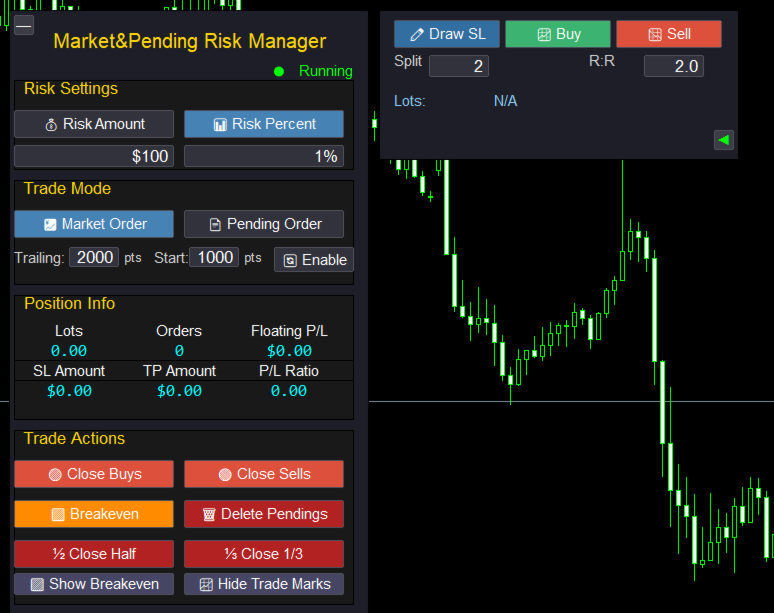
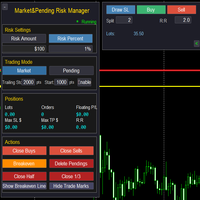
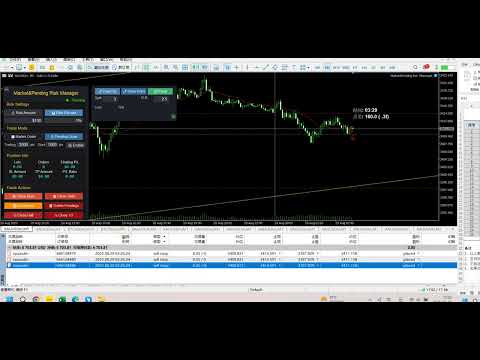
Market & Pending Risk Manager is a professional MT5 trading panel EA that integrates multiple functions such as market order trading, pending order trading, risk management, and trailing stop loss, providing traders with a comprehensive trading solution.

⭐ Core Advantages

🚀 Intelligent Dual-Mode Trading

  • Market Order Mode: One-click buy/sell for fast execution
  • Pending Order Mode: Precise entry to wait for the optimal timing
  • Seamless Switching: Freely switch between the two modes with a single click

🛡️ Professional Risk Management

  • Fixed Amount Risk: Set the maximum loss amount for each trade
  • Percentage Risk: Control risk based on the proportion of account balance
  • Automatic Lot Size Calculation: Intelligently calculate the optimal trading volume according to the stop-loss distance

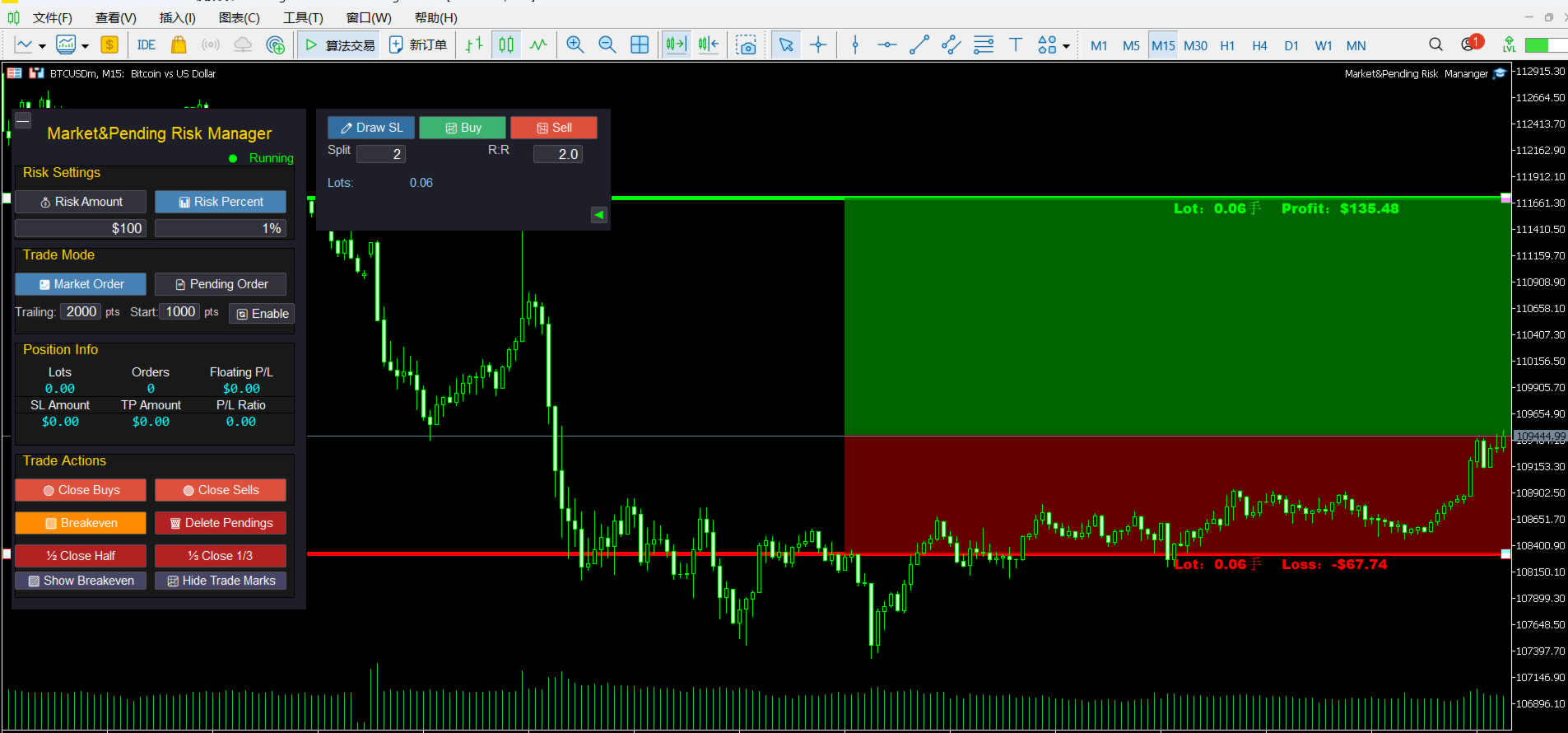
📈 Visual Trading Lines

  • Drag-and-Drop Operation: Directly drag on the chart to adjust stop-loss and take-profit prices
  • Real-Time Calculation: Dynamically display risk-reward ratio, lot size, and risk amount
  • Color-Coded Zones: Intuitively show risk zone (red) and profit zone (green)

🔄 Intelligent Trailing Stop Loss

  • Custom Activation Condition: Set the number of pips of profit required to activate the trailing stop loss
  • Flexible Stop-Loss Distance: Adjustable trailing distance for the trailing stop loss
  • Automatic Tracking: No manual intervention required, automatically protecting profits

📊 Comprehensive Position Management

  • Real-Time Information Display: Position lot size, number of orders, and floating P&L
  • One-Click Close Function: Close buy orders, sell orders, or all positions respectively
  • Partial Close: Support closing 1/2 or 1/3 of the position
  • Breakeven Function: One-click move all positions to the breakeven price

📋 Detailed Operation Guide

🎯 1. Risk Settings

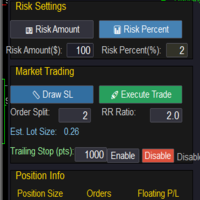
💰 Fixed Amount Mode

  1. Click the 💰 Risk Amount button to activate
  2. Set the risk amount in the input box (e.g.: $100)
  3. The system will automatically calculate the lot size based on the stop-loss distance

📊 Percentage Mode

  1. Click the 📊 Risk Percent button to activate
  2. Set the risk percentage in the input box (e.g.: 1%)
  3. The system will calculate the risk amount based on the account balance

🎯 2. Market Order Trading Process

Step 1: Select Mode

  • Click 💹 Market Order to enter the market order trading mode

Step 2: Draw Stop-Loss Line

  • Click the ✏️ Draw SL button
  • A red stop-loss line will appear on the chart
  • Drag to adjust to the appropriate stop-loss position

Step 3: Set Parameters

  • Split: Set the number of split orders (e.g.: 2 means placing orders in 2 batches)
  • R:R: Set the risk-reward ratio (e.g.: 2.0 means the profit target is twice the risk)

Step 4: Execute Trade

  • Click 📈 Buy to execute a buy order
  • Click 📉 Sell to execute a sell order
  • The system will automatically calculate the take-profit position and place the order

🎯 3. Pending Order Trading Process

Step 1: Select Mode

  • Click 📄 Pending Order to enter the pending order trading mode

Step 2: Draw Trading Lines

  • Click ✏️ Draw SL to draw the stop-loss line (red)
  • Click ✏️ Draw Entry to draw the entry line (yellow)
  • Drag to adjust to the appropriate positions

Step 3: Set Parameters

  • Split: Set the number of split orders
  • R:R: Set the risk-reward ratio

Step 4: Submit Pending Order

  • Click ✅ Pend to submit the pending order
  • The system will automatically identify the order type (Buy Stop/Sell Stop/Buy Limit/Sell Limit)

🎯 4. Trailing Stop Loss Settings

Parameter Configuration

  • Trailing: Trailing stop loss distance (e.g.: 2000 pips)
  • Start: Activation condition (e.g.: Activate after 1000 pips of profit)
  • Enable/Disable: Turn the trailing stop loss function on/off

Working Principle

  1. After the position profit reaches the activation pips, the trailing stop loss starts working
  2. When the price moves in a favorable direction, the stop loss automatically tracks it
  3. When the price retraces, the stop loss remains at the highest level

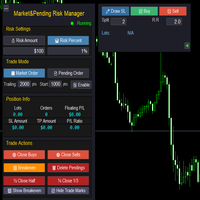
🎯 5. Position Management Functions

One-Click Close

  • 🟢 Close Buys: Close all buy orders
  • 🔴 Close Sells: Close all sell orders
  • 🗑️ Delete Pendings: Delete all pending orders

Partial Close

  • ½ Close Half: Close half of the position
  • ⅓ Close 1/3: Close one-third of the position

Breakeven Function

  • 🟩 Breakeven: Move the stop loss of all positions to the opening price

🎨 Interface Personalization

👁️ Display Control

  • 🟩 Show/Hide Breakeven: Show/hide the breakeven line
  • 📈 Show/Hide Trade Marks: Show/hide trade markers
  • ◄ ►: Hide/show the right-side panel

🎯 Intelligent Tips

  • Hover the mouse over the lines to display detailed information
  • Display a confirmation message after a successful trade
  • Display a warning prompt for incorrect operations

⚠️ Risk Control

  • Minimum stop-loss distance protection
  • Automatic verification of lot size range
  • Automatic correction of invalid parameters

💡 Usage Tips

🎯 Best Practices

  1. Set risk first, then draw lines: Ensure the risk of each trade is controllable
  2. Set a reasonable risk-reward ratio: A risk-reward ratio of 1:2 or higher is recommended
  3. Make good use of the split function: Build and close large positions in batches
  4. Enable trailing stop loss: Protect realized profits

📊 Parameter Recommendations

  • Risk Percentage: It is recommended not to exceed 2% of the account
  • Trailing Stop Loss Distance: Adjust according to the volatility of the trading instrument (usually 20-50 pips)
  • Activation Condition: It is recommended to set it to 1-2 times the stop-loss distance

🎨 Interface Optimization

  • The right-side panel can be hidden to save screen space
  • Trade markers can be turned off to keep the chart clean
  • The breakeven line can be displayed to monitor the breakeven point

Recommended products
XAU Structure Pullback H1 Expert Advisor for MetaTrader 5 — Gold / XAUUSD focus Version: 1.00 What it is XAU Structure Pullback H1 is an Expert Advisor for gold on the H1 chart. Architecture is simple and deliberate: Impulse — a clear directional displacement is identified on structure. Pullback band — price retraces into a mapped structure participation band. Continue — the system joins the continuing direction with selectable exit style. Built for structured automated participation — not grid
FREE
input double MaxLossLevel      = 500.0; // Max Loss Level in account currency input double SafetyBufferMoney = 10.0;  // Safe Buffer. In this case Threshold be 500+10 = 510 input int    CheckEverySeconds = 2; input bool   is_debugged       = false; // Print additional messages in the Terminal It will checks every CheckEverySeconds. If the total Loss of the account Go below Threshold of  MaxLossLevel + SafeBufferMoney, then start Heding: for each open Position, open a new reversed Position with
FREE
Title:   Smart Position Manager PRO - Advanced Risk & Position Manager Description: Smart Position Manager PRO is an all-in-one visual trade management and risk calculation tool designed for serious traders who prioritize iron discipline and strict risk management. Whether you are executing precise SMC or ICT setups on personal capital or managing large funded accounts on strict prop firms, this tool ensures you focus on counting percentages rather than emotional money swings. With a highly int
FREE
Gold Adaptive M15 Gold Adaptive M15 is an automated Expert Advisor developed specifically for trading Gold (XAUUSD) on the M15 timeframe. The EA uses a multi-condition trading approach designed to identify short-term price imbalances and corrective movements within changing Gold market conditions. The strategy does not rely on a single entry signal. Several internal conditions evaluate market direction, recent price movement, volatility and the quality of a potential setup before a position is o
FullMarginRiskGuard
Seti Gautama Adi Nugroho
FullMargin RiskGuard - Advanced Risk Management for New Traders Unlock the power of full margin trading with confidence using FullMargin RiskGuard , a cutting-edge Expert Advisor (EA) designed specifically for beginner traders on the MetaTrader 5 platform. Inspired by the renowned trading style of Papip Celebes, this EA empowers users to execute full trade strategies while safeguarding their capital with advanced risk management features. Key Features: MaxFloatingLoss Protection: Set your maxim
FREE
Kiwi Structure Edge MT5 Kiwi Structure Edge MT5 is an automated Expert Advisor that uses confirmed market-structure breaks to identify potential trading opportunities. The EA detects Break of Structure (BOS) and Change of Character (CHoCH) events from confirmed swing highs and swing lows. It combines these signals with an optional higher-timeframe trend filter, grid basket management, spread protection and configurable drawdown control. Market-structure entries The entry engine analyses complete
FREE
Gold Adaptive EA MT5 is an automated Expert Advisor for MetaTrader 5 designed for trading Gold (XAUUSD). The EA uses several internal trading models and market filters to adapt to different phases of Gold price movement. Instead of relying on one fixed entry pattern, Gold Adaptive EA MT5 analyzes market behavior and selects suitable logic for trend continuation, impulse moves, pullbacks and selected recovery conditions. The main goal of the Expert Advisor is to provide a structured Gold tradi
FREE
XAU VWAP Mean Reversion H4 Expert Advisor for MetaTrader 5 — Gold / XAUUSD focus Version: 1.00 What it is XAU VWAP Mean Reversion H4 is an Expert Advisor for gold on the H4 chart. Intraday VWAP mean-reversion style participation on gold H4. Built for structured automated participation — not grid , not martingale . Evaluate on your broker and risk profile before any live use. This product is a technical system . Exact thresholds and entry equations remain internal product design and are not publ
FREE
Auric Mohd iK
Md Iqbal Kaiser
AURIC MOHD-iK is a dynamic, logic-based Expert Advisor (EA) engineered specifically for trading XAUUSD (Gold). Unlike standard trading systems that rely on lagging, unreliable indicators, this EA operates purely on clean price logic—executing trades the way an experienced human trader naturally reads the market. This version is completely free with limitations, offering permanent value to your trading setup with zero hidden costs. Active Auric Mode That's it!!!!!!!!!! Core Trading Parameters Ac
FREE
Pearl hft EA MT5
S M Najmul Hasan
PEARL HFT EA V2.809  ( the full version is available here - https://www.mql5.com/en/market/product/193862 CONFIGURE PROPERLY BEFORE RUN - Setfiles Cent Account Recommended. Back Testing will not give you real result. Practice on Live Chart Demo Account First.Close trading 1 hour before and after Red Box news, and do not trade in a volatile market. Do not run 24/7. Use Session Profit target for Each Run.   Suitable for For All Forex Symbols, All Type of Cent Accounts, Any Broker  Just need to con
FREE
Jireh Fair Value Gap EA
Jesse De Souza Ferreira
Jireh Fair Value Gap EA Free Introductory Release — Download, test and help shape the future of this project through your feedback. The Jireh Fair Value Gap Trader EA is an automated trading system that identifies Fair Value Gaps (FVGs) and executes trades when price returns to mitigate the imbalance. Designed around Smart Money Concepts (SMC), the EA combines multiple confirmation filters and advanced risk management tools to help traders automate a disciplined FVG trading strategy. Whether
FREE
Dashboard Signals aNa Magic ATR EA
Choawana Malaikitsanachalee
English Description aNa Magic ATR EA – Dashboard and Signals (MT5) ATR-based SL/TP (TP1–TP3), EMA200 trend filter, RSI gate, clean on-chart dashboard and segmented guide lines. MagicNumber support for multi-EA setups. What it does This Expert Advisor automates entries and risk targets using ATR. It filters the market with EMA(200) and an RSI range to avoid low-quality trades. A compact dashboard shows entry, TP1-TP3 and SL for both long and short. Lines are drawn as short segments (not full-wid
FREE
Inverse Liquidity Grab Ultimate EA
Stephen Muriithi Muraguri
5 (1)
This EA finds Fair Value Liquidity (FVL) on the chart, tracks when they get mitigated , and then looks for an inversion signal (price “fails” through the zone). When that inversion happens, it places a trade in the opposite direction of the original Liquidity gap (an Inverse FVG approach). It also lets you control when it trades using market sessions , and it can auto-close positions at New York open (all positions or profitable-only). Key advantages Clear, rule-based entries (no guessing): trad
FREE
PZ Goldfinch Scalper EA MT5
PZ TRADING SLU
3.33 (57)
This is the latest iteration of my famous scalper, Goldfinch EA, published for the first time almost a decade ago. It scalps the market on sudden volatility expansions that take place in short periods of time: it assumes and tries to capitalize of inertia in price movement after a sudden price acceleration. This new version has been simplified to allow the trader use the optimization feature of the tester easily to find the best trading parameters. [ Installation Guide | Update Guide | Troublesh
FREE
AI Advisor – Let AI See Your Real Trading World AI Advisor builds rich prompts directly from your account information, ready to paste into any AI chat. It helps you quickly review your account status, understand the current market structure, spot risks, and explore potential profit opportunities. Quick links  Download & versions Download:      AI Advisor v1.02.ex4      AI Advisor   v1.02.ex5 Installation guide AI Advisor  Version Overview FAQ & troubleshooting How to Use – 3 Simple Steps Open
FREE
Fast Trade Pro
Oezkan Kahveci
https://www.mql5.com/tr/users/bilisimprofesoru/seller This is a highly profitable fully automatic and semi-automatic grid strategy. ======== Usage ======== : Symbol: XAU and any major currency pair Timeframe: M1 or higher, but all timeframes can be tested Note: The grid strategy always involves a certain level of risk due to the accumulation of position sizes. However, its high profit potential ensures that it remains popular regardless of how much the forex market evolves. Semi-automatic tradi
The only EA for TRADING PSYCHOLOGY:Discipline, Mindset Training & Risk Control  Checklist-Enforced Trading (No trades allowed until  strategy checklist is met)  1-Click Revenge Trade Blocker (Auto-freezes account after losses)  Overtrading Circuit Breaker (Hard daily trade limits enforced)  Neuroplasticity Training (Rewires retail habits into institutional discipline)  Institutional Risk Protocols (Auto SL/TP, position sizing, daily loss cutoffs)  Prop Firm  and account Safeguard (Preve
DCA Tool All-in-One – Automated and Semi-Automated DCA Trading Utility for MetaTrader 5 Usage Recommendation The DCA Tool All-in-One is a powerful trading utility designed to help traders execute Dollar Cost Averaging (DCA) strategies in both automated and semi-automated modes , optimizing trade management on the MetaTrader 5 platform. Before using it on a live account, traders should fully understand the tool's operation, perform thorough backtesting, and combine it with market analysis
FREE
This EA trades daily breakouts placing bidirectional pending orders using the last day's trading range -or using market orders, as desired-, provided these price levels have not been yet tested. It offers many trading behaviors and flexible position management settings, plus a martingale and inverse martingale mode. [ Installation Guide | Update Guide | Troubleshooting | FAQ | All Products  |  Get Help ] Easy to use and supervise Customizable break-even, SL, TP and trailing-stop Works for ECN
FREE
SR Breakout EA MT4 Launch Promo: Depending on the demand, the EA may become a paid product in the future. Presets:  Click Here Key Features: Easy Installation : Ready to go in just a few steps - simply drag the EA onto any chart and load the settings. Safe Risk Management:   No martingale, grid, or other high-risk money management techniques. Risk management, stop loss, and take profit levels can be adjusted in the settings. Customizable Parameters:   Flexible configuration for individual tradin
FREE
Gap Catcher
Mikita Kurnevich
5 (5)
Read more about my products Gap Cather - is a fully automated trading algorithm based on the GAP (price gap) trading strategy. This phenomenon does not occur often, but on some currency pairs, such as AUDNZD, it happens more often than others. The strategy is based on the GAP pullback pattern. Recommendations:  AUDNZD  TF M1  leverage 1:100 or higher  minimum deposit 10 USD Parameters:  MinDistancePoints - minimum height of GAP  PercentProfit - percentage of profit relative to GAP level
FREE
BKT Adaptive RSI EA A multi-strategy RSI trading system for MetaTrader 5 that combines a classic mean-reversion entry with optional divergence and failure-swing confirmation, managed through an averaging position model with a profit-lock exit. BKT Adaptive RSI EA is an automated trading system built around the Relative Strength Index. It offers five selectable internal smoothing methods plus an optional second smoothing layer on top of the RSI output, allowing the same core logic to behave more
FREE
EA16 Taka Grid
Nhat Tien Duong
TAKA Grid EA (EA16): The Sideway King & Prop Firm Shield Are you tired of EAs that get destroyed by choppy, ranging markets? Meet TAKA Grid EA , the ultimate mean-reversion system designed specifically for the AUDNZD cross pair on the M15 timeframe. It doesn't rely on explosive breakouts; it dominates the sideways chop with mathematical precision.   ENTER YOUR KEY HERE:   [  EA16_99999D_TANINCODER_595559587987 ] -- MANDATORY: ALLOW WEBREQUEST TO ACTIVATE THE BOT To verify your License
FREE
EA Zone Recovery Assistant เป็น EA ที่ช่วยเปิดออเดอร์ Recovery ตามระดับราคาที่ผู้ใช้กำหนดได้อัตโนมัติ //โดยหลักการทำงานมีดังนี้// เมื่อผู้ใช้เปิดออเดอร์ Buy หรือ Sell (Market Order) EA จะตรวจสอบจุด SL ภายในเวลาที่กำหนดในตัวแปร Input Delay Check for setting Price Recovery ถ้าผู้ใช้วาง SL วางภายในเวลาที่กำหนด ระบบจะลบ SL ออกแล้วใช้จุดที่วาง SL เปิดออเดอร์ Recovery เมื่อกราฟวิ่งผิดทางถึงจุดที่กำหนด //แต่ถ้าผู้ใช้ไม่วาง SL ภายในเวลาที่กำหนดระบบจะไม่มีการทำ Recovery ในออเดอร์นั้นแม้ผู้ใช้มีการวาง SL
FREE
NAS100 Auto Sl And TP MT5
Moustapha Boulouz
5 (2)
Introducing NAS100 Auto SL and TP Maker for MT5: Never miss setting StopLoss and TakeProfit again with our NAS100 Auto SL and TP Maker, an indispensable assistant for traders navigating the Nasdaq 100 market on MetaTrader 5. This tool is designed for those who seek a seamless solution to automate the management of StopLoss and TakeProfit levels. Key Features: Effortless Automation: Automatically monitors Nasdaq 100 trades without StopLoss and/or TakeProfit. Dynamically adjusts levels based on u
FREE
The 7 Ways
Kaloyan Ivanov
The Expert Advisor uses seven core indicators— RSI, MACD, Moving Average, Bollinger Bands, Stochastic Oscillator, ATR, and Ichimoku —to generate trading signals on customizable timeframes. It allows enabling or disabling buy and sell directions independently and supports trading restrictions based on weekdays and positive swap conditions. Risk management is handled through fixed take profit, stop loss, and lot size settings, with an option to open new trades even when existing positions are acti
FREE
Game Changer Gold — Smart Hedge Recovery EA for XAUUSD Game Changer Gold is an automated Expert Advisor designed primarily for XAUUSD (Gold) trading, with settings optimized for fast-moving market conditions on the M1 timeframe . The EA combines a trend-following + RSI pullback entry system with an intelligent opposite-direction hedge recovery mechanism . Instead of simply adding positions in the same direction when the market moves against a trade, Game Changer Gold alternates hedge positions a
FREE
Pillartrade
QuanticX
3 (1)
Announcement: All EAs (Expert Advisors) from QuanticX are currently available for free, but only for a limited time! To enjoy a Lifetime QuanticX support and continue receiving free EAs, we kindly request you to leave a review and track the performance of our EAs on Myfxbook. Additionally, don't hesitate to reach out to us for exclusive bonuses on EAs and personalized support. Pillartrade by QuanticX Welcome to Pillartrade - Your Long-Only Trading Ally for US500 Join the forefront of financial
FREE
Long Waiting
Aleksandr Davydov
Expert description Algorithm optimized for Nasdaq trading The Expert Advisor is based on the constant maintenance of long positions with daily profit taking, if there is any, and temporary interruption of work during the implementation of prolonged corrections The Expert Advisor's trading principle is based on the historical volatility of the traded asset. The values of the Correction Size (InpMaxMinusForMarginCallShort) and Maximum Fall (InpMaxMinusForMarginCallLong) are set manually. Recomm
FREE
VadineroLab MT5 Export Master to CSV EXEL JSON - Expert Advisor for exporting and analyzing symbols, account, terminal parameters, active trades, current account state, trading history, global variables.   Generates the following report types: * Symbols Parameters — spread, tick size, min/max lot, swap, … * Account Parameters — balance, equity, leverage, currency, margin info, … * Terminal Parameters — server, version, language, date, environment, … * Trade History — orders, deals, positions, se
FREE
Buyers of this product also purchase
Trade Assistant MT5
Evgeniy Kravchenko
4.43 (216)
It helps to calculate the risk per trade, the easy installation of a new order, order management with partial closing functions, trailing stop of 7 types and other useful functions. Additional materials and instructions Installation instructions - Application instructions - Trial version of the application for a demo account Line function -   shows on the chart the Opening line, Stop Loss, Take Profit. With this function it is easy to set a new order and see its additional characteristics bef
Forex Trade Manager MT5
InvestSoft
4.98 (679)
Trade Manager MT5 is an advanced position size calculator and trade management tool for MetaTrader 5, designed to help traders plan trades faster, control risk more precisely, and manage open positions directly from the chart. It combines order placement, risk based lot calculation, Stop Loss and Take Profit management, Break Even, Trailing Stop, Partial Close, Equity Protection, and external trade management in one panel. Whether you trade forex, indices, metals, commodities, crypto, or future
Local Trade Copier EA MT5
Juvenille Emperor Limited
4.94 (149)
Local Trade Copier EA MT5 is a fast and flexible trade copier for copying and managing trades between multiple MetaTrader 5 accounts on the same Windows computer or Windows VPS. It combines local trade synchronization with Receiver-side controls for lot sizing, risk management, trade filtering, symbol mapping, trade management and account protection. Set up your Transmitter and Receiver terminals in about 1 minute and copy manual or EA trades between accounts at the same or different brokers. U
Strategy Ledger Pro
Abdullah Uygar Tuna
5 (4)
Strategy Ledger Pro is a read-only account analysis panel for MetaTrader 5. It separates account results by Expert Advisor, strategy, symbol, and magic number, so you can see what each one really contributes. The panel is available in 11 languages: English, Français, Deutsch, Español, Italiano, Português, Русский, Türkçe, 中文, 日本語 and 한국어. Before you download the demo. The Market runs the demo of any paid product in the Strategy Tester only. This panel analyses the trades on your own account, and
Telegram to MT5 MultiChannel Copier
Sergio Marquez Uroz
4.59 (17)
Telegram to MT5 Multi-Channel Copier   automatically copies trading signals from your Telegram channels straight to MetaTrader 5. No bots, no browser extensions, no manual copying. A signal arrives in Telegram and the EA opens the trade in your terminal within seconds. And before you copy a channel, the built-in backtester shows you what that channel would have done in your account. The product has two components: a Windows application that listens to your Telegram channels, and this Expert Advi
================================================================================ POC BREAKOUT - V20.72. Full Professional Grade Toolkit ================================================================================ POC Breakout is a full MetaTrader 5 trading dashboard for discretionary traders who want breakout signals, Point of Control (POC) context, volume profiles, order flow, market structure, news, alerts, and advanced trade planning in one professional workspace. Attached directly to you

TradePanel MT5
Alfiya Fazylova
4.88 (169)
Trade Panel is a multi-functional trading assistant. The app contains over 50 trading functions for manual trading and allows you to automate most trading tasks. Application instructions + video instructions: https://www.mql5.com/en/blogs/post/772292 Trial version of the application for a demo account: https://www.mql5.com/en/blogs/post/750865 How to install the application: https://www.mql5.com/en/blogs/post/756239 How to test the application in visual mode: https://www.mql5.com/en/blogs/post/7
Copy Telegram signals with your own trading rules Telegram to MT5 Signal Trader automatically copies text-based trading signals from public and private Telegram channels and groups into MetaTrader 5. Manage multiple providers and MT5 accounts from one desktop app, with individual risk and trade settings for each provider . No Telegram bot or API setup needed for copying. Simply sign in with your own Telegram account by phone or QR code and select the channels or groups you have already joined. Y
FarmedHedge Pair Trading Dashboard
Tanapisit Tepawarapruek
5 (5)
Farmed Hedge Yield Farming | All Markets (Manual - Hybrid - Semi/Automated EA) VERIFIED TRADING RESULTS - Farmed Hedge Yield Axi Copy:  https://www.mql5.com/en/signals/2356376 - Farmed Hedge Yield Exn Copy:   https://www.mql5.com/en/signals/2356404 - Farmed Hedge Yield V Copy:  https://www.mql5.com/en/signals/2357156 IMPORTANT NOTICE: FarmedHedge is a MANUAL-FOCUSED TRADING UTILITY ,not a fully automated EA. Results shown on this Signal include manual trades and overall strategic management.
Power Candles Strategy Scanner - Self-Optimizing Multi-Symbol Setup Finder Series price: 111 USD until Sunday, 27 September 2026, then 139 USD again. Self-optimizing settings work one chart at a time, and finding where they pay off right now means opening chart after chart. Power Candles Strategy Scanner runs the same self-optimizing engine as the Power Candles indicator on every symbol in your Market Watch, side by side. One panel ranks where it pays off: the winning strategy per symbol, its op
Exp COPYLOT CLIENT for MT5
Vladislav Andruschenko
3.97 (35)
Professional Trade Copier for MetaTrader 5 Fast, professional, and reliable trade copier for MetaTrader . COPYLOT allows you to copy Forex trades between MT4 and MT5 terminals with support for Hedge and Netting accounts. COPYLOT MT5 version supports: - MT5 Hedge to MT5 Hedge - MT5 Hedge to MT5 Netting - MT5 Netting to MT5 Hedge - MT5 Netting to MT5 Netting - MT4 to MT5 Hedge - MT4 to MT5 Netting MT4 version Full Description +DEMO +PDF How To Buy How To Install How to get Log Files H
Signal Trading View to MT5 Pro
Mirel Daniel Gheonu
4.5 (2)
Signal TradingView to MT5 Pro  Instant professional execution between TradingView and MetaTrader 5 Automate your trading strategy with the most robust communication bridge between TradingView alerts and real execution in MT5. Designed for traders who demand speed, flexibility, and impeccable risk management, this Expert Advisor transforms any alert message into a precise market or limit order.   Install and TEST the TRIAL version HERE STRENGTHS AND ADVANTAGES Universal Parsing Engine (Propriet
HINN MagicEntry Extra
ALGOFLOW OÜ
4.74 (19)
HINN MAGIC ENTRY – the ultimate tool for entry and position management! SIMPLE. FASTEST. INTUITIVE. MAX AUTOMATED. Place orders by selecting a level directly on the chart! full description   ::  demo-version  :: 60-sec-video-description Key features: - Market, limit, and pending orders - Automatic lot size calculation - Automatic spread and commission accounting - Unlimited partitial take-profits  - Breakeven and trailing stop-loss and take-profit  functions - Invalidation leves - Intuitive, a
Premium Trade Manager - The Trade Panel With a Coach Built In Premium Trade Manager puts a trading coach inside your chart, with a full execution engine underneath it. Set the trade up the way you always do, then let Max, your AI trading coach, read that exact setup against your live account and give you a straight verdict before you commit: is the stop disciplined, is the risk sane, is a high-impact release minutes away, are you near a prop-firm limit. Below sits the engine that runs everything
Message me after purchase to receive the complete manual kit + 3-day OpenAI API trial to test the AI features + Another bonus gift The current price is a limited discount for August Relaunch Update — secure your edition now before price go up. Next Price: $340 This is completely different from any trading panel you’ve tried or seen on the market. It’s one of the most innovative AI-powered trading panels available in the retail market right now. Imagine connecting   AI directly to your chart   —
MT5 Trading Deck
Manuel Michiels
5 (2)
One button. One trade. MT5 Trading Deck is a hotkey trading panel for MetaTrader 5 that turns the platform into a keyboard-driven execution cockpit. Stop loss, take profit and lot size are pre-calculated for every key; the moment you press, a market order is live on the broker. A complete technical user manual is attached in the product Comments section. It documents every input parameter, the full hotkey map, the recommended Stream Deck XL layout, and the advanced workflows for Pre-Limit orders
Grid Manual MT5
Alfiya Fazylova
4.73 (22)
Grid Manual is a trading panel for working with grid strategies. The utility is universal, has flexible settings and an intuitive interface. It works with a grid of orders not only in the direction of averaging losses, but also in the direction of increasing profits. The trader does not need to create and maintain a grid of orders, the utility will do it. It is enough to open an order and the "Grid manual" will automatically create a grid of orders for it and will accompany it until the close. F
EasyInsight AIO MT5
Alain Verleyen
4.92 (12)
EASY Insight AIO – All-In-One Power for AI-Driven Trading Want to skip the setup and start scanning the entire market – Forex, Gold, Crypto, Indices, and even Stocks – in seconds? EASY Insight AIO is the complete plug-and-play solution for AI-powered trade analysis. It includes all core Stein Investments indicators built-in and automatically exports clean, structured CSV files – perfect for backtesting, AI prompts, and live market decision-making. No need to install or configure indicators manu
Trade Dashboard MT5
Fatemeh Ameri
4.94 (134)
Trade Dashboard simplifies how you open, manage, and control your trades, with built-in lot size calculation. It allows you to execute trades, manage risk, and control positions directly on the chart, with tools such as partial close, breakeven, and trailing stop. Designed to reduce manual work and help you stay focused on your trading decisions. A demo version is available for testing. Detailed explanations of features are provided within the MQL5 platform. Installation instructions are include
Trade copier MT5
Alfiya Fazylova
4.61 (56)
Trade Copier is a professional utility designed to copy and synchronize trades between trading accounts. Copying occurs from the account / terminal of the supplier to the account / terminal of the recipient, which are installed on the same computer or VPS . PROMOTION - If you have already purchased the "Trade Copier MT5," you can receive the "Trade Copier MT4" for free (for copying MT4 > MT5 and MT4 < MT5). For more detailed information about the conditions, please contact us via private message
EA Overfitter
Stephen J Martret
5 (1)
That backtest looks great. But will it still be making money tomorrow, next week, next month? EA Overfitter re-runs your EA on 100 price histories it has never seen. One score tells you if the edge is real. A backtest tells you what an EA did on one price history — the one that happened to occur. What you cannot tell from it is how much of that result was the strategy and how much was the particular path. EA Overfitter answers that. It builds up to 100 synthetic price histories your EA has n
MT5 to Telegram Signal Provider turns your trading account into a signal provider. Every trade action, whether manual, by EA or from your phone, is instantly sent as a message to Telegram. You can fully customize the format or use a ready-made template for quick setup. [ Demo ] [ Manual ] [ MT4 Version ] [ Discord Version ]     New: [ Telegram To MT5 ] Setup A step by step user guide is available. Key Features Ability to customize order details sent to subscribers You can create a tiered subs
Telegram To MT5 Ultra
Mirel Daniel Gheonu
5 (5)
Telegram To MT5 — Signal Copier Turn the trading calls from your Telegram channels into real MT5 orders — automatically, on as many accounts as you like, with risk and rules fully under your control. Telegram To MT5 connects the VIP / signal channels you already follow on Telegram to your MetaTrader 5 terminal. A free companion desktop app reads the messages (even from channels that block bots), and this Expert Advisor executes them on your account — applying your own risk settings, symbol mappi
EA Slipstream
Stephen J Martret
5 (1)
Your backtest filled every order at the price it asked for. Your account does not. EA Slipstream measures what execution costs your EA, using your own fills, slippages and spreads to show you the true performance of your EA. A backtest prices every trade at the level the EA named. In live trading a pending order fills at whatever price is available when it triggers, a stop closes wherever the market is when it is hit, and the spread at that moment is whatever the account was quoting. The differ
Dynamic Fibonacci Grid
Tsvetan Tsvetanov
5 (1)
Introducing the latest version of the Dynamic Fibonacci Grid Dashboard for MT5. Now packed with many new features, this new dashboard transforms your trading experience and allows you to see the market and the price action from a completely different perspective. Discover new possibilities with simultaneous analysis of multiple timeframes covering multiple symbols. User-friendly interface for manual trading and management of positions and an expanded ability to apply predefined automated strate
Telegram to MT5 Coppy
Sergey Batudayev
5 (10)
Telegram to MT5: The Ultimate Signal Copying Solution Simplify your trading with Telegram to MT5, the modern tool that copies trading signals directly from Telegram channels and chats to your MetaTrader 5 platform, without the need for DLLs. This powerful solution ensures precise signal execution, extensive customization options, saves time, and boosts your efficiency. [ Instructions and DEMO ] [ FAQ ] [ How atach logs properly ] [ Settings descrition ] Key Features Direct Telegram API Integrati
The News Filter MT5
Leolouiski Gan
4.78 (23)
This product filters   all expert advisors and manual charts   during news time.  It is able to remove any of your EA during news and automatically reattach them after news ends. This product also comes with a complete  order management system   that can handle your open positions and pending orders before the release of any news. Once you purchase   The News Filter , you will no longer need to rely on built-in news filters for future expert advisors, as this product can filter them all from her
The product will copy all telegram signal to MT5 ( which you are member) , also it can work as remote copier.  Easy to set up, copy order instant, can work with almost signal formats, image signal,  s upport to translate other language to English Work with all type of channel or group, even channel have "Restrict Saving Content", work with  multi channel, multi MT5 Work as remote copier: with signal have ticket number, it will copy exactly via ticket number. Support to backtest signal. How to s
Anchor Trade Manager
Kalinskie Gilliam
5 (9)
Your EAs cannot see each other, but Anchor can. Anchor gives you one place to coordinate your EAs, manage risk, and decide when trading is allowed. It works alongside the trading bots you already use without any changes to them. The Problem One EA opens a trade. Then another starts trading. The next thing you know, you wake up to multiple grids built across your account. Each EA may be doing exactly what it was designed to do, but together they can place far more risk on your account than you in
Footprint Chart Pro — Professional OrderFlow EA for MetaTrader 5 Version 6.34 | Professional tool for real traders | Institutional-Grade Visualization DEMO USERS - PLEASE SELECT EVERY TICK / REAL TICK WHEN TESTING AND YOU HAVE DOWNLOADED HISTORICAL DATA. IF YOU SEE A WAITING SCREEN AND IT IS NOT DOWNLOADING, IT MEANS YOU HAVE LOW HISTORICAL DATA. TRY 1 MIN AND 5 MIN FIRST ON 1 DAY DATA. ONE DAY DATA SHOULD BE THE NEWEST AND MOST CURRENT DATE. PLEASE WAIT UNTIL THE MARKET HAS ROLLED OVER PERIOD.
More from author
Market & Pending Risk Manager EA Operation Manual Market & Pending Risk Manager is a professional MT5 trading panel EA that integrates multiple functions such as market order trading, pending order trading, risk management, and trailing stop loss, providing traders with a comprehensive trading solution. Core Advantages Intelligent Dual-Mode Trading Market Order Mode: One-click buy/sell for fast execution Pending Order Mode: Precise entry to wait for the optimal timing Seamless Switching
FREE
Market & Pending Risk Manager EA Operation Manual Market & Pending Risk Manager is a professional MT5 trading panel EA that integrates multiple functions such as market order trading, pending order trading, risk management, and trailing stop loss, providing traders with a comprehensive trading solution. Core Advantages Intelligent Dual-Mode Trading Market Order Mode: One-click buy/sell for fast execution Pending Order Mode: Precise entry to wait for the optimal timing Seamless Switching:
FREE
Filter:
Cha beer
18
Cha beer 2026.09.07 13:18 
 

User didn't leave any comment to the rating

Reply to review