

How MQL5 Lite MCP AI Assistant Changed My Debugging Approach on Generated MQL5 Codes
 184
184
 0
0

In my earlier article on collaborative debugging, correcting a generated MQL5 program often meant inspecting errors line by line or copying the source and compiler report into an external AI conversation. The MQL5 Lite MCP AI Assistant introduces a different workflow by placing AI-assisted code analysis and correction directly inside MetaEditor. In this article, we use that workflow to repair a faulty D1 PriceMarker, strengthen its runtime behavior, and show why successful compilation is only the first stage of debugging.
Contents
- Revisiting my earlier debugging workflow
- What changed inside MetaEditor
- Preparing the debugging exercise
- Understanding the faulty D1 PriceMarker
- Prompting the integrated assistant
- Building the complete implementation
- Compiling and observing runtime behavior
- Contrasting workflow steps
- Limitations and responsible use
- Conclusion
- Key lessons
- Attachments
Revisiting my earlier debugging workflow
In October 2024, I published From Novice to Expert: Collaborative Debugging in MQL5. The article introduced debugging through compiler messages, breakpoints, watch expressions, Print() statements, temporary code isolation, the Strategy Tester, documentation, community assistance, and AI.
That workflow remains useful because debugging is broader than correcting syntax. A compiler can detect a missing delimiter, an undeclared identifier, or an incompatible function call, but it cannot automatically prove that the programmer's trading or analytical intention has been implemented correctly. Runtime state, price data, event order, and strategy assumptions still have to be examined.
The earlier article used a D1 PriceMarker program that drew the previous daily candle's open, high, low, and close levels. Its faulty version produced a cascade of compiler errors. We worked through the reported locations, corrected API calls, and used the result to illustrate several debugging methods.
AI assistance appeared near the end of that process. With an external model, the programmer copied the source code and the MetaEditor error report into a separate chat. After receiving a proposed fix, they copied it back into MetaEditor and recompiled. If another error appeared, the context-transfer loop started again.
This approach worked, but it had friction. The external model did not automatically share the current editor, compiler state, surrounding project files, terminal logs, or the exact modifications that had occurred since the previous prompt. The developer had to transport that context manually and make sure that the external conversation still described the current source.
The key lesson from the old workflow was therefore not that AI could replace debugging. It was that AI could join a collaborative process when the programmer supplied sufficient context and critically reviewed the suggestions.
What changed inside MetaEditor
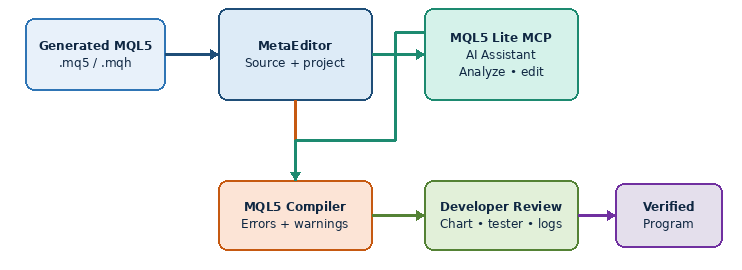
Fig. 1. Integrated MQL5 debugging architecture
MetaTrader 5 Build 6060 introduced built-in support for the Model Context Protocol. It also added agentic AI features to the terminal and MetaEditor. MetaQuotes describes the MetaEditor AI Assistant as capable of generating MQL5 programs, analyzing existing code, detecting errors, suggesting fixes, explaining algorithms, and assisting with refactoring and project enhancement. You can launch the assistant from MetaEditor's File menu, toolbar, or the Navigator context menu. Conversations are saved in the Navigator's Chats tab.
The official release information also explains that users who sign in with an MQL5.community account receive access to the MQL5 Lite plan, while other supported AI providers can be configured separately. The selected settings are synchronized between the terminal and MetaEditor. See the MetaTrader 5 Build 6060 announcement and the MetaEditor AI Assistant help.
For debugging, the important change is proximity. The conversation is available inside the development environment, but that does not prove that every source file, compiler message, journal entry, or runtime state was passed to the assistant. Context depends on the selected file, the request, tool permissions, and the operations actually performed. In our exercise, Figure 4 shows the named source being located and analyzed; it does not establish access to every project artifact.
This does not mean every issue will be resolved with a single prompt. A detailed request remains important, and the assistant may still misunderstand intent, modify behavior unnecessarily, or produce a correction that compiles but is logically wrong. Integration may reduce context switching when the required context is available; it does not remove the need for engineering judgment.
The development loop can be summarized as follows:
- Compile the generated MQL5 source in MetaEditor.
- Let the AI Assistant inspect the source and reported errors.
- Review the proposed or applied corrections.
- Recompile and repeat only when errors remain.
- Review the final source before running it.
- Verify the intended behavior on a chart or in the Strategy Tester.
The final two stages are essential. Compilation confirms that the source satisfies the language and compiler requirements. It does not confirm that the program draws the correct prices, opens the intended trades, manages risk correctly, or responds safely to runtime failures.
Preparing the debugging exercise
To examine the integrated workflow with a concrete example, we return to the D1 PriceMarker idea. The objective is straightforward: read the completed daily candle at shift 1 and draw four horizontal levels for its open, high, low, and close prices. Each level also receives a text label.
Three source files accompany the article:
- D1_PriceMarker_Buggy.mq5 deliberately contains controlled syntax and API errors.
- D1_PriceMarker_AI_Fixed.mq5 captures the first stage, where the compilation faults are corrected.
- D1_PriceMarker_Final.mq5 completes the EA with history validation, automatic refresh, checked object operations, and deterministic cleanup.
The faulty file is not intended for live use. It allows you to reproduce the compilation exercise and follow the correction path. The first corrected file corresponds to the MetaEditor and Strategy Tester images, while the final file incorporates the complete runtime safeguards developed in this article.
We organize the exercise around four practical stages:
| Stage | Question | Verification method | Result |
|---|---|---|---|
| Initial compilation | What faults does MetaEditor report? | MetaEditor error and warning counts | Figure 2 shows four errors and zero warnings |
| AI-assisted correction | What did the assistant change and why? | Prompt, assistant interaction, and source changes | Figures 3 and 4 show the prompt and analysis stage; they do not contain a complete response or source diff |
| Recompilation | Does the corrected source compile? | MetaEditor compiler result | Figure 5 shows zero errors and zero warnings for D1_PriceMarker_AI_Fixed.mq5 |
| Runtime verification | Does it mark the correct completed D1 candle? | Strategy Tester visualization and independent OHLC comparison | Figure 6 shows all four marker types; the independent OHLC comparison remains a test step |
The MetaEditor and Strategy Tester images establish the initial compiler result, the AI Assistant workflow, successful recompilation of D1_PriceMarker_AI_Fixed.mq5, and the displayed chart output. They do not replace the independent price, refresh, failure-path, and cleanup tests described later.
Understanding the faulty D1 PriceMarker
The faulty program contains three obvious categories of problems. First, the ObjectCreate() call for the horizontal line is missing its terminating semicolon. One syntax fault can cause several secondary compiler messages because the parser can no longer interpret the following statement correctly.
Second, the program uses OBJPROP_Y as though it were an object-property constant. It is not listed in the official MQL5 object-properties enumeration. An OBJ_TEXT object is anchored with chart time and price coordinates. In the corrected implementation, ObjectCreate() supplies TimeCurrent() and the marker price when the label is created, so the invalid OBJPROP_Y assignment is removed.
Third, several object operations are executed without checking their Boolean return values. Ignoring a failed creation or property assignment can leave the chart in a partially configured state while providing too little information for diagnosis.
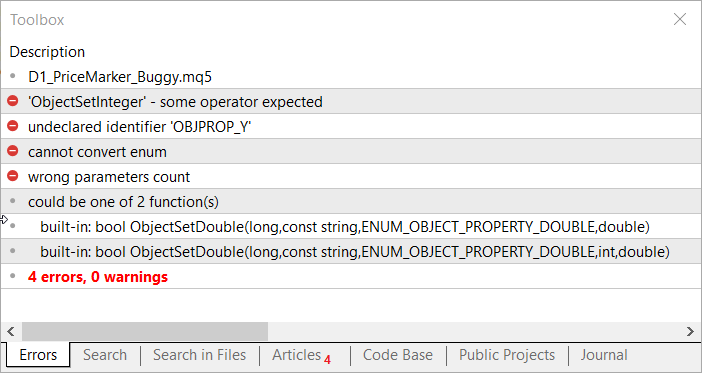
Fig. 2. Initial compilation of D1_PriceMarker_Buggy.mq5 reports four errors and zero warnings
Figure 2 records the initial MetaEditor result. The error list shows the missing operator before ObjectSetInteger, the undeclared OBJPROP_Y identifier, an enum-conversion problem, and an incorrect parameter count. These messages provide the starting evidence for the debugging exercise.
The exercise reinforces an important rule raised in the discussion of the earlier article. Start with the first compiler error. Later messages may be consequences of the first syntax or declaration problem rather than independent defects.
The purpose of supplying a deliberately faulty attachment is also educational. Readers can practice on the same source rather than reconstructing errors from screenshots.
Prompting the integrated assistant
Our prompt contains three explicit instructions: find the named source, correct its compilation errors, and save the result under a specified filename and folder. It does not explicitly request recompilation, an explanation, preservation of the D1 behavior, or separation of compilation and runtime evidence:
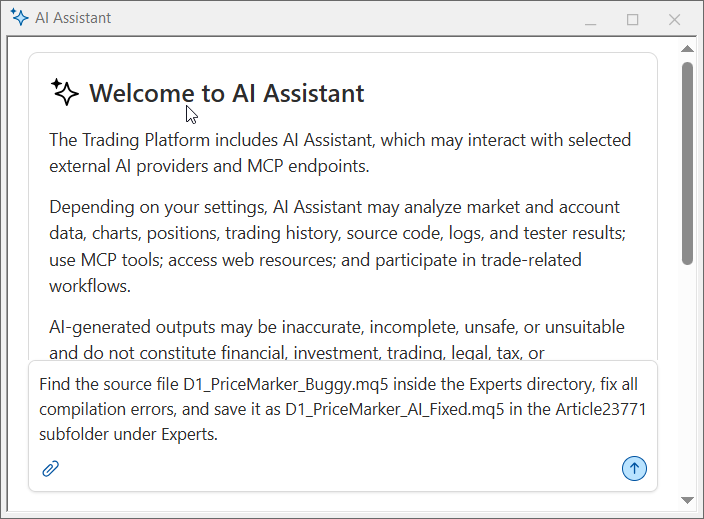
Fig. 3. Debugging instruction entered in the integrated MetaEditor AI Assistant
The filename and destination make this more specific than “fix my code,” but the request still leaves important verification boundaries unstated. A stronger reproducible prompt would add them explicitly:
- Preserve the intended previous-D1-candle marker behavior.
- Use the current compiler report and record the final error and warning counts.
- Explain each source change and identify remaining runtime tests.
- Do not redesign unrelated program behavior.
We compiled D1_PriceMarker_Buggy.mq5 before sending the debugging instruction to the integrated AI Assistant. Figure 3 shows the complete request in the assistant input area before submission. The additional boundaries above improve future prompts; they were not part of the instruction used here.
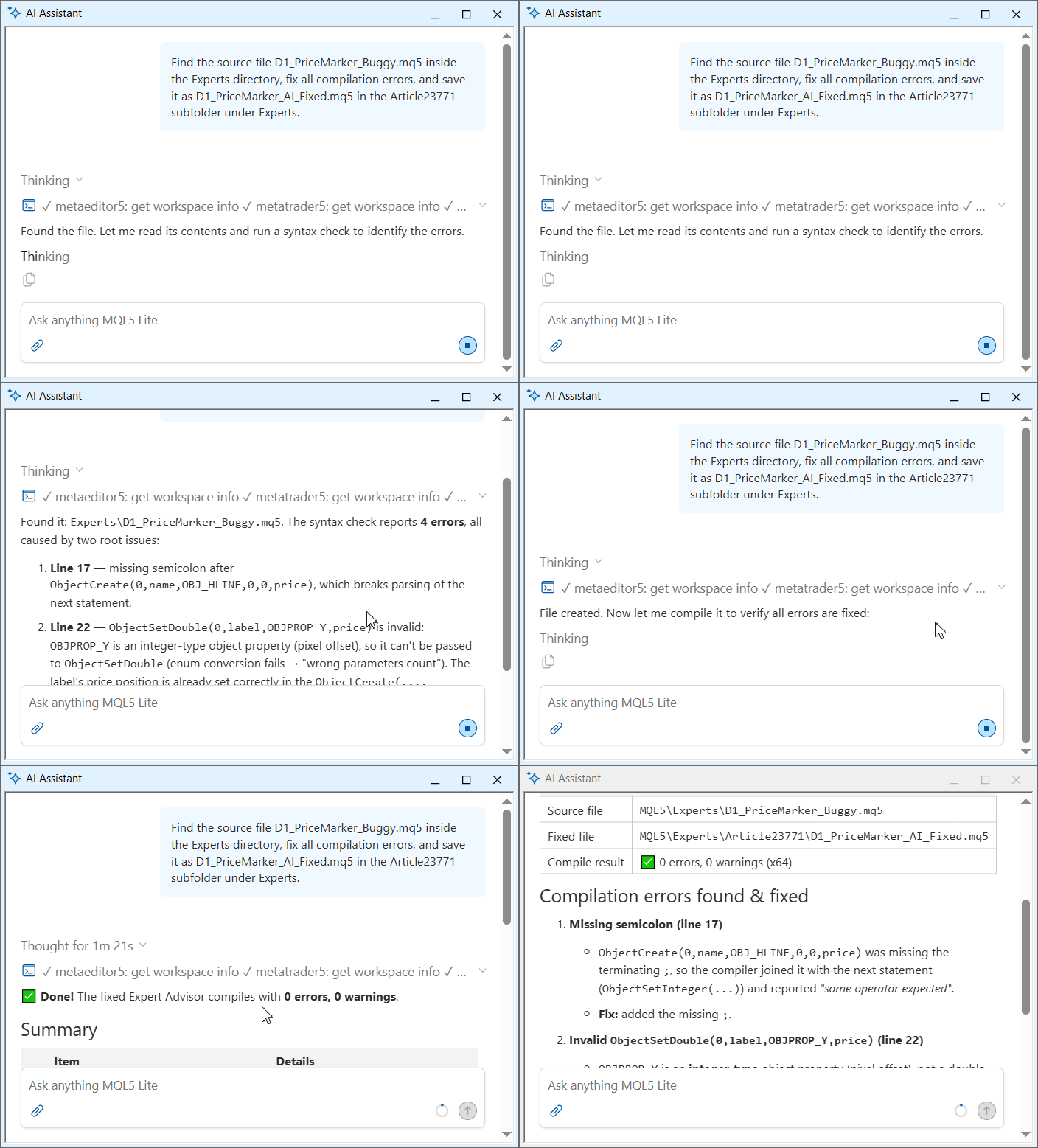
Fig. 4. AI Assistant locating the buggy source and beginning its syntax analysis
The animated sequence in Figure 4 shows the assistant receiving the request, locating D1_PriceMarker_Buggy.mq5 in the workspace, and beginning a syntax check. It documents the processing stage but should not be treated as compilation evidence by itself; the compiler result is recorded separately.
If the assistant asks permission to use a tool, modify the source, or execute compilation, review the requested operation before approving it. Security settings can control AI access to trading operations, network requests, and command-line operations. Those controls should be configured according to the task rather than enabled broadly without review.
Building the complete implementation
D1_PriceMarker_AI_Fixed.mq5 completes the first debugging stage: it compiles and creates four previous-day price markers during initialization. We then extend the exercise beyond compiler repair by adding the runtime controls that a dependable chart tool requires.
D1_PriceMarker_Final.mq5 reads one complete MqlRates record, validates its time and prices, uses a reserved object namespace, checks creation and property operations, refreshes from OnTimer(), and deletes only its eight deterministic object names.
MQL5 constants and predefined variables
The final EA requests the daily timeframe through PERIOD_D1 and reports successful initialization with INIT_SUCCEEDED. It creates horizontal lines with OBJ_HLINE. The object-properties enumeration defines OBJPROP_COLOR, OBJPROP_WIDTH, and OBJPROP_TEXT, while the predefined variables _Symbol and _Digits provide the current chart symbol and its price precision. The table summarizes how these identifiers are used:
| Identifier | Role in the implementation | Official documentation |
|---|---|---|
| PERIOD_D1 | Selects the daily timeframe for the four price-series calls | Chart Timeframes |
| INIT_SUCCEEDED | Reports successful EA initialization | OnInit and initialization return codes |
| OBJ_HLINE | Creates each horizontal price line | OBJ_HLINE |
| OBJ_TEXT | Creates each price label at a chart time and price coordinate | OBJ_TEXT |
| OBJPROP_COLOR | Sets the horizontal-line color | Object Properties |
| OBJPROP_WIDTH | Sets the horizontal-line width | Object Properties |
| OBJPROP_TEXT | Sets the visible text of each marker label | Object Properties |
| _Symbol | Provides the current chart symbol | _Symbol |
| _Digits | Provides the current symbol's price precision | _Digits |
| OBJPROP_Y | Appears only in the faulty source and is not a valid MQL5 object-property identifier | Official object-properties enumeration |
Reading one completed daily candle
The final implementation reads all four prices from one MqlRates record. CopyRates() must return exactly one completed candle at shift 1, after which the time, price values, and high-low relationship are validated before any chart object is changed:
//+------------------------------------------------------------------+
//| Reads the completed D1 candle and refreshes all owned markers    |
//+------------------------------------------------------------------+
bool UpdateMarkers()
  {
   MqlRates daily_bar[1];
   ResetLastError();
   if(CopyRates(_Symbol,PERIOD_D1,1,1,daily_bar)!=1)
     {
      PrintFormat("Completed D1 history is unavailable. Error=%d",GetLastError());
      return(false);
     }
   if(daily_bar[0].time<=0 || daily_bar[0].open<=0.0 ||
      daily_bar[0].high<=0.0 || daily_bar[0].low<=0.0 ||
      daily_bar[0].close<=0.0 || daily_bar[0].high<daily_bar[0].low)
     {
      Print("Completed D1 candle contains invalid values.");
      return(false);
     }
Shift 0 represents the current, incomplete daily candle. Shift 1 therefore supplies the most recently completed daily candle. Reading one record also prevents four independent series calls from being treated as valid when one of them failed.
Creating horizontal levels and labels
CreatePriceMarker() receives an owned-name suffix, caption, completed-bar time, price, and line color. It removes only the two deterministic names for that marker, checks every creation and property operation, and reports GetLastError() when a step fails. The reserved D1PM_23771_ prefix reduces accidental collisions and cleanup never performs a broad prefix deletion.
DeleteIfPresent() centralizes the checked deletion path used during replacement, failure cleanup, and deinitialization:
//+------------------------------------------------------------------+
//| Deletes one owned object when it exists                          |
//+------------------------------------------------------------------+
bool DeleteIfPresent(const string name)
  {
   if(ObjectFind(0,name)<0)
      return(true);
   ResetLastError();
   if(ObjectDelete(0,name))
      return(true);
   PrintFormat("Cannot delete %s. Error=%d",name,GetLastError());
   return(false);
  }
The initial correction adds the missing semicolon and removes the invalid OBJPROP_Y assignment. The final implementation also checks every Boolean result and removes a partially created marker when configuration fails. The same checks apply to both the line and its text label.
Positioning labels with chart coordinates
An OBJ_TEXT object uses chart time and price coordinates. The final source places each label at the completed D1 candle's opening time and at the same price used by its horizontal line. The label text combines the marker caption with the price formatted to _Digits. No separate pixel-position property is required.
Cleaning the chart
The final implementation checks once per second for a newly completed D1 candle. During deinitialization, it stops the timer and deletes the four exact line names and four exact label names:
//+------------------------------------------------------------------+
//| Stops refresh and removes the objects owned by this EA           |
//+------------------------------------------------------------------+
void OnDeinit(const int reason)
  {
   EventKillTimer();
   if(!DeleteOwnedObjects())
      Print("Deinitialization cleanup was incomplete.");
  }
DeleteOwnedObjects() uses the same D1PM_23771_ namespace as CreatePriceMarker() and calls ObjectDelete() only for the eight known names. Creation and cleanup therefore follow one naming contract, while unrelated chart objects remain outside the EA's ownership boundary.
Compiling and observing runtime behavior
We begin with the deliberately faulty file, which produces four errors and zero warnings as shown in Figure 2. After the AI-assisted corrections, MetaEditor generates D1_PriceMarker_AI_Fixed.mq5 with zero errors and zero warnings. This completes the compilation exercise. Because D1_PriceMarker_Final.mq5 adds further runtime safeguards, compile and test that file separately before publication.
Compilation procedure
- Record the installed MetaTrader 5 build from Help > About.
- Open and compile D1_PriceMarker_Buggy.mq5.
- Record the exact compiler errors and warnings.
- Submit the controlled debugging prompt to the MetaEditor AI Assistant.
- Review the applied changes; record an explanation only if the assistant actually provides one.
- Recompile and record the exact final result.
- Compile D1_PriceMarker_Final.mq5 separately and retain its own compiler report.
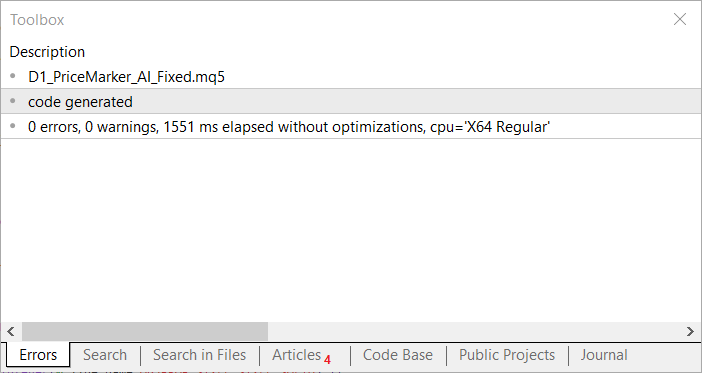
Fig. 5. MetaEditor reports zero errors and zero warnings for D1_PriceMarker_AI_Fixed.mq5
Figure 5 shows the result of the AI-assisted compilation stage. The Toolbox identifies D1_PriceMarker_AI_Fixed.mq5 and reports code generation with zero errors and zero warnings. The displayed elapsed time is 1551 ms without optimizations on the X64 Regular target.
Describe the exercise as a single-prompt correction only when correction and recompilation both follow from that instruction. If additional instructions are needed, include them in the account of the workflow. This keeps the explanation reproducible for a reader following the same steps.
Runtime procedure
Figure 6 demonstrates D1_PriceMarker_AI_Fixed.mq5. To test the complete EA, attach D1_PriceMarker_Final.mq5 to a symbol with sufficient D1 history. Four horizontal lines and four text labels should appear. Compare them with the previous D1 candle's OHLC values using the Data Window or an independent check.
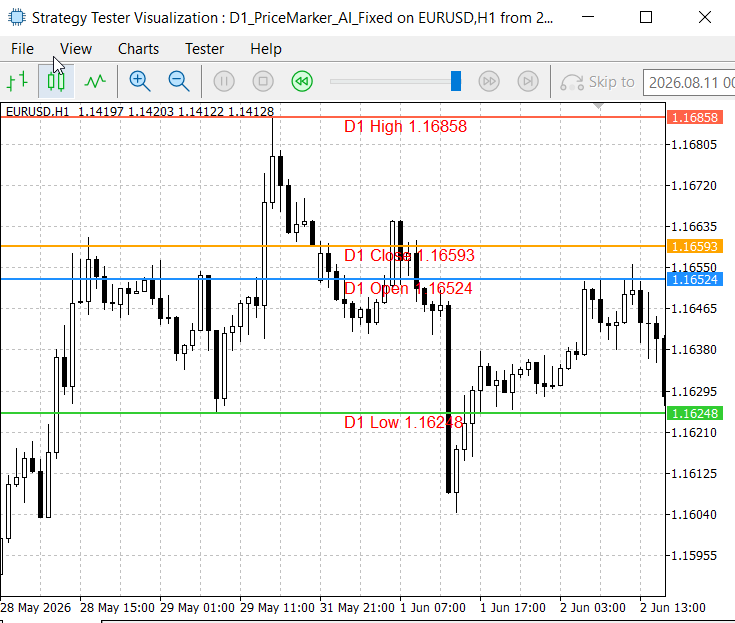
Fig. 6. D1 PriceMarker AI Fixed running in the Strategy Tester (visualization mode)
Figure 6 shows D1 PriceMarker AI Fixed running in the Strategy Tester in visualization mode on EURUSD H1. Four colored horizontal levels and their text labels are visible: D1 High at 1.16858, D1 Close at 1.16593, D1 Open at 1.16524, and D1 Low at 1.16248. The image confirms that the EA created and labeled all four marker types during this test. Independent comparison with the source D1 candle is still required before claiming that every displayed price is correct.
The following runtime cases should also be tested:
- Change the chart timeframe and confirm that the price levels remain based on D1 shift 1.
- Wait for or simulate a new completed daily candle and verify that the final implementation refreshes once.
- Remove the final EA and verify that all eight D1PM_23771_ objects disappear.
- Test a symbol with insufficient history and verify that initialization fails without creating partial markers.
- Confirm that unrelated user-drawn objects remain untouched.
What successful compilation cannot prove
A zero-error compilation cannot establish that:
- shift 1 was selected instead of the current D1 candle;
- open, high, low, and close values were mapped to the correct labels;
- chart objects update after a new daily candle;
- cleanup removes only program-owned objects;
- an Expert Advisor's trading decisions are safe or profitable.
This distinction becomes more important when an assistant can correct compiler faults quickly. Faster compilation should create more time for logical review, not encourage the developer to skip it.
Contrasting workflow steps
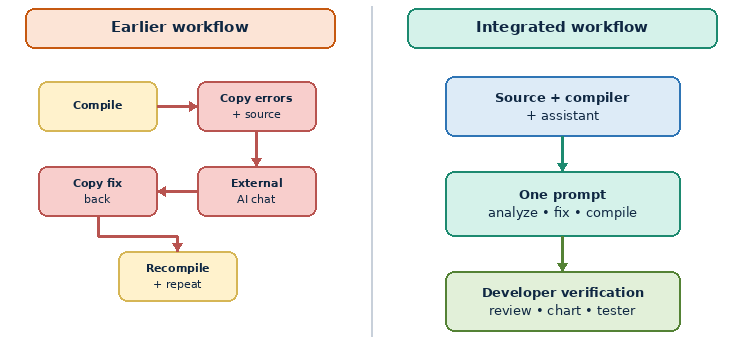
Fig. 7. External and integrated debugging workflow comparison
This diagram and the following table are a qualitative workflow contrast. We did not replay an external AI under the same prompt, source state, iteration count, timing method, or acceptance criteria. They therefore do not establish a measured speed, accuracy, or productivity advantage.
| Development stage | Earlier external-AI workflow | Integrated MetaEditor workflow |
|---|---|---|
| Error discovery | Compile and read the error list manually | Compile within the active development workspace |
| Context preparation | Copy source and compiler messages | Work from the current source and available development context |
| AI interaction | Open an external chat and paste context | Prompt the assistant from MetaEditor |
| Applying corrections | Copy the response back manually | Review proposed or applied source modifications |
| Recompilation | Return to MetaEditor and compile | Continue the correction loop in the same workspace |
| Conversation history | Stored separately from the project | Available through the Navigator's Chats tab |
| Main risk | Stale or incomplete transferred context | Over-trusting broad tool access or automatic changes |
| Developer responsibility | Review, compile, debug, and test | Review, compile, debug, and test |
The last row does not change. The integrated arrangement can remove some manual movement between applications when the relevant source and tools are actually available to the assistant. This case study does not quantify that difference, and ownership of the source and its consequences remains with the developer.
Limitations and responsible use
AI may correct the wrong interpretation
Generated source can be syntactically valid while misunderstanding the trading idea. Prompts should describe observable behavior, not only compiler errors. When the strategy is complex, divide the request into smaller units and verify each module.
Automatic changes need review
Inspect modifications before relying on the compiled program. Pay particular attention to trade execution, risk sizing, symbol and magic-number filtering, array access, indicator handles, object ownership, network operations, and cleanup.
Provider and privacy settings matter
The platform supports MQL5 plans and separately configured external providers. Source code, logs, account context, or other information may be processed according to the selected provider and settings. Never include passwords, API keys, payment data, or unnecessary private account information in a prompt. Review the displayed terms and security controls before granting access.
Traditional tools remain necessary
Breakpoints, watches, profiling, journal inspection, chart observation, and the Strategy Tester remain essential. An assistant can help interpret evidence and propose changes, but the debugger reveals runtime state and the tester exercises behavior across controlled market data.
Evidence boundaries
Our example follows one integrated debugging session. We did not measure elapsed workflow time, manual-edit counts, or repeat the same task with an external AI under identical conditions. The workflow comparison is therefore qualitative. The screenshots show compilation status and visible objects, but an independent D1 comparison is still needed to confirm every displayed price.
D1_PriceMarker_Final.mq5 implements the complete validation, refresh, failure-handling, and cleanup paths. Before using its results as publication evidence, compile it and test its D1 values, daily refresh, insufficient-history response, and deinitialization behavior.
Conclusion
The MQL5 Lite MCP AI Assistant brings AI-assisted debugging into the MetaEditor workflow. In our exercise, it helped move D1_PriceMarker_Buggy.mq5 from four compiler errors to a program that compiled without errors or warnings and displayed all four marker types. The result also demonstrated why compilation and visible output are not the end of debugging.
We completed the implementation in D1_PriceMarker_Final.mq5 by adding history validation, checked object operations, deterministic object ownership, automatic daily refresh, and exact-name cleanup. The final step is to compile this complete source and run the targeted tests described above.
Key lessons
| Lesson | Description |
|---|---|
| 1 | Integrated AI can reduce manual transfer when the required source and compiler context are available to the session. |
| 2 | A debugging prompt should state the intended behavior, permitted actions, preservation constraints, and required evidence. |
| 3 | The first compiler error may be the root of several later messages and should be investigated first. |
| 4 | Successful compilation does not verify runtime behavior, trading logic, or profitability. |
| 5 | AI-generated changes must be reviewed before compilation results or terminal behavior are trusted. |
| 6 | MetaEditor's debugger, logs, chart inspection, and Strategy Tester remain part of the workflow. |
| 7 | Provider settings and AI permissions should be limited to the task, and sensitive data should never be exposed unnecessarily. |
Attachments
| File | Type | Purpose |
|---|---|---|
| D1_PriceMarker_Buggy.mq5 | Expert Advisor | Deliberately faulty source for reproducing the integrated debugging workflow |
| D1_PriceMarker_AI_Fixed.mq5 | Expert Advisor | Compilation-correction stage shown in the MetaEditor and Strategy Tester images |
| D1_PriceMarker_Final.mq5 | Expert Advisor | Complete implementation with validation, refresh, checked object operations, and exact-name cleanup |
Warning: All rights to these materials are reserved by MetaQuotes Ltd. Copying or reprinting of these materials in whole or in part is prohibited.
This article was written by a user of the site and reflects their personal views. MetaQuotes Ltd is not responsible for the accuracy of the information presented, nor for any consequences resulting from the use of the solutions, strategies or recommendations described.

 Neural Networks in Trading: Robust Trading Signals in Any Market Regime (Conclusion)
 Developing a Quantitative Session Analysis Tool (Part 1): Building a Data-Driven View of Market Sessions
 Swing Extremes and Pullbacks (Part 5): Filtering Weak Swings Using Candle Imbalance
 Creating and Testing a Council of 15 Models in MetaTrader 5

- Free trading apps
- Over 8,000 signals for copying
- Economic news for exploring financial markets
You agree to website policy and terms of use