

Building A Candlestick Trend Constraint Model (Part 12) Measuring Lower-Timeframe Trigger Quality
 480
480
 0
0

You have already built the A–B–C–D detector: completed Candles A and B set direction, while M1 events inside C and D provide the hidden setup and confirmation. The practical problem now is that a detector can be logically correct yet produce triggers that are too late, too rare, or exposed to excessive adverse movement — and without explicit measurements you cannot decide which A–B relationships merit further study. We therefore add an engineering-grade measurement layer that does not change the pattern rules.
Its purpose is reproducible evidence collection: for every completed D window record C setup time, D confirmation time, breakout distance relative to C, directional MFE and MAE from processed M1 ranges, including the confirmation bar’s full range, and the trigger rate. The EA exports CSV records with run_id and record_kind, maintains grouped counters, and displays a compact status summary on the chart and in the journal. The higher‑timeframe opening after D is the commit boundary; detach snapshots are written separately so incomplete windows never contaminate completed statistics.
Contents
- Objective and Scope
- Defining Trigger Quality
- The Observation Lifecycle
- Measurement Records
- Capturing Timing and Distance
- Finalizing Observations
- Grouped Statistics
- CSV Export
- CCanvas Chart Comments
- Operating the Expert Advisor
- Testing and Verification
- Limitations
- Conclusion
- Key Lessons
- Attachments
Objective and Scope
To make these comparisons useful, we keep recognition, measurement, reporting, and execution separate. In Part 11, we established the recognition rules. Here, the measurement layer follows each accepted sequence through its D window and records the outcome without changing those rules.
We implement this measurement layer in an Expert Advisor (EA). It processes new bars, maintains the active observation, writes CSV records, and displays summaries. Trading is disabled by default; an independent execution gate controls any order requests when you enable it.
| Responsibility | Our implementation boundary |
|---|---|
| Classification | Completed A and B define the relationship and direction. |
| Setup | Completed M1 bars inside C establish the retest and structure response. |
| Confirmation | Completed M1 bars inside D confirm, invalidate, or leave the sequence to expire. |
| Measurement | Timing, breakout distance, MFE, and MAE describe the observed path. |
| Execution | A separate permission and safety gate decides whether a confirmed signal can become an order. |
Defining Trigger Quality
We describe trigger quality through separate measurements rather than a single weighted score. Timing, breakout distance, frequency, and excursions answer different questions. Keeping them separate lets you choose comparison criteria explicitly instead of hiding those choices inside a score.
| Measure | Definition | Interpretation |
|---|---|---|
| C setup minutes | Elapsed server minutes from C’s opening to the accepted setup bar’s opening timestamp. | Shows how early or late the hidden setup forms. |
| D confirmation minutes | Elapsed server minutes from D’s opening to the confirmation bar’s opening timestamp. | Measures the delay before confirmation. |
| Breakout points | Directional distance between the signal close and the relevant C extreme. | Shows how far the confirming bar closed beyond C. |
| MFE | Maximum favorable distance from the signal close across processed M1 ranges, including the confirmation bar, in points. | Describes the largest favorable distance in the observed bars. |
| MAE | Maximum adverse distance from the signal close across processed M1 ranges, including the confirmation bar, in points. | Describes the largest adverse distance in the observed bars. |
| Trigger rate | Triggered sequences divided by completed sequences for a relationship. | Describes frequency, not profitability. |
For a bullish sequence, favorable movement is the M1 high minus the signal close, while adverse movement is the signal close minus the M1 low. The signs reverse for a bearish sequence. We retain the maximum nonnegative value observed in each direction. Commission, swap, slippage, and exit rules are deliberately absent from these path measurements.
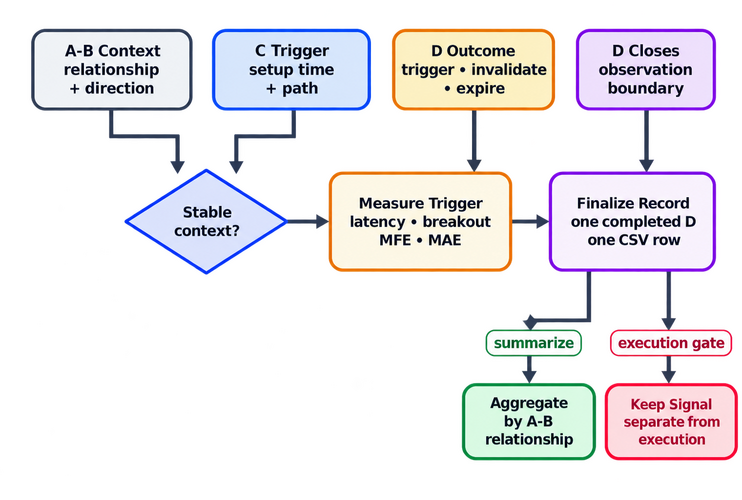
Fig. 1. Converting the A-B-C-D sequence into a finalized observation
Our Part 11 detector provides the recognition rules. The attached Candlestick_Trend_Constraint_P12.mq5 contains the complete A-B classifier, C scanner, D evaluator, replay, initialization, execution guards, and reporting calls. The extracts below focus on measurement and its lifecycle; read those functions together in the full MQ5 file when tracing a signal end to end.
The Observation Lifecycle
Completed A and B supply the context; M1 bars inside C and D supply setup and confirmation. At the next higher-timeframe opening, D ends and ReportCompletedSequence records its final state. On removal, OnDeinit records a snapshot of the unfinished D window. The snapshot does not enter the completed statistics.
The boundary keeps shutdown snapshots out of completed averages. A snapshot can still show what the EA knew when it was removed, but its excursions cover only the observed portion of D.
RefreshDailySequence compares the current D opening time with the active window. When they differ, it reports the ended window before InitializeSequence replaces its candles and state. During startup, ReplayDHistory restores the M1 path of the new D without placing orders for signals that occurred before attachment.
//+------------------------------------------------------------------+
//| Refreshes the sequence when a new higher-timeframe D candle opens|
//+------------------------------------------------------------------+
bool RefreshDailySequence(const bool replay_history)
  {
//--- The four newest context candles are required for A-B-C-D
   MqlRates daily[];
   ArraySetAsSeries(daily,true);

   ResetLastError();
   int copied=CopyRates(_Symbol,InpContextTimeframe,0,4,daily);
   if(copied!=4)
     {
      PrintFormat("Daily context unavailable: copied=%d, error=%d",
                  copied,GetLastError());
      return(false);
     }

//--- Nothing changes while the current D candle is still forming
   if(g_active_d_time==daily[0].time)
      return(true);

//--- A new D candle closes the previous sequence and opens the next
   ReportCompletedSequence();
   if(!InitializeSequence(daily))
      return(false);

//--- At startup replay the already closed part of D without trading
   if(replay_history)
      ReplayDHistory();

   return(true);
  }
The CopyRates check prevents an incomplete four-candle context from replacing the active sequence. The call order keeps the completed window separate from a snapshot recorded during removal.
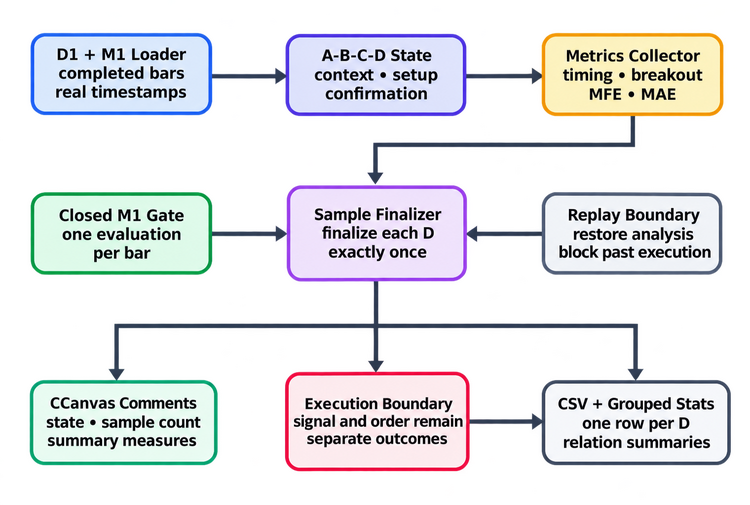
Fig. 2. Components and safety boundaries of the measurement EA
Measurement Records
The sequence structure stores the active observation: four context candles, relationship, direction, event times, signal price, MFE, and MAE. We use a separate aggregate structure for each A-B relationship so the EA can replace its live context without losing the totals from earlier completed windows.
SRelationStats holds terminal-outcome counters and measurement sums. The EA calculates averages when reporting them. We keep the sums so each reported measure can use its appropriate denominator.
//+------------------------------------------------------------------+
//| Aggregated measurements for one A-B relationship                 |
//+------------------------------------------------------------------+
struct SRelationStats
  {
   int                  sequences;
   int                  triggered;
   int                  invalidated;
   int                  expired;
   double               sum_mfe_points;
   double               sum_mae_points;
   double               sum_confirmation_minutes;
  };
The relationship enumeration acts as the index into the statistics array, so each pattern class receives an independent record. The counters retain all terminal outcomes, while the accumulated measurements use only triggered observations. An expired sequence belongs in the trigger-rate denominator, but it has no post-signal excursion and must not dilute the MFE or MAE average.
Capturing Timing and Distance
The EA joins timeframes by bar timestamps instead of assuming a fixed number of M1 bars inside D. This identifies event order in available history, but it cannot reconstruct missing minutes. Before analyzing a window, verify that the required M1 history is sufficiently complete for the symbol and trading session.
MinutesBetween computes elapsed server-clock minutes between events. It returns 0.0 when timestamps are missing or reversed, and also for a valid zero-minute interval. ElapsedText keeps missing durations empty in the CSV. Neither function measures active trading minutes across session breaks.
//+------------------------------------------------------------------+
//| Returns the number of minutes between two valid timestamps       |
//+------------------------------------------------------------------+
double MinutesBetween(const datetime first,const datetime second)
  {
   if(first<=0 || second<first)
      return(0.0);

   return((double)(second-first)/60.0);
  }

//+------------------------------------------------------------------+
//| Returns a CSV-safe elapsed time or empty for an absent event     |
//+------------------------------------------------------------------+
string ElapsedText(const datetime first,const datetime second)
  {
   if(first<=0 || second<first)
      return("");

   return(DoubleToString(MinutesBetween(first,second),1));
  }
C setup latency begins at the opening time of C, whereas D confirmation latency begins at the opening time of D. Both stored event timestamps identify the M1 bar’s opening; the closing decision becomes available only after that bar completes. These are elapsed server minutes, not counts of traded minutes. Keeping these origins explicit prevents the two waiting periods from being mixed in later analysis. Breakout distance uses the C high for bullish signals and the C low for bearish signals. We divide every distance by SYMBOL_POINT so the CSV, inputs, and journal use the same point-based unit.
UpdateExcursion measures directional movement from the signal close using each processed M1 bar’s high and low. For a BUY, favorable movement is high minus signal price; adverse movement is signal price minus low. The SELL calculations reverse these directions. The maxima remain nonnegative and are stored in price units until finalization converts them to points.
//+------------------------------------------------------------------+
//| Updates maximum favorable and adverse movement after a signal    |
//+------------------------------------------------------------------+
void UpdateExcursion(const MqlRates &bar)
  {
   if(g_sequence.state!=SEQUENCE_TRIGGERED)
      return;

//--- Measure movement relative to the signal price by direction
   double favorable=0.0;
   double adverse=0.0;

   if(g_sequence.direction>0)
     {
      favorable=bar.high-g_sequence.signal_price;
      adverse=g_sequence.signal_price-bar.low;
     }
   else
     {
      favorable=g_sequence.signal_price-bar.low;
      adverse=bar.high-g_sequence.signal_price;
     }

//--- Keep the worst-case favorable and adverse extremes
   g_sequence.mfe=MathMax(g_sequence.mfe,MathMax(0.0,favorable));
   g_sequence.mae=MathMax(g_sequence.mae,MathMax(0.0,adverse));
  }
EvaluateDMinute calls this function on the confirmation bar as well as subsequent processed bars. Consequently, the confirmation bar’s full range can include prices reached before its closing signal. These values are bar-range diagnostics, not strictly post-confirmation tick excursions. Live processing evaluates the latest closed bar; it does not recover every missed minute, and the context rollover can omit the final old-D bar. A completed record means that D has ended, not that history coverage has been proven complete.
BreakoutDistancePoints measures how far the confirmation close lies beyond C’s directional extreme. It uses C high for a BUY and C low for a SELL, divides by the symbol’s point size, and clamps the result to zero. A non-triggered state returns zero internally; the CSV writer leaves the corresponding measurement empty instead of exporting it as a valid zero.
//+------------------------------------------------------------------+
//| Returns the D breakout distance in points                        |
//+------------------------------------------------------------------+
double BreakoutDistancePoints(void)
  {
   if(g_sequence.state!=SEQUENCE_TRIGGERED)
      return(0.0);

   double point=SymbolInfoDouble(_Symbol,SYMBOL_POINT);
   if(point<=0.0)
      return(0.0);

   if(g_sequence.direction>0)
      return(MathMax(0.0,(g_sequence.signal_price-g_sequence.c.high)/point));

   if(g_sequence.direction<0)
      return(MathMax(0.0,(g_sequence.c.low-g_sequence.signal_price)/point));

   return(0.0);
  }
Finalizing Observations
The next higher-timeframe opening is the commit boundary for the previous observation. ReportCompletedSequence checks that a sequence exists and has not already been handled, then converts its stored MFE and MAE from price units to points. Aggregation, export, and the journal receive the same converted measurements; an export failure can still leave the in-memory count ahead of the CSV.
RefreshDailySequence() calls this function before initializing the next A-B-C-D context. The ordering is essential: the previous sequence must be committed while its relationship, signal time, state, and excursions are still available. Only after that commit may the live structure be cleared for the next candle block.
InitializeSequence assigns the new D opening time before handling inactive cases and returns true on every current path. An unclassified relationship or missing C setup becomes EXPIRED; a qualifying setup becomes TRACK_D. At D’s end, TRACK_D becomes EXPIRED. IDLE is a transient initialization state, not an additional completed outcome. Thus the denominator includes all initialized, ended D windows, including inactive ones; it is not the success rate among armed setups. The entry guard below also prevents recommitting an already handled window if this function is called again.
//+------------------------------------------------------------------+
//| Reports the completed sequence before the next D1 cycle begins   |
//+------------------------------------------------------------------+
void ReportCompletedSequence(void)
  {
//--- Report each existing window at most once per attachment
   if(g_active_d_time==0 || g_sequence_flushed)
      return;

//--- An armed but unconfirmed window expires only after D has ended
   if(g_sequence.state==SEQUENCE_TRACK_D)
      g_sequence.state=SEQUENCE_EXPIRED;

   double point=SymbolInfoDouble(_Symbol,SYMBOL_POINT);
//--- Convert the extremes into points for the journal
   double mfe_points=(point>0.0 ? g_sequence.mfe/point : 0.0);
   double mae_points=(point>0.0 ? g_sequence.mae/point : 0.0);

//--- Export the ended D window before adding it to the report totals
   bool exported=ExportObservation(mfe_points,mae_points,"completed");
   AggregateCompletedSequence(mfe_points,mae_points);
   g_sequence_flushed=true;
   if(!exported)
      Print("Completed window counted in memory; CSV export failed.");

   PrintFormat("ABCD complete: D=%s, relation=%s, state=%s, "
               "MFE=%.1f points, MAE=%.1f points, samples=%d",
               TimeToString(g_sequence.d.time,TIME_DATE),
               RelationName(g_sequence.relation),
               StateName(g_sequence.state),mfe_points,mae_points,
               g_completed_sequences);
  }
ReportCompletedSequence marks the ended D window handled after the export attempt and in-memory aggregation. It logs an export failure because memory totals can differ from stored CSV rows. The flag is checked at entry, preventing repeated processing within one attachment; it does not persist across reattachments.
When you remove the EA during D, OnDeinit writes a row with record_kind=snapshot and leaves completed counts unchanged. It then prints the completed-window summary, releases the canvas and, when enabled, deletes only chart objects with our EA prefix. This keeps reporting and cleanup within the EA’s own lifecycle.
//+------------------------------------------------------------------+
//| Expert deinitialization                                          |
//+------------------------------------------------------------------+
void OnDeinit(const int reason)
  {
//--- Preserve the live D state as a partial snapshot without aggregation
   if(g_active_d_time!=0 && !g_sequence_flushed)
     {
      double flush_point=SymbolInfoDouble(_Symbol,SYMBOL_POINT);
      double flush_mfe=(flush_point>0.0 ? g_sequence.mfe/flush_point : 0.0);
      double flush_mae=(flush_point>0.0 ? g_sequence.mae/flush_point : 0.0);
      bool snapshot_written=ExportObservation(flush_mfe,flush_mae,"snapshot");
      g_sequence_flushed=true;
      PrintFormat("Removal snapshot: CSV=%s, completed samples=%d",
                  (snapshot_written ? "written" : "failed"),
                  g_completed_sequences);
     }

//--- Preserve a final grouped summary after the optional snapshot flush
   PrintStatistics();
//--- Release the canvas first, then the optional owned objects
   DestroyStatusCanvas();

   if(InpDeleteObjectsOnRemoval)
      ObjectsDeleteAll(0,g_prefix);

   ChartRedraw(0);
  }
The prefix limits object cleanup to the EA’s drawings. The in-memory g_sequence_flushed flag avoids repeated processing in one attachment, but reattaching to the same D can write another snapshot. The run_id distinguishes attachments; it does not make rows globally unique. Check D time and record kind within each run, and isolate test files before combining data.
Grouped Statistics
Each ENUM_AB_RELATION value indexes one SRelationStats element. AggregateCompletedSequence() validates that index before changing any counters. This guard prevents an undefined relationship from writing outside the array or contaminating a valid group.
The aggregation function accepts only explicit terminal states: triggered, invalidated or expired. An armed TRACK_D sequence stays out of the totals until D ends. Only triggered records contribute MFE, MAE and confirmation-time sums.
//+------------------------------------------------------------------+
//| Aggregates one completed sequence by its A-B relationship        |
//+------------------------------------------------------------------+
void AggregateCompletedSequence(const double mfe_points,
                                const double mae_points)
  {
   int index=(int)g_sequence.relation;
   if(index<0 || index>=ArraySize(g_stats) ||
      (g_sequence.state!=SEQUENCE_TRIGGERED &&
       g_sequence.state!=SEQUENCE_INVALIDATED &&
       g_sequence.state!=SEQUENCE_EXPIRED))
      return;

//--- Every completed D window contributes one relationship sample
   g_stats[index].sequences++;
   g_completed_sequences++;

   if(g_sequence.state==SEQUENCE_TRIGGERED)
     {
      g_stats[index].triggered++;
      g_stats[index].sum_mfe_points+=mfe_points;
      g_stats[index].sum_mae_points+=mae_points;
      g_stats[index].sum_confirmation_minutes+=
         MinutesBetween(g_sequence.d.time,g_sequence.d_signal_time);
      g_triggered_sequences++;
     }
   else
      if(g_sequence.state==SEQUENCE_INVALIDATED)
         g_stats[index].invalidated++;
      else
         if(g_sequence.state==SEQUENCE_EXPIRED)
            g_stats[index].expired++;
  }
You can now compare two distinct properties: how often an ended window triggered, and what movement the EA recorded for triggered cases. The overall rate includes inactive windows, while excursion and confirmation averages use triggered cases only. These are descriptive measurements; comparing them requires adequate samples and consistent observation conditions.
CSV Export
The FileOpen() function confines MQL5 file access to the terminal file sandbox. ExportObservation() opens the configured file for reading and writing, then checks INVALID_HANDLE before attempting another file operation. A failed open is therefore reported in the Experts journal instead of allowing the export path to continue with an invalid resource.
When the CSV file is empty, ExportObservation writes its schema. It appends typed records with run_id and record_kind, then checks writing and flushing results. The exporter leaves confirmation and excursion fields empty when the state is not triggered. Use a separate file for each test configuration so its observations share the same rules and columns.
//+------------------------------------------------------------------+
//| Appends a typed completed record or a partial shutdown snapshot  |
//+------------------------------------------------------------------+
bool ExportObservation(const double mfe_points,const double mae_points,
                       const string record_kind)
  {
   if(!InpExportCSV)
      return(true);

   ResetLastError();
   int handle=FileOpen(InpCSVFileName,
                       FILE_READ|FILE_WRITE|FILE_CSV|FILE_ANSI,';');
   if(handle==INVALID_HANDLE)
     {
      PrintFormat("FileOpen() failed for %s. Error=%d",
                  InpCSVFileName,GetLastError());
      return(false);
     }

   bool success=true;
//--- Write the schema when the export file is empty
   if(FileSize(handle)==0)
     {
      ResetLastError();
      if(FileWrite(handle,"run_id","record_kind","symbol",
                   "context_timeframe","trigger_timeframe","d_time",
                   "relation","direction","final_state","c_setup_time",
                   "d_signal_time","c_setup_minutes",
                   "d_confirmation_minutes","breakout_points",
                   "mfe_points","mae_points")==0 || GetLastError()!=0)
         success=false;
     }

//--- Preserve missing measurements as empty CSV fields
   string c_minutes=ElapsedText(g_sequence.c.time,g_sequence.c_setup_time);
   string d_minutes="";
   string breakout="";
   string mfe="";
   string mae="";
   if(g_sequence.state==SEQUENCE_TRIGGERED)
     {
      d_minutes=ElapsedText(g_sequence.d.time,g_sequence.d_signal_time);
      breakout=DoubleToString(BreakoutDistancePoints(),1);
      mfe=DoubleToString(mfe_points,1);
      mae=DoubleToString(mae_points,1);
     }

   if(success)
     {
      ResetLastError();
      if(!FileSeek(handle,0,SEEK_END) || GetLastError()!=0)
         success=false;
     }
   if(success)
     {
      ResetLastError();
      if(FileWrite(handle,g_run_id,record_kind,_Symbol,
                   EnumToString(InpContextTimeframe),
                   EnumToString(InpTriggerTimeframe),
                   TimeToString(g_sequence.d.time,TIME_DATE|TIME_MINUTES),
                   RelationName(g_sequence.relation),g_sequence.direction,
                   StateName(g_sequence.state),
                   TimestampText(g_sequence.c_setup_time),
                   TimestampText(g_sequence.d_signal_time),c_minutes,
                   d_minutes,breakout,mfe,mae)==0 || GetLastError()!=0)
         success=false;
     }

   ResetLastError();
   FileFlush(handle);
   int flush_error=GetLastError();
   FileClose(handle);
   if(!success || flush_error!=0)
     {
      PrintFormat("CSV export failed for %s. Flush error=%d",
                  InpCSVFileName,flush_error);
      return(false);
     }
   return(true);
  }
FileFlush requests a write before the file handle closes. The default file, CTC_P12_TriggerQuality_v2.csv, includes both completed records and partial snapshots, identified by record_kind. Export errors are logged; successful return values are not a substitute for reading the exported file.
CCanvas Chart Comments
The CCanvas class is used only to display chart comments. UpdateStatus() reads the current analytical state and converts it into eight concise lines. These report the relationship, direction, sequence state, C setup time, completed sample count, trigger rate, excursion averages, and CSV status.
The function returns immediately when the bitmap resource is unavailable. This guard keeps a visualization failure outside the detector, measurement, export, and execution paths. The canvas remains an observer rather than a dependency of the trading model.
//+------------------------------------------------------------------+
//| Draws state and measurement comments through CCanvas             |
//+------------------------------------------------------------------+
void UpdateStatus(void)
  {
   if(!g_status_canvas_ready)
      return;

//--- Compose the compact state lines from the runtime sequence
   string direction="Neutral";
   if(g_sequence.direction>0)
      direction="Bullish";
   else
      if(g_sequence.direction<0)
         direction="Bearish";

   string c_setup=(g_sequence.c_setup_time>0 ?
                   TimeToString(g_sequence.c_setup_time,
                                TIME_DATE|TIME_MINUTES) :
                   "none");

   double average_mfe=0.0;
   double average_mae=0.0;
   OverallExcursionAverages(average_mfe,average_mae);

   string lines[8];
   lines[0]="Candlestick Trend Constraint Part 12";
   lines[1]="A-B: "+RelationName(g_sequence.relation);
   lines[2]="Direction: "+direction;
   lines[3]="State: "+StateName(g_sequence.state);
   lines[4]="C setup: "+c_setup;
   lines[5]=StringFormat("Samples: %d | triggered: %d | rate: %.1f%%",
                         g_completed_sequences,g_triggered_sequences,
                         OverallTriggerRate());
   lines[6]=StringFormat("Triggered averages: MFE %.1f | MAE %.1f points",
                         average_mfe,average_mae);
   lines[7]="CSV: "+(InpExportCSV ? InpCSVFileName : "disabled");

//--- Pick a text color that contrasts with the chart background
   color bg=(color)ChartGetInteger(0,CHART_COLOR_BACKGROUND);
   uint bg_rgb=(uint)bg;
   double luminance=(0.299*(bg_rgb&0xFF)+
                     0.587*((bg_rgb>>8)&0xFF)+
                     0.114*((bg_rgb>>16)&0xFF));
   color text_rgb=(luminance>128.0 ? clrBlack : clrWhite);
   uint text_color=ColorToARGB(text_rgb,255);

//--- Clear the previous text while keeping the canvas transparent
   g_status_canvas.Erase(0);
   for(int i=0;i<ArraySize(lines);i++)
      g_status_canvas.TextOut(4,4+i*18,lines[i],text_color);

   g_status_canvas.Update();
  }
The display code calculates chart-background luminance and selects black or white text for contrast. Erase clears the previous frame, TextOut draws the status lines, and Update publishes the bitmap. These operations keep the comments readable as the observation changes.
The detector and exporter continue to work when CCanvas is disabled. We keep the display independent so changes to chart comments do not alter recognition, measurement, or export.
Operating the Expert Advisor
| Input | Default | Purpose |
|---|---|---|
| InpContextTimeframe | D1 | Defines the completed A-B-C-D context. |
| InpTriggerTimeframe | M1 | Provides the hidden setup and confirmation path. |
| InpExportCSV | true | Writes completed D windows and removal-time snapshots as separately labeled CSV records. |
| InpCSVFileName | CTC_P12_TriggerQuality_v2.csv | Names the dataset inside the terminal file sandbox. |
| InpShowStatusPanel | true | Displays chart comments through CCanvas. |
| InpDeleteObjectsOnRemoval | true | Deletes only chart objects owned through our EA prefix when the EA is removed. |
| InpEnableTrading | false | Keeps measurement independent from optional execution. |
Compile Candlestick_Trend_Constraint_P12.mq5 in MetaEditor, attach it to the symbol you want to study, and begin with trading disabled. Ensure that the D1 and M1 histories are available. The EA processes newly completed trigger bars; if you attach it during D, replay reconstructs the analytical state without executing historical signals.
For a meaningful dataset, keep the relationship and trigger inputs fixed throughout one experiment. Changing thresholds midway causes the same CSV file to mix observations produced by different rules. Use a new filename whenever you change the model configuration materially.
Testing and Verification
We use the Strategy Tester to observe the recognition and measurement paths with execution disabled. The checks below describe the expected behavior; the results that follow identify what the completed run and inspected CSV actually establish.
| Test | Procedure | Expected evidence |
|---|---|---|
| Compilation | Compile our EA in MetaEditor. | Record the exact error and warning counts. |
| Single finalization | Run across several D1 boundaries and compare journal completions with CSV rows. | Observed in the completed run: 313 completed CSV rows match the journal, with no repeated run/symbol/D keys. Restart behavior still requires separate testing. |
| Replay safety | Start midway through D with trading enabled on a demo test. | State is reconstructed without an order for a historical trigger. |
| Excursion direction | Inspect one bullish and one bearish trigger bar by bar. | MFE and MAE use the correct directional extremes. |
| CSV append | Reinitialize without deleting the dataset. | The header remains single and new observations append at the end. |
| Canvas cleanup | Remove and reattach our EA. | No orphaned bitmap-label resource remains. |
Use "Every tick based on real ticks" when available, or "1 minute OHLC" for structural testing. "Open prices only" is unsuitable for verifying the timing of this model’s M1 processing; access to historical bars alone does not establish the required event sequence. Record the MetaTrader 5 build, symbol, data source, account mode, date range, modeling mode, spread assumptions, and complete input set with every experiment.
Observed demonstration results
We ran the EA with trading disabled to examine measurement and export across complete D windows. The completed run produced 313 observations and one separately labeled shutdown snapshot. We opened the CSV and matched every completed row’s D date, relationship, final state, MFE, and MAE to the corresponding journal entry.
| Run condition | Recorded setting |
|---|---|
| Build and data | MetaTester 5 build 6230; EURUSD history synchronized from the terminal’s demo-server data source. |
| Timeframes and account | H1 tester chart; D1 context; M1 trigger; initial simulated deposit USD 10,000, leverage 1:100. Netting/hedging mode was not recorded. |
| Configured test interval | 1 January 2024 00:00 to 31 December 2024 00:00, server time. The run finished normally at 30 December 2024 23:59:59. |
| Modeling and spread | Every tick (generated ticks), not real ticks. Actual spread conditions were not recorded; InpMaxSpreadPoints=50 is an execution filter, not the modeled spread. |
| Run isolation | The journal contains an earlier interrupted attempt. The figures below use the subsequent completed run and the matching CSV only. |
| CSV identity | One run_id: EURUSD_1704067200_612916875. Completed rows span D openings from 29 December 2023 to 29 December 2024; the first is a carried-in context before the configured start. D=30 December 2024 is a shutdown snapshot. |
These settings matter because the results below should be read as an audit of the measurement pipeline under one specific test configuration, not as a universal estimate of pattern behavior. In particular, the use of generated ticks and a single symbol-period means the run is suitable for internal consistency checks, but not for broad performance claims.
We used the input settings listed below.
| Input | Value |
|---|---|
| InpContextTimeframe | 16408 |
| InpTriggerTimeframe | 1 |
| InpBreakBufferPoints | 10 |
| InpReversalCloseFraction | 0.5 |
| InpSwingDepth | 3 |
| InpRetestTolerancePoints | 30 |
| InpMinBodyRangeRatio | 0.55 |
| InpDrawSequence | true |
| InpDeleteObjectsOnRemoval | false |
| InpShowStatusPanel | true |
| InpExportCSV | true |
| InpCSVFileName | CTC_P12_TriggerQuality.csv |
| InpEnableTrading | false |
| InpVolume | 0.1 |
| InpRiskReward | 2.0 |
| InpStopBufferPoints | 100 |
| InpMaxSpreadPoints | 50 |
| InpDeviationPoints | 20 |
| InpMagicNumber | 24516012 |
| Measurement | Result |
|---|---|
| Completed observations | 313 |
| Triggered / invalidated / expired | 40 / 22 / 251 |
| Triggered-window share | 40 / 313 = 12.8% |
| Mean triggered MFE / MAE | 249.7 / 234.8 points |
| Mean confirmation timestamp offset | 475.1 server minutes from D opening |
| Separate shutdown snapshots | 1; excluded from completed totals |
| Duplicate completed keys | 0 within this CSV, using run_id, symbol, and D opening |
| A-B relationship | Windows | Triggered | Invalidated | Expired | Triggered share | Mean MFE, points | Mean MAE, points |
|---|---|---|---|---|---|---|---|
| Bullish continuation | 43 | 10 | 6 | 27 | 23.3% | 292.7 | 184.4 |
| Bearish reversal | 30 | 3 | 5 | 22 | 10.0% | 184.0 | 420.0 |
| Bearish continuation | 47 | 9 | 5 | 33 | 19.1% | 209.2 | 363.7 |
| Inside-bar compression | 60 | 18 | 4 | 38 | 30.0% | 257.0 | 167.4 |
| Unclassified | 120 | 0 | 0 | 120 | 0.0% | — | — |
| Bullish reversal | 13 | 0 | 2 | 11 | 0.0% | — | — |
Inside-bar compression triggered in 18 of 60 windows, the highest observed share among these groups. Bullish reversal produced no triggers in 13 windows. These differences identify candidates for further study; unequal sample sizes and a single symbol-period do not establish that one relationship has a trading advantage.
The 12.8% overall rate includes 120 unclassified windows. It measures frequency across all counted D windows, not conversion among armed setups. Excursion averages use only the 40 triggered completed records. Non-triggered rows leave confirmation, breakout, MFE, and MAE fields empty, and the shutdown snapshot does not enter these totals.
This generated-tick run demonstrates the reporting path and agreement between the exported observations and journal. It does not independently validate the detector or M1 coverage. The excursion calculation includes the confirmation bar’s full range, and the documented processing gaps remain relevant. No trades were enabled, so these results are not trading returns. We disabled object cleanup for this run, so cleanup testing remains separate.
The earlier attachment-and-removal illustration below demonstrates replay and chart-object handling; it is separate from the completed tester run.
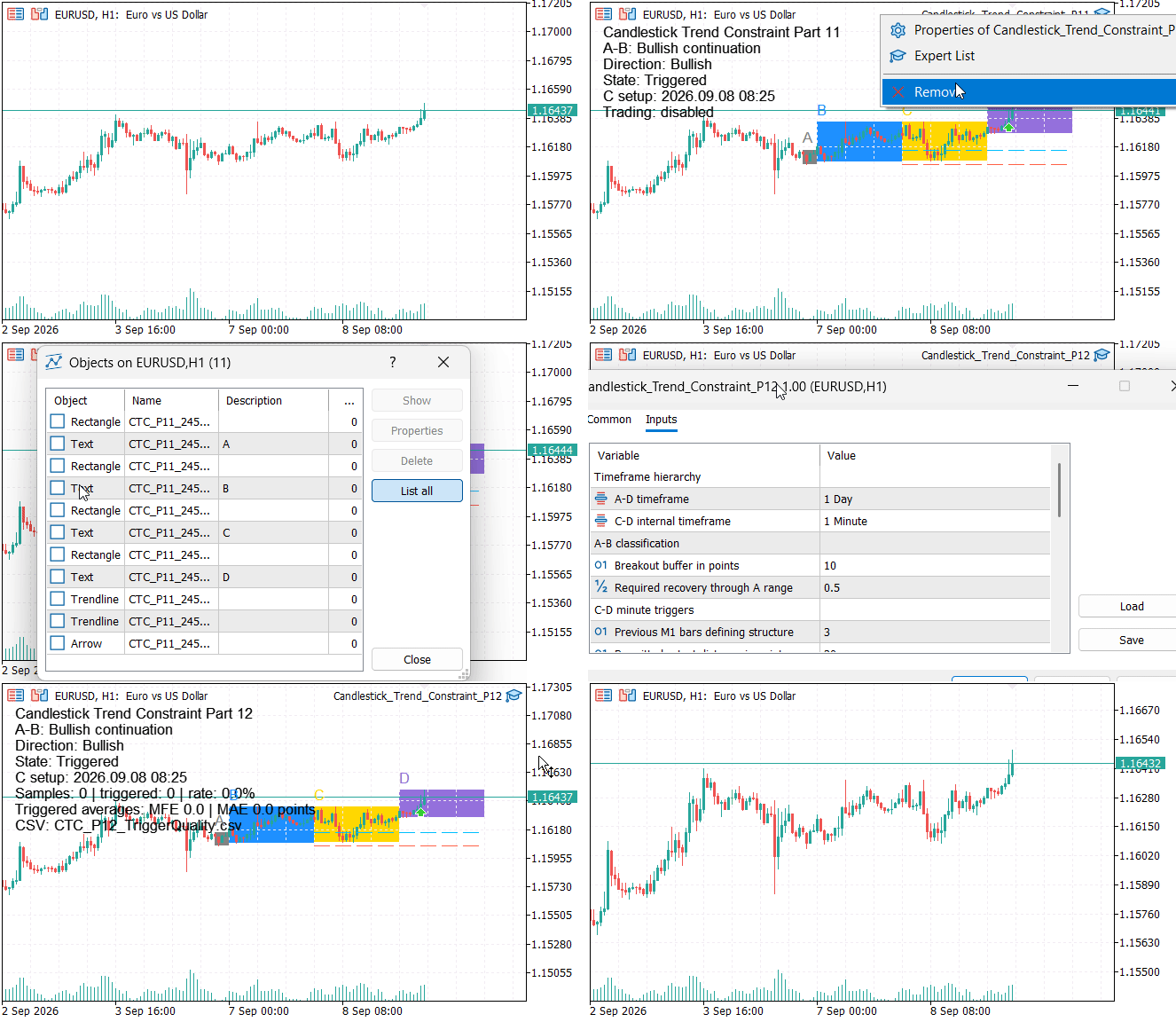
Fig. 3. Attaching and removing Parts 11 and 12 while observing trigger reconstruction, CSV flushing, and owned-object cleanup
The additional tester image shows the interrupted attempt at an intermediate checkpoint: 39 samples and a 17.9% share. Use the completed-run CSV and summary above for the final figures.
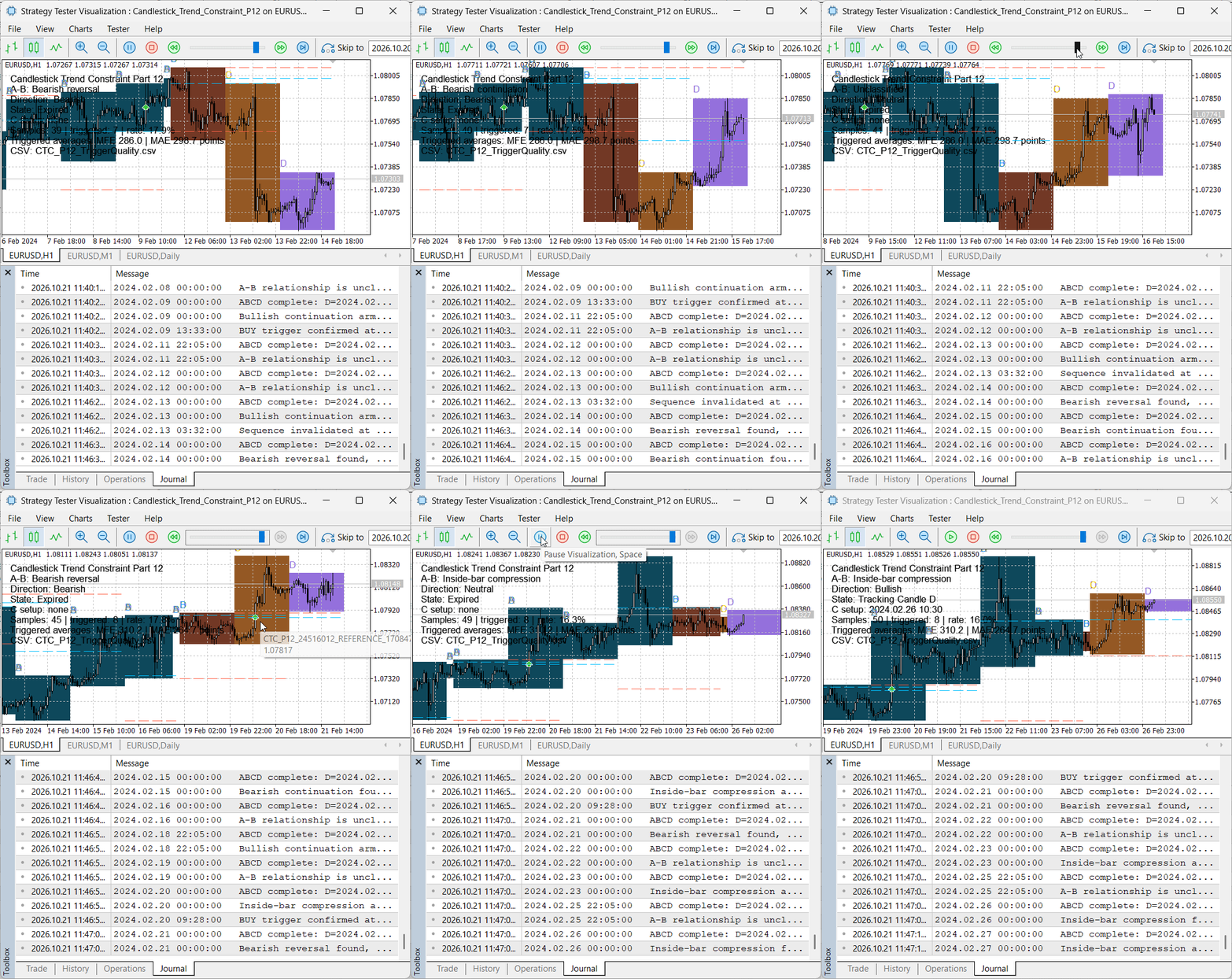
Fig. 4. Intermediate tester checkpoint during the earlier interrupted attempt
Limitations
- Our statistics exist in memory for the current EA session; the CSV preserves observations across sessions, but our EA does not reload and aggregate earlier rows.
- Reattachment during the same D can append another partial snapshot. run_id separates sessions but does not prevent duplicate market windows.
- The D1 boundary follows broker-server time, so different brokers can produce different higher-timeframe candles.
- Completed-row MFE and MAE end with Candle D; snapshot excursions cover only the observed portion of D.
- An expired window enters frequency statistics only after D ends; its post-signal excursion fields remain empty.
- The CSV does not include commission, swap, slippage, or a complete exit policy.
- A high triggered-window share or favorable average does not establish robustness, causality, or profitability.
- Reliable comparison requires adequate samples, several instruments, multiple market regimes, and out-of-sample testing.
Conclusion
In this article, we have extended the candlestick-constraint detector into a measurable experiment without altering detection logic. The EA now manages an explicit observation lifecycle: it tracks each A–B relationship, records terminal states (triggered/invalidated/expired), converts excursions into point units, and commits completed observations at the next higher‑timeframe opening. Observations and removal‑time snapshots are exported to a stable CSV schema (including run id and record kind), while grouped in‑memory SRelationStats accumulate per‑relation counters and sums for later averaging.
Visualization via a nonessential CCanvas status panel and a strict object‑prefix lifecycle keep reporting observational and reversible. Crucially, detection remains decoupled from execution: an independent permission gate decides whether a confirmed signal becomes an order. The practical result is a reproducible dataset that lets you compare candidate trigger paths by frequency, latency, breakout magnitude, and MFE/MAE — enabling data-driven selection of promising relationships without conflating movement statistics with claims about profitability. Continued work requires adequate sample sizes, multi‑instrument and out‑of‑sample testing, and explicit inclusion of trading costs when moving from measurement to performance evaluation.
Key Lessons
| Lesson | Description |
|---|---|
| Measure a signal before optimizing it | Preserving timing, distance, MFE, and MAE separately reveals behavior before arbitrary weights turn them into a score. |
| Higher-timeframe closed-bar relationships control direction | Completed A-B context provides a stable constraint, while the lower timeframe reveals the hidden retest, displacement, and structure path that makes the context actionable. |
| Separate recognition from outcome evaluation | Our detector decides whether the pattern occurred; our measurement layer describes what followed without changing that decision. |
| Use a natural completion event as the commit boundary | The next higher-timeframe opening ends D; shutdown snapshots remain outside completed statistics. Completeness of the processed M1 path must be checked separately. |
| Join timeframes with timestamps | Bar opening times locate C and D across gaps and server-specific boundaries; missing M1 bars still require separate coverage checks. |
| Restore analytical state without executing historical signals | Replay reconstructs context after initialization, while only live processing may authorize execution. |
| Treat missing outcomes explicitly | Expired and invalidated sequences belong in frequency statistics but must not be assigned fictional post-signal excursions. |
| Keep visualization observational | CCanvas reports state and summaries without becoming an input to classification, measurement, or trading. |
| A signal and an accepted order are different outcomes | Analytical confirmation remains separate from permissions, ownership, spread, volume, stops, and server acceptance. |
| Design exports for reproducibility | Stable columns, typed records, explicit timeframes and a run identifier support auditing. Check repeated D windows across runs before comparative analysis. |
| Own the complete chart-object lifecycle | Create objects with a unique prefix and delete that same namespace during deinitialization so removing an EA restores a clean chart without touching unrelated objects. |
| Make cross-session identity explicit | An in-memory one-time flag prevents duplicate writes within one attachment, while persistent datasets still need a run identifier or a stable deduplication key across reattachments. |
Attachments
| Filename | Type | Purpose |
|---|---|---|
| Candlestick_Trend_Constraint_P12.mq5 | Expert Advisor | Complete A-B-C-D detector, measurement collector, CSV exporter, CCanvas comments, and optional execution logic. |
Warning: All rights to these materials are reserved by MetaQuotes Ltd. Copying or reprinting of these materials in whole or in part is prohibited.
This article was written by a user of the site and reflects their personal views. MetaQuotes Ltd is not responsible for the accuracy of the information presented, nor for any consequences resulting from the use of the solutions, strategies or recommendations described.

 Creating a Cairo-Inspired Graphics Library for MetaTrader 5 (Part 7): Arcs, Circles and Rounded Rectangles
 Optimal Trade Exit in MQL5: Longstaff-Schwartz Least-Squares Monte Carlo for Continuation-Value Estimation
 How to Train an MLP Using Markov Chain Features in MQL5
 Building a Prop-Firm Rule Guard in MQL5 (Part 1): The Observation Layer

- Free trading apps
- Over 8,000 signals for copying
- Economic news for exploring financial markets
You agree to website policy and terms of use