

How to Detect and Normalize Chart Objects in MQL5 (Part 6): Manipulating Chart Objects with MetaTrader 5 Agentic AI Assistant
 92
92
 0
0

Contents
- Introduction
- Accessibility Workflow and Capability Boundary
- The Chart Object as the AI-to-EA Contract
- Implementing the Producer Programs
- Implementing AIObjectTrader
- Implementing AIObjectProtocol.mqh
- Implementing AIObjectGeometry.mqh
- Testing and Runtime Evidence
- Current Boundaries and Key Lessons
- Conclusion
- Attachments
Introduction
You can describe chart analysis in natural language — “place a resistance level”, “draw a pitchfork from the last three pivots”, “add Fibonacci Time Zones to the swing” — but turning that analytical intent into something an Expert Advisor can reliably interpret is a different problem. A manually drawn object may be unusable for automated monitoring, while code-created drawings often lack consistent naming, identity, or an update lifecycle. As a result, an EA cannot reliably distinguish “my signal” from ordinary annotations, determine whether to monitor TOUCH/BREAK/ZONE, or connect an analyst’s intent to deterministic execution.
In this article, we connect natural-language analysis to chart-object evaluation in MQL5. The Assistant creates indicators and scripts that select anchors and place native objects. We use a structured naming format to carry the intended direction, event, and analytical role into AIObjectTrader. The current EA provides preliminary name recognition and selected geometry helpers; complete protocol validation and end-to-end trade verification remain outside the demonstrated result.
This approach extends the workflow introduced in Part 5, Fibonacci in Focus, where manually drawn Fibonacci objects were normalized so an Expert Advisor could evaluate them. Part 6 moves the starting point earlier: instead of beginning with an object already placed on the chart, we begin with the analyst’s intention expressed in natural language.
We follow the object from its creation to its recognition by the EA. This lets you inspect each stage separately before considering automated execution.
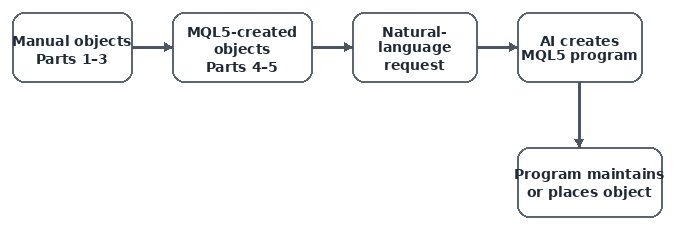
Fig. 1. The series progresses from trader-drawn objects and automated placement toward a natural-language entry point where the Assistant builds MQL5 indicators or scripts that produce the chart objects.
Accessibility Workflow and Capability Boundary
The accessibility problem is not object availability. It is the knowledge needed to select the correct tool, anchors, parameters, and interpretation. Natural language reduces that entry barrier, while the generated MQL5 program preserves a visible and testable result.
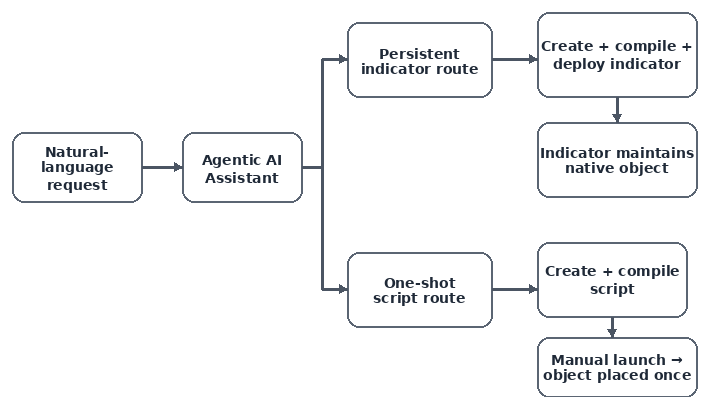
Fig. 2. The Assistant does not directly place graphical objects in the tested environment. It creates MQL5 programs: indicators can be compiled and deployed automatically, while scripts can be created and compiled but still require manual launch.
The Pitchfork request demonstrated both routes. The first attempt stopped after compilation, while the later Assistant attached a Pitchfork indicator to GBPUSD H1. The official MQL5 reference confirmed that Andrews' Pitchfork is the native OBJ_PITCHFORK object, correcting the earlier Assistant statement that no built-in Pitchfork existed.
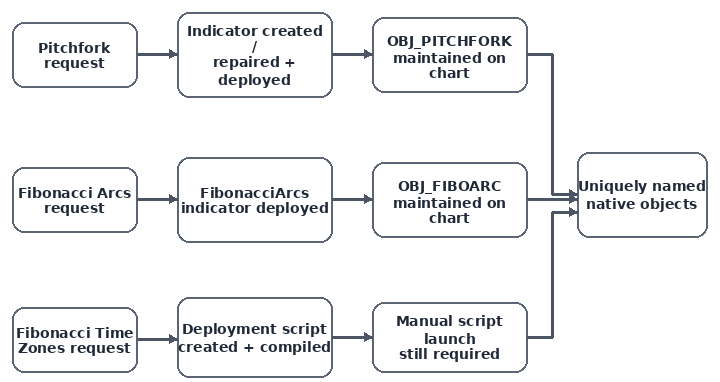
Fig. 3. The two Pitchfork tests expose an evolving execution boundary: the first stopped after compilation, while the later test progressed through indicator attachment and visible chart placement.
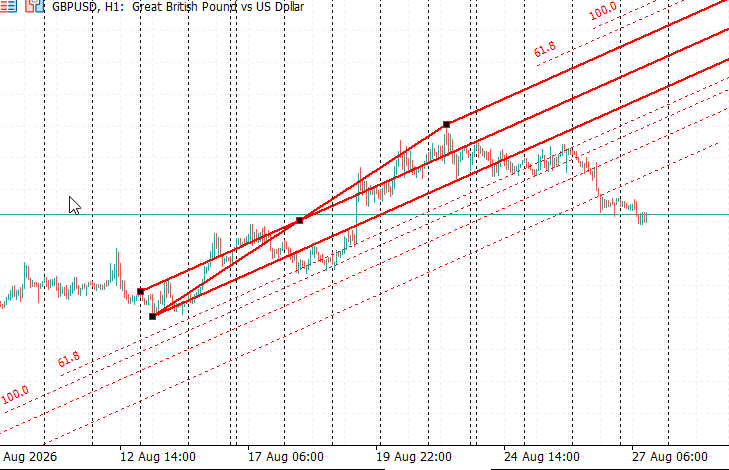
Fig. 4. The Andrews Pitchfork indicator attached through the AI Assistant produces the visible Pitchfork structure on GBPUSD H1. The next integration requirement is to ensure that the native OBJ_PITCHFORK receives the structured unique name expected by AIObjectTrader.
Fibonacci Arcs followed the persistent-indicator route, while Fibonacci Time Zones used a one-shot script that required manual launch. Our workflow begins with a description, continues through program creation and object placement, and then passes the object to the EA for recognition and supported evaluation. Trading is an optional later stage and was not demonstrated in the recorded test.
The Chart Object as the AI-to-EA Contract
The producer program and AIObjectTrader communicate through the chart object. We define the following naming format to carry the analytical intent:
The format defines eight fields. The current parser recognizes the prefix, direction, event, numeric suffix, and Pitchfork line selection, but does not validate every field. The name carries an instruction for evaluation; it does not by itself establish that the object is suitable for trading.
AI_<SYMBOL>_<TIMEFRAME>_<DIRECTION>_<EVENT>_<OBJECT>_<ROLE>_<ID>
The final numeric ID distinguishes names on the chart checked by the producer. Allocation is chart-local, and the producers use different limits. Pitchfork initialization deletes candidate names sharing InpObjectBase before allocating a new name, so its identity is retained during an active run but not recovered across reinitialization. Cleanup is based on the shared prefix rather than a separate instance-ownership key.
Focused Prompt Demonstration
We use three object examples to explore two producer lifecycles: one-shot scripts for a horizontal level and Fibonacci Time Zones, and a persistent indicator for a Pitchfork.
Place a horizontal resistance line on EURUSD H1 at the most relevant resistance. Name it AI_EURUSD_H1_SELL_BREAK_HLINE_RESISTANCE_001, incrementing the ID if necessary. Do not trade.
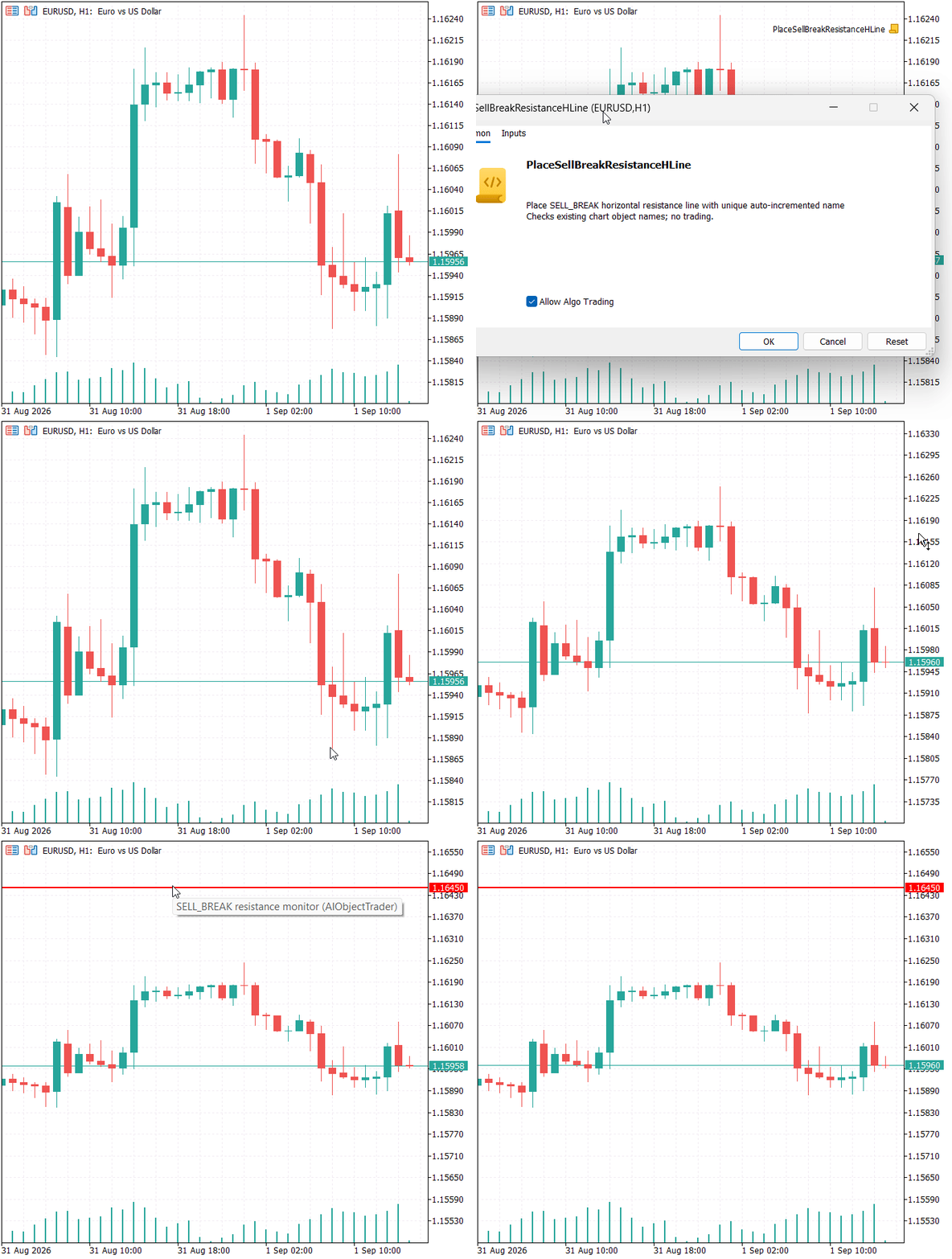
Fig. 5. The horizontal-resistance demonstration produces a one-shot MQL5 script for EURUSD H1. After execution, the script creates a uniquely named OBJ_HLINE for SELL_BREAK monitoring without submitting a trade.
Create and deploy a persistent GBPUSD H1 indicator that maintains native OBJ_PITCHFORK geometry. Name it AI_GBPUSD_H1_BUY_TOUCH_PITCHFORK_MEDIAN_001 and preserve the name while anchors update. Do not trade.
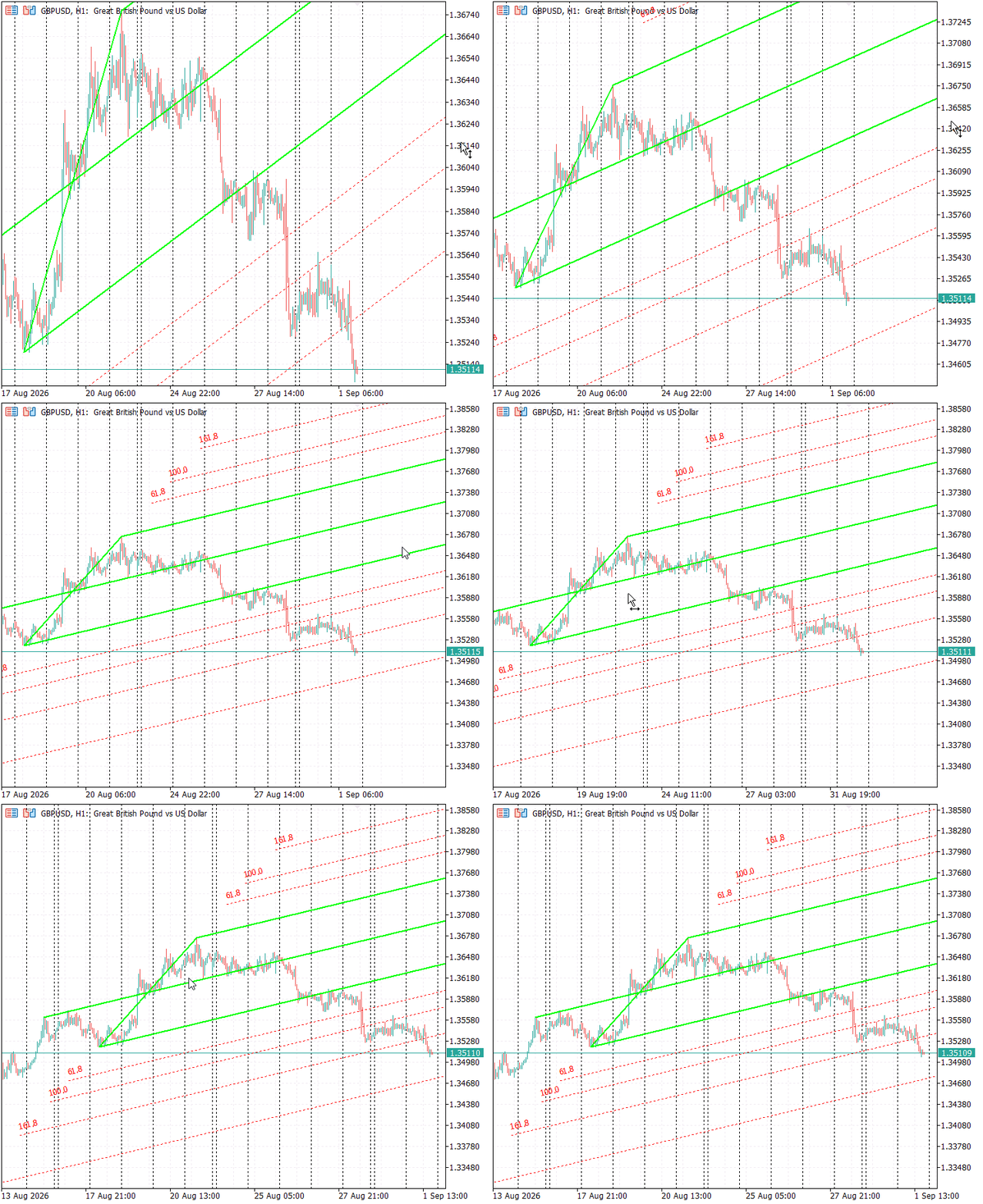
Fig. 6. The persistent Pitchfork demonstration creates and deploys an indicator that maintains a native OBJ_PITCHFORK on GBPUSD H1 while preserving one AIObjectTrader-compatible object identity during anchor updates.
Create a one-shot GBPUSD H1 Fibonacci Time Zones script. Name it AI_GBPUSD_H1_BUY_TOUCH_FIBOTIME_SWING_001, incrementing the ID if necessary. Compile it and leave it ready for manual Navigator launch. Do not trade.
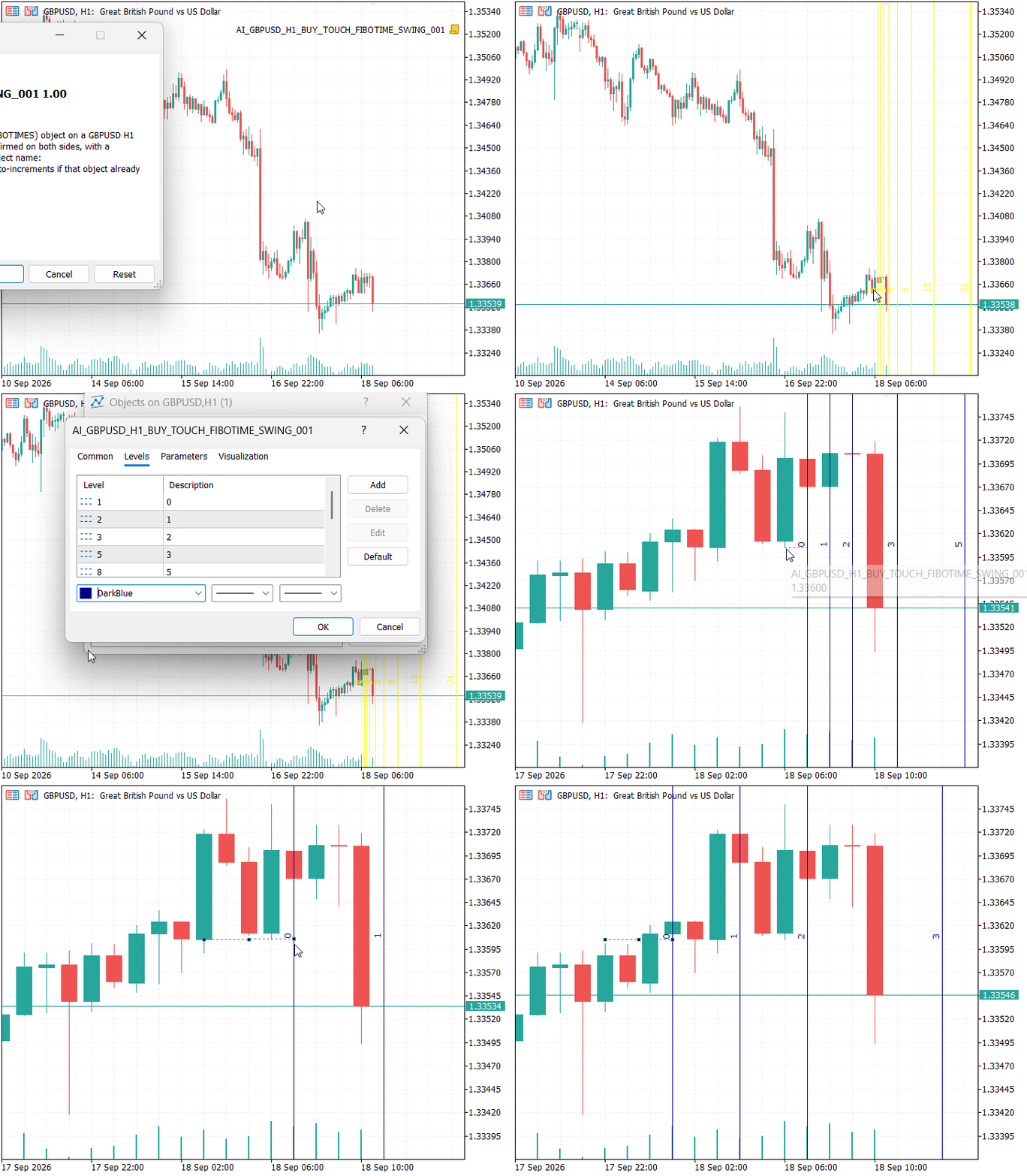
Fig. 7. The Fibonacci Time Zones demonstration creates and compiles a one-shot script. Manual launch remains necessary; once executed, the script places a uniquely named native OBJ_FIBOTIMES object on the target GBPUSD H1 chart.
Implementing the Producer Programs
The producer examples show one-shot placement and persistent updates. Their code explains how a natural-language request becomes a native object that the EA can identify.
Horizontal Resistance: Unique One-Shot Identity
The horizontal-line script searches IDs from 1 through 9999 on the current chart. StringFormat() pads IDs to at least three digits, so values above 999 use four digits. If every candidate is occupied, the function returns prefix plus 000 without checking that fallback. This exhaustion path does not guarantee a free name and needs an explicit failure policy before trading use.
BuildUniqueName() separates name allocation from event interpretation. The resistance price is provided through InpResistance; the script does not search market history for the most relevant resistance. InpSymbol and InpTimeframe do not redirect object creation: the script places the line on the chart from which you launch it. Use the intended EURUSD H1 chart and keep the name aligned with that context.
//+------------------------------------------------------------------+
//| BuildUniqueName - finds an unused chart-local object name        |
//| Returns prefix+"000" if IDs 1 through 9999 are occupied.         |
//+------------------------------------------------------------------+
string BuildUniqueName(const string prefix)
  {
   const long chart_id=ChartID();

   for(int id=1; id<=9999; id++)
     {
      string candidate=prefix+StringFormat("%03d",id);

      if(ObjectFind(chart_id,candidate)<0)
         return(candidate);
     }

   return(prefix+"000");
  }
The SELL_BREAK name requests a downward crossing of the selected level, as defined by AIIsBreak(). It does not encode a sell merely because the object is labelled resistance, nor does it request an upward breakout. The direction and event fields define the monitored relationship; the role field describes the analytical use of the level.
Pitchfork: Persistent Identity with Updating Geometry
The Pitchfork indicator retains g_obj_name while updating anchors during an active run. OnInit() first deletes candidates sharing InpObjectBase, then allocates a free name. OnDeinit() deliberately leaves the object on the chart. A later initialization can therefore delete and recreate that object, and instances sharing the prefix can affect each other.
During one uninterrupted run, a BUY_TOUCH_PITCHFORK_MEDIAN object can retain its name as the anchors change. Across reinitialization, this behavior is not yet guaranteed by the shown source.
//+------------------------------------------------------------------+
//| Expert initialization function                                   |
//+------------------------------------------------------------------+
int OnInit()
{
   g_chart_id = ChartID();
   DeleteAllPrefixObjects(InpObjectBase);
   g_obj_name = BuildUniqueName(InpObjectBase);
   PrintFormat("DeployBuyTouchPitchfork: monitoring object '%s'", g_obj_name);
   return(INIT_SUCCEEDED);
}

//+------------------------------------------------------------------+
//| Remove every remaining pitchfork object of this indicator so the |
//| target always starts from the _001 name with clean geometry.     |
//+------------------------------------------------------------------+
void DeleteAllPrefixObjects(const string prefix)
{
   for(int id = 1; id <= 9999; id++)
   {
      string candidate = prefix + StringFormat("%03d", id);
      if(ObjectFind(g_chart_id, candidate) >= 0)
         ObjectDelete(g_chart_id, candidate);
   }
}
//+------------------------------------------------------------------+
//| Set/refresh the pitchfork anchors (same object name each time)   |
//+------------------------------------------------------------------+
void UpdatePitchfork(const datetime t0, const double p0,
                     const datetime t1, const double p1,
                     const datetime t2, const double p2)
{
   //--- a degenerate (zero-anchor) stale object cannot be updated in
   //--- place, so drop it and let EnsurePitchfork recreate it properly
   if(ObjectFind(g_chart_id, g_obj_name) >= 0)
   {
      datetime cur0 = (datetime)ObjectGetInteger(g_chart_id, g_obj_name, OBJPROP_TIME, 0);
      if(cur0 <= D'1970.01.01 00:00')
         ObjectDelete(g_chart_id, g_obj_name);
   }

   EnsurePitchfork(t0, p0, t1, p1, t2, p2);
   if(ObjectFind(g_chart_id, g_obj_name) < 0)
      return;

   ObjectSetInteger(g_chart_id, g_obj_name, OBJPROP_TIME,  0, (long)t0);
   ObjectSetInteger(g_chart_id, g_obj_name, OBJPROP_TIME,  1, (long)t1);
   ObjectSetInteger(g_chart_id, g_obj_name, OBJPROP_TIME,  2, (long)t2);
   ObjectSetDouble  (g_chart_id, g_obj_name, OBJPROP_PRICE, 0, p0);
   ObjectSetDouble  (g_chart_id, g_obj_name, OBJPROP_PRICE, 1, p1);
   ObjectSetDouble  (g_chart_id, g_obj_name, OBJPROP_PRICE, 2, p2);

   //--- keep the fork projecting to the right even when refreshed
   ObjectSetInteger(g_chart_id, g_obj_name, OBJPROP_RAY_RIGHT, true);

   ChartRedraw(g_chart_id);
}
Fibonacci Time Zones: One-Shot Script
The Time Zones script resolves the target swing and chart before object creation. It then allocates the first free structured name, creates OBJ_FIBOTIMES, redraws the chart, and exits. Unlike the Pitchfork indicator, it has no persistent recalculation cycle. A later launch can create another independently named Time Zones object while the previous one remains available for inspection. The Assistant can prepare the script, but the tested environment still needs manual Navigator launch.
This gives the script route a different implementation role from the indicator route. The script performs all required preparation in one OnStart() execution: it decides where the object belongs, confirms that its name is free, creates the native object, and then hands control back to the chart. From that point onward, the script is no longer involved. Any further interpretation is the responsibility of AIObjectTrader, which is exactly why the object name must carry enough information for the EA to understand the intended direction and event.
The allocation and creation stage below is an exact excerpt from OnStart(). It searches the destination chart for IDs from 001 through 999, stops if allocation fails, and creates the native object using the selected swing and time-unit anchors. CleanExisting is false by default; enabling it removes objects sharing the generated base name before allocation. When no swing meets the amplitude threshold, the script can use the latest detected pivot as a fallback.
   //--- object name: base_NNN, increment the numeric ID until the name is free
   string objName = "";
   int    id      = 1;
   while(id <= 999)
     {
      string candidate = "AI_" + symbol + "_" + TimeframeToString(tf) + "_BUY_TOUCH_FIBOTIME_SWING" +
                         StringFormat("_%03d", id);
      if(ObjectFind(chartId, candidate) < 0)
        {
         objName = candidate;
         break;
        }
      id++;
     }

   if(objName == "")
     {
      Print("Could not allocate a free object name (001..999 all taken on the target chart).");
      return;
     }

   //--- anchors: swing point and one fibo unit to the right (same price level)
   datetime anchorTime = iTime(symbol, tf, anchorIdx);
   int      unit       = MathMax(1, UnitBars);
   datetime t2         = anchorTime + (datetime)unit * (datetime)PeriodSeconds(tf);

   if(!ObjectCreate(chartId, objName, OBJ_FIBOTIMES, 0, anchorTime, anchorPrice, t2, anchorPrice))
     {
      PrintFormat("Failed to create Fibonacci Time Zones '%s' on chart %I64d, error %d.",
                  objName, chartId, GetLastError());
      return;
     }
Organizing the Source Files
MQL5\
├── Experts\Article24080\AIObjectTrader.mq5
├── Indicators\Article24080\DeployBuyTouchPitchfork.mq5
├── Scripts\Article24080\PlaceSellBreakResistanceHLine.mq5
├── Scripts\Article24080\AI_GBPUSD_H1_BUY_TOUCH_FIBOTIME_SWING_001.mq5
└── Include\Article24080\Core\
    ├── AIObjectGeometry.mqh
    └── AIObjectProtocol.mqh
Implementing AIObjectTrader
AIObjectTrader separates object production from evaluation. It scans existing chart objects, performs preliminary name recognition, and passes recognized objects to the evaluation layer. The architecture includes event tracking and optional CTrade requests, but the recorded test establishes recognition and unsupported-type handling only.
Once an object is available, the EA applies programmed evaluation rules. The producer still influences the result through its anchor-selection method. We therefore keep production, recognition, geometry evaluation, event tracking, and order requests as separate stages.
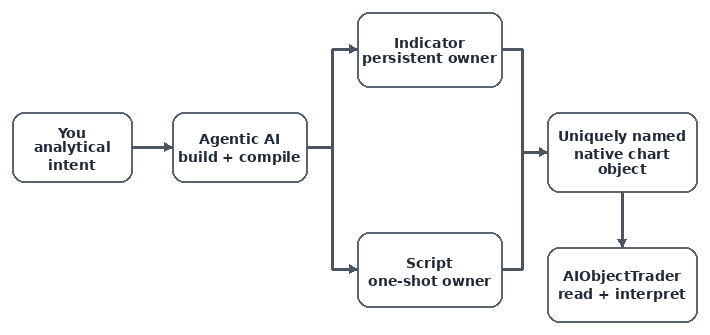
Fig. 8. AI-generated indicators and scripts form the producer layer. Their uniquely named native chart objects feed the same scanner, geometry adapters, interaction rules, risk controls, and execution logic in AIObjectTrader.
Initialization and Tick Flow
Initialization assigns the magic number and symbol filling mode. The magic number later separates EA-owned positions from unrelated trades, while SetTypeFillingBySymbol() adapts CTrade to the active symbol. On every tick, the EA scans first and stores bid/ask afterward. That order preserves the previous market observation for live crossing tests; writing the new values first would remove the historical side of the comparison.
These two functions establish the EA's runtime rhythm. OnInit() performs the one-time setup, while OnTick() repeatedly feeds the current market state into the object scanner. The EA does not attempt to trade at either stage directly. Instead, OnTick() delegates the decision to ScanAIObjects(), which keeps the event loop small and makes the later protocol and geometry stages easier to test independently.
//+------------------------------------------------------------------+
//| Expert initialization function                                   |
//| Sets the magic number, the filling mode for the current symbol   |
//| and logs a short summary of the supported object types.          |
//+------------------------------------------------------------------+
int OnInit()
  {
   g_trade.SetExpertMagicNumber(InpMagicNumber);
   g_trade.SetTypeFillingBySymbol(_Symbol);
   Print("AIObjectTrader initialized. Structured unique names required; supported: HLINE, TREND, RECTANGLE, PITCHFORK.");
   return(INIT_SUCCEEDED);
  }
//+------------------------------------------------------------------+
//| Expert tick function                                             |
//| Refreshes the tick and runs the object scan on every incoming    |
//| price update.                                                    |
//+------------------------------------------------------------------+
void OnTick()
  {
   MqlTick tick;
   if(!SymbolInfoTick(_Symbol,tick)) return;
   ScanAIObjects(tick);
   g_last_bid=tick.bid; g_last_ask=tick.ask;
  }
Protocol-Aware Chart Scan
The scanner currently performs a preliminary filter: AI_ prefix, at least eight name segments, a numeric final token, and substring-based direction and event extraction. It does not yet enforce the complete eight-field contract, exact token positions, symbol/timeframe agreement, unique direction/event tokens, declared-versus-native type agreement, or role compatibility. Therefore, a malformed AI-prefixed name may pass this preliminary gate.
Complete validation requires exactly eight fields in their defined positions, an allowed ID width and range, symbol and timeframe agreement, a matching native object type, and compatible event and role values. These checks are not implemented by the scanner excerpt. Until they are added, preliminary recognition must not be treated as approval to trade.
//+------------------------------------------------------------------+
//| ScanAIObjects - walks all objects on the current chart           |
//|                                                                  |
//| Filters out any object that is not part of the AI_ protocol,     |
//| does not carry a numeric instance ID, or has an unknown          |
//| direction/event. Valid candidates are forwarded to               |
//| EvaluateObject().                                                |
//+------------------------------------------------------------------+
void ScanAIObjects(const MqlTick &tick)
  {
   long chart_id=ChartID();
   for(int i=0;i<ObjectsTotal(chart_id,-1,-1);i++)
     {
      string name=ObjectName(chart_id,i,-1,-1);

      //--- only objects that obey the AI_ naming protocol are managed
      if(name=="" || !AIIsProtocolObject(name))
         continue;

      //--- an AI object must end with a numeric instance ID
      if(!AIHasNumericId(name))
        {
         if(InpDebug)
            PrintFormat("IGNORED | %s | missing structured numeric ID",name);

         continue;
        }

      //--- decode direction and event; skip objects we cannot interpret
      ENUM_AI_DIRECTION direction=AIParseDirection(name);
      ENUM_AI_EVENT event_type=AIParseEvent(name);
      if(direction==AI_DIRECTION_NONE || event_type==AI_EVENT_NONE) continue;

      //--- retrieve the concrete object type and evaluate it
      ENUM_OBJECT type=(ENUM_OBJECT)ObjectGetInteger(chart_id,name,OBJPROP_TYPE);
      EvaluateObject(chart_id,name,type,direction,event_type,tick);
     }
  }
Type Dispatch and Safe Failure
EvaluateObject() combines resolved market observations with each supported geometry. HLINE, TREND, and PITCHFORK accept TOUCH or BREAK, while RECTANGLE accepts ZONE and tests fresh entry into its price bounds. The complete function below includes those branches, signal logging, per-object tracking, and optional execution.
FIBOTIMES and FIBOARC reach the unsupported branch. Pitchfork evaluation obtains the selected line from AIParsePitchforkLine(): UPPER takes precedence over LOWER, and absence of both defaults to MEDIAN. The helper does not require an explicit valid role token, so complete role validation remains a separate requirement.
//+------------------------------------------------------------------+
//| EvaluateObject - evaluates a single managed object               |
//|                                                                  |
//| Depending on the object type and the decoded event, computes     |
//| whether a fresh signal has occurred between the previous and     |
//| the current price. A signal is dispatched only once per bar      |
//| (deduplicated via WasSignaledOnBar / MarkSignaled).              |
//+------------------------------------------------------------------+
void EvaluateObject(const long chart_id,const string name,const ENUM_OBJECT type,
                    const ENUM_AI_DIRECTION direction,const ENUM_AI_EVENT event_type,
                    const MqlTick &tick)
  {
   double previous_price=0.0,current_price=0.0,trigger=0.0;
   datetime previous_time=0,current_time=0,signal_bar=0;
   if(!GetEvaluationPrices(direction,tick,previous_price,current_price,
                           previous_time,current_time,signal_bar)) return;

   bool signal=false;

   //--- HORIZONTAL LINE: touch or break of a flat level
   if(type==OBJ_HLINE)
     {
      if(event_type==AI_EVENT_ZONE || !AIGetHorizontalPrice(chart_id,name,trigger)) return;
      signal=(event_type==AI_EVENT_TOUCH)
             ? AIIsTouch(current_price,trigger,InpTouchTolerance)
             : AIIsBreak((int)direction,previous_price,current_price,trigger,trigger);
     }
   //--- TRENDLINE: touch or break of a moving (sloped) level
   else if(type==OBJ_TREND)
     {
      if(event_type==AI_EVENT_ZONE) return;
      double p0=0.0,p1=0.0;
      if(!AIGetTrendPrice(chart_id,name,previous_time,p0) ||
         !AIGetTrendPrice(chart_id,name,current_time,p1)) return;
      trigger=p1;
      signal=(event_type==AI_EVENT_TOUCH)
             ? AIIsTouch(current_price,p1,InpTouchTolerance)
             : AIIsBreak((int)direction,previous_price,current_price,p0,p1);
     }
   //--- RECTANGLE: entering a price zone
   else if(type==OBJ_RECTANGLE)
     {
      if(event_type!=AI_EVENT_ZONE) return;
      double lower=0.0,upper=0.0;
      if(!AIGetRectangleZone(chart_id,name,lower,upper)) return;
      bool now=(current_price>=lower && current_price<=upper);
      bool before=(previous_price>=lower && previous_price<=upper);
      signal=now && !before;                       // fresh entry into the zone
      trigger=(direction==AI_DIRECTION_BUY ? upper : lower);
     }
   //--- PITCHFORK: touch or break of a selected line
   else if(type==OBJ_PITCHFORK)
     {
      if(event_type==AI_EVENT_ZONE) return;
      int line=(int)AIParsePitchforkLine(name);
      double p0=0.0,p1=0.0;
      if(!AIGetPitchforkPrice(chart_id,name,previous_time,line,p0) ||
         !AIGetPitchforkPrice(chart_id,name,current_time,line,p1)) return;
      trigger=p1;
      signal=(event_type==AI_EVENT_TOUCH)
             ? AIIsTouch(current_price,p1,InpTouchTolerance)
             : AIIsBreak((int)direction,previous_price,current_price,p0,p1);
     }
   else
     {
      if(InpDebug) PrintFormat("UNSUPPORTED | %s | type=%d",name,(int)type);
      return;
     }

   //--- discard duplicates: a given object fires only once per bar
   if(!signal || WasSignaledOnBar(name,signal_bar)) return;
   MarkSignaled(name,signal_bar);

   PrintFormat("SIGNAL | %s | %s | %s | market=%.*f | trigger=%.*f",
               name,AIDirectionToString(direction),AIEventToString(event_type),
               _Digits,current_price,_Digits,trigger);

   //--- trading is optional; default behaviour is signal-only mode
   if(!InpEnableTrading)
     {
      PrintFormat("TEST MODE | %s | trade request suppressed",name);
      return;
     }

   ExecuteSignal(name,direction,tick);
  }
Closed-Bar and Live Evaluation
In closed-bar mode, GetEvaluationPrices() enables series indexing on the dynamic rates array before calling CopyRates(). With ArraySetAsSeries(), rates[1] is the latest completed candle and rates[2] is the preceding candle. The function assigns both prices and timestamps, and uses rates[1].time as the signal-bar identifier.
The timestamp in MqlRates is the period start time. This implementation therefore compares closing prices with sloped geometry evaluated at the corresponding bar opening times. Live mode uses the stored previous bid or ask, but approximates its timestamp as one second before TimeCurrent() rather than retaining the actual previous tick time. Both timing choices matter for moving levels. Symbol and timeframe validation are not enforced by the current scanner.
//+------------------------------------------------------------------+ //| GetEvaluationPrices - resolves previous/current evaluation | //| | //| Two modes are supported: | //| - Closed-bar mode (default): uses the last two finished bars, | //| which removes intra-bar noise and makes break detection | //| stable and reproducible. | //| - Live mode: uses the current tick against the previously | //| stored tick, for the fastest possible reaction. | //| | //| @return true when both prices could be resolved. | //+------------------------------------------------------------------+ bool GetEvaluationPrices(const ENUM_AI_DIRECTION direction,const MqlTick &tick, double &previous_price,double ¤t_price, datetime &previous_time,datetime ¤t_time, datetime &signal_bar) { if(InpRequireClosedBar) { MqlRates rates[]; ArraySetAsSeries(rates,true); if(CopyRates(_Symbol,_Period,0,3,rates)<3) return(false); current_price=rates[1].close; previous_price=rates[2].close; current_time=rates[1].time; previous_time=rates[2].time; signal_bar=rates[1].time; return(true); } //--- live mode: pick the ask for buys and the bid for sells current_price=(direction==AI_DIRECTION_BUY ? tick.ask : tick.bid); previous_price=(direction==AI_DIRECTION_BUY ? g_last_ask : g_last_bid); if(previous_price<=0.0) return(false); current_time=TimeCurrent(); previous_time=current_time-1; signal_bar=iTime(_Symbol,_Period,0); return(signal_bar>0); }
WasSignaledOnBar() and MarkSignaled() track the most recent signal bar for each full object name in memory. This limits repeated signals during the EA run, but does not persist across reattachment or restart. Repeated TOUCH proximity can therefore produce a signal on another bar. Opposing objects are processed in scan order without a separate conflict-resolution policy.
Execution Guards
ExecuteSignal() checks spread, owned positions, and normalized volume before sending a market-order request. It supports zero stop-loss or take-profit inputs as disabled distances and normalizes nonzero levels to the symbol digits. The function captures the CTrade return value and logs ResultRetcode() and its description. Those diagnostics are implemented, but the article contains no recorded successful trade result.
Execution follows event evaluation. With trading disabled, you can investigate recognition and signal behavior before allowing order requests. EvaluateObject() marks an event before calling ExecuteSignal(), so an execution guard or rejected request may still consume that event for the bar. This behavior needs to be defined and tested alongside duplicate tracking and opposing signals.
//+------------------------------------------------------------------+
//| ExecuteSignal - applies safety filters and sends the order       |
//|                                                                  |
//| Guards applied before trading:                                   |
//|  - max spread filter (when enabled),                             |
//|  - one-position-only filter (when enabled),                      |
//|  - volume normalization to the symbol's lot step.                |
//|                                                                  |
//| The resulting market order is sent via CTrade and its retcode    |
//| is logged.                                                       |
//+------------------------------------------------------------------+
void ExecuteSignal(const string object_name,const ENUM_AI_DIRECTION direction,const MqlTick &tick)
  {
   if(InpMaxSpreadPoints>0 && (tick.ask-tick.bid)/_Point>InpMaxSpreadPoints) return;
   if(InpOnePositionOnly && HasOwnedPosition()) return;

   double volume=NormalizeVolume(InpVolume);
   if(volume<=0.0) return;

   bool sent=false;
   if(direction==AI_DIRECTION_BUY)
     {
      //--- long: SL below and TP above the ask
      double sl=InpStopLossPoints>0 ? NormalizeDouble(tick.ask-InpStopLossPoints*_Point,_Digits):0.0;
      double tp=InpTakeProfitPoints>0 ? NormalizeDouble(tick.ask+InpTakeProfitPoints*_Point,_Digits):0.0;
      sent=g_trade.Buy(volume,_Symbol,0.0,sl,tp,object_name);
     }
   else
     {
      //--- short: SL above and TP below the bid
      double sl=InpStopLossPoints>0 ? NormalizeDouble(tick.bid+InpStopLossPoints*_Point,_Digits):0.0;
      double tp=InpTakeProfitPoints>0 ? NormalizeDouble(tick.bid-InpTakeProfitPoints*_Point,_Digits):0.0;
      sent=g_trade.Sell(volume,_Symbol,0.0,sl,tp,object_name);
     }

   PrintFormat("%s | %s | retcode=%u | %s",
               sent ? "TRADE REQUEST" : "TRADE FAILED",
               object_name,g_trade.ResultRetcode(),g_trade.ResultRetcodeDescription());
  }
Implementing AIObjectProtocol.mqh
AIObjectProtocol.mqh provides preliminary prefix, direction, event, numeric-suffix, and Pitchfork-line recognition. Complete contract validation additionally requires positional parsing, context checks, native-type agreement, and rejection of ambiguous roles.
We keep recognition helpers in a separate header so the scanner does not repeat string searches. AIHasNumericId() requires at least eight underscore-separated segments and a nonempty numeric final segment. It does not require exactly eight fields, validate the ID range, or verify the symbol and timeframe. AIParsePitchforkLine() provides a default selection rather than strict role validation.
Ownership and Direction
//+------------------------------------------------------------------+
//| AIIsProtocolObject - validates the AI_ name prefix               |
//|                                                                  |
//| An object belongs to the AI system only when its name starts     |
//| with the reserved "AI_" prefix. Objects with any other prefix    |
//| are ignored by the scanner.                                      |
//|                                                                  |
//| @param name  Full chart object name.                             |
//| @return      true if the name begins with "AI_".                 |
//+------------------------------------------------------------------+
bool AIIsProtocolObject(const string name)
  {
   return(StringFind(name,"AI_")==0);
  }
//+------------------------------------------------------------------+
//| AIParseDirection - extracts the trade direction token            |
//|                                                                  |
//| Looks for the "_BUY_" / "_SELL_" markers used inside the         |
//| structured object name.                                          |
//|                                                                  |
//| @param name  Structured object name (e.g. AI_..._BUY_...).       |
//| @return      ENUM_AI_DIRECTION, or AI_DIRECTION_NONE if neither  |
//|              token is present.                                   |
//+------------------------------------------------------------------+
ENUM_AI_DIRECTION AIParseDirection(const string name)
  {
   if(StringFind(name,"_BUY_")>=0)
      return(AI_DIRECTION_BUY);

   if(StringFind(name,"_SELL_")>=0)
      return(AI_DIRECTION_SELL);

   return(AI_DIRECTION_NONE);
  }
The AI_ prefix is an ownership hint, not proof that a name follows the contract. The current substring search can accept misplaced or contradictory tokens; a positional parser should reject them rather than choose the first matching direction.
If neither direction substring is present, the scanner ignores the object. If both are present, the current parser returns BUY because it checks that substring first. A complete parser must reject that ambiguity. Visual styling does not change the encoded direction.
Recognizing Events, Pitchfork Lines, and Instance IDs
//+------------------------------------------------------------------+
//| AIParseEvent - extracts the event type token                     |
//|                                                                  |
//| Looks for the "_TOUCH_", "_BREAK_" or "_ZONE_" markers used      |
//| inside the structured object name.                               |
//|                                                                  |
//| @param name  Structured object name (e.g. AI_..._TOUCH_...).     |
//| @return      ENUM_AI_EVENT, or AI_EVENT_NONE if none matches.    |
//+------------------------------------------------------------------+
ENUM_AI_EVENT AIParseEvent(const string name)
  {
   if(StringFind(name,"_TOUCH_")>=0)
      return(AI_EVENT_TOUCH);

   if(StringFind(name,"_BREAK_")>=0)
      return(AI_EVENT_BREAK);

   if(StringFind(name,"_ZONE_")>=0)
      return(AI_EVENT_ZONE);

   return(AI_EVENT_NONE);
  }

//+------------------------------------------------------------------+
//| AIParsePitchforkLine - extracts the pitchfork line reference     |
//|                                                                  |
//| Pitchfork objects can carry an optional "_UPPER" / "_LOWER"      |
//| suffix in the topic portion of the name. Absence of both         |
//| suffixes means the median line is intended.                      |
//|                                                                  |
//| @param name  Structured object name.                             |
//| @return      ENUM_AI_PITCHFORK_LINE (MEDIAN by default).         |
//+------------------------------------------------------------------+
ENUM_AI_PITCHFORK_LINE AIParsePitchforkLine(const string name)
  {
   if(StringFind(name,"_UPPER")>=0) return(AI_PITCHFORK_UPPER);
   if(StringFind(name,"_LOWER")>=0) return(AI_PITCHFORK_LOWER);
   return(AI_PITCHFORK_MEDIAN);
  }
//+------------------------------------------------------------------+
//| AIHasNumericId - verifies the trailing instance ID               |
//|                                                                  |
//| A well-formed AI object name ends with a numeric instance ID     |
//| (separated by an underscore) which guarantees that each object   |
//| is uniquely identifiable, e.g. "..._SWING_001".                  |
//|                                                                  |
//| @param name  Structured object name.                             |
//| @return      true only if the last underscore-delimited          |
//|              segment is at least 1 digit and contains only       |
//|              digits (and the name has >= 8 segments).            |
//+------------------------------------------------------------------+
bool AIHasNumericId(const string name)
  {
   int pos=StringFind(name,"_");

   if(pos<0)
      return(false);

   string parts[];
   int count=StringSplit(name,'_',parts);

   if(count<8)
      return(false);

   string id=parts[count-1];

   if(StringLen(id)<1)
      return(false);

   for(int i=0;i<StringLen(id);i++)
     {
      ushort ch=StringGetCharacter(id,i);

      if(ch<'0' || ch>'9')
         return(false);
     }

   return(true);
  }
The evaluator restricts TOUCH and BREAK to its supported line geometries and ZONE to rectangles. TOUCH means proximity within the configured tolerance; it does not require a new transition into that tolerance. Rectangle evaluation checks price bounds without using the rectangle's time span. Numeric ID width and range are not enforced by the protocol helper.
Separating object type from event makes the naming format extensible. New geometry adapters can share existing event vocabulary where the interpretation is compatible. Duplicate tracking can use the complete object name within its defined scope; the numeric suffix alone does not establish uniqueness across charts or restarts.
Implementing AIObjectGeometry.mqh
AIObjectGeometry.mqh converts chart objects into levels and price bounds. The horizontal, trend, rectangle, and Pitchfork helpers check native object type. The trend helper also checks the API error state; the Pitchfork helper rejects a zero time denominator, invalid line index, and a nonpositive result. Complete property-read and anchor validation, and comparison with native display settings, still need dedicated tests.
This is where graphical objects are normalized into values the EA can compare with market data. The main EA never needs to know which OBJPROP fields belong to a rectangle or how a Pitchfork line is reconstructed. It requests a level or zone through a dedicated helper and then applies the generic event logic. That keeps object-specific calculations in one place and makes future geometry extensions easier to isolate.
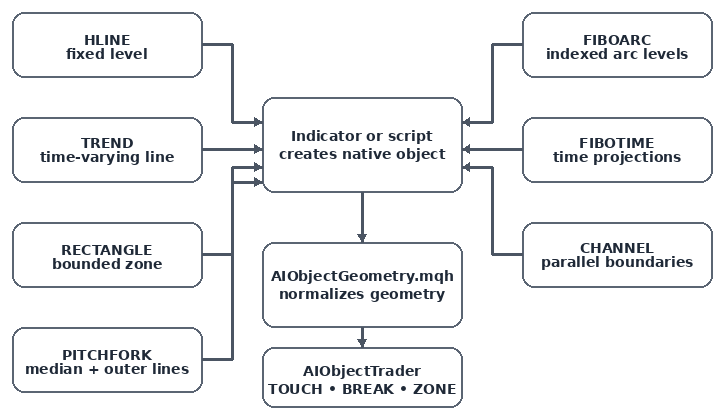
Fig. 9. Different graphical objects can be reduced to reusable geometric relationships: fixed levels, time-varying lines, zones, indexed levels, parallel boundaries, and Pitchfork median/outer lines.
Horizontal, Trend, and Rectangle Geometry
//+------------------------------------------------------------------+
//| AIGetHorizontalPrice - reads the price of an OBJ_HLINE           |
//|                                                                  |
//| @param chart_id  Target chart (ChartID()).                       |
//| @param name      Object name (must be an OBJ_HLINE).             |
//| @param price     [out] Horizontal level price.                   |
//| @return          true on success, false if the object is not     |
//|                  an horizontal line or price is not positive.    |
//+------------------------------------------------------------------+
bool AIGetHorizontalPrice(const long chart_id,const string name,double &price)
  {
   if((ENUM_OBJECT)ObjectGetInteger(chart_id,name,OBJPROP_TYPE)!=OBJ_HLINE)
      return(false);
   price=ObjectGetDouble(chart_id,name,OBJPROP_PRICE,0);
   return(price>0.0);
  }
//+-----------------------------------------------------------------+
//| AIGetTrendPrice - interpolates an OBJ_TREND at a given time     |
//|                                                                 |
//| Evaluates the analytic value of a sloped trendline at the       |
//| requested bar time using ObjectGetValueByTime.                  |
//|                                                                 |
//| @param chart_id  Target chart.                                  |
//| @param name      Object name (must be an OBJ_TREND).            |
//| @param time      Bar time at which the line is evaluated.       |
//| @param price     [out] Interpolated level price.                |
//| @return          true on success.                               |
//+-----------------------------------------------------------------+
bool AIGetTrendPrice(const long chart_id,const string name,const datetime time,double &price)
  {
   if((ENUM_OBJECT)ObjectGetInteger(chart_id,name,OBJPROP_TYPE)!=OBJ_TREND)
      return(false);
   ResetLastError();
   price=ObjectGetValueByTime(chart_id,name,time,0);
   return(GetLastError()==0 && price!=0.0);
  }
//+------------------------------------------------------------------+
//| AIGetRectangleZone - reads the two bounds of an OBJ_RECTANGLE    |
//|                                                                  |
//| The two anchor prices are converted into a normalized lower /    |
//| upper envelope so that the zone order does not matter.           |
//|                                                                  |
//| @param chart_id  Target chart.                                   |
//| @param name      Object name (must be an OBJ_RECTANGLE).         |
//| @param lower     [out] Lower zone bound.                         |
//| @param upper     [out] Upper zone bound.                         |
//| @return          true on success with a valid positive range.    |
//+------------------------------------------------------------------+
bool AIGetRectangleZone(const long chart_id,const string name,double &lower,double &upper)
  {
   if((ENUM_OBJECT)ObjectGetInteger(chart_id,name,OBJPROP_TYPE)!=OBJ_RECTANGLE)
      return(false);
   double p1=ObjectGetDouble(chart_id,name,OBJPROP_PRICE,0);
   double p2=ObjectGetDouble(chart_id,name,OBJPROP_PRICE,1);
   lower=MathMin(p1,p2);
   upper=MathMax(p1,p2);
   return(lower>0.0 && upper>lower);
  }
OBJ_HLINE returns one fixed level, so the same trigger can be used for previous and current comparisons. OBJ_TREND is evaluated at a requested time because its active price changes along the slope. Rectangle anchors are normalized with MathMin() and MathMax() into lower and upper boundaries. These helpers hide object-specific property handling from the main EA.
The normalization also gives the event layer a consistent interface. TOUCH and BREAK do not care whether a value came from an object property or from a time-based interpolation, and ZONE does not care which rectangle anchor was originally higher. The geometry header converts each native object into the simplest deterministic form required by the event rule.
Pitchfork and Generic Events
//+------------------------------------------------------------------+
//| AIGetPitchforkPrice - evaluates a Pitchfork line at a time       |
//|                                                                  |
//| Reconstructs the geometric model of a standard Andrews           |
//| pitchfork:                                                       |
//|   - anchors P0 (origin), P1, P2 (the two base pivots);           |
//|   - median point  M = (P1 + P2) / 2 at time  tM = (t1 + t2)/2;   |
//|   - a line through P0 and M defines the slope of all three       |
//|     parallel lines.                                              |
//|                                                                  |
//| The requested line (median=0, upper=1, lower=2) is extrapolated  |
//| to the given time using its own anchor point.                    |
//|                                                                  |
//| @param chart_id   Target chart.                                  |
//| @param name       Object name (must be an OBJ_PITCHFORK).        |
//| @param time       Bar time at which the line is evaluated.       |
//| @param line_index ENUM_AI_PITCHFORK_LINE (0/1/2).                |
//| @param price      [out] Evaluated line price.                    |
//| @return           true on success, false for invalid objects,    |
//|                   zero-length time span or bad line index.       |
//+------------------------------------------------------------------+
bool AIGetPitchforkPrice(const long chart_id,
                         const string name,
                         const datetime time,
                         const int line_index,
                         double &price)
  {
   if((ENUM_OBJECT)ObjectGetInteger(chart_id,name,OBJPROP_TYPE)!=OBJ_PITCHFORK)
      return(false);

   //--- read the three pitchfork anchors (time, price)
   datetime t0=(datetime)ObjectGetInteger(chart_id,name,OBJPROP_TIME,0);
   datetime t1=(datetime)ObjectGetInteger(chart_id,name,OBJPROP_TIME,1);
   datetime t2=(datetime)ObjectGetInteger(chart_id,name,OBJPROP_TIME,2);
   double p0=ObjectGetDouble(chart_id,name,OBJPROP_PRICE,0);
   double p1=ObjectGetDouble(chart_id,name,OBJPROP_PRICE,1);
   double p2=ObjectGetDouble(chart_id,name,OBJPROP_PRICE,2);

   //--- median anchor: average of the two base pivots
   datetime tm=(datetime)(((long)t1+(long)t2)/2);
   double pm=(p1+p2)/2.0;

   //--- the time span from the origin to the median must be positive
   if(tm==t0)
      return(false);

   //--- common slope carried by all pitchfork lines
   double slope=(pm-p0)/(double)(tm-t0);

   //--- extrapolate the requested line to the target time
   if(line_index==0)
      price=p0+slope*(double)(time-t0);
   else if(line_index==1)
      price=p1+slope*(double)(time-t1);
   else if(line_index==2)
      price=p2+slope*(double)(time-t2);
   else
      return(false);

   return(price>0.0);
  }
//+------------------------------------------------------------------+
//| AIIsTouch - tolerance-based touch detection                      |
//|                                                                  |
//| A touch is considered valid when the current market price is     |
//| within 'tolerance_points' of the object level.                   |
//|                                                                  |
//| @param market_price      Current bid/ask (or bar close).         |
//| @param object_price      Level price of the object.              |
//| @param tolerance_points  Allowed distance in points.             |
//| @return                  true when |market - object| <= tol.     |
//+------------------------------------------------------------------+
bool AIIsTouch(const double market_price,const double object_price,const int tolerance_points)
  {
   return(MathAbs(market_price-object_price)<=tolerance_points*_Point);
  }

//+------------------------------------------------------------------+
//| AIIsBreak - one-directional level break detection                |
//|                                                                  |
//| Detects a fresh crossing of a level between two consecutive      |
//| evaluations. The level may itself move (e.g. a sloped trend-     |
//| line), so both the previous and the current level price are      |
//| supplied.                                                        |
//|                                                                  |
//| @param direction        1 = BUY (cross above), 2 = SELL (below). |
//| @param previous_price   Previous market price.                   |
//| @param current_price    Current market price.                    |
//| @param previous_level   Previous level price.                    |
//| @param current_level    Current level price.                     |
//| @return                 true only on a fresh valid crossing.     |
//+------------------------------------------------------------------+
bool AIIsBreak(const int direction,
               const double previous_price,const double current_price,
               const double previous_level,const double current_level)
  {
   if(direction==1)
      return(previous_price<=previous_level && current_price>current_level);
   if(direction==2)
      return(previous_price>=previous_level && current_price<current_level);
   return(false);
  }
The Pitchfork helper derives a common slope from the origin and the midpoint of the two remaining anchors. Line 0 passes through the origin, line 1 through anchor 1, and line 2 through anchor 2. UPPER and LOWER select the latter two lines; their spatial order depends on the anchor arrangement. A zero denominator or unsupported line index returns false. Native-display equivalence and malformed-anchor cases remain unverified.
This is the main reason we keep the event functions generic. AIIsTouch() only needs a market value, an object value, and a tolerance. AIIsBreak() only needs two market observations and two geometry observations. The same event code can therefore work with several native objects once AIObjectGeometry.mqh has converted them into the required values.
Testing and Runtime Evidence
Interpreting the Recorded Result
The demonstrations show producer creation and selected visible chart objects. The Journal excerpt below records a Fibonacci Time Zones object reaching the EA's unsupported-type branch. This test does not establish geometry or event correctness, duplicate handling, or successful order execution.
Planning Further Tests
For further testing, use malformed names, conflicting direction or event tokens, symbol and timeframe mismatches, declared/native type mismatches, invalid Pitchfork roles, degenerate anchors, and exhausted name allocation. Then test repeated events, opposing signals, and accepted and rejected order requests on a demo account. Keep the observed results separate from expected behavior.
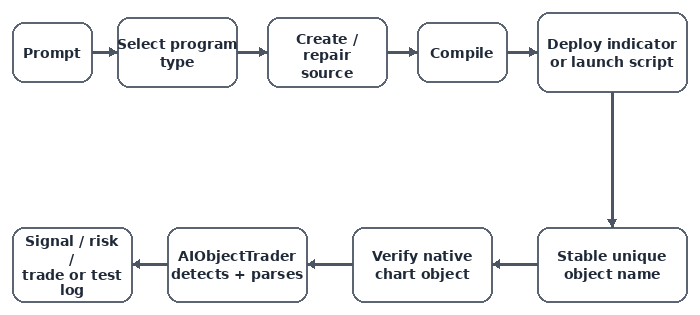
Fig. 10. Validation follows the actual capability boundary: prompt, program type selection, source creation, compilation, indicator deployment or manual script launch, stable object naming, chart verification, AIObjectTrader detection, and deterministic execution.
Testing is performed in layers: producer creation, object naming, EA recognition, geometry support, event detection, and finally trading. This separation became visible when AIObjectTrader was attached to the chart containing the Fibonacci Time Zones object:
2026.09.02 12:01:04.369  AIObjectTrader (GBPUSD,M5)
UNSUPPORTED | AI_GBPUSD_H1_BUY_TOUCH_FIBOTIME_SWING_001 | type=13
The Journal line shows that AIObjectTrader encountered the named object and logged its unsupported native type. The EA was attached to GBPUSD M5 while the name encoded H1. The preliminary scanner did not reject that mismatch. This result confirms discovery and type dispatch, while also showing why context validation belongs before geometry evaluation.
Current Boundaries and Key Lessons
| Finding | Meaning |
|---|---|
| Program type matters | Indicators can be attached automatically; scripts still require manual launch in the tested environment. |
| The chart is the contract | AI-generated programs and AIObjectTrader communicate through visible, uniquely named native objects. |
| Protocol and geometry are separate | An object can be recognized successfully even when its native geometry is not implemented. |
| AI claims require verification | The Pitchfork assumption was corrected through the MQL5 reference and runtime evidence. |
| Rule-based execution is a design goal | Producer heuristics select anchors; the current EA implements partial recognition and selected geometry rules. Complete validation and trade results remain unverified. |
Conclusion
In this article, we demonstrated how natural-language prompts can produce MQL5 indicators and scripts that place native chart objects. We organized the connection to AIObjectTrader through a structured naming format, preliminary recognition, and geometry helpers. The producer selects the anchors; the EA applies programmed rules to the resulting object.
The Fibonacci Time Zones test confirmed object discovery followed by rejection of an unsupported type. Complete protocol validation, context checks, event tracking, and trade-result verification remain necessary before enabling automated execution. You can use the same separation of responsibilities to develop and test additional object adapters.
Our demonstrated path reaches program creation, object placement, and preliminary EA recognition. Supported evaluation and optional trading require their own verification.
Attachments
DrawBuySupportTrendline.mq5 is an additional script in the package. It draws a line from input anchor coordinates rather than detecting fresh swing lows. The three prompt demonstrations above remain focused on the horizontal line, Pitchfork, and Time Zones.
The source files use the Article24080 folder layout shown above. The Origin column identifies the programs generated from the demonstrated prompts and the EA and headers used for object recognition and evaluation. Their descriptions reflect the scope explained in this article.
| File | Type | Origin | Folder structure | Description |
|---|---|---|---|---|
| AIObjectTrader.mq5 | Expert Advisor | Article trading framework | MQL5\Experts\Article24080\AIObjectTrader.mq5 | Scans AI-prefixed chart objects using preliminary name recognition and provides the framework for geometry evaluation and optional order requests. End-to-end trading is not demonstrated. |
| DeployBuyTouchPitchfork.mq5 | Indicator | Generated from the Agentic AI Pitchfork prompt | MQL5\Indicators\Article24080\DeployBuyTouchPitchfork.mq5 | Maintains a native GBPUSD H1 OBJ_PITCHFORK and retains its structured name during an active indicator run. |
| PlaceSellBreakResistanceHLine.mq5 | Script | Generated from the Agentic AI horizontal-resistance prompt | MQL5\Scripts\Article24080\PlaceSellBreakResistanceHLine.mq5 | Creates a uniquely named EURUSD H1 OBJ_HLINE resistance level for SELL_BREAK monitoring without placing trades. |
| AI_GBPUSD_H1_BUY_TOUCH_FIBOTIME_SWING_001.mq5 | Script | Generated from the Agentic AI Fibonacci Time Zones prompt | MQL5\Scripts\Article24080\AI_GBPUSD_H1_BUY_TOUCH_FIBOTIME_SWING_001.mq5 | Finds a qualifying GBPUSD H1 swing or the latest pivot fallback and places a uniquely named native OBJ_FIBOTIMES object after manual script launch. |
| AIObjectGeometry.mqh | Include | Article support header for deterministic geometry | MQL5\Include\Article24080\Core\AIObjectGeometry.mqh | Provides reusable geometry adapters for supported graphical objects, including Pitchfork median and outer-line calculations. |
| AIObjectProtocol.mqh | Include | Article support header for the structured naming contract | MQL5\Include\Article24080\Core\AIObjectProtocol.mqh | Provides preliminary prefix, direction, event, numeric-suffix, and Pitchfork-line recognition. Complete positional, context, and role validation is not implemented. |
Warning: All rights to these materials are reserved by MetaQuotes Ltd. Copying or reprinting of these materials in whole or in part is prohibited.
This article was written by a user of the site and reflects their personal views. MetaQuotes Ltd is not responsible for the accuracy of the information presented, nor for any consequences resulting from the use of the solutions, strategies or recommendations described.

 Features of Custom Indicators Creation
 Recovering Option-Implied Probability Distributions Across Four Markets in MQL5
 Features of Experts Advisors
 Implementing an LLM Agent with SQL Memory in MetaTrader 5

- Free trading apps
- Over 8,000 signals for copying
- Economic news for exploring financial markets
You agree to website policy and terms of use